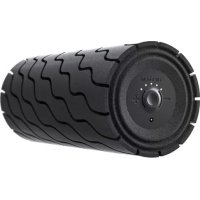
Wave Roller - Massage device THERAGUN - Free user manual and instructions
Find the device manual for free Wave Roller THERAGUN in PDF.


| Brand | Theragun |
| Model | Wave Roller |
| Product type | Intelligent massage roller (foam roller) |
| Dimensions | 35 cm length, 15 cm diameter |
| Weight | 1.5 kg |
| Power | Rechargeable lithium-ion battery 7.4 V / 2600 mAh |
| Number of speeds | 5 adjustable speeds |
| Charge indicator | LED on the power button (solid green = charged) |
| Battery life | Approximately 2-3 hours depending on speed |
| Connectivity | Bluetooth 5.0 |
| Compatible app | Theragun (iOS and Android) |
| Smart features | App synchronization, session tracking |
| Charging method | Via charging station (wired) or wireless |
| Care and cleaning | Clean with a slightly damp soft cloth, do not immerse |
| Safety | Automatic shutdown after prolonged inactivity |
| Spare parts | Charging station available separately |
| Repairability | Battery not user-replaceable |
Frequently Asked Questions - Wave Roller THERAGUN
User questions about Wave Roller THERAGUN
0 question about this device. Answer the ones you know or ask your own.
Ask a new question about this device
Download the instructions for your Massage device in PDF format for free! Find your manual Wave Roller - THERAGUN and take your electronic device back in hand. On this page are published all the documents necessary for the use of your device. Wave Roller by THERAGUN.
USER MANUAL Wave Roller THERAGUN
Smart Vibrating Foam Roller from the creators of Theragun.
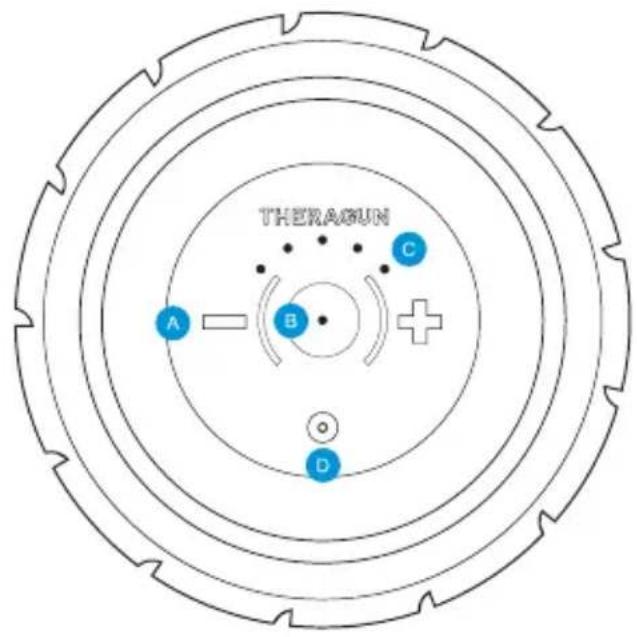
A Plus and Minus speed buttons
LED battery indicator light
LED speed indicator
D Charging port
See Warnings insert for important safety instructions
Using the Wave Roller™
- To turn on the Wave Roller, firmly press and hold the power button for 1-2 seconds.
- Wave Roller will start on the lowest of five settings. To increase speed, short press the plus button until desired speed is active.
- Place the device under the treatment area gradually applying light to moderate pressure as needed.
- To turn off the Wave Roller, firmly press and hold the power button until the device turns off.
Smart Features
Your Wave Roller is smart device enabled with Bluetooth connectivity, designed to pair seamlessly with the Theragun app. When you download the app, you'll be guided through a step-by-step setup and shown how to pair your device.
Scan the QR code to get started.

Charging the Wave Roller™
- After turning off the device, plug the power adapter into the charging port.
- The LED light on the power button will flash until fully charged.
- Charging is complete when the LED light on the power button is solid green.
- Battery level is continuously displayed on the LED light of the power button when the device is on. To view battery level when the device is off, briefly press the power button and the LED battery light will flash to indicate the battery level.
Charging the Wave Roller Wirelessly
Battery level on the Wave Roller is indicated with the following colors:
Flashing red: Low charge
Flashing blue: Half-way charged
Flashing green: High charge
Solid green: Fully charged
DE
Wave Roller™
Utiliser le Wave Roller™
Smart Vibrating Foam Roller from the creators of Theragun.
Born in Los Angeles, CA.
Designed for everybody.


@Theragun