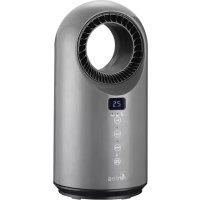
AR4P04RG - Heating ARDES - Free user manual and instructions
Find the device manual for free AR4P04RG ARDES in PDF.


| Product Type | Fan heater |
| Brand | Ardes |
| Model | AR4P04RG |
| Power supply | 220-240 V ~ 50/60 Hz (European standard) |
| Nominal thermal power | 1.5 kW |
| Minimum thermal power | 1.0 kW |
| Maximum continuous thermal power | 1.5 kW |
| Standby consumption | 0.0002 kW |
| Temperature control | Electronic with thermostat (15 °C to 40 °C) |
| Operating modes | Fan only, low heat, high heat, automatic |
| Oscillation | Yes, automatic (SWING button) |
| Timer | From 1 to 12 hours (auto shut-off) |
| Remote control | Yes, with CR2025 battery (included) |
| Display | Digital temperature display |
| Filter | Removable and washable (regular cleaning recommended) |
| Safety | Overheat protection (do not cover), auto shut-off in case of tipping (not specified but likely) |
| Use | Indoor, stable horizontal surface, minimum distance 1 m from flammable materials |
| Maintenance and cleaning | Unplug and allow to cool before cleaning; damp cloth, no abrasive products; clean filter regularly |
| Spare parts and repairability | Contact authorized service center; do not open the appliance; power cable to be replaced only by a professional |
| General information | 24-month warranty; household use; do not use with external programmer; for well-insulated rooms |
Frequently Asked Questions - AR4P04RG ARDES
User questions about AR4P04RG ARDES
0 question about this device. Answer the ones you know or ask your own.
Ask a new question about this device
Download the instructions for your Heating in PDF format for free! Find your manual AR4P04RG - ARDES and take your electronic device back in hand. On this page are published all the documents necessary for the use of your device. AR4P04RG by ARDES.
USER MANUAL AR4P04RG ARDES
NON COPRIRE
natural_image
Symbol of a trash bin crossed out by two crossed lines (no text or numbers present)natural_image
Symbol of a trash bin crossed with a diagonal line, no text or numbers presentSMALTIMENTO
- This appliance can be used by children aged from 8 years and above and persons with reduced physical, sensory or mental capabilities or lack of experience and knowledge if they have been given supervision or instruction concerning use of the appliance in a safe way and understand the hazards involved.
• Children shall not play with the appliance. - Cleaning and user maintenance shall not be made by children without supervision.
• Children of less than 3 years should be kept away unless continuously supervised. - Children aged from 3 years and less than 8 years shall only switch on/off the appliance provided that it has been placed or installed in its intended normal operating position and they have been given supervision or instruction concerning use of the appliance in a safe way and understand the hazards involved.
• Children aged from 3 years and less than 8 years shall not plug in, regulate and clean the appliance or perform user maintenance. - CAUTION — Some parts of this product can become very hot and cause burns. Particular attention has to be given where children and
vulnerable people are present.
- If the power cable gets damaged, it has to be
• replaced only at a service centre approved by the manufacturer in order to prevent any risks

DO NOT COVER
- WARNING: In order to avoid overheating, do not cover the heater.
- Do not place the appliance immediately below a socketoutlet.
- Do not use this heater in the immediate surroundings of a bath, a shower or a swimming pool.
- Do not use this heater if it has been dropped.
- Do not use if there are visible signs of damage to the heater.
- Use this heater on a horizontal and stable surface.
- WARNING: Do not use this heater in small rooms when they are occupied by persons not capable of leaving the room on their own, unless constant supervision is provided.
- WARNING: To reduce the risk of fire, keep textiles, curtains, or any other flammable material a minimum distance of 1 m from the air outlet.
ATTENTION : read this booklet carefully it contains important instructions for a safe installation, use and maintenance. Important instructions to be kept for future reference.
Keep handy the guarantee, receipt of payment and these instructions for future use and reference.
After removing the packaging, check the appliance for any signs of damage.
In case of visible damage, do not use it and contact a qualified technician. Do not leave parts of the packaging with in the reach of children.
This appliance is not a children's toy: it is an electrical device and must be treated with the necessary caution.
Before connecting the appliance, make sure that the power supply voltage matches the indication on the data plate.
If the plug and socket are not compatible, the socket has to be replaced with a suitable type by skilled persons.
Do not use adapters or extension cables which do not meet current safety standards or that exceed the current carrying capacity limits.
When you don't use the appliance disconnect it from the power supply and assure that the interruptor is off.
Do not tug on the power cable or on the appliance itself to remove the plug from the socket.
The use of any electrical appliance requires that a number of basic rules are observed, namely:
- Never touch the appliance with wet or humid hands.
- Do not leave the appliance exposed to weathering (rain, sunlight).
- Do not subject it to rough handling.
In case of a breakdown or malfunctioning of the appliance, disconnect it at once.
Do not attempt to repair it, but take it to a service centre approved by the manufacturer.
If you decide you do not want to use this appliance any longer, disable it by cutting the power cable - of course, after disconnecting it from the socket.
The power cable should be extended to its full lenght to avoid over heating.
For safety reasons, the appliance should never be opened.
The appliance has been designed and manufactured to operate in the home.
Any other use is considered inappropriate and dangerous.
Do not insert objects through the safety grill or the air inlets.
During use, rest the appliance on a flat surface.
Do not use this heating appliance with programmers, timers, separate remote control systems (different to the ones provided with the appliance)
or any other device that automatically turns on the appliance, as there is a risk of fire in the event the appliance is covered or positioned incorrectly.
Do not use the heater in presence of flammable substances (petrol, paints, etc.).
Do not place the cord near sources of heat.
WARNING: DO NOT COVER THIS PRODUCT NEAR CURTAINS OR OTHER COMBUSTIBLE MATERIAL.
WARNING: DO NOT COVER THE APPLIANCE OR OBSTRUCT THE AIR INLETS TO AVOID OVERHEATING.
WARNINGS ABOUT BATTERIES:
- KEEP BATTERIES OUT OF THE REACH OF CHILDREN. Swallowing can lead to chemical burns, perforation of soft tissue, and death. Severe burns can occur within 2 hours of ingestion. Seek medical attention immediately.
- Do not allow children to replace batteries.
- Always insert batteries correctly with regard to polarity (+ and -) marked on the battery and the equipment.
- Do not short-circuit batteries.
- Do not charge batteries.
- Do not force discharge batteries.
- Do not mix new and used batteries or batteries of different types or brands.
- Exhausted batteries should be immediately removed from equipment and properly disposed of.
- Do not heat batteries
- Do not weld or solder directly to batteries.
- Do not dismantle batteries.
- Do not deform batteries.
- Do not dispose of batteries in fire.
- A lithium battery with a damaged container should not be exposed to water.
- Do not encapsulate and/or modify batteries.
- Store unused batteries in their original packaging away from metal objects. If already unpacked, do not mix or jumble batteries.
- Remove batteries from equipment if it is not to be used for an extended period of time unless it is for emergency purposes.
- Clean the battery contacts and also those of the equipment prior to battery installation.
- In case of leak from batteries, avoid any contact with it; in case of contact, wash the affected part with water and seek medical attention.
(pag.2)
| 1 - Outlet grid2 - Display3 - Base4 - Dust filter5 - Hooks | 6 - Main switch7 - Indicator light: “TIMER”8 - Indicator light: “SWING”9 - Indicator light: “ON” |
Technical data indicated on the appliance.
Instructions for use
GB
Batteries
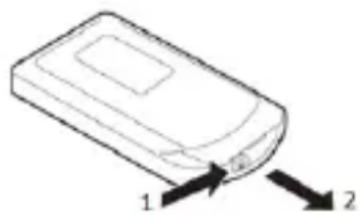
The remote control is supplied with CR2025 3V batteries; remove the protective plastic from the battery compartment of the remote control before use.
When the battery has run out, it must be replaced with another one of the same type.
To remove the battery, refer to the diagram shown on the back of the remote control:
natural_image
Line drawing of a mobile phone with two arrows pointing to the side (no text or symbols)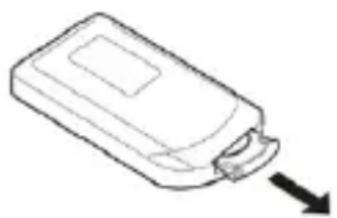
natural_image
Line drawing of a rectangular electronic device with a curved handle and arrow pointing to it (no text or symbols)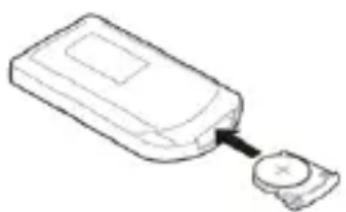
natural_image
Line drawing of a device with a button and a cross mark, no text or symbols presentDescription of controls:
Make sure that the function switch (6) is in the OFF position “0” before connecting or disconnecting the apparatus.
To turn the appliance on, insert the plug in the power outlet, set the main switch (6) to "I".
For your convenience the unit can be operated by using control panel in the main body or using remote control included.
"On/Off" button
- When the device is switched off, press this button to turn it on. The device switches on in summer ventilation mode (indicator "Fan" on). The indicator light (9) will switch on and the display (2) shows the room temperature.
- When the device is switched on, press this button to turn it off.
Wait 30 seconds until the fan will stop; then switch off the appliance by setting the main switch (6) to "0".
"Mode" button
When the device is switched on, press this button to change the operating mode:
- ventilation (indicator "Fan");
- minimum heating (indicator "Low");
- maximum heating (indicators "High").
"SWING" button
Press this button to activate or deactivate the automatic swing function of the device. When the swing function is active, the corresponding indicator (8) lights up.
"TIMER" button (D)
Press the TIMER button when the device is working to program automatic switch-off at an interval of between 1 to 12 hours from when it is programmed. Every time the button is pressed, the interval increases by one hour.
A few seconds after selecting the timer, the display (2) will show the room temperature again.
When the timer function is activated, the indicator (7) lights up on the control panel. To disable the timer function, press the timer button repeatedly until the display shows "0 0".
"Tem" button (control panel)
"UP +" "DOWN -" buttons (remote control)
Press one of these buttons to set the desired room temperature (automatic function); the set temperature will flash on the display (2).
Press button “+” to increase the temperature or button “-” to decrease it: the set temperature will change from a minimum of 15^ C to a maximum of 40^ C.
Once the desired temperature has been selected, the display (2) will show the room temperature after a few seconds.
In automatic mode, the device will automatically regulate the heating power based on the difference between the room temperature and the set temperature. In this operating mode, the device will also switch between the various power levels (ventilation, low power, high power) repeatedly. The selected power level is always shown on the display. Once the set temperature has been reached, ventilation will still remain active in order to monitor the room temperature more effectively.
To disable this function, press the “MODE” button and manually select the desired function (ventilation only, low power or high power).
Disconnect the plug from the socket and let the appliance cool down well before cleaning it.
In order to clean the appliance, use a soft or slight damp cloth.
Never use abrasives or chemical solvents.
Do not use very wet substances, liquids or cloths to prevent water from entering into the appliance and irreparably damaging it.
NEVER IMMERSE THE APPLIANCE INTO THE WATER.
To clean the filter:
Press the clips (5), gently remove the back grill by pulling it outwards, remove the filter and clean it using a soft slight damp cloth then replace in the appliance and reseal the back grill.
User Information
PACKAGING
In order to respect the environment, packaging material must be disposed of properly in accordance with separate collection.
Check local regulations.
natural_image
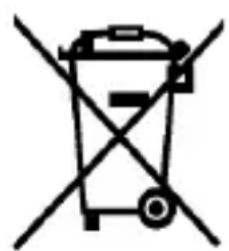
Symbol of a trash bin crossed out by two crossed lines (no text or numbers present)BATTERIES - Remove the batteries from the appliance before its disposal. Do not dispose the batteries with domestic waste. The batteries must be disposed of in the appropriate containers or in the specific collecting centre. Suitable segregated collection helps prevent damage to the environment and to human health. To remove batteries, refer to Instructions for use.
natural_image
Symbol of a trash bin crossed with a diagonal line, no text or numbers presentUSER INFORMATION
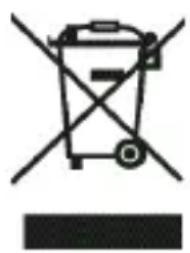
“Implementation of Directive 2012/19/EU on Waste Electrical and Electronic Equipment (WEEE)”, pertaining to reduced use of hazardous substances in electrical and electronic equipment, as well as to waste disposal.
The symbol of the crossed-out wheelie bin on the equipment or on its packaging indicates that the product must be disposed of separately from other waste at the end of its service life.
The user must therefore take the dismissed equipment to suitable separate collection centres for electrical and electronic waste.
For more details, please contact the appropriate local authority.
Suitable segregated collection of the equipment for subsequent recycling, treatment or environmentally-friendly disposal helps prevent damage to the environment and to human health, and encourages the re-use and/or recycling of the materials that make up the equipment.
Abusive disposal of the product by the user shall result in the application of administrative fines in accordance with the laws in force.
GUARANTEE
Terms and Conditions
The guarantee is valid for 24 months.
This guarantee applies only if it has been duly filled in and is submitted with the receipt showing the date of purchase.
The guarantee covers the replacement or repair of parts making up the appliance which were faulty at source due to manufacturing faults.
After the guarantee has expired, the appliance will be repaired against payment.
The manufacturer declines any responsibility for damage to persons, animals or property due to misuse of the appliance and failure to observe the directions contained in the instructions.
Limits
All rights under this guarantee and any responsibility on our part will be voided if the appliance has been:
- mishandled by unauthorized persons
- improperly used, stored or transported.
The guarantee does not cover damage to the outward appearance or any other that does not prevent regular operation.
If any faults should be found despite the care taken in selecting the materials and in creating the product, or if any information or advice are required, please contact your local dealer.
| Model identifier(s): AR4P04 | AR-AR4P04RG | |||||
| Item | Symbol | Value Unit | Item Unit | |||
| Heat output | Type of heat input, for electric storage local space heaters only (select one) | |||||
| Nominal heat output | P_nom | 1,5 kW | Manual heat charge control, with integrated thermostat | N.A. | ||
| Minimum heat output (indicative) | P_min | 1,0 kW | Manual heat charge control with room and/or outdoor temperature feedback | N.A. | ||
| Maximum continuous heat output | P_max,c | 1,5 kW | Electronic heat charge control with room and/or outdoor temperature feedback | N.A. | ||
| Auxiliary electricity consumption | Fan assisted heat output N.A. | |||||
| At nominal heat output | eI_max | N.A. kW | Type of heat output/room temperature control (select one) | |||
| At minimum heat output | eI_min | N.A. kW | Single stage heat output and no room temperature control | No | ||
| In standby mode | eI_SB | 0,0002 kW | Two or more manual stages, no room temperature control | No | ||
| With mechanic thermostat room temperature control | No | |||||
| With electronic room temperature control | Yes | |||||
| Electronic room temperature control plus day timer | No | |||||
| Electronic room temperature control plus week timer | No | |||||
| Other control options (multiple selections possible) | ||||||
| Room temperature control, with presence detection | No | |||||
| Room temperature control, with open window detection | No | |||||
| With distance control option No | ||||||
| With adaptive start control No | ||||||
| With working time limitation Yes | ||||||
| With black bulb sensor No | ||||||
| Contact details POLY POOL S.p.A. - via Sottocorna 21/B, 24020 Parre (BG) - Italy | ||||||
NE PAS COUVRIR
natural_image
Symbol of a trash bin crossed with a diagonal line, no text or numbers presentMISE AU REBUT INFORMATION UTILISATEUR
NICHT ABDECKEN
NO CUBRIR
natural_image
Symbol of a trash bin crossed with two crossed lines, representing no waste or discharge (no text or labels)natural_image
Symbol of a trash bin crossed with a diagonal line, no text or numbers presentNEZAKRÝVEJTE
NEZAKRÝVAJTE
- UPOZORNENIE: nezakrývajte spotrebič ani neblokujte vetracie otvory, aby ste zabránili prehriatiu.
- Nepokladajte spotrebič priamo pod
- NON COPRIRE
- SMALTIMENTO
- vulnerable people are present.
- DO NOT COVER
- ATTENTION : read this booklet carefully it contains important instructions for a safe installation, use and maintenance. Important instructions to be kept for future reference.
- WARNING: DO NOT COVER THIS PRODUCT NEAR CURTAINS OR OTHER COMBUSTIBLE MATERIAL.
- WARNING: DO NOT COVER THE APPLIANCE OR OBSTRUCT THE AIR INLETS TO AVOID OVERHEATING.
- WARNINGS ABOUT BATTERIES:
- Instructions for use
- Batteries
- Description of controls:
- "On/Off" button
- Wait 30 seconds until the fan will stop; then switch off the appliance by setting the main switch (6) to "0".
- "Mode" button
- "SWING" button
- "TIMER" button (D)
- "Tem" button (control panel)
- To clean the filter:
- User Information
- PACKAGING
- GUARANTEE
- Terms and Conditions
- The guarantee is valid for 24 months.
- Limits
- NE PAS COUVRIR
- MISE AU REBUT INFORMATION UTILISATEUR
- NICHT ABDECKEN
- NO CUBRIR
- NEZAKRÝVEJTE
- NEZAKRÝVAJTE
Brand : ARDES
Model : AR4P04RG
Category : Heating