WH125971 - Heating Emerio - Free user manual and instructions
Find the device manual for free WH125971 Emerio in PDF.



| Product type | Electric wall heater |
| Rated thermal power | 2000 W (2.0 kW) |
| Minimum thermal power | 1000 W (1.0 kW) |
| Power supply | 220-240 V ~ 50/60 Hz |
| Heating levels | Low (1 kW) and high (2 kW) |
| Adjustable temperature range | 18 °C to 45 °C |
| Sleep timer | 1 to 8 hours |
| Weekly programmer | 5 preset modes (P1-P5) + 1 free mode (P6) |
| Open window detection | Yes (shutdown and alarm if temperature drops >8°C in 5 min) |
| Oscillation | Yes (motorized louvers) |
| Remote control | Yes, with CR2025 battery included |
| Display | Digital LED screen |
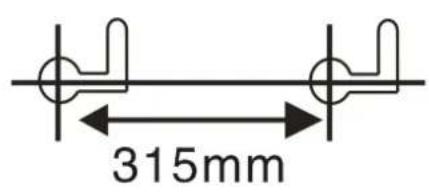
| Wall mounting | Dowels supplied, center distance 315 mm |
| Minimum installation height | 1.8 m above the floor |
| Safety distances | ≥30 cm from ceiling/side walls, ≥100 cm from combustible materials |
| Minimum room volume | 7 m³ |
| Overheating protection | Automatic shutdown at 51 °C |
| Maintenance | Clean with a dry or slightly damp cloth; do not use aggressive detergents |
| Warranty | 2 years |
| Customer service | info.de@emerio.eu |
Frequently Asked Questions - WH125971 Emerio
User questions about WH125971 Emerio
0 question about this device. Answer the ones you know or ask your own.
Ask a new question about this device
Download the instructions for your Heating in PDF format for free! Find your manual WH125971 - Emerio and take your electronic device back in hand. On this page are published all the documents necessary for the use of your device. WH125971 by Emerio.
USER MANUAL WH125971 Emerio
natural_image
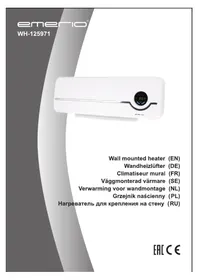
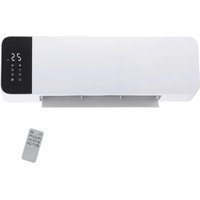
White air conditioner unit with digital display and black handle (no visible text or symbols)Wall mounted heater (EN)
Wandheizlüfter (DE)
Before use make sure to read all of the below instructions in order to avoid injury or damage, and to get the best results from the appliance. Make sure to keep this manual in a safe place. If you give or transfer this appliance to someone else make sure to also include this manual.
In case of damage caused by user failing to follow the instructions in this manual the warranty will be void. The manufacturer/importer accepts no liability for damages caused by failure to follow the manual, a negligent use or use not in accordance with the requirements of this manual.
- Read and save these instructions. Attention: pictures in the IM are for reference only.
- This appliance can be used by children aged from 8 years and above and persons with reduced physical, sensory or mental capabilities or lack of experience and knowledge if they have been given supervision or instruction concerning use of the appliance in a safe way and understand the hazards involved.
- Children shall not play with the appliance.
- Cleaning and user maintenance shall not be made by children without supervision.
- Children of less than 3 years should be kept away unless continuously supervised.
-
Children aged from 3 years and less than 8 years shall only switch on/off the appliance provided that it has been placed or installed in its intended normal operating position and they have been given supervision or instruction concerning use of the appliance in a safe way and understand the hazards involved. Children aged from 3 years and less than 8 years shall not plug in, regulate and clean the appliance or perform user maintenance.
-
CAUTION — Some parts of this product can become very hot and cause burns. Particular attention has to be given where children and vulnerable people are present.
- If the supply cord is damaged, it must be replaced by the manufacturer, its service agent or similarly qualified persons in order to avoid a hazard.
- The heater must be installed at least 1,8 m above the floor.
- CAUTION: In order to avoid a hazard due to inadvertent resetting of the thermal cutout, this appliance must not be supplied through an external switching device, such as a timer, or connected to a circuit that is regularly switched on and off by the utility.
- This appliance is intended to be used in household and similar applications.
- Do not use outdoors. Do not use to dry clothes or any fabric.
- The heater must not be located immediately below a socket outlet.
- Do not use the heater if the power cord is damaged.
- WARNING: In order to avoid overheating, do not cover the heater.
- WARNING: The heater must not be used if the panel is damaged.
- Do not use this heater in the immediate surroundings of a bath, a shower or a swimming pool.

-
Means "DO NOT COVER".
-
Keep combustible material such as furniture, cushions, bedding, paper, clothes, curtains etc. at least 100cm away from the heater.
-
This heater has hot and arcing or sparking parts inside. Do not use it in the areas where gasoline, paint, or flammable liquids are used or stored.
-
Always unplug the appliance when not in use.
- The appliance is hot when in use. To avoid burned, do not let bare skin touch hot surfaces.
- The supply voltage and utility frequency, specified on the machine, need to match those of the socket that is used. The electrical socket that you are using must be to hand at all times in order to be able to remove the plug from the socket in the event of an emergency.
- Fully extend the cord before plugging in the heater. Make sure it does not come into contact with any part of the heater and prevent it from heating up any other way. Do not run the cord underneath carpeting; do not cover it with mats, carpet strips or similar and make sure it is not placed in any passageways. Make sure the cord cannot be stepped on and that no furniture is placed on top of it. Do not lead the cord around sharp corners and do not roll it up too tightly after use!
- If possible, do not use an extension cord, as this causes the risk of overheating and fire. If the use of an extension cord is unavoidable, then make sure it is an undamaged, approved extension cord with a minimum diameter of 2 × 1.5 mm^2 and a minimum permissible power of 1000 Watt. To prevent overheating, always fully extend the cord!
- Do not use the heater outdoors and do not use it in spaces, smaller than 7 m^3 .
- Always switch the heater off, unplug it and leave to cool down before:
- cleaning the heater
- carrying out maintenance on the heater
- touching or moving the heater.
-
Keep the heater clean. Dust, dirt and/or a buildup of deposits in or behind the heater are a common cause of overheating. Make sure these deposits are removed regularly.
-
The appliance (incl. cord and plug) may only be opened
and/or repaired by properly authorized and qualified persons.
-
Only use this heater for its intended purpose and as described in this instruction manual.
-
Regarding the information pertaining to the installation, please refer to the below paragraph of the manual.
PARTS DESCRIPTION
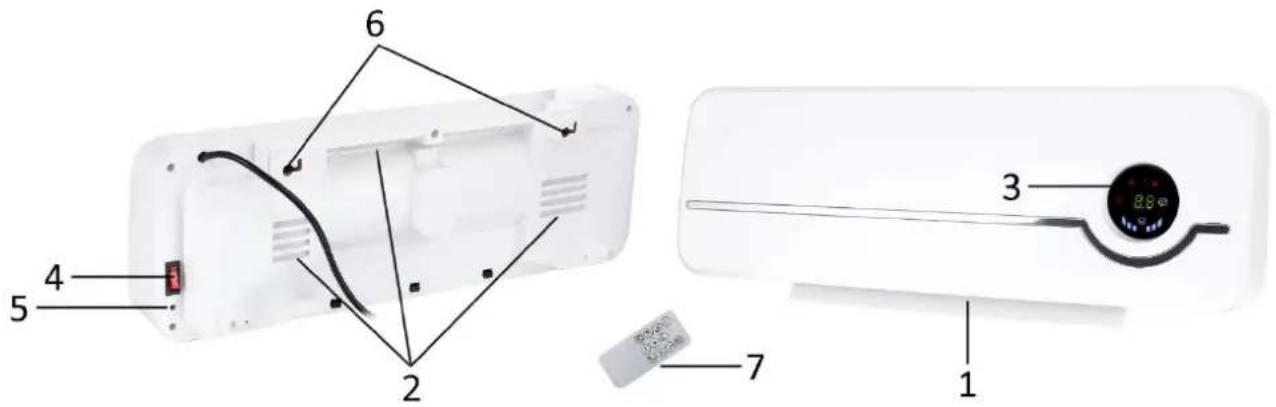
- Air outlet (with a cover)
- Air inlet
- Digital display and indicator lights (see the table below)
- Power switch
- One-start button
- Hanging hole
- Remote control
| Heating indicator light: low heating --- one light ☐ on; high heating --- two lights ☐ ☐ ☐ on; No heating (Only the fan is working.) --- no light on. | ||
 | Temperature setting indicator light. When you set the temperature, this light will be on. When you select the open window detection, this light will be flickering. | |
 | Week timer indicator light. When you have set the week timer, this light will be on (the current time belongs to the set time range) or flash (the current time is not in the set time range). | |
 | Swing indicator light. When you select the swing function, this light will be on. If you turn off the swing function, this light will be off. | |
 |  | Working indicator light. It indicates the appliance is working. After flashing for 10 minutes and there is no operation, this light will turn off. If you press any button on the control panel, this light will flash again. |
Remote control
This unit has a remote control. One piece of CR2025 battery will be provided with the remote control. Before starting to use the remote control, remove the plastic protection from the battery. If you want to change the battery, please refer to the instruction behind the remote control. If it is not in use for a long time, please take the battery out of the remote control. Keep button cell batteries out of reach of small children.
The functions of this appliance are mainly controlled by the remote control, whose buttons are explained in below table.
| Button | Function | Explanation |
 | ON/Standby | Press it, the appliance is on. Press it again, the appliance enters into standby (If the appliance has worked before with the heating function, its fan keeps working for 30 seconds with a countdown on the display.). In standby, the room temperature is still displayed. |
 | Heating selection | Press it consecutively, you will make the appliance runs in low heating, high heating and no heating (Only the fan is working.). |
 | Timer setting | Press the button once or several times to set the timer from 1H to 8H ("H" stands for hour.). For example, when you set it as 3H, the appliance will automatically enter into standby after 3 hours. |
 | Swing selection | Press it to turn on or off the swing function. When the swing is on, the cover on the air outlet will swing slowly. |
 | Temperature setting | Press it to enter the temperature setting. Press buttons "+" "-" to select the desired temperature. The set temperature will flicker for several seconds and then the setting is completed, the LED will go back to the display of room temperature. The temperature range you can select is from 18 °C to 45 °C. |
 | Open window detection | Press this button to turn on or off the open window detection, which cannot be start up when the appliance is in no-heating mode or temperature setting. |
 | Week timer | Press this button to select the desired week timer mode, P1 – P5 are system settings, and P6 is free mode. |
 | Cancel button for temperature setting mode and week timer | During the setting, directly press this button to cancel the setting. After the setting is completed, first press the temperature setting button (if you want to cancel the temperature setting) or the week timer button (if you want to cancel the week timer), then press this button. |
 | Value increase | Press this button to increase the value when needed. |
 | Value decrease | Press this button to decrease the value when needed. |
 | Confirmation | Press this button to confirm the value just set. |
WALL MOUNTING
This heater has been designed to hang securely on the wall. Do not use it until it has been properly installed, as described in these instructions for use and never, for example, in a standing position or when leaning against something!
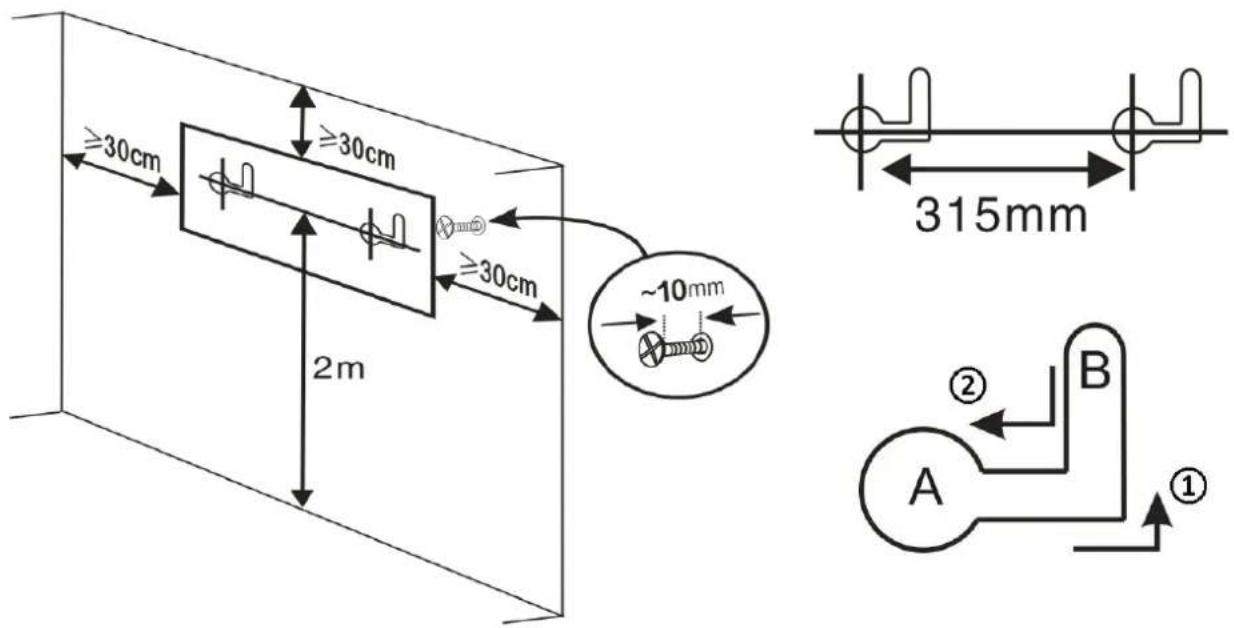
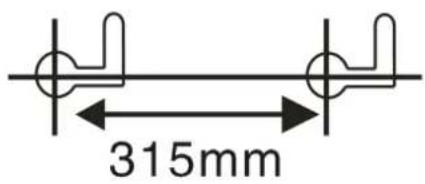
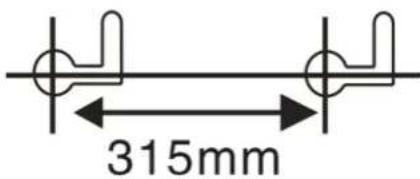
Two expansion bolts are provided for the wall mounting. See below drawings and follow the instructions. After the mounting, the distance between the product and ceiling / side walls should be at least 30 cm.
-
Drill two holes in a wall. The holes should be above 2 meters from the ground. The diameter of the holes should be just containing the expansion bolt, which is 6 mm. The distance between the hole centers should be 315 mm.
-
Tuck the expansion bolts into the holes. The inside bolts should protrude about 10 mm than the expansion pipes to form the pothooks.
-
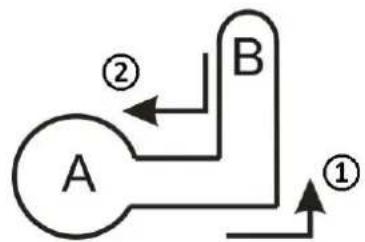
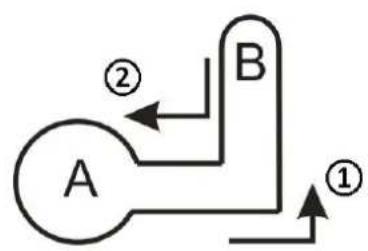
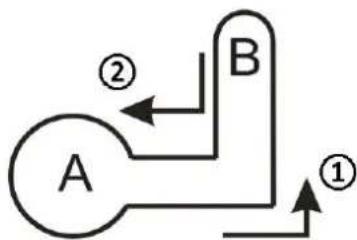
To hang on the appliance, align the pothook with the spot A, then move and make the pothook stay at the spot B (arrow ①).
To remove the appliance, align the pothook from the spot B back to the spot A (arrow ②), then take off the appliance.
OPERATION
Plug the appliance into an appropriate electrical outlet. Press the power switch to the position "I" to connect the power. The room temperature will be illuminated on the LED display. The appliance is on standby. After use, press the power switch to the position "O" to disconnect the power.
-
Press the ON/Standby button to turn on the appliance. Press the button again to turn the appliance into standby. Press the one-start button to fast start the operation, the appliance works in high heating and swing mode by default. Press this button again, the appliance will turn into standby too. If the appliance has worked before with the heating function, its fan keeps working for 30 seconds with a countdown on the display. In standby, the room temperature is still displayed.
-
Use the remote control for all the functions. It should be directed towards the LED display while using.
-
Select the heating level among low heating (one indicator light on), high heating (two indicator lights

on) and no heating (both indicator lights off). If you don't set the desired temperature, there will keep running in the heating level you select.
-
Set the desired temperature by pressing the temperature setting button. Adjust the value by buttons "+" -". Press the button "OK" to confirm the set temperature. The temperature range you can set is 18 - 45 °C.
-
To cancel the temperature setting: If you haven't set the desired temperature, press the temperature setting button again; if you have set the desired temperature, press the temperature setting button first
then press the cancel button

Note:
- When the set temperature is lower than the room temperature, the appliance stops heating.
- When the set temperature is 1-2 °C higher than the room temperature, the appliance runs in low heating.
-
When the set temperature is 3 °C (or more) higher than the room temperature, the appliance runs in high heating.
-
You can also set the timer to let the appliance automatically enter into standby or make the airflow swing. See the table in the section "Remote control" for reference.
-
This appliance also supports open window detection and week timer. See the detailed introduction below.
OPEN WINDOW DETECTION
Note: This function can only be activated when the appliance is in heating mode or temperature setting mode.
- Press the open window detection button on the remote control. The temperature setting indicator light flickers. The open window detection starts after 1 minute.
- 10 minutes as a round. The appliance will take the temperature in the beginning of each round as a checking reference, and check it every 5 minutes. If the temperature in the checking point decreases more than 8 °C than the referenced temperature, the appliance will stop heating, send out alarm for 5 seconds. Meanwhile the fan is working, the temperature setting indicator light and a code “OF” on LED flickers for 30 seconds, then the appliance goes into standby. In this case you could do by either way as follows.
1) Press the open window detection button to restart with the same working mode before the appliance stops. The open window detection will then restart too.
2) Press the ON/Standby button, the appliance will enter into standby.
-
If in the checking point, the temperature decreases less than 8 °C compared to the referenced temperature, the former is the same as or higher than the latter, the appliance will keep heating and the open window detection will continue.
-
The maximum detection temperature is 51 °C . The appliance will stop running automatically when it detects the temperature reaches 51 °C .
WEEK TIMER
Note:
• This function can only be activated when the appliance is in heating mode or temperature setting mode.
- When the week timer is set, the timer for entering into standby automatically will be inactive.
To use the week timer function, please follow below steps.
- Press the week timer button. If this is the first start-up after the power switch is pressed to "I", you need to set the current time first.
1) The LED displays "01", press "+" "-" to select the day. "01 - 07" stand for Monday to Sunday. Press "OK" to confirm the setting. For example, it's Friday today, then you select "05".
2) The LED displays "00", press "+" "-" to set the hour. For example, the time now is 16:24, then you select "16" here. Press "OK" to confirm the setting.
3) The LED displays "00", press "+" "-" to set the minute. For example, the time now is 16:24, then you select "24" here. Press "OK" to confirm the setting.
Note: If you don't press "OK" within 10 seconds, the setting will fail.
- After setting the current time, or this is a start from the standby mode, the LED display will show "P1", which is the mode code. If this is not the mode you want, press the week timer button again and again to choose a mode from "P2" to "P6". Appliance's working time is listed according to the different modes in below table.
If you press the week timer button after the display of "P6", you will exit the setting of week timer.
| Mode | Monday | Tuesday | Wednesday | Thursday | Friday | Saturday | Sunday |
| P1 | 8:00-17:00 | 8:00-17:00 | 8:00-17:00 | 8:00-17:00 | 8:00-17:00 | 8:00-17:00 | 8:00-17:00 |
| P2 | 18:00-7:00^a | 18:00-7:00^a | 18:00-7:00^a | 18:00-7:00^a | 18:00-7:00^a | 18:00-7:00^a | 18:00-7:00^ a |
| P3 | 8:00-17:00 | 8:00-17:00 | 8:00-17:00 | 8:00-17:00 | 8:00-17:00 | OFF | OFF |
| P4 | 18:00-7:00^a | 18:00-7:00^a | 18:00-7:00^a | 18:00-7:00^a | 18:00-7:00^a | OFF | OFF |
| P5 | OFF | OFF | OFF | OFF | OFF | 00:00-23:59 | 00:00-23:59 |
| P6 | Free mode | Free mode | Free mode | Free mode | Free mode | Free mode | Free mode |
| Notes:For P2/P4 Mode, the stop time is at the next day. | |||||||
- To set the working time freely, select the mode "P6", and press "OK", then follow the steps below. Please note only hour can be set, minute is not supported.
1) The LED displays "1", which stands for Monday. ("1" = Monday, "2" = Tuesday, "3" = Wednesday, "4" = Thursday, "5" = Friday, "6" = Saturday, "7" = Sunday.) Press "+" "-" to select the day you want to set. For example, you want to set Wednesday, then select the number "3".
2) The LED displays "00", which stands for the start time. If you set it as "09", it means the appliance will start work at 9:00 a.m. Press "OK" then the display shows "00" again, this time you should select the stop time. Only hour can be set too. If you set it as "16", it means the appliance will stop work at 16:00 p.m.
3) After the setting of day "7" (Sunday), press "OK" and the week timer setting is finished. The week timer indicator light will be on when the set time range includes the current time, or flash when the set time range excludes the current time.
Note:
-
If you select one day as "00" for start and "00" for stop, then the appliance will not work on this day.
• If you skip a certain day in the setting, then the appliance will not work on that day too. -
To cancel the week timer: If you haven't finished the setting, press the week timer button again; if you have finished setting the week timer, press the week timer button first then press the cancel button

CLEANING AND MAINTENANCE
Press the power switch to the position "O" to switch off the appliance. Remove the plug from the socket and allow the heater to cool down before cleaning or carrying out maintenance work.
- For thorough cleaning, you can take the heater off the wall. Wipe the outside of the heater regularly with a dry or slightly damp cloth.
- Do not use aggressive soaps, sprays, cleaners or abrasives, waxes, polishes or chemical solutions which can cause irreparable scratches and damage!
- Do not drop any liquid into the machine.
- Keep the appliance clean especially the air inlet and outlet.
TECHNICAL DATA:
Operating voltage: 220-240V \~ 50-60Hz
Power consumption: 2000W
GUARANTEE AND CUSTOMER SERVICE
Before delivery our devices are subjected to rigorous quality control. If, despite all care, damage has occurred during production or transportation, please return the device to your dealer. In addition to statutory legal rights, the purchaser has an option to claim under the terms of the following guarantee:
For the purchased device we provide 2 years guarantee, commencing from the day of sale. If you have a defective product, you can directly go back to the point of purchase.
Defects which arise due to improper handling of the device and malfunctions due to interventions and repairs by third parties or the fitting of non-original parts are not covered by this guarantee. Always keep your receipt, without the receipt you can't claim any form of warranty. Damage caused by not following the instruction manual, will lead to a void of warranty, if this results in consequential damages then we will not be liable.
Neither can we hold responsible for material damage or personal injury caused by improper use if the instruction manual is not properly executed. Damage to accessories does not mean free replacement of the whole appliance. In such case please contact our service department. Broken glass or breakage of plastic parts is always subject to a charge. Defects to consumables or parts subjected to wearing, as well as cleaning, maintenance or the replacement of said parts are not covered by the warranty and are to be paid.
ENVIRONMENT FRIENDLY DISPOSAL
Recycling – European Directive 2012/19/EU
This marking indicates that this product should not be disposed with other household wastes. To prevent possible harm to the environment or human health from uncontrolled waste disposal, recycle it responsibly to promote the sustainable reuse of material resources. To return your used
device, please use the return and collection systems or contact the retailer where the product was purchased.
They can take this product for environmentally safe recycling.

BATTERY MUST BE RECYCLED OR DISPOSED OF PROPERLY. DO NOT OPEN. DO NOT DISPOSE
OR IN FIRE OR SHORT CIRCUIT.
Emerio Deutschland GmbH (no service address)
Lerchenweg 3
40789 Monheim am Rhein
Deutschland
Customer service:
T: +49 (0) 3222 1097 600
E: info.de@emerio.eu
ERP information (EN)
Declare that the product detailed below:
Information requirements for electric local space heaters
| Model identifier(s): | |||||
| Item | Symbol | Value | Unit | Item | Unit |
| Heat output | Type of heat input, for electric storage local space heaters only (select one) | ||||
| Nominal heat output | P_nom | 2.0 | kW | manual heat charge control, with integrated thermostat | No |
| Minimum heat output (indicative) | P_min | 1.0 | kW | manual heat charge control with room and/or outdoor temperature feedback | No |
| Maximum continuous heat output | P_max,c | 2.0 | kW | electronic heat charge control with room and/or outdoor temperature feedback | No |
| Auxiliary electricity consumption | fan assisted heat output | No | |||
| At nominal heat output | el_max | N/A | kW | Type of heat output/room temperature control (select one) | |
| At minimum heat output | el_min | N/A | kW | single stage heat output and no room temperature control | No |
| In standby mode | el_SB | 0.00043 | kW | Two or more manual stages, no room temperature control | No |
| with mechanic thermostat room temperature control | No | ||||
| with electronic room temperature control | No | ||||
| electronic room temperature control plus day timer | No | ||||
| electronic room temperature control plus week timer | Yes | ||||
| Other control options (multiple selections possible) | |||||
| room temperature control, with presence detection | No | ||||
| room temperature control, with open window detection | Yes | ||||
| with distance control option | No | ||||
| with adaptive start control | No | ||||
| with working time limitation | Yes | ||||
| with black bulb sensor | No | ||||
| Contact details | Emerio Deutschland GmbHLerchenweg 340789 Monheim am RheinDeutschland | ||||
Satisfies the requirement of the Council Directives:
COMMISSION REGULATION (EU) No 2015/1188 of 28 April 2015 and Amending COMMISSION REGULATION (EU) 2016/2282 implementing Directive 2009/125/EC of the European Parliament and of the Council with regard to ecodesign requirements for local space heaters
Regarding information for consumers on how to install, use and maintain the product, WEEE information, please check the instruction manual provided with packaging.
SICHERHEITSHINWEISE
flowchart
graph TD
    A["A"] -->|②| B["B"]
    B -->|①| A
ANVÄNDNING
flowchart
graph TD
    A["A"] --> B["B"]
    B --> A
    style A fill:#fff,stroke:#000
    style B fill:#fff,stroke:#000
    note1["②"] --> A
    note2["①"] --> B
WERKING
flowchart
graph TD
    A["A"] -->|②| B["B"]
    B -->|①| A
ЭКСПЛУАТАЦИЯ

- PARTS DESCRIPTION
- Remote control
- WALL MOUNTING
- OPERATION
- Note:
- OPEN WINDOW DETECTION
- WEEK TIMER
- CLEANING AND MAINTENANCE
- TECHNICAL DATA:
- GUARANTEE AND CUSTOMER SERVICE
- ENVIRONMENT FRIENDLY DISPOSAL
- OR IN FIRE OR SHORT CIRCUIT.
- Customer service:
- ERP information (EN)
- SICHERHEITSHINWEISE
- ANVÄNDNING
- WERKING
- ЭКСПЛУАТАЦИЯ
Brand : Emerio
Model : WH125971
Category : Heating