Revolution HBS1400 - Blender HAMILTON BEACH - Free user manual and instructions
Find the device manual for free Revolution HBS1400 HAMILTON BEACH in PDF.


User questions about Revolution HBS1400 HAMILTON BEACH
0 question about this device. Answer the ones you know or ask your own.
Ask a new question about this device
Download the instructions for your Blender in PDF format for free! Find your manual Revolution HBS1400 - HAMILTON BEACH and take your electronic device back in hand. On this page are published all the documents necessary for the use of your device. Revolution HBS1400 by HAMILTON BEACH.
USER MANUAL Revolution HBS1400 HAMILTON BEACH
natural_image
Line drawing of a modern kitchen blender with digital display and control buttons (no text or symbols)Revolution Series
Ice Shaver/Blender
Operation Manual
Page 2
Série Révolution
IMPORTANT: This operation manual should be reviewed with all equipment operators as part of your operator training program.
Your safety and the safety of others is very important.
We have provided many important safety messages in this manual and on your appliance.
Always read and obey all safety messages.

This is the safety alert symbol.
This symbol alerts you to hazards that can kill or hurt you and others.
All safety messages will be preceded by the safety alert symbol and the word "DANGER" or
"WARNING." These words mean:
DANGER
WARNING
You will be killed or seriously injured if you don't follow instructions.
You can be killed or seriously injured if you don't follow instructions.
All safety messages will identify the hazard, tell you how to reduce the chance of injury, and tell you what can happen if the instructions are not followed.
WARNING

Electrical Shock Hazard
Plug into a grounded outlet.
Do not remove ground.
Do not use an adapter.
Do not use an extension cord.
Failure to follow these instructions can result in death, fire, or electrical shock.
WARNING

Cut Hazard
Do not attempt to operate ice shaver without cover in place.
Do not put place anything except ice in the ice hopper.
Always make sure splash shield is in place when blending.
Do not put hands, spoons or other utensils in jar when blending.
Failure to follow these instructions can result in broken bones, cuts or other injuries.
Technical Service
For assistance or replacement parts, call our
Technical Service number:
866-285-1087 or 910-693-4277
8 a.m. – 5:00 p.m. EST Monday – Friday
www.commercial.hamiltonbeach.com
IMPORTANT SAFETY INSTRUCTIONS
WARNING – When using electrical appliances, basic safety precautions should be followed, including the following:
- Read the Operation Manual before using blender. Keep Operation Manual handy.
- Plug into a grounded 3-prong outlet.
- Do not remove ground prong.
- Do not use an adapter.
- Do not use an extension cord.
- Disconnect power before cleaning or servicing.
- To reduce risk of personal injury, unplug cord from outlet when not in use, and before putting on or taking off parts.
- To protect against electrical shock, do not immerse cord, plug, or blender base in water or any other liquid.
- Do not spray the base with a high-pressure spray gun.
- Do not use appliance for other than intended use.
- Not intended for use by or near children.
- The use of accessory attachments not recommended by Hamilton Beach may cause injuries.
- To reduce risk of personal injury and to prevent damage to blender or container and cutter assembly, DO NOT insert utensils into blender container while operating blender.
- Do not fill the ice hopper with anything other than ice.
- Do not store any kitchen utensils in the container because the blender will be damaged if inadvertently turned on.
- To prevent possibility of serious personal injury, keep hands out of blender jar while operating blender. Always operate blender with jar cover in place.
- Avoid contacting moving parts.
- Blades are sharp. Handle carefully.
- If cutter assembly blades are loose, discontinue use immediately and replace cutter assembly. Do not attempt to repair or tighten cutter assembly.
-
Inspect container and cutter assembly daily. Check cutter for wear, nicks, or broken blades. Replace cutter assembly at least every 90 days.
-
Do not use outdoors.
- This appliance is intended for short periods of operation, with a rated operating time of 3 minutes.
- Do not operate the blender without the splash guard in place.
- Do not exceed the maximum capacity. The maximum capacity equals the ounces (liters) listed on the container, and significantly less with thick mixtures.
- Do not use more than 5 cups (1.3 liters) of cleaning solution when cleaning the ice hopper. See "Caring for the Ice Shaver/Blender".
- To prevent damage to blender, container, or cutter assembly, DO NOT move or shake blender while in operation. If blending action stops during operation, turn blender OFF, remove container from base, remove container cover, and use a thin rubber spatula to push mixture towards cutters.
- To prevent burns from hot liquids splashing out of the container, always remove the filler cap of the container cover before blending hot liquids.
- Do not operate any appliance with a damaged cord or plug or after the appliance malfunctions, or is dropped or damaged in any manner. Call the Technical Service number, 866-285-1087 or 910-693-4277, for instructions on examination, repair, or electrical or mechanical adjustment.
- If the supply cord of this appliance is damaged, it must be replaced by the manufacturer or its service agent or a similar qualified person. If fitted with a non-rewirable U.K. plug, the 13 amp fuse approved by ASTA to be B.S. 1362 must be used. If you need a replacement fuse carrier, it must be replaced by the same colour coded carrier with the same markings. Fuse covers and carriers can be obtained from approved service agents. IMPORTANT: If the molded plug is cut off, dispose of it immediately. The plug is not rewirable and would cause a shock hazard if inserted into a socket.
- SAVE THESE INSTRUCTIONS -
Parts and Features
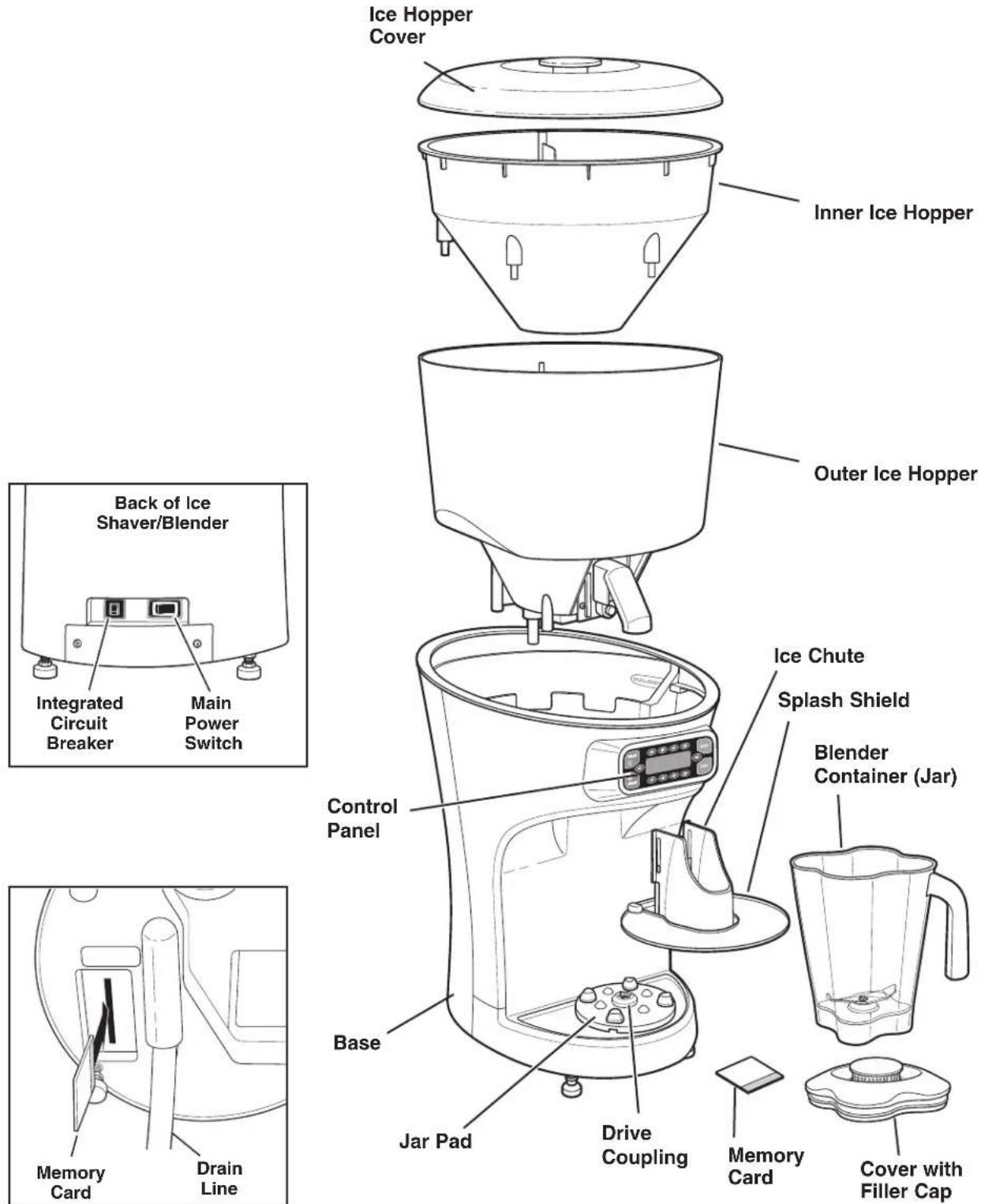
The parts and features for the Revolution Ice Shaver/Blender are shown on this page. Become familiar with all parts and features before use.
Your Ice Shaver/Blender is designed for blending and mixing beverages and frozen desserts.
text_image
Ice Hopper Cover Inner Ice Hopper Outer Ice Hopper Back of Ice Shaver/Blender Integrated Circuit Breaker Main Power Switch Control Panel Ice Chute Splash Shield Blender Container (Jar) Base Jar Pad Drive Coupling Memory Card Cover with Filler Cap Drain Line Memory CardBottom View of Unit
Preparation
Setting up the Unit
The Ice Shaver/Blender must be placed on a sturdy, level surface. It is recommended that it be located near a sink or other drain location.
Leveling the Unit
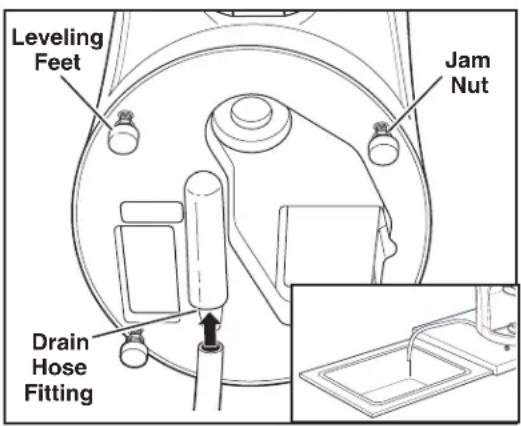
For proper operation and drainage, the unit must be level. Loosen the jam nuts and turn the leveling feet (clockwise to lower a corner, counterclockwise to raise a corner) until the unit is level and all four leveling feet are in solid contact with the countertop. Once the unit is level, tighten the jam nuts to lock the feet at the desired height.
Drain Hose
The end of the drain hose should drain into a sink, drain, or bucket. To ensure proper drainage, the outlet end of the drain hose must be lower than the fitting end, and there should be no kinks or pinch points in the hose. If a tight bend is needed, such as at the edge of a countertop, use an elbow fitting and hose clamps (not included) to make the bend.
Preparing for Use
Before plugging in the unit for the first time, the ice hopper should be sanitized. To do so:
- Remove the ice hopper lid and lift out the inner hopper.
-
Loosen the thumbscrew on the agitator assembly and lift the assembly up and out of the ice pool. WARNING: Shaver blade is sharp!
-
Remove the ice chute by pressing the release button and pulling down on the ice chute.
-
Wipe the inside of the ice pool with a clean soft cloth dampened with sanitizing solution (see Cleaning Instructions for recommended sanitizing solution).
-
Rinse the ice chute, the agitator assembly and inner hopper in sanitizing solution, and allow to air dry.
-
Once all parts are dry, slide the agitator assembly carefully back into place and secure with the thumbscrew. Align the bosses on inner hopper with the matching holes in the ice hopper, making sure that the interlock post is inserted into the hole behind the inner hopper fin. Press gently down into place. Reinstall the ice chute by sliding it back until it clicks into place (press the button slightly to allow the chute to slide over the button).
-
Plug the unit into a grounded outlet.
-
Wash and sanitize the blender jar as described in the section "Cleaning Instructions-Blender".
text_image
Leveling Feet Jam Nut Drain Hose Fitting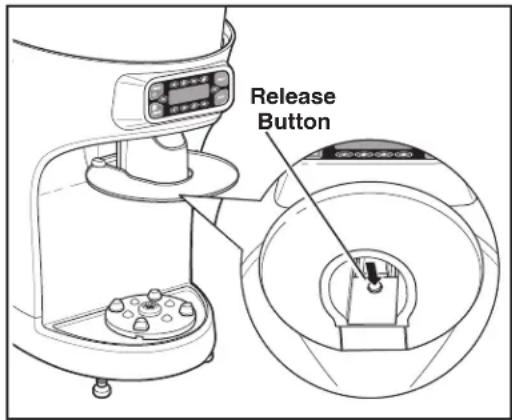
text_image
Release Button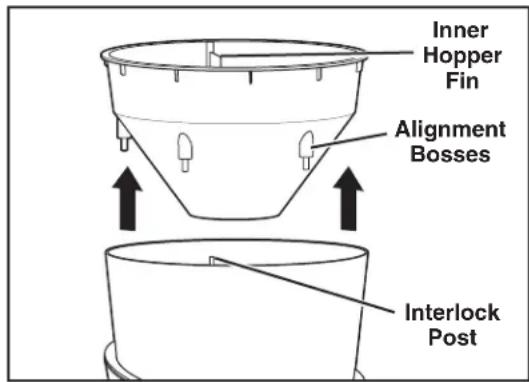
text_image
Inner Hopper Fin Alignment Bosses Interlock Post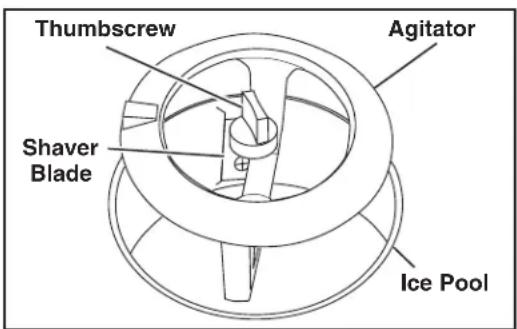
text_image
Thumbscrew Agitator Shaver Blade Ice PoolOperation
Control Panel
Familiarize yourself with the control panel and the display messages before using the unit.
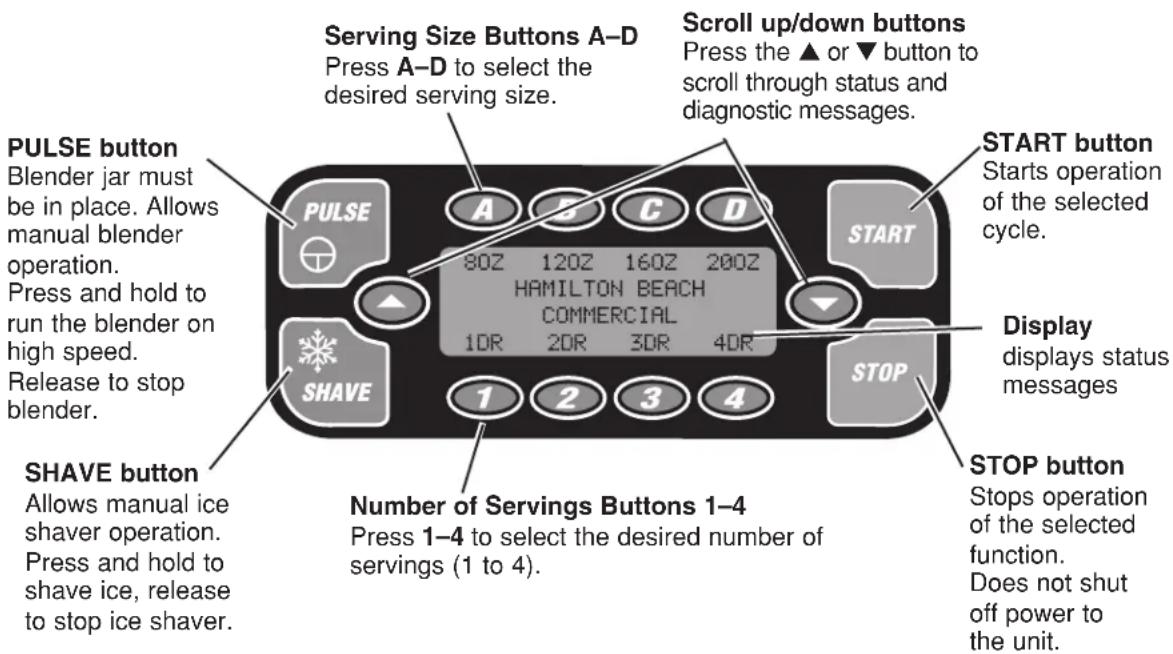
text_image
PULSE button Blender jar must be in place. Allows manual blender operation. Press and hold to run the blender on high speed. Release to stop blender. SHAVE button Allows manual ice shaver operation. Press and hold to shave ice, release to stop ice shaver. Serving Size Buttons A–D Press A–D to select the desired serving size. Scroll up/down buttons Press the ▲ or ▼ button to scroll through status and diagnostic messages. START button Starts operation of the selected cycle. HAMILTON BEACH COMMERCIAL 10R 20R 30R 40R STOP button Stops operation of the selected function. Does not shut off power to the unit. Number of Servings Buttons 1–4 Press 1–4 to select the desired number of servings (1 to 4).Display messages
The screen can be used to display important diagnostic and troubleshooting information, as well as operating information. Press the ▲ or ▼ button to scroll through status and diagnostic messages.
For Example:
TOTAL SHAVE/BLEND CYCLES - 999999
To Display Cycle Count:
While the unit is not in operation, press the ▲ or ▼ button to display the cycle counts.
DRAIN SENSOR ENABLED
To Enable or Disable the Drain Sensor:
With this message displayed, press the pulse to select between enabled and disabled.
JAR PAD SENSOR ENSABLED
To Enable or Disable the Jar Pad Sensor:
With this message displayed, press the pulse to select between enabled and disabled.
Start-Up Messages
Start Up Messages
Once the unit has been set-up in the desired location move the main power switch to the ON (I) position.
The following message should appear in the display:
LOADING
SETTINGS
Once initial settings have loaded, the display will show the following standby message:
80Z 120Z 160Z 200Z
HAMILTON BEACH
COMMERCIAL
1DR 2DR 3DR 4DR
NOTE:
If the memory card has not been installed, or is not properly installed, the following messages will appear:
TURN OFF MAIN POWER
SWITCH AND INSERT
MEMORY CARD
If this message appears, turn the unit off, unplug it, and make sure that the memory card is properly installed. Then plug the unit back on and restart it.
Diagnostic Messages
Diagnostic Messages
The ice shaver/blender control system has a number of safety and diagnostic features. Some of these features are monitored by sensors, such as the jar pad sensors, drain sensor, and safety interlocks on the ice hopper.
INNER HOPPER
NOT IN PLACE
Cycle Counts
When the unit is in standby mode, pressing the ▲ and ▼ buttons will scroll through status and diagnostic messages. These include the current cycle count and the number of cycles remaining in the warranty.
TOTAL SHAVE/BLEND
CYCLES - 999999
CYCLES REMAINING
IN WARRANTY - 999999
Service Messages
Others, such as service messages, are based on operating cycle count, and are designed to let you know when parts subject to wear should be replaced. The lifespan of these parts is based on number of cycles under normal operating conditions. Pressing the STOP button will allow the unit to run 100 cycles before the message reappears. Once service has been performed, press PULSE to set the cycle count back to zero for that service item.
SERVICE MESSAGE
REPLACE
CUTTER ASSEMBLY
Using Automatic Cycles
WARNING

Electrical Shock Hazard
Plug into a grounded outlet.
Do not remove ground.
Do not use an adapter.
Do not use an extension cord.
Failure to follow these instructions can result in death, fire, or electrical shock.
About Automatic Cycles
The automatic cycles on the Ice Shaver/Blender save time and help ensure consistent results. You select the serving size and the number of servings, and the unit automatically shaves the appropriate amount of ice and runs the blender for a preset time to ensure the proper mixing of ingredients.
Using Automatic Cycles
- Fill the ice hopper and make sure the ice hopper cover is properly in place.
- Place the non-ice ingredients to be blended in the jar.
- Make sure the main power switch is in the ON (I) position.
- Place the jar onto the base. Make sure it is securely seated. If the jar is not properly seated, the jar pad sensors (if enabled) will not allow the blender to start and an error message will be displayed when the START button is pressed. Once the jar is properly seated, the following standby message should be displayed:
80Z 120Z 160Z 200Z
HAMILTON BEACH
COMMERCIAL
1DR 2DR 3DR 4DR
- Press the pad (A-D) for the desired serving size.
Your selection will begin flashing.
WARNING

Cut Hazard
Do not attempt to operate ice shaver without cover in place.
Do not put place anything except ice in the ice hopper.
Always make sure splash shield is in place when blending.
Do not put hands, spoons or other utensils in jar when blending.
Failure to follow these instructions can result in broken bones, cuts or other injuries.
- Press the pad (1-4) for the desired number of servings.
NOTE: If the selected total quantity (size x quantity) exceeds the capacity of the container (64 oz./1.9 L), the following message will appear:
CONTAINER CAPACITY
EXCEEDED
Select a new quantity within 5 seconds to continue; if a new quantity is not selected within 5 seconds, the unit will return to standby mode.
- Once the size and quantity have been selected and the container is properly in place, press START.
The Ice Shaver/Blender will begin shaving ice, and the blender will begin to mix. This ensures proper mixture of the ice and other ingredients. Once the proper amount of ice has been shaved into the blender jar, the ice shaver will stop, while the blender continues to run until the end of the cycle. - Remove the jar to serve.
- Clean the jar as directed in "Care and Cleaning."
Shaving Ice
WARNING

Electrical Shock Hazard
Plug into a grounded outlet.
Do not remove ground.
Do not use an adapter.
Do not use an extension cord.
Failure to follow these instructions can result in death, fire, or electrical shock.
Filling the Hopper
The Ice Shaver/Blender is designed for use with ice cubes such as those made by most commercial ice makers or available as bagged ice. Do NOT attempt to shave large blocks or chunks of ice; they will not feed properly and can damage the machine.
The hopper is designed to hold 5 gallons of ice.
- Remove the ice hopper cover.
- Pour cubed ice slowly into the hopper. If there are large clumps mixed in with the cubes, break them up before putting them in the hopper. NOTE: Do not overfill the hopper. The ice hopper cover has a safety interlock and the Ice Shaver/Blender will not work unless the cover is seated properly.
WARNING

Cut Hazard
Do not attempt to operate ice shaver without cover in place.
Do not put place anything except ice in the ice hopper.
Failure to follow these instructions can result in broken bones, cuts or other injuries.
Shaving Ice
The Ice Shaver/Blender can be operated manually, or as part of a programmed cycle. For details on use with programmed cycles, see “Automatic Cycles”.
To operate the Ice Shaver/Blender manually:
- Fill the ice hopper with ice and replace the ice hopper cover, making sure it is properly seated.
- Place the blender jar or another suitable container under the ice chute.
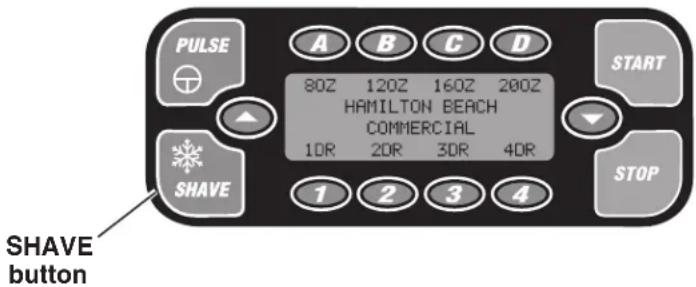
- Press and hold the SHAVE button on the control panel. The display will show the following message:
HAMILTON BEACH
COMMERCIAL
SHAVING...
-
When the desired amount of ice has been shaved, release the button.
-
Once all shaved ice has dropped from the chute, remove the jar or container.
text_image
PULSE 80Z 120Z 160Z 200Z HAMILTON BEACH COMMERCIAL 1DR 2DR 3DR 4DR START SHAVE STOP 1 2 3 4 SHAVE buttonBlending
WARNING

Electrical Shock Hazard
Plug into a grounded outlet.
Do not remove ground.
Do not use an adapter.
Do not use an extension cord.
Failure to follow these instructions can result in death, fire, or electrical shock.
WARNING

Cut Hazard
Always make sure splash shield is in place when blending.
Do not put hands, spoons or other utensils in jar when blending.
Failure to follow these instructions can result in broken bones, cuts or other injuries.
The blender is designed for mixing frozen beverages and desserts. Do NOT blend hot mixtures in the blender!
Blending
NOTE: Before you use the blender for the first time, wash and sanitize the container and cover (see Cleaning Instructions).
The blender can operate manually, or as part of a programmed cycle. For details on use with programmed cycles, see "Automatic Cycles".
To operate the blender manually, proceed as follows:
- Remove the ice chute.
- Place the ingredients to be blended in the container.
- Place the cover and filler cap on the container.
-
Make sure the main power switch is in the ON (I) position.
-
Place the container onto the base. Make sure it is securely seated. If the container is not properly seated, the jar pad sensors (if enabled) will not allow the blender to start and an error message will be displayed when the PULSE button is pressed.
-
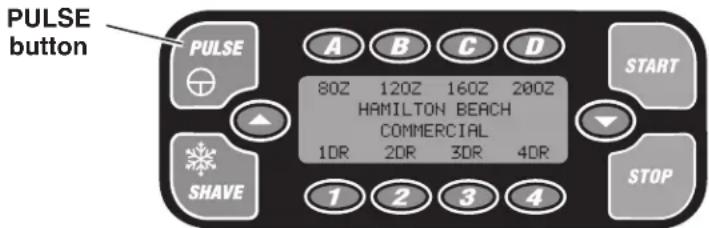
Press and hold the PULSE button on the control panel. The display will show the following message:
HAMILTON BEACH
COMMERCIAL
PULSING...
-
Once the beverage or dessert has reached the desired consistency, release the PULSE button.
-
Remove the container to serve.
-
Clean the container as directed in "Care and Cleaning."
text_image
PULSE button PULSE 80Z 120Z 160Z 200Z HAMILTON BEACH COMMERCIAL 1DR 2DR 3DR 4DR SHAVE 1 2 3 4 START STOPCaring for the Ice Shaver/Blender
Cleaning Instructions—General
WARNING

Electrical Shock Hazard
Unplug unit before general cleaning.
Do not immerse base in water or other liquid.
Failure to follow these instructions can result in death, fire, or electrical shock.
General cleaning
Do not allow food residue to dry on any part of the unit. Wash and rinse container, blender blade assembly and base after each use, or whenever it will not be used again within one hour:
- Wipe the exterior of the base with a damp cloth or sponge, then wipe dry with a soft towel. The base contains electrical components: do not immerse, use a high-pressure washer, or use a dishwasher to clean the base.
- Take particular care not to scratch the display screen and exterior of the ice hopper. Use only a soft, slightly damp cloth. Do NOT use any sort of harsh or abrasive cleaners, or dry paper towel; these can scratch the display window.
Recommended Sanitizing Solution:
The following solution is recommended when sanitizing the blender jar and blades, and to sanitize the inside of the ice hopper:
The sanitizing solution should consist of 1 tablespoon of household bleach per 1 gallon of clean, cool water ( 60^ F, 16^ C) mixed according to the instructions on the bleach. When using a sanitizing solution other than that recommended, the sanitizing solution concentration should be tested using commercially available test strips and should indicate a concentration between 100 and 200 parts per million of bleach to water.
WARNING

Cut Hazard
Unplug unit before general cleaning.
Use extreme care when cleaning ice hopper and removing ice agitator.
Failure to follow these instructions can result in cuts.
Ice Hopper and Agitator
The ice hopper and agitator assembly should be washed and sanitized before the unit is first used, and any time the unit has not been used for several days.
- Remove the ice hopper cover and lift out the inner hopper.
- Loosen the thumbscrew on the agitator assembly and lift the assembly up and out of the ice pool. WARNING: Shaver blade is sharp!
- Remove the ice chute by pressing the unlock button and pulling down.
- Wipe the inside of the ice pool with a clean soft cloth dampened with sanitizing solution (see Cleaning Instructions for recommended sanitizing solution).
- Rinse the ice chute, the agitator assembly and inner hopper in sanitizing solution, and allow to air dry. Wipe the shaving pool, shaver blade, and ice deflector with a clean, soft cloth dampenend with sanitizing solution (see Recommended Sanitizing Solution).
- Once all parts are dry, slide the agitator assembly carefully back into place and secure with the thumbscrew. Align the bosses on inner hopper with the matching holes in the ice hopper and press gently down into place. Ensure that the interlock is correctly aligned. Reinstall the ice chute by sliding it back until it clicks into place.
Cleaning Instructions—Blender
WARNING

Electrical Shock Hazard
Plug into a grounded outlet.
Do not remove ground.
Do not use an adapter.
Do not use an extension cord.
Do not immerse base in water or other liquid.
Failure to follow these instructions can result in death, fire, or electrical shock.
General cleaning
Do not allow food residue to dry on any part of the blender. Wash and rinse container, blender blade assembly and base after each use, or whenever it will not be used again within one hour, as follows:
- Remove the container from the base. Add cleaning solution to the container. Use a washing solution of hot water (less than 115^ F/46°C) and a non-sudsing detergent. Use the recommended amount of detergent.
- Scrub and flush out the container interior to remove food residue. Empty container.
- Fill container 14 full with fresh washing solution and place it on the base.
- Run the blender on high speed for 2 minutes.
- Repeat step 3 using clean rinse water (95° F/35° C).
- Wipe down the container with a soft cloth or sponge, dampened with fresh washing solution.
- Wipe the exterior of the base with a damp cloth or sponge. The base contains electrical components: do not immerse, use a high-pressure washer, or use a dishwasher to clean the base.
WARNING

Cut Hazard
Always place cover on jar when blending. Do not put hands, spoons or other utensils in jar when blending.
Failure to follow these instructions can result in broken bones or cuts.
Sanitizing
- Wash container as instructed in "General Cleaning."
- Fill container with sanitizing solution (See "Recommended Sanitizing Solution") and place on base.
- Run on blender base for 2 minutes. Empty container.
- Wipe the container exterior with a soft cloth or sponge dampened with sanitizing solution.
- Immerse the cover and filler cap in sanitizing solution for two minutes.
- Remove any remaining moisture from cutter assembly by placing empty container on base and running on PULSE for two seconds.
- When ready to use, rinse with clean water.
NOTE: Do not rinse container, cover or filler cap after sanitizing.
Troubleshooting Guide
| Problem . . . Solution . . | |
| Unit will not run or stops while it is running and cannot be restarted. | Check to see if unit is securely plugged into an electric outlet.Check to see if the fuse for the electric outlet has blown or if a circuit breaker has tripped.Check to see if the circuit breaker on the back of the unit has tripped.Check to make sure that the ON/OFF switch is in the ON (I) position.Check to make sure that the memory card is installed properly. |
| Quantity of dispensed ice is not consistent | Check to make sure that the unit is level and sitting on a solid, sturdy surface. |
| Unit is flooding or water leaking onto counter | Make sure that the end of the drain hose is not under water or blocked.Make sure that the drain hose is properly installed and routed. See Preparation. |
| Increased blender vibration or noise, or leaking from blender jar base | Check blade assembly for loose or damaged blades. Replace if necessary. |
Troubleshooting Guide — Status Messages
| Displayed Message... Solution | ... |
| BLENDER MOTOROVERHEAT-TURN OFFMAIN POWER SWITCH | • Electric blender motor is too hot. This can be caused when the blender jar is too full or when blending very thick ingredients. Reduce the quantity of product in the jar and allow several minutes for the motor to cool before blending. |
| INNER HOPPERNOT IN PLACE | • There is a safety interlock on the inner ice hopper. Make sure that the inner hopper is properly in place. |
| HOPPER LIDNOT IN PLACE | • There is a safety interlock on the ice hopper lid. Make sure that the lid is properly in place. |
| CHECKDRAIN | • There is a sensor on the drain that will indicate if water has backed up in the drain. Check the drain line for blockages or kinks. |
| CONTAINER CAPACITYEXCEEDED | • The drink size and number of drinks have exceeded 64 ounces (1.9 L). |
| JAR NOT IN PLACE | • Make sure that the container jar is properly seated on the blender base. The jar pad sensors prevent the blender motor from starting if the container jar is not properly seated. |
Troubleshooting Guide — Status Messages
| The following service messages will scroll across the display twice during the LOADING SETTINGS phase of the power-up cycle. | |
| Displayed Message... | Solution... |
| SERVICE MESSAGE REPLACE CUTTER ASSEMBLY | · The blender cutter assembly should be replaced whenever it is worn or damaged, or after 90 days of heavy use. The unit counts the number of blending cycles and displays a reminder. |
| SERVICE MESSAGE REPLACE SHAVER BLADE | · The ice shaver blade should be replaced whenever it is worn or damaged, or after 90 days of heavy use. The unit counts the number of shaving cycles and displays a reminder. |
| SERVICE MESSAGE REPLACE BLENDER MOTOR BRUSHES | · The unit counts the number of cycles and displays the reminder “REPLACE BLENDER MOTOR BRUSHES” when the expected life span of the blender motor brushes has been reached. |
| SERVICE MESSAGE REPLACE BLENDER MOTOR BELT | · The unit counts the number of cycles and displays the reminder “REPLACE BLENDER MOTOR BELT” when the expected life span of the blender motor belt has been reached. |
| SERVICE MESSAGE REPLACE SHAVER MOTOR BELT | · The unit counts the number of cycles and displays the reminder “REPLACE SHAVER MOTOR BELT” when the expected life span of the ice shaver motor belt has been reached. |
| SERVICE MESSAGE REPLACE BLENDER DRIVE ASSEMBLIES | · The unit counts the number of cycles and displays the reminder “REPLACE BLENDER MOTOR ASSEMBLY” when the expected life span of the blender drive assembly has been reached. |
| REVOLUTION SENSOR ERROR | · The revolution sensor on the shaver motor is not functioning correctly. |
| SPEED SENSOR FAILURE | · The speed sensor on the blender motor is not functioning correctly. |
Maintenance
Inspect the blender and its various parts and replace as follows:
| Daily | Unplug the unit and remove the container from the base, and then inspect the container and cutter unit assembly for wear, nicks, and broken or loose blades. Replace if necessary. If the blades are loose, discontinue use immediately and replace the blades.See “Replacement Parts” below. |
| Weekly | Unplug the unit, and then inspect the power cord insulation and power plug for cracks.Refer to “Requesting Assistance or Service” for repair or replacement. |
| Quarterly | Replace the container and cutter assembly at least every 90 days.See “Replacement Parts” below. |
Replacement Parts
Refer to "Technical Service" to order parts below.
| Part Description | Part Number |
| 64 oz. container 6126-1200 | |
| Cutter assembly 961200 | |
| Ice shaver blade assembly SB1200 | |
| Shaver belt 990028700 | |
| Blender belt 990028800 | |
| Blender motor brush kit 990028900 | |
| Blender motor assembly 990029000 | |
| Chute cover/splash shield 990029100 | |
| Inner ice hopper 990029200 | |
| Ice hopper cover 990029400 | |
| Jar pad 990029500 | |
| Drive bearing assembly with clutch 990029600 | |
| Pre-programmed memory card MC1200 | |
| Container lid with filler cap 990029800 | |
| Drain hose 990029900 | |
| Controls panel | 990030000 |
| Agititator/thumbscrew/O-ring | 990030200 |
| Shaving pool with chute | 990030300 |
| Hopper isolation grommets | 990030400 |
| Main PCBA assembly | 990030500 |
| Speed/revolution sensor | 990030600 |
| Leveling foot/jam nut | 990030700 |
| Belt tensioner assembly | 990030800 |
| Inner hopper/Hopper lid interlock switch | 990030900 |
Product Warranty
This Warranty supersedes all other Product Warranties
LIMITED WARRANTY
This product is warranted to be free from defects in material and workmanship for a period of two (2) years from the date of original purchase, or 25,000 cycles, whichever comes first, except as noted below. During this period, we will repair or replace this product, at our option, at no cost to you. THE FOREGOING WARRANTY IS IN LIEU OF ANY OTHER WARRANTY OR CONDITION, WHETHER EXPRESS OR IMPLIED, WRITTEN OR ORAL INCLUDING WITHOUT LIMITATION ANY STATUTORY WARRANTY OR CONDITION OF MERCHANTABILITY OR FITNESS FOR A PARTICULAR PURPOSE, ANY LIABILITY IS EXPRESSLY LIMITED TO AN AMOUNT EQUAL TO THE PURCHASE PRICE PAID, AND ALL CLAIMS FOR SPECIAL, INCIDENTAL AND CONSEQUENTIAL DAMAGES ARE HEREBY EXCLUDED. There is no warranty with respect to parts subject to wear, including without limitation: motor brushes, container and cutter assembly, clutches, bristle brushes, funnel, stainless steel cup, agitators, carafes, etc. This warranty extends only to the original purchaser and does not cover any condition resulting from abuse, misuse, neglect, unauthorized repair, or use not in conformity with the printed directions. Always use this product in accordance with the printed directions. This warranty gives you specific legal rights and you may also have other legal rights which vary from state to state, or province to province. Some states do not allow limitations on implied warranties or special, incidental or consequential damages, so the foregoing limitations may not apply to you.
If you have a claim under this warranty please contact our TECHNICAL SERVICE DEPARTMENT at 1-866-285-1087 or 910-693-4277. (For faster service please have model, series, and type numbers ready for operator to assist you.) Reasonable proof of date of purchase must be presented; otherwise the effective date of the warranty will be based upon the date of manufacture plus ninety (90) days.
Hamilton Beach/Proctor-Silex, Inc.
Commercial Technical Service
261 Yadkin Road
Southern Pines, NC 28387
8/05

text_image
ECSPExpress Care Service Program \*
* Available only to end users located in the continental U.S., Alaska, and Hawaii
Hamilton Beach Commercial understands that your foodservice equipment is a crucial element in the profitability of your business. If your equipment breaks down, you would like repair that's quick, convenient, and dependable. That's why we provide the Express Care Service Program for this product while it's under the Product Warranty. You'll find that it's better for your bottom line and your peace of mind.
Follow these three easy steps for quick, convenient and dependable ECSP repairs:
Step One: Dial 1-866-285-1087 toll-free to speak to a member of our highly trained technical service staff (hours Monday – Friday 8:00 AM – 5:00 PM EST). We will make an initial phone diagnosis.
Step Two. If it is determined that minimal on-site maintenance cannot be performed, Hamilton Beach Commercial will ship a replacement product to your location.
Step Three: Once the replacement unit is received, you send the troubled unit back to Hamilton Beach Commercial (we'll provide the box and supporting materials to return the unit). Hamilton Beach Commercial will pay the freight cost for the returned unit.
NOTE: The warranty of the replacement unit will be prorated based on the time period remaining on the replaced unit.
TOTAL SHAVE/BLEND CYCLES - 999999
NOMBRE TOTAL DE CYCLES RÂPE / MÉLANGE - 999999
DRAIN SENSOR ENABLED
CAPTEUR DE VIDANGE ACTIVÉ
JAR PAD SENSOR ENSABLED
CAPTEUR DE SUPPORT DE BAC ACTIVÉ
TOTAL SHAVE/BLEND CYCLES - 999999
NOMBRE TOTAL DE CYCLES RÂPE / MÉLANGE - 999999
CYCLES REMAINING IN WARRANTY - 999999
NOMBRE DE CYCLES RESTANT SOUS GARANTIE
SERVICE MESSAGE REPLACE CUTTER ASSEMBLY
MESSAGE D'ENTRETIEN REPLACEZ LE COUTEAU
Commercial Technical Service
261 Yadkin Road
Southern Pines, NC 28387
09/05

text_image
ECSPExpress Care Service Program \*
TOTAL SHAVE/BLEND CYCLES - 999999
DRAIN SENSOR ENABLED
SENSOR DE DRENAJE HABILITADO
JAR PAD SENSOR ENSABLED
SENSOR DE ALMOHADILLA DE JARRA HABILITADO
TOTAL SHAVE/BLEND CYCLES - 999999
SERVICE MESSAGE REPLACE CUTTER ASSEMBLY
MENSAJE DE SERVICIO REEMPLACE EL ENSAMBLAJE DE CORTE
Commercial Technical Service
261 Yadkin Road
Southern Pines, NC 28387
9/05

Express Care Service Program \*
Southern Pines, NC 28387