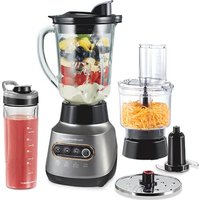
53800 - Blender HAMILTON BEACH - Free user manual and instructions
Find the device manual for free 53800 HAMILTON BEACH in PDF.


| Product Type | Blender with food processor attachment (3-in-1 system) |
| Brand | Hamilton Beach |
| Model | 53800 |
| Power Supply | 120 V ~ 60 Hz |
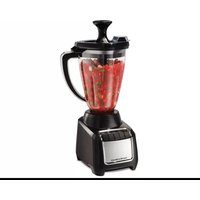
| Main Container Capacity | 1250 ml (48 oz) |
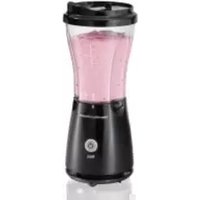
| Travel Cup Capacity | 590 ml (20 oz) |
| Main Functions | Blending, pulse, chopping, slicing, grating, easy clean (EasyClean) |
| Number of Speeds | Multiple settings: LO, HI, PULSE, presets (puree/smoothie/frozen drink, slice/grate/milkshake/easy clean) |
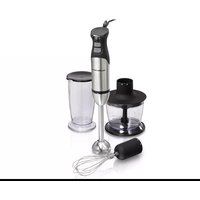
| Included Accessories | Container with lid, travel cup (2) with sip lids, processor bowl, chopping/blending blade, reversible slicing/grating disc, processor adapter, red adapter, pusher |
| Safety | Lid lock, overload protection, sharp blades handled with care |
| Maintenance | Wipe base with a damp cloth; removable parts dishwasher-safe (except processor adapter and red adapter); EasyClean function for quick rinse |
| Warranty | 5 years in Canada, 3 years in the United States |
| Usage | Household only |
| Features | 3-in-1 system, internal cord storage, drip-free pour spout, vent, Pulse function, reversible disc (slice/grate) |
| Repairability | Replacement parts available online at hamiltonbeach.com/parts |
| Blade Material | Stainless steel (estimated) |
Frequently Asked Questions - 53800 HAMILTON BEACH
User questions about 53800 HAMILTON BEACH
0 question about this device. Answer the ones you know or ask your own.
Ask a new question about this device
Download the instructions for your Blender in PDF format for free! Find your manual 53800 - HAMILTON BEACH and take your electronic device back in hand. On this page are published all the documents necessary for the use of your device. 53800 by HAMILTON BEACH.
USER MANUAL 53800 HAMILTON BEACH
Visit hamiltonbeach.com for our complete line of products and Use and Care Guides – as well as delicious recipes, tips, and to register your product online.
LIRE AVANT UTILISATION
Français.... 18
3-in-1 Electronic Kitchen System
natural_image
Black and white photo of a kitchen blender with side dishes and a side drink, no visible text or symbols.IMPORTANT SAFEGUARDS
When using electrical appliances, basic safety precautions should always be followed to reduce the risk of fire, electric shock, and/or injury to persons, including the following:
- Read all instructions.
- This appliance is not intended for use by persons with reduced physical, sensory, or mental capabilities, or lack of experience and knowledge, unless they are closely supervised and instructed concerning use of the appliance by a person responsible for their safety.
- This appliance shall not be used by children. Keep the appliance and its cord out of reach of children.
- Close supervision is necessary when any appliance is used near children. Children should be supervised to ensure that they do not play with the appliance.
- To protect against risk of electrical shock, do not put cord, plug, base, or motor in water or other liquid.
- Turn the appliance OFF (O), then unplug from outlet when not in use, before assembling or disassembling parts, and before cleaning. To unplug, grasp the plug and pull from the outlet. Never pull from the power cord.
- Avoid contact with moving parts. Do not attempt to defeat any safety interlock mechanisms.
- Do not operate any appliance with a damaged supply cord or plug, or after the appliance malfunctions or has been dropped or damaged in any manner. Supply cord replacement and repairs must be conducted by the manufacturer, its service agent, or similarly qualified persons in order to avoid a hazard. Contact Customer Service for information on examination, repair, or adjustment as set forth in the Limited Warranty
-
The use of attachments, including canning jars, not recommended or sold by the appliance manufacturer may cause fire, electric shock, or personal injury.
-
Do not use outdoors.
-
Do not let cord hang over edge of table or counter or touch hot surfaces, including stove.
-
Do not place on or near a hot gas or electric burner, or in a heated oven.
-
Keep hands and utensils out of the jar and away from the cutting blade assembly, while blending or chopping food, to reduce the risk
2
of severe personal injury and/or damage to the blender or available attachments (attachments may not be provided with blender). A rubber spatula may be used but must be used only when blender is not running.
-
Blades are sharp; handle carefully—especially when assembling, disassembling, emptying or cleaning blender jar.
-
Do not use a broken, chipped, or cracked blender jar.
-
Do not use broken, cracked, or loose cutting blade assembly.
-
Always operate blender with cover in place.
-
Do not use appliance for other than intended purpose.
-
Do not leave blender unattended while it is operating.
-
Check that the appliance is OFF (O) before plugging cord into wall outlet. To disconnect, turn the control to OFF (O); then remove plug from wall outlet. To unplug, grasp the plug and pull from the outlet. Never pull from the power cord.
-
CAUTION! In order to avoid a hazard due to inadvertent resetting of the thermal cut-out, this appliance must not be supplied through an external switching device, such as a timer, or connected to a circuit that is regularly switched on and off by the utility.
-
If the jar should twist or rotate when the motor is switched ON (I), switch OFF (O) immediately and tighten jar in collar or on blender base.
-
Ensure cutting blade assembly is tight and secure to jar. Injury can result if moving blades accidentally become exposed.
-
Ensure collar on base of blender jar and travel jar is tight and secure. Injury can result if moving blades accidentally become exposed.
-
Risk of thermal burn injury due to excessive pressure in the travel jar. Do not blend hot liquids in the travel jar.
-
When blending hot liquids, remove filler-cap of two-piece lid or open vent opening of lid with mess-free spout, and close any lid openings along the edge intended for pouring. Hot liquids may push lid off jar during blending. To prevent possible burns: Do not fill blender jar beyond the 3-cup (710-mL) level. With the protection of an oven mitt or thick towel, place one hand on top of lid. Keep exposed skin away from lid. Start blending at lowest speed.
-
Be careful if hot liquid is poured into the blender jar as it can be ejected
out of the appliance due to a sudden steaming.
- To reduce the risk of injury, never place cutting blade assembly on base without jar properly attached.
- Operating time cannot exceed 3 minutes for any accessory or speed setting.
- Keep hands and utensils away from moving chopping/mixing blade and slicing/shredding disc while processing food to reduce the risk of severe personal injury and/or damage to the food processor. A rubber scraper may be used but ONLY when the food processor or chopper is not running.
- The chopping/mixing blade and slicing/shredding disc are sharp. Handle carefully. Store out of reach of children.
- To reduce the risk of injury, never place chopping/mixing blade or
slicing/shredding disc on the processor or food processor adapter without bowl properly attached.
- Be certain lid is securely locked in place before operating food processor attachment.
- Never feed food into food chute by hand. Always use the food pusher.
- Do not attempt to defeat the processor or chopper lid interlock mechanism.
- Make sure the chopping/mixing blade and slicing/shredding disc have come to a full stop before removing processor lid.
- Never use appliance for a longer period or with a larger amount of ingredients other than that recommended by appliance manufacturer. See section titled "Food Processing Chart."
SAVE THESE INSTRUCTIONS
Other Consumer Safety Information
This appliance is intended for household use only. Use for food or liquids only.
⚠ WARNING Electrical Shock Hazard: This appliance is provided with a polarized plug (one wide blade) to reduce the risk of electric shock. The plug fits only one way into a polarized outlet. Do not defeat the safety purpose of the plug by modifying the plug in any way or by using an adapter. If the plug does not fit fully into the outlet, reverse the plug. If it still does not fit, have an electrician replace the outlet.
The length of the cord used on this appliance was selected to reduce the hazards of becoming tangled in or tripping over a longer cord. If a longer cord is necessary, an approved extension cord may be used. The electrical rating of the extension cord must be equal to or greater than
Wattage/Peak Power Information
The wattage/ampere rating of the blender is determined by an Underwriters Laboratory test and is based on available cutting blade assembly, jar combinations, and attachments that may not be provided with your unit, but are available as replacement parts. This is a measure of input wattage/amperes after 30 seconds of operation.
the rating of the appliance. Care must be taken to arrange the extension cord so that it will not drape over the countertop or tabletop where it can be pulled on by children or accidentally tripped over.
If the cutting blade assembly locks and will not move, it will damage the motor. Do not use. Contact Customer Service for information.
Do not place blender jar in the freezer filled with food or liquid. This can result in damage to the cutting blade assembly, jar, blender, and possibly result in personal injury.
To avoid an electrical circuit overload, do not use another high-wattage appliance on the same circuit with this appliance.
Peak power is the measure of the motor wattage during the first seconds of operation. This is when a blender requires the most power to crush ice, frozen fruit, etc. This is a better measure of what a blender motor can consume when power is needed most.
Parts and Features
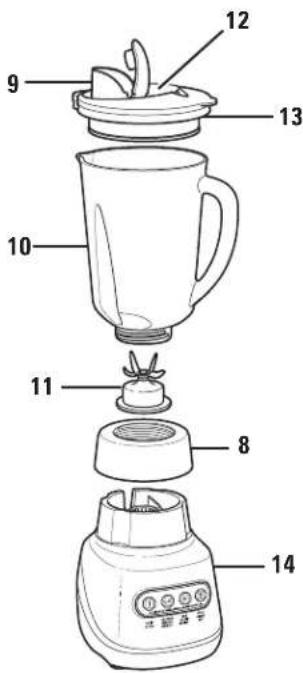
Before first use: Wash everything except Blender Base in hot, soapy water. Dry thoroughly. Wipe Blender Base with a damp cloth or sponge. DO NOT IMMERSE BASE IN WATER. Care should be taken when handling Cutting Blade Assembly as it is very sharp.
*Optionalaccessory on select models
To order parts, visit: hamiltonbeach.com/parts
| 1 | Food Pusher* |
| 2 | Processor Lid with Food Chute* |
| 3 | Processor Bowl* |
| 4 | Chopping/Mixing Blade* |
| 5 | Slicing/Shredding Disc* |
| 6 | Food Processor Adapter* |
| 7 | Red Adapter* |
| 8 | Collar |
| 9 | Mess-Free Spout With Hinged Cap |
| 10 | Blender Jar |
| 11 | Cutting Blade AssemblyNOTE: Gasket is permanently affixed to cutting blades. Do not try to remove it. |
| 12 | Vent Opening |
| 13 | Lid |
| 14 | Base |
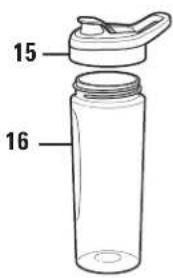
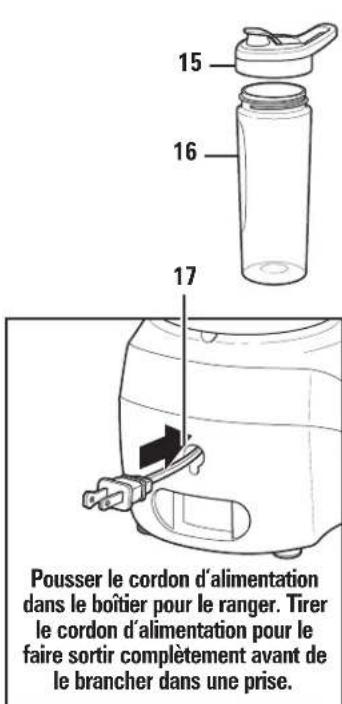
| 15 | Drinking Lid (2)* |
| 16 | 20-oz. Travel Jar (2)* |
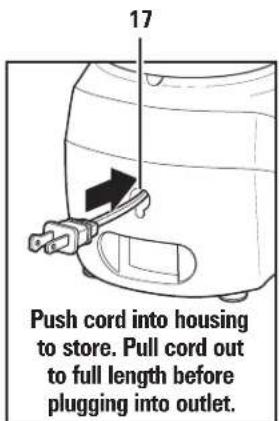
| 17 | Cord Stuff Storage (located on bottom of base) |
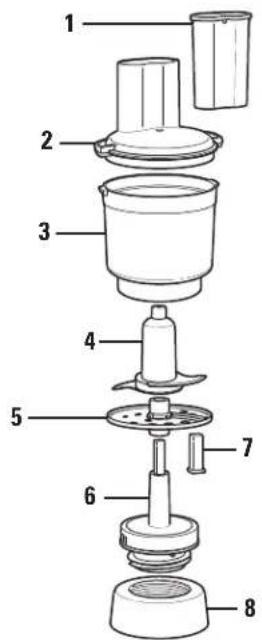
Food Processor Attachment (on select models)
Using Your Blender
Important: Your Blender Jar and Cutting Blade Assembly are subject to wear during normal use. Always inspect Jar for nicks, chips, or cracks. Always inspect Cutting Blade Assembly for broken, cracked, or loose blades. If Jar or Cutting Blade Assembly is damaged, do not use. Visit hamiltonbeach.com/parts to obtain replacement parts.
natural_image
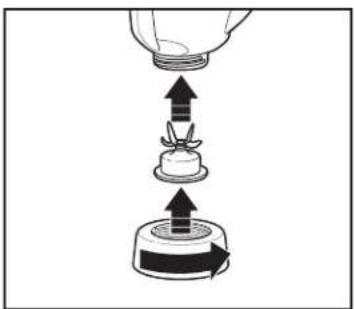
Diagram showing a container being inserted into a container with an arrow indicating direction (no text or symbols)- Place Cutting Blade Assembly on bottom of Blender Jar. Rotate Collar counterclockwise until tight.
natural_image
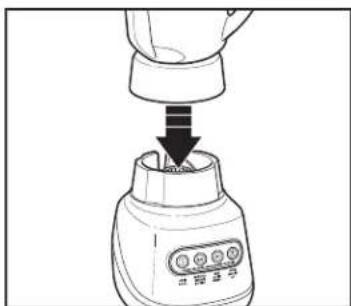
Line drawing of a blender with a downward arrow indicating process (no text or symbols)- Place Blender Jar on Base.
natural_image
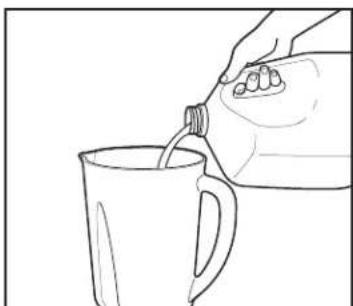
Line drawing of a hand pouring liquid from a bottle into a mug (no text or symbols)- Add ingredients to Jar. Add liquid ingredients first (at least 8 oz. [238 mL]), then other ingredients. DO NOT fill ingredients above 48 oz. (1250 mL) fill line.
natural_image
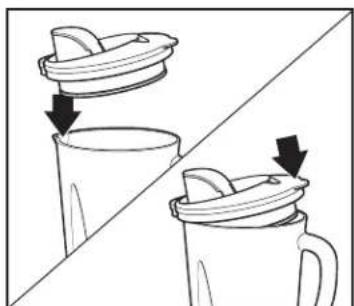
Two-step illustration of a cup and mug with lid, showing liquid transfer or cleaning process (no text or symbols)- Put Lid on Jar by placing Spout side first, then pressing down on back of Lid until it is seated on top of Jar. Ensure Hinged Cap is closed.
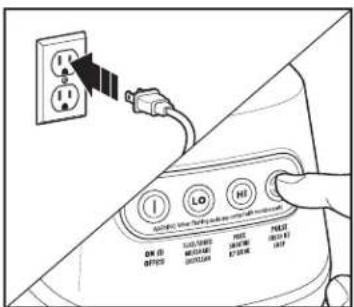
- Plug into outlet. Press desired speed button. When using PULSE button, Blender will only run when button is held down.
natural_image
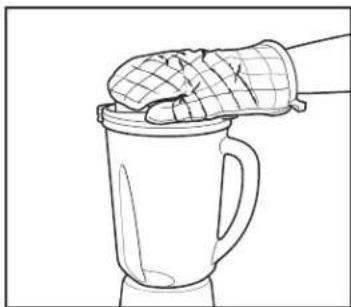
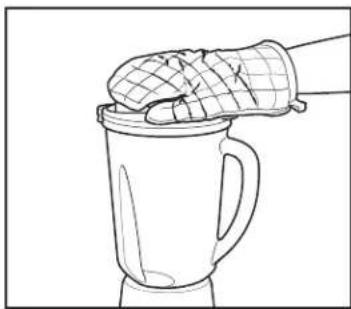
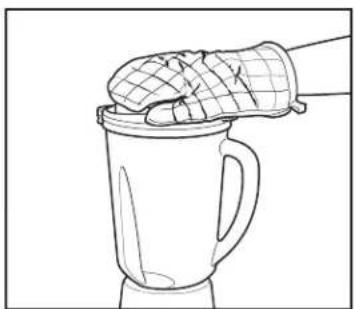
Line drawing of a hand holding a glove above a mug filled with liquid, no text or symbols present- Hold Jar in place while blending.
WARNING Burn Hazard. When blending hot liquids, open center vent opening of lid and close the edge cover intended for pouring. Hot liquids may push lid off jar during blending. Do not fill blender jar beyond the 48 oz. (1250 mL) level. With the protection of an oven mitt or thick towel, place one hand on top of lid. Keep exposed skin away from lid. Start blending at lowest speed.
natural_image
Illustration of hands using a tool to press or adjust a component, with arrows indicating motion (no text or symbols)Using Your Blender (cont.)
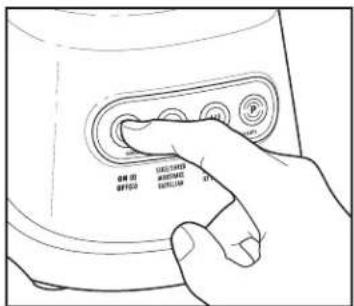
- Press OFF (○) to turn off Blender.
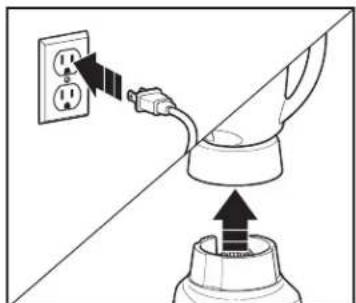
- Unplug. Remove Blender Jar from Base.
natural_image
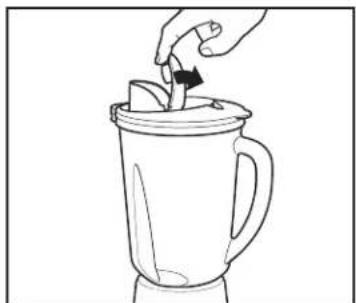
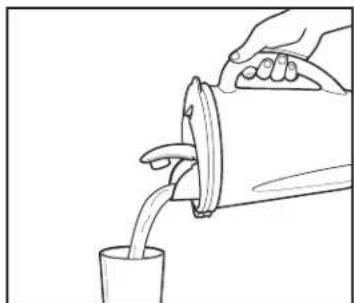
Line drawing of a hand pouring liquid into a blender (no text or symbols)- Open Spout. 10. Pour mixture into container or Travel Jar (if included).
natural_image
Line drawing of a hand pouring liquid from a container into a cup (no text or symbols)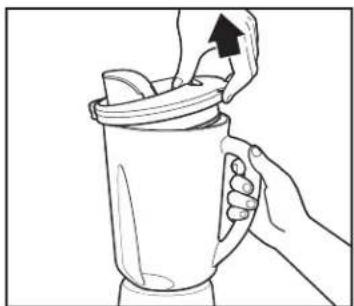
natural_image
Line drawing of a hand pouring liquid into a mug with a handle (no text or symbols)- To remove Lid, grasp handle on side of Jar, then pull up on back of Lid.
Blending Tips
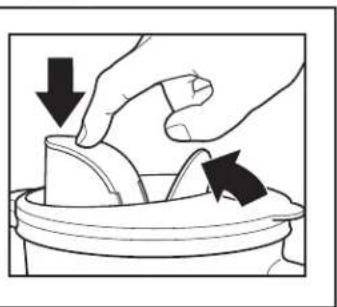
• To add foods when Blender is operating, open Hinged Cap and add ingredients through opening.
- For best performance, minimum amount of liquid needed per recipe is one cup (8 oz./237 mL). Add more liquid if food is not blending properly.
- If blending action stops during blending or ingredients stick to sides of Jar, there may not be enough liquid in Jar to blend efficiently.
- Do not try to mash potatoes, mix stiff dough, whip egg whites, grind raw meat, or extract juices from fruits and vegetables.
- Do not store food or liquids in Blender Jar.
- Avoid bumping or dropping Blender when in operation or at any time.
Using Travel Jar (on select models)
WARNING Burn Hazard.
Do not blend hot ingredients in travel jar. Pressure may build, causing jar to pop off and hot ingredients to erupt.
WARNING Laceration
Hazard. Handle blade carefully; it is very sharp.
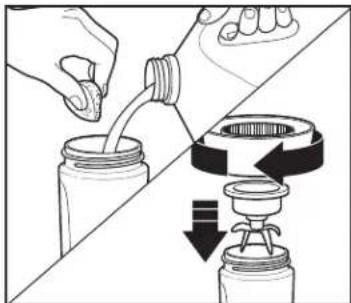
- Make sure unit is unplugged. Add ingredients to Travel Jar. DO NOT fill ingredients above MAX fill line. Carefully place Cutting Blade Assembly and Collar onto Travel Jar.
natural_image
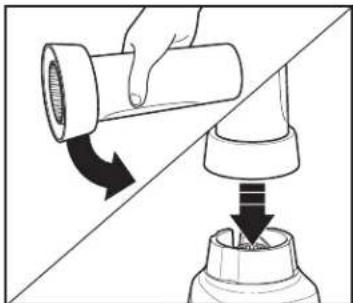
Diagram showing a hand holding a pipe fitting being inserted into a bottle, with arrows indicating direction (no text or symbols)- Turn Travel Jar upside down, shake to mix ingredients, and place onto Base.
natural_image
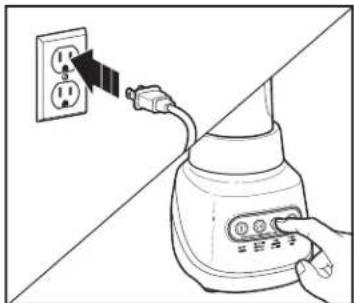
Illustration of a hand inserting a plug into a power outlet, showing electrical connections (no text or symbols)- Plug into outlet. Hold Jar in place while blending. Press ON (I) or press and hold PULSE to blend 15 to 30 seconds or until smooth. Always operate on a countertop or other supporting surface.
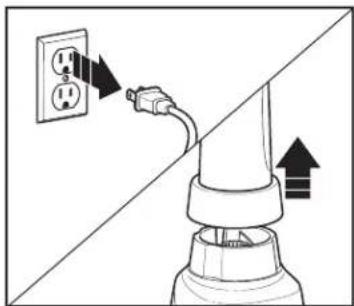
natural_image
Diagram showing a plug inserted into an electrical outlet with arrows indicating direction (no text or symbols)- Unplug. Remove Jar from Base.
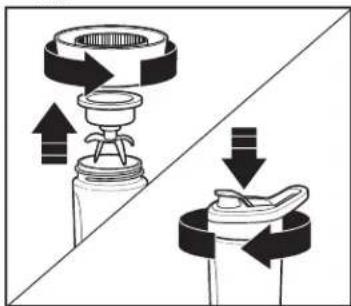
natural_image
Diagram showing two mechanical components with directional arrows indicating motion, no text or symbols present- Turn bottom up; remove Collar and Cutting Blade Assembly from Jar. Hand-tighten Drinking Lid onto Travel Jar.
Blending Tips for 20-oz. Travel Jar
- If blending action does not start, stops during blending, or ingredients stick to sides of Jar, turn Blender OFF (O). Remove Jar, shake contents, and return to blending.
- For best performance in 20-oz. Travel Jar, minimum amount of liquid needed per recipe is 3/4 cup (6 ounces/177 mL).
- When filling Jar, place frozen ingredients or ice into Jar first. When turned upside down to blend, frozen items will be on top.
- Do not chop or process hard foods such as cheese, crackers, or meat.
- Avoid bumping or dropping Blender.
- Do not blend hot liquids in Travel Jar.
- Do not fill Travel Jar above MAX fill line.
Blending Drinks With Blender Jar
TYPE OF DRINK INGREDIENTS NUMBER OF SERVINGS BLENDER SETTING/TIME
| Fruit Smoothie 1 cup (237 mL) milk1 1/2 cups (355 mL) yogurt2 cups (473 mL) frozen berries or other fruitSweetener to taste (optional) | 3 to 4(makes 4 cups [946 mL]) | PUREE/SMOOTHIE/ICY DRINK setting for 45 seconds or until blended. |
| Milkshake 1 1/2 cups (355 mL) milk2 large scoops ice cream2 to 3 tablespoons (15 to 44 mL) flavored syrup | 2 to 3(makes 3 cups [710 mL]) | SLICE/SHRED/MILKSHAKE/EASYCLEAN setting for 5 to 10 seconds, or LO until blended. |
| Frozen Drink 1 cup (237 mL) drink mix, such as Piña Colada mix10 ice cubes | 2(makes 2 cups [473 mL]) | PUREE/SMOOTHIE/ICY DRINK setting for 45 seconds, or PULSE 5 times and blend on HI for 45 seconds or until blended. |
TIPS FOR BEST RESULTS:
• Always place liquid in Blender Jar first, then remaining ingredients.
- If frozen fruit or ice are not blending, stop Blender and PULSE a few times.
• See "Blending Tips" on page 6.
Blending Drinks With Travel Jar
TYPE OF DRINK INGREDIENTS NUMBER OF SERVINGS BLENDER SETTING/TIME
| Whole Juice 1/2 cup (118 mL) frozen mango or pineapple1 handful baby spinach leaves1 cup (237 mL) green seedless grapes | 2 to 3(makes 2–2 1/2 cups [473 to 591 mL]) | Add ingredients to Jar in order listed. Place Cutting Blade Assembly on top of Jar; secure with Collar. Turn upside down on Blender and place hand on top of Jar to hold in place. Blend on PUREE/SMOOTHIE/ICY DRINK for 30 seconds. Remove Jar from Blender. Shake ingredients in Jar and return to blend on PUREE/SMOOTHIE/ICY DRINK for 15 to 20 seconds longer. Remove Collar and Cutting Blade Assembly and screw on Drinking Lid. |
| Fruit Smoothie 1 cup (237 mL) frozen strawberries1 large banana1/4 cup (59 mL) greek vanilla yogurt3/4 cup (177 mL) pineapple juice | 2 to 3(makes 2–2 1/2 cups [473 to 591 mL]) | Add ingredients to Jar in order listed. Place Cutting Blade Assembly on top of Jar; secure with Collar. Turn upside down on Blender and place hand on top of Jar to hold in place. Blend on PUREE/SMOOTHIE/ICY DRINK for 25 to 30 seconds. Remove Collar and Cutting Blade Assembly and screw on Drinking Lid. |
| Milkshake 3 scoops any flavor ice cream(#16 scoop)3/4 cup (177 mL) milk | 2 to 3(makes 2–2 1/2 cups [473 to 591 mL]) | Add ingredients to Jar in order listed. Place Cutting Blade Assembly on top of Jar; secure with Collar. Turn upside down on Blender and place hand on top of Jar to hold in place. Blend on SLICE/SHRED/MILKSHAKE/EASYCLEAN for 20 seconds. Remove Collar and Cutting Blade Assembly and screw on Drinking Lid. |
TIPS FOR BEST RESULTS:
- When filling Jar, place frozen ingredients or ice into Jar first. When turned upside down to blend, frozen items will be on top.
- If frozen fruit or ice are not blending, stop Blender and PULSE a few times.
- See "Blending Tips for 20-oz. Travel Jar" on page 7.
Using Food Processor Attachment – Chopping/Mixing Blade
WARNING
Laceration Hazard.
Handle chopping/mixing blade carefully; it is very sharp. Make sure unit is turned OFF (O) and is unplugged.
Always wait until blade has stopped moving before removing lid.
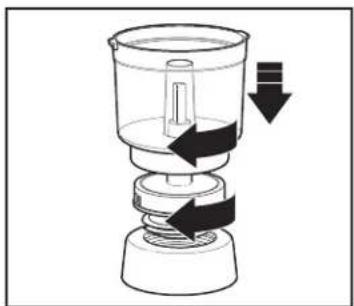
natural_image
Diagram of a mechanical device with arrows indicating motion or force direction (no text or symbols)- Make sure Blender is OFF (●) and unplugged. Insert Food Processor Adapter into Collar and turn clockwise to tighten. Then, place Food Processor Adapter straight down on Base. Place Food Processor Bowl on Food Processor Adapter and turn clockwise to lock Bowl into place.
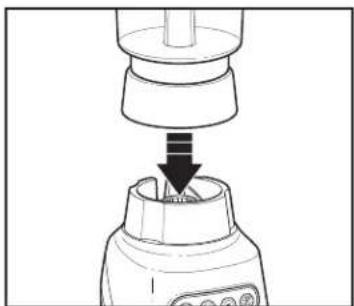
natural_image
Diagram of a blender with a downward arrow indicating compression or disassembly (no text or symbols present)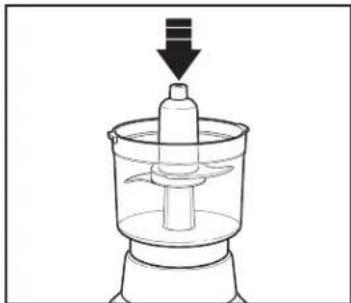
natural_image
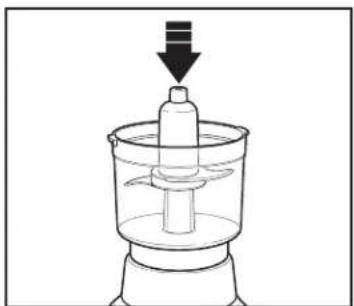
Line drawing of a mechanical device with a downward arrow indicating motion (no text or symbols)- Place Bowl on Base. 3. Carefully slide Chopping/Mixing Blade straight down onto Food Processor Adapter.
natural_image
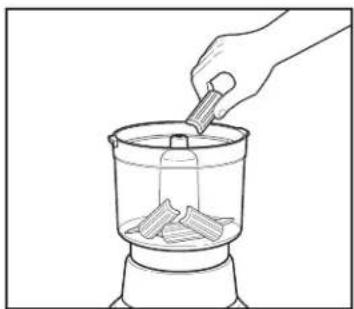
Line drawing of a hand using a pipette to add food into a container (no text or symbols)- Cut food into 1-inch pieces. Place food to be chopped/mixed in Bowl.
natural_image
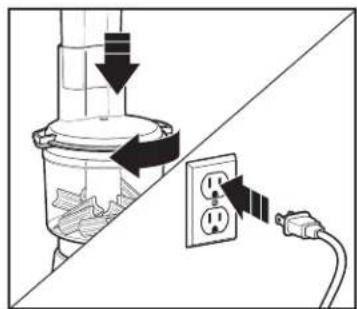
Diagram showing a plug inserted into a socket connected to an electrical outlet (no text or symbols present)- Rotate Lid clockwise to secure on Base. Place Food Pusher in Lid. Plug into outlet.
Using Food Processor Attachment – Chopping/Mixing Blade (cont.)
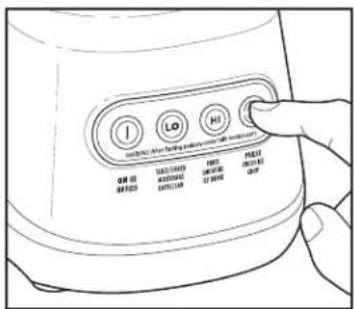
- Press desired speed button. For best chopping results, press PULSE in 1-second increments and check progress as you go. Many foods only require a few pulses. When using PULSE buttons, Blender will only run when button is held down. Hold Bowl in place while processing.
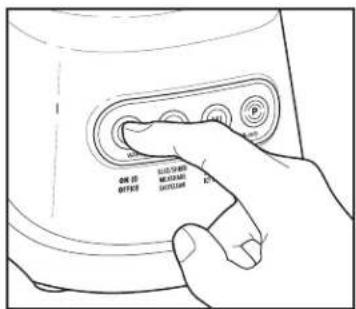
- Press OFF (O) to turn off Blender.
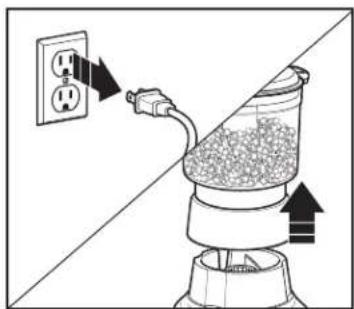
natural_image
Diagram of a power outlet with an attached plug, showing airflow direction (no text or symbols)- Unplug. Remove Bowl from Base.
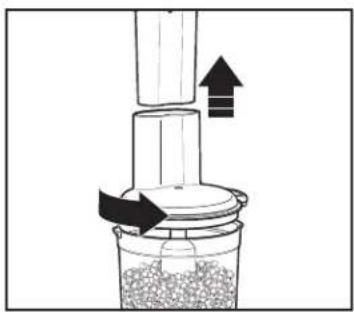
natural_image
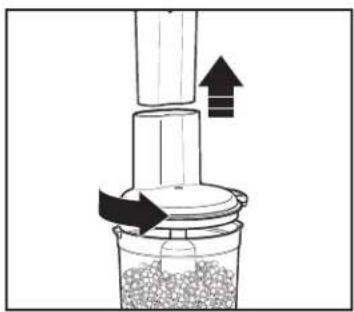
Diagram of a mechanical device with arrows indicating motion or force direction (no text or symbols)- Remove Lid.
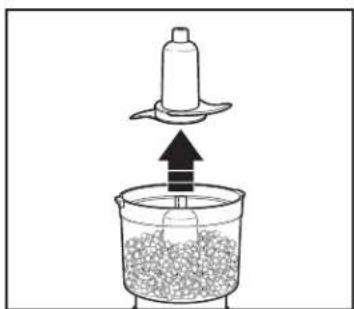
natural_image
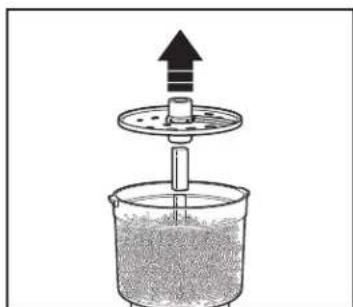
Diagram of a mechanical device with a lever and granular material inside a container (no text or symbols)- Carefully remove Blade from Adapter.
natural_image
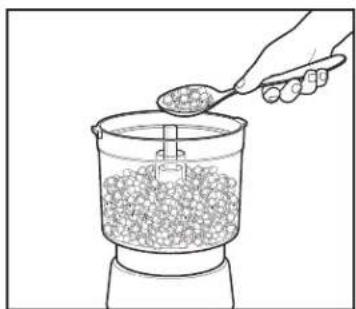
Line drawing of a hand pouring granular material from a container into a mixing bowl (no text or symbols)- Scoop food out of Bowl.
WARNING
Laceration Hazard.
Always use food pusher to feed food into the chute. Never push food through chute with fingers or other objects.
Using Food Processor Attachment – Slicing/Shredding Disc
natural_image
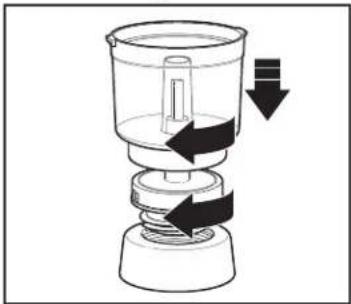
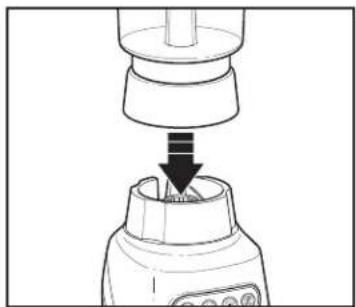
Diagram of a mechanical device with arrows indicating motion or force direction (no text or symbols)- Make sure Blender is OFF (①) and unplugged. Insert Food Processor Adapter into Collar and turn clockwise to tighten. Then, place Food Processor Adapter straight down on Base. Place Food Processor Bowl on Food Processor Adapter and turn clockwise to lock Bowl into place.
natural_image
Diagram of a blender with a downward arrow indicating compression or disassembly (no text or symbols present)WARNING Laceration Hazard.
Handle disc carefully; it is very sharp. Make sure unit is turned OFF (Q) and is unplugged.
Always wait until disc has stopped moving before removing lid.
natural_image
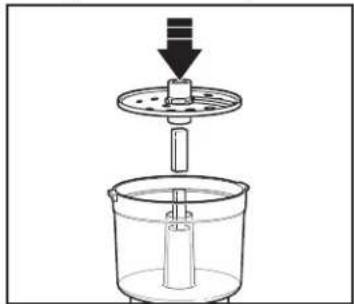
Diagram of a mechanical device with a cylindrical component and downward arrow, no text or symbols present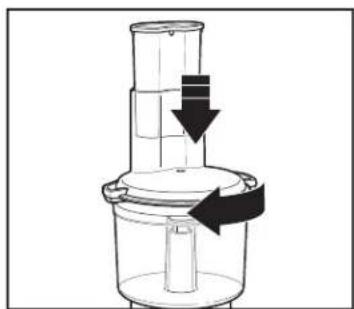
natural_image
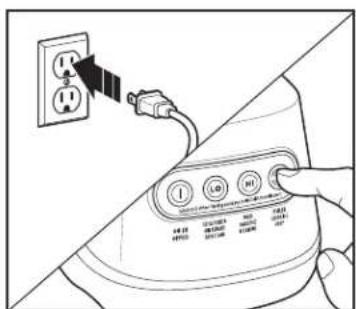
Diagram of a mechanical device with a downward arrow indicating motion or force, no text or symbols present- Rotate Lid clockwise to secure on Base. Ensure unit is in OFF (① position before plugging into outlet.
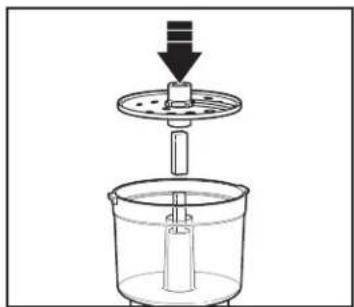
on Food Processor Adapter before placing Slicing/Shredding Disc into Bowl. For slicing, the word "SLICE" should face up; for shredding, the word "SHRED" should face up.
NOTE: Red Adapter will need to be turned over to use other side of Disc.
- Press LO button.
Using Food Processor Attachment – Slicing/Shredding Disc (cont.)
natural_image
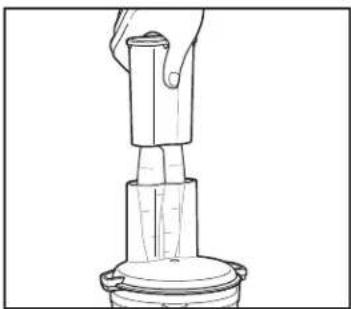
Line drawing of a hand holding a cylindrical object with a base, no text or symbols present- While motor is running, use Food Pusher to slowly push food into the Food Chute. Hold Bowl in place while processing. DO NOT process food above MAX LIQUID FILL line.
WARNING Laceration Hazard. Always use food pusher to feed food into the chute. Never push food through chute with fingers or other objects.
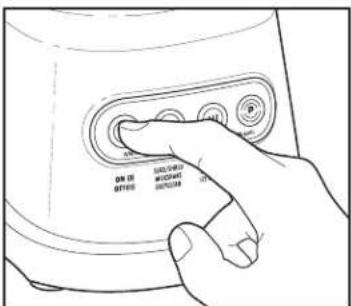
- Press OFF (○) to turn off Blender.
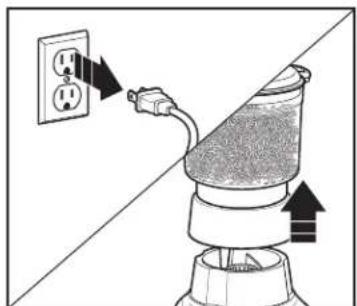
natural_image
Diagram of a portable air conditioner with a power outlet and plug, showing airflow direction (no text or symbols)- Unplug. Remove Bowl from Base.
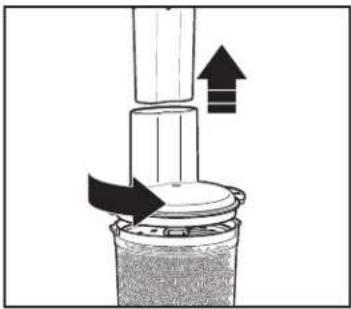
natural_image
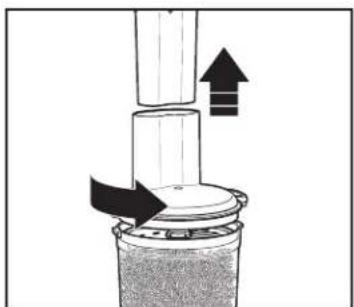
Diagram of a mechanical press or valve assembly with directional arrows indicating movement (no text or symbols)- Remove Lid.
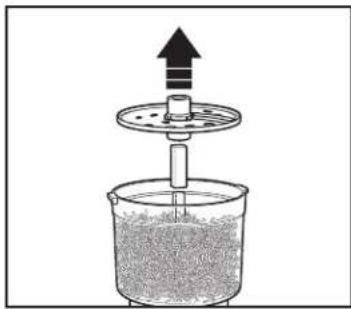
natural_image
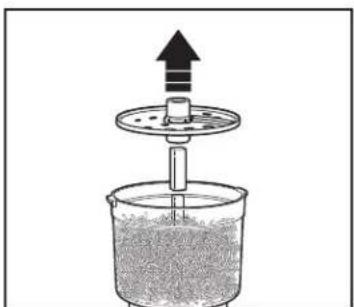
Diagram of a mechanical device with an upward arrow and a central shaft, no text or symbols present- Carefully remove Disc and Red Adapter from Food Processor Adapter.
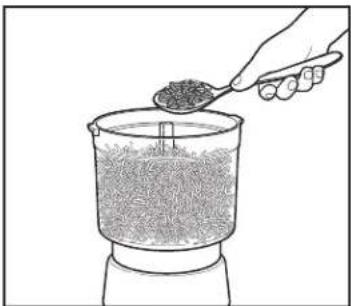
natural_image
Line drawing of a hand pouring granular material into a container (no text or symbols)- Scoop food out of Bowl.
WARNING
Laceration Hazard.
Always use food pusher to feed food into the chute. Never push food through chute with fingers or other objects.
Tips and Techniques
- For a more uniform consistency, start with pieces of food that are similar in size. Cut food into 1-inch (2.5-cm) pieces before processing with Chopping/Mixing Blade.
- This Food Processor is excellent to chop, mix, slice, or shred most foods. However, to maintain peak performance, do not use your Food Processor Attachment for the following: grinding grain, coffee beans, or spices; slicing frozen meats; kneading dough; or crushing ice.
- When chopping foods, pulsing on and off will produce best results.
-
Operating time will depend on quantity of food being processed. Most foods can be sliced, chopped, or shredded in seconds. If unit is operated continuously for an extended period of time, let Food Processor Attachment rest about 4 minutes before continuing.
-
Do not puree or mash starchy vegetables like potatoes as they are easily overprocessed and will become gummy.
• To slice or shred cheese, use only firm cheese like cheddar, Monterey Jack, or Swiss that has been chilled for at least 30 minutes. - Reversible Slicing/Shredding Disc has a slicing blade on one side and shredding teeth on other side. The name engraved on blade, facing up, is the function selected. For slicing, the word "SLICE" should face up; for shredding, the word word "SHRED" should face up. Place on Food Processor Adapter with desired cutting edge facing up.
• To julienne vegetables, slice, remove from Bowl, and restack vegetables. Pack into Food Chute with slices vertical. Slice again to make matchstick-cut vegetables. - When using Food Processor Chopping/Mixing Blade, do not process liquids past MAX LIQUID FILL line, and other ingredients past the 3-cup/24 oz. line.
Food Processing Chart
Disc is reversible and labeled. Label should face up for desired function. When using Disc, do not process past MAX LIQUID FILL line on Bowl.
ATTACHMENT FOODS
| Chopping/Mixing Blade Chop: Nuts, meat, garlic, onions, peppers, celery, herbs, bread (for crumbs), crackers. Maximum 2 cups (473 mL)Mince/Puree: Vegetables, fruit.Maximum 2 cups (473 mL)Mix: Salad dressings. Maximum 2 cups (473 mL)Puree: Soups, sauces. Maximum 2 cups (473 mL)Grate: Cheese, such as Parmesan (chilled). Maximum 5 oz. (142 g) | |
| Slicing Disc | Cucumbers, apples, mushrooms, carrots, potatoes, cabbage, tomatoes, pepperoni, peppers, radishes, firm cheeses (chilled) |
| Shredding Disc | Cabbage, potatoes, carrots, firm cheeses (chilled) |
Recipes
Mango Pineapple Salsa
Ingredients:
2 cups (473 mL) chopped fresh pineapple
1 orange, peeled and chopped
1 cup (237 mL) chopped fresh mango
1/2 cup (118 mL) chopped red pepper
1/2 cup (118 mL) pineapple juice
1/4 cup (59 mL) chopped fresh cilantro
1/4 cup (59 mL) chopped onion
3 tablespoons (44 mL) apple cider vinegar
1/2 teaspoon (2.5 mL) salt
1/4 teaspoon (1.3 mL) black pepper
Directions:
- Using Chopping/Mixing Blade, separately chop pineapple, mango, red pepper and cilantro.
- Once chopped, combine all ingredients in a large bowl.
- Cover with plastic wrap and refrigerate until ready to serve.
Serves: 6 to 8
Curried Cheese Ball
Ingredients:
1/2 cup (118 mL) finely shredded Colby and Monterey Jack cheese
1 package (8 oz. [227 g]) cream cheese, softened
2 tablespoons (30 mL) chopped chives
2 tablespoons (30 mL) Major Grey's chutney
1 tablespoon (15 mL) curry powder
1/2 cup (118 mL) chopped lightly salted dry-roasted peanuts
1/4 cup (59 mL) cilantro, chopped
Directions:
- Using the Shredding Disc, shred both cheeses.
- Mix cream cheese, shredded cheese, chives, chutney and curry powder in small bowl until well blended.
- Using the Chopping/Mixing Blade, separately chop peanuts and cilantro.
- Mix cream cheese, shredded cheese, chives, chutney and curry powder in small bowl until well blended.
- Cover and refrigerate several hours.
- Stir peanuts and cilantro together in a small bowl. Place cream cheese mixture on a sheet of plastic wrap or waxed paper and roll into a ball.
- Sprinkle peanut mixture over cream cheese; roll to coat entire ball.
- Cover and refrigerate several hours for flavors to blend. Serve with crackers.
Serves: 20 to 22
Care and Cleaning
- Unplug.
- Remove Blender Jar from Base. Rotate Collar clockwise until Collar and Cutting Blade Assembly come apart from Blender Jar.
- Remove Travel Jar from Base. Rotate Collar counterclockwise until Collar and Cutting Blade Assembly come apart from Travel Jar.
- Remove Bowl from Base. Rotate Collar clockwise until Collar and Food Processor Adapter come apart from Bowl.
- Wipe Blender Base, control panel, and cord with a damp cloth or sponge. To remove stubborn spots, use a mild, nonabrasive cleanser.
WARNING Electrical Shock Hazard.
Disconnect power before cleaning. Do not immerse cord, plug, base, or motor in water or other liquid.
- Food Processor Adapter and Red Adapter are not dishwasher safe. Wipe Food Processor Adapter and Red Adapter with a damp cloth or sponge.
- All other removable parts are dishwasher safe. DO NOT use "SANITIZE" setting when washing in dishwasher. SANITIZE cycle temperatures could damage your product. Parts may also be washed with hot, soapy water. Care should be taken when handling Cutting Blade Assembly, Chopping/Mixing Blade, and Slicing/Shredding Disc, since they are very sharp. Rinse and dry thoroughly. Do not soak.
EASYCLEAN
FOR BLENDER JAR: Pour 2 cups (473 mL) warm water in Jar and add 1 drop liquid dishwashing detergent. Run Blender on EASYCLEAN for 20 to 30 seconds. Discard soapy water. Rinse with clean water.
This function is not a substitute for regular cleaning as instructed in "Care and Cleaning" above. This function should never be used when blending any mixture containing eggs, milk, or any other dairy products, meats, or seafood.
EASYCLEAN function should only be used to rinse Blender between batches of processing same food. When processing of a single type of food is finished, Blender should be disassembled and thoroughly cleaned as instructed in "Care and Cleaning" above.
FOR TRAVEL JAR: Pour 1 cup (237 mL) warm water in Jar and add 1 drop liquid dishwashing detergent. Run Blender on EASYCLEAN for 10 seconds. Discard soapy water. Rinse with clean water.
Limited Warranty
This warranty applies to products purchased and used in the U.S. and Canada. This is the only express warranty for this product and is in lieu of any other warranty or condition.
This product is warranted to be free from defects in material and workmanship for a period of five (5) years from the date of original purchase in Canada and three (3) years from the date of original purchase in the U.S. During this period, your exclusive remedy is replacement of this product or any component found to be defective, at our option; however, you are responsible for all costs associated with our returning a product or component under this warranty to you. If the product or component is unavailable, we will replace with a similar one of equal or greater value.
This warranty does not cover glass, filters, wear from normal use, use not in conformity with the printed directions, or damage to the product resulting from accident, alteration, abuse, or misuse. This warranty extends only to the original consumer purchaser or gift recipient. Keep the original sales receipt, as proof of purchase is required to make a warranty claim. This warranty is void if the product is used for other than single-family household use or subjected to any voltage and waveform other than as specified on the rating label (e.g., 120V \~ 60 Hz).
We exclude all claims for special, incidental, and consequential damages caused by breach of express or implied warranty. All liability is limited to the amount of the purchase price. Every implied warranty, including any statutory warranty or condition of merchantability or fitness for a particular purpose, is disclaimed except to the extent prohibited by law, in which case such warranty or condition is limited to the duration of this written warranty. This warranty gives you specific legal rights. You may have other legal rights that vary depending on where you live. Some states or provinces do not allow limitations on implied warranties or special, incidental, or consequential damages, so the foregoing limitations may not apply to you.
To make warranty claim, do not return this appliance to the store. Please write Hamilton Beach Brands, Inc., Attn: Consumer Affairs, 261 Yadkin Road, Southern Pines, NC 28387, or visit hamiltonbeach.com/customer-service in the U.S. or hamiltonbeach.ca/customerservice in Canada. For faster service, include the model, type, and series numbers on your appliance.
PRÉCAUTIONS IMPORTANTES
natural_image
Diagram showing a bottle being inserted into a container with an arrow indicating upward motion (no text or symbols)natural_image
Line drawing of a blender with a handle and control panel, showing a downward arrow indicating compression or disassembly (no text or symbols present)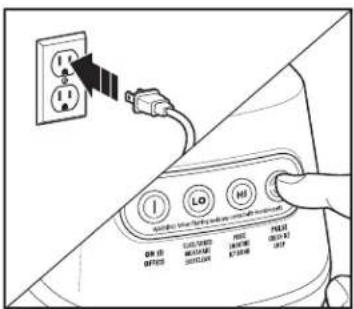
natural_image
Line drawing of a hand holding a glove over a mug filled with liquid (no text or symbols)natural_image
Line drawing of a hand pouring liquid from a cup into a mug (no text or symbols)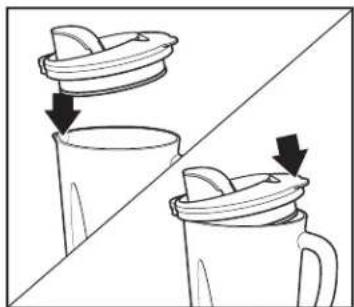
natural_image
Two-step illustration of a cup and mug with lid, showing liquid transfer or cleaning process (no text or symbols)natural_image
Illustration of hands using a tool to lift or rotate a circular object into a container (no text or symbols)natural_image
Line drawing of a hand pouring liquid into a blender with a handle (no text or symbols)natural_image
Line drawing of a hand pouring liquid from a container into a cup (no text or symbols)natural_image
Line drawing of a hand pouring liquid into a mug with a lid, showing an upward arrow (no text or symbols)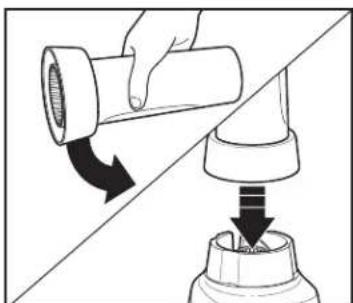
natural_image
Diagram showing a hand turning a pipe fitting into a mechanical component, with arrows indicating direction (no text or symbols)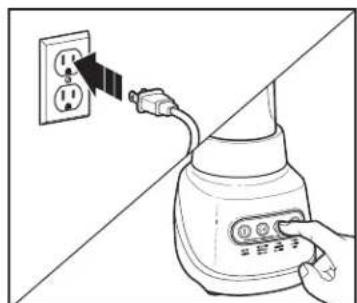
natural_image
Illustration of a hand inserting a plug into an electrical socket (no text or symbols)natural_image
Diagram showing a plug inserted into an electrical outlet with arrows indicating direction (no text or symbols)natural_image
Diagram showing two mechanical components with directional arrows indicating movement or assembly (no text or symbols)natural_image
Diagram of a mechanical device with arrows indicating motion or force direction (no text or symbols)natural_image
Line drawing of a blender with a downward arrow indicating compression or disassembly (no text or symbols)- Mettre le bol sur la base.
natural_image
Simple line drawing of a mechanical device with a downward arrow indicating motion (no text or symbols)natural_image
Line drawing of a hand using a tool to press or brush into a container filled with food items (no text or symbols)natural_image
Diagram showing a plug inserted into a socket connected to an electrical outlet (no text or symbols present)- Débrancher. Retirer le bol de la base.
natural_image
Diagram of a mechanical device with arrows indicating motion or force direction (no text or symbols)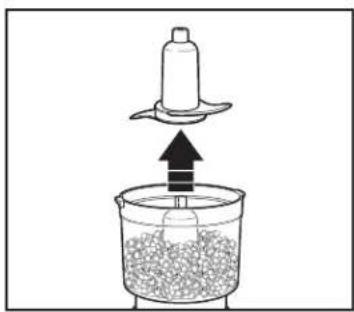
natural_image
Diagram of a kitchen mixer with a ladle and granular liquid, showing upward motion (no text or symbols)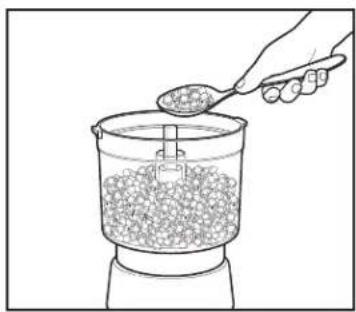
natural_image
Line drawing of a hand pouring granular material into a container (no text or symbols)AVERTISSEMENT
natural_image
Diagram of a mechanical device with arrows indicating motion or force direction (no text or symbols)natural_image
Diagram of a blender with a downward arrow indicating compression or disassembly (no text or symbols present)- Mettre le bol sur la base. 3.
natural_image
Diagram of a mechanical device with a cylindrical component inserted into a container, showing a downward arrow indicating motion (no text or symbols present)natural_image
Diagram of a mechanical device with a cylindrical component and directional arrows indicating motion (no text or symbols)natural_image
Line drawing of a hand pressing down on a mechanical component (no text or symbols)natural_image
Diagram of a portable air conditioner with a power outlet and plug, showing airflow direction (no text or symbols)- Débrancher. Retirer le bol de la base.
natural_image
Diagram of a mechanical press or valve assembly with arrows indicating direction (no text or symbols)- Retirer le couvercle.
natural_image
Diagram of a mechanical setup with a rotating disk and upward arrow, no text or symbols presentnatural_image
Line drawing of a hand pouring granular material into a container (no text or symbols)natural_image
Diagram showing a bottle being inserted into a container with an arrow indicating upward motion (no text or symbols)natural_image
Line drawing of a blender being inserted into a container with a handle (no text or symbols)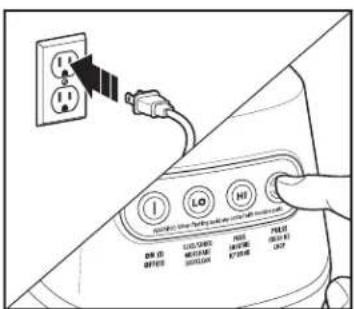
natural_image
Line drawing of a hand holding a glove over a mug filled with food, no text or symbols presentnatural_image
Line drawing of a hand pouring liquid from a container into a mug (no text or symbols)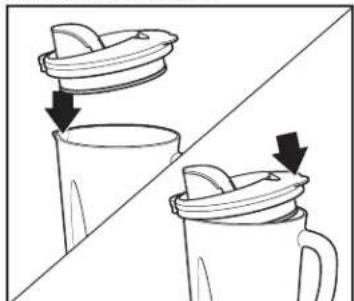
natural_image
Two-step diagram showing a lid being lifted by arrows, one open and one filled with liquid (no text or symbols)natural_image
Illustration of hands placing a lid into a container with arrows indicating motion (no text or symbols)natural_image
Line drawing of a hand pouring liquid into a blender (no text or symbols)natural_image
Line drawing of a hand pouring liquid from a container into a cup (no text or symbols)natural_image
Line drawing of a hand pouring liquid into a mug with a lid, showing an arrow indicating direction (no text or symbols)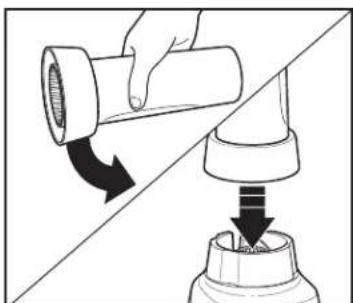
natural_image
Diagram showing a hand holding a pipe fitting being inserted into a mechanical component, with arrows indicating direction (no text or symbols present)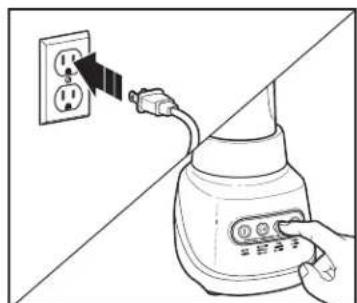
natural_image
Illustration of a hand inserting a plug into an electrical socket (no text or symbols)natural_image
Diagram showing a plug inserted into an electrical outlet with arrows indicating direction (no text or symbols)natural_image
Diagram showing two mechanical components with directional arrows indicating motion, no text or symbols presentnatural_image
Diagram of a mechanical device with arrows indicating motion or force direction (no text or symbols)natural_image
Diagram of a blender with a downward arrow indicating compression or disassembly (no text or symbols present)natural_image
Simple line drawing of a kitchen mixer with a downward arrow indicating compression (no text or symbols)natural_image
Line drawing of a hand using a pipette to press or feed into a container with food items (no text or symbols)natural_image
Diagram showing a power plug connected to an electrical outlet with arrows indicating direction (no text or symbols)natural_image
Diagram showing a power plug connected to an electrical outlet with arrows indicating direction (no text or symbols)natural_image
Diagram of a power outlet with an attached plug, showing airflow direction (no text or symbols)natural_image
Diagram of a mechanical device with arrows indicating motion or force direction (no text or symbols)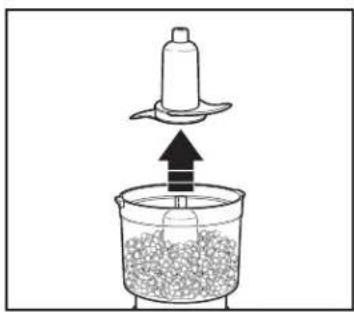
natural_image
Diagram of a kitchen utensil pressing into a container with granular material (no text or symbols)natural_image
Line drawing of a hand pouring granular material into a container (no text or symbols)ADVERTENCIA
natural_image
Diagram of a mechanical device with arrows indicating motion or force direction (no text or symbols)natural_image
Diagram of a mechanical device with a downward arrow indicating process (no text or symbols present)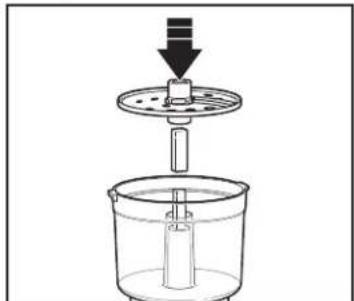
natural_image
Diagram of a mechanical device with a cylindrical component inserted into a container, showing a downward arrow (no text or symbols present)natural_image
Diagram of a mechanical device with a downward arrow indicating motion or force, no text or symbols presentnatural_image
Line drawing of a hand holding a cylindrical object with a base, no text or symbols presentnatural_image
Diagram of a portable air conditioner with a power outlet and plug, showing airflow direction (no text or symbols)natural_image
Diagram of a mechanical press or valve assembly with arrows indicating direction (no text or symbols)- Quite la tapa.
natural_image
Diagram of a mechanical device with an upward arrow and a central rotating knob, containing granular material (no text or symbols)natural_image
Line drawing of a hand pouring granular material into a container (no text or symbols)Mixcoac, Benito Juárez
- LIRE AVANT UTILISATION
- IMPORTANT SAFEGUARDS
- SAVE THESE INSTRUCTIONS
- Other Consumer Safety Information
- Wattage/Peak Power Information
- Parts and Features
- Using Your Blender
- Using Your Blender (cont.)
- Blending Tips
- Using Travel Jar (on select models)
- WARNING Burn Hazard.
- WARNING Laceration
- Blending Tips for 20-oz. Travel Jar
- Blending Drinks With Blender Jar
- TIPS FOR BEST RESULTS:
- Blending Drinks With Travel Jar
- Using Food Processor Attachment – Chopping/Mixing Blade
- WARNING
- Using Food Processor Attachment – Chopping/Mixing Blade (cont.)
- Laceration Hazard.
- Using Food Processor Attachment – Slicing/Shredding Disc
- WARNING Laceration Hazard.
- Using Food Processor Attachment – Slicing/Shredding Disc (cont.)
- Tips and Techniques
- Food Processing Chart
- Recipes
- Mango Pineapple Salsa
- Ingredients:
- Directions:
- Curried Cheese Ball
- Care and Cleaning
- WARNING Electrical Shock Hazard.
- EASYCLEAN
- Limited Warranty
- PRÉCAUTIONS IMPORTANTES
- AVERTISSEMENT
- ADVERTENCIA
Brand : HAMILTON BEACH
Model : 53800
Category : Blender