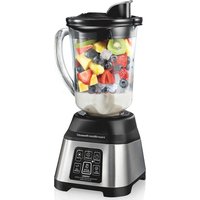
56202 - Blender HAMILTON BEACH - Free user manual and instructions
Find the device manual for free 56202 HAMILTON BEACH in PDF.


| Product Type | Blender |
| Brand | Hamilton Beach |
| Model | 56202 |
| Container Material | Glass |
| Container Capacity | 1.18 L (40 oz) |
| Maximum Power | 700 W |
| Preset Programs | Auto Smoothie, Icy Drink, Clean, Ace Crush, Stop |
| Pulse Function | Yes (Ace Crush button) |
| Pour Spout | Drip-free pour spout with hinged cap |
| Lid | With vent and fill cap |
| Personal Jar | Included (473 mL / 16 oz) depending on model |
| Overheat Protection | Yes (automatic shutdown and 15-minute cooling) |
| Dishwasher-Safe Parts | Glass jar, lid, blade assembly, collar |
| Warranty | 5 years (Canada) / 3 years (U.S.) |
| Usage | Household use only |
Frequently Asked Questions - 56202 HAMILTON BEACH
User questions about 56202 HAMILTON BEACH
0 question about this device. Answer the ones you know or ask your own.
Ask a new question about this device
Download the instructions for your Blender in PDF format for free! Find your manual 56202 - HAMILTON BEACH and take your electronic device back in hand. On this page are published all the documents necessary for the use of your device. 56202 by HAMILTON BEACH.
USER MANUAL 56202 HAMILTON BEACH
Visit hamiltonbeach.com for our complete line of products and Use and Care Guides – as well as delicious recipes, tips, and to register your product online.
LIRE AVANT UTILISATION
Français.... 10
natural_image
Hamilton Beach blender oven with visible ingredients and control buttons (no text or symbols on main body)Smoothie Smart ^TM
Electronic Blender
Mélangeur
électrique
Smoothie Smart ^TM
Licuadora
electrónica
Smoothie Smart ^TM
IMPORTANT SAFEGUARDS
When using electrical appliances, basic safety precautions should always be followed to reduce the risk of fire, electric shock, and/or injury to persons, including the following:
- Read all instructions.
- This appliance is not intended for use by persons with reduced physical, sensory, or mental capabilities, or lack of experience and knowledge, unless they are closely supervised and instructed concerning use of the appliance by a person responsible for their safety.
- This appliance shall not be used by children. Keep the appliance and its cord out of reach of children.
- Close supervision is necessary when any appliance is used near children. Children should be supervised to ensure that they do not play with the appliance.
- To protect against risk of electrical shock, do not put cord, plug, base, or motor in water or other liquid.
- Turn the appliance OFF (2) then unplug from outlet when not in use, before putting on or taking off parts, and before cleaning. To unplug, grasp the plug and pull from the outlet. Never pull from the power cord.
- Avoid contact with moving parts.
- Flashing light indicates ready to operate. Avoid any contact with blades or moveable parts.
- Do not operate any appliance with a damaged supply cord or plug, or after the appliance malfunctions or has been dropped or damaged in any manner. Supply cord replacement and repairs must be conducted by the manufacturer, its service agent, or similarly qualified persons in order to avoid a hazard. Contact Customer Service for information on examination, repair, or adjustment as set forth in the Limited Warranty.
- The use of attachments, including canning jars, not recommended or sold by the appliance manufacturer may cause a risk of injury to persons.
- Do not use outdoors.
-
Do not let cord hang over edge of table or counter or touch hot surfaces, including stove.
-
Do not place on or near a hot gas or electric burner, or in a heated oven.
- Keep hands and utensils out of the jar and away from the cutting blade, while blending or chopping food, to reduce the risk of severe personal injury and/or damage to the blender (attachments may not be provided with blender). A rubber spatula may be used but must be used only when blender is not running.
- Blades are sharp; handle carefully—especially when assembling, disassembling, emptying or cleaning blender jar.
- Do not use a broken, chipped, or cracked blender jar.
- Do not use broken, cracked, or loose cutting blade assembly.
- Always operate blender with lid in place.
- To reduce the risk of injury, never place cutting blade assembly on base without jar properly attached.
- Be careful if hot liquid is poured into the blender container as it can be ejected out of the appliance due to a sudden steaming.
- When blending hot liquids, remove filler-cap of two-piece lid or open vent opening of lid with mess-free spout, and close any lid openings along the edge intended for pouring. Hot liquids may push lid off jar during blending. To prevent possible burns: Do not fill blender jar beyond the 3-cup (710-mL) level. With the protection of an oven mitt or thick towel, place one hand on top of lid. Keep exposed skin away from lid. Start blending at lowest speed.
- Ensure collar on base of blender jar is tight and secure. Injury can result if moving blades accidentally become exposed.
- If the jar should twist or rotate when the motor is switched ON (① switch OFF (① immediately and tighten jar in collar or on blender base.
-
Ensure cutting blade assembly is tight and secure to jar. Injury can result if moving blades accidentally become exposed.
-
Check that the appliance is OFF (before plugging cord into wall outlet. To disconnect, turn the control to OFF (then remove plug from wall outlet. To unplug, grasp the plug and pull from the outlet. Never pull from the power cord.
-
Do not leave blender unattended while it is operating.
-
Do not use appliance for other than intended purpose.
-
CAUTION! In order to avoid a hazard due to unattended resetting of the thermal cut-out, this appliance must not be supplied through an external switching device, such as a timer, or connected to a circuit that is regularly switched on and off by the utility.
SAVE THESE INSTRUCTIONS
Other Consumer Safety Information
This appliance is intended for household use only. Use for food or liquids only.
WARNING Electrical Shock Hazard: This appliance is provided with a polarized plug (one wide blade) to reduce the risk of electric shock. The plug fits only one way into a polarized outlet. Do not defeat the safety purpose of the plug by modifying the plug in any way or by using an adapter. If the plug does not fit fully into the outlet, reverse the plug. If it still does not fit, have an electrician replace the outlet.
The length of the cord used on this appliance was selected to reduce the hazards of becoming tangled in or tripping over a longer cord. If a longer cord
is necessary, an approved extension cord may be used. The electrical rating of the extension cord must be equal to or greater than the rating of the appliance. Care must be taken to arrange the extension cord so that it will not drape over the countertop or tabletop where it can be pulled on by children or accidentally tripped over.
If the blades lock and do not move, it will damage the motor. Do not use. Contact Hamilton Beach Customer Service.
Do not place blender jar in the freezer filled with food or liquid. This can result in damage to the cutting blade assembly, jar, blender, and possibly result in personal injury.
Wattage/Peak Power Information
The wattage/ampere rating of the blender is determined by an Underwriters Laboratory test and is based on available cutting blade assembly, jar combinations, and attachments that may not be provided with your unit, but are available as replacement parts. This is a measure of input wattage/amperes after 30 seconds of operation. The blender as provided may draw significantly less power.
Peak power is the measure of the motor wattage during the first seconds of operation. This is when a blender requires the most power to crush ice, frozen fruit, etc. This is a better measure of what a blender motor can consume when power is needed most.
Parts and Features
To order parts, visit: hamiltonbeach.com/parts
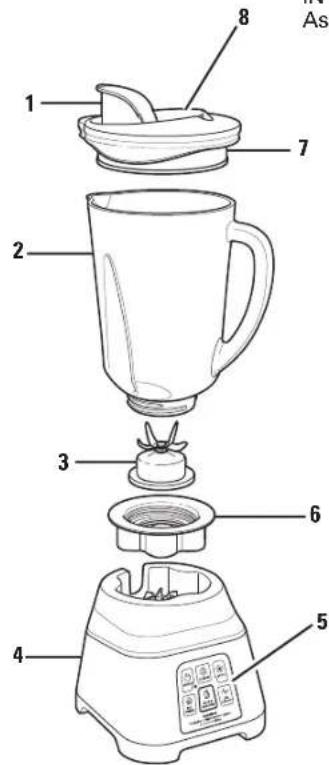
| 1 | Mess-Free Spout with Hinged Cap |
| 2 | Glass Jar |
| 3 | Cutting Blade Assembly |
| 4 | Base |
| 5 | Control Panel |
| 6 | Collar |
| 7 | Lid |
| 8 | Vent Opening |
| 9 | Drinking Lid |
| 10 | 16-oz. Personal Cup* ** |
Before first use: After unpacking Blender, wash everything except Blender Base in hot, soapy water. Dry thoroughly. Wipe Blender Base with a damp cloth or sponge. DO NOT IMMERSE BASE IN WATER. Care should be taken when handling Cutting Blade Assembly, as it is very sharp.
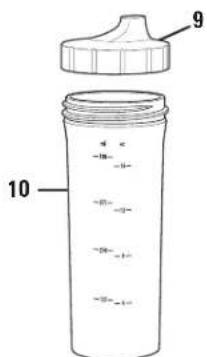
*Not a blending jar
**Included with select models
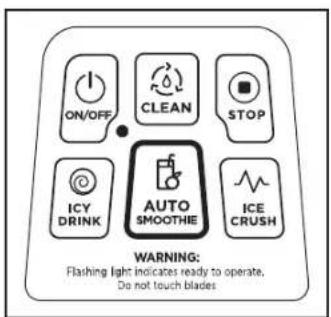
Control Panel
Using Your Blender
IMPORTANT: Your Glass Jar and Cutting Blade Assembly are subject to wear during normal use. Always inspect Jar for nicks, chips, or cracks. Always inspect Cutting Blade Assembly for broken, cracked, or loose blades. Avoid contact with blades or moving parts. If Jar or Cutting Blade Assembly is damaged, do not use. Visit hamiltonbeach.com/parts to obtain replacement parts.
natural_image
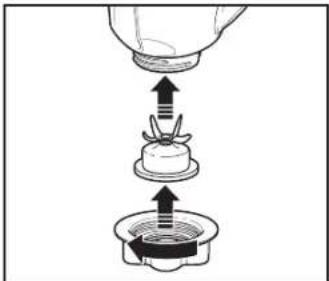
Diagram showing a mechanical assembly with an upward arrow indicating motion, no text or symbols present.- Rotate the Collar clockwise until tight.
natural_image
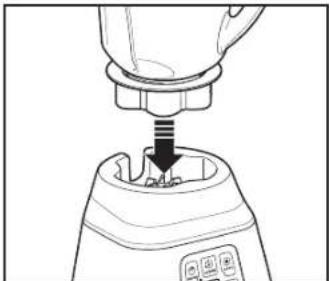
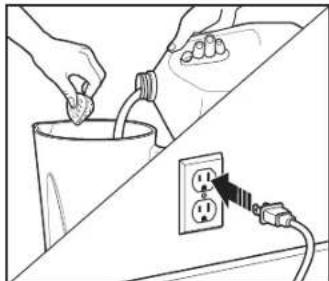
Line drawing of a blender with a handle and screwdriver inserted (no text or symbols)- Place Jar on Base. 3. Add ingredients to Jar. Place Lid on Jar. Plug into outlet.
natural_image
Illustration of hands connecting a cup to an electrical outlet with wires, no text or symbols present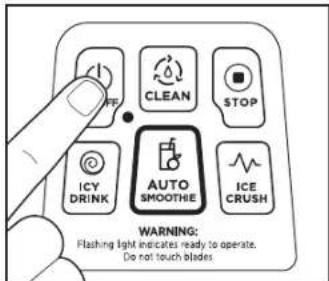
- Press the ON/OFF button. The ready light will flash. Select desired cycle to start Blender. The Blender will not operate unless the ON/OFF button is pressed first.
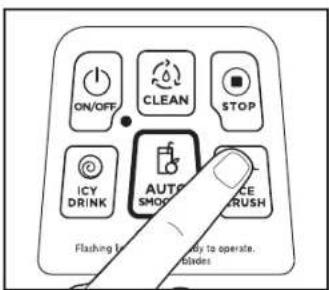
- To pulse, press and hold ⚠️ ICE CRUSH button. Blender will run only when button is held down.
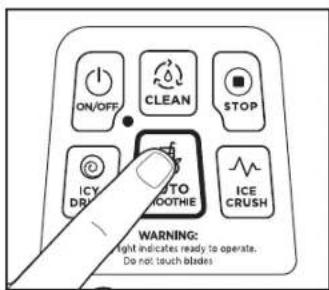
- The AUTO SMOOTHIE setting pulses to crush ice, switches to low to mix, and then ramps to high for smoothness. After the 45-second cycle, the Blender will stop automatically.
Using Your Blender (cont.)
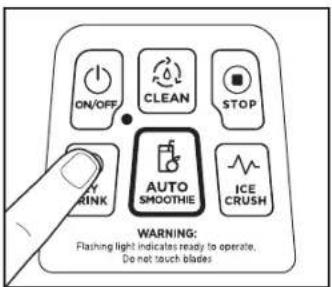
- Press the @CY DRINK button and run until desired consistency is reached. This function blends at high speed and can also be used for pureeing.
natural_image
Line drawing of a waste bin with an arrow indicating direction (no text or symbols)- ⚠ WARNING Burn Hazard.
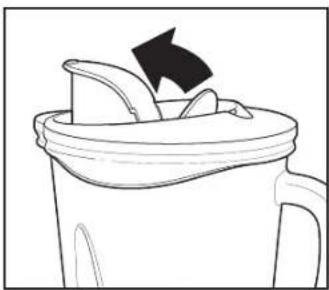
When blending hot liquids, open center vent opening of lid and close the edge cover intended for pouring. Hot liquids may push lid off jar during blending. Do not fill glass jar beyond the 3-cup (710-mL) level. With the protection of an oven mitt or thick towel, place one hand on top of lid. Keep exposed skin away from lid. Start blending at lowest speed by pressing the CLEAN button.
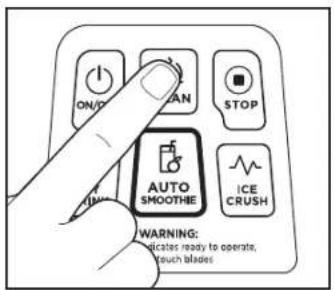
- The ⒶCLEAN function blends at a lower speed and can be used for all lower speed blending. To use, follow Care and Cleaning on page 8.
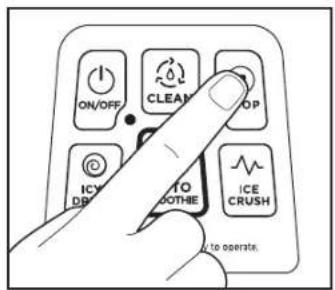
- Push ⬤ STOP button when finished blending. Push the ⏻ ON/OFF button to turn off the Blender; the ⬾ON/OFF button will continue to flash after the Blender has stopped and will stay in the standby (power ready) mode until the ⭕ ON/OFF button is pushed again.
natural_image
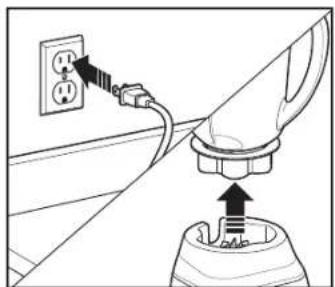
Diagram showing a plug inserted into a socket with an outlet, no text or symbols present6
11. Unplug. Remove Jar from Base.
natural_image
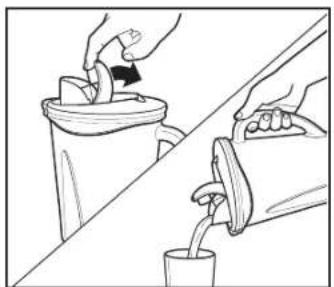
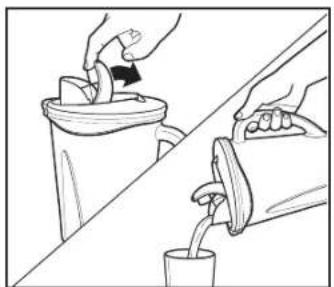
Illustration of hands pouring liquid from a container into a cup (no text or symbols)- Open Spout. Pour mixture into container or Personal Cup. Serve.
Blending Drinks
TYPE OF DRINK INGREDIENTS NUMBER OF SERVINGS BLENDER SETTING/TIME
| Fruit Smoothie 1 cup (237 mL) milk1 1/2 cups (355 mL) yogurt2 cups (473 mL) frozen berries or other fruitSweetener to taste (optional) | 3 to 4(makes 4 cups [946 mL]) | AUTO SMOOTHIE setting for 45-second setting or until blended. |
| Milkshake 1 1/2 cups (355 mL) milk2 large scoops ice cream2 to 3 tablespoons (15 to 44 mL) flavored syrup | 2 to 3(makes 3 cups [710 mL]) | CLEAN setting for 5 to 10 seconds or ICE CRUSH 5 or more times until blended. |
| Frozen Drink 1 cup (237 mL) drink mix,such as Piña Colada mix10 ice cubes | 2(makes 2 cups [473 mL]) | ICY DRINK setting for 45 seconds or ICE CRUSH 5 or more times until blended. |
TIPS FOR BEST RESULTS:
• Always place liquid in Jar first, then remaining ingredients.
- If ice or frozen fruit pieces are not blending, stop Blender and pulse a few times.
- Do not let ice stand in Jar or allow ice to freeze in Jar. Immediately crush ice after placing in Jar.
NOTE: This machine is equipped with motor overload protection. If the motor stops during operation due to overheating, unplug and allow it to cool down for approximately 15 minutes. Plug machine back in to resume normal operation.
Care and Cleaning
- Plug into outlet. Add 3 cups (710 mL) warm water and one or two drops of liquid dish detergent to Glass Jar. Place Lid on Jar. Press the ON/OFF button. The ready light will flash. Press CLEAN button to clean the Jar, and then press STOP button to turn off. Unplug. Pour out soapy water. Rinse and dry.
- Remove Glass Jar from Base. Rotate the Collar counterclockwise until the Collar and Cutting Blade Assembly come apart from the Jar.
Blender Tips
- To add foods when Blender is operating, open Hinged Cap and add ingredients through the opening.
- For best performance, the minimum amount of liquid needed per recipe is 1 cup (8 ounces/237 mL). Add more liquid if food is not blending properly.
- If blending action stops during blending or ingredients stick to sides of the Jar, there may not be enough liquid in the Jar to blend efficiently.
WARNING Electrical Shock Hazard.
Disconnect power before cleaning. Do not immerse cord, plug, base, or motor in water or other liquid.
- Wipe Blender Base, Control Panel, and cord with a damp cloth or sponge. To remove stubborn spots, use a mild, nonabrasive cleanser.
- The Glass Jar, Personal Cup, Lid, Cutting Blade Assembly, and Collar are dishwasher-safe.
-
DO NOT use the "SANITIZE" setting when washing in the dishwasher. "SANITIZE" cycle temperatures could damage your product. Parts may also be washed with hot, soapy water. Care should be taken when handling the Cutting Blade Assembly, since the blades are very sharp. Rinse and dry thoroughly. Do not soak.
-
DO NOT use Blender to mash potatoes, mix stiff dough, whip egg whites, grind raw meat, or extract juices from fruits and vegetables.
• DO NOT store food or liquids in the Jar. - Avoid bumping or dropping the Blender when in operation or at any time.
NOTE: This machine is equipped with motor overload protection. If the motor stops during operation due to overheating, unplug and allow it to cool down for approximately 15 minutes. Plug machine back in to resume normal operation.
Limited Warranty
This warranty applies to products purchased and used in the U.S. and Canada. This is the only express warranty for this product and is in lieu of any other warranty or condition.
This product is warranted to be free from defects in material and workmanship for a period of five (5) years from the date of original purchase in Canada and three (3) years from the date of original purchase in the U.S. During this period, your exclusive remedy is replacement of this product or any component found to be defective, at our option; however, you are responsible for all costs associated with our returning a product or component under this warranty to you. If the product or component is unavailable, we will replace with a similar one of equal or greater value.
This warranty does not cover glass, filters, wear from normal use, use not in conformity with the printed directions, or damage to the product resulting from accident, alteration, abuse, or misuse. This warranty extends only to the original consumer purchaser or gift recipient. Keep the original sales receipt, as proof of purchase is required to make a warranty claim. This warranty is void if the product is used for other than single-family household use or subjected to any voltage and waveform other than as specified on the rating label (e.g., 120 V \~ 60 Hz).
We exclude all claims for special, incidental, and consequential damages caused by breach of express or implied warranty. All liability is limited to the amount of the purchase price. Every implied warranty, including any statutory warranty or condition of merchantability or fitness for a particular purpose, is disclaimed except to the extent prohibited by law, in which case such warranty or condition is limited to the duration of this written warranty. This warranty gives you specific legal rights. You may have other legal rights that vary depending on where you live. Some states or provinces do not allow limitations on implied warranties or special, incidental, or consequential damages, so the foregoing limitations may not apply to you.
To make warranty claim, do not return this appliance to the store. Please write Hamilton Beach Brands, Inc., Attn: Consumer Affairs, 261 Yadkin Road, Southern Pines, NC 28387, or visit hamiltonbeach.com/customer-service in the U.S. or hamiltonbeach.ca/customer-service in Canada. For faster service, include the model, type, and series numbers on your appliance.
PRÉCAUTIONS IMPORTANTES
Panneau de commande
natural_image
Diagram showing a hand pouring liquid into a small container with arrows indicating flow direction (no text or symbols)natural_image
Line drawing of a blender with a handle and screwdriver inserted (no text or symbols)natural_image
Illustration of hands inserting a plug into a cup and connecting to an electrical outlet (no text or symbols)natural_image
Line drawing of a waste bin with an arrow indicating direction (no text or symbols)natural_image
Illustration of hands pouring liquid from a cup into a bin (no text or symbols)natural_image
Diagram showing a plug inserted into a socket with an outlet, no text or symbols present14
Panel de control
natural_image
Diagram showing a hand pouring liquid into a small container with arrows indicating flow direction (no text or symbols)natural_image
Line drawing of a blender with a handle and screwdriver inserted (no text or symbols)natural_image
Illustration of hands inserting a plug into a cup and connecting to an electrical outlet (no text or symbols)natural_image
Simple line drawing of a cup with a lid and arrow indicating waste (no text or symbols)ADVERTENCIA
natural_image
Diagram showing a plug inserted into a socket with an outlet, no text or symbols present22
natural_image
Illustration of hands pouring liquid from a container onto a surface, with a potted plant nearby (no text or symbols)Mixcoac, Benito Juárez
840373801 | Page Size: 8.5" x 5.5"
11/23
- LIRE AVANT UTILISATION
- IMPORTANT SAFEGUARDS
- SAVE THESE INSTRUCTIONS
- Other Consumer Safety Information
- Wattage/Peak Power Information
- Parts and Features
- Using Your Blender
- Using Your Blender (cont.)
- Blending Drinks
- TIPS FOR BEST RESULTS:
- Care and Cleaning
- Blender Tips
- WARNING Electrical Shock Hazard.
- Limited Warranty
- PRÉCAUTIONS IMPORTANTES
- ADVERTENCIA
Brand : HAMILTON BEACH
Model : 56202
Category : Blender