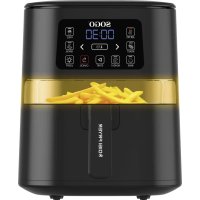
SS10820 - Deep fryer Sogo - Free user manual and instructions
Find the device manual for free SS10820 Sogo in PDF.



| Product type | Air Fryer |
| Brand | Sogo |
| Model | SS10820 |
| Capacity | 4 liters |
| Power | 1600 W |
| Voltage | 220-240 V |
| Frequency | 50-60 Hz |
| Dimensions (approx.) | 30 x 30 x 35 cm |
| Weight (approx.) | 4 kg |
| Cooking functions | Air fry, roast, bake, reheat, fry, grill |
| Temperature range | 100-200 °C (depending on function) |
| Timer | 1 to 60 minutes (depending on function) |
| Display | Digital (temperature and time) |
| Transparent window | Yes, with internal light |
| Control panel | Touch buttons: start, cancel, function, adjust, light |
| Basket material | Steel with non-stick coating |
| Safety | Automatic shut-off when basket is removed, hot surfaces, overheat protection |
| Care and cleaning | Basket washable with hot water and dish soap; wipe exterior with a damp cloth; do not use abrasive products |
| Storage | In a dry place, after complete cooling |
| Spare parts and repairability | Repairs by qualified technician; Sogo authorized service center |
| General information | Indoor domestic use; compliant with European directives |
Frequently Asked Questions - SS10820 Sogo
User questions about SS10820 Sogo
0 question about this device. Answer the ones you know or ask your own.
Ask a new question about this device
Download the instructions for your Deep fryer in PDF format for free! Find your manual SS10820 - Sogo and take your electronic device back in hand. On this page are published all the documents necessary for the use of your device. SS10820 by Sogo.
USER MANUAL SS10820 Sogo
natural_image
Black SOGO air fryer with digital display and food item inside (no visible text or symbols on main body)
FREIDORA DE AIRE CON VENTANA DE VISUALIZACIÓN AIR FRYER WITH VIEWING WINDOW
FRITEUSE À AIR AVEC FENÊTRE D'OBSERVATION
Caution: please read and preserve these important instructions
IMPORTANTE:
1 Always read the instruction book carefully before use.
2 This manual can be downloaded from our website, www.sogo.es
3 Keep these instructions for future reference.
SAFETY INSTRUCTIONS FOR THE USER
- Please read the instructions carefully before using the appliance.
- This product is designed for indoor household, non-industrial and non-commercial use. Do not use the item outdoors or for any other purpose. Misuse or improper handling can cause problems with the appliance and can cause injury to the user.
- Make sure that the voltage indicated on the rating plate matches the main wall outlet voltage before plugging in the appliance.
- Always remove the plug from the outlet when the appliance is not in use. Do not leave the appliance unattended when it is switched on.
-
Before cleaning or storing your appliance, always unplug the appliance from the power source and allow it to cool.
-
The appliances are not intended to be operated by means of an external timer or separate remote-control system.
- Do not place or operate the appliance near sources of water.
- Never immerse the appliance or the plug-in water or any other liquid. In the event of the appliance being dropped into water, immediately disconnect it from the main supply and take it to an authorized service agent for repair before using it again.
- Neither immerse the housing, which contains electrical components and the heating elements in water, nor rinse it under the tap.
- To protect against electric shock do not immerse cord, plugs, or housing in water or any other liquid.
- Do not place or use the appliance and its power cord on or near hot surfaces (for example, cooktops) or open flames.
- Do not leave the power cord hanging by sharp edges and keep it away from hot objects and flames. Do not wrap the cord around the appliance and do not bend it.
-
Do not use the appliance if the cord or plug is damaged. In the event that the cord is damaged, it should only be replaced by the manufacturer, its service agent, or similarly qualified persons, to avoid hazards.
-
In the event of a malfunction of the appliance or if it has been damaged in any way, return the appliance to the nearest authorized service center for examination, repair or adjustment.
- In case of hardware problems, do not try to repair the product yourself. Repair should only be carried out by qualified technicians.
- When you want to remove the plug from the wall socket, do so by pulling the plug and not by the cord or the appliance itself.
- Make sure your hands are dry before plugging or unplugging.
- This appliance is not to be used by the persons (including children) with reduced physical, sensory or mental capabilities or lack of experience and knowledge, unless they have been given supervision or instruction.
- This appliance can be used by children aged from 8 years and above, and persons with reduced physical, sensory or mental capabilities or lack of experience and knowledge if they have been given supervision or instruction concerning, use of the appliance in a safe way and understand the hazards involved.
- Children must be supervised to ensure that they do not play with the appliance.
-
Children should not perform cleaning or maintenance, unless they are over 8 years old and supervised.
-
Keep the appliance and its cord out of reach of children less than 8 years.
- Do not allow the children to use the appliance without supervision.
- Do not use the appliance for any other purpose than described in this manual.
- Do not let the appliance operate unattended.
- Never use accessories that are not recommended by the manufacturer.
- Always disconnect the appliance from the mains when it is left unattended and before assembling, disassembling or cleaning.
- Do not use the appliance for any other purpose than described in this manual.
- Do not let the appliance operate unattended.
- Do not place the appliance against a wall or against any other appliance. Leave at least 10 cm free space from the all sides before placing the appliance.
- Unplug from outlet when not in use and before cleaning. Allow to cool before putting on or taking out accessories.
- Ensure that the appliance is placed on a horizontal, even and stable surface.
- After cooking, frying basket and inner pot should not be placed directly on the countertop to avoid burning the countertop.
• This appliance is intended to be used in household
and similar applications such as:
a. staff kitchen areas in shops, offices and other working environments;
b. farm houses;
c. by clients in hotels, motels and other residential type environments;
d. bed and breakfast type environments.
Instruction to be followed while using the appliance
- Always put the ingredients to be fried in the basket, to prevent it from coming into contact with the heating elements.
- Do not cover the air inlet and the air outer openings while the appliance is operating.
- Do not fill the pan with oil as this may cause a fire hazard.
- Extreme caution must be taken when moving an appliance containing hot oil or other hot liquids.
- Never touch the internal part of the appliance while in use.
- The temperature of accessible surfaces may be high when the appliance is operating
- Do not place anything on top of the appliance to prevent from any type of burn cause of hot surface.
-
During air frying, hot steam is released through the air outlet openings, Keep your hands and face at a safe distance from the steam and from the air outlet openings.
-
Also be careful of hot steam and air when you remove the pan from the appliance.
- Immediately unplug the appliance if you see dark smoke coming out of the appliance. Wait for the smoke emission to stop before you remove the pan from the appliance.
• WARNING: Do not touch hot surfaces.
- WARNING: This equipment shall be used with CAUTION as this electrical appliance contains a heating function. Surface of this appliance is also different from other functional surfaces which can produce high temperatures. Since temperatures are differently perceived by different persons. The equipment must be touch only at intended handles and gripping surfaces with the help of heat protectors like gloves or similar type of clothing. Otherwise let it for sufficient time to cool down before touching the hot surfaces.
Introduction
This electric air fryer provides an easy and healthy way of preparing your favourite dishes. The best part of using the air fryer is that you can prepare as many types of fried dishes and have them without worry and or being conscious about consuming fatty foods, as it does not consume oil at all or if it consumes oil, then only a very little quantity.
By using hot rapid air circulation, it is able to make numerous dishes. The best part is that the Air fryer heats food at all directions and most of the ingredients do not need any oil.
TECHNICAL SPECIFICATIONS
| Model No. | Voltage Power Frequency Capacity | |
| SS-10820 | 220-240V 1600W 50-60Hz 4L |
- Main Unit
- Frying basket
- Control Panel
- Handle
- Frying Plate
- Transparent Window

KEY FUNCTIONS

| a | Start button: This button is use to start the cooking function after selecting the desired menu option. The display starts showing time and temperature alternatively. |
| b | Cancel button: This button is to cancel any menu function while in function and at that time the unit stops working and enters into the standby mode. |
| c | Function button: There are 6 menu functions to prepare various type of food. AsI. Air fryII. RoastIII. BakeIV. ReheatV. FriesVI. Broil |
| d | Temp/Time display: To display the temperature and time of any selected menu. When pressed default time and temperature appears. |
| e | Temp/Time button: This single button uses to toggle between Time and Temperature, by pressing this button you can choose, the function that you want to change. |
| f | Decrease/Increase button: With the help of arrow signs, can adjust the time and temperature and increase and decrease the value. |
| g | Light button: To illuminate the internal light to peep through the window and check the cooking status. The light can be illuminate any time while cooking and to turn on the light press the button once and to turn off press it again. |
Note:
Time: While adjusting the time as per requirement can be changed in intervals of 1 and 3 minutes, while pressing for short time changes in the intervals of 1 minute and while pressing longer than normal changes into the intervals of 3 minutes.
Temperature: Temperature can be adjusted as per requirement; it changes with the intervals of 5^ C.
Transparent window:
This appliance is provided with the transparent window to peep through any time in order to check the cooking status of your food.
Note:
During cooking, by pressing the Start button it starts cooking and by pressing the same button it stops cooking.
During cooking, you can remove the frying basket to check the food and the machine will stop cooking, when the frying basket put back, the unit will resume cooking.
Or can check the cooking status through the window.
During cooking, can press the light button to turn on the light to check the food, then press the light button again to turn it off.
Note: To cook chicken or chicken wings, you can cook with the "ROAST" or "AIR FRY" function, choosing from the preset menu functions, adjusting the time and temperature.
BAKE:
- Select the Bake function and the screen will display the default temperature, you can adjust as per your requirement.
- Press Temp/Time button, default time and temperature will show on the display.
- With the help of Decrease/Increase button can adjust the time and temperature as well.
- Press the Start button and the unit will start with beep sound and Temp/Time display start to countdown.
- After arriving the end time, the cooking function finishes and the machine will beep and enter into standby mode ("OFF" appear on display)
ROAST
- Select the Roast function and the screen will display the default temperature, you can adjust as per your requirement.
- Press Temp/Time button, default time and temperature will show on the display.
- With the help of Decrease/Increase button can adjust the time and temperature as well.
- Press the Start button and the unit will start with beep sound and Temp/Time display start to countdown.
- After arriving the end time, the cooking function finishes and the machine will beep and enter into standby mode ("OFF" appear on display)
BROIL
- Select the Broil function and the screen will display the default temperature, you can adjust as per your requirement.
- Press Temp/Time button, default time and temperature will show on the display.
- Press the Start button and the unit will start with beep sound and Temp/Time display start to countdown.
- After arriving the end time, the cooking function finishes and the machine will beep and enter into standby mode ("OFF" appear on display)
REHEAT
- Select the Reheat function and the screen will display the default temperature; you can adjust as per your requirement.
- Press Temp/Time button, default time and temperature will show on the display.
- With the help of Decrease/Increase button can adjust the time and temperature as well.
- Press the Start button and the unit will start with beep sound and Temp/Time display start to countdown.
- After arriving the end time, the cooking function finishes and the machine will beep and enter into standby mode ("OFF" appear on display)
AIR FRY
- Select the Air fry function and the screen will display the default temperature, you can adjust as per your requirement.
- Press Temp/Time button, default time and temperature will show on the display.
- With the help of Decrease/Increase button can adjust the time and temperature as well.
- Press the Start button and the unit will start with beep sound and Temp/Time display start to countdown.
- After arriving the end time, the cooking function finishes and the machine will beep and enter into standby mode ("OFF" appear on display)
FRIES
- Select the Fries function and the screen will display the default temperature, you can adjust as per your requirement.
- Press Temp/Time button, default time and temperature will show on the display.
- Press the Start button and the unit will start with beep sound and Temp/Time display start to countdown.
- After arriving the end time, the cooking function finishes and the machine will beep and enter into standby mode ("OFF" appear on display)
| Function Default Temp Range Time Range | |||
| Bake | 175°C20: 00 | 150-200°C5°C/step | 05: 00-60: 00short press :1min/steplong press: 3min/step |
| Roast | 190°C20: 00 | 120-190°C5°C/step | 10: 00-50: 00short press :1min/steplong press: 3min/step |
| Broil | 200°C10: 00 | N/A | 01: 00-20: 00short press :1min/steplong press: 3min/step |
| Reheat | 180°C20: 00 | 100-180°C5°C/step | 01: 00-20: 00short press :1min/steplong press: 3min/step |
| Air fry | 200°C20: 00 | 150-200°C5°C/step | 05: 00-50: 00short press :1min/steplong press: 3min/step |
| Fries | 190°C20: 00 | N/A | 05: 00-30: 00short press :1min/steplong press: 3min/step |
CLEANING AND MAINTENANCE
- Make sure to clean the appliance after every use.
- Before cleaning remove the plug from the wall socket and let the appliance cool down, and once cooled down you can clean the appliance.
Tip: Remove the fry basket from the appliance when the cooking finishes it helps the appliance to cool down more quickly.
- Clean the fry basket with hot water, some washing-up liquid.
Note: Do not use the abrasive liquids, otherwise it can damage the nonstick surface of air fryer basket.
-
Wipe the outside of the appliance with a moist cloth.
-
You can use degreasing liquid to remove any remaining dirt.
Tip: If dirt is stuck to the bottom of the fry basket, fill the fry basket with hot water with some washing-up liquid in it and let it for some time, the hot water helps to remove the dirt without using any abrasive agents.
STORAGE
-
Unplug the appliance and allow it to cool completely before storing. Make sure all parts are clean and dry.
-
Store the air fryer in a dry location.
-
Do not place any heavy items on top of the hot air fryer during storage, as this may damage it.
WARRANTY PERIOD:
SOGO provides you 2 years warranty from the date of purchase against any defect due to defective material or workmanship of the product. If the product poses any defect or become defective during this period, SOGO will repair it free of cost (change in certain cases) in any of their own or authorized after-sales service centre.
The warranty does not cover if the product has been used in a wrong way or being used other than its intended use. Failing to follow the SOGO manual guidelines in order to ensure the product and user safety will lead to warranty extinction. Also the warrantee will be invalid, if the product servicing or repair has been done by any service centre other than SOGO'S its own service
centres or officially authorized centres.
In order to get the complete info about the after sales issues and complete list of our authorized service centres information, kindly visit to the SOGO customer service website given at the end of this manual. There also you can find the contact details of our main service centre.
Welcome to the SOGO family and hope the correct use and maintenance of the product gives you long service life.
IMPORTANT:
DECLARATION OF CONFORMITY
This device complies with Low Voltage Directive 2014/35/EC, Electromagnetic Compatibility Directive 2014/30/EU, Directive 2015/863/EU on the restriction of the use of certain hazardous substances in electrical and electronic equipment and Directive 2009/125/EC on the eco-design requirements applicable to energy-related products.


DÉCLARATION DE CONFORMITÉ
This symbol means that in case you wish to dispose of the product once its working life has ended, take it to an authorised waste agent for the selective collection of waste electrical and electronic equipment (WEEE).

Imported by:
Sanysan Appliances S.L, NIF: B98753056, C/ Barcas 2, 2 46002 Valencia, Spain Product made in P.R.C. – Designed by SOGO based on the European Quality Standards Customer Service: www.sogosat.com / sogosat@sogosat.com / 0034 902 222 161
Brand : Sogo
Model : SS10820
Category : Deep fryer