00415003 - Audio accessory In-akustik - Free user manual and instructions
Find the device manual for free 00415003 In-akustik in PDF.


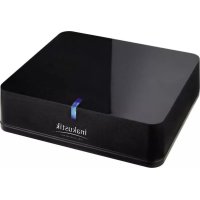
| Product Type | Bluetooth Receiver for Stereo System |
| Brand | In-akustik |
| Model | 00415003 (BTR-1500) |
| Bluetooth Compatibility | aptX codec, SBC, A2DP profile |
| Maximum Range | 10 meters (line of sight) |
| Audio Outputs | Digital (TOSLINK) and Analog (RCA) |
| Number of Pairing Memory Slots | Up to 8 devices |
| Default PIN Code | 0000 |
| Power Supply | AC/DC power adapter (included) |
| LED Indicator | Flashing when waiting for connection, solid when connected |
| NFC Function | Yes (touch pairing) |
| Box Contents | Main unit, power adapter |
| Maintenance | Clean with a dry cloth, unplug before cleaning |
| Safety Precautions | Do not use near water, avoid heat sources, unplug if unused for long periods |
| Recommended Use | Connection to a stereo system via audio or optical cable |
| Device Compatibility | Smartphones, tablets, computers with Bluetooth |
Frequently Asked Questions - 00415003 In-akustik
User questions about 00415003 In-akustik
0 question about this device. Answer the ones you know or ask your own.
Ask a new question about this device
Download the instructions for your Audio accessory in PDF format for free! Find your manual 00415003 - In-akustik and take your electronic device back in hand. On this page are published all the documents necessary for the use of your device. 00415003 by In-akustik.
USER MANUAL 00415003 In-akustik
line
| Time | Value | |------|-------| | 0 | 0 | | 1 | 0 | | 2 | 0 | | 3 | 0 | | 4 | 0 | | 5 | 0 | | 6 | 0 | | 7 | 0 | | 8 | 0 | | 9 | 0 | | 10 | 0 | | 11 | 0 | | 12 | 0 | | 13 | 0 | | 14 | 0 | | 15 | 0 | | 16 | 0 | | 17 | 0 | | 18 | 0 | | 19 | 0 | | 20 | 0 | | 21 | 0 | | 22 | 0 | | 23 | 0 | | 24 | 0 | | 25 | 0 | | 26 | 0 | | 27 | 0 | | 28 | 0 | | 29 | 0 | | 30 | 0 | | 31 | 0 | | 32 | 0 | | 33 | 0 | | 34 | 0 | | 35 | 0 | | 36 | 0 | | 37 | 0 | | 38 | 0 | | 39 | 0 | | 40 | 0 | | 41 | 0 | | 42 | 0 | | 43 | 0 | | 44 | 0 | | 45 | 0 | | 46 | 0 | | 47 | 0 | | 48 | 0 | | 49 | 0 | | 50 | 0 | | 51 | 0 | | 52 | 0 | | 53 | 0 | | 54 | 0 | | 55 | 0 | | 56 | 0 | | 57 | 0 | | 58 | 0 | | 59 | 0 | | 60 | 0 | | 61 | 0 | | 62 | 0 | | 63 | 0 | | 64 | 0 | | 65 | 0 | | 66 | 0 | | 67 | 0 | | 68 | 0 | | 69 | 0 | | 70 | 0 | | 71 | 0 | | 72 | 0 | | 73 | 0 | | 74 | 0 | | 75 | 0 | | 76 | 0 | | 77 | 0 | | 78 | 0 | | 79 | 0 | | 80 | 0 | | 81 | 0 | | 82 | 0 | | 83 | 0 | | 84 | 0 | | 85 | 0 | | 86 | 0 | | 87 | 0 | | 88 | 0 | | 89 | 0 | | 90 | 0 | | 91 | 0 | | 92 | 0 | | 93 | 0 | | 94 | 0 | | 95 | 0 | | 96 | 0 | | 97 | 0 | | 98 | 0 | | 99 | 0 | | Note: The actual values in the CSV data will vary each time the code is run due to the random nature of the data generation. The provided values are just an example. | |natural_image
Technical line drawing of a rectangular device and a connected electrical plug (no text or symbols)text_image
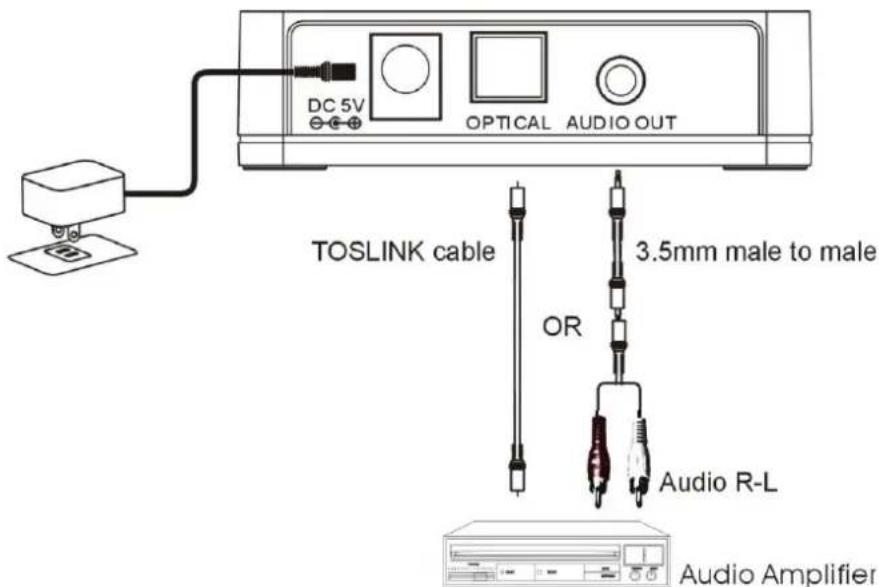
DC 5V OPTICAL AUDIO OUT TOSLINK cable 3.5mm male to male OR Audio R-L Audio AmplifierThank you for purchasing this product. For optimum performance and safety, please read these instructions carefully before connecting, operating or adjusting this product. Please keep this manual for future reference.
FEATURES
- Supports aptX® codec
• Supports SBC codec
• Supports A2DP Bluetooth profile
• 33 feet(10M) effective range
• TOSLINK digital audio output
• Audio RL audio output - 8 devices ID storable
WHAT'S IN THE BOX
natural_image
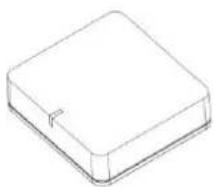
Simple line drawing of a rectangular electronic component or package (no text or symbols)Main unit
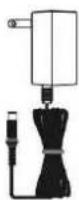
AC/DC adaptor
2.0 CONNECTION
text_image
DC 5V OPTICAL AUDIO OUT TOSLINK cable 3.5mm male to male OR Audio R-L Audio Amplifier2.1 ANALOGUE CONNECTION
- Connect a 3.5mm end of a suitable audio cable to phone jacket on the receiver
- Connect the other end to an audio input on your home stereo system (3.5mm or 3.5mm + 3.5mmm -> 2 RCA). Consult your stereo user's manual for more information on how to accomplish this.
2.2 DIGITAL CONNECTION
- Connect one TOSLINK cable end to optical jacket on the Premium Bluetooth Receivers (recommended)
- Connect the other end to one TOSLINK input of your home stereo system. Consult your stereo user's manual for more information on how to accomplish this.
- Connect AC power adaptor cable to DC input jacket of Premium Bluetooth Receivers, AC end to any AC outlet.
- The LED light will flash once to show the unit is powered and ready for being paired for your devices.
2.3 NFC FAST CONNECTION
The premium Bluetooth receiver is equipped with a standard NFC tag (NFC = Near Field Communication). Before you can use this feature, you need to check your Smartphone or tablet with NFC function and the operational system is Android 4.1 and above.
Start the NFC function
- Turn on the NFC function, as described in your manual
- Tap the Receiver with your smartphone or tablet to connect
- Tap it again to disconnect
3.0 PAIRING A RECEIVER
For pairing with your phone, please follow the instructions for setting Bluetooth on the manual of your device.
NOTE
Some devices, such as iPhone, will connect immediately after pairing so the LED will ON. Other devices, such as notebook, may ask you if you wish to connect and LED will go off after pairing until a connection is established.
The Premium Bluetooth Receiver is capable of being paired to up to 8 devices. It means that you have to enter the PIN code once for each device. PIN: 0000
The effective range of the PREMIUM Bluetooth receiver is 33 feet (10M).
RECONNECTING YOUR DEVICE
If you move out of range or turn off the Bluetooth feature on you iPad/iPhone/iPod touch or Smartphone, BTR-1500 will disconnected from your device. To reconnect, simply open the Bluetooth manager and tap on the "Music Receiver", then you do not need to input PIN again, the connection will be done automatically.
ADDING A NEW PHONE OR TABLET
If you want to switch from one device to another, please follow these steps:
- End the existing Bluetooth connection with connected device.
- The receiver can now be connected with another device such as iPad/ iPod/iPhone or Smartphone or tablet.
- Follow the section "Pairing the receiver" to connect a new device.
Out of range or lost signal:
- When the paired phone or device away from receiver (33 feet) or there is something blocking the Bluetooth signal. The LED light will go off, it means the connection between device and receiver is lost. To avoid a lost connection:
- Move the music device back into range (within 33 feet), and make sure there's a clear line of sight and there are no obstructions between receiver and device.
- Within 15 seconds, the connection will automatically be reestablished and LED will turn on. If the connection is lost for more than 15 seconds, you need to reconnect the device and receiver again. Please follow the "Reconnect Your Device" section.
4.0 LED - DISPLAY
| Indication | meaning | Description |
| Flash once 1 sec per 5 secs | Power on /Pairing | Waiting for connection |
| Permanent Lighted | connected | Device and main unit are connected |
5.0 TROUBLESHOOTING
You can solve your problems from this section
No music out from my stereo speaker:
• Make sure the BTR-1500 is powered.
• Make sure an audio cable or an Optical cable is correctly and firmly connected to BTR-1500
- Make sure that the audio source selection of your amplifier is correct with your audio connection (analogue audio or TOSLINK)
• Make sure the volume of the stereo is set to a comfortable listening level
• Make sure you are within range.
- Make sure the Bluetooth function is opened on your device.
• Make sure you are playing the music from your device.
6.0 SAFETY WARNINGS
- The receiver requires full connection and both hands to install.
- Do not use the receiver near water(for example, a bath tub, wash bowl, kitchen sink, laundry tub, wet basement, swimming pool, or other areas located near water).
- Only clean with dry cloth.
- Unplug the eceiver before cleaning.
• Install the receiver far away from heat sources. - Use only suitable accessories.
- Unplug the receiver when unused for long time.
Cher client,