Streaming Mediaplayer Premium - Media player In-akustik - Free user manual and instructions
Find the device manual for free Streaming Mediaplayer Premium In-akustik in PDF.


| Product Type | Premium WiFi Audio Receiver (Media Player) |
| Model Number | 00415007 |
| Dimensions (approx.) | 78 x 78 x 18 mm |
| Weight (approx.) | 60 g |
| Power Supply | Micro USB (5V DC), includes USB cable and AC adapter |
| Audio Formats Supported | WAV, FLAC, AAC, MP3, ALAC, PCM up to 24 bit/96 kHz (High-Res) |
| Wireless Standards | Wi-Fi (802.11 b/g/n), DLNA, AirPlay |
| Audio Outputs | Stereo 3.5 mm jack, Optical digital output |
| USB Port | USB-A for external storage (memory stick) |
| Compatible Systems | Android 4.0+, iOS 7+, Windows XP+, Mac OS 10.7+, Windows Phone |
| Recommended App | EZCast (free from Google Play/Apple App Store or www.iezvu.com) |
| Frequency Range | 20 – 20,000 Hz (-0.5 dB) |
| Dynamic Range | >92 dB |
| Internet Radio | Supported via EZCast app |
| Default SSID | EZMusicxxx |
| Default Password | 00000000 |
| Reset Function | Press and hold reset button on back for approx. 5 seconds |
| Cleaning | Disconnect from power, use soft dry lint-free cloth or brush. No solvents. |
| Safety | Indoor use only, avoid humidity and heat, disconnect mains during long absence |
| Scope of Delivery | Receiver, USB-A to Micro USB cable, audio cable, power cable, manual |
Frequently Asked Questions - Streaming Mediaplayer Premium In-akustik
User questions about Streaming Mediaplayer Premium In-akustik
0 question about this device. Answer the ones you know or ask your own.
Ask a new question about this device
Download the instructions for your Media player in PDF format for free! Find your manual Streaming Mediaplayer Premium - In-akustik and take your electronic device back in hand. On this page are published all the documents necessary for the use of your device. Streaming Mediaplayer Premium by In-akustik.
USER MANUAL Streaming Mediaplayer Premium In-akustik
Apple / iPhone / iPad / Airplay / MAC are trademarks of Apple Inc., registered in the U.S. and other countries. "Google", the "Google logo", "Google Maps", "Chromecast", "Google Play", the "Google Play logo", "Android" and the "Android logo" are trademarks or registered trademarks of Google Inc. "Wi-Fi" is a registered trademark of Wi-Fi Alliance. "Windows®" is a trademark or registered trademark of Microsoft Corporation. DLNA®, the DLNA Logo and DLNA CERTIFIED® are trademarks, service marks, or certification marks of the Digital Living Network Alliance.
SAFETY INSTRUCTIONS
GENERAL
Read, observe and adhere to the following safety instructions. Please keep the operating manual. Observe all the warning notices on the components and in the operating manual.
PROPER USE
The components are solely designed for operation indoors. Connect them as specified in the operating instructions. Only use accessories which have been recommended by the manufacturer.
HUMIDITY
Select an installation location for the components which does not have a high level of relative humidity and is free of moisture. Never use the components near water. Moisture can bypass the electrical insulation and pose a lethal danger, as it can for all products not specially designed to be water-resistant. The components may not be exposed to dripping or sprayed water.
PRODUCT PROTECTION
Do not under any circumstances expose the components to high levels of humidity. Extreme temperature fluctuations, humidity and extended exposure to light can damage the components and alter their appearance. Make sure that no foreign objects or liquids enter the components.
POSITIONING
Do not position the components near sources of heat, heaters, heating valves, ovens or other heat-producing devices. The components may only be stored and operated in the temperature range stated. The components heat up during operation.
CONNECTION
The components must only be connected to the specified rated voltage! All cables must be positioned in such a way that there is no danger of them being damaged (e.g. being stepped on, placed under furniture etc.). Never remove cables by pulling the cable; instead, always hold the plug when disconnecting. In stand-by mode, the components are not completely disconnected from the mains supply. To avoid any unnecessary hazards or energy consumption during longer absences, the components should be disconnected from the mains supply.
MAINTENANCE
Maintenance on the product may only be performed by persons qualified to do so. Maintenance is necessary in all cases of damage, i.e. in the case of damaged cables and plugs, as well as after liquid spills or objects falling on the components, components falling down, foreign bodies entering the components, exposure of components to rain or humidity, or other influences impairing the functioning of the components.
LOOKING AFTER THE PRODUCT
Disconnect the components from the power supply before cleaning them Always clean the components with a soft, dry and lint-free cloth, or with a brush. Do not under any circumstances use scouring powder, alcohol, benzine, furniture polish or similar substances.
- Designation: Premium WiFi Audio Receiver
- Item-No.: 00415007
• EAN-Code: 4001985514878
DISPOSAL
Old or defective devices that are labelled with a crossed-out rubbish bin may not be disposed of in conventional household waste. They must be disposed of at local recycling centres in accordance with the applicable national legislation. Proper disposal helps to conserve resources and protect the environment.
DESCRIPTION
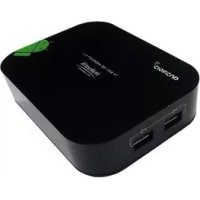
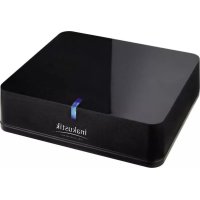
Compact WiFi high res audio streamer for playing music files on your HiFi system, e.g. from a smartphone, computer or server/NAS. It supports standard formats such as WAV, FLAC, AAC, MP3, etc. up to 24 bit/96 kHz (high resolution audio) and is compatible with Android, Apple, Windows and Mac systems. The power is supplied using a USB cable or the included AC adapter.
Kompatible Systeme:
- Android 4.0 or higher
- Apple iOS7 or higher
- Mac OS10.7 or higher
- Windows XP or higher
· Windows Phone
Standards/audio formats supported:
· DLNA (WAV, MP3)
· Airplay (MP3, AAC, WMA, WAV, PCM, m4a/ALAC, FLAC)
- USB (MP3, AAC, WMA, WAV, PCM, m4a/ALAC, FLAC)
- Internet Radio
Recommended app:
· EZcast
Technical data:
· High-Res Audio: 24 Bit/96 kHz
- Stereo output via 3.5 mm jack
- Optical digital output
- USB-A connection for external memory
· Frequency range: 20 – 20,000 Hz -0.5 dB
· Dynamic range: >92 dB
• Power supply: via micro USB
· Weight (approx. 60 g)
· Dimensions: approx. 78 x 78 x 18 mm
Scope of delivery:
1 x Premium WiFi Audio Receiver
1 x USB-A Micro USB Kabel
1 x Audiokabel
1 x Bedienungsanleitung
1 x Netzkabel
MISC
Indication without guarantee. All product images similar. We reserve the right to make changes.
SIMPLIFIED EU DECLARATION OF CONFORMITY
Hereby, in-akustik GmbH & Co. KG declares that the equipment is in compliance with Directive low voltage 2014/35/EU, EMV 2004/108/EG and RoHS 2011/65/EU. The full text of the EU declaration of conformity is available at the following internet address: www.in-akustik.com
CONNECTION:
Connect your Hi-Fi amplifier or your active loudspeakers (or similar items) to the Premium WiFi Audio Receiver. Depending on the equipment in use, please use the supplied 3.5 mm audio cable or an optical cable. Select the corresponding input on your device. Now connect the Premium WiFi Audio Receiver to the power supply. Use the supplied USB cable and the USB power supply unit for this. The receiver outputs an acoustic signal via the connected loudspeaker as soon as it is ready for operation.
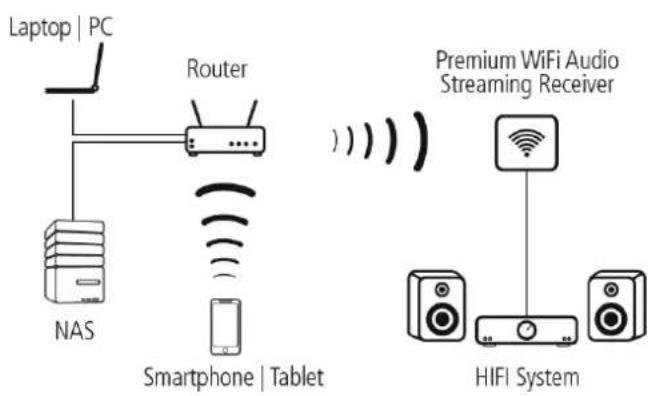
flowchart
graph TD
    A["Laptop | PC"] --> B["Router"]
    B --> C["NAS"]
    C --> D["Smartphone | Tablet"]
    D --> E["HIFI System"]
    E --> F["Premium WiFi Audio Streaming Receiver"]
    F --> G["Wireless Device"]
WLAN AND PASSWORD:
You can find the Premium WiFi Audio Receiver under the SSID "EZMusicxxx" in the WLAN network. The password set at the factory is "00000000".
USING EZCAST:
You can change the set-up of the Premium WiFi Audio Receivers with the EZCAST app. You can configure the connection to your WLAN network, change and update your password and other settings. You can also play back music or call up Internet radio stations with this app. You can download the latest version of the EZCast app from Google Play or the Apple App Store. Search for "EZCast" and install the app on your device. The software is available for Windows and MAC under www.iezvu.com.
CONNCETION AND SET-UP:
First set up a WLAN connection between the Premium WiFi Audio Receiver and your smartphone/tablet. Select the receiver "EZMusicxxxx" from the network list and enter the password. Now start the EZCast app. Click on search and select your Premium WiFi Audio Receiver. You can now play back music directly from your smartphone/tablet. In order to ensure simple operation and that you can use all of the functions, you should integrate the Premium WiFi Audio Receiver in your home network. Navigate to the set-up menu. You can configure WLAN access to your home network under the "Internet" menu item. Now other devices in the network can play back music via the Premium WiFi Audio Receiver. You can now also play back music from your server and call up Internet radio stations.
DEVICE NAME AND PASSWORD:
You can also change the name and the password of the Premium WiFi Audio Receiver in the set-up menu. CAUTION: Make a note of the changed password.
Resetting: If you forget or lose the password for example, you can reset the device to the factory settings. Press and hold the reset button on the back of the device for approx. 5 seconds. Remember that all settings made will be lost if you do this.
USB MEMORY:
You can plug a USB memory stick with your music data directly in the Premium WiFi Audio Receiver. You can find the stick under the Air-Disk menu item and can play back the stored music.
APPLE AIRPLAY:
You can also play back music without using the EZCAST app directly with via AirPlay. Your iPhone or iPad has to be directly connected to the Premium WiFi Audio Receiver for this, or both devices have to be in the same WLAN network. Select the Premium WiFi Audio Receiver in the AirPlay list as the playback device.
APPS FROM OTHER PROVIDERS::
Other apps can also be used to play back music via the Premium WiFi Audio Receiver. The basis for this in the DLNA standard. There are now a very great many apps of this kind. However, the performance and compatibility vary from app to app.
EXCLUSION OF LIABILITY:
We would like to expressly point out that the software named is NOT a product of the in-akustik company. Downloading and using the software named are performed at the user's own risk. in-akustik GmbH und Co. KG accepts no liability for any damage, loss of data or similar damages.
The same applies to the content or links found under the sources for the software named.
Trademark-Hinweise:
Apple / iPhone / iPad / Airplay / MAC are trademarks of Apple Inc., registered in the U.S. and other countries. "Google", the "Google logo", "Google Maps", "Chromecast", "Google Play", the "Google Play logo", "Android" and the "Android logo" are trademarks or registered trademarks of Google Inc. "Wi-Fi" is a registered trademark of Wi-Fi Alliance. "Windows ^ " is a trademark or registered trademark of Microsoft Corporation. DLNA ^ , the DLNA Logo and DLNA CERTIFIED ^ are trademarks, service marks, or certification marks of the Digital Living Network Alliance.
text_image
inakustik PENZ KABEL AMBIENTECH
natural_image
Coiled black cable with a metallic connector and labeled 'KABEL' (no other text or symbols visible)
natural_image
Interior view of an Ambientech appliance with open door and internal components (no visible text or symbols)
natural_image
Product display of Musik & Medien featuring multiple views and a central golden sculpture (no text or symbols on the images themselves)