Premium Headphone Amp No.1 - Earphones In-akustik - Free user manual and instructions
Find the device manual for free Premium Headphone Amp No.1 In-akustik in PDF.


User questions about Premium Headphone Amp No.1 In-akustik
0 question about this device. Answer the ones you know or ask your own.
Ask a new question about this device
Download the instructions for your Earphones in PDF format for free! Find your manual Premium Headphone Amp No.1 - In-akustik and take your electronic device back in hand. On this page are published all the documents necessary for the use of your device. Premium Headphone Amp No.1 by In-akustik.
USER MANUAL Premium Headphone Amp No.1 In-akustik
Thank you for choosing this product. For optimum performance and safety, please read these instructions carefully before connecting, operating or adjusting this product. Please keep this manual in a safe place.
WARNING
High volume levels can result in permanent damage to hearing. Therefore only set moderate volume levels.
SMARTPHONES
To perfect musical enjoyment, when operating with a smartphone, we recommend setting the device to flight mode as a continuous connection to a wireless network can cause noise interference.
SAFETY INSTRUCTIONS
- General
Read, observe and adhere to the following safety instructions. Please keep the operating manual. Observe all the warning notices on the components and in the operating manual.
- Proper use
The components are solely designed for operation indoors. Connect them as specified in the operating instructions. Only use accessories which have been recommended by the manufacturer.
- Humidity
Select an installation location for the components which does not have a high level of relative humidity and is free of moisture. Never use the components near water. Moisture can bypass the electrical insulation and pose a lethal danger, as it can for all products not specially designed to be water-resistant. The components may not be exposed to dripping or sprayed water.
- Product protection
Do not under any circumstances expose the components to high levels of humidity. Extreme temperature fluctuations, humidity and extended exposure to light can damage the components and alter their appearance. Make sure that no foreign objects or liquids enter the components.
- Positioning
Do not position the components near sources of heat, heaters, heating valves, ovens or other heat-producing devices. The components may only be stored and operated in the temperature range stated. The components heat up during operation.
- Connection
The components must only be connected to the specified rated voltage!
All cables must be positioned in such a way that there is no danger of them being damaged (e.g. being stepped on, placed under furniture etc.). Never remove cables by pulling the cable; instead, always hold the plug when disconnecting.
In stand-by mode, the components are not completely disconnected from the mains supply. To avoid any unnecessary hazards or energy consumption during longer absences, the components should be disconnected from the mains supply.
- Maintenance
Maintenance on the product may only be performed by persons qualified to do so. Maintenance is necessary in all cases of damage, i.e. in the case of damaged cables and plugs, as well as after liquid spills or objects falling on the components, components falling down, foreign bodies entering the components, exposure of components to rain or humidity, or other influences impairing the functioning of the components.
- Looking after the product
Disconnect the components from the power supply before cleaning them Always clean the components with a soft, dry and lint-free cloth, or with a brush. Do not under any circumstances use scouring powder, alcohol, benzine, furniture polish or similar substances.
DESCRIPTION
The headphones outputs of mobile devices such as smartphones, tablets and laptops are usually very weak as the focus of these devices lies on completely different features. Unfortunately, this results in limited sound quality.
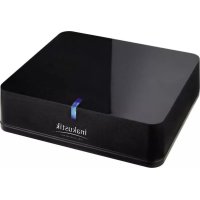
The Premium Headphone Amp No. 1 takes the strain off the outputs of smartphones etc. Its high-quality analogue amplifiers are optimally tuned for this purpose. They drive and control the connected headphones with exceptional accuracy and provide greater volume, dynamics and precision. In addition, the unit also protects the rechargeable battery of mobile devices and increases their service life.
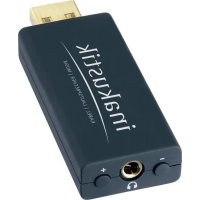
The Premium Headphone Amp No. 1 also has a high-quality DAC that replaces the integrated (and mostly simple) sound cards of PCs, laptops, etc. This further boosts the sound quality.
The analogue volume controller with integrated on/off switch makes operation very simple.
FEATURES
- Black brushed aluminium housing
Super-flat design (13 mm) - Integrated USB DAC
- Integrated rechargeable lithium-ion battery
- Can operate for up to 60 hours
- Two headphone jacks
- Also suitable for high-impedance headphones
Large dynamic range - Latest chip technologies
- Compatible with Windows XP, Vista, Windows 7/8
- LED operating indicator
- Plug & Play
CONNECTIONS AND OPERATING ELEMENTS
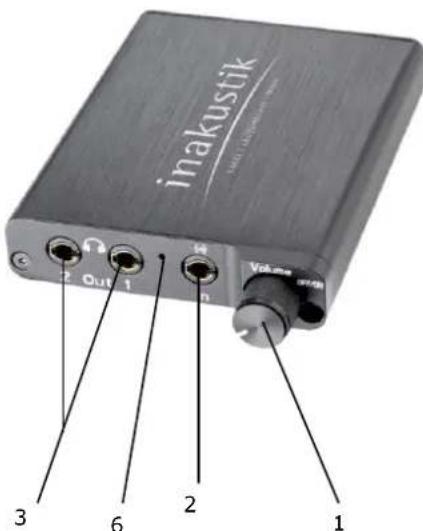
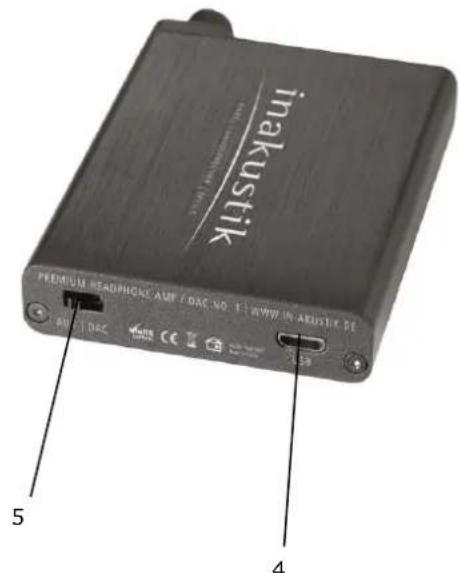
1 = On/off switch and volume control
2 = AUX input for connecting to a headphones output or similar
3 = Headphones connections (2x)
4 = Mini-USB B connection for charging and connecting to a PC / laptop or MAC
5 = Input selection switch AUX DAC (USB)
6 = Operating display
OPERATION
AUX MODE:
- Set the input selection switch [5] on the bottom of the amplifier to the AUX position.
- Connect the AUX input [2] with the headphones or audio output of the source device (e.g. smartphone, MP3 player, tablet etc.).
- Plug the headphones (up to two units can be connected) into the headphones connections [3].
- Switch on the amplifier and set the desired volume level [1].
DAC (USB) MODE:
- Set the input selection switch [5] on the bottom of the amplifier to the DAC position.
- Connect the USB connection of the amplifier [4] with a USB connection on your PC, MAC or laptop. The operating system will load the required driver the first time you make the connection. This can take a short while.
- Plug the headphones (up to two can be connected) into the headphones connections [3].
- Switch on the amplifier and set the desired volume level [1].
CHARGING:
The integrated rechargeable battery is charged by the USB connection [4]. To do this, connect the amplifier to your PC, MAC or laptop or a suitable power adaptor.
Switch off the amplifier [1]. The operating indicator [6] glows while the battery is charging.
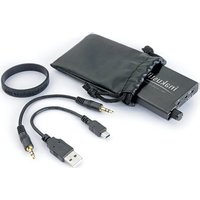
SCOPE OF DELIVERY
1 x Premium Headphone Amp No. 1
1 x operating manual
1 x 3.5 mm jack cable, stereo
1xUSB cable
1x strap
TECHNICAL DATA
Output rating: maximum 2 x 320 mW
Impedance: 16-300 ohms
Input impedance: 5 kOhms
Signal-to-noise ratio: 96 dB
Crosstalk attenuation: 60 dB
Amplification: 10 dB
Distortion factor: < 0.008% (10 mW)
Frequency range: 22Hz - 65kHz
Battery: 3.7 V / 950 mAh (lithium-ion)
Dimensions: approx. 90 × 13 × 57 mm
Weight: approx. 90 g (with battery)
DISPOSAL
Old or defective devices that are labelled with a crossed-out rubbish bin may not be disposed of with conventional household waste. They must be handed in at local recycling centres in accordance with the applicable national legislation. Proper disposal helps to conserve resources and protect the environment. Batteries should NOT go into the garbage. You are bound to properly dispose of spent batteries by law. You can bring your batteries to any battery-selling shop or public collecting point.
AMPLIFICATEUR CASQUE PREMIUM / DAC N° 1
Cher client,