DW2WiFi - Door/window sensor Sonoff - Free user manual and instructions
Find the device manual for free DW2WiFi Sonoff in PDF.



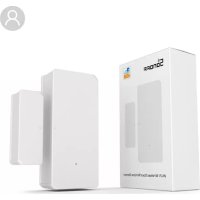
| Product type | Wireless WiFi door/window sensor |
| Brand | Sonoff |
| Model | DW2WiFi |
| Dimensions (transmitter) | 70 x 31 x 19 mm |
| Dimensions (magnet) | 42 x 14 x 16 mm |
| Weight | Less than 1 kg |
| Power supply | 2 AAA 1.5 V batteries (not included) |
| Operating voltage | DC 3 V (2 x 1.5 V) |
| Standby current | ≤ 40 µA |
| Transmission current | ≤ 15 mA |
| Connectivity | Wi-Fi IEEE 802.11 b, 2.4 GHz |
| Compatible operating systems | Android & iOS |
| Required app | eWeLink |
| Detection distance | Gap > 20 mm between magnet and transmitter triggers alarm |
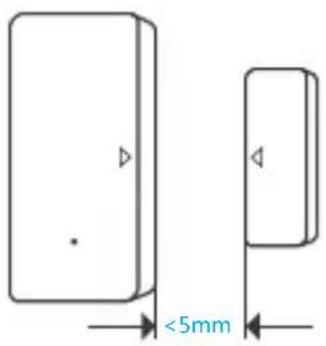
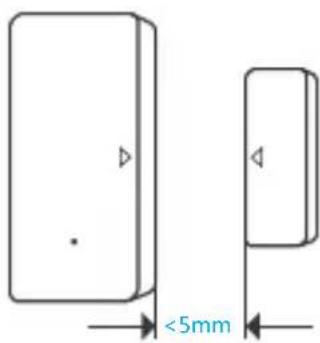
| Installation gap | Less than 5 mm between magnet and transmitter |
| Operating temperature | -10°C to 40°C |
| Housing material | PC (polycarbonate) |
| Recommended installation height | Less than 2 m |
| Main functions | Push alarm notification, operation history, battery indicator, shared control |
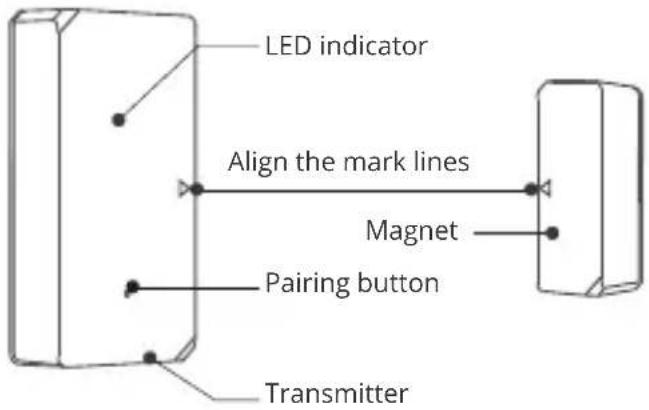
| LED indicator | Slow blink: pairing mode; fast blink 1x: router failure; 2x: server failure |
| Installation | 3M adhesive mounting (remove protective film) |
| Maintenance and cleaning | Clean with a dry cloth; replace batteries when low |
| Safety | Do not install outdoors, near wiring or magnetic objects |
Frequently Asked Questions - DW2WiFi Sonoff
User questions about DW2WiFi Sonoff
0 question about this device. Answer the ones you know or ask your own.
Ask a new question about this device
Download the instructions for your Door/window sensor in PDF format for free! Find your manual DW2WiFi - Sonoff and take your electronic device back in hand. On this page are published all the documents necessary for the use of your device. DW2WiFi by Sonoff.
USER MANUAL DW2WiFi Sonoff
natural_image
Two rectangular shapes with arrow indicators, no text or symbols presentWi-Fi Wireless Door/Window Sensor
· 中文 ---- 1-5
• Deutsch ---- - 11-15
natural_image
Diagram of a mechanical component with a blue arrow indicating direction (no text or symbols)2- 2. 根据正负极标识,装上电池
natural_image
Top-down schematic of a room layout with central furniture and floor indicators (no text or labels)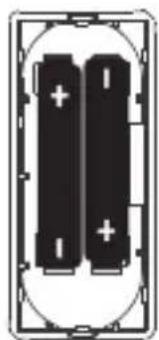
natural_image
Pure electrical circuit lines without any symbols2-3. 合上后盖
电池需另行购买。
3. 进入配网模式
natural_image
Simple diagram showing a vertical panel with two connected components, one emitting light (no text or symbols)natural_image
Two 3D mechanical parts with blue rotation arrows indicating movement (no text or symbols)flowchart
graph TD
    A["•"] --> B["△"]
    B --> C["◀"]
- 分别粘贴在所需开合区域。

text_image
<5mmnatural_image
Illustration of a hand holding a doorbell next to a door panel, with no visible text or symbols.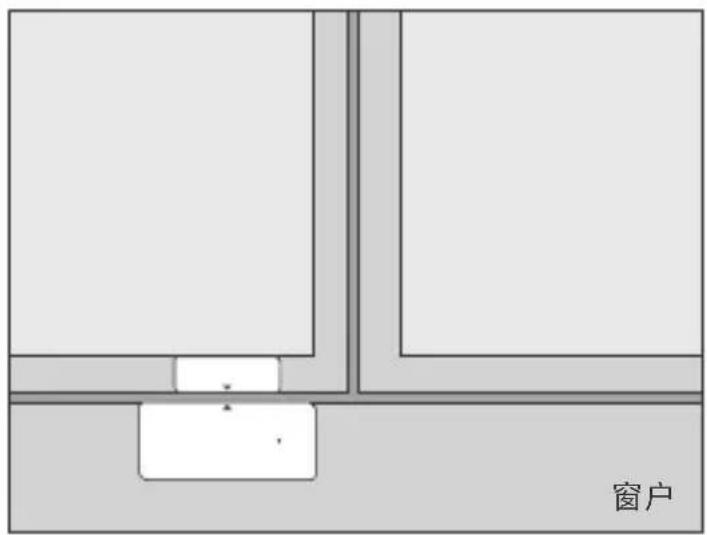
text_image
窗户注意事项:
请勿安装在户外容易被破坏的位置;
请勿安装在基础不牢固或有雨淋的位置;
请勿安装在线路旁或磁性物体附近;
更换电池
text_image
Diagram showing a device with an arrow indicating direction and a close-up of its internal structure, likely illustrating a process or assembly.Operation instruction
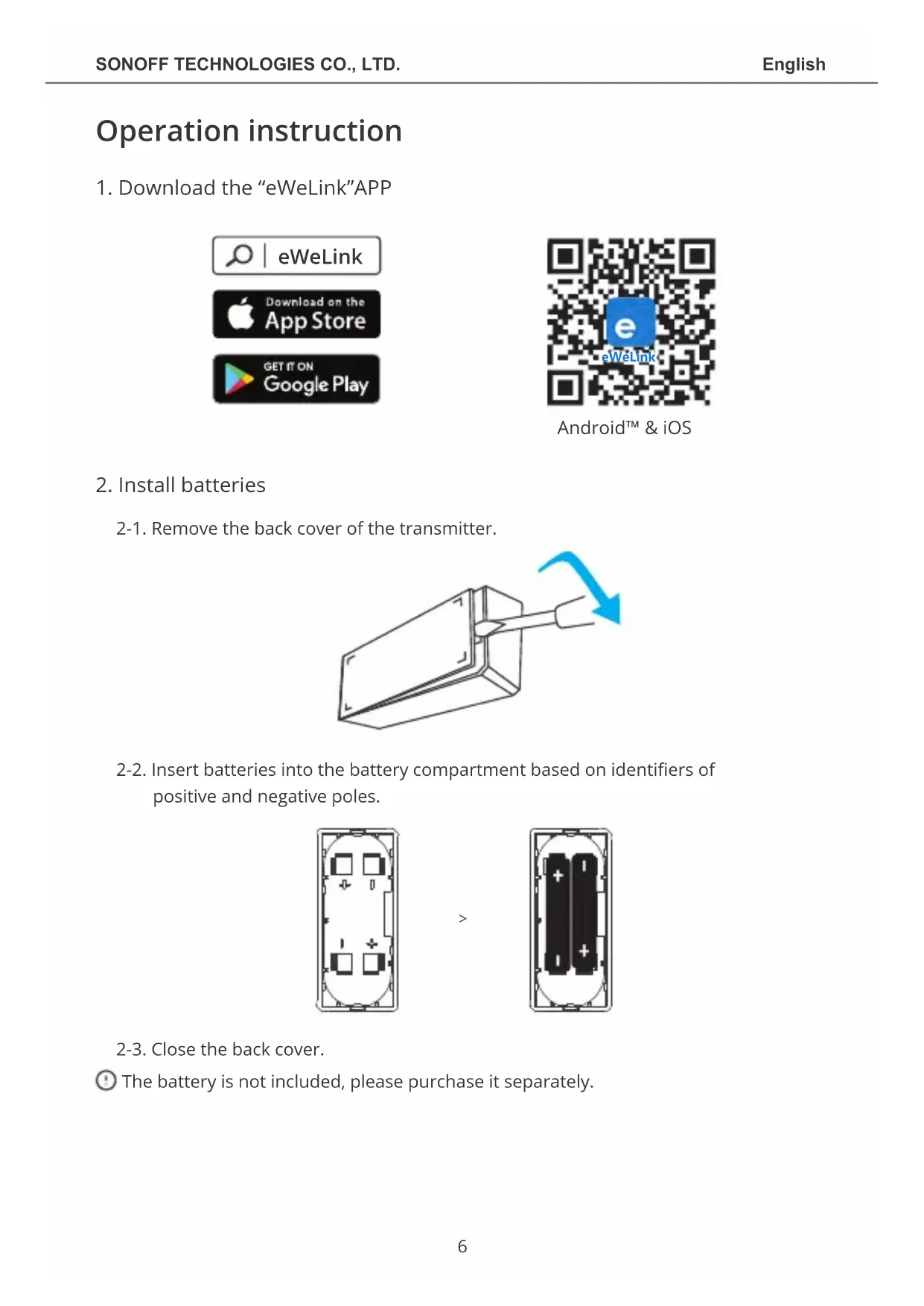
1. Download the "eWeLink"APP
text_image
eWeLink Download on the App Store GET IT ON Google Play
text_image
e eWeLinkAndroid™ & iOS
2. Install batteries
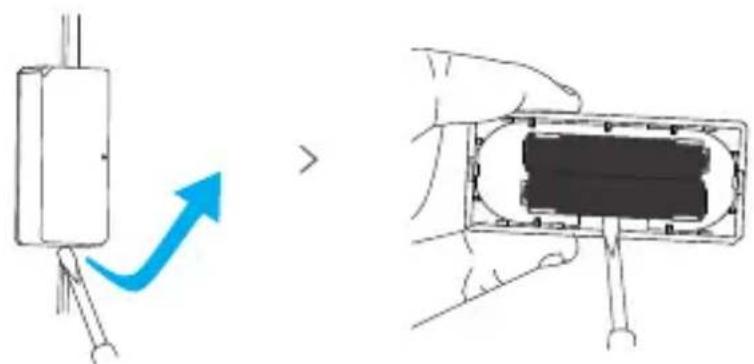
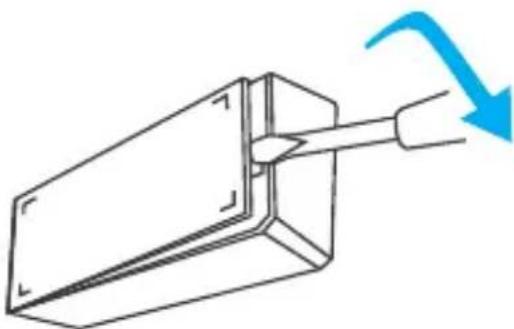
2-1. Remove the back cover of the transmitter.
natural_image
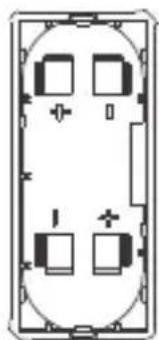
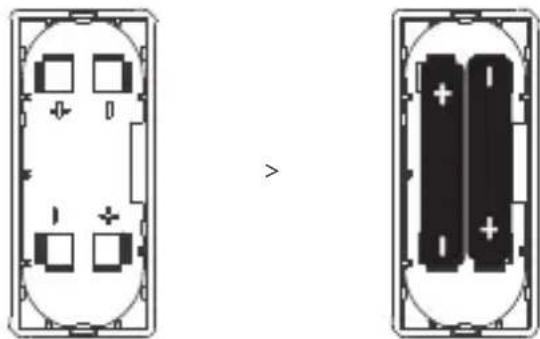
Diagram of a mechanical component with a blue arrow indicating direction (no text or symbols)2-2. Insert batteries into the battery compartment based on identifiers of positive and negative poles.
natural_image
Diagram showing two layout views of a room with furniture and battery cells, no text or symbols present2-3. Close the back cover.
The battery is not included, please purchase it separately.
3. Enter pairing mode
natural_image
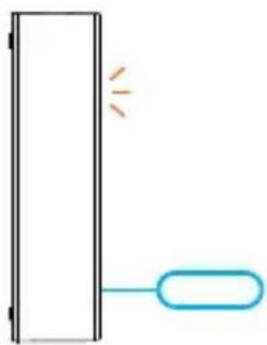
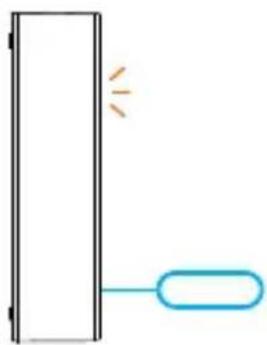
Simple diagram showing a vertical panel with two connected components, one emitting light and the other holding a rounded rectangle (no text or symbols)Long press the pairing button on the transmitter for 5s with the eject pin until the LED indicator flashes, then the device enters the pairing mode.
4. Add the device
text_image
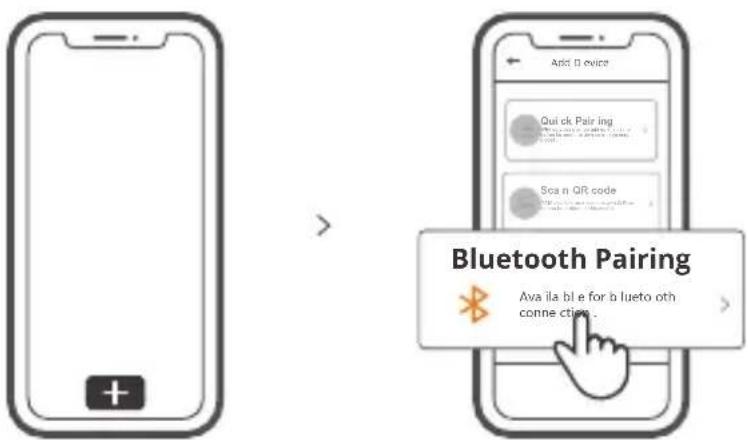
Bluetooth Pairing Ava ila ble for b lueto oth conne ction :Tap "+" and select "Bluetooth connect", then operate following the prompt on the APP.
Install the device
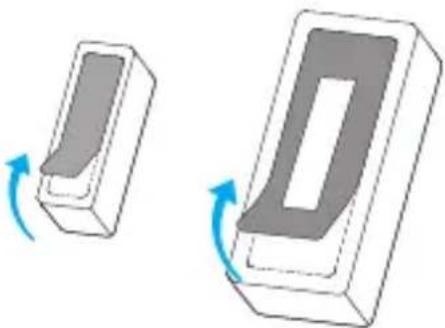
- Tear off the protective film of the 3M adhesive.
natural_image
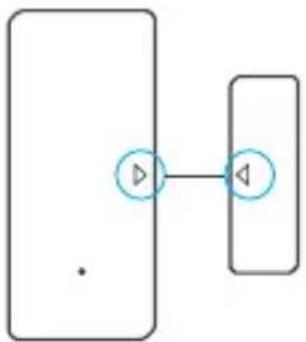
Two 3D mechanical parts with blue rotation arrows indicating motion (no text or symbols)- Try to align the mark line on the magnet with that on the transmitter during installation.
flowchart
graph TD
    A["•"] --> B["△"]
    B --> C["◀"]
- Install them in the opening and closing area separately.

text_image
<5mmMake sure the installation gap is less than 5mm when the door or the window is closed.
Specifications
| Model | DW2-Wi-Fi |
| Battery model | AAA 1.5V |
| Working voltage | DC3V (2 x 1.5V battery) |
| Quiescent current | ≤40uA |
| Emission current | ≤15mA |
| Wi-Fi | IEEE 802.11 b 2.4GHz |
| Operating systems | Android & iOS |
| Installation gap | <5mm |
| Working temperature | -10°C~40°C |
| Material | PC |
| Dimension | Transmitter: 70x31x19mm Magnet: 42x14x16mm |
Product Introduction
text_image
LED indicator Align the mark lines Magnet Pairing button TransmitterThe device weight is less than 1 kg.
The installation height of less than 2 m is recommended.
LED indicator status instruction
| Flashes | Bluetooth Pairing Mode |
| Flashes quickly once | Unable to discover the router |
| Flashes quickly twice | Connect to the router but fail to connect to Wi-Fi |
Features
DW2-Wi-Fi is a Wi-Fi wireless door/window transmitter which triggers the transmitter by separating the magnet for more than 20mm from the transmitter, then the transmitter will send an alarm message and pushes it to APP. You can share the device with your family to check the door/window status together.

Share Control

Alarm push
notification
Battery level
Application
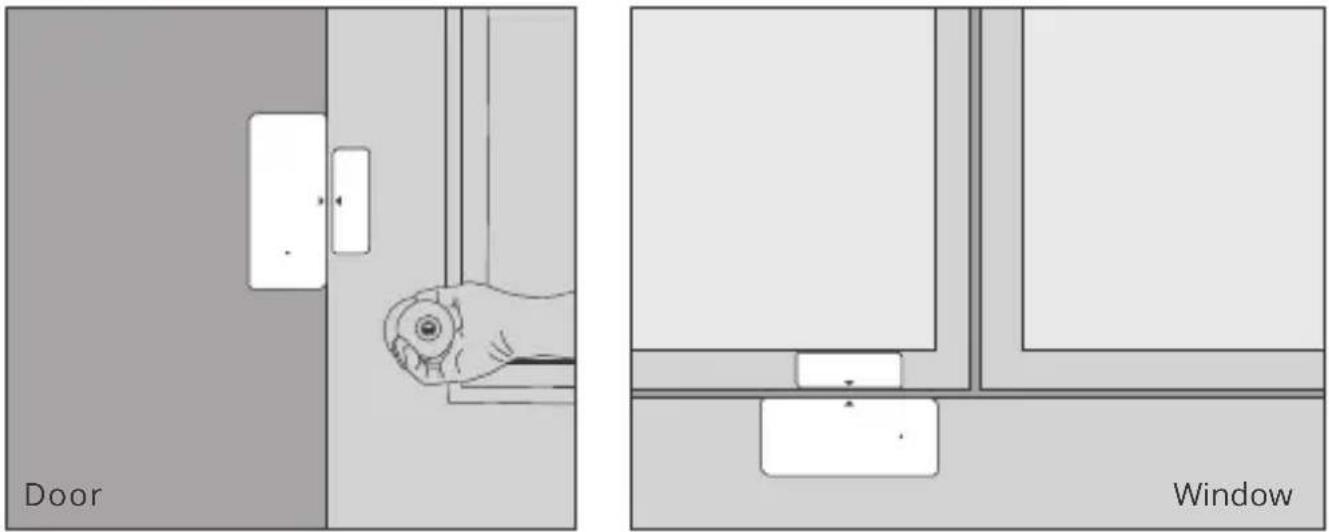
text_image
Door WindowNote:
- Do not install outside the door/window.
- Do not install in the unstable position or in the place exposed to rain or moisture.
- Do not install near wiring or magnetic object.
Replace batteries
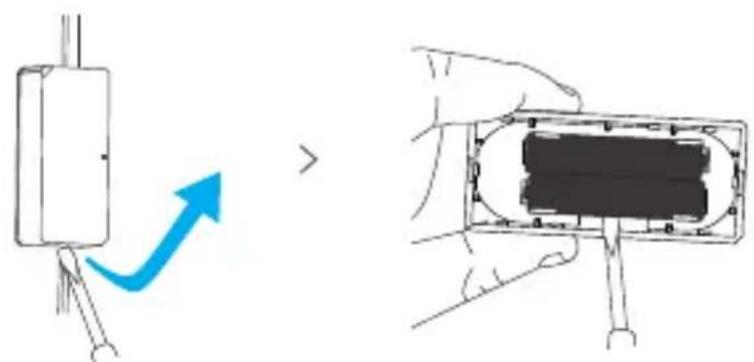
text_image
Diagram showing a device with an arrow indicating direction and a close-up of its internal components being handled by hands.Betriebsanweisung
natural_image
Diagram of a mechanical component with a blue arrow indicating direction (no text or symbols)natural_image
Diagram showing two views of a room layout with labeled compartments and battery cells (no text or symbols)natural_image
Simple diagram showing a vertical panel with two connected components, one emitting light (no text or symbols)natural_image
Two 3D mechanical parts with blue rotation arrows indicating movement (no text or symbols)flowchart
graph TD
    A["•"] --> B["△"]
    B --> C["◀"]
text_image
Diagram showing a device with an arrow indicating direction and a close-up of its internal structure, likely illustrating a process or assembly.natural_image
Diagram of a mechanical component with a blue arrow indicating direction (no text or symbols)natural_image
Diagram showing two layout views of a device with labeled components and an arrow indicating transformation (no text or symbols present)2-3. Cierre la tapa trasera.
natural_image
Simple diagram showing a vertical panel with two connected components, one emitting light and the other holding a rounded rectangle (no text or symbols)natural_image
Two 3D mechanical components with blue rotation arrows indicating motion (no text or symbols)flowchart
graph TD
    A["•"] --> B["•"]
    B --> C["•"]
text_image
Diagram showing a device with an arrow indicating direction and a close-up of its internal components, likely illustrating a process or assembly.natural_image
Diagram of a mechanical component with a blue arrow indicating direction (no text or symbols)natural_image
Diagram showing two layout views of a device with labeled components and an arrow indicating transformation (no text or symbols present)natural_image
Simple diagram showing a vertical panel with two connected elements, one emitting light and the other holding a rounded rectangle (no text or symbols)natural_image
Two 3D mechanical parts with blue rotation arrows indicating motion (no text or symbols)text_image
Diagram showing a device with an arrow indicating direction and a close-up of its internal component being held by hands.natural_image
Diagram of a mechanical component with a blue arrow indicating direction (no text or symbols)natural_image
Diagram showing two layout views of a device with labeled components and directional arrow (no text or symbols)natural_image
Simple diagram showing a vertical panel with two connected components, one emitting light and the other holding a rounded rectangle (no text or symbols)natural_image
Two 3D mechanical components with blue rotation arrows indicating motion (no text or symbols)flowchart
graph TD
    A["•"] --> B["△"]
    B --> C["◀"]
text_image
Diagram showing a device with an arrow indicating direction and a close-up of its internal components being held by hands.natural_image
Diagram of a mechanical component with a blue arrow indicating direction (no text or symbols)natural_image
Diagram showing two layout views of a device with labeled components and directional arrow (no text or symbols)natural_image
Simple diagram showing a vertical panel with two connected components, one emitting light and the other with an oval shape (no text or symbols)natural_image
Two 3D mechanical components with blue rotation arrows indicating motion (no text or symbols)text_image
Diagram showing a device with an arrow indicating direction and a close-up of its internal components being handled by hands.FCC Warning
Changes or modifications not expressly approved by the party responsible for compliance could avoid the user's authority to operate the equipment.
This device complies with part 15 of the FCC Rules. Operation is subject to the following two conditions: (1) This device may not cause harmful interference, and (2) this device must accept any interference received, including interference that may cause undesired operation.
FCC Radiation Exposure Statement:
This equipment complies with FCC radiation exposure limits set forth for an uncontrolled environment. This equipment should be installed and operated with minimum distance20cm between the radiator & your body. This transmitter must not be co-located or operating in conjunction with any other antenna or transmitter.
Note:
This equipment has been tested and found to comply with the limits for a Class B digital device, pursuant to part 15 of the FCC Rules. These limits are designed to provide reasonable protection against harmful interference in a residential installation. This equipment generates, uses and can radiate radio frequency energy and, if not installed and used in accordance with the instructions, may cause harmful interference to radio communications. However, there is no guarantee that interference will not occur in a particular installation. If this equipment does cause harmful interference to radio or television reception, which can be determined by turning the equipment off and on, the user is encouraged to try to correct the interference by one or more of the following measures:
— Reorient or relocate the receiving antenna.
— Increase the separation between the equipment and receiver.
— Connect the equipment into an outlet on a circuit different from that to which the receiver is connected.
— Consult the dealer or an experienced radio/TV technician for help.
Hereby, Shenzhen Sonoff Technologies Co., Ltd. declares that the radio equipment type DW2-Wi-Fi is in compliance with Directive 2014/53/EU. The full text of the EU declaration of conformity is available at the following internet address:
https://sonoff.tech/usermanuals
TX Frequency:
WiFi: 2412-2472MHz
RX Frequency:
WiFi: 2412-2472MHz
BLE Frequency:2402-2480MHz
WiFi Output Power: 12.62dBm(802.11b)
BLE Output Power: 1.9dBm/MHZ

text_image
SonoFFShenzhen Sonoff Technologies Co., Ltd.
1001, BLDG8, Lianhua Industrial Park, shenzhen, GD, China
ZIP code: 518000
Website: sonoff.tech