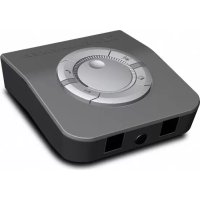
UI 770 - Phone SENNHEISER - Free user manual and instructions
Find the device manual for free UI 770 SENNHEISER in PDF.



User questions about UI 770 SENNHEISER
0 question about this device. Answer the ones you know or ask your own.
Ask a new question about this device
Download the instructions for your Phone in PDF format for free! Find your manual UI 770 - SENNHEISER and take your electronic device back in hand. On this page are published all the documents necessary for the use of your device. UI 770 by SENNHEISER.
USER MANUAL UI 770 SENNHEISER
Safety instructions 2
UI 770 universal interface 3
Delivery includes 4
Putting the UI 770 into operation 4
Connection sockets 4
Connection possibilities ....5
Inserting the battery 6
Adjusting the UI 770 ....7
When is the UI 770 ready for operation? ....9
Using the UI 770 10
Switching between the headset and the handset 11
Muting the headset microphone 11
Adjusting the sound clarity of the headset speaker ..... 11
Selecting the source – PC or telephone 11
Adjusting the volume of the headset speaker 12
Using the dictaphone output 12
Cleaning the UI 770 12
If a problem occurs 12
Accessories 14
Specifications 14
Manufacturer declarations 15

UI 770 | 1

Safety instructions
Safety instructions
Please read this instruction manual carefully and completely before using the product.
Always include this instruction manual when passing the product on to third parties.
▶ Do not use an obviously defective product.
Preventing damage to health and accidents
Do not listen at high volume levels for long periods of time to prevent hearing damage.
Keep the product, accessories, small parts and packaging parts out of reach of children and pets to prevent accidents and choking hazards.
▶ Do not use the product in situations which require special attention.
Preventing damage to the product and malfunctions
▶ Always keep the product dry and do not expose it to extreme temperatures (hairdryer, heater, extended exposure to sunlight, etc.) to avoid corrosion or deformation.
▶ Only use attachments/accessories supplied or recommended by Sennheiser.
Do not short-circuit the contacts of the product. Make sure that no metal objects (e.g. paper clips, hair pins, earrings) come into contact with the interfaces and contacts.
2 | UI 770



natural_image
Two abstract geometric diagrams with circular and crosshair patterns (no text or symbols)
UI 770 universal interface
Intended use/Liability
The universal interface can be used for calling and – together with a PC (VoIP) and/or a telephone – for audio input/output and is intended for professional office or call center use.
It is considered improper use when this product is used for any application not named in this instruction manual.
Sennheiser does not accept liability for damage arising from abuse or misuse of this product and its attachments/accessories. The risk is to be borne by the user.
Sennheiser is not liable for damages to USB devices that are not consistent with the USB specifications.
Sennheiser is not liable for damages resulting from the loss of connection due to flat batteries.
UI 770 universal interface
The UI 770 allows you to connect:
- a standard telephone that supports handsets with a dynamic, carbon or electret microphone
- a handset
- a headset of the Sennheiser Office or Call Center series
- a PC with a sound card or USB audio adapter (enabling you to use the headset for VoIP and multimedia applications)
• a dictaphone for voice recording
With the UI 770, you can then switch between the headset, the handset and the PC, set the volume of the headset speaker and microphone and mute the headset microphone.



Delivery includes
Delivery includes
- UI 770
• 1.5 V C-size battery (IECLR 14) - Telephone connecting cable
- Modular to Easy Disconnect cable
- Instruction manual
Putting the UI 770 into operation
Connection sockets
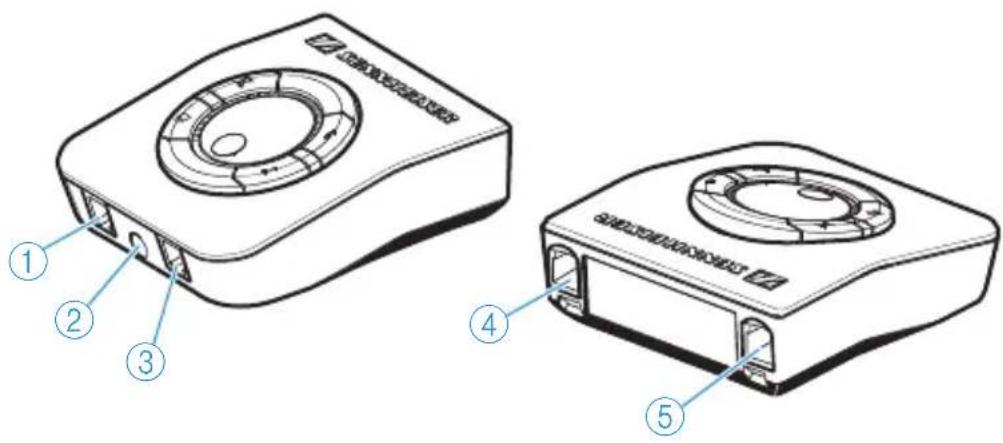
The connection sockets are located at the front and rear of the UI 770.
text_image
Technical diagram of a device with labeled components, showing front and side views with numbered parts.①Headset socket
②Dictaphone socket for voice recording
③Handset socket
④ Phone socket for the telephone
⑤Aux/PC socket for PC connection
4 | UI 770




natural_image
Two abstract geometric symbols: a circular pattern with radial lines and a crosshair with concentric circles (no text or labels)Putting the UI 770 into operation
Connection possibilities
An overview of the connection possibilities can be found on the fold-out page.
| Peripheral device | Connection on the UI 770 | Connection on the peripheral device | |
| A | Headset Modular (RJ11) Sennheiser Communications Easy Disconnect | ||
| B | Dictaphone | 3.5 mm jack | 3.5 mm jack, cable depends on dictaphone socket |
| C | Handset Modular (RJ11) Modular (RJ11) | ||
| D | Phone | Modular (RJ11) | Depending on phone |
| E | Aux/PC | Modular (RJ11) | 3.5 mm jack |
Connecting the headset to the UI 770
A Connect the modular plug of the adapter cable to the headset socket on the UI 770 until it locks in place.
Connecting the dictaphone to the UI 770
B Connect the 3.5 mm jack plug of the dictaphone connecting cable to the dictaphone socket on the UI 770 until it locks into place. Connect the 3.5 mm jack plug to your dictaphone.
Connecting the handset to the UI 770
C Pull the modular plug of the handset cable out of the telephone and connect it to the handset socket on the UI 770 until it locks into place.



natural_image
Pure geometric diagram with concentric circles and crosshairs, no text or symbols present

Putting the UI 770 into operation
Connecting the telephone to the UI 770
D Connect one of the two modular plugs of the supplied telephone connecting cable to the phone socket until it locks into place. Connect the second modular plug to the handset socket on your telephone.
Even with the UI 770 connected, you can use all functions of your telephone as usual. To make a call, lift the handset and dial a phone number. To end a call, replace the handset. The "hands-free conversation" function can also be used as usual.
Connecting the PC to the UI 770
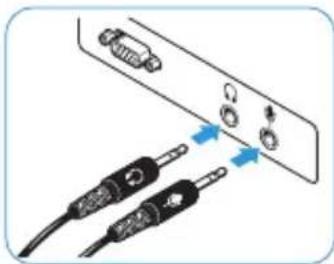
E Connect the modular plug of the PC connecting cable to the Aux/PC socket on the UI 770 until it locks into place. Connect the two jack plugs to your PC sound card as shown.
natural_image
Diagram showing two connected cables with arrows pointing to ports (no text or symbols)Inserting the battery
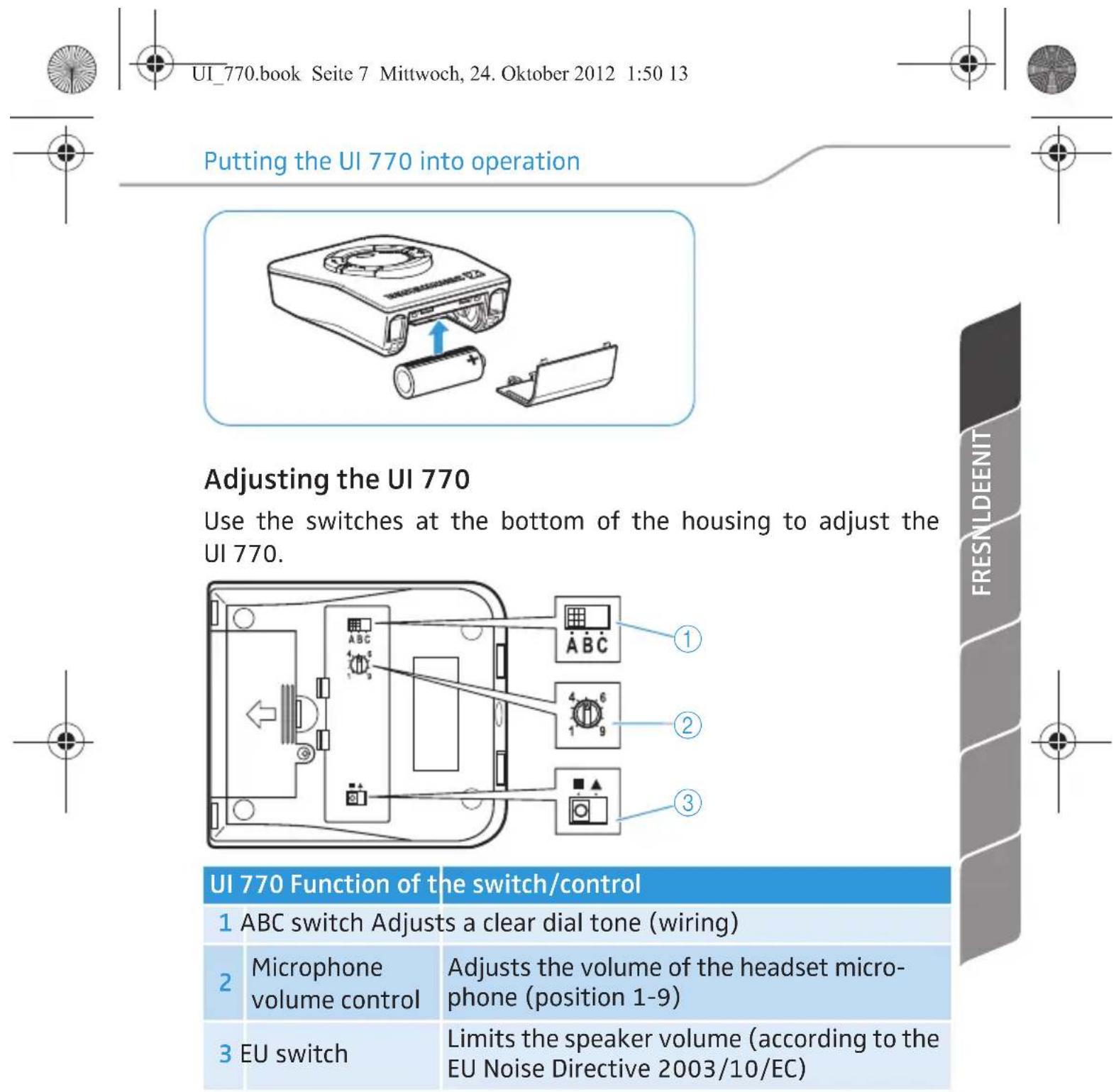
When inserted into the UI 770, the battery has a service life of approx. one year. Under normal use, it is recommended to replace the battery once a year.
Remove the lower rear part of the housing. Use the supplied screw to tamper-proof the battery compartment (which may be mandatory in some countries).
Insert the battery as shown and replace the lower rear part of the housing.
6 | UI 770


text_image
UI_770.book Seite 7 Mittwoch, 24. Oktober 2012 1:50 13 Putting the UI 770 into operation Adjusting the UI 770 Use the switches at the bottom of the housing to adjust the UI 770. UI 770 Function of the switch/control 1 ABC switch Adjusts a clear dial tone (wiring) 2 Microphone volume control 3 EU switch Adjusts the volume of the headset micro-phone (position 1-9) Limits the speaker volume (according to the EU Noise Directive 2003/10/EC)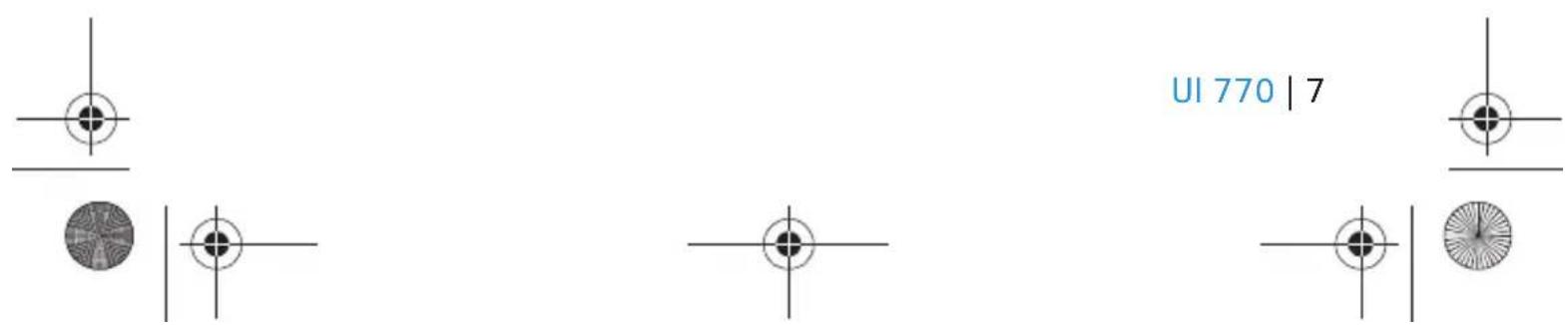
text_image
UI 770 | 7Putting the UI 770 into operation
Adjusting a clear dial tone
First make sure that the handset and the headset are connected correctly. The handset must be activated, i.e. the headset/handset button (see page 10) must be in "down" position. Check if you can hear a dial tone in the handset.
▶Press the headset/handset button to activate the headset. Check if you can hear a dial tone in the headset. Otherwise, set the ABC switch to the positions "A", "B" and "C" one after the other. In each position, check if you can hear a dial tone.
Adjusting the volume of the headset microphone
The microphone volume control on the UI 770 allows you to adjust the volume of the headset microphone: a soft voice is slightly amplified and a loud voice is attenuated.
Adjust the telephone to a medium volume level.
▶ Turn the microphone volume control to position "1".
Make a call and speak into the microphone with a normal voice. Slowly turn the microphone volume control until the other party can hear you.
Limiting the speaker volume
The EU switch on the UI 770 allows you to limit the speaker volume of the headset to comply with EU Directive 2003/10/EC.
To limit the speaker volume, move the EU switch from position "square" to "triangle".
8 | UI 770



natural_image
Pure geometric diagram with concentric circles and crosshairs, no text or symbols present

Putting the UI 770 into operation
The UI 770 universal interface is a special version featuring a reduced output level. Even with the volume of the UI 770 set to the maximum, the signal transmitted by the connected Sennheiser Communications headset will never exceed the maximum of 85 dB(A) per day as a time-weighted average* value, which is in compliance with the EU Noise Directive**.
* The time-weighted average value is based on a breakdown of a typical working day and measured as the sound pressure level with a B&K HATS (Head And Torso Simulator).
** EU Directive 2003/10/EC on the minimum health and safety requirements regarding the exposure of workers to the risks arising from physical agents (noise).
When is the UI 770 ready for operation?
The UI 770 is ready for operation as soon as:
• the battery is inserted
- it is connected and adjusted to your telephone
If you disconnect the UI 770 from the telephone, it is immediately put out of operation.

UI 770 | 9

Using the UI 770
Using the UI 770
flowchart
graph TD
    A["Mute"] --> B["Mute/Active"]
    B --> C["Not active/default"]
    D["Headset/handset"] --> E["Handset/Active"]
    E --> F["Headset/default"]
    G["PC interface"] --> H["Communication through PC/Active"]
    H --> I["Not active/default"]
    J["Sound clarity"] --> K["Sound clarity/Active"]
    K --> L["Not active/default"]
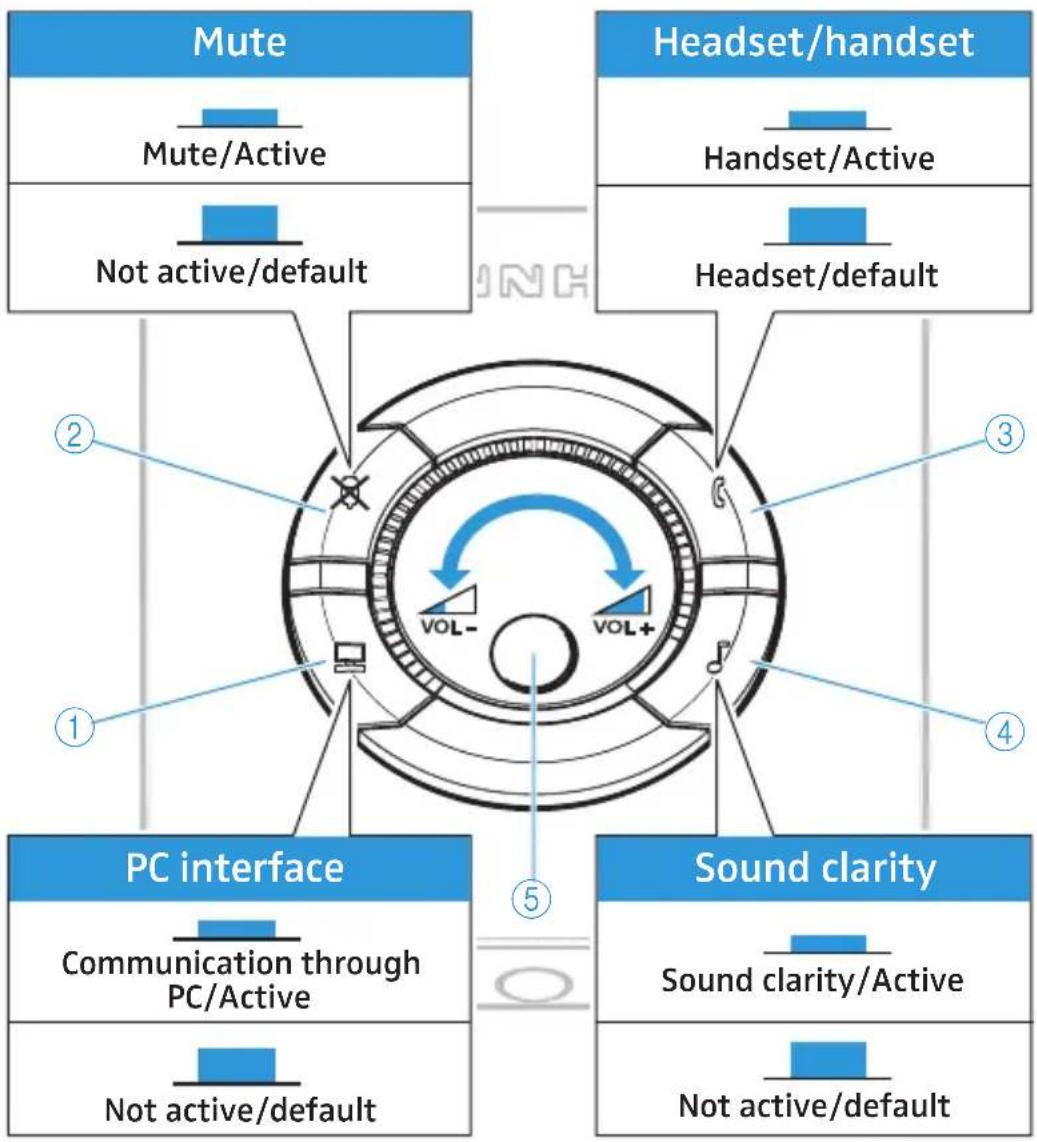
①PC/telephone button
④Sound clarity button
②Mute button
⑤ Volume control
③Headset/handset button
10 | UI 770






natural_image
Pure geometric diagram with concentric circles and crosshairs, no text or symbols present
Using the UI 770
Switching between the headset and the handset
▶ Press the headset/handset button to switch between the headset and the handset. Button down: Handset is activated Button up: Headset is activated
Muting the headset microphone
▶ Press the mute button to mute the headset microphone. Button down: Microphone is muted Button up: Microphone is activated
Adjusting the sound clarity of the headset speaker
With the UI 770, you can adjust the sound clarity of the headset speaker. Annoying background noise coming through the headset speaker is filtered out and speech intelligibility is thus enhanced.
▶ Press the sound clarity button to filter out annoying background noise.
Button down: Speech intelligibility enhancement is activated Button up: Speech intelligibility enhancement is deactivated
Selecting the source – PC or telephone
Press the PC/telephone button ☐ to select the source – PC or telephone.
Button down: PC is selected as the source
Button up: Telephone is selected as the source
If the PC is selected as the source, the mute button and volume control are deactivated. Consequently, you cannot mute the headset microphone or adjust the volume of the headset speaker using the UI 770 but you have to adjust the volume via your PC.


Cleaning the UI 770
Adjusting the volume of the headset speaker
Use the volume control to continuously adjust the volume of the headset speaker.
"Dynamic Volume Control" ensures that the volume set via the volume control is kept constant, even if the other party speaks with varying volumes.
Using the dictaphone output
The dictaphone output can be used to record a conversation in both directions.
Cleaning the UI 770
Only use a soft – and, if necessary, slightly damp – cloth for cleaning the UI 770. Do not use any solvents or cleansing agents as these can damage the varnish of the UI 770.
If a problem occurs
| Problem What to do | |
| No dial tone Make sure that the headset/handset button is in “up” position. | |
| Adjustment to your telephone is not possible | Your telephone does not meet standard requirements. Please contact your dealer. |
12 | UI 770



natural_image
Two abstract geometric symbols: a circular pattern with radial lines and a crosshair with concentric circles (no text or labels)If a problem occurs
| Problem What to do | |
| The other party cannot hear you | Make sure that the mute button is in "up" position. |
| No connection to the PC | Make sure that the cables are connected correctly. |
| Increase the volume on your PC. | |
| Your PC and the UI 770 are not compatibel. Please contact your dealer. | |
| Your voice can hardly be heard | Make sure that the headset microphone is positioned at the corner of your mouth. |
| Make sure that the volume of the headset microphone is sufficient. | |
| Make sure that the UI 770 is correctly adjusted to your telephone. | |
| The speaker volume varies | Your telephone does not meet standard requirements. Please contact your dealer. |
| The battery may be low. Replace the battery |
If the problem persists, please contact your local Sennheiser Communications agent for assistance. Never repair or attempt to repair the units as this will invalidate the warranty.

For possible solutions to problems, please refer to the FAQ on our website at www.senncom.com > "Products" > "Universal Interface".


Accessories
Accessories
| Accessories Cat. No. | |
| Headset holder 3in1 (headset holder – desktop mounting plate - desktop lock plate) | 502392 |
| Cable (modular to 2x 3.5 mm jack plug) for connection of UI to PC via standard sound card – existing CUIPC 1 | 05373 |
| Cable (modular to USB plug) for connection of UI to PC directly via USB port | 502394 |
| Cable (3.5 mm jack plug to 3.5 mm jack plug) for connection of UI to “dictaphone device” (PC, PDA, tape recorder etc.) | 502391 |
| Cable (modular to modular) for connection of UI to desk phone CPHUI 1 | 502392 |
| Cable (modular to Easy Disconnect) for connection of UI to headset – CSTD 01 standard bottom cable | 05373 |
Specifications
Dimensions [mm] 91 x 32 x 101
Weight approx. 137 g
approx. 205 g with battery
Battery 1.5 V C-size battery (IEC LR 14)
14 | UI 770



natural_image
Two abstract geometric diagrams with circular and crosshair patterns (no text or symbols)

Manufacturer declarations
Manufacturer declarations
Warranty
Sennheiser Communications A/S gives a warranty of 24 months on this product. For the current warranty conditions, please visit our website at www.senncom.com or contact your Sennheiser partner.
Australian warranty
Sennheiser's goods come with guarantees that cannot be excluded under the Australian Consumer Law. You are entitled to a replacement or refund for a major failure and compensation for any other reasonably foreseeable loss or damage. You are also entitled to have the goods repaired or replaced if the goods fail to be of acceptable quality and the failure does not amount to a major failure.
This warranty is in addition to other rights or remedies under law. Nothing in this warranty excludes, limits or modifies any liability of Sennheiser which is imposed by law, or limits or modifies any remedy available to the consumer which is granted by law. To make a claim under this warranty, contact
Syntec International Pty Ltd, Unit 3, 31 Gibbs Street Chatswood NSW 2067, AUSTRALIA Phone: (02) 9910 6700, email:
service@syntec.com.au.
All expenses of claiming the warranty will be borne by the person making the claim.
The Sennheiser International Warranty is provided by Syntec International Pty Ltd (ABN 94003433798), unit 3, 31 Gibbs Street Chatswood NSW 2067 Australia.

UI 770 | 15


Manufacturer declarations
In compliance with the following requirements
• WEEE Directive (2002/96/EC)

Please dispose of this product at the end of its operational lifetime by taking it to your local collection point or recycling center for such equipment.

The supplied standard batteries can be recycled. Please dispose of them as special waste or return them to your specialist dealer. In order to protect the environment, only dispose of exhausted batteries.
In compliance with:
| USA |  | ||
| Canada ICES-003 Class B | |||
| Europe |  |  |  |
| Australia/ New Zealand |  | N340 | |
| China |  | ||
CE Conformity
• EMC Directive (2004/108/EC)
• RoHS Directive (2011/65/EU)
The declaration is available at www.senncom.com.
Before putting the product into operation, please observe the respective country-specific regulations!
16 | UI 770



Manufacturer declarations
Trademarks
Sennheiser is a registered trademark of Sennheiser electronic GmbH & Co. KG.
Other product and company names mentioned in this instruction manual may be the trademarks or registered trademarks of their respective owners.
Statements regarding FCC and Industry Canada
FCC Declaration of Conformity (DoC)

SENNHEISER Model No:UI 770
We,
Sennheiser Electronic Corporation One Enterprise Drive • Old Lyme • CT 06371 • USA Tel: +1 (860) 434 9190, ext. 144 Fax: +1 (860) 434 1759
declare the above device comply with the requirements of Federal Communications Commission.
This device complies with Part 15 of the FCC rules. Operation is subjected to the following two conditions: 1) This device may not cause harmful interference, and 2) This device must accept any interference received, including interference that may cause undesired operation.
Responsible Party: John Falcone
This device complies with Part 15 subpart b of the FCC Rules and NMB 003 of Industry Canada. Operation is subject to the following two conditions: (1) this device may not cause harmful interference, and (2) this device must accept any interference received, including interference that may cause undesired operation. This equipment has been tested and found to comply with the limits for a Class B digital device, pursuant to Part 15 of the FCC Rules. These limits are designed to provide reasonable protection against harmful interference in a residential installation. This equipment generates, uses and can radiate radio frequency energy and, if not installed and used in accordance with the instructions, may cause harmful interference to radio communications. However, there is no guarantee that interference will not occur in a particular installation. If this equipment does cause harmful interference to radio or television reception, which can be determined by turning the
UI 770 | 17
Manufacturer declarations
equipment off and on, the user is encouraged to try to correct the interference by one or more of the following measures:
- Reorient or relocate the receiving antenna.
- Increase the separation between the equipment and receiver.
- Connect the equipment into an outlet on a circuit different from that to which the receiver is connected.
- Consult the dealer or an experienced radio/TV technician for help.
This class B digital apparatus complies with the Canadian ICES-003. Changes or modifications made to this equipment not expressly approved by Sennheiser electronic Corp. may void the FCC authorization to operate this equipment.
18 | UI 770



Inhalt
natural_image
Pure geometric diagram with concentric circles and crosshairs, no text or symbols present
Universal Interface UI 770
text_image
Technical diagram of two electronic device modules with numbered labels pointing to ports or features.natural_image
Two abstract geometric diagrams with concentric circles and crosshairs, no text or symbols present.natural_image
Diagram showing two connected audio/video cables with arrows indicating connection (no text or symbols)Batterie einsetzen
natural_image
Pure geometric diagram with concentric circles and crosshairs, no text or symbols present

natural_image
Pure geometric diagram with concentric circles and crosshairs, no text or symbols presentUI 770 verwenden
natural_image
Two abstract geometric diagrams with circular and crosshair patterns (no text or symbols)

natural_image
Simple crosshair symbol with concentric circles and intersecting lines (no text or labels)UI 770 | 15



natural_image
Two abstract geometric diagrams with circular and crosshair patterns (no text or symbols)

Universal Interface UI 770
natural_image
Pure geometric diagram with concentric circles and intersecting lines, no text or symbols present

Contenu
Contenu
text_image
Technical diagram of two electronic device modules with numbered labels pointing to ports and components.①Prise Casque-micro
②Prise Dictaphone
③Prise Combiné
④Prise Téléphone
⑤Prise Aux/PC
4 | UI 770



natural_image
Two abstract geometric symbols: a circular pattern with radial lines and a crosshair with concentric circles (no text or labels)Mise en service de la UI 770
natural_image
Diagram showing two cables connected to a panel with three connectors (no text or symbols visible)Insérer la pile
natural_image
Pure geometric diagram with concentric circles and crosshairs, no text or symbols present

Mise en service de la UI 770
natural_image
Two abstract geometric diagrams with circular and crosshair patterns (no text or symbols)
• Directive WEEE (2002/96/CE)

| USA |  | ||
| Canada ICES-003 Class B | |||
| Europe |  |  |  |
| Australia/New Zealand |  | N340 | |
| China |  | ||
• Directive CEM (2004/108/CE)
• Directive RoHS (2011/65/CE)
natural_image
Two abstract geometric diagrams with circular and crosshair patterns (no text or symbols)
Universal Interface UI 770
natural_image
Two abstract geometric diagrams with concentric circles and crosshairs, no text or symbols present.
natural_image
Diagram showing two cables connected to a device panel with connectors (no text or symbols visible)natural_image
Pure geometric diagram with concentric circles and crosshairs, no text or symbols present

natural_image
Two abstract geometric diagrams with circular and crosshair patterns (no text or symbols)
Utilizzo di UI 770
natural_image
Two abstract geometric diagrams with circular and crosshair patterns (no text or symbols)Dati tecnici
natural_image
Simple crosshair symbol with concentric circles and intersecting lines (no text or labels)UI 770 | 15


| USA | | ||
| Canada ICES-003 Class B | |||
| Europe | |  | |
| Australia/New Zealand |  | N340 | |
| China |  | ||
Conformità CE
natural_image
Two abstract geometric diagrams with circular and crosshair patterns (no text or symbols)
Universal Interface UI 770
text_image
Technical diagram of two electronic device modules with numbered labels pointing to internal components.natural_image
Two abstract geometric diagrams with circular and crosshair patterns (no text or symbols)
natural_image
Diagram showing two connected audio equipment cables with switches and connectors (no text or symbols)natural_image
Pure geometric diagram with concentric circles and crosshairs, no text or symbols present

natural_image
Diagram of a battery pack with an open rear panel and two batteries, showing internal components (no text or symbols)Ajuste del UI 770
text_image
Diagram of a device panel with labeled components and switches, showing connections between ports and indicators.natural_image
Pure geometric diagram with concentric circles and crosshairs, no text or symbols present

natural_image
Two abstract geometric diagrams with circular and crosshair patterns (no text or symbols)Uso del UI 770
natural_image
Two abstract geometric symbols: a circular pattern with radial lines and a crosshair with concentric circles (no text or labels)natural_image
Pure geometric diagram with concentric circles and crosshairs, no text or symbols present

natural_image
Simple crosshair symbol with concentric circles and intersecting lines (no text or labels)UI 770 | 15


natural_image
Pure geometric diagram with concentric circles and intersecting lines, no text or symbols present• Directiva CEM (2004/108/CE)
• Directiva RoHS (2011/65/UE)
natural_image
Two abstract geometric diagrams with circular and crosshair patterns (no text or symbols)
Universele interface UI 770
text_image
Technical diagram of two electronic device modules with numbered labels pointing to ports or features.① Bus headset
② Bus dicteerapparaat
③Bus telefoonhoorn
④Bus telefoon
⑤Bus Aux/PC

4 | UI 770



natural_image
Two abstract geometric symbols: a circular pattern with radial lines and a crosshair with concentric circles (no text or labels)natural_image
Diagram showing two cables connected to a panel with connectors and arrows indicating connection (no text or symbols)Batterijen plaatsen
natural_image
Pure geometric diagram with concentric circles and crosshairs, no text or symbols present

natural_image
Pure geometric diagram with concentric circles and crosshairs, no text or symbols present
De UI 770 gebruiken
natural_image
Two abstract geometric diagrams with circular and crosshair patterns (no text or symbols)