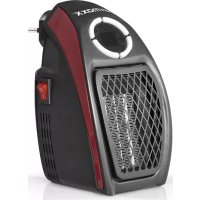
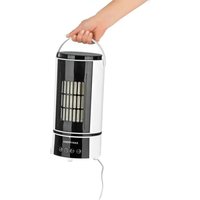
02502 - Heating EasyMaxx - Free user manual and instructions
Find the device manual for free 02502 EasyMaxx in PDF.



| Product type | Mini electric heater |
| Brand | EasyMaxx |
| Model | 02502 |
| Power supply | 220-240 V ~ 50 Hz |
| Power | 500 W |
| Protection class | II |
| Temperature range | 15 – 32 °C |
| Timer | 1 to 12 hours |
| Fan speeds | 2 levels (HH high, LL low) |
| Control type | Electronic with display and +/− buttons |
| Display | Digital screen (temperature and timer) |
| Thermostat | Yes, automatic temperature maintenance |
| Overheat protection | Automatic shutdown in case of overheating |
| Water protection | Do not use near bathtub, shower, or pool |
| Do not cover | Overheating risk |
| Recommended use | Well-insulated indoor rooms |
| Cleaning | Damp cloth, no abrasive products |
| Storage | Dry and clean place, out of reach of children |
| Delivery contents | 1 mini heater, 1 instruction manual |
Frequently Asked Questions - 02502 EasyMaxx
User questions about 02502 EasyMaxx
0 question about this device. Answer the ones you know or ask your own.
Ask a new question about this device
Download the instructions for your Heating in PDF format for free! Find your manual 02502 - EasyMaxx and take your electronic device back in hand. On this page are published all the documents necessary for the use of your device. 02502 by EasyMaxx.
USER MANUAL 02502 EasyMaxx
We are delighted that you have chosen this mini heater. If you have any questions, contact the customer service department via our website: www.service-shopping.de
Explanation of Symbols

Danger symbols: These symbols indicate risks of injury. Read through the associated safety instructions carefully and follow them.

Protection class II

Warning: Do not cover the device during operation!

Caution: hot surfaces!

Supplementary information

Read instructions before use!
DANGER warns of serious injuries and danger to life
WARNING warns of possible serious injuries and danger to life
CAUTION warns of slight to moderate injuries
NOTICE warns of damage to property
Intended Use
- The device is intended for supplementary heating purposes inside buildings.
- This device is only intended for well-insulated rooms or occasional use.
- The device is designed for personal and domestic use only and is not intended for commercial applications.
- The device should only be used as described in these instructions. Any other use is deemed to be improper.
Safety Instructions
■ CAUTION – Parts of the device can become very hot and cause burns if touched. Special care must be taken in the presence of children or vulnerable persons.

WARNING: Do not cover the device during operation in order to prevent it from overheating.
■ WARNINGThis device is not fitted with controls for regulating the room temperature. Unless there is constant supervision the heater must not be used in small rooms occupied by persons who are unable to leave the room by themselves.
If the device is positioned or installed in its normal place of use, children from the age of 3 and below the age of 8 must only switch the device on and off if they are supervised or have received instruction on how to use the device safely and have understood the dangers resulting from failure to comply with the relevant safety precautions.
If the device is positioned or installed in its normal place of use, it may be used by people with reduced physical, sensory or mental abilities or a lack of experience and / or knowledge if they are supervised or have received instruction on how to use the device safely and have understood the dangers resulting from failure to comply with the relevant safety precautions.
Children from the age of 3 and below the age of 8 must not plug the device in, regulate or clean it, or carry out user maintenance.
■Children under 3 years of age must be kept away from the device, unless they are under constant supervision.
- The device is not designed to be operated with an external timer or a separate remote control system.
This heater should not be used close to a bathtub, shower or swimming pool.
- The device must always be disconnected from the mains when left unattended and before it is cleaned.
If the device is damaged, it must be replaced by the manufacturer or customer service department or a similarly qualified person (e.g. specialist workshop) in order to avoid any hazards.

WARNING – Danger of suffocation! Keep children and animals away from the packaging material.

CAUTION – Danger of burns! The device will become hot during use. Only the ON / OFF switch must be used. Allow the device to cool down after it has been switched off.

DANGER – Danger of Electric Shock from Water!
■ Use and store only in closed rooms.
- Do not use the device in rooms with high humidity.
- Never touch the device with wet hands when it is connected to the mains.
■ Never immerse the device in water or other liquids, and make sure it cannot become damp!

WARNING – Danger of Electric Shock from Damage and Inappropriate Use!
- Only connect the device to a socket with safety contacts that is properly installed and matches the technical data of the device. The socket must also be readily accessible after connection so that the connection to the mains can quickly be isolated.
- Do not use the device with an extension cable.
■ Remove the mains plug from the socket if a fault occurs during operation or before a thunderstorm.

WARNING – Danger of Fire!
- Do not use the device in rooms containing easily ignitable, poisonous or explosive substances.
- Do not use the device in the vicinity of highly flammable materials (curtains, textiles, etc.).
- Do not cover the device during operation in order to prevent it from catching fire.
EN Instructions
In the event of a fire: Do not extinguish with water! Smother the flames with a fireproof blanket or a suitable fire extinguisher.
NOTICE – Risk of Damage to Material and Property
■ Protect the device from naked flames, sub-zero temperatures, persistent moisture, wet conditions and impact.
- Do not lay or place any heavy objects on the device.
Items Supplied
1 x mini heater
1 x instructions for use
Check the device for transport damage. If the device is damaged you should not (!) use it, but instead contact our customer service department.
Device Overview

1 Mains plug
2 ON / OFF switch
3 Heating bars / fan heater (under the cover)
4 Control panel with display
Control panel
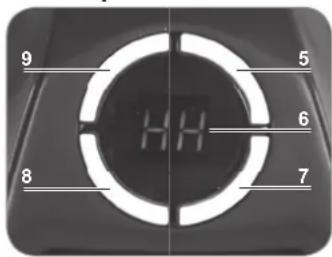
5 + Increase operating time / temperature
6 Display
7 Timer (1 - 12 hours)
8 Speed – speed of the fan heater (2 levels)
9 – Reduce operating time / temperature
Before initial use
Before using the device, remove all packaging materials and any labels that may be on the device and are used for protection during transportation or for advertising.
Use

PLEASE NOTE!
The heater should only be used in wall sockets in a vertical position, and not horizontally (lying).
The device is equipped with protection against overheating; the device switches off if it gets too hot. In this case you turn the ON / OFF switch to the 0 position. You then allow the device to cool down and remove the plug from the socket. It will be ready for use again after approx. 10 – 15 minutes.
- Insert the mains plug into a properly installed socket that is easily accessible.
- To switch the device on you turn the ON / OFF switch (2) to the I position. The display (6) flashes "25" (for 25 °C) and the heating process starts.
- You can set the required temperature (15 - 32 °C) to higher with the + button (5) and to lower with the - button (9). The selected temperature has been reached when the number in the display stops flashing.
- With the speed regulator (8) you can set the speed of the fan heater:
-HH - high speed
-LL - low speed

The device automatically stops heating as soon as the preset temperature in the room has been reached. Once the room cools down again the device begins heating again automatically for as long as it is switched on.
- To switch the device off you turn the ON/OFF switch to the 0 position.
- Allow the device to cool down and disconnect it from the mains.
Setting the Timer
You can set the operating time between 1 - 12 hours. The device switches off automatically at the end of this time.
- Switch the device on (see the "Use" chapter).
- Press the timer button (7). "0" flashes on the display (6). You can set the operating time for longer with the + button (5) or shorter with the - button (9).
- When the operating time is no longer visible on the display, you can select the temperature and speed of the fan heater (see above). After that the display switches between the preset operating time and the temperature.
- The device stops the heating process automatically after the preset operating time has elapsed.
- To switch the device off you turn the ON / OFF switch (2) to the 0 position.
- Allow the device to cool down and disconnect it from the mains.
Cleaning and Storage

PLEASE NOTE!
- Do not use any caustic or abrasive cleaning agents for cleaning. These can damage the surface.
- If necessary, wipe down the device with a slightly damp cloth.
- When not in use the device should be stored in a dry place which is not accessible to children and animals.
Troubleshooting
If the device does not work properly, first check whether you are able to rectify the problem yourself.

Do not attempt to repair a defective electrical device yourself!
The device does not work.
- Is the mains plug inserted in the socket correctly?
- Is the socket defective? Try another socket.
- Check the fuse of the mains connection.
Technical Data
Article number: 02502
Model number: TS-20143
Thermostat: 15 – 32 °C
Supply voltage: 220 – 240V \~ 50 Hz
Power: 500 W
Protection class: II


Disposal

The packaging material can be recycled.

Dispose of the device in an environmentally friendly manner at a recycling centre for used electrical and electronic devices. More information is available from your local authorities.
| Model designation(s): TS-20143 | ||||||
| Specification | Symbol | Value | Unit | Specification | Unit | |
| Heating output | Only in the case of electric storage local space heat-ers: Method for controlling the heat supply (please select one option) | |||||
| Rated heat output P | nom | 0.500 kW | manual control of the heat supply with an integrated thermostat | [yes / no] | ||
| Minimum heat supply (guide value) | Pmin | 0.465 kW | manual control of the heat supply with feedback of the room temperature and / or ambient temperature | [yes / no] | ||
| Maximum continuous heat supply | Pmax,c | 0.500 kW | electronic control of the heat supply with feedback of the room temperature and / or ambient temperature | [yes / no] | ||
| Auxiliary energy consumption | fan-driven heat output | [yes / no] | ||||
| At rated heat output e/ | max | 0.515 kW | Type of heat output / room temperature control (please select one option) | |||
| At minimum heat output e/ | min | 0.450 kW | single-setting heat output, no room temperature control | [yes / no] | ||
| In standby e/ | SB | 0.001 kW | two or more manual settings, no room temperature control | [yes / no] | ||
| room temperature control with mechanical thermostat | [yes / no] | |||||
| with electronic room temperature control | [yes / no] | |||||
| electronic room temperature control and time-of-day regulation | [yes / no] | |||||
| electronic room temperature control and day-of-week regulation | [yes / no] | |||||
| Other control options (multiple selection possible) | ||||||
| room temperature control with occupancy sensor | [yes / no] | |||||
| room temperature control with open-window detection | [yes / no] | |||||
| with remote control option | [yes / no] | |||||
| with adaptive control of heating start | [yes / no] | |||||
| with operating time limit | [yes / no] | |||||
| with black bulb sensor | [yes / no] | |||||
| Contact details DS Produkte GmbH, Am Heisterbusch 1, 19258 Gallin, Deutschland (Germany) | ||||||
Chère cliente, cher client,
WAARSCHUWING – Brandgevaar!
- Explanation of Symbols
- Intended Use
- Safety Instructions
- DANGER – Danger of Electric Shock from Water!
- WARNING – Danger of Electric Shock from Damage and Inappropriate Use!
- WARNING – Danger of Fire!
- EN Instructions
- NOTICE – Risk of Damage to Material and Property
- Items Supplied
- Before initial use
- Use
- PLEASE NOTE!
- Setting the Timer
- Cleaning and Storage
- Troubleshooting
- Do not attempt to repair a defective electrical device yourself!
- Technical Data
- Disposal
- WAARSCHUWING – Brandgevaar!
Brand : EasyMaxx
Model : 02502
Category : Heating