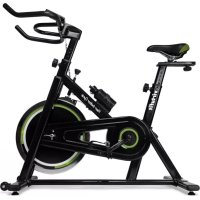
Stage 1 - Indoor bike trainer VirtuFit - Free user manual and instructions
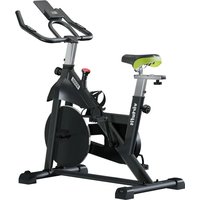
Find the device manual for free Stage 1 VirtuFit in PDF.



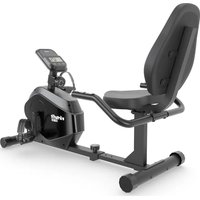
| Brand | VirtuFit |
| Model | Stage 1 |
| Product type | Indoor cycle trainer |
| Use | Domestic |
| Maximum user weight | 135 kg |
| Console power supply | 1 CR2032 3V battery |
| Heart rate receiver | Wireless 5 kHz (compatible chest strap not included) |
| Resistance | Adjustable by rotary knob, integrated emergency brake |
| Console functions | Time, Distance, Calories, Speed, RPM, Heart rate, SCAN |
| Adjustments | Seat height and fore-aft, handlebar height |
| Dimensions (L x W x H) | Approx. 120 x 50 x 100 cm |
| Weight of the device | Approx. 30 kg |
| Operating temperature | 10 °C to 35 °C |
| Storage temperature | 5 °C to 45 °C |
| Maintenance | Daily cleaning, annual lubrication of the brake pad, semi-annual bolt check |
| Warranty | Excluding manufacturing defects, does not cover wear due to improper use or poor maintenance |
| Spare parts | Available from the dealer (e.g., brake pad, batteries) |
| Repairability | Must be carried out by a professional technician unless otherwise indicated |
Frequently Asked Questions - Stage 1 VirtuFit
User questions about Stage 1 VirtuFit
0 question about this device. Answer the ones you know or ask your own.
Ask a new question about this device
Download the instructions for your Indoor bike trainer in PDF format for free! Find your manual Stage 1 - VirtuFit and take your electronic device back in hand. On this page are published all the documents necessary for the use of your device. Stage 1 by VirtuFit.
USER MANUAL Stage 1 VirtuFit
STEP 04
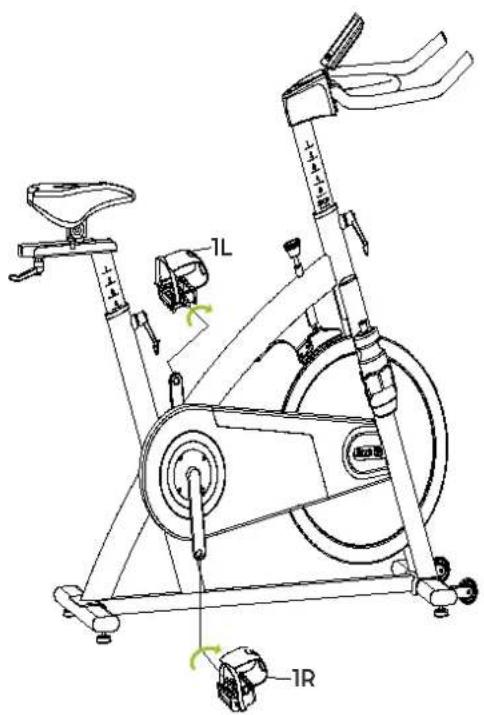
FIG. A
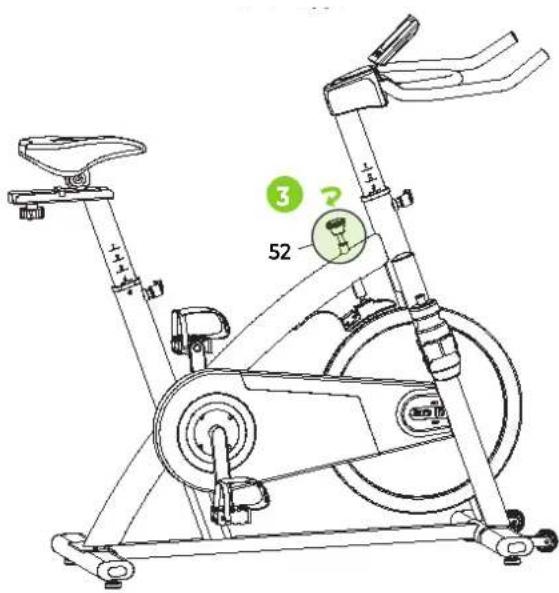
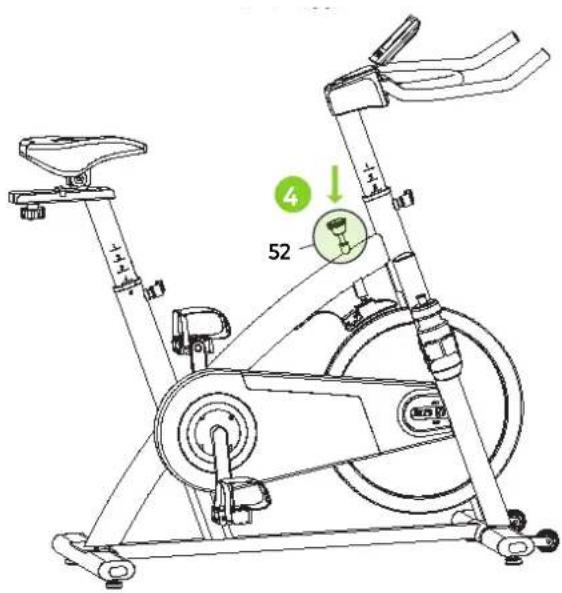
FIG. C
natural_image
Line drawing of a person bending forward with hands raised (no text or symbols)1
natural_image
Line drawing of a person sitting cross-legged, holding their head in thought (no text or symbols)2

natural_image
Line drawing of a person performing a seated stretch or exercise (no text or symbols)3
natural_image
Line drawing of a person in athletic attire performing a stretching or martial arts pose (no text or symbols)4
natural_image
Line drawing of a person performing a stretching exercise with arms raised (no text or symbols)5
INDEX
| Safety instructions | 07 | ||
| Guarantee | 07 | ||
| Assembly instructions 07 | |||
| Adjusting | 08 | ||
| Training with heart rate 08 | |||
| Maintenance | 08 | ||
| Troubleshooting | 09 | ||
| Console | 09 | ||
| Training guidelines | 10 | ||
SAFETY INSTRUCTIONS

WARNING!
Consult your doctor before you start exercising. This is particularly important for people with health problems. Please read all instructions before using the machine. VirtuFit assumes no responsibility for injury or property damage resulting from the use of this equipment. Please read this manual carefully before assembling and/or using the machine.
- Make sure that the machine is properly assembled and that all nuts and bolts are tight before using it.
- Lubricate all moving parts annually with petroleum jelly (acid-free) or silicone spray.
- Do not wear loose clothing to avoid getting caught in moving parts.
• Install and use the unit on a solid, level surface.
• Always wear clean sports shoes when using the appliance. - Keep children and pets away from the appliance when in use.
- Maintain your balance when using the device.
- Do not place your fingers or other objects in the moving parts.
- Before exercising, consult your physician to determine the appropriate frequency, duration and intensity of exercise for your age and physical condition. Stop exercising immediately if you experience nausea, shortness of breath, fainting, headache, chest pain, tightness or any other discomfort.
- Do not hold the machine by the seat when moving.
• This machine should only be used by one person at a time.
- This machine is designed for domestic use and the maximum user weight is 135 kg.
• Leave 1-2 metres of space behind the machine to avoid accidents.
- Place the machine on a clean, flat surface. Do not place it on a thick carpet, as this may hinder the ventilation of the machine. Do not place the machine outdoors or near water.
- Keep the storage area dry, clean and level to prevent damage. Do not use the device for any purpose other than training.
- Use the device only in an environment where the ambient temperature is between 10^ and 35^ . Store the device only in an environment where the temperature is between 5^ and 45^ .
GUARANTEE
Warranty claims are excluded if the cause of the defect is the result of:
- Maintenance and repair work not carried out by an official dealer. Unless otherwise specified by the supplier or manufacturer.
- Improper use, negligence and/or poor maintenance.
- Failure to maintain the appliance in accordance with the manufacturer's instructions.
ASSEMBLY INSTRUCTIONS (STEP 01-04)
Missing parts: If any parts are missing from the packaging, carefully check the polystyrene foam and the appliance itself. Some parts (bolts, screws, etc.) are already attached to the unit.
Error message: Make sure that all cables are carefully attached. The aluminium feet of the console are very sensitive and must be kept straight. If the console gives an error message after the machine has been mounted, the aluminium feet of the console may be bent. Straightening the aluminium feet may make the error message disappear.
Hex head bolts: Make sure that the hex head spanner is pushed into the bolt before applying force. This will prevent the head of the socket bolt from turning.
ADJUSTING (FIG. B, 1-4)
Saddle adjustment (1)
In order to train effectively, it is advisable to adjust the saddle to the correct height. When pedalling, your knees should be slightly bent when the pedals are in the down position.
To adjust the saddle, follow the steps below:
To adjust the seat height, turn the spring-loaded knob on the seat post on the frame and tighten it. Position the vertical seat post at the desired height so that the holes are aligned, release the button and tighten firmly. To move the saddle forwards towards the handlebars or backwards away from the handlebars, turn the adjusting knob and ring and tighten the knob again. Slide the horizontal seat post into the desired position. Set the pin in the holes and then tighten the adjusting knob.
Handlebar adjustment (2)
To adjust the handlebar, follow the steps below:
Rotate the knob and secondary knob and pull both knobs. Slide the handlebar post along the housing on the main frame to the desired height and with the holes correctly aligned, tighten the spring button and then the secondary button.
Resistance knob (3)
To ensure a smooth and efficient pedaling motion, the resistance is adjusted at the factory during production.
Setting the resistance
By increasing or decreasing the tension, you can add variety to your training sessions by adjusting the resistance of the bicycle. To increase the tension and increase the resistance (which provides more power to the pedal), turn the resistance knob (52) to the right. To decrease the tension and to decrease the resistance (which gives less force to the pedal), turn the resistance knob (52) to the left.
The block may have dried out, causing a squeaking sound. If so, lubricate the felt pad a little with the supplied silicone oil.
NOTE! It is recommended to start training at a level that suits your own needs. Remember to start slow and gentle and work your way up to the level that suits you.
Emergency Brake (4)
The same button you use to adjust the tension of the bike also functions as an emergency brake. Use this safety feature in any situation where you would need to stop cycling.
NOTE! To use the emergency brake function, you must press the button (52). Firmly press down.
TRAINING WITH HEART RATE
Wireless heart rate receiver (5 kHz)
This VirtuFit fitness equipment is equipped with a wireless heart rate receiver. For the heart rate measurement with a wireless heart rate monitor uses a heart rate monitor which works on a 5 kHz frequency. With a wireless heart rate monitor, it is important that the electrodes are slightly moist and the heart rate monitor fits well to your body. Refer to your heart rate monitor's user manual for proper instructions. Incorrect use of the heart rate monitor may result in abnormal readings.
NOTE! A wireless heart rate monitor is not included as standard. Contact your dealer to purchase a wireless heart rate monitor
WARNING!
- If you have a pacemaker, it is recommended that you consult your physician before using a wireless heart rate monitor
- In rooms with multiple heart rate monitors, it is recommended that you keep enough distance to avoid interference between different devices.
· Always try to keep the wireless heart rate monitor within a range of 1 meter from the console for optimal reception.
· Always wear a wireless heart rate monitor directly on the body, under clothing.
MAINTENANCE
Safe and efficient use can only be achieved if the appliance is properly installed and maintained. It is your responsibility to ensure that the appliance is maintained regularly. Parts that have been used and/or damaged must be replaced before the appliance is used again. The appliance should only be used and stored indoors. Long-term exposure to weather and temperature/humidity changes can have a serious impact on the electrical components and moving parts of the unit. Always unplug the power cord from the unit before cleaning or servicing it.
Daily maintenance
- Clean and remove sweat and moisture after each use.
- Check that the unit is free of dust and dirt.
- Do not use aggressive cleaning agents and keep the device away from moisture.
Semi-annual maintenance
- Inspect all bolts and nuts connected to the moving parts of the unit. Tighten bolts and nuts as necessary and appropriate.
We recommend the following:
- Clean the unit after use.
- Use a dry cloth to clean the control panel and the areas around the on/off switch.
- Use a soft, clean cloth and detergent to remove stubborn marks and dirt from the unit.
- Store the unit in a safe, dry place away from heat and water.
CAUTION! Repairs must be carried out by a professional technician, unless otherwise specified by the supplier or manufacturer.
Cleaning
General cleaning of the unit will extend its life. Keep the appliance clean by dusting it regularly. Regular maintenance will prolong the life of your appliance and prevent injuries! For more information, please visit https://www.virtufit.nl/service/faq/
CAUTION! Wear clean shoes to reduce the risk of soiling the machine. At least once a year, remove the cover to remove dust.
Lubricating the brake block
Use the enclosed bottle of silicone oil to lightly lubricate the brake pad. This will reduce friction on the flywheel and provide a quieter experience. When you begin to notice that the pad is becoming dry, apply a little silicone oil again. Make sure the block does not get dry.
Battery
3V CR2032 BATTERIES
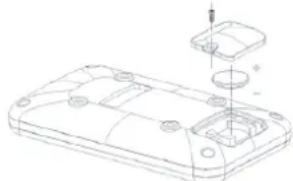
The display uses 3V CR2032 batteries, which are replaceable on the back of the display. The batteries must be inserted correctly.
If the screen is unreadable or only parts of the image work, proceed as follows:
- Remove the batteries and wait 15 seconds.
- Replace the batteries correctly.
Tips on using the battery
- Remove the batteries from the screen when they are empty or when the device will not be used for a long period of time.
- Do not recharge, disassemble or dispose of batteries in fire.
- Pay close attention to the + and - when inserting the batteries.
- It is recommended to use alkaline batteries, they have a longer life than normal batteries.
- Batteries should be replaced when the display loses brightness or stops showing.
Battery replacement
- If the display is not accurate, it is recommended to replace the batteries.
- Use 1 x 3V CR2032 battery for power.
natural_image
Technical line drawing of a device casing with internal components and a small inset component (no text or symbols)TROUBLESHOOTING
The display does not show any values: Check that the sensor and console cables are properly attached and undamaged. If this does not solve the problem, contact the supplier.
Device squeaks: Check that all bolts and nuts are tight. If necessary. Check whether the brake pad needs to be lubricated.
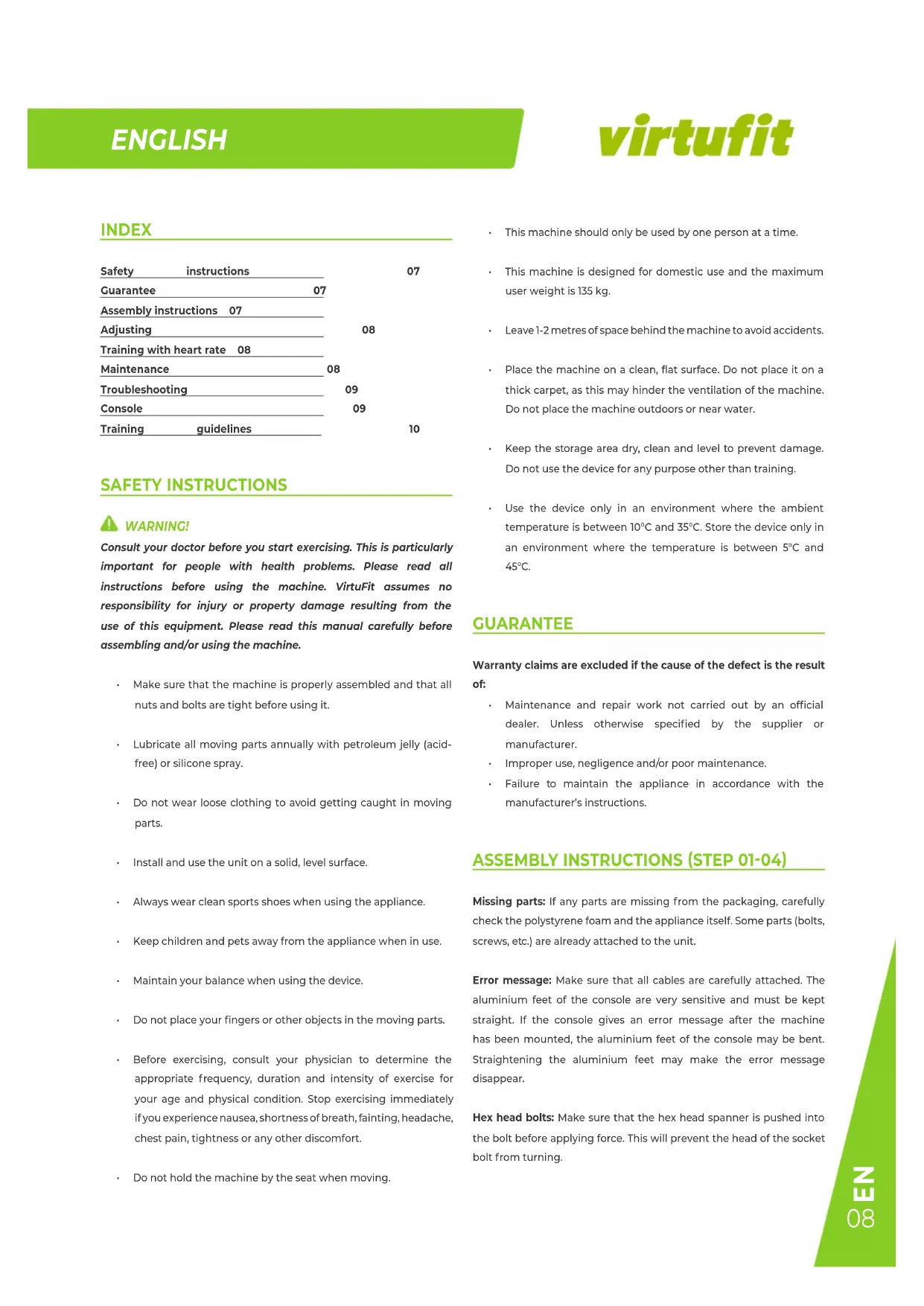
Ticking noise when pedalling: This may be caused by one of the pedals. Remove the pedal(s) and mount it (them) correctly on the unit. Tighten the pedal(s) firmly. If this does not solve the problem, contact the supplier.
NOTE! The "R" (right) pedal must be mounted clockwise and the "L" (left) pedal must be mounted counter-clockwise.
Console does not work: If there is no signal when pedalling, check that the cable is correctly connected.
CONSOLE (FIG. A)
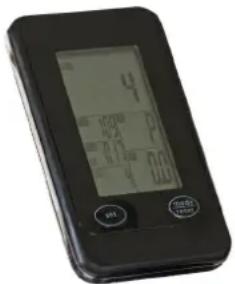
- MODE/RESET
- To confirm all settings.
- Press and hold for 2 seconds to remove all settings.
- SET To set the TIME, DISTANCE, CALORIES and PULSE values.
Functions
• SCAN Shows all functions TIME - DISTANCE - CALORIES - PULSE - RPM/SPEED in order.
- RPM Shows the number of revolutions per minute (Rounds Per Minute). The RPM and SPEED move to a different display window every 6 seconds after you start training.
- SPEED Displays the speed during exercise.
- TIME Total time of the workout will display.
• DISTANCE Distance travelled will be displayed.
- CALORIES Total calories burned during the workout will be displayed.
- PULSE If using heart rate sensors, your heart rate will be displayed during exercise.
TRAINING GUIDELINES (FIG. C, 1-5)
A successful training program includes a warm-up, the actual training and a cool-down. Perform the complete training program at least twice, but preferably three times a week and keep a rest day between training sessions. After a few months, the intensity of the training can be increased, for example to four or five times a week.
The warm-up
The purpose of a warm-up is to prepare the body for training and to reduce the risk of injury. Warm up your body for two to five minutes before starting a cardio or strength training session. Do exercises that increase the heart rate and warm up the working muscles. Examples of this type of activity are running, jogging, jumping jacks, skipping and running in place.
Stretching
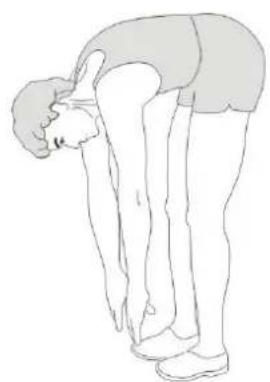
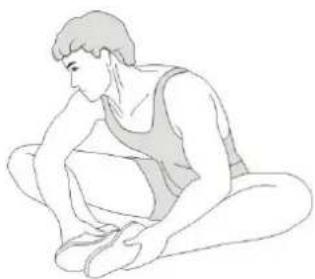
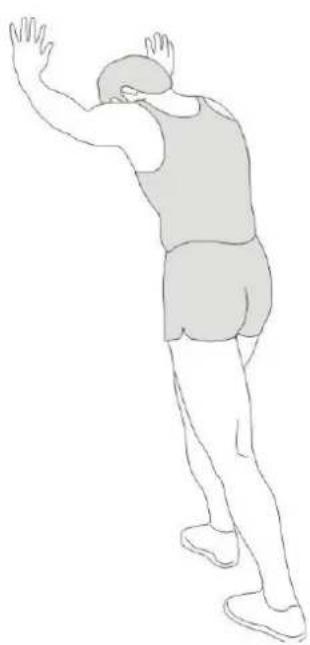
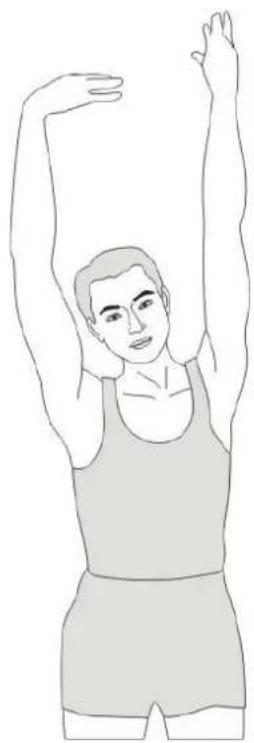
Stretching while the muscles are warm is very important after a good warm-up and cool-down. It reduces the risk of injury. Stretching exercises should be held for 15-30 seconds. Here are some examples of stretching exercises:
- Toe touch (Fig. C-1)
• Inner thight stretch (Fig. C-2)
• Hamstring stretch (Fig. C-3)
• Achilles stretch (Fig. C-4) - Side stretch (Fig. C-5)
Cooling down
The purpose of the cool-down is to return the body to its (near) normal resting position at the end of the workout. A good cool-down slowly reduces your heart rate and promotes recovery.
INHOUD
AFSTELLEN (FIG. B, 1-4)
Zadel afstellen (1)
natural_image
Technical line drawing of a device casing with internal components and a small inset component (no text or symbols)PROBLEEMOPLOSSINGEN
AJUSTEMENT (FIG. B, 1-4)
DESCRIPTION QTY.
| 1L Pedal | 1 | |
| 1R Pedal | 1 | |
| 2 | Flat washer | 3 |
| 3 | Carriage bolt | 4 |
| 4 | Rear stabilizer | 1 |
| 5 | Flat washer | 4 |
| 6 | Domed nut | 4 |
| 7 | Spring adjustment knob | 2 |
| 8 | Plastic sleeve | 2 |
| 9 | Bottle holder | 1 |
| 10 | Vertical seat post | 1 |
| 11 | End cap 2 | 2 |
| 12 | Seat post | 1 |
| 13 | Seat | 1 |
| 14 | Stopper | 4 |
| 15 | Front stabilizer | 1 |
| 16 | Main frame | 1 |
| 17 | Handle bar post | 1 |
| 18 | Handle bar | 1 |
| 19 | Spring washer 4 | |
| 20 | Bolt | 8 |
| 21 | End cap (4) | 1 |
| 22 | Computer holder | 1 |
| 23 | Computer | 1 |
| 24 | End kap (3) | 2 |
| 25 | Locking knob | 1 |
| 26 | Flat washer □32*□8.2*2 | 1 |
| 27 | End kap (1) | 2 |
| 28 | Fixing nut 1 | 2 |
| 29 | Crank end cap 2 | |
| 30 | End kap (4) | 1 |
| 31 | Lock nut | 5 |
| 32 | Bidon | 1 |
| 33 | Left crank | 1 |
| 34 | Crank coer | 1 |
| 35 | Bearing | 2 |
| 36 | Right crank | 1 |
| 37 | End kap (2) | 4 |
DESCRIPTION QTY.
| 38 Fixing nut 2 2 | |
| 39 Fixing bolt M6*54 2 | |
| 40 Nut M6 2 | |
| 41 Screw ST4.2*19 6 | |
| 42 Screw ST4.2*19 4 | |
| 43 Screw ST4.8*13 5 | |
| 44 Outer chain cover 1 | |
| 45 Little chain cover 1 | |
| 46 Axis ☐20*162 1 | |
| 47 Long fixing tube | 1 |
| 48 Short fixing tube | 1 |
| 49 Inner chain cover | 1 |
| 50 Belt | 1 |
| 51 Belt wheel | 1 |
| 52 Knob | 1 |
| 53 Bushing | 1 |
| 54 Spring 1 | 1 |
| 55 Bolt | 2 |
| 56 Wheel | 2 |
| 57 Nut M8 | 4 |
| 58 Fixing nut M12*1.25 | 2 |
| 59 Fixing tube | 1 |
| 60 Bearing | 2 |
| 61 Flywheel | 1 |
| 62 Flywheel shaft | 1 |
| 63 Fixing nut 2 | 1 |
| 64 Flywheel cover | 1 |
| 65 Flat washer 35*20*2.0 | 1 |
| 66 Fixing nut | 2 |
| 67 Spring 2 | 1 |
| 68 Short fixing tube | 1 |
| 69 Flat washer 27*M20*1 | 1 |
| 70 Domed nut | 1 |
| 71 Spring cover | 1 |
| 72 Spring 3 | 1 |
| 73 Plastic frame | 1 |
| 74 Little plastic | 1 |
| 75 Woolly block | 1 |
USER MANUAL
virtufit
DESCRIPTION QTY.
| 76 Bolt 1 2 | |
| 77 Spring brake 1 | |
| 78 Lock nut 2 | |
| 79 Spring washer 2 | |
| 80 Bolt 2 2 |
virtufit
COMPANY INFORMATION
For an ongoing service request or to purchase parts, please visit; service@virtufit.nl. Always state the service number (ITS number) with a question about the current application for a quick and efficient settlement. A service request must always be submitted via the service form. So the request not to request service via info@virtufit.nl.
Do you have a problem with your VirtuFit fitness equipment and would you like to submit a service request? Then scan the QR code on the right and fill in our service form.

VIRTUFIT
Twekkelerweg 263
7553 LZ Hengelo
The Netherlands
info@virtufit.nl
- SAFETY INSTRUCTIONS
- WARNING!
- GUARANTEE
- ASSEMBLY INSTRUCTIONS (STEP 01-04)
- ADJUSTING (FIG. B, 1-4)
- Saddle adjustment (1)
- To adjust the saddle, follow the steps below:
- Handlebar adjustment (2)
- To adjust the handlebar, follow the steps below:
- Resistance knob (3)
- Setting the resistance
- Emergency Brake (4)
- TRAINING WITH HEART RATE
- Wireless heart rate receiver (5 kHz)
- MAINTENANCE
- Daily maintenance
- Semi-annual maintenance
- We recommend the following:
- Cleaning
- Lubricating the brake block
- Battery
- 3V CR2032 BATTERIES
- If the screen is unreadable or only parts of the image work, proceed as follows:
- Tips on using the battery
- Battery replacement
- TROUBLESHOOTING
- CONSOLE (FIG. A)
- - MODE/RESET
- Functions
- TRAINING GUIDELINES (FIG. C, 1-5)
- The warm-up
- Stretching
- Cooling down
- INHOUD
- AFSTELLEN (FIG. B, 1-4)
- Zadel afstellen (1)
- PROBLEEMOPLOSSINGEN
- AJUSTEMENT (FIG. B, 1-4)
- DESCRIPTION QTY.
- USER MANUAL
- virtufit
Brand : VirtuFit
Model : Stage 1
Category : Indoor bike trainer