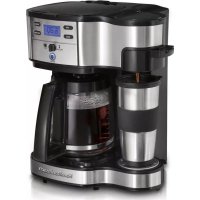
The Scoop 49980R - Coffee machine HAMILTON BEACH - Free user manual and instructions
Find the device manual for free The Scoop 49980R HAMILTON BEACH in PDF.


| Product Type | Dual-Use Coffee Maker (single-serve side and carafe side) |
| Brand | Hamilton Beach |
| Model | The Scoop 49980R |
| Color | Red (per model number 49980R) |
| Power Supply | 120 V ~ 60 Hz |
| Single-Serve Capacity | Up to 14 oz (414 ml) of water |
| Carafe Capacity | Up to 12 cups (60 oz / 1.8 L) |
| Main Features | Single-serve brewing, carafe brewing, delayed programming, bold option |
| Auto Shut-Off | Single-serve side: at end of cycle; carafe side: after 2 hours |
| Filter Type | Paper basket-style filter or permanent filter (optional) |
| Carafe Included | Yes, glass carafe with lid |
| Water Reservoir | Removable, separate for each side |
| Maintenance and Cleaning | Monthly cleaning with white vinegar (single-serve side: 1/2 cup vinegar + 1/2 cup water; carafe side: 2 cups vinegar) |
| Safety | Polarized plug, hot surfaces, do not immerse, do not use damaged filter |
| Spare Parts and Accessories | Permanent filter, carafe, filter basket; available at hamiltonbeach.ca |
| Repairability | Not user-serviceable; contact customer service for repairs |
| Warranty | 5 years in Canada, 1 year in USA (parts and labor) |
| Country of Origin | Not specified (likely made in China) |
Frequently Asked Questions - The Scoop 49980R HAMILTON BEACH
User questions about The Scoop 49980R HAMILTON BEACH
0 question about this device. Answer the ones you know or ask your own.
Ask a new question about this device
Download the instructions for your Coffee machine in PDF format for free! Find your manual The Scoop 49980R - HAMILTON BEACH and take your electronic device back in hand. On this page are published all the documents necessary for the use of your device. The Scoop 49980R by HAMILTON BEACH.
USER MANUAL The Scoop 49980R HAMILTON BEACH
Visit hamiltonbeach.com for our complete line of products and Use and Care Guides - as well as delicious recipes, tips, and to register your product online
For questions and other information: hamiltonbeach.com
When using electrical appliances, basic safety precautions should always be followed to reduce the risk of fire, electric shock, and/or injury to persons, including the following:
- Read all instructions.
- This appliance is not intended for use by persons (including children) with reduced physical, sensory, or mental capabilities, or lack of experience and knowledge, unless they are closely supervised and instructed concerning use of the appliance by a person responsible for their safety.
- Close supervision is necessary when any appliance is used by or near children. Cleaning and user maintenance shall not be made by children without supervision. Children should be supervised to ensure that they do not play with the appliance.
- Do not touch hot surfaces. Use handles or knobs. Care must be taken, as burns can occur from touching hot parts or from spilled, hot liquid.
- To protect against electric shock, do not place cord, plug, or coffeemaker in water or other liquid.
- Unplug from outlet when either the coffee maker or clock is not in use and before cleaning. Allow to cool before putting on or taking off parts and before cleaning the appliance.
- Coffeemaker must be operated on a flat surface away from the edge of counter to prevent accidental tipping.
- The use of accessory attachments not recommended by the appliance manufacturer may cause injuries.
-
Do not operate any appliance with a damaged supply cord or plug, or after the appliance malfunctions or has been dropped or damaged in any manner. Supply cord replacement and repairs must be conducted by the manufacturer, its service agent, or similarly qualified persons in order to avoid a hazard. Contact Customer Service for information on examination, repair, or adjustment as set forth in the Limited Warranty.
-
Do not use outdoors.
- Do not let cord hang over edge of table or counter or touch hot surfaces, including stove.
- Do not place on or near a hot gas or electric burner, or in a heated oven.
- Use only the carafe provided with the appliance.
- The carafe is designed for use with this coffeemaker. It must never be used on a range top or in a microwave oven.
- Do not set a hot carafe on a wet or cold surface.
- Do not use a cracked carafe or one with a loose or weakened handle.
- Do not clean carafe with cleansers, steel wool pads, or other abrasive materials.
- Do not use appliance for other than intended use.
- WARNING! To reduce the risk of fire or electric shock, do not remove the bottom cover of the coffeemaker. There are no user-serviceable parts inside. Repair should be done by authorized service personnel only.
- To disconnect, turn any control to the OFF position and then remove plug from wall outlet. To unplug, grasp the plug and pull from the outlet. Never pull from the power cord.
- Be certain carafe lid is securely in place during brew cycle and when pouring coffee. Do not use force when placing lid on carafe.
- Keep-Hot plate may remain hot after the coffee maker is turned off.
SAVE THESE INSTRUCTION
Other Consumer Safety Information
This appliance is intended for household use only.
WARNING Shock Hazard: This appliance has a polarized plug (one wide blade) that reduces the risk of electric shock. The plug fits only one way into a polarized outlet. Do not defeat the safety purpose of the plug by modifying the plug in any way or by using an adapter. If the plug does not fit fully into the outlet, reverse the plug. If it still does not fit, have an electrician replace the outlet.
The length of the cord used on this appliance was selected to reduce
the hazards of becoming tangled in or tripping over a longer cord. If a longer cord is necessary, an approved extension cord may be used.
The electrical rating of the extension cord must be equal to or greater than the rating of the appliance. Care must be taken to arrange the extension cord so that it will not drape over the countertop or tabletop where it can be pulled on by children or accidentally tripped over.
To avoid an electrical circuit overload, do not use another high-wattage appliance on the same circuit with this appliance.
Single-Serve Side Parts and Features
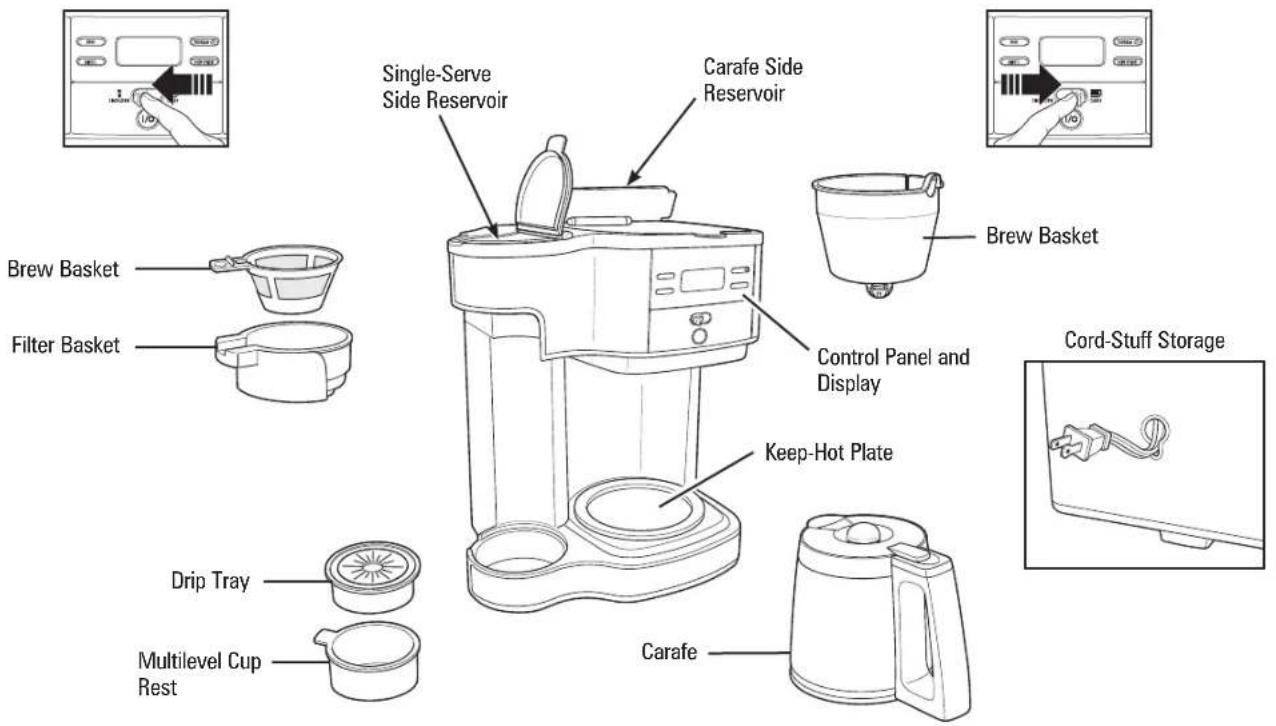
How to Use Single-Serve Side
WARNING Burn Hazard.
To avoid contact with hot coffee or water:
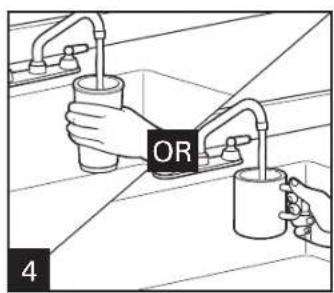
Do not use more than 14 ounces (414 ml) of water.
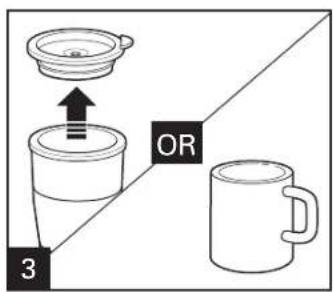
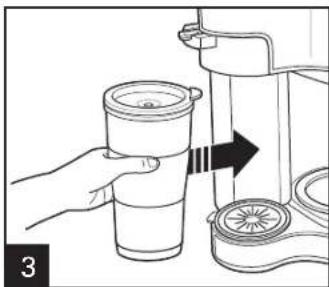
- Fill single-serve reservoir with mug or cup into which the coffee will be brewed.
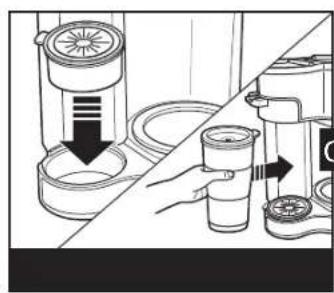
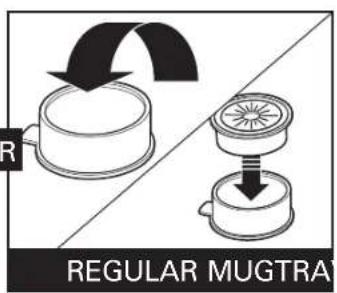
- Fully insert mug or cup under filter basket.
AUTOMATIC SHUTOFF: The coffeemaker will automatically shut off after brew cycle is complete.
NOTES:
The unit will only brew on one side at a time.
- To avoid overflow, use slightly less grounds when brewing decaf or flavored coffees.
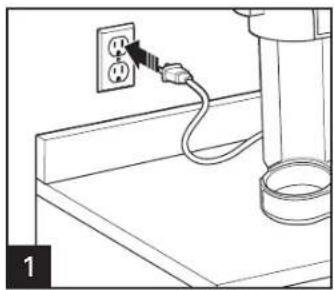
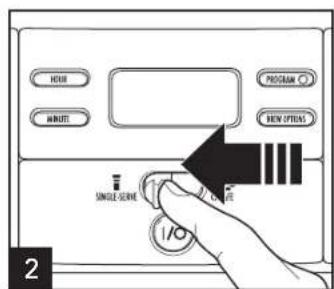
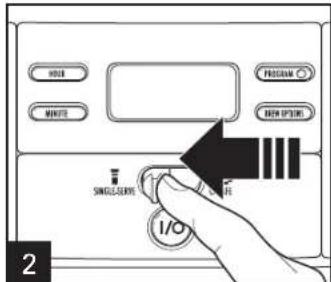
Push lever left to select Single- Serve.

How to Use Single-Serve Side (cont.)
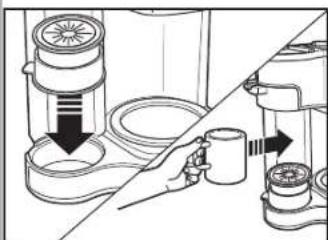
REGULAR MUG
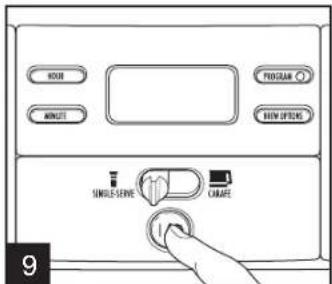
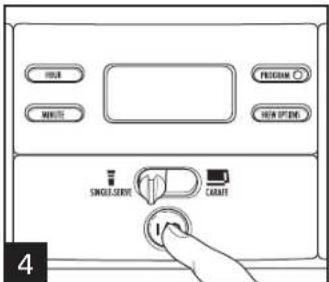
Press I/QON/OFF) button to begin the flow of coffee. Coffeemaker will shut off when brew cycle is complete. To stop flow of coffee midcycle, press I/QON/OFF) button.
7A-1 - GROUNDSD
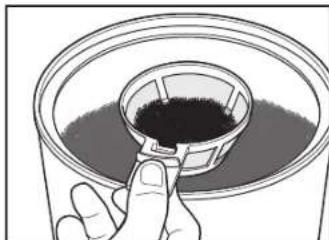
For regular coffee, use a maximum of two level tablespoons of grounds. To avoid overflow, use slightly less grounds when brewing decaf or flavored coffees.
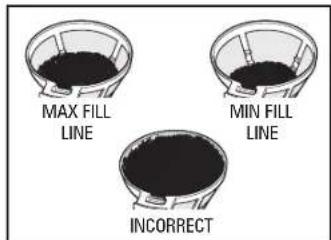
WARNING! Keep ground coffee below MAX fill line to prevent overflow.
7A-2 - GROUNDSD
Single-serve brew basket has two markings: the lower level marking if making 8 oz. (237 ml) of coffee, and the higher level mark if making 14 oz. (414 ml) of coffee. DO NOT fill scoop to top or this will cause overflow.
How to Use Carafe Side
AUTOMATIC SHUTOFF: The coffeemaker will automatically shut off 2 hours after brew cycle is complete.
NOTE: The unit will only brew on one side at a time.
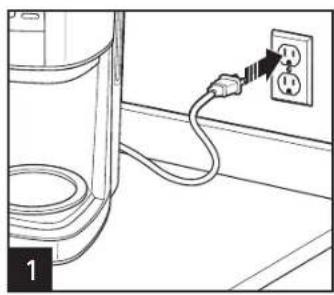
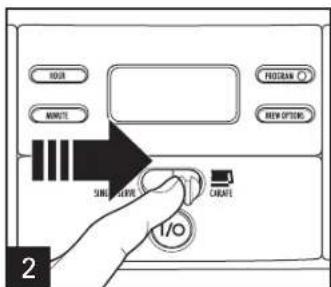
Push lever right to select Carafe.

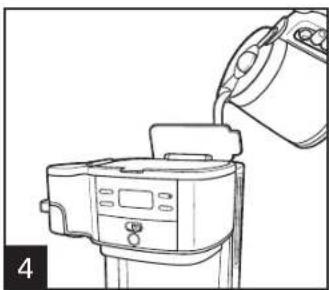
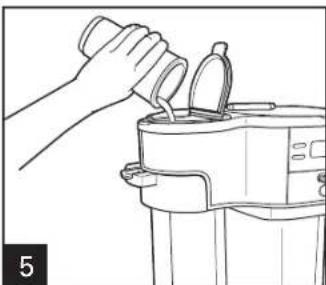
Lift lid and pour water from carafe into reservoir. NOTE: Do not fill past the 12-cup mark (60 ounces [1.8 L]).

Place carafe, with carafe lid attached, on keep-hot plate.
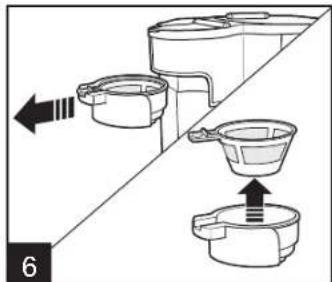
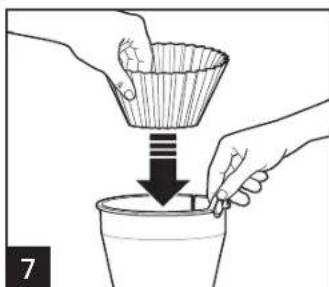
Place a cupcake-style paper filter in brew basket. A permanent filter may also be used.
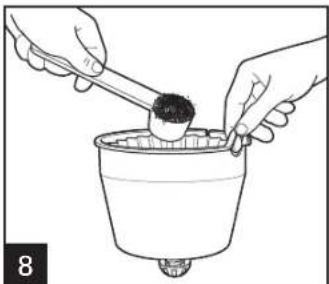
For each cup of coffee being made, place one level Tablespoon (15 ml) of coffee into filter.
How to Use Carafe Side (cont.)
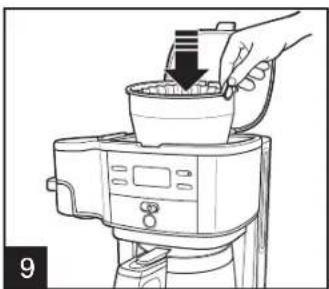
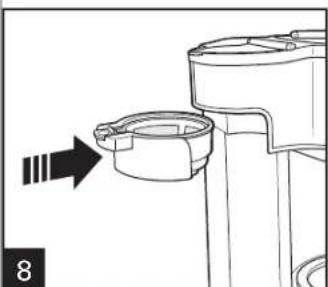
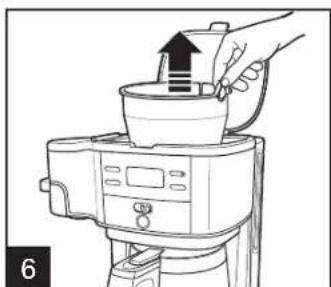
Place brew basket in brew basket well. Ensure brew basket is fully seated.
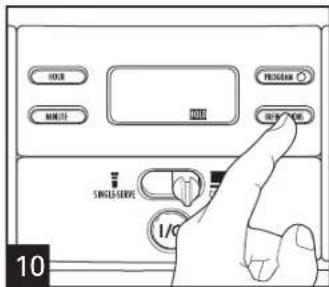
For enhanced full/strong-flavored coffee, press BREW OPTIONS button until BOLD is displayed.
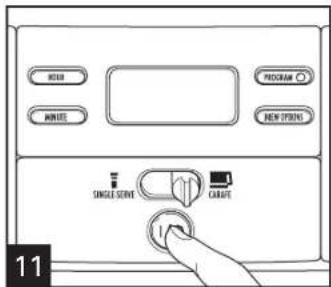
Press I/QON/OFF) button to start. Press I/QON/OFF) button again to turn off.
NOTE: If the coffeemaker is not turned off manually, it will automatically shut off in 2 hours.
To Order Permanent Filter or Other Parts and Accessories: visit hamiltonbeach.com
NOTE: BOLD mode will require additional time to complete a brewing cycle. If Brew Option is not selected, the coffeemaker will automatically brew on the regular/default setting.
Programming (For Either the Single-Serve OR Carafe Side)
NOTE: The unit will only brew on one side at a time.
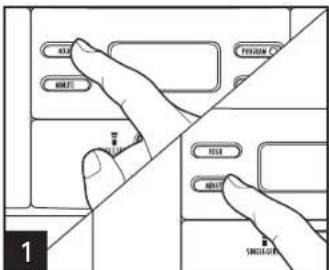
Press HOUR and then MINUTE to set clock.
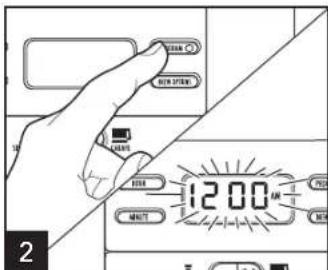
Hold PROGRAM until clock flashes.
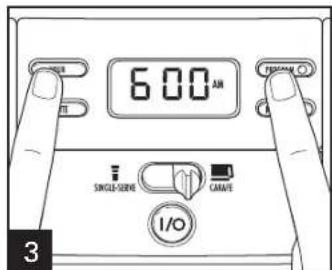
Continue holding PROGRAM button, press HOUR and MINUTE until the desired brewing start time is reached, and then release PROGRAM button.
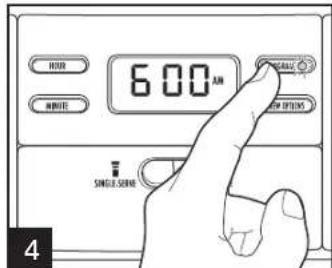
Press PROGRAM to activate automatic brewing. A green LED will illuminate to indicate the unit is programmed.
Tips for Best-Tasting Coffee
- All coffees are made from either arabica beans or robusta beans, or some combination of both. Arabica beans are slightly more expensive, but tend to produce better-tasting coffee.
- Ground coffee will become stale much faster than whole beans. If buying foreground coffee, choose a package with the latest expiration date or a smaller quantity.
-
If grinding whole beans, set your coffee grinder on a fine/medium grind. This will yield the best-tasting grounds. Try to use freshly ground coffee within about a week of grinding.
-
Using a water filter, filtered water, or bottled water will yield better-tasting coffee than tap water.
- Use approximately 1 tablespoon of grounds for each cup of coffee being made. To avoid overflow, use slightly less grounds (3/4 tablespoons [11.1 ml]) when brewing decaf or flavored coffees. Also, be aware that using coffee that is ground too finely may also cause the filter basket to overflow.
- Make sure your coffeemaker is clean. See "Care and Cleaning" sections.
Care and Cleaning – Single-Serve Side
All coffeemakers should be cleaned at least once a month (once a week for areas with hard water).
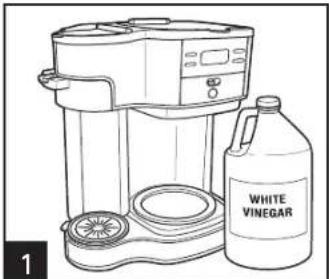
Pour 1/2 cup (118 ml) of plain white vinegar and 1/2 cup (118 ml) of cold water into single-serve side reservoir.
Press I (ON) button. Press OFF button after 30 seconds and wait 30 minutes. Press I (ON) button. Press OFF button when finished.
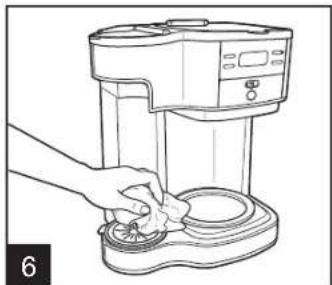
Run 2-3 more brew cycles with CLEAN WATER only. Allow to cool between cycles. 10
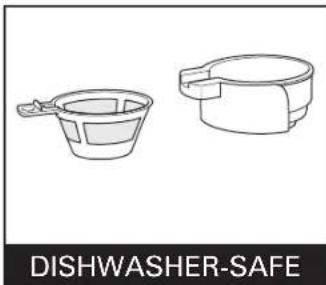
DO NOT use the "SANI" setting when washing in the dishwasher. "SANI" cycle temperatures could damage your product.
Care and Cleaning – Carafe Side
All coffeemakers should be cleaned at least once a month (once a week for areas with hard water).
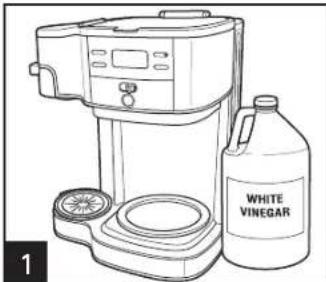
Pour 1 pint (2 cups/473 ml) vinegar into carafe side reservoir.
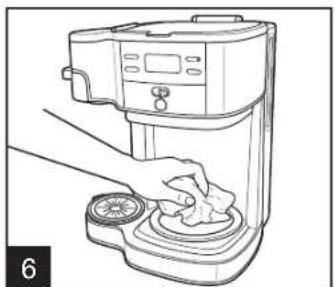
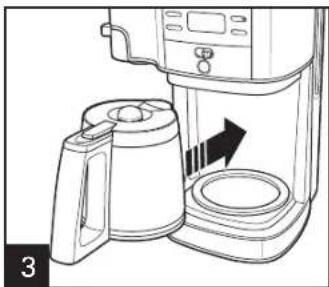
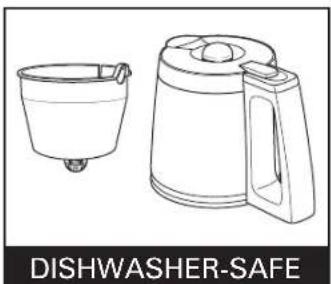
DO NOT use the "SANI" setting when washing in the dishwasher. "SANI" cycle temperatures could damage your product.
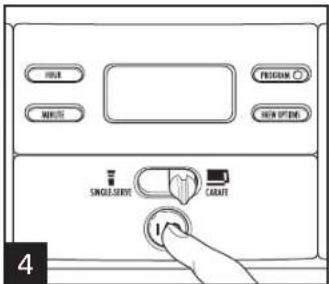
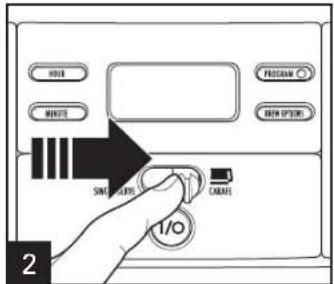
Press I (ON) button. Press O(OFF) button after 30 seconds and wait 30 minutes. Press I (ON) button. Press Q(OFF) button when finished.
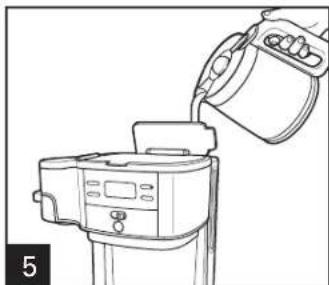
Run 2-3 more brew cycles with CLEAN WATER only. Allow to cool between cycles.
Troubleshooting (Single-Serve Side)
PROBLEM
Weak coffee.
Coffee overflows from brew basket, travel mug, or regular mug.
Coffee tastes bad.
PROBABLE CAUSE
- Not enough ground coffee used. See "How to Use Single-Serve Side."
- Excessive amount of water in single-serve reservoir. Use travel mug or mug into which coffee will be brewed to fill reservoir. Use slightly less grounds when brewing decaffeinated or flavored coffees. Set coffee grinder to automatic drip grind.
- Coffeemaker needs cleaning.
- Coffee ground too coarsely or too finely. Set coffee grinder to automatic drip grind.
Poor coffee quality and freshness. - Poor water quality (use filtered or bottled water).
Troubleshooting (Carafe Side)
PROBLEM
Brew basket overflows or coffee brews slowly.
Coffee leaks onto base.
Coffee tastes bad.
PROBABLE CAUSE
- Excessive amounts of ground coffee.
- Decaffeinated and/or coffee ground too finely can cause overflow. Set coffee grinder to automatic drip grind and use slightly less grounds.
- Coffeemaker needs cleaning.
If using a paper filter:
- Coffee grounds between paper filter and brew basket.
- Paper filter not open and in proper position.
-
Rinse brew basket before inserting paper filter so the edges will remain pressed against the sides of the basket.
Poor-quality paper filter. -
Carafe removed from keep-hot plate for more than 20 seconds during the brewing cycle.
-
Coffeemaker needs cleaning.
- Coffee ground too coarsely or too finely. Set coffee grinder to automatic drip grind.
- Coffee-to-water ratio unbalanced. Adjust for personal preference.
- Poor coffee quality and freshness.
- Poor water quality (use filtered or bottled water).
Troubleshooting (Carafe Side) (cont.)
PROBLEM
Coffee sediment in cup.
Coffee not brewing or unit will not turn on.
Longer than normal brew time.
PROBABLE CAUSE
- Use a high-quality, basket-style paper filter instead of optional permanent coffee filter.
- Carafe not positioned on keep-hot plate.
Water reservoir is empty. - Unit is unplugged.
Power outage. - Power surge. Unplug; then plug the unit back in.
-
Clock requires reset after power outage.
-
Mineral deposits can build up in the pump of your coffeemaker. Periodic cleaning of the inside of the unit is recommended. More frequent cleaning may be necessary, depending on the hardness of your water. See "Care and Cleaning - Carafe Side" section.
NOTE: Do not disassemble the unit.
Limited Warranty
This warranty applies to products purchased and used in the U.S. and Canada. This is the only express warranty for this product and is in lieu of any other warranty or condition.
This product is warranted to be free from defects in material and workmanship for a period of five (5) years from the date of original purchase in Canada and one (1) year from the date of original purchase in the U.S. During this period, your exclusive remedy is repair or replacement of this product or any component found to be defective, at our option; however, you are responsible for all costs associated with returning the product to us and our returning a product or component under this warranty to you. If the product or component is no longer available, we will replace with a similar one of equal or greater value.
This warranty does not cover glass, filters, wear from normal use, use not in conformity with the printed directions, or damage to the product resulting from accident, alteration, abuse, or misuse. This warranty extends only to the original consumer purchaser or gift recipient. Keep the original sales receipt, as proof of purchase is required to make a warranty claim. This warranty is void if the product is used for other than single-family household use or subjected to any voltage and waveform other than as specified on the rating label (e.g., 120V 60Hz ).
We exclude all claims for special, incidental, and consequential damages caused by breach of express or implied warranty. All liability is limited to the amount of the purchase price. Every implied warranty, including any statutory warranty or condition of merchantability or fitness for a particular purpose, is disclaimed except to the extent prohibited by law, in which case such warranty or condition is limited to the duration of this written warranty. This warranty gives you specific legal rights. You may have other legal rights that vary depending on where you live. Some states or provinces do not allow limitations on implied warranties or special, incidental, or consequential damages, so the foregoing limitations may not apply to you.
To make a warranty claim, do not return this appliance to the store. Please write Hamilton Beach Brands, Inc., Customer Service Department, 4421 Waterfront Dr., Glen Allen, VA 23060, or visit hamiltonbeach.com/customer-service in the U.S. or hamiltonbeach.ca/ customer-service in Canada. For faster service, locate the model, type, and series numbers on your appliance.
PRECAUTIONS IMPORTANTES
Col. Polanco V Seccion,
Miquel Hidalgo
Ruperto Martinez No.238 Ote
Col. Centro, MONTERREY, N.L., C.P. 64000
Tel:8183436700
Jalisco
SERVICIOS DE MANTENIMIENTO CASTILLO
Garibaldi No. 1450
Ladrón de Guevara, GUADALAJARA, Jalisco, C.P. 44660
Tel: 33 3825 3480
Model Characteristicas Eléctricas:
49980, 49933, 4A650 120 V ~ 60 Hz 950 W

- SAVE THESE INSTRUCTION
- OTHER CONSUMER SAFETY INFORMATION
- SINGLE-SERVE SIDE PARTS AND FEATURES
- HOW TO USE SINGLE-SERVE SIDE
- WARNING BURN HAZARD
- NOTES
- HOW TO USE SINGLE-SERVE SIDE (CONT.)
- HOW TO USE CARAFE SIDE
- HOW TO USE CARAFE SIDE (CONT.)
- PROGRAMMING (FOR EITHER THE SINGLE-SERVE OR CARAFE SIDE)
- TIPS FOR BEST-TASTING COFFEE
- CARE AND CLEANING – SINGLE-SERVE SIDE
- CARE AND CLEANING – CARAFE SIDE
- TROUBLESHOOTING (SINGLE-SERVE SIDE)
- PROBLEM
- PROBABLE CAUSE
- TROUBLESHOOTING (CARAFE SIDE)
- IF USING A PAPER FILTER
- TROUBLESHOOTING (CARAFE SIDE) (CONT.)
- LIMITED WARRANTY
- PRECAUTIONS IMPORTANTES
- JALISCO
Brand : HAMILTON BEACH
Model : The Scoop 49980R
Category : Coffee machine