InstaChill M22993 - Fan Livington - Free user manual and instructions
Find the device manual for free InstaChill M22993 Livington in PDF.



User questions about InstaChill M22993 Livington
0 question about this device. Answer the ones you know or ask your own.
Ask a new question about this device
Download the instructions for your Fan in PDF format for free! Find your manual InstaChill M22993 - Livington and take your electronic device back in hand. On this page are published all the documents necessary for the use of your device. InstaChill M22993 by Livington.
USER MANUAL InstaChill M22993 Livington
text_image
AS SEEN ON TV ORIGINAL M MEDIASHOPlivington®
INSTACHILL
text_image
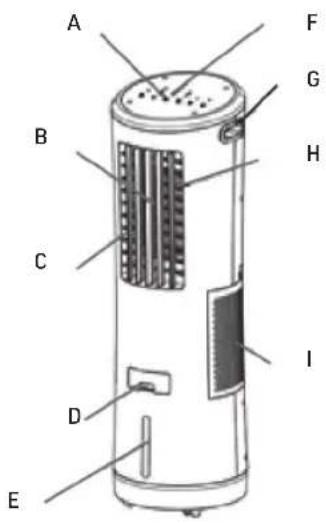
A B C D E F G H I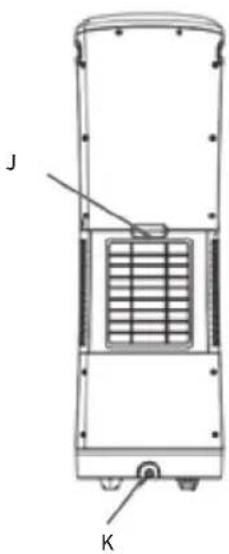
text_image
J KLieferumfang
1 x Livingston InstaChill, 1 x Fernbedienung
Contents
1 x Livingston InstaChill, 1 x Remote control
Volume de livraison
1 x Livingston InstaChill, 1 x Télécommande
Description of parts
A. Control panel
B. Air outlet
C. Pivoting grill
D. Charge for water supply
E. Water level indicator
F. LED light
G. Handle
H. Manually adjustable grille
1. Air inlet
J. Rear cover
K. Water drainage cap
Instructions for Use 09
Mode d'emploi....12
natural_image
Hand holding a remote control device with a red laser beam projecting onto a white industrial temperature range (no text or symbols visible)Important information about your InstaChill remote control
The remote control sensor is located behind the slats of your InstaChill.
In order to be able to correctly control your InstaChill using the remote control, the remote control must be pointed in the direction and height of the sensor as accurately as possible (see image).
Always keep the remote control pointed straight at the slats (H: approx. 80-100cm) from a maximum distance of 5 metres.
We're here to help! DO NOT RETURN YOUR DEVICE!
If you believe that your remote control does not work as it should, or if you have any questions about its use, etc., please contact us.*
Web: www.mediashop.tv
text_image
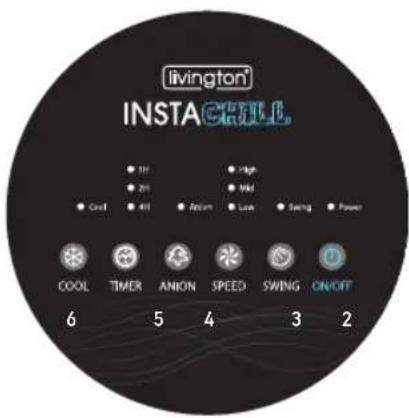
livington INSTA CHILL. ● 1H ● 2H ● Cool ● 4H ● Action ● High ● Mid ● Low ● Swing ● Power COOL TIMER ANION SPEED SWING ON/OFF 6 5 4 3 2- ON/OFF
- SWING (Left-Right)
- SPEED
(Low / Medium / High)
- ANION
- TIMER (1H/2H/4H)
- COOL
Fonctions écran
- MARCHE/ARRÊT
- PIVOTEMENT (gauche-droite)
- VITESSE
Remote control functions
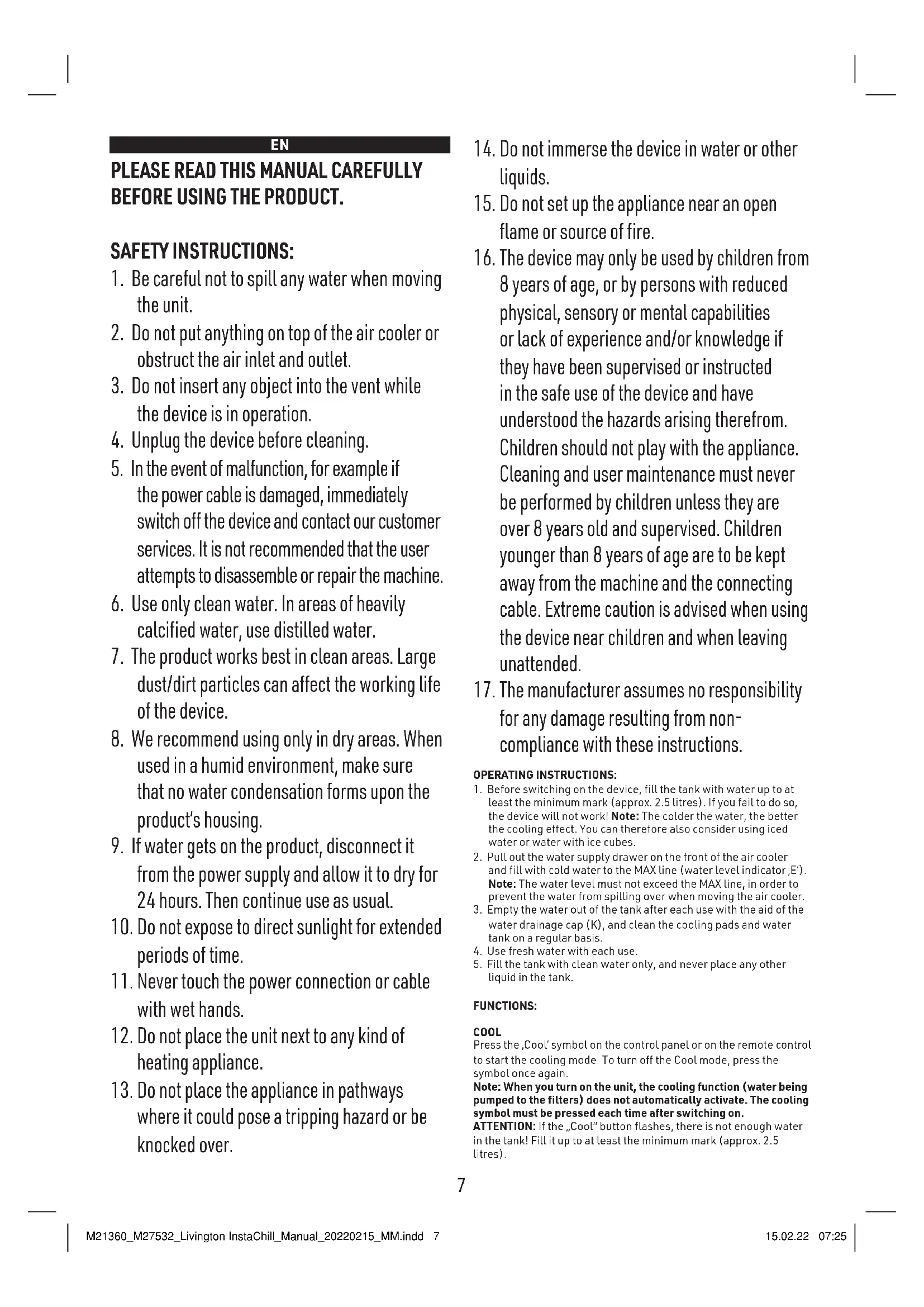
PLEASE READ THIS MANUAL CAREFULLY BEFORE USING THE PRODUCT.
SAFETY INSTRUCTIONS:
- Be careful not to spill any water when moving the unit.
- Do not put anything on top of the air cooler or obstruct the air inlet and outlet.
- Do not insert any object into the vent while the device is in operation.
- Unplug the device before cleaning.
- In the event of malfunction, for example if the power cable is damaged, immediately switch off the device and contact our customer services. It is not recommended that the user attempts to disassemble or repair the machine.
- Use only clean water. In areas of heavily calcified water, use distilled water.
- The product works best in clean areas. Large dust/dirt particles can affect the working life of the device.
- We recommend using only in dry areas. When used in a humid environment, make sure that no water condensation forms upon the product's housing.
- If water gets on the product, disconnect it from the power supply and allow it to dry for 24 hours. Then continue use as usual.
- Do not expose to direct sunlight for extended periods of time.
- Never touch the power connection or cable with wet hands.
- Do not place the unit next to any kind of heating appliance.
-
Do not place the appliance in pathways where it could pose a tripping hazard or be knocked over.
-
Do not immerse the device in water or other liquids.
- Do not set up the appliance near an open flame or source of fire.
- The device may only be used by children from 8 years of age, or by persons with reduced physical, sensory or mental capabilities or lack of experience and/or knowledge if they have been supervised or instructed in the safe use of the device and have understood the hazards arising therefrom. Children should not play with the appliance. Cleaning and user maintenance must never be performed by children unless they are over 8 years old and supervised. Children younger than 8 years of age are to be kept away from the machine and the connecting cable. Extreme caution is advised when using the device near children and when leaving unattended.
- The manufacturer assumes no responsibility for any damage resulting from non-compliance with these instructions.
OPERATING INSTRUCTIONS:
- Before switching on the device, fill the tank with water up to at least the minimum mark (approx. 2.5 litres). If you fail to do so, the device will not work! Note: The colder the water, the better the cooling effect. You can therefore also consider using iced water or water with ice cubes.
- Pull out the water supply drawer on the front of the air cooler and fill with cold water to the MAX line (water level indicator, E'). Note: The water level must not exceed the MAX line, in order to prevent the water from spilling over when moving the air cooler.
- Empty the water out of the tank after each use with the aid of the water drainage cap (K), and clean the cooling pads and water tank on a regular basis.
- Use fresh water with each use.
- Fill the tank with clean water only, and never place any other liquid in the tank.
FUNCTIONS:
COOL
Press the 'Cool' symbol on the control panel or on the remote control to start the cooling mode. To turn off the Cool mode, press the symbol once again.
Note: When you turn on the unit, the cooling function (water being pumped to the filters) does not automatically activate. The cooling symbol must be pressed each time after switching on.
ATTENTION: If the „Cool“ button flashes, there is not enough water in the tank! Fill it up to at least the minimum mark (approx. 2.5 litres).
POWER
Press the On/Off symbol on the control panel or the remote control to turn on the air cooler. Its light illuminates. Press this symbol again to turn off the device. Its light will turn off.
SWING
Press the swing symbol on the control panel or on the remote control to automatically pan the vertical front grille, and the corresponding light will turn on. Press this symbol again to stop the swing mode, and the light will turn off. The rear grilles can be adjusted manually to direct the air flow from top to bottom as needed.
SPEED
Press the speed symbol so that the fan with the lowest speed (1) starts up. Press the symbol on the control panel or on the remote control again to switch the speed between low (1), medium (2) and high (3).
ANION
Press the anion symbol on the control panel or on the remote control. To stop the anion mode, press the symbol again. ANION is a system to kill the bacteria in the water tank. The anion function adds a negative charge to the water, which inhibits the growth of bacteria and other pathogens, and attracts dust. The function corresponds to that of an air cleaner.
TIMER
Press the timer symbol on the control panel or the remote control to set the timer. The setting changes with every press of the symbol. From 1 to 7 hours, in ascending order. To turn it off, press again.
IMPORTANT TIPS:
- The cooling function works best at low humidity. If there is a very high level of humidity, the temperature cannot be significantly reduced.
- Use cool, fresh water with each use. The colder the water, the greater the cooling effect. Small ice cubes can also be added to the water to improve the effect even further.
- Switch off the cooling function („Cool“) 20 to 30 minutes before switching off and allow the unit to continue running so that the cooling pads can dry. This helps avoid bad odours, deposits and mildew.
- Note: When you turn on the unit, the cooling function (water being pumped to the filters) does not automatically activate. The cooling symbol must be pressed each time after switching on.
Cleaning & Maintenance (3-piece special filter)
text_image
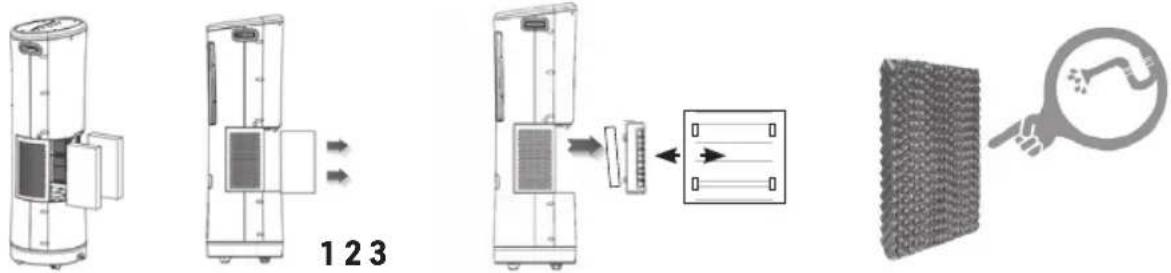
123- Remove the cover (J) from the back - remove the safety screw with a screwdriver (remembering to screw it back on afterwards).
- Pull out the special filter in the direction of the arrow (1).
- Removing the special filter from the front opening: Hold the housing with one hand. Gently pull it with the other hand on one side and up out of the frame (2).
- Regularly clean the special filter with ordinary water and wipe off any dirt with a soft brush or cloth (3).
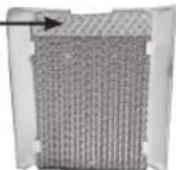
- Pay attention to the dimensions when inserting the filter. The
filters are different sizes and must be fitted correspondingly. You will see that the filters have an irregular shape on the upper side. This must always point upwards when inserting. If the filters are very dirty, they should be replaced: with regular use this should be at least every 6 months.
Note: If de-scaling is required, make sure that you remove the filters beforehand.
WATER DRAINAGE CAP
To remove the water from the unit, place a container below the water drainage cap (K) on the lower part of the rear of the unit, or place it in the shower/bathtub. Then carefully open the water drainage cap (K), ensuring that no water spills over so as not to damage the floor.
Made in China
Troubleshooting:
| Problem Possible Cause Corrective Action Remarks | |||
| The evaporative air cooler does not work and does not respond to the buttons being pressed. | Power failure or faulty power connection. | Measure the input voltage and connect the device to a dedicated power source. | It is recommended to use a voltmeter to determine the precise voltage. |
| The remote control batteries are empty. | Change the batteries. | ||
| The remote control or the control panel is damaged. | Please contact our customer services. | ||
| The remote control. | The remote control must be pointed directly at the appliance. | ||
| There is no air flow from the unit, even though the machine is in operation. | The motor is damaged. | Please contact our customer services. | |
| The thermal protection in the motor has been triggered. | Turn off the appliance until the motor has cooled down. | ||
| The pump works, but the appliance does not cool. | The cooling function (water being pumped to the filters) is not switched on. | The cooling symbol must be pressed again each time after switching on. | |
| The special filter is clogged or has become dirty. | Clean or replace the special filter. | ||
| The special filter is dry or does not contain enough water. | Check the upper water distribution tray, and determine if there is a blockage.The cooling function is deactivated - please activate | ||
| The relative humidity is excessively high. | When the evaporative air cooler is used for an extended period of time, the humidity in the room can become very high, so the temperature can not be reduced to as great an extent. Turn the cooling mode to a lower level or deactivate it until the humidity has decreased. | ||
| There is not enough water in the tank. | Fill the tank up to at least the minimum mark (approx. 2.5 litres). | Note: The colder the water, the better the cooling effect. | |
| "Cool" button flashes | There is not enough water in the tank. | Fill the tank up to at least the minimum mark (approx. 2.5 litres). | Note: The colder the water, the better the cooling effect. |
| The pump works, but does not circulate water, or the special filters contain too little water. | The upper water distribution tray has become clogged. | Clean the upper water distribution tray. | |
| There is not enough water in the tank. | Fill the tank up to at least the minimum mark (approx. 2.5 litres). | Note: The colder the water, the better the cooling effect. | |
| Water spurts out of the device. | The special filter or the rear cover (J) is not in the right position. | Position the special filter or the rear cover (J) correctly. | |
| The upper water distribution tray has become clogged. | Clean the upper water distribution tray. | ||
| There is an unpleasant odour. | The water tank or the special filter is dirty. | Clean the water tank and the special filter. | |
| White sediments are visible in the water tank. | The water is too hard. | Drain the water tank, and clean or de-scale the special filters and tank more frequently. | In areas with hard water, use distilled water in the future. |
FR
VEUILLEZ LIRE ATTENTIVEMENT LE PRÉSENT MODE D'EMPLOI AVANT D'UTILISER LE PRODUIT.
CONSIGNES DE SÉCURITÉ :
natural_image
Close-up of a textured fabric or material sample with no visible text or symbolsEN: This symbol means that such electrical equipment or batteries must not be disposed of with normal household waste. You are legally obliged to hand in such items - free of charge - to a public collection point or distributor-created collection point for the recycling of electrical devices and expired bulbs and batteries within the scope of the Electrical and Electronic Equipment Act that are not encapsulated by or fixed into the appliance, and can be removed or separated from the appliance non-destructively, for disposal at the end of their service life. Use rechargeable batteries instead of single-use batteries wherever possible. The recovery and recycling of old appliances makes an important contribution to protecting our environment. Improper disposal can result in toxic substances being released into the environment, which can have harmful effects upon people, animals and plants. Batteries with an increased pollutant content are also marked with the following symbols: Cd = cadmium, Hg = mercury, Pb = lead. Consumers are themselves responsible for deleting any personal data from appliances.
EN: This product complies with the European directives.
EN: For indoor use only.
office@mediashop-group.com | www.mediashop.tv