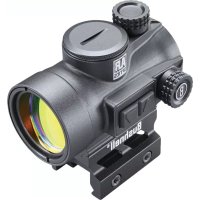
USER MANUAL TRS26 BUSHNELL
natural_image
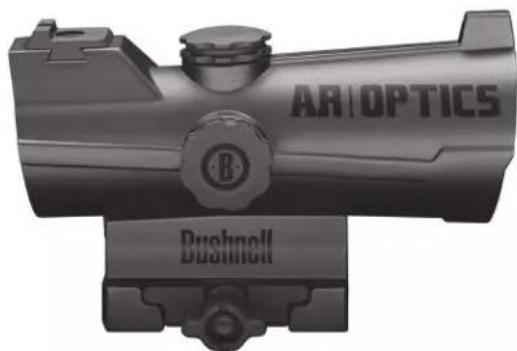
Black and white photo of a precision optical device labeled 'ARIOPTICS' and 'Bushnell' (no additional text or symbols visible)
ENRAGE
natural_image
Exterior view of a precision optical device labeled 'ARIOPTICS' and 'Bushnell' (no additional text or symbols visible)
INCINERATE
natural_image
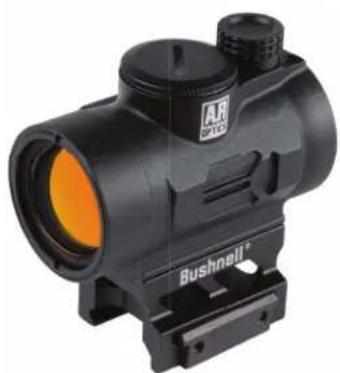
Black mounted optical device with orange lens and control knobs (no visible text or symbols)
TRS-26
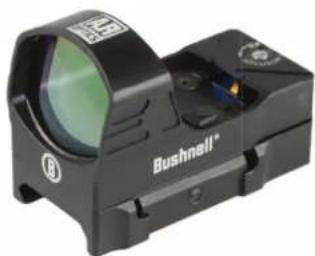
natural_image
Black Bushnell 100 retor with optical lens and targeting scope (no text or symbols on body)
FIRST STRIKE 2.0
RED DOT SIGHT OWNER'S GUIDE
Thank you for purchasing your new Bushnell® AR Optics® Red Dot Sight (illuminated optical sight).
This manual will help you optimize your viewing experience by explaining how to utilize the sight's features and how to care for it. Read the instructions carefully before using your sight.

WARNING! : DO NOT LOOK AT THE SUN THROUGH THE OPTICS, AS PERMANENT EYE DAMAGE OR EVEN BLINDNESS MAY RESULT.
ABOUT THE BUSHNELL® AR OPTICS® TACTICAL RED DOT SIGHTS
All the AR Optics models described in this manual are state-of-the-art sights, engineered especially for competitive shooting and target shooting or plinking with handguns, rifles, shotguns and bows, as well as hunting at shorter ranges.
Your sight's illuminated reticle has been pre-focused so the aiming point always appears in focus on the target. By comparison, open sights force you to focus on the rear sight, front sight and target at the same time and bring the target into focus.
AR Optics Red Dot Sights can be easily used with both eyes open (eye relief is unlimited), increasing the shooter's awareness of the surrounding environment and providing faster target acquisition due to the parallax free design, as the dot follows the movement of the user's eye while remaining fixed on the target. Engineered for greater speed and accuracy, these sights allow you to focus on the target rather than a reticle, thus increasing accuracy. Here's a more detailed look at each model in the AR Optics line of red dot sights:
- The ENRAGE (AR751305) is rugged and built to last. Multi-coated optics deliver bright, crisp images for easy target acquisition. The 2 MOA dot has eight brightness settings, with an off setting between each. The included hi-rise mount gives you everything you need, right out of the box. Battery life is approx. 7000 hours at a brightness setting of "4".
- The INCINERATE (AR750132) makes target acquisition second nature. The circle-dot reticle features a 25 MOA circle that naturally draws the eye to the 2-MOA center dot, making it ideal for both tactical rifles and shotguns. It has an included hi-rise mount, and eight brightness settings with an off setting between each. The rear sight on Incinerate is compatible with Glock® dovetail sights. Battery life is approx. 6500 hours at a brightness setting of "4".
- The TRS-26 (AR71XRD) goes beyond its historic predecessor with improvements in several key areas. The TRS-26 is powered by a long-lasting battery that sets the industry standard with more than 30,000 hours of battery life (at a brightness level of "6"). It delivers a brighter, crisper 3 MOA dot with 11 brightness levels and push-button operation in a compact package. The Bushnell AR Optics TRS-26 is the standard for multipurpose red dots.
- The FIRST STRIKE 2.0 (AR71XRS) is two times the red dot its older brother was. The First Strike 2.0 is just as versatile – it includes a hi-rise mount and is at home on both shotguns and flat top MSRs. It features an industry-leading battery life of more than 110,000 hours (at a typical brightness level of "5"), with tool-less side compartment battery removal and a brighter 4 MOA dot with 10 brightness settings. The Bushnell AR Optics First Strike 2.0 improves upon a classic.
Note: battery life as listed will vary depending on the brightness settings used (stated life estimates are based on a typical, medium brightness setting), freshness and quality of the battery, ambient temperature, and other factors.
About Red Dot Lens Positioning
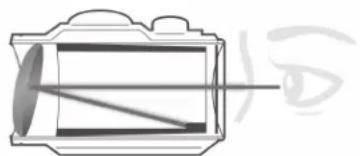
All red dot sights have an objective lens at the front of the unit that is spherical in shape. However, unlike a conventional riflescope with all lenses mounted perpendicular (at a 90 degree angle) to the axis of the tube, the objective lens in a red dot sight is positioned off axis and appears to be tilted when looking at the sight (right). This angle of the front lens allows the
light generated by the battery powered LED light source inside the unit to be reflected back into the sight. The reflected light becomes the "dot" or aiming reference that the shooter sees when a red dot sight is switched on. This engineered "bending" of light is what makes today's red-dot sights so popular and easy to use.
natural_image
Diagram of a human eye through a lens system, showing light rays passing through the lens (no text or labels)
MOUNTING YOUR AR OPTICS® SIGHT

WARNING! : BEFORE MOUNTING YOUR SIGHT, REPLACING ITS BATTERY, OR REMOVING OR PERFORMING MAINTENANCE ON THE SIGHT, BE SURE ACTION IS OPEN, CLIP OR MAGAZINE IS REMOVED AND A ROUND IS NOT IN THE CHAMBER. DO NOT ATTEMPT ANY WORK UNTIL THE GUN HAS BEEN CLEARED AND DETERMINED TO BE SAFE.
Your AR Optics Sight includes a riser block (Enrage, Incinerate, First Strike 2.0) or high rise mount (TRS-26) that fits Picatinny or Weaver style rails.
The base or bases you use with your sight should be manufactured specifically for your pistol, rifle or shotgun and should create a uniform horizontal and vertical mounting platform. Be sure they are properly installed and securely fastened according to the manufacturer's instructions for your safety. There is no set eye relief for your AR Optics sight; therefore, you
should provide at least three inches of clearance between the viewing lens and your eye when in the shooting position. Note that fi rearms with adjustable length-of-pull ("LOP") buttstocks can affect or limit the amount of usable eye relief.
Set the mount onto the base or bases so that it aligns with the crosscut grooves. Work the mount into the base until the crossbolt seats into the groove. Forward load the mount, so that the crossbolt engages the forward groove and clearance is removed. While holding the unit in position, securely tighten the locking nut or mounting plate. The following notes (next page) provide some specific mounting details for the various models of AR Optics red dot sights.
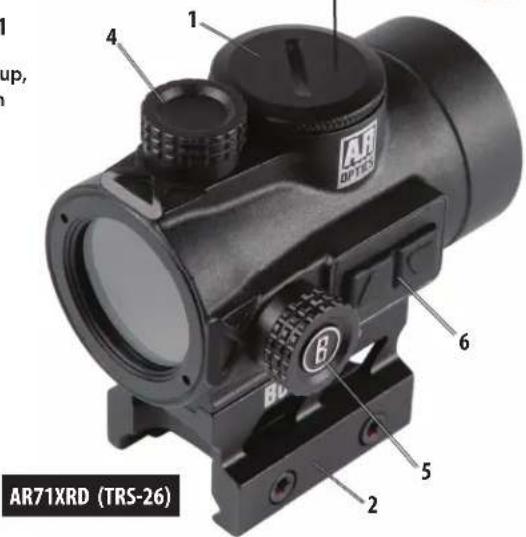
PARTS GUIDE
- Battery Compartment
- Mount (w/Hi-Rise insert on Incinerate, Enrage. Hi-Rise is included but not pre-installed on First Strike.)
- Lens
- Elevation Adjustment (remove cap if necessary)
- Windage Adjustment (remove cap if necessary)
- Brightness Control (rheostat dial or up/down buttons)
- Optional Rear Sight Mount-fi ts Glock® dovetail (AR750132 only)
- Sm. Hex Bolts (AR71XRS only)
- LED (AR71XRS only)
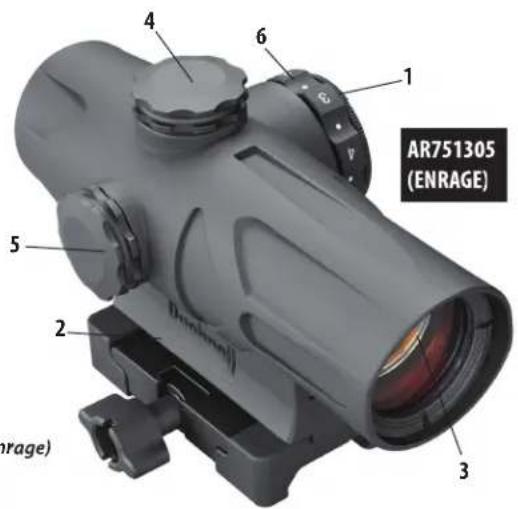
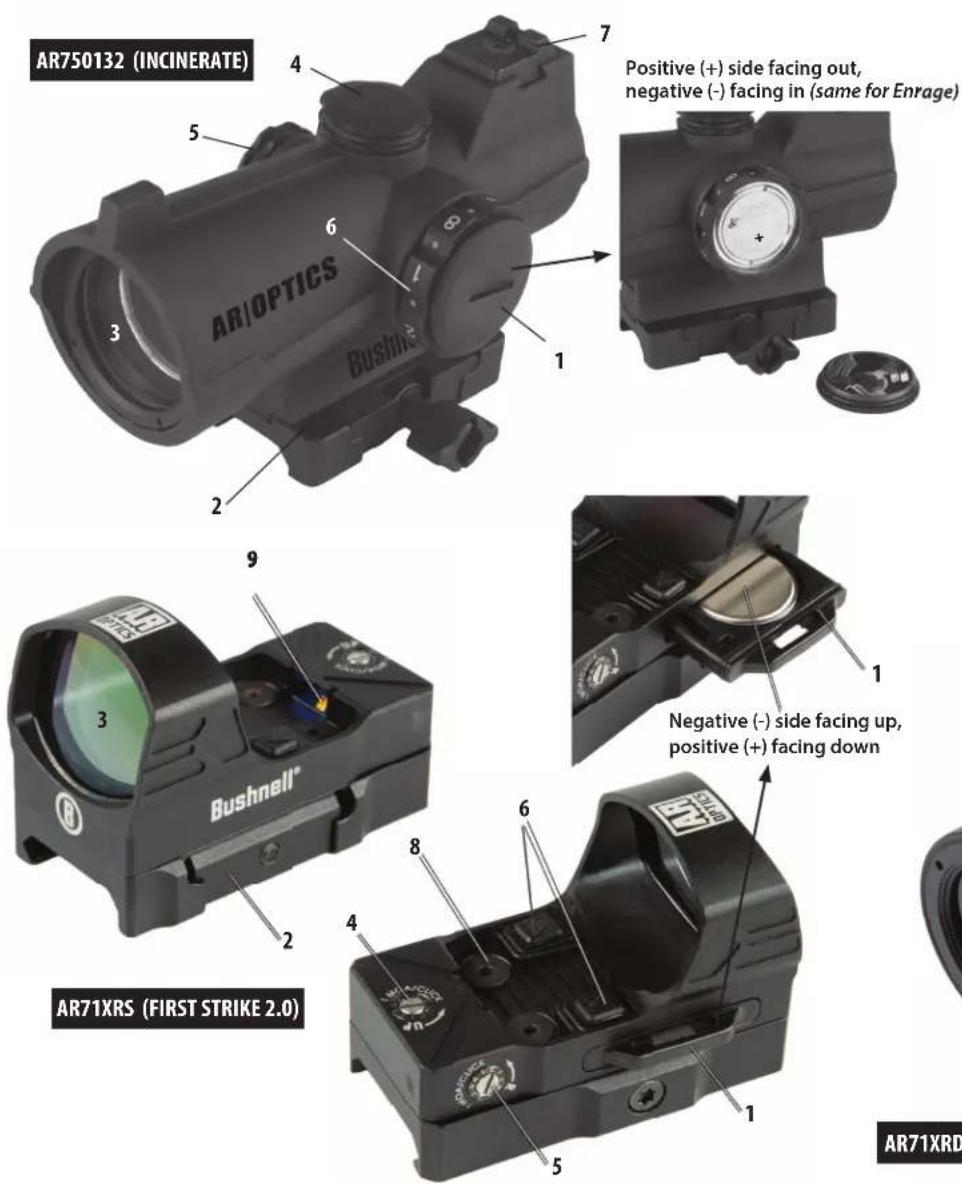
Positive (+) side facing up, negative (-) facing down
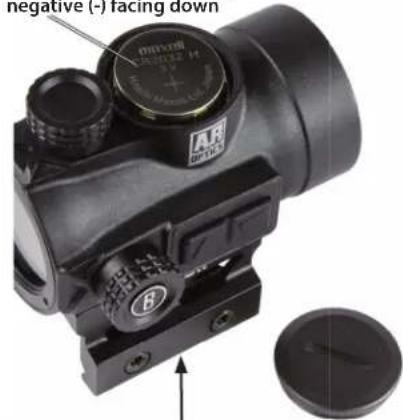

WARNING: IF THE SIGHT IS NOT MOUNTED FAR ENOUGH FORWARD, ITS REARWARD MOTION MAY INJURE THE SHOOTER WHEN THE RIFLE RECOILS.
MOUNTING DETAILS BY MODEL
Enrage/Incinerate
- Set the mount onto the base rail or bases so that they align with the crosscut grooves.
- Work the mount into the base until the crossbolt seats into the groove.
- Securely tighten the locking nut with a coin or screwdriver. CAUTION: Do not overtighten.
TRS-26
- Loosen the shaft by means of the provided multi-tool, so that the locking bar can clamp around the Picatinny/ Weaver rail.
- Install the sight to the weapon rail by tightening the shaft. First, ensure that the sight is correctly positioned and that the shaft fits into a groove on the Picatinny/Weaver rail. To make sure that the shaft is firmly tightened, screw the shaft clockwise until a light resistance can be encountered. CAUTION: Do not overtighten.
- Finally, make sure that the shaft with locking bar is firmly tightened around the base rail.
First Strike 2.0
- Any Weaver or Picatinny style base is suitable for mounting the First Strike 2.0. Make sure the base you use is manufactured specifically for your pistol, rifle or shotgun. Be sure the base is properly installed and securely fastened according to the manufacturer's instructions for your safety.
- Loosen the hex bolt on the mount of the sight using the provided tool. Position the mount on your base rail so that the crossbolt engages a slot. Tighten the hex bolt. CAUTION: Do not overtighten.
ACTIVATING THE BATTERY
Before powering on your sight for the first time, you will need to open the battery compartment and remove the protective sticker or plastic disc from the battery. See the Parts Guide for the location of the battery compartment on your model.
REPLACING THE BATTERY
Should your reticle grow dim or not light at all, replace the battery. To install a new battery, unscrew the round battery compartment cover (Enrage/Incinerate/TRS-26) using a coin, or pull out the battery tray* (First Strike 2.0). Insert a new CR2032 lithium battery, noting the position of the positive and negative sides, which varies by model (see Parts Guide). Replace battery cover.
*(if necessary, insert a small screwdriver in the open slot of the First Strike's battery tray to leverage the tray out slightly first)
CAUTION: When replacing the battery cover, be sure that the O-ring is present and not damaged. Failure to do so could result in water leakage into the battery compartment.
Verify that red dot is present by switching the power on and increasing the brightness if necessary (see next section).
SWITCHING POWER ON/OFF
To turn the sight's power on and off:
(Enrage/Incinerate): Activate the illuminated dot by turning the rheostat knob to any numbered position. To switch off the sight, select a dot mark between any two numbers.
(TRS-26/First Strike 2.0): Press and release the "Up" arrow button to power on the sight ("Down" button also works on First Strike 2.0). To switch power off, press and hold the "Down" arrow button for 2.5 seconds. Note: power will automatically switch off after 2 hours (TRS-26) or 8 hours (First Strike 2.0) to extend battery life if no button has been pressed. Switch power on again to continue using the sight if necessary.
To adjust the brightness level of the dot reticle:
(Enrage/Incinerate): Turn the rheostat knob clockwise to increase brightness and counterclockwise to decrease brightness. With the "1" lined up with the index mark, the dot will be the dimmest, and with a setting of "8", the dot is at the brightest illumination level.
(TRS-26/First Strike 2.0): Press and release the "Up" arrow button to increase brightness. Press and release the "Down" arrow button to decrease brightness.
- With the sight mounted, rest the gun on a solid support. Switch on the sight's power and adjust brightness as needed until dot is easily visible.
- Remove the windage and elevation adjustment caps.
- Sight along the barrel and aim at a target 50 to 100 yards away. Sight through your AR Optics Red Dot and turn the windage and/or elevation adjustments by hand to align the center dot with the target as seen along the barrel. Each click of adjustment moves the point of impact by the amount written on the adjustments. Once the scope is zeroed, replace the adjustment caps.
FIRST STRIKE 2.0
- With the sight mounted, rest the gun on a solid support. Switch on the sight's power and adjust brightness as needed until dot is easily visible.
- Start by sighting along the barrel and aim at a target 25 to 50 yards away. View through your First Strike sight and gently rotate the windage and/or elevation adjustments, using the supplied tool to align the red dot with the target as seen along the barrel.
- You should then fire a test shot to determine the point of impact of your weapon. If you are not hitting your aiming point (the center of the target) make an adjustment by turning the windage or elevation screw(s) in the direction you want the bullet to move. The chart on the right will aid you in determining the proper amount of adjustment necessary to change the point of impact, depending upon the range at which you are shooting.
Point of Impact Chart (First Strike 2.0)
| Distance 1 Full Revolution of Adjustment Screw |
| 25 yds 7.5 inches |
| 50 yds 15 inches |
| 100 yds 30 inches |
| Distance 1 Hash Mark of Adjustment Screw |
| 25 yds .75 inches |
| 50 yds 1.5 inches |
| 100 yds 3 inches |
OPERATION UNDER EXTREME CONDITIONS
- Extreme heat (moist or dry): no special procedures required. Avoid prolonged exposure if possible.
- Extreme cold: extreme low temperature may shorten battery life. It could also make the rotary dial (brightness control) on the Incinerate/Enrage a little harder to turn than at normal temperatures.
- Salt air: no special procedures required.
- Sea spray, water, mud and snow: ensure that battery cap and the two adjustment caps (if present) are tightened before exposing the sight to sea spray, mud, snow or before immersing the sight in water. Hand tighten only. Keep lens covers closed when sight is not being used. Clean lenses with lens paper/cloth (see caution note below) and wipe the sight dry as soon as possible after exposure to water, sea spray, mud or snow.
- Dust storms and sand storms: keep lens covers closed when sight is not being used.
CAUTION: The lenses shall never be cleaned with fingers but with lens paper/cloth, to avoid scratching the glass.
Use a soft brush or "canned air" to remove any loose debris (sand, grass, etc.) prior to using the lens paper or soft clean cloth.
TROUBLE SHOOTING
Problem: Red Dot Does Not Appear
Possible Causes/Solutions:
- Discharged battery: Replace battery with a new CR2032 lithium cell.
- Battery installed incorrectly: Remove and reinstall battery, referring to the Parts Guide battery compartment image.
- Battery not making good contact: Clean contact surfaces and reinstall battery.
- Defective Rotary Switch: Contact Bushnell customer service.
Problem: Impossible To Zero
Possible Causes/Solutions:
- Adjustment screw is at its limit: Check alignment of mount to barrel.
- Impact point is moving: Check mount and weapon rail (or carry handle) stability.

Products manufactured on or after April 2017 are covered by the Bushnell Ironclad Warranty. The Ironclad Warranty is a full lifetime warranty that covers the lifetime of this Product. Each Product has a defined lifetime; lifetimes can range from 1 to 30 years. This Product's lifetime can be found at the website listed below and/or on the Bushnell webpage specific to this Product.
We warrant that this Product is free from defects in materials and workmanship and will meet all represented performance standards for the lifetime of this Product. If this Product isn't working properly due to a covered defect, we will, at our option, either repair or replace it and ship it back to you at no charge. This warranty is fully transferable and does not require a receipt, warranty card, or product registration. This warranty does not cover the following: electronic components; batteries; cosmetic damage; damage caused by failing to properly maintain the product; loss; theft; damage as a result of unauthorized repair, modification, or disassembly; intentional damage, misuse, or abuse; and ordinary wear and tear. This Warranty will be void if the date stamp or other serialization codes have been removed from the Product.
To view the full warranty and find details on how to request service under the warranty, go to our website at www.bushnell.com/warranty. Alternatively, you can request a copy of the warranty by calling us at 1-800-423-3537 or writing to us at one of the following addresses:
IN U.S.A. Send To: IN CANADA Send To:
Bushnell Outdoor Products Bushnell Outdoor Products
Attn.: Repairs
Attn.: Repairs
9200 Cody 140 Great Gulf Drive, Unit B
Overland Park, Kansas 66214 Vaughan, Ontario L4K 5W1
For products purchased outside the United States or Canada please contact your local dealer for applicable warranty information.
This warranty gives you specific legal rights.
You may have other rights which vary from country to country.
©2018 Bushnell Outdoor Products
FCC Statement
This device complies with part 15 of the FCC Rules. Operation is subject to the following two conditions: (1) This device may not cause harmful interference, and (2) this device must accept any interference received, including interference that may cause undesired operation.
This equipment has been tested and found to comply with the limits for a Class B digital device, pursuant to Part 15 of the FCC Rules. These limits are designed to provide reasonable protection against harmful interference in a residential installation.
This equipment generates, uses and can radiate radio frequency energy and, if not installed and used in accordance with the instructions, may cause harmful interference to radio communications. However, there is no guarantee that interference will not occur in a particular installation.
If this equipment does cause harmful interference to radio or television reception, which can be determined by turning the equipment off and on, the user is encouraged to try to correct the interference by one or more of the following measures:
- Reorient or relocate the receiving antenna.
- Increase the separation between the equipment and receiver.
- Connect the equipment into an outlet on a circuit different from that to which the receiver is connected.
- Consult the dealer or an experienced radio/TV technician for help.
Shielded interface cable must be used with the equipment in order to comply with the limits for a digital device pursuant to Subpart B of Part 15 of FCC Rules. Specifications and designs are subject to change without any notice or obligation on the part of the manufacturer.

Industry Canada Statement :
This device complies with ISED's license-exempt RSSs. Operation is subject to the following two conditions: (1) This device may not cause harmful interference, and (2) this device must accept any interference received, including interference that may cause undesired operation.
This device complies with the Industry Canada portable RF exposure limit set forth for an uncontrolled environment and is safe for the intended operation as described in this manual. Further RF exposure reduction can be achieved if the product can be kept as far as possible from the user's body or if the device is set to a lower output power if such function is available.
Disposal of Electric and Electronic Equipment
(Applicable in the EU and other European countries with separate collection systems)
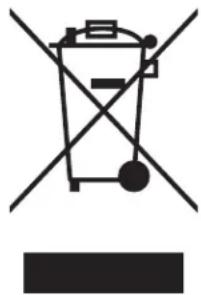
This equipment contains electric and/or electronic parts and must therefore not be disposed of as normal household waste. Instead, it should be disposed at the respective collection points for recycling provided by the communities. For you, this is free of charge.
If the equipment contains exchangeable (rechargeable) batteries, these too must be removed before and, if necessary, in turn be disposed of according to the relevant regulations (see also the respective comments in this unit's instructions).
Further information about the subject is available at your community administration, your local waste collection company, or in the store where you purchased this equipment.
natural_image
Simple line drawing of a trash bin with crossed lines indicating no waste or discharge (no text or symbols)

WARNING: This product uses a Lithium based battery. Lithium batteries can overheat and cause damage if physically abused. Do not use batteries that are damaged or show signs of physical wear.
natural_image
Cross-sectional diagram of a mechanical component with internal lines and a magnified inset showing an eye (no text or symbols)
MONTAGE DE VOTRE VISEUR AR OPTICS®

AVERTISSEMENT ! : AVANT DE MONTER LE VISEUR OU DE REMPLACER SA PILE, OU DE LE RETIRER OU D' EFFECTUER L'ENTRETIEN SUR LE VISEUR, ASSUREZ-VOUS QUE L'ARME EST OUVERTE, QUE LE MAGASIN OU LE CHARGEUR EST RETIRÉ ET QUE LA CHAMBRE EST VIDE. N' EFFECTUEZ AUCUNE OPÉRATION AVANT DE VOUS ASSURER QUE L'ARME EST VIDE ET SÛRE.
MISE EN MARCHE/ARRÊT
Causes possibles/Solutions :
Causes possibles/Solutions :
Bushnell Outdoor Products
Attn.: Repairs
9200 Cody
Overland Park, Kansas 66214
Bushnell Outdoor Products
Attn.: Repairs
140 Great Gulf Drive, Unit B
Vaughan, Ontario L4K 5W1
©2018 Bushnell Outdoor Products
NOTE FCC
This device complies with ISED's licence-exempt RSSs. Operation is subject to the following two conditions: (1) This device may not cause harmful interference, and (2) this device must accept any interference received, including interference that may cause undesired operation.
This device complies with the Industry Canada portable RF exposure limit set forth for an uncontrolled environment and is safe for the intended operation as described in this manual. Further RF exposure reduction can be achieved if the product can be kept as far as possible from the user's body or if the device is set to a lower output power if such function is available.
natural_image
Simple line drawing of a trash bin with crossed lines indicating no waste or discharge (no text or symbols)

natural_image
Diagram of a lens system with visible light rays passing through it (no text or labels)
MONTAJE DE LA MIRA AR OPTICS®

Bushnell Outdoor Products Bushnell Outdoor Products
Attn.: Repairs
Attn.: Repairs
9200 Cody 140 Great Gulf Drive, Unit B
Overland Park, Kansas 66214 Vaughan, Ontario L4K 5W1
© 2018 Bushnell Outdoor Products
NOTA DE LA FCC
natural_image
Simple line drawing of a trash bin with crossed lines indicating no waste or discharge (no text or symbols)

natural_image
Diagram of a double lens system with visible ray path and eye symbol (no text or labels)
MONTAGE IHRES AR OPTICS® VISIERS

WARNUNG! : BEVOR SIE DAS VISIER MONTIEREN, DIE BATTERIE AUSTAUSCHEN ODER DAS VISIER ENTFERNEN ODER WARTEN, STELLEN SIE SICHER, DASS DER
ABZUG OFFEN IST, DER LADESTREIFEN ODER DAS MAGAZIN ENTFERNT WURDE UND SICH KEINE PATRONE IM PATRONENLAGER BEFINDET. BEGINNEN SIE NICHT MIT DER ARBEIT, BEVOR IHRE WAFFE GELEERT WURDE UND ALS GESICHERT ANZUSEHEN IST.
natural_image
Close-up of a black optical instrument with labeled components and a close-up view showing a circular component (no readable text or symbols)
Bushnell Outdoor Products Bushnell Outdoor Products
Attn.: Repairs Attn.: Repairs
9200 Cody 140 Great Gulf Drive, Unit B
Overland Park, Kansas 66214 Vaughan, Ontario L4K 5W1
© 2018 Bushnell Outdoor Products
FCC-HINWEIS
natural_image
Symbol of a trash bin crossed with two diagonal lines, no text or labels present


natural_image
Diagram of a human eye through a lens system, showing light path and focal point (no text or labels)
MONTAGGIO DEL MIRINO AR OPTICS®

AVVERTENZA! : PRIMA DI MONTARE IL MIRINO, SOSTITUIRNE LA BATTERIA, O RIMUOVERLA, O ESEGUIRE LA MANUTENZIONE SUL MIRINO, ASSICURARSI CHE L'AZIONE SIA APERTA, IL FERMO O IL CARICATORE RIMOSSO E NON SIA RIMASTO UN COLPO NELLA CAMERA. NON TENTARE DI ESEGUIRE ALCUN LAVORO FINCHÉ LA PISTOLA NON È SCARICA E NON È RITENUTA SICURA.
Bushnell Outdoor Products Bushnell Outdoor Products
Attn.: Repairs Attn.: Repairs
9200 Cody 140 Great Gulf Drive, Unit B
Overland Park, Kansas 66214 Vaughan, Ontario L4K 5W1
©2018 Bushnell Outdoor Products
NOTA FC C
natural_image
Simple line drawing of a trash bin with crossed lines indicating no waste or discharge (no text or symbols)

©2018 Bushnell Outdoor Products
Bushnell, ^TM , ^® , denote trademarks of Bushnell Outdoor Products
www.bushnell.com
9200 Cody, Overland Park, KS 66214