
StableView 181035 - Binoculars BUSHNELL - Free user manual and instructions
Find the device manual for free StableView 181035 BUSHNELL in PDF.


| Product Type | Stabilized Binoculars |
| Brand | Bushnell |
| Model | StableView 181035 |
| Magnification | 10x |
| Objective Diameter | 35 mm |
| Compensation Angle (stabilization) | 3° |
| Exit Pupil | 3.5 mm |
| Eye Relief | 12 mm |
| Field Width at 1000 m | 86.6 m |
| Minimum Focus Distance | 3.6 m |
| Interpupillary Distance | 53 to 74 mm |
| Dimensions (L x W x H) | 18.4 x 15.2 x 8.9 cm (without strap) |
| Weight | 1,244 g |
| Power Supply | 2 AA alkaline batteries (not included) |
| Stabilization Modes | Normal and Fine |
| Stabilization Technology | Piezo-gyroscopic with direct drives |
| Lens Coating | Multi-coated anti-reflective |
| Prism Treatment | Phase Coating |
| Waterproof | Yes (nitrogen-filled) |
| Included Accessories | Soft case, shoulder strap, wrist strap, eyepiece caps, cleaning cloth, manual |
| Warranty | 2 years (limited warranty) |
| Maintenance | Clean lenses with special cloth; rinse with fresh water after use at sea |
| Safety | Never look directly at the sun or intense light |
| Temperature Range | -10°C to 50°C |
Frequently Asked Questions - StableView 181035 BUSHNELL
User questions about StableView 181035 BUSHNELL
0 question about this device. Answer the ones you know or ask your own.
Ask a new question about this device
Download the instructions for your Binoculars in PDF format for free! Find your manual StableView 181035 - BUSHNELL and take your electronic device back in hand. On this page are published all the documents necessary for the use of your device. StableView 181035 by BUSHNELL.
USER MANUAL StableView 181035 BUSHNELL
Model: 18-1035
LIT. #: 98-0495/10-04
CONTENTS
ENGLISH 1
FRANÇAIS 11
ESPAÑOL 24
DEUTSCH 37
ITALIANO 50
PORTUGUÊS 63
QUICK REFERENCE GUIDE
1) Load two AA alkaline batteries into the compartment on the handstrap.
2) Press the Power button (a) to turn on. The electronic system will start up, and the binoculars will go to Standby mode after about five seconds. (LED indicator stops blinking
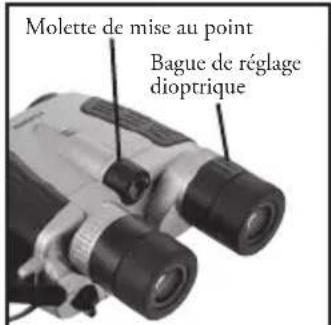
3) Adjust the eyepiece spacing (b) to match the distance between your two eyes.
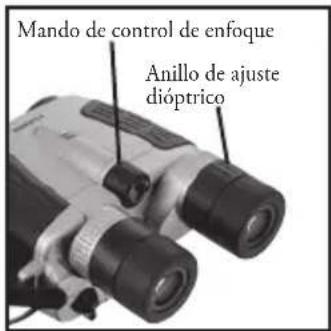
4) Use your left eye as you adjust the focus control knob (c). When the image becomes sharp, use your right eye and turn the diopter adjustment ring (d) to focus for the right eye. Once you have performed the diopter correction, use only the control knob (c) to check focus again.
5) Turn the stabilization lever (e) to the ACTIVE position to activate the stabilization feature.
6) Press the power button briefly to change to fine mode, which is more effective at countering hand shake. Tap the power button again to return to normal mode.
7) When finished, turn the stabilization lever (e) to the HOLD position and press the Power button (a) to turn off.
| LED Status | |
| Lit in orange Standby (stabilization off) | |
| Lit in green Stabilization | active (normal) |
| Flashing in orange/green | Fine mode |
| Lit in red Batteries should be replaced | |
| Flashing in red System problem | |
| Off Power Off | |

QUICK REFERENCE GUIDE

Bushnell®
STABLEVIEW™
Large light-gathering 35mm objective lenses

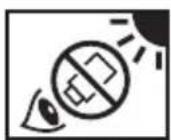
DANGER
Never look directly at the sun or any bright light through the binocular. Serious harm, including loss of vision, can result.

CONGRATULATIONS
Thank you for purchasing Bushnell StableView binoculars. Be sure to read this manual thoroughly for proper use.
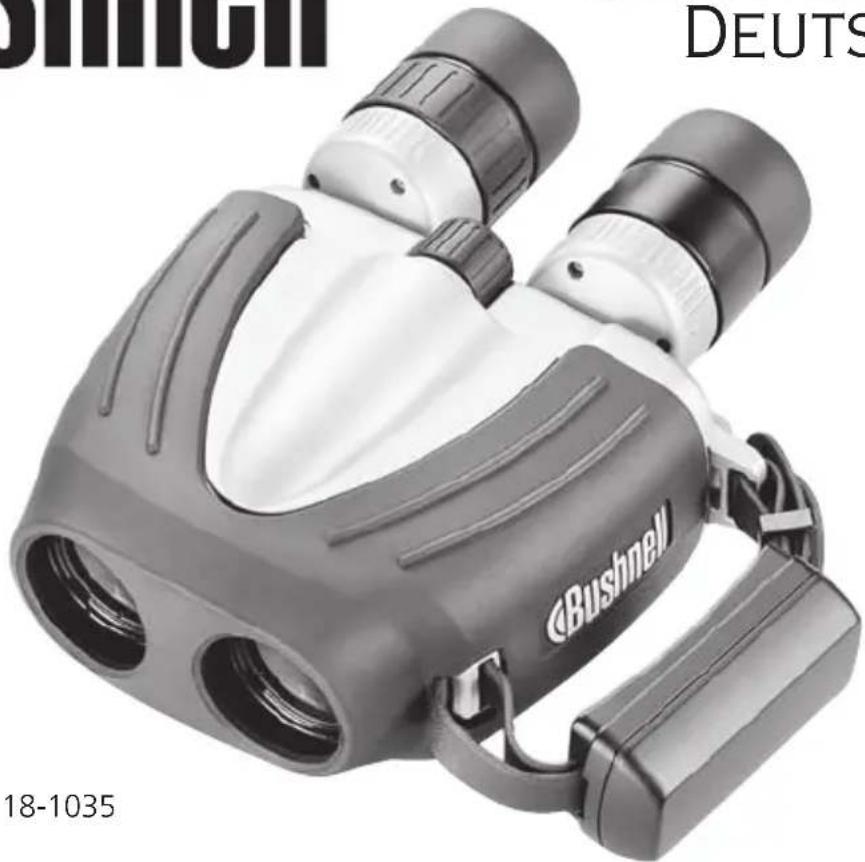
Bushnell StableView binoculars use advanced technology in optics, electronics, and ergonomics.
The stabilization feature built into these binoculars cancels out vibration from the outside and the shake that occurs with hand-held use, offering stabilized viewing without a tripod, even at high magnifications.
Your Bushnell StableView has an exclusive feature, providing two different stabilization modes in one binocular for the first time. “Normal” mode is designed to counteract the long, slow motion encountered in a boat, plane or car, and is also ideal for tracking moving subjects such as a bird in flight. “Fine” mode compensates for short, rapid external vibration, designed to be very effective against the visible effect of hand held shake (tremor) that many experience with high power binoculars. The modes are easily set, and you can quickly switch between them.
The newly designed lenses are multi-coated, provide a wide field of view and reduced eye fatigue. The prisms are phase-coated to offer sharp contrast and bright images.
Bushnell StableView binoculars are waterproof and airtight, allowing worry-free usage in a boat or rainy weat
High level warning against severe personal harm or serious product damage.
Precautions that should be followed in order to prevent damage to the product or injury to those using it.
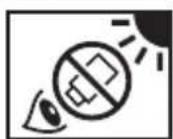
DANGER
Never look directly at the sun or any bright light through the binocular. Serious harm, including loss of vision, can result.
CONTENTS
Bushnell StableView
Soft case
Cleaning cloth
Neckstrap
Eyepiece cap
Instruction manual (this handbook)
DIGITAL STABILIZING
HOW IT WORKS
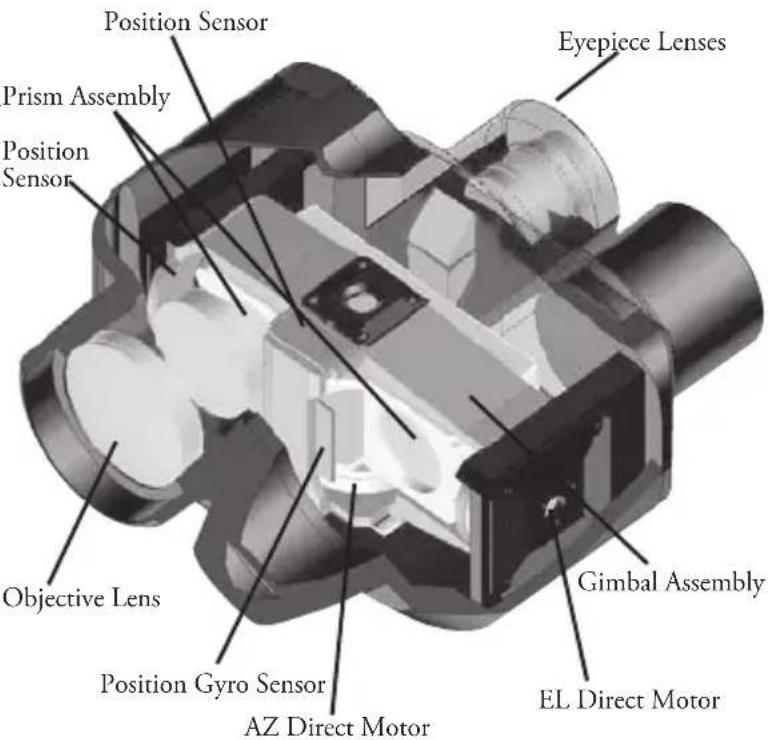
- AZ (azimuth) and EL (elevation) piezo gyro vibration sensors and direct-drive motors work together to move a gimbaled assembly with erecting prism to counteract vibration and keep the image steady, which offers shake-free viewing even from a moving vehicle.
- The position sensor activates the stabilization feature as it detects vertical and horizontal motion.
- The newly designed lenses are multi-coated for bright images.
- The prisms have a special coating that gives sharper images than ever before.
- The eyepieces incorporate advanced optical technology that offers a wide field of view and reduces eye fatigue. The eyecups can be twisted up and down for use with glasses.
- Bushnell StableView binoculars are waterproof and filled with dry nitrogen to prevent internal fogging of the optical components.
HOW TO ADJUST AND FOCUS
Eyepiece
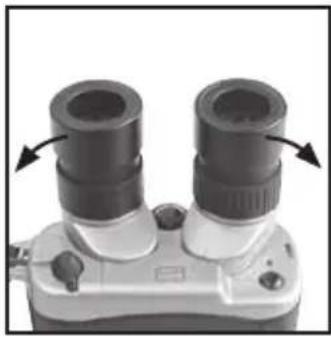
Rotate the rubber eyecups up or down to adjust the height. If you wear glasses or sunglasses when using the binoculars, set the eyepcups at their lowest positions.
Interpupillary adjustment
Use both eyes to look into the eyepieces and adjust the interpupillary distance to match the distance between your two eyes until you see just one perfectly circular image.
Diopter adjustment
You should perform the diopter correction before first usage, as the vision of your two eyes might be different.
Close your right eye and use only your left eye as you adjust the focus control knob.
Once you get a sharp image, close your left eye and open your right eye. Turn the right diopter adjustment ring to focus for the right eye. (Do NOT use the focus control knob.)
Now look through the binoculars with both eyes and make sure the diopter adjustment is perfect. Only the focus control knob should be needed for later focusing.


BATTERY INSTALLATION
1) Slide the battery compartment release switch on the handstrap to the Open position to release the battery holder.
2) Insert two new size AA alkaline batteries.
3) Attach the battery holder to the handstrap and slide the release switch to the locked position to secure the compartment.


WARNING
- NEVER slide the stabilization lever to the ACTIVE position if you do not have two batteries installed. Damage could result.
- Use the same type of batteries. Do NOT mix old and new batteries. Doing so can cause leakage or rupture.
- When changing the batteries outdoors, be sure not to let any water get into the battery compartment.
- If you plan to leave the binoculars stored for a prolonged period, remove the batteries in order to prevent natural discharge and/or leakage.
When the batteries are removed, keep the battery holder attached to the handstrap to protect the internal contact points. - Keep the contact points away from any metal. Damage could result.
SPECIFICATIONS
| MagnificationObjective Lens DiameterCompensation Angle (stabilization correction)Eye ReliefField of ViewMinimum Focusing DistanceExit PupilInterpupillary Adjustment DistanceDimensions: LxWxHWeightBatterySafe Ambient Temperature Range | 10x35mm312mm260ft. at 1000yds/86.6m at 1000m12ft.3..5mm53 to 74 mm7.25 x 6 x 3.5 inches (without strap)43.9oz/1244g(2) Size AA alkaline batteries (not included)-10 C to 50 C (14 F to 122 F) |
Specifications and designs are subject to change without notice.
When you press the Power button the first time, the LED lights in orange, and the binoculars go to Standby mode. Your Bushnell StableView binoculars go through an internal system check and take about five seconds to stabilize their performance.
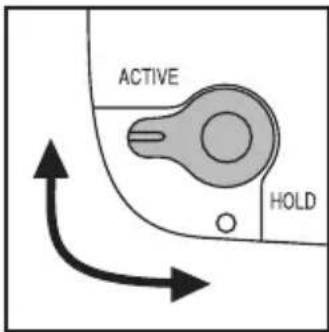
Then, turn the stabilization lever to the ACTIVE position. The LED turns green, indicating that the stabilization feature is active.

Stabilization Mode Switching
There are 2 stabilization modes: the regular stabilization mode (normal mode), and enhanced stabilization mode (fine mode). During use in normal mode, you can switch to fin mode. In fine mode, cancellation of rapid vibration is improved over normal mode, achieving sharp, hand held images. However, as panning (tracking of the target) motion is not counteracted in fine mode, it is recommended that you first locate the target in normal mode, then switch to fine mode for observation.
| LED Status | |
| Lit in orange Standby (stabilization off)Lit in green Stabilization active (normal)Flashing in orange/green Fine modeLit in red Batteries should be replacedFlashing in red System problemOff Power Off |
Mode Operation
Use the power button to switch the stabilization modes.
During normal mode operation (Power ON; stabilization lever at ACTIVE position), hold down the power button briefly then release to operate in fine mode.
During fine mode operation, the LED will alternately flash in orange and green.
Briefly pressing the power button again will switch operation back to normal mode, and the LED will return to a steady green light.
Stabilization Lever
Setting the stabilization lever back to the HOLD position turns the stabilization feature off, and the LED turns orange again, indicating Standby mode.
Set the stabilization lever as you wish.
Standby mode conserves battery power.
When finished, turn the stabilization lever to the HOLD position and press the Power button to turn off. If you leave your Bushnell StableView binoculars in either Standby or Stabilization mode for a few minutes without using them, the stabilization lever will return to the HOLD position, and the binoculars will shut off automatically.
| Stabilization lever position | power button operation | Equipment status | LED status |
| HOLD Hold down ON (Standby) | Lit/flashing orange | ||
| Press briefly,ACTIVE | Switches between then release for several seconds in standby mode | flashing fine and normal modes (normal) | green/orange (fine) or steady green |
| HOLD Hold down | OFF | OFF |
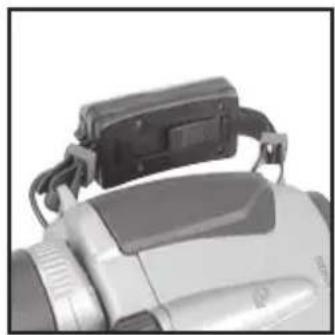
HOW TO USE THE HANDSTRAP
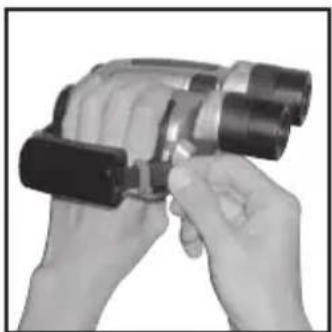
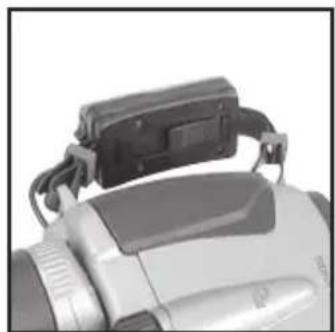
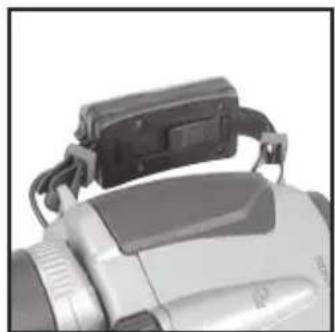
The binoculars can be more securely held when you slip your hand through the handstrap.
Slip your hand through the handstrap and adjust the belt length.
To tighten the strap, pull the belt on the eyepiece end.
To loosen the strap, lift the buckle on the backside of the handstrap and pull on the belt.

WARNING
The handstrap also serves as the battery holder. Do NOT apply strong force or remove the strap from the binoculars. Damage could result.
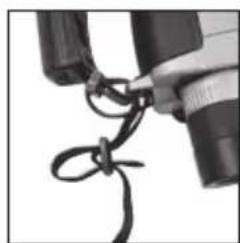
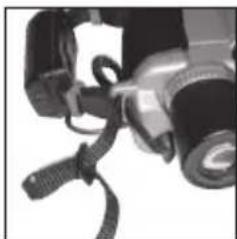
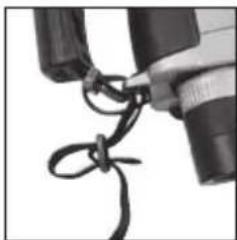
INSTALLING THE NECKSTRAP
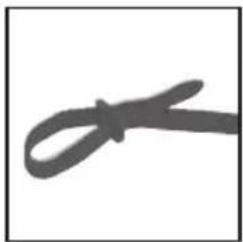
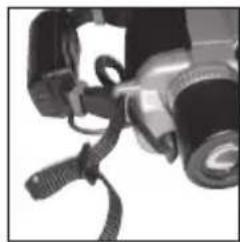
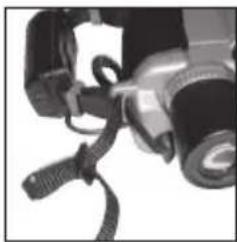
1) Make a large loop at each end of the neckstrap
2) Insert strap through neckstrap bracket
3) Lead the strap inside the loop and through the buckle and pull tight. Do the same with the outer loop.
4) Do the same with the opening in the binoculars to attach the strap on the other side.


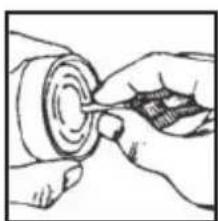
KEEP YOUR LENSES CLEAN
Dust, salt, and oil left from fingerprint smudges should never be allowed to remain on the lenses because they can harm the coating applied to lens surfaces. Use lens cleaning tissues and a good lens cleaning fluid. Both are usually available wherever cameras, binoculars or eye glasses are sold. For best results, when you need to clean one lens, clean all four. Start by blowing off any dust that may be on the lenses. Then, follow these steps...
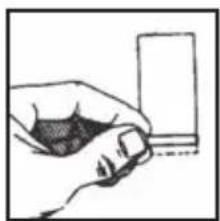
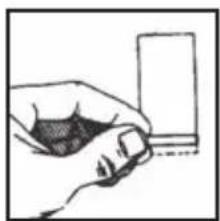
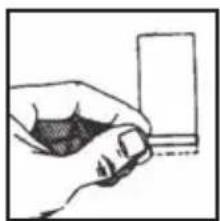
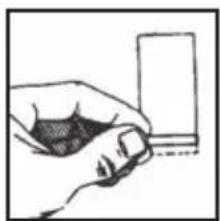
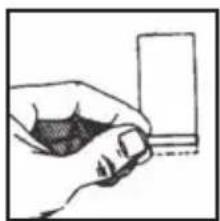
1) Take a single lens tissue and fold it twice as shown
2) Roll the tissue into a cylinder and moisten only one tip with lens cleaning fluid.
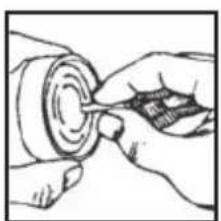
3) Starting in the center of the lens, gently rub in a circular motion from the center to the outside. Use each tissue only once. Sometimes, it may be necessary to repeat the process.

STEP 1 STEP 2

STEP 3
PRECAUTIONS AND WARNINGS
DANGER: Never look directly at the sun or any bright light through the binocular. Serious harm, including loss of vision, can result.

WARNING
- The Bushnell StableView binocular is waterproof. But it can be damaged if water or other foreign material (dust, sand, etc.) gain entry. Do not open the battery compartment in a marine, high humidity or dusty environment, the interior of the binocular can be compromised. Make sure that the battery holder stays in the proper position and the release switch is in the locked position.
- Do not change batteries in wet or dusty conditions.
- If you plan to leave the binocular stored for long periods of time keep it in a cool, dry location and remove the batteries or damage could result from leakage.
- If you use the Bushnell StableView at sea, it is recommended that you flush it with fresh water following exposure to salt spray/salt air.
- Do not use these binoculars while driving a vehicle or operating machinery. A variety of accidents are possible.
WARRANTY / REPAIR
TWO-YEAR LIMITED WARRANTY
Your Bushnell® product is warranted to be free of defects in materials and workmanship for two years after the date of purchase. In the event of a defect under this warranty, we will, at our option, repair or replace the product, provided that you return the product postage prepaid. This warranty does not cover damages caused by misuse, improper handling, installation, or maintenance provided by someone other than a Bushnell Authorized Service Department.
Any return made under this warranty must be accompanied by the items listed below:
1) A check/money order in the amount of \$10.00 to cover the cost of postage and handling
2) Name and address for product return
3) An explanation of the defect
4) Proof of Date Purchased
5) Product should be well packed in a sturdy outside shipping carton, to prevent damage in transit, with return postage prepaid to the address listed below:
IN U.S.A. SEND TO: IN CANADA SEND TO:
Bushnell Performance Optics Bushnell Performance Optics
Attn.: Repairs Attn.: Repairs
8500 Marshall Drive 25A East Pearce Street, Unit 1
Lenexa, Kansas 66214 Richmond Hill, Ontario L4B 2M9
For products purchased outside the United States or Canada please contact your local dealer for applicable warranty information. In Europe you may also contact Bushnell at: BUSHNELL Performance Optics GmbH
European Service Centre
MORSESTRASSE 4
D- 50769 KÖLN
GERMANY
Tél: +49 (0) 221 709 939 3
Fax: +49 (0) 221 709 939 8
This warranty gives you specific legal rights.
You may have other rights which vary from country to country.
©2004 Bushnell Performance Optics
Bushnell®
STABLEVIEW™ FRANÇAIS

Modèle : 18-1035
PUBL. # 98-0420/05-04
GUIDE DE RÉFÉRENCE RAPIDE


AVERTISSEMENT

AVERTISSEMENT


MAINTENEZ LES LENTILLES PROPRES

ÉTAPE 1 ÉTAPE 2 ÉTAPE 3
8500 Marshall Drive 25A East Pearce Street, Unit 1
Lenexa, Kansas 66214 Richmond Hill, Ontario L4B 2M9
European Service Centre
MORSESTRASSE 4
D- 50769 KÖLN
ALLEMAGNE
Tél: +49 (0) 221 709 939 3
Fax: +49 (0) 221 709 939 8
©2004 Bushnell Performance Optics
Bushnell®
STABLEVIEW™
ESPAÑOL

Modelo: 18-1035 - Spanish
LIT. #: 98-0420/05-04
ESPECIFICACIONES


ADVERTENCIA


MANTENGA LAS LENTES LIMPIAS
PASO 1 PASO 2 PASO 3
8500 Marshall Drive 25A East Pearce Street, Unit 1
Lenexa, Kansas 66214 Richmond Hill, Ontario L4B 2M9
European Service Centre
MORSESTRASSE 4
D- 50769 KÖLN
ALEMANIA
Tél: +49 (0) 221 709 939 3
Fax: +49 (0) 221 709 939 8
©2004 Bushnell Performance Optics
Bushnell®
STABLEVIEW™
DEUTSCH
StableView Fernglas
Bedienungshandbuch 18-1035
BEDIENUNGSHANDBUCH


!WARNUNG

WARNUNG


HALTEN SIE IHRE LINSEN SAUBER

SCHRITT 1 SCHRITT 2 SCHRITT 3
GARANTIE / REPERATUREN
ZWEI JAHRE GARANTIE
8500 Marshall Drive 25A East Pearce Street, Unit 1
Lenexa, Kansas 66214 Richmond Hill, Ontario L4B 2M9
European Service Centre
MORSESTRASSE 4
D- 50769 KÖLN
DEUTSCHLAND
Tel: +49 (0) 221 709 939 3
Fax: +49 (0) 221 709 939 8
©2004 Bushnell Performance Optics
Bushnell®
STABLEVIEW™
ITALIANO

Modello: 18-1035
LIT. #: 98-0420/05-04
GUIDA DI RIFERIMENTO RAPIDO


AVVERTENZA


TENERE PULITE LE LENTI
123
8500 Marshall Drive 25A East Pearce Street, Unit 1
Lenexa, Kansas 66214 Richmond Hill, Ontario L4B 2M9
European Service Centre
MORSESTRASSE 4
D- 50769 KÖLN
GERMANIA
Tél: +49 (0) 221 709 939 3
Fax: +49 (0) 221 709 939 8
©2004 Bushnell Performance Optics
Bushnell®
STABLEVIEW™
PORTUGUÊS

Modelo: 18-1035
LIT. #: 98-0420/05-04


ADVERTÊNCIA

MANTENHA AS LENTES LIMPAS


ETAPA 1 ETAPA 2 ETAPA 3
8500 Marshall Drive 25A East Pearce Street, Unit 1
Lenexa, Kansas 66214 Richmond Hill, Ontario L4B 2M9
© 2004 Bushnell Performance Optics
Bushnell®
www.bushnell.com
©2004 Bushnell Performance Optics


- CONTENTS
- QUICK REFERENCE GUIDE
- BUSHNELL®
- STABLEVIEW™
- DANGER
- CONGRATULATIONS
- DIGITAL STABILIZING
- HOW IT WORKS
- HOW TO ADJUST AND FOCUS
- EYEPIECE
- INTERPUPILLARY ADJUSTMENT
- DIOPTER ADJUSTMENT
- BATTERY INSTALLATION
- WARNING
- STABILIZATION MODE SWITCHING
- MODE OPERATION
- STABILIZATION LEVER
- HOW TO USE THE HANDSTRAP
- INSTALLING THE NECKSTRAP
- KEEP YOUR LENSES CLEAN
- PRECAUTIONS AND WARNINGS
- WARRANTY / REPAIR
- TWO-YEAR LIMITED WARRANTY
- IN U.S.A. SEND TO: IN CANADA SEND TO
- STABLEVIEW™ FRANÇAIS
- GUIDE DE RÉFÉRENCE RAPIDE
- AVERTISSEMENT
- MAINTENEZ LES LENTILLES PROPRES
- ESPAÑOL
- ADVERTENCIA
- MANTENGA LAS LENTES LIMPIAS
- DEUTSCH
- BEDIENUNGSHANDBUCH
- WARNUNG
- HALTEN SIE IHRE LINSEN SAUBER
- GARANTIE / REPERATUREN
- ZWEI JAHRE GARANTIE
- ITALIANO
- GUIDA DI RIFERIMENTO RAPIDO
- AVVERTENZA
- TENERE PULITE LE LENTI
- PORTUGUÊS
- ADVERTÊNCIA
- MANTENHA AS LENTES LIMPAS
Brand : BUSHNELL
Model : StableView 181035
Category : Binoculars