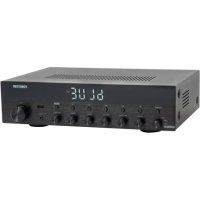
AS6060 - Receiver FoneStar - Free user manual and instructions
Find the device manual for free AS6060 FoneStar in PDF.


| Product Type | Hi-Fi Stereo Amplifier / Receiver |
| Brand | FoneStar |
| Model | AS6060 |
| Dimensions (W x H x D) | 330 x 92 x 276 mm |
| Power Supply | 230 V AC, 350 W |
| Output Power | 60 + 60 W RMS at 4 Ω |
| Frequency Response | 20 - 20,000 Hz |
| Signal-to-Noise Ratio | >85 dB |
| Harmonic Distortion | <0.5% at 1 kHz |
| Audio Inputs | 3 RCA stereo inputs (DVD, LINE, CD), 1 auxiliary input 3.5 mm jack, 1 optical digital input (Toslink) and coaxial (RCA), 2 balanced 6.3 mm microphone jacks |
| Speaker Outputs | Screw or banana terminals for L/R speakers, 4-16 Ω |
| Main Functions | Bluetooth 5.0 receiver, USB player, FM tuner, karaoke with echo, brushed aluminum front panel, LCD display, remote control |
| Protections | Temperature, short circuit, overload |
| Included Accessories | FM antenna cable, batteries for remote control |
| Care and Cleaning | Clean with a soft, dry cloth. Do not use abrasive products. |
| Safety | Use speakers with an impedance between 4 and 16 Ω. Ensure adequate ventilation. |
Frequently Asked Questions - AS6060 FoneStar
User questions about AS6060 FoneStar
0 question about this device. Answer the ones you know or ask your own.
Ask a new question about this device
Download the instructions for your Receiver in PDF format for free! Find your manual AS6060 - FoneStar and take your electronic device back in hand. On this page are published all the documents necessary for the use of your device. AS6060 by FoneStar.
USER MANUAL AS6060 FoneStar
INSTRUCTION MANUAL/MANUAL DE USUARIO/MODE D'EMPLOI/MANUAL DE INSTRUÇÕES
FONESTAR
DESCRIPTION
- New amplifier with unique FONESTAR design, high reliability and precision during playback.
- An exceptional finish with a brushed aluminium front and high contrast high visibility LCD display.
- Stylish and practical design, can be integrated into any furniture, whether for home or professional use.
- A wide range of playback options (Bluetooth ^® , USB y FM) and audio inputs make it highly versatile and adaptable.
- Two microphone inputs to use as Karaoke and sing over your favorite songs.
CONTROLS AND FUNCTIONS
FRONT PANEL
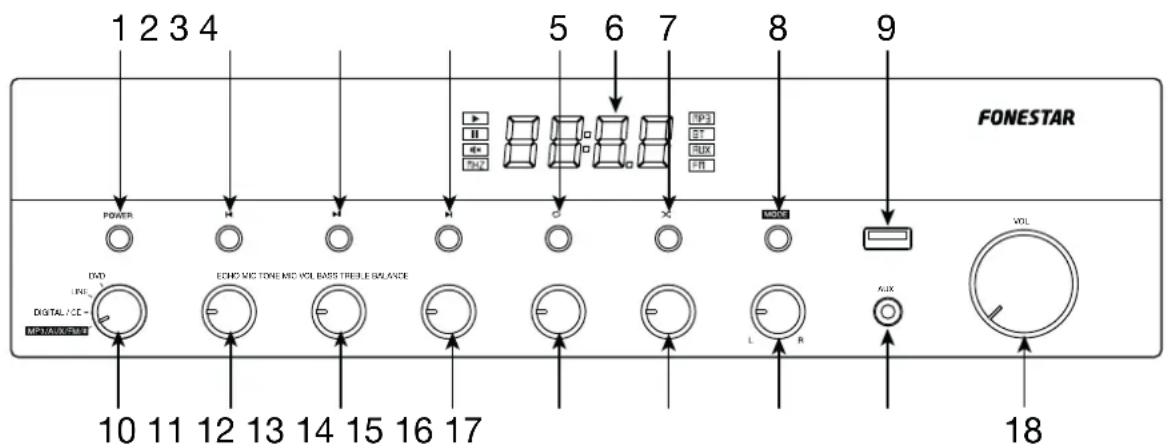
1.- POWER: on/off switch for the amplifier.
2.- K: A long press decreases the volume of the player. A short press in Bluetooth or USB mode skips to the previous audio track; in FM mode it skips to the previous stored frequency.
3.- ▶II: in Bluetooth or USB mode it plays/stops audio playback; in FM mode, it auto-stores all detected frequencies with sufficient signal quality.
4.- ▶: a long press increases player volume. A short press, in Bluetooth or USB mode skips to the next audio track, in FM mode skips to the next stored frequency.
5.- ⬇: in USB mode, allows you to select the repeat mode: ONE OR ALL.
6.- Player information display.
7.- ✗ in USB mode, activates random play (RAND).
8.- MODE: short presses of this button allow you to change the mode on the player to choose the desired audio source: Bluetooth, aux, FM radio, or USB device, provided the input selector is in the MP3/AUX/FM/* position.
9.- USB port for audio file playback.
10.- Input selection control for playback: rear panel line inputs (LINE and DVD), digital or line inputs (DIGITAL - CD) or the player (MP3/AUX/FM//*).
11.- ECHO: control that adds an echo or reverb effect to the MIC 1 and MIC 2 microphone signal.
12.- MIC TONE: adjusts the equalization of MIC 1 and MIC 2 signals, allowing you to enhance or attenuate frequencies to improve sound.
13.- MIC VOL: control that regulates the volume of MIC 1 and MIC 2 microphone inputs.
14.- BASS: boosts/attenuates low frequencies.
15.- TREBLE: boosts or attenuates high frequencies.
16.- BALANCE: allows to adjust the sound to achieve a balanced result by giving more emphasis to the L or R channel on the output signal.
17.- AUX: stereo auxiliary input for connecting audio devices such as phones, computers, etc. 3.5 mm stereo jack connector.
18.- VOL: headphone output volume control.
REAR PANEL
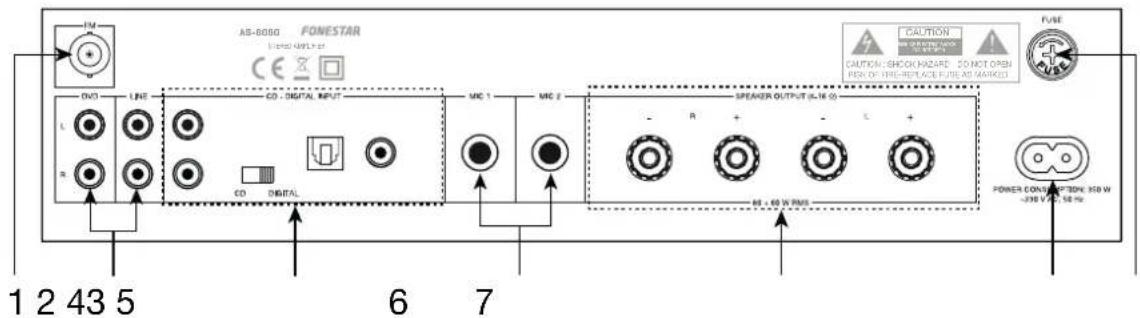
1.- FM: antenna input for FM digital tuner.
2.- DVD, LINE, CD: stereo line inputs for connecting audio devices such as mixers, computers, players, etc. 2 x RCA connectors. To play one of these inputs it will be necessary to set the input selector to the corresponding DVD, LINE or CD position.
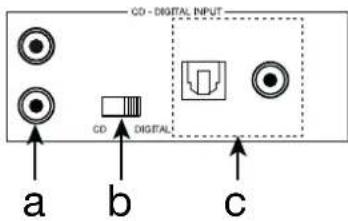
3.- CD - DIGITAL INPUT: analogue and digital input with selector. To play one of these inputs it will be necessary to set the input selector switch to the corresponding DIGITAL/CD position and the selector switch of these inputs to CD.
a.- Stereo line input for connection of audio devices such as mixing consoles, computers, players, etc. 2 x RCA connectors.
b.- CD input selector - DIGITAL INPUT. In the CD position it enables the 2 x RCA digital input and in the DIGITAL position it enables the optical (Toslink) and coaxial (RCA) digital inputs.
c.- Digital inputs for the connection of audio devices such as TVs, computers, players, etc. Toslink and RCA connectors. The optical input has priority over the coaxial input when switching on the equipment, provided that both inputs have a signal; otherwise, the input that has a signal will be played.
4.- MIC 1, MIC 2: balanced 6.3 mm jack plug microphone inputs.
5.- SPEAKER OUTPUT: stereo output of 60 + 60 W RMS for connection of 4-16 Ω low impedance speakers. Screw terminals or bananas.
6.- AC power socket.
7.- FUSE: fuse holder.
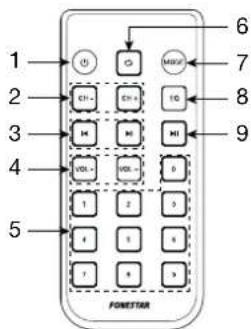
PLAYER REMOTE CONTROL
1.- ⏻: on/StandBy button on the player
2.- CH-/CH+: in radio mode, a short press allows to skip to the previous/next stored station.
3.- 🖱️: In Bluetooth, USB and SD mode, allows you to skip to the previous/next audio track; in radio mode, a short press allows you to fine-tune by decreasing/increasing the frequency by 0.1 MHz.
4.- VOL-/VOL+: increase/decrease the volume of the player.
5.- 0-9: numeric buttons. In USB mode, direct select to play a specific audio track. In radio mode, allows to select the stations stored in the memory.
6.- ☑: in USB mode, allows to select the repeat mode. RAND (RANDOM), ONE (ONE), OR ALL (ALL).
7.- MODE: allows you to change the operating mode between: Bluetooth, USB, AUX and FM radio.
8.- EQ: in Bluetooth or USB mode, allows to switch between the different existing EQ (EQ 0-5).
1.- ▶II: in Bluetooth or USB mode plays/stops audio playback; in FM mode, it auto-stores all detected frequencies with sufficient signal quality; in AUX mode, mutes audio output.
OPERATION
INPUT PRIORITY
The microphone inputs MIC 1 and MIC 2 will always be played back, regardless of the selected source. Both microphone inputs have a volume control and 2 effect controls. These microphone inputs play along with the selected audio source without attenuating it.
PLAYER
To play audio via Bluetooth, from the USB device, AUX input or FM radio tuner, you must select the player as audio source by setting the control to MP3/AUX/FM/ × position. Next, you must select the mode using the MODE button.
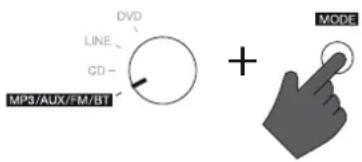
Bluetooth MODE
- Select Bluetooth mode. The display will show BLUE.
- Open the Bluetooth settings menu on your smartphone or tablet to pair the amplifier. Locate and select the FONESTAR device and pair with it. The amplifier will play a 3 tone.
NOTE: this amplifier recalls the last paired device. So, if it is the same device, you do not need to perform the pairing process.
- Select the music on your smartphone/tablet and start playback.
- Make sure your smartphone/tablet is loud enough to be heard through the speakers. This allows you to control the volume from the amplifier itself at a later time without having to operate any other equipment.
- Press ▶/▶to switch songs or ▶/▶play/pause playback.
NOTE: this mode allows you to change the equalization.
USB MODE
- Select the USB mode if the USB device is already inserted or insert the device to activate the mode automatically. The display will show 4 digits with track number (0001) and then playback time (00:00).
- Press ◀/▶to switch songs or ▶/▶play/pause playback.
NOTE: this mode allows you to change the playback mode and equalization.
AUX MODE
- Connect the device via the AUX stereo input (on the front of the unit) and select AUX mode. The display will show AUX.
- Activate the connected audio device (player, mixer, PC, smartphone, etc.) and start playback.
- Make sure that the signal from your audio device is loud enough to be heard through the speakers. This allows you to control the volume from the amplifier itself at a later time without having to operate any other equipment.
FM MODE
- Select FM mode. The display will show the tuned frequency (00.0).
NOTE: to use this mode, you need to connect an antenna to the FM rear panel.
- Perform an automatic tuning of the stations to start using this mode by long pressing the button ▶II.
- Once you have finished, you can select the station you want to listen to between those tuned with K/Non the front panel or CH-/CH+ on the remote control.
CONNECTION
IMPORTANT: refrigerate the amplifier properly. To do this, make sure that the place where it is installed has access to airflow and that the slots in the chassis are free of obstructions.
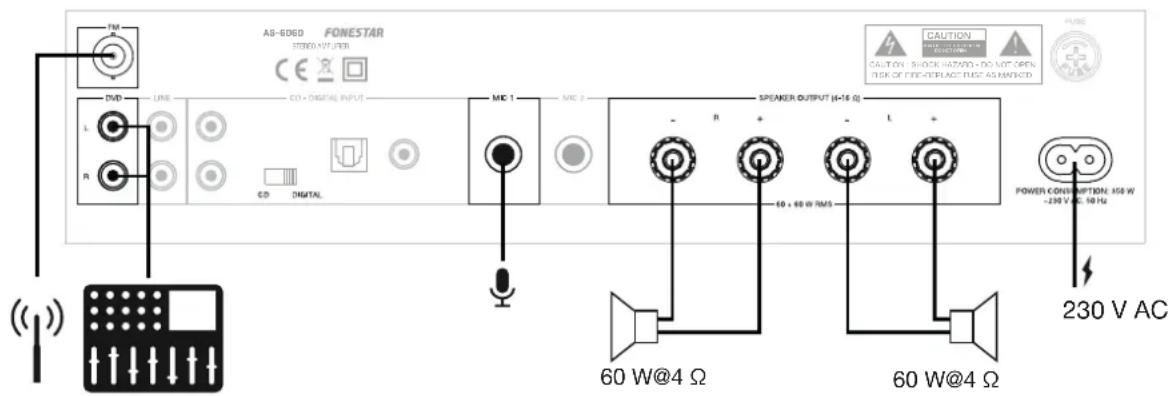
- With the amplifier switched off, connect all audio sources. If you are going to use the FM radio, you will need to connect an FM reception antenna.
- Connect the low impedance loudspeakers to the loudspeaker output.
IMPORTANT: for proper operation and performance of the device, use the correct power, impedance and frequency limits. Before connecting to other equipment, be aware of the conditions required in a LOW IMPEDANCE installation. More information can be found at:
fonestar.com/downloads/install_fonestar_en.pdf
- Check that the volume and gain controls are at minimum, connect the amplifier to power.
- Turn on the amplifier.
- Select the audio input on the selector: DVD, LINE, DIGITAL/CD or MP3/AUX/FM/ *. If you select the latter, then select the mode of operation of the player using the MODE button.
- Finally, adjust all volume, EQ (BASS and TREBLE) and BALANCE controls.
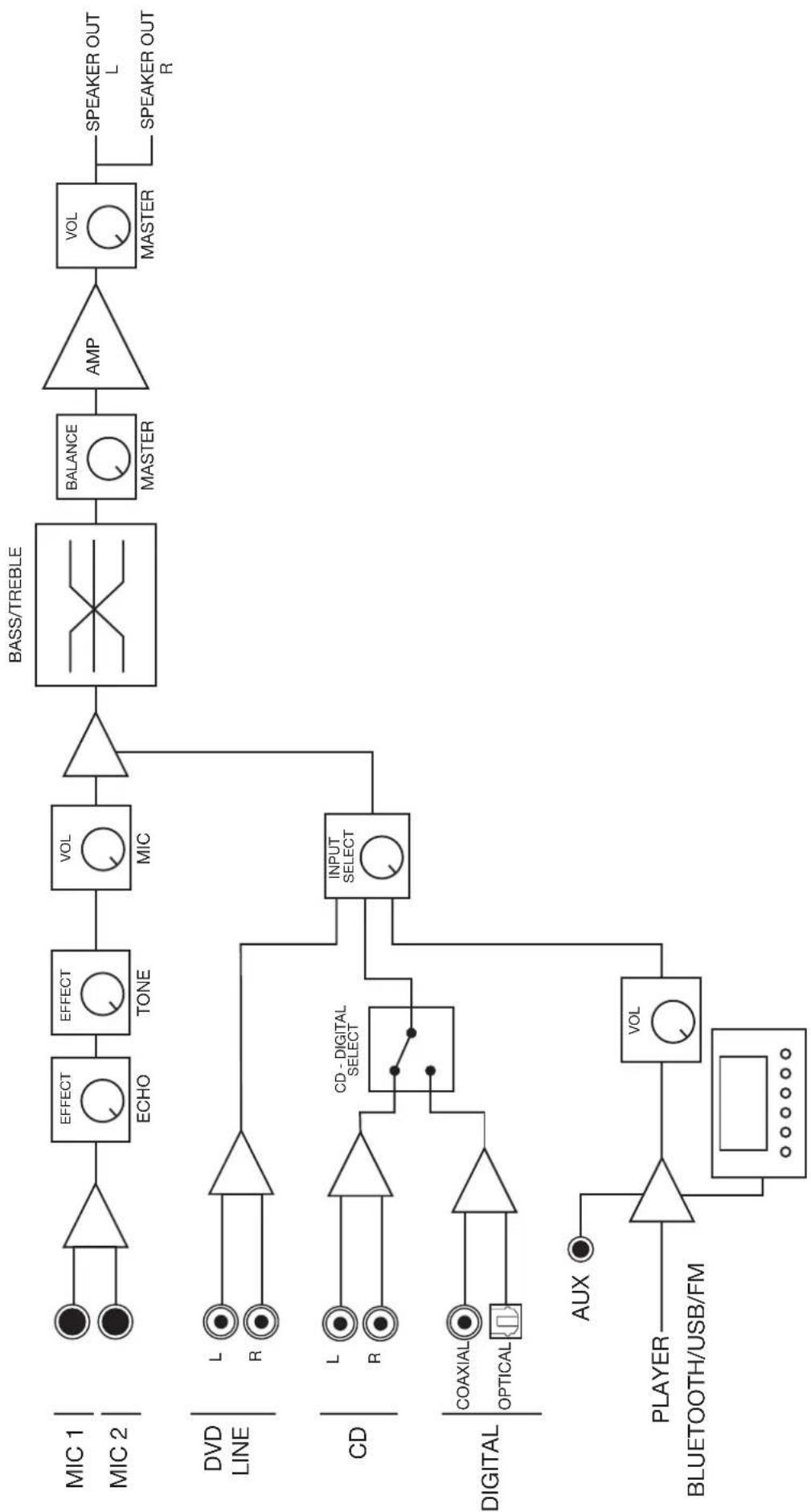
flowchart
graph LR
    A["MIC 1"] --> B["NOT"]
    C["MIC 2"] --> D["NOT"]
    B --> E["EFFECT"]
    D --> F["EFFECT"]
    E --> G["ECHO"]
    F --> H["TONE"]
    G --> I["VOL"]
    H --> J["MIC"]
    I --> K["NOT"]
    K --> L["BASS/TREBLE"]
    L --> M["BALANCE"]
    M --> N["MASTER"]
    N --> O["AMP"]
    O --> P["VOL"]
    P --> Q["MASTER"]
    Q --> R["SPEAKER OUT L"]
    Q --> S["SPEAKER OUT R"]
    T["DVD LINE"] --> U["L"]
    T --> V["R"]
    W["CD"] --> X["L"]
    W --> Y["R"]
    Z["DIGITAL"] --> AA["COAXIAL"]
    Z --> AB["OPTICAL"]
    AC["AUX"] --> AD["PLAYER"]
    AE["BLUETOOTH/USB/FM"] --> AF["VOL"]
    AG["INPUT SELECT"] --> AH["CD - DIGITAL SELECT"]
    AI["DVID LINE"] --> AJ["L"]
    AI --> AK["R"]
TECHNICAL SPECIFICATIONS
| AS-6060 | |
| FEATURES Hi-Fi stereo amplifier. Bluetooth receiver 5.0. USB player. FM Radio Microphone inputs with echo. Digital audio input for TV connection. Aluminium panel. Remote control of the player. | |
| POWER 60 + 60 W RMS | at 4 Ω |
| RESPONSE 20-20,000 Hz | |
| S/N RATIO >85 dB | |
| DISTORTION Harmonic: | < 0.5% at 1 kHz |
| INPUTS 3 stereo aux: DV | D/AUX/CD, 2 x RCA, 17,000 Ω 300 mV RMS 1 stereo aux, 3.5 mm jack, 15,000 Ω 300 mV RMS on front panel 1 digital audio, TOSLINK and RCA 2 balanced mics, 6.3 mm jack, 900 Ω 9 mV RMS |
| OUTPUTS Speakers: | Main L/R, 4-16 Ω screw or banana terminals |
| PROTECTION Temperature, short circuit and overload | |
| POWER 230 V AC, 350 W | |
| DIMENSIONS 330 x 92 x | 276 mm depth |
| ACCESSORIES FM antenna cable Remote control | |
EN
SIMPLIFIED EU DECLARATION OF CONFORMITY
FONESTAR SISTEMAS S.A. hereby declares that the Hi-Fi stereo amplifier AS-6060 complies with the Directive 2014/53/EU.
The complete text of the EU Declaration of Conformity is available at the following internet address:
fonestar.com/AS-6060
DESCRIPCIÓN
fonestar.com/AS-6060
DESCRIPTION
fonestar.com/AS-6060
DESCRIÇÃO
fonestar.com/AS-6060
www.fonestar.com