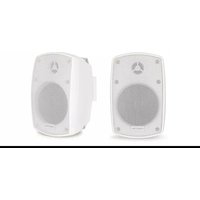
ELIPSE-4B - Loudspeaker FoneStar - Free user manual and instructions
Find the device manual for free ELIPSE-4B FoneStar in PDF.


| Product Type | Portable Bluetooth Speaker |
| Brand | FoneStar |
| Model | ELIPSE-4B |
| Dimensions (W x H x D) | 200 mm x 120 mm x 80 mm |
| Weight | 0.5 kg |
| Power Supply | Built-in rechargeable battery (3.7V, 2000 mAh) via micro USB |
| Bluetooth Version | 5.0 |
| Output Power | 5W RMS |
| Frequency Response | 100 Hz - 20 kHz |
| Driver Size | 52 mm |
| Battery Life | Up to 6 hours at moderate volume |
| Charging Time | Approximately 2-3 hours |
| Main Functions | Wireless audio streaming, hands-free calling, micro SD card playback, AUX input |
| Controls | Power, volume up/down, play/pause, next/previous track, Bluetooth pair, answer/end call |
| Water Resistance | IPX4 (splash proof) |
| Included Accessories | Micro USB charging cable, AUX cable, user manual |
| Cleaning and Care | Wipe with a soft, dry cloth. Do not use harsh chemicals or immerse in water. |
| Safety Warnings | Do not expose to extreme temperatures, avoid dropping, keep away from children under 3 years |
| Spare Parts Availability | Battery and charging port replaceable by qualified technician; contact FoneStar support |
| Repair Information | Refer to user manual for troubleshooting; for repairs, contact authorized service center |
Frequently Asked Questions - ELIPSE-4B FoneStar
User questions about ELIPSE-4B FoneStar
0 question about this device. Answer the ones you know or ask your own.
Ask a new question about this device
Download the instructions for your Loudspeaker in PDF format for free! Find your manual ELIPSE-4B - FoneStar and take your electronic device back in hand. On this page are published all the documents necessary for the use of your device. ELIPSE-4B by FoneStar.
USER MANUAL ELIPSE-4B FoneStar
ELIPSE-5WIFI, ELIPSE-5BWIFI
PAIR OF LOUDSPEAKERS
INSTRUCTION MANUAL

natural_image
Black rectangular electronic device with mesh grille and 'FONESTAR' branding (no other text or symbols visible)
natural_image
Black foam roller with visible grille and brand logo (FOMESTAR) on front panelWe take this opportunity to thank you for buying this product.
We recommend you read the instruction manual before switching on the machine and follow the instructions that are given. Keep the manual for future reference.
SECURITY AND THE ENVIRONMENT
ELECTRICAL SECURITY
Check that the current in the mains connection where the machine is to be installed corresponds to the power supply of the machine.
To avoid damaging the equipment, electrical shocks, fire or physical injury when you connect or disconnect the equipment from the power supply, pull the plug firmly out of the mains socket holding the plug, never the cable.
Always do this with dry hands.
Keep the power supply cable far from sources of heat. Do not put heavy objects on top of it or change it.
Clean dust and dirt off the power supply cable regularly.
Do not open the machine; you could get an electric shock.
CAUTION
While installing the machine, make sure it is switched off and unplugged.
Do not open the machine. Touching the internal parts is dangerous and you could receive an electric shock.
The machine must not be splashed or dripped on. Never place recipients with liquid inside on the machine.
Do not place anything inside the machine.
LOCATION
Place the equipment on a horizontal surface with enough space around it to allow ventilation.
Avoid direct sunlight, heat sources and excessive dust.
Do not place the machine near magnetic fields or static electricity.
Do not use surfaces which vibrate or receive impact.
Do not pile machines on top of one another.
VENTILATION
Never block or cover the ventilation slits on the machine.
Do not expose it to direct sunlight or place it near sources of heat.
PERIODS OF INACTIVITY
When the machine is not going to be used for a long period of time, disconnect it from the mains.
If you are using an adapter, take into account that it will continue using electricity even if the machine is switched off. If it is not going to be used for a long period of time, disconnect it from the mains.
THE ENVIRONMENT
To save energy, switch the machine off when you are not going to use it for a long time. The machine could contain substances that are harmful to the environment or human health. To minimize the effect of these substances the machine must be correctly managed and recycled when you decide to dispose of it.
When you dispose of it remember: it cannot be thrown into a conventional rubbish bin.
If it contains or uses batteries, these must be disposed of separately.
The machine (without batteries) must be disposed of correctly. Put it in a container specially intended for the collection of electronic and electrical appliances, at the dump or hand it over to the dealer when you purchase similar equipment, so that the dealer can dispose of it correctly (at no added cost).
SIGNIFICANCE OF THE SYMBOLS ON THE MACHINE\*

The symbol formed by the expression “Class 1 laser product” written in a rectangle indicates that visible or invisible laser radiation could be produced. Avoid direct exposure to the laser.

The symbol formed by a ray of lightening inside a triangle shows that the machine has connection terminals or a circuit with areas with a current which could cause an electric shock, even in normal working conditions.

The symbol formed by an exclamation mark in a triangle shows that the instruction manual must be referred to for information on how the machine works and its use.

The symbol formed by one square inside another square shows that the machine has double electrical insulation.

The European Community symbol shows that the machine complies with the current European Union legislation, as well as its transposition to local legislation.

The symbol of a rubbish bin crossed out and over a horizontal line shows that when the product is disposed of it must be done properly, placing it in a special selective electronic and electrical equipment container or through a dealer when purchasing a similar product, at no additional cost. It also shows that the machine was put on the market after 13th August 2005 (European Community Directive 2002/96/CE of Electrical and Electronic recycling, and its Spanish equivalent R.D.208/2005).
In accordance with what is set out in the aforementioned decree, FONESTAR is registered in the RAEE (Registro de Aparatos Eléctricos y Electrónicos) in a special section REI (Registro de establecimientos Industriales), with the entry number 001851.
*It is possible that some of these symbols do not appear on the machine.
EXEMPTION OF LIABILITY
The characteristics of the equipment and the content of the manual can change without forewarning. FONESTAR, S.A. does not assume responsibilities regarding the inappropriate use of the equipment or the information supplied in this instruction manual, and specifically disclaims any implied liability for marketability or fitness for any other use.
All rights reserved by FONESTAR, S.A.
DESCRIPTION
- Pair of Wi-Fi loudspeakers. 2 x 20 W RMS.
- App to control from smartphones and tablets.
- Playback via Wi-Fi of playlists, online music services and internet radio.
- 6 customizable preset buttons.
CONTROLS AND FUNCTIONS

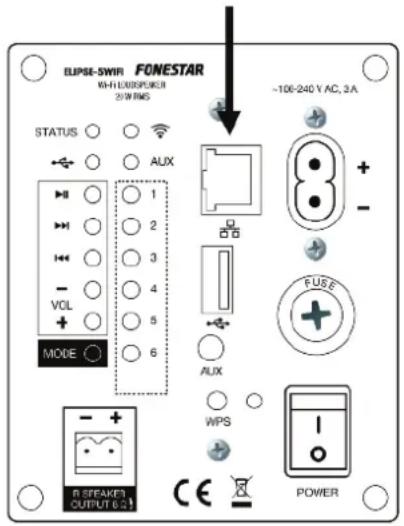
- R SPEAKER OUTPUT 8 Ω: amplified output for connecting the passive loudspeaker, euroblock connector.
2.- Direct access to presets 1-6. In order to set the required station in each position the MÜZO APP must be used.
3.- MODE: button which allows the playback mode to be changed among: playback in Wi-Fi mode, aux input and USB storage device connected to the amplifier.
4.- VOL -/+: volume controls.
5.- ◀◀/▶◀: buttons which allow moving to the previous/next track to the one being played at that moment.
6.-▶II: starts and pauses playback.
7.- LED USB operating mode.
8.- STATUS: LED status indicator.
It flashes slowly when the amplifier is searching for a network or waiting to connect to a wireless network.
It flashes quickly when the amplifier is connected to the network.
It remains permanently lit in red when the device is connected to the network and ready to operate.
9.- AUX: aux input LED operating indicator.
10.- Wi-Fi mode LED operating indicator.
11.- Wi-Fi Protected Setup (WPS) button. It has several operating modes:
1) Short press: WPS function, allows the device to be connected wirelessly to the existing network and so operate correctly. The WPS button must be pressed when the ELIPSE-5WIFI loudspeaker is first connected to the network. This connection is made using the MÜZO APP which indicates when to press it.
2) 8-second press: to activate/deactivate the priority function through signal level of the aux input. By default, priority is deactivated.
12-. AUX: aux input, 3.5 mm jack connector. This input has priority through signal level.
Note: by default, priority is deactivated. In order to activate the priority function in this input, press and hold the button for 8 seconds (11).
13.- USB storage device connection port. Allows the playback of audio files contained in MP3 format.
14.- Ethernet input for connecting the loudspeaker to a router, RJ-45 connector. Allows the connection of the device to a router using cable to be subsequently operated via the mobile application. For more information, consult the Instructions for Use section.
15.- Power supply input 230 V AC.
16.- FUSE: AC power supply circuit protective fuse.
17.- Loudspeaker LED power indicator.
18.- POWER: active loudspeaker on/off switch.
OPERATING WITH ETHERNET CABLE
- The ELIPSE-5WIFI loudspeaker can also operate in the same way using ethernet cable, instead of wirelessly. In order to do so, connect the loudspeaker to a router using the input indicated:
- It operates in the same way as in wireless mode. Use the MÜZO application to configure each loudspeaker in the installation.
Wi-Fi OPERATING
- In order to control remotely and get maximum benefit from the functions of this pair of loudspeakers, the free MÜZO application can be used. It is available for downloading in the PlayStore for Android or in AppleStore for iOS. Using this application, you can connect the device to the Wi-Fi network, change the mode, increase/decrease the volume as well as set and control the radio stations; all this for one or several ELIPSE-5WIFI loudspeakers.
- First, download and install the APP and follow the steps for connecting the loudspeaker to a Wi-Fi network. Once connected, you will have access to all the functions from your mobile device.
- The following images quickly show the simplicity of this application.
- In figure 2 we have several loudspeakers added to our network from which we can select one or another in order to control them.
- In figure 3 we have the menu from which we select the audio source, the most frequent are: "My music" to play music from our telephone or from the USB connected to the amplifier, "Tuneln" for online radio stations, "Spotify" to play music from the Spotify APP (a Premium account is required) and "Line input" for devices connected to the AUX input of the ELIPSE-5WIFI.
- Figure 4 shows the list of radio stations stored in the memory, these stations can be activated directly from the rear panel of the loudspeaker with the number buttons 1 to 6.


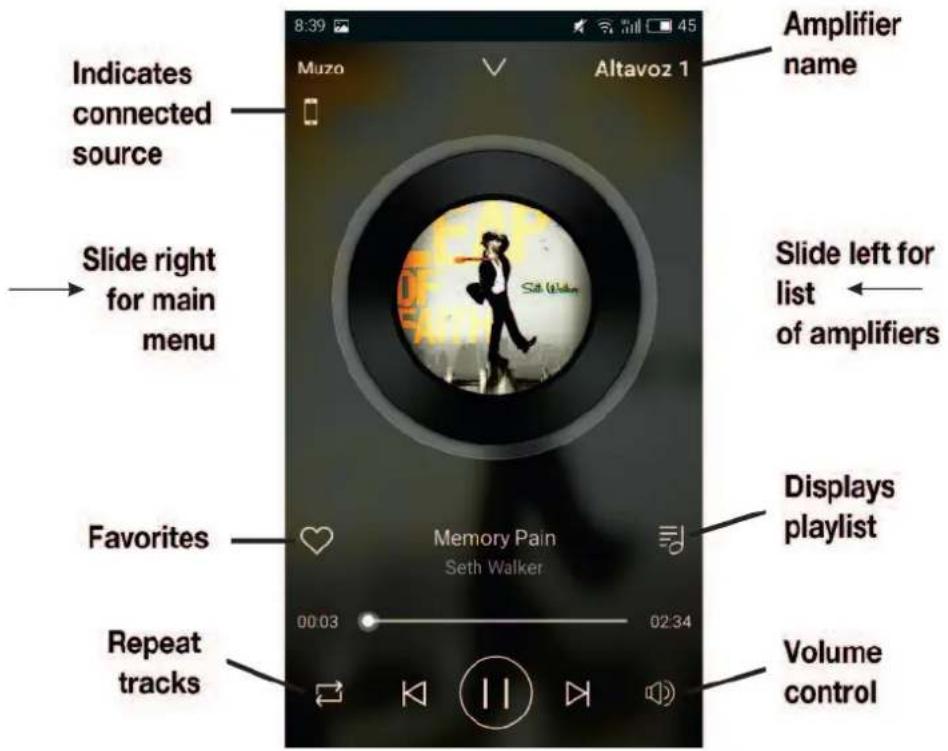
- Finally, once the device is playing, the following display will be shown. Below, we explain the useful information that can be found.
TECHNICAL SPECIFICATIONS
| ELIPSE-5WIFI ELIPSE-5BWIFI | ||
| CHARACTERISTICS Pair of Wi-Fi loudspeakers.App to control from smartphones and tablets.Playback via Wi-Fi of playlists, online music services and internet radio.6 customizable preset buttons.USB player and aux input.Active loudspeaker with amplifier and output for passive loudspeaker. | ||
| POWER 2 x 20 W RMS | ||
| LOUDSPEAKERS 1 x 5 | 1/4" polypropylene woofer1 x 1" tweeter" | |
| RESPONSE 20-17,000 Hz -3 dB | ||
| INPUTS 1 aux, 3.5 mm jack 7,700 Ω 1 V | ||
| CONNECTORS Loudspeaker: euroblock | ||
| COLOUR Black (RAL 9017) White (RAL 9003) | ||
| POWER SUPPLY 100-240 V AC, 3 A | ||
| DIMENSIONS 163 x 252 x 155 mm depth | ||
| ACCESSORIES Adjustable fixing mounts | ||
FONESTAR SISTEMAS S.A. hereby declares that the ELIPSE-5WIFI and ELIPSE-5BWIFI loudspeakers comply with the Directive 2014/53/EU. The complete text of the EU Declaration of Conformity is available at the following internet address:
fonestar.com/ES/ELIPSE-5WIFI
WARRANTY
This product has been tested and has passed the corresponding quality control prior to being put on the market.
FONESTAR guarantees the suitability of the product for its specified use during a period of 2 years from the delivery date and commits itself to repair or substitute the goods as expressed in the Spanish law ‘La Ley General para la Defensa de los Consumidores y Usuarios, Real Decreto Legislativo 1/2007 16 Noviembre.
The lack of conformity in the first six months after purchase, due to a manufacturing defect, will be rectified with no more than showing the proof of purchase. After six months FONESTAR reserves the right to demand proof of the product being sold with that problem.
This warranty does not include damage produced by: inappropriate use or negligence, accidents, worn out parts due to use, breakages, burns, spilt liquids or other substances, excessive humidity, battery deterioration and internal manipulation of the device, the software or its components by unauthorized persons, and in general any use that is unrelated to the nature and purpose of the product.
If any service is needed during the warranty period because of lack of conformity, please contact the business or distributor where the product was purchased in no more than 2 months after being conscious of the problem. It is only necessary to contact FONESTAR if it is impossible or imposes an undue burden for them to solve it.
To benefit from this warranty it is necessary to show the proof of purchase with the date clearly visible, with no corrections or crossing out.
This document adds information, and never decreases the consumers' rights, which in all cases are protected by the Spanish law 'La Ley General para la Defensa de los Consumidores y Usuarios, Real Decreto Legislativo 1/2007 16 Noviembre.
- ELIPSE-5WIFI, ELIPSE-5BWIFI
- SECURITY AND THE ENVIRONMENT
- ELECTRICAL SECURITY
- CAUTION
- LOCATION
- VENTILATION
- PERIODS OF INACTIVITY
- THE ENVIRONMENT
- SIGNIFICANCE OF THE SYMBOLS ON THE MACHINE\*
- EXEMPTION OF LIABILITY
- DESCRIPTION
- CONTROLS AND FUNCTIONS
- OPERATING WITH ETHERNET CABLE
- Wi-Fi OPERATING
- WARRANTY
Brand : FoneStar
Model : ELIPSE-4B
Category : Loudspeaker