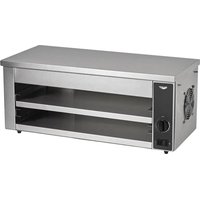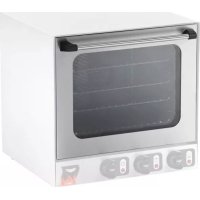
XCOA1023 - Oven Vollrath - Free user manual and instructions
Find the device manual for free XCOA1023 Vollrath in PDF.


| Product Type | Commercial Restaurant Oven |
| Compatible Models | 40701, 40702, 40703 (XCOA1023) |
| Dimensions | 40703: half-size; 40701/40702: full-size |
| Power Supply | 120 V (40703) or 220 V (40701/40702) |
| Lamp Wattage | 15 W (120 V) or 25 W (220 V) |
| Main Functions | Baking, Grill (40701/40703), Steam (40702) |
| Temperature Range | Up to 274 °C (525 °F) |
| Timer | 1 to 120 minutes or continuous operation |
| Grids Provided | 3 (40703) or 4 (40701/40702) |
| Required Clearance | At least 30.4 cm (12") from non-combustible walls |
| Water Connection (Steam) | Pressure 3 to 30 PSI, 1.9 cm (3/4") male fitting |
| Feet | Height 10 cm (4") – mandatory for safety |
| Safety | Grounding mandatory; do not use without the feet |
| Cleaning | Daily with damp cloth and soapy water; removable door |
| Lamp Replacement | Unscrew the cover, install a suitable new lamp |
| Warranty | Vollrath Co. LLC warranty against defects in materials and workmanship |
| Technical Support | Contact Vollrath: techservicereps@vollrathco.com |
Frequently Asked Questions - XCOA1023 Vollrath
User questions about XCOA1023 Vollrath
0 question about this device. Answer the ones you know or ask your own.
Ask a new question about this device
Download the instructions for your Oven in PDF format for free! Find your manual XCOA1023 - Vollrath and take your electronic device back in hand. On this page are published all the documents necessary for the use of your device. XCOA1023 by Vollrath.
USER MANUAL XCOA1023 Vollrath
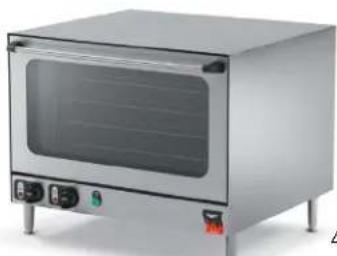
Cayenne® CountertopConvectionOven
ThankyouforpurchasingthisVollrathequipment.Beforeoperatingthe equipment,readandfamiliarizeyourselfwiththefollowingoperating andsafetyinstructions.SAVETHESEINSTRUCTIONSFORFUTURE REFERENCE.Savetheoriginalboxandpackaging.Usethispackaging toshiptheequipmentifrepairsareneeded.
SAFETYPRECAUTIONS
Toensuresafeoperation, read the following statements and understand their meaning. This manual contains safety precautions which are explained below. Pleaseread carefully.

WARNING
Warningisusedtoindicatethepresenceofahazardthatwillorcan causeseverepersonalinjuryordeath.

CAUTION
Cautionisusedtoindicatethepresenceofahazardthatwillorcan causeminorormajorpersonalinjuryifthecautionisignored.
NOTICE: Notice is used to note information that is important but not hazard-related.
Toreduceriskofinjuryordamagetotheequipment
- Donotsetitemsondoor, usethedoorasashelforleanondoor.
- Useonlygroundedelectricaloutletsmatchingthenameplaterated voltage.
- Donotuseanextensioncordwiththisequipment.Donotplugthis equipmentintoapowerstripormulti-outletpowercord.
- Unplugequipment, turnoffandletitcoolbeforecleaningormoving.
- Keepequipmentandpowercordawayfromopenflames,electric burnersorexcessiveheat.
- Donotoperateequipmentinpublicareasand/oraroundchildren.
•Theequipmentmaybehot, even though the pilot light(s) is not on. - Donotoperateifequipmenthasbeendamagedorismalfunctioning inanyway.
- Donotcleantheequipmentwithsteelwool.
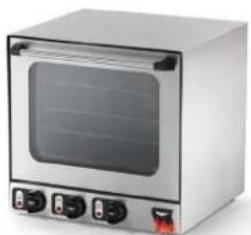
natural_image
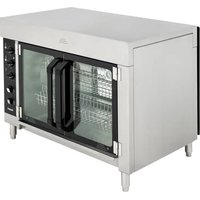
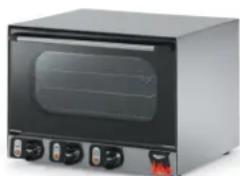
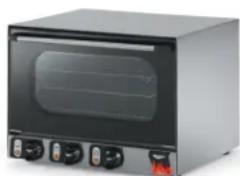
Exterior view of a stainless steel oven with control buttons (no text or symbols visible)40701
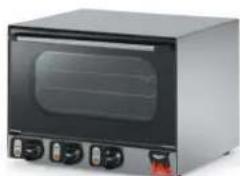
natural_image
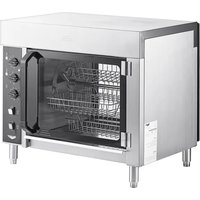
Exterior view of a modern kitchen oven with control buttons (no visible text or symbols)40703
natural_image
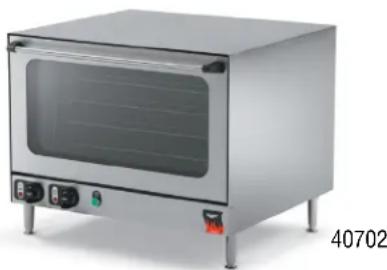
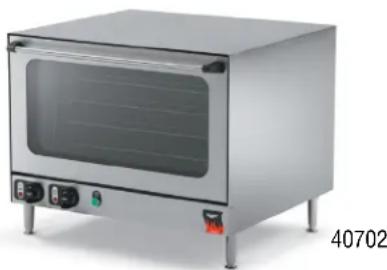
Exterior view of a stainless steel kitchen oven with control buttons and a side panel (no visible text or symbols)40702
| ItemNo.ModelSize | Shelves(Included) | ||
| 40703COA7002 | Half-size | 3 | |
| 40701COA80044 | |||
| 40702COA8005 | Full-size4 |
TableofContents
UnpackingtheEquipment......page2
ClearanceandPositioning......page2
BeforeFirstUse......page2
Operation......page3
Cleaning......page3
Maintenance......page4
Troubleshooting......page4
FUNCTIONANDPURPOSE
This unit is intended to be used for cooking fresh or frozen foods in commercial food service operations only. It is not intended for household, industrial or laboratory use.
UNPACKINGTHEEQUIPMENT


WARNING
Fire, Injury, DeathHazard
Thisequipmentmustinstalledbyaqualifiedinstallerin accordancewithallfederal,stateandlocalcodes.Failureto installthisequipmentproperlycanresultininjuryordeath.
When nolongerneeded, disposeofallpackagingandmaterialsinan environmentally responsible manner.
- Remove all packing material and tape, as well as any protective plastic from the equipment.
- Cleananyglueresidueleftoverfromtheplasticortape.
CLEARANCEANDPOSITIONING
NOTICE: Theremustbeaminimumof12"(30.4cm) between the equipment and any surrounding walls. Thesurrounding walls must be made of noncombustible materials. The equipment must be installed in accordance with local fire and building regulations.
- Placetheequipmentinthedesiredpositionandheight.
2.ItemNumber40702Only.
- Thisovenisequippedwithawatersprayfeature. Connectthe oventoapotablewatersupplywithapressurebetween3and30 PSI.A ^3/4 " (1.9cm) maleinletforwaterconnectionisprovidedon thebackoftheoven.
•The4"legsmustbeinstalledtocomplywithNSF.


WARNING
FireHazard.
Thisunitisdesignedtobeusedwithlegs.Donotusewithout legsinstalled.Useofthisequipmentwithoutlegscancause theunittooverheatandcauseafire.
- Plugtheequipmentintoaproperlygroundedelectricalsupply matchingthenameplaterating.Damagetotheequipmentcanoccur ifincorrectpowerissuppliedtoequipment.
BEFOREFIRSTUSE
Burn-in
Closethedoorandturnthebakecontrolto525°F(274°C).Setthe timerfor30minutes.Duringthisburn-inyoumaynoticeaslightodor, thisisnormal.
Clean
Before using this equipment must be cleaned and dried thoroughly. Clean all surfaces before use. Failure to cleans surfaces before using the unit could cause food contamination.
FEATURESANDCONTROLS
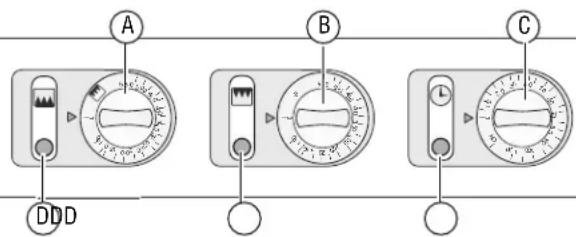
40701and40703
text_image
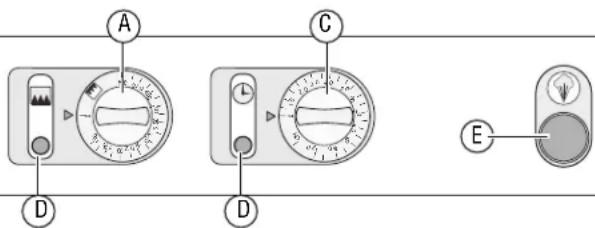
A B C DDD40702
text_image
A C D D EABakeControl. Usedtosetoradjustthetemperatureoftheoven. Thenumbersonthedialcorrespondwiththeoventemperature. The "0"positionisoff. Thetimerneedstobe "ON"forthe heatingelementstofunction.
BBrownControl.(40701and40702Only).Usedtosetoradjust the temperature of the upper element. Thenumbersonthedial correspond with the oventemperature. The bake control must be set in the "BROWN" position and the timer in the "ON" position for the upper element to heat. The and does not operate when the brown function is operating.
CTimer.Timercanbesetfor1-120minutes,oritcansetto constant"ON"position. Thetimermustbeoperatinginorderfor "Bake"tofunction. Thetimerdoesnothaveabuzzer.
DPilotLights. Thislight indicates that the oven is heating and the timer is activated. Once the temperature has been reached the light will go out. Equipment will continue to maintain heat and temperature as the light cycles on and off. This light is not a power "ON" indicator. The timer pilot light will illuminate when the timer is operating.
EMistControlButton.(40702Only).Apushbuttonlocatedon thefrontpaneloftheoven.Spraysasmallamountofwaterto enterthebakingchamber.
OPERATION


CAUTION
BurnHazard
Donottouchhotfood, liquidorheatingsurfaceswhile equipmentisheatingoroperating.
Hotsurfaces, steamandfoodcanburnskin. Allow the hot surface to cool beforehand. Donot drop or spill water onto the cooking surface as it canspray or splatter.
BakeFunction(All)
Usetobakeorcookafoodproduct.
- Placethewireshelvesorpansinthedesiredpositionsinsidethe unit.Allowaspaceofatleast2"(5cm)betweenwireshelvesor pans.
- Setthebakecontrolthedesiredtemperature.
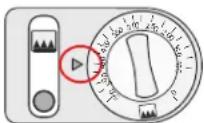
- Set the timer control to the desired time. The fan and oven light will operate continuously. The heating elements will cycle on and off to maintain a consistent temperature.
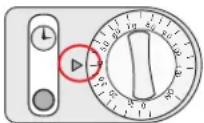
- Placefoodproductintotheunitandmonitor.
BrownFunction(40701and40703Only)
- Placetheshelvesinthedesiredpositionsinsidetheunit. Assurethe foodproductisnottoocloseortouchingtheinsidetoporheating elements.
NOTICE: Thefansdonotoperateinbrowningmode.
- Turnthebakecontrolknobtothebrownfunctionicon.
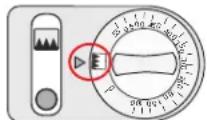
- Setthebrowncontrolknobtothedesiredtemperature. Thetimer controldoesnotneedtobeusedforthebrowningfunctionto operate.
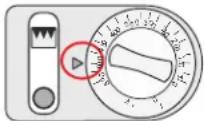
- Placethefoodproductintotheoven.
MistFunction(40702Only)
Usetocreateaheaviercrustonbreadandrolls.
Themistfunctionworksbestifactivatedatthebeginningofthebakingcycle,aftertheovenhasreachedthecookingtemperatureandthefoodproducthasjustbeenplacedintotheoven.
- Pressthemistcontrolbuttonontoactivateasprayofwaterintothe cookingchamber.Donotpressthebuttonlongerthan2-second pulses.
CLEANING


WARNING
ElectricalShockHazard
Keepwaterandotherliquidsfromenteringtheinsideofthe equipment.Liquidinsidetheequipmentcouldcausean electricalshock.Donotspraywaterorcleaningproducts.Liquidcouldcontacttheelectricalcomponentsandcausea shortcircuitoranelectricalshock.
NOTICE: Donotimmersethecord, plugorequipmentinwateror anyotherliquid.
NOTICE: Donotusecausticorabrasivecleanersonthisequipment.
Tomaintaintheappearanceandincreasetheservicelife,cleanyour equipmentdaily.
- Turnoff and unplug the equipment.
- Allow the equipment to cool completely before cleaning.
- Useadampclothdippedinsoapywatertocleantheoutsideofthe equipment.
Removetheovendoor
Theovendoormayberemovedforcleaning.
- Allow the equipment to cool completely before removing the door.
-
Openthedoor.
-
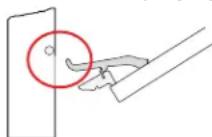
Notethedownorbackpositionofthehingelocks.Checkthatboth sidesareinthisposition.
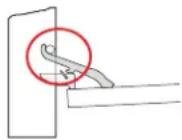
- Placethehingelockoverthehingearmasshown.Repeatonthe otherside.
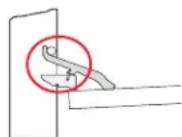
- Tilttheovendoorupslightlyandlifttheovendoorout.
- Using adampcloth, spongedipped in soapy watertoclean the door.
- Usetowelstocompletelydrythedoororallowittoairdry completely.
- Carefully set theovendoor into the oven. Placethearmso that it sets underpin.
- Rotatethehingelockoffthehingearm. Repeatedonbothsides.
- Open and closeted to overify that it is operating correctly.
MAINTENANCE
ReplacetheOvenLight
- Turnoffandunplugtheequipment.
- Allow the equipment to cool completely before cleaning.
- Unscrewthelightcover.
- Remove and discard the old light.
- Installanewlight. Thenewlight must be rated for the hight temperature and must match then a name plate voltage.
•40701-220Volt-25watts
•40702-220Volt-25watts
•40703-120Volt-15watts
- Installthelightcover.
TROUBLESHOOTING
| ProblemMightbeCausedByCourseofAction | ||
| Pilotlightdoesnotcomeonwhenthe temperaturecontrolisturnedup. | Theequipmentisnotpluggedin.Plugintheequipment. | |
| Pilotlightmalfunction.Replacepilotlight. | ||
| Thermostatcontrolmalfunction.Replaceethermostatcontrol. | ||
| Thelightcomeson,equipmentdoesnoheat.Heatingelementmalfunction.Replaceheatingelement. | ||
| Brown function does not work. | Bake control not set to brown setting. | Set bake control to brown setting |
| Mist function does not operate. | Blocked or no water supply. | Turn water supply on or clean blockage. |
SERVICEANDREPAIR
ServiceablepartsareavailableonVollrath.com.
To avoid serious injury or damage, never attempt to repair the unit or replace a damaged power cord yourself. Do not send units directly to TheVollrathCompanyLLC.PleasecontactVollrathTechnicalServicesforinstructions.
When contacting Vollrath Technical Services, please be ready with the item number, model number (if applicable), serial number, and proof of purchaseshowingthedatetheunitwaspurchased.
WARRANTYSTATEMENTFORTHEVOLLRATHCO.L.L.C.
This warranty does not apply to products purchased for personal, family or household use, and The Vollrath Company LLC does not offer a written warranty topurchasersforsuchuses.
The Vollrath Company LLC warrants the products it manufactures or distributes against defects in materials and workmanship as specifically described in our full warranty statement. In all cases, the warranty runs from the date of the end user's original purchase date found on the receipt. Any damages from improper use, abuse, modification or damage resulting from improper packaging during return shipment for warranty repair will not be covered under warranty.
Forcompletewarrantyinformation,productregistrationandnewproductannouncement,visitwww.vollrath.com.
| TheVollrathCompany,L.L.C.Headquarters1236North18thStreetSheboygan,Wisconsin53081-3201USAMainTel:800-624-2051or920-457-4851MainFax:800-752-5620or920-459-6573CanadaCustomerService:800-695-8560TechServices:techservicereps@vollrathco.comwww.vollrath.com | VollrathEuropeBVBeneluxbaan75121ADRIJENTheNetherlands+31161870005 | VollrathofChinaVollrathShanghaiTradingLimited23A,TimeSquarePlaza|500ZhangYangRoadPudong,Shanghai200122Tel:86-21-50589580 | VollrathdeMexicoS.deR.L.deC.V.PerifericoSurNo.7980Edificio4-ECol.SantaMariaTequepexpan45600Tlaquepaque,Jalisco|MexicoTel:(52)333-133-6767Tel:(52)333-133-6769Fax:(52)333-133-6768 |
FouràconvectionposableCayenne
®
natural_image
Exterior view of a stainless steel kitchen oven with control buttons (no text or symbols visible)40701
natural_image
Exterior view of a modern kitchen oven with control buttons (no visible text or symbols)40703
natural_image
Exterior view of a stainless steel kitchen oven with control panel and side-mounted buttons (no visible text or symbols)text_image
A C D D Enatural_image
Exterior view of a stainless steel kitchen oven with control buttons (no text or symbols visible)40701
natural_image
Exterior view of a modern kitchen oven with control buttons (no visible text or symbols)40703