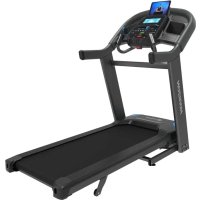
USER MANUAL 7.4AT Horizon Fitness
natural_image
Abstract black-and-white logo with stylized 'f' and circular design (no text or symbols)
HORIZON
FITNESS
7.4 A
TREADMILL
TREADMILL OWNER'S MANUAL MANUEL DU PROPRIÉTAIRE DU TAPIS ROULANT MANUAL DEL PROPIETARIO DE LA CAMINADORA

Read the TREADMILL GUIDE before using this OWNER'S MANUAL.
SAVE THESE INSTRUCTIONS
When using an electrical product, basic precautions should always be followed, including the following: Read all instructions before using this treadmill. It is the responsibility of the owner to ensure that all users of this treadmill are adequately informed of all warnings and precautions. If you have any questions after reading this guide, contact Customer Tech Support at the number listed on the back panel of the OWNER'S MANUAL.
This treadmill is intended for in-home use only. Do not use this treadmill in any commercial, rental, school or institutional setting. Failure to comply will void the warranty.


DANGER
TO REDUCE THE RISK OF ELECTRICAL SHOCK:
Always unplug the treadmill from the electrical outlet immediately after using, before cleaning, performing maintenance and putting on or taking off parts.

WARNING
TO REDUCE THE RISK OF BURNS, FIRE, ELECTRICAL SHOCK OR INJURY TO PERSONS:
- Never use the treadmill before securing the safety tether clip to your clothing.
- If you experience any kind of pain, including but not limited to chest pains, nausea, dizziness, or shortness of breath, stop exercising immediately and consult your physician before continuing.
- When exercising, always maintain a comfortable pace.
- Do not wear clothes that might catch on any part of the treadmill.
• Always wear athletic shoes while using this equipment.
- Do not jump on the treadmill.
- At no time should more than one person be on treadmill while in operation.
- This treadmill should not be used by persons weighing more than specified in the OWNER'S MANUAL WARRANTY SECTION. Failure to comply will void the warranty.
- When lowering the treadmill deck, wait until rear feet are firmly on the floor before stepping on the deck.
- Disconnect all power before servicing or moving the equipment. To clean, wipe surfaces down with soap and slightly damp cloth only; never use solvents. (See MAINTENANCE)
- The treadmill should never be left unattended when plugged in. Unplug from outlet when not in use, and before putting on or taking off parts.
- Do not operate under blanket or pillow. Excessive heating can occur and cause fire, electric shock, or injury to persons.
- Connect this exercise product to a properly grounded outlet only.

WARNING
TO REDUCE THE RISK OF BURNS, FIRE, ELECTRICAL SHOCK OR INJURY TO PERSONS:
- At NO time should pets or children under the age of 13 be closer to the treadmill than 10 feet.
- At NO time should children under the age of 13 use the treadmill.
• Children over the age of 13 or disabled persons should not use the treadmill without adult supervision.
- Use the treadmill only for its intended use as described in the treadmill guide and owner's manual.
- Do not use other attachments that are not recommended by the manufacturer. Attachments may cause injury.
- Never operate the treadmill if it has a damaged cord or plug, if it is not working properly, if it has been dropped or damaged, or immersed in water. Return the treadmill to a service center for examination and repair.
- Keep power cord away from heated surfaces. Do not carry this unit by its supply cord or use the cord as a handle.
- Never operate the treadmill with the air opening blocked. Keep the air opening clean, free of lint, hair, and the like.
- To prevent electrical shock, never drop or insert any object into any opening.
- Do not operate where aerosol (spray) products are being used or when oxygen is being administered.
- To disconnect, turn all controls to the off position, then remove plug from outlet.
- Do not use treadmill in any location that is not temperature controlled, such as but not limited to garages, porches, pool rooms, bathrooms, car ports or outdoors. Failure to comply will void the warranty.
- This treadmill is intended for in-home use only. Do not use this treadmill in any commercial, rental, school or institutional setting. Failure to comply will void the warranty.
- Do not remove the console covers unless instructed by Customer Tech Support. Service should only be done by an authorized service a technician.
It is essential that your treadmill is used only indoors, in a climate controlled room. If your treadmill has been exposed to colder temperatures or high moisture climates, it is strongly recommended that the treadmill is warmed up to room temperature before first time use. Failure to do so may cause premature electronic failure.


GROUNDING INSTRUCTIONS
This product must be grounded. If a treadmill should malfunction or breakdown, grounding provides a path of least resistance for electrical current to reduce the risk of electrical shock. This product is equipped with a cord having an equipment-grounding conductor and a grounding plug. The plug must be plugged into an appropriate outlet that is properly installed and grounded in accordance with local codes and ordinances.

DANGER
Improper connection of the equipment-grounding conductor can result in a risk of electric shock. Check with a qualified electrician or service provider if you are in doubt as to whether the product is properly grounded. Do not modify the plug provided with the product. If it will not fit the outlet, have a proper outlet installed by a qualified electrician.
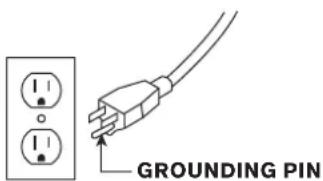
This product is for use on a nominal 110-120 Volt circuit and has a grounding plug that looks like the plug in the illustration. Make sure that the product is connected to an outlet having the same configuration as the plug. No adapter should be used with this product.
This product must be used on a dedicated circuit. To determine if you are on a dedicated circuit, shut off the power to that circuit and observe if any other devices lose power. If so, move devices to a different circuit. Note: There are usually multiple outlets on one circuit. This treadmill should be used with a minimum 15-amp circuit.
3-POLE GROUNDED OUTLET
text_image
GROUNDING PIN

WARNING
Connect this exercise product to a properly grounded outlet only.
Never operate product with a damaged cord or plug even if it is working properly.
Never operate any product if it appears damaged, or has been immersed in water.
Contact Customer Tech Support for replacement or repair.
ASSEMBLY

WARNING
There are several areas during the assembly process that special attention must be paid. It is very important to follow the assembly instructions correctly and to make sure all parts are firmly tightened. If the assembly instructions are not followed correctly, the treadmill could have parts that are not tightened and will seem loose and may cause irritating noises. To prevent damage to the treadmill, the assembly instructions must be reviewed and corrective actions should be taken.
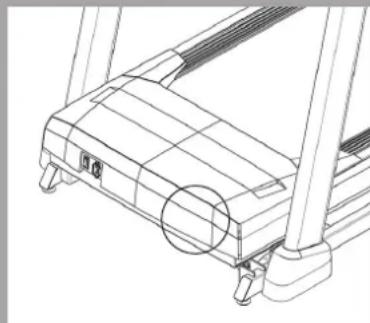
Before proceeding, find your treadmill's serial number located on a white barcode sticker near the on/off power switch and power cord and enter it in the space provided below.
ENTER YOUR SERIAL NUMBER AND MODEL NAME IN THE BOXES BELOW:
» Refer to the SERIAL NUMBER and MODEL NAME when calling for service.
SERIAL NUMBER:
TM
MODEL NAME: HORIZON 7.4AT TREADMILL
SERIAL NUMBER LOCATION
natural_image
Line drawing of a treadmill with a circular component on the side (no text or symbols)
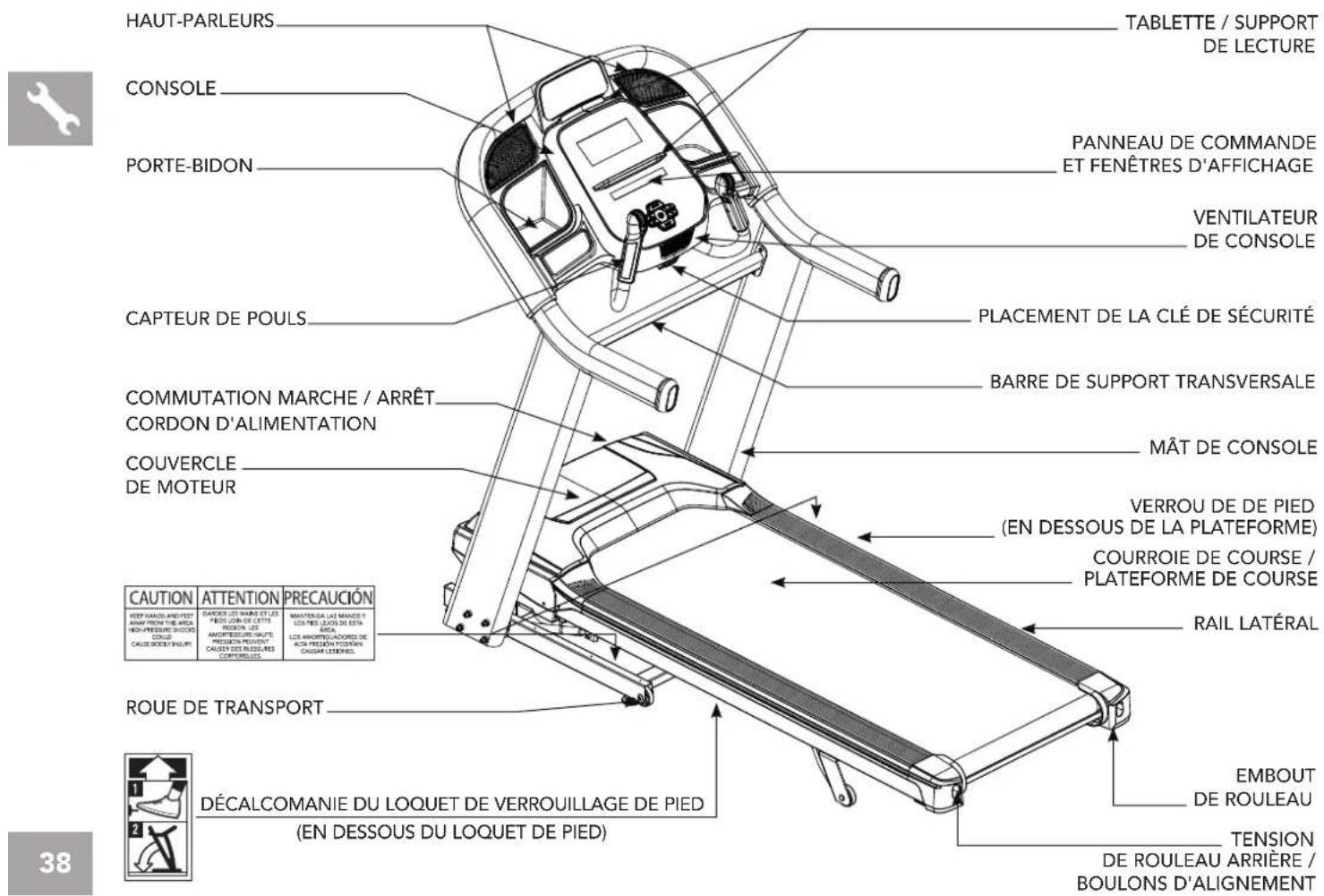
text_image
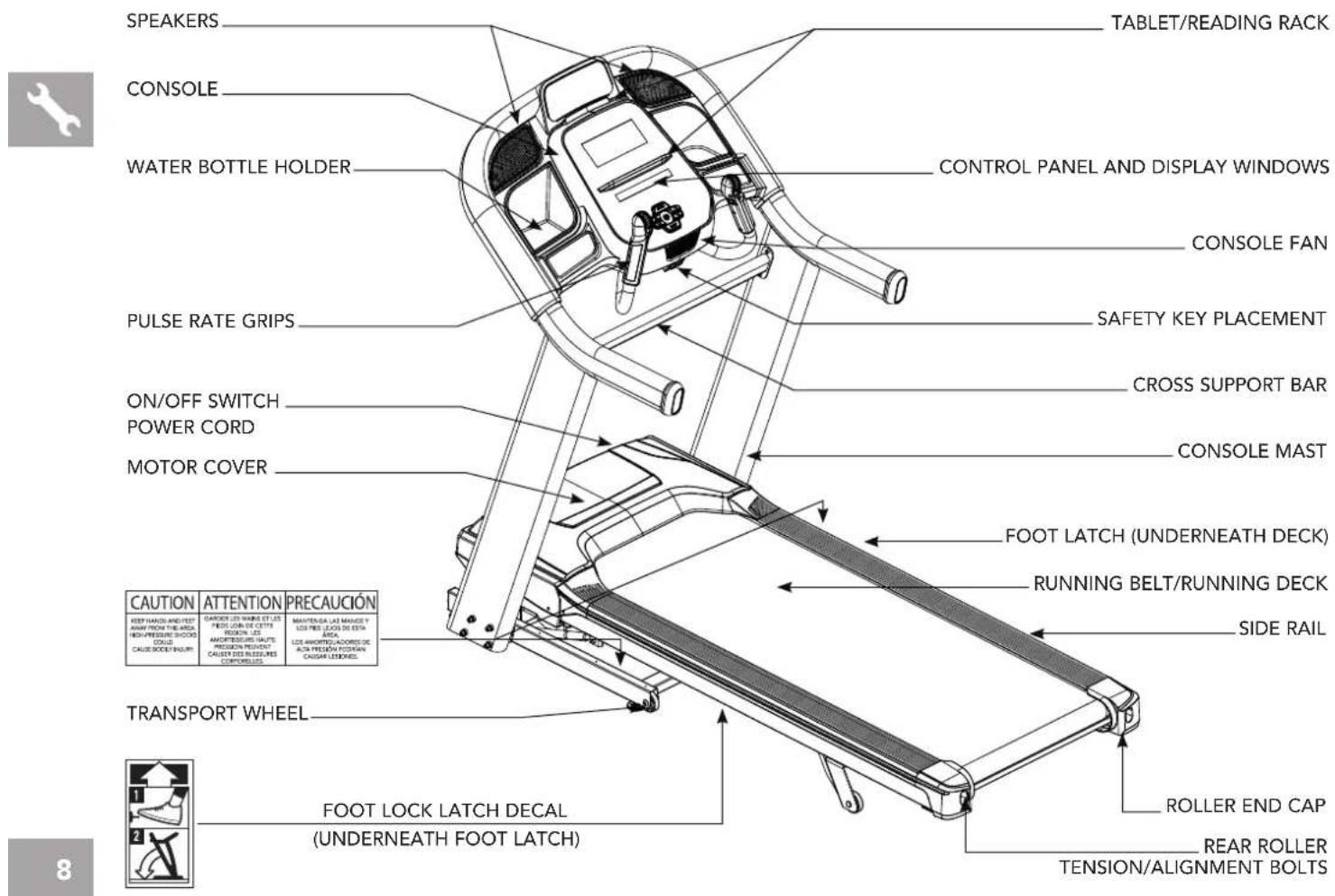
SPEAKERS
TABLET/READING RACK
CONSOLE
WATER BOTTLE HOLDER
CONTROL PANEL AND DISPLAY WINDOWS
CONSOLE FAN
PULSE RATE GRIPS
SAFETY KEY PLACEMENT
ON/OFF SWITCH
POWER CORD
CROSS SUPPORT BAR
MOTOR COVER
CONSOLE MAST
CAUTION ATTENTION PRECAUCIÓN
KEEP HAND AND FEET
ARW FROM THE AREA
HIGH/PRESSURE SHOCO
CAUSE BODY INSUR
CAPSIC LOS HANDS ET LTS
PEACH CAN DE CETTE
BOXION LES
AMORRESURE HAUTE
PRECISION PRACTIT
CAUSTA DES RECESSLES
CORPORLES
MAINTENZA LAS HANDS Y
LOS FEES, LAGOS DE EXA
AREA,
LDS AMOUNTED ACORES DE
ALON PRESEN FORTRAN
CAUSAR LEDGES.
FOOT LATCH (UNDERNEATH DECK)
RUNNING BELT/RUNNING DECK
SIDE RAIL
TRANSPORT WHEEL
1 FOOT LOCK LATCH DECAL
(UNDERNEATH FOOT LATCH)
ROLLER END CAP
2 REAR ROLLER
TENSION/ALIGNMENT BOLTS
8
8 mm T-Wrench
6 mm L-Wrench
5 mm L-Wrench
PARTS INCLUDED:
□ 1 Main Frame
□ 1 Console Assembly
2 Console Masts
□ 1 Cross Support Bar
□ 1 Hardware Kit
□ 1 Safety Key
□ 1 Audio Adapter Cable
☐ 1 Bottle of Silicone Lubricant
(for 2 applications)
□ 1 Power Cord
□ 2 Pulse Rate Grips

NEED HELP?
If you have questions or if there are any missing parts, contact Customer Tech Support. Contact information is located on the back panel of this manual.
PRE ASSEMBLY
UNPACKING
Place the treadmill carton on a level flat surface. It is recommended that you place a protective covering on your floor. Take CAUTION when handling and transporting this unit. Never open box when it is on its side. Once the banding straps have been removed, do not lift or transport this unit unless it is fully assembled and in the upright folded position, with the lock latch secure. Unpack and assemble the unit where it will be used. The enclosed treadmill is equipped with high-pressure shocks and may spring open if mishandled. Never grab hold of any portion of the incline frame and attempt to lift or move the treadmill.

WARNING
DO NOT ATTEMPT TO LIFT THE TREADMILL! Do not move or lift treadmill from packaging until specified to do so in the assembly instructions. You may remove the plastic wrap from console masts.

WARNING
FAILURE TO FOLLOW THESE INSTRUCTIONS COULD RESULT IN INJURY!
NOTE: During each assembly step, ensure that ALL nuts and bolts are in place and partially threaded in before completely tightening any ONE bolt.
NOTE: A light application of grease may aid in the installation of hardware. Any grease, such as lithium bike grease is recommended.


ASSEMBLY STEP 1
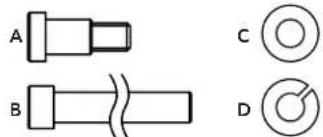
| HARDWARE FOR STEP 1 |
| PART TYPE DESCRIPTION QTY | | |
| | M8X1.25PX11L 2 A UPRIGHT | GUIDE BO |
| B | MAST BOLT | M8X1.25PX80L | 8 |
| C | FLAT WASHER | 8.4X15.5X1.6T | 8 |
| D | SPRING WASHER | 8.2X15.4X2.0T | 8 |
text_image
Technical diagram of a treadmill with labeled parts and an inset showing a close-up of the component.
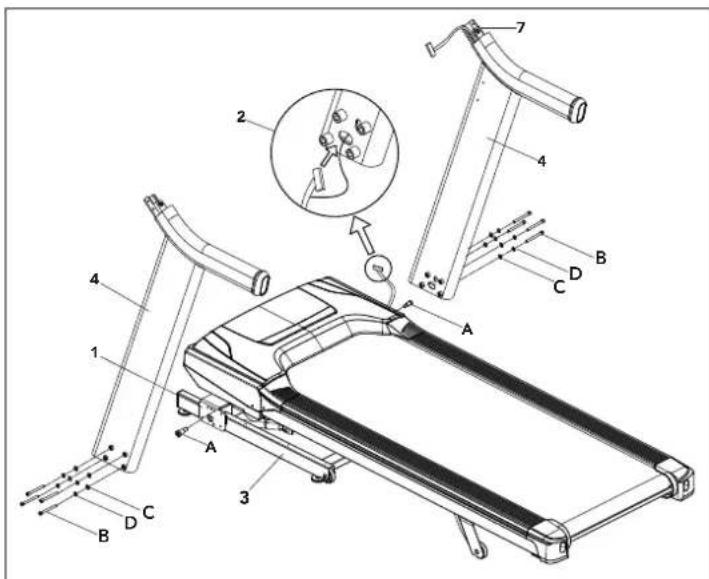
A Cut the yellow banding straps and lift the running deck upward from the rear to remove all contents from underneath the running deck.
B Open HARDWARE FOR STEP 1.
C Insert UPRIGHT GUIDE BOLT (A) into MAIN FRAME BRACKET (1) and fully tighten.
NOTE: Do not fully tighten the following bolts until the end of STEP 4.
D Attach LEAD WIRE to bottom end of CONSOLE CABLE (2). Pull LEAD WIRE through RIGHT CONSOLE MAST (4). After pulling the wire through the mast, the top of the CONSOLE CABLE (2) should be located at the ATTACHMENT BRACKET (7).
E Attach RIGHT CONSOLE MAST (4) to MAIN FRAME (3) using 4 BOLTS (B), 4 FLAT WASHERS (C) AND 4 SPRING WASHERS (D). Feed the extra console cable back into the upright mast.
NOTE: Be careful not to pinch the console cable while attaching the right console mast.
F Repeat STEP E on the LEFT SIDE.
natural_image
Pure electrical circuit lines without any symbols
ASSEMBLY STEP 2
| HARDWARE FOR STEP 2 |
| PART TYPE DESCRIPTION QTY | | | |
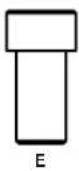
| | M6X1.0PX15L 4 E BOLT | |
text_image
E
5
4
4
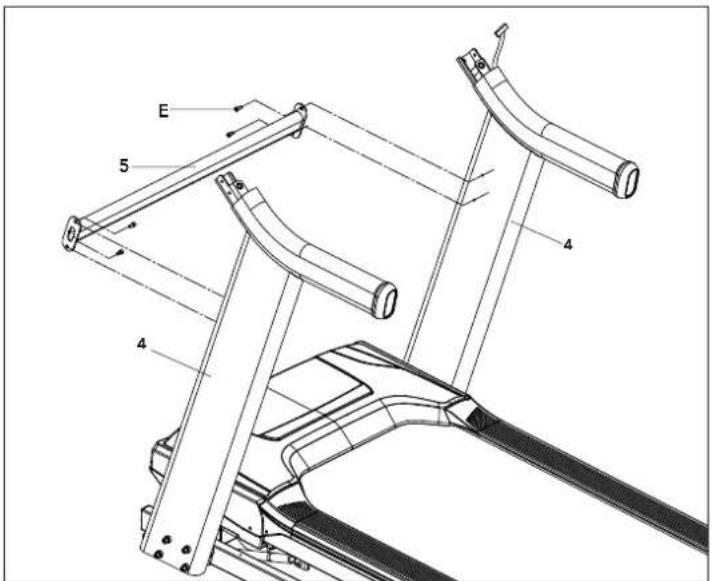
NOTE: Do not fully tighten bolts until STEP 3.
A Open HARDWARE FOR STEP 2.
B Attach CROSS SUPPORT BAR (5) using holes on UPRIGHT MASTS (4) with 4 BOLTS (E).

ASSEMBLY STEP 3
| HARDWARE FOR STEP 3 |
| PART TYPE DESCRIPTION QTY | | |
| F | ARC WASHER | 8.4X15.5X1.6T | 4 |
| G | SHORT BOLT | M8x1.25Px15L | 2 |
| H | LONG BOLT | M8x1.25Px70L | 2 |

text_image
Technical diagram of a stationary exercise machine with labeled components and internal wiring connections
A Open HARDWARE FOR STEP 3.
B Have someone help hold the console while attaching the CONSOLE CABLE (2). Use the lead wire to carefully pull the CONSOLE CABLE (2) out of the RIGHT CONSOLE MAST (4). Attach the CONSOLE CABLE (2) from the CONSOLE (6) to the CONSOLE CABLE (2) from the top of the RIGHT UPRIGHT MAST (4). Detach and discard the lead wire.
C Carefully slide the CONSOLE (6) onto the ATTACHMENT BRACKETS (7) being careful not to pinch the CONSOLE CABLE (2). Align the holes on the bottom side of the CONSOLE (6) with the holes on the ATTACHMENT BRACKETS (7).
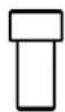
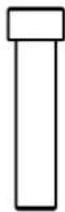
D Attach the CONSOLE (6) to the ATTACHMENT BRACKETS (7) by first placing ARC WASHERS (F) onto BOLTS (G) AND (H) as illustrated. Insert SHORT BOLTS (G) into the top hole of the ATTACHMENT BRACKET (7) and LONG BOLTS (H) into the bottom hole.
E Repeat STEP D for the opposite side.

FGH
ASSEMBLY STEP 4
| HARDWARE FOR STEP 4 |
| PART TYPE DESCRIPTION QTY | | |
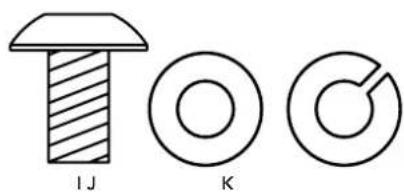
| I | BOLT | M8x15L | 8 |
| J | SPRING WASHER | 8.2X15.4X2.0T | 8 |
| K | FLAT WASHER | 8.4X15.5X1.6T | 8 |

text_image
Technical diagram of a treadmill with labeled parts and component annotations
A Open HARDWARE FOR STEP 4.
B Attach RIGHT SIDE PULSE RATE GRIP (8) to the underside of the CONSOLE (6) using 4 BOLTS (I), 4 SPRING WASHERS (J) and 4 FLAT WASHERS (K).
C Connect the RIGHT CONSOLE CABLES (9R) and carefully tuck in wires to avoid damage.
D Repeat STEP B on the LEFT SIDE.
E Connect the LEFT CONSOLE CABLES (9L) and carefully tuck wires to avoid damage.
NOTE: Fully tighten all bolts from PREVIOUS STEPS
natural_image
Three technical diagrams showing a bolt, a circular cross-section, and a segmented circular section (no text or labels)
ASSEMBLY COMPLETE!
Before the first use, lubricate the treadmill deck by following the instructions in the MAINTENANCE section in the TREADMILL GUIDE.

TREADMILL OPERATION
This section explains how to use your treadmill's console and programming.
The BASIC OPERATION section in the TREADMILL GUIDE has instructions for the following:
• LOCATION OF THE TREADMILL
• USING THE SAFETY KEY
• FOLDING THE TREADMILL
• MOVING THE TREADMILL
• LEVELING THE TREADMILL
• TENSIONING THE RUNNING BELT
• CENTERING THE RUNNING BELT
• USING THE HEART RATE FUNCTION


text_image
C A R B P O N
M
88.88 88.88 88.88
+100
88.88 .88.88
98.88 88.8 88.8 88.8
PROGRAMS
HORIZON START
INCLINE PUSH SPEED
STOP
I K E F D S J T J
G H
16
CONSOLE OPERATION
Note: There is a thin protective sheet of clear plastic on the overlay of the console that should be removed before use.
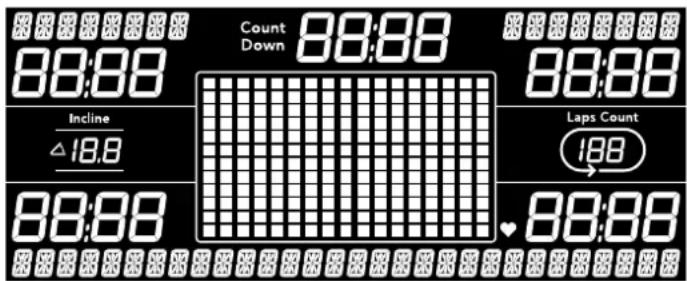
A) LCD DISPLAY WINDOWS: Watts, Pace, Calories/Hour, Heart Rate, Laps.
B) LED DISPLAY: Time, Speed, Distance, Incline, Pace, Heart Rate, and Calories.
C) WORKOUT LED INDICATORS: indicates what workout is set for the current program.
D) SELECT TARGET/WORKOUT KNOB: rotate/press to select your desired workout/target
E) START: press to begin exercising, start your workout, or resume exercising after pause.
F) STOP: press to pause/end your workout. Hold for 3 seconds to reset the console.
G) INCLINE SCROLL WHEEL: used to adjust incline in small increments (.5%).
H) SPEED SCROLL WHEEL: used to adjust speed in small increments (.1 MPH).
I) INCLINE QUICK KEYS: used to reach desired incline more quickly.
J) SPEED QUICK KEYS: used to reach desired speed more quickly.
K) FAN KEY: press to turn fan on and off.
L) FAN: personal workout fan.
M) SPEAKERS: music plays through speakers when your CD / MP3 player is connected to the console.
N) AUDIO IN JACK: plug your CD / MP3 player into the console using the included audio adaptor cable.
O) AUDIO OUT / HEADPHONE JACK: plug your headphones into this jack to listen to your music through the headphones. Note: when headphones are plugged into the headphone jack the sound will no longer come out through the speakers.
P) USB INPUT: 1A/5V USB output power.
Q) WATER BOTTLE POCKETS: holds personal workout equipment.
R) TABLET/READING RACK: holds tablet or reading material.
S) BLUETOOTH INDICTOR LIGHT: displays when machine is paired with a Bluetooth compatible device.
T) INTERVAL KEYS: these are programmable keys. When an user is selected, they can be programmed to a desired speed and incline setting.

text_image
Count 88:88
Down 88:88
Incline
△18.8
Laps Count
188
88:88
88:88

text_image
TIME
8.8.8.8.
SPEED
8.8.8.
DISTANCE
8.8.8.
CALORIES
COUNT DOWN
INCLINE
PACE
8.8.8.
HEART RATE
DISPLAY WINDOWS
- TIME: Shown as minutes : seconds. View the time remaining or the time elapsed in your workout.
- DISTANCE: Shown as miles. Indicates distance traveled during your workout.
- SPEED: Shown as MPH. Indicates how fast your walking or running surface is moving.
• INCLINE: Shown as percent. Indicates the incline of your walking or running surface.
• CALORIES: Total calories burned during your workout.
- HEART RATE: Shown as BPM (beats per minute). Used to monitor your heart rate (displayed when contact is made with both pulse grips).
- PACE: Indicates how many minutes it takes to complete a mile while running or walking at your current speed.
- WATTS: Indicates the power output at your current speed and incline.
- CALORIES/ HOUR: Indicates the number of calories you will burn in an hour at your current speed and incline
- BRICKYARD: Each vertical segment represents a speed or incline unit, each horizontal segment represents time.
- LAPS: Shows how many 400 meter (1/4 mile) laps have been completed.
- COUNT (SPRINT 8): Shows how many Sprint 8 program sprints you have completed
GETTING STARTED
1) Check to make sure no objects are placed on the belt that will hinder the movement of the treadmill.
2) Plug in the power cord and turn the treadmill ON. (The ON/OFF switch is next to the power cord.)
3) Stand on the side rails of the treadmill.
4) Attach the safety key clip to part of your clothing making sure that it is secure and will not become detached during operation.
5) Insert the safety key into the safety keyhole in the console.
6) You have two options to start your workout:
A) QUICK START UP
Simply press the START key to begin working out.
Time, distance, and calories will all count up from zero. OR...
B) SELECT A WORKOUT OR TARGET
1) Select your USER by turning the workout knob and then pressing when your desired USER is displayed.
2) Select your WEIGHT by turning the workout knob and then pressing when your desired WEIGHT is displayed.
3) Select your PROGRAM by turning the workout knob and then pressing when your desired PROGRAM is displayed.
4) Adjust the SETTING by turning the workout knob and then pressing when your desired SETTING is displayed.
5) Press START to begin.

Roll forward/backward to increase/decrease incline.
SPEED SCROLL WHEEL
Roll forward/backward to increase/decrease speed
INTERVAL BUTTON 1 INTERVAL BUTTON 2

text_image
WHEEL
incline.
TON 1 INTERVAL BUTTON 2
SPEED
Roll f
The programmable interval buttons located on the pulse rate grips are designed to help you customize this machine to match whatever workout you like to do the most.
The LEFT and RIGHT INTERVAL BUTTONS are programmable for speed and incline.
To program the INTERVAL button, you must select a user, start the machine, set the desired speed and incline, press and hold the desired INTERVAL button for three seconds until the treadmill beeps. Now the INTERVAL button is programmed to your settings. After programming the INTERVAL button, it will remember the setting for that user until reprogrammed.
Now when the INTERVAL button is pressed, the treadmill speed and incline will change to the settings you programmed for that button.
The most common type of workout these keys will help with is interval training. We suggest programming one of the INTERVAL buttons to your high intensity segments and the other to your recovery segments.
Another common use is to set one INTERVAL button to your warm up and cool down settings and the other to your desired workout settings.
These buttons should allow you to customize the settings of your treadmill to quickly fit the type of workout you enjoy most.
WORKOUT PROFILES

MANUAL: Control everything about your workout – from start to finish. This program is a basic workout with no pre-defined settings, allowing you to manually adjust the machine at any time. It begins with an incline at 0 and speed at 0.5 mph.

HILL CLIMB: Simulates a hill ascent and descent. This program helps tone muscle and improve cardiovascular ability. Incline changes and segments repeat every 30 seconds.
Incline changes and segments repeat every 30 seconds.
| Segment 1 | 2 3 4 5/6 | 8m | 8.9 10 | | | | | | | | | |
| Time 30 sec | 30 sec | 30 sec | 30 sec | 30 sec | 30 sec | 30 sec | 30 sec | 30 sec | | | | |
| Level 1 0 0 | 1 1.5 2 2.5 | 3 3 2.5 2 | 1.5 1 | | | | | | | | | |
| Level 2 0 0 | 1.5 2 2.5 3 | 3.5 3.5 3 | 2.5 2 1.5 | | | | | | | | | |
| Level 3 0 1 | 2 2.5 3 3.5 | 4 4 3.5 3 | 2.5 2 | | | | | | | | | |
| Level 4 0 1 | 5 2.5 3 3.5 | 4 4.5 4.5 | 4 3.5 3 2 | 5 | | | | | | | | |
| Level 5 0 1 | 5 3 3.5 4 4 | 5 5 5 4.5 | 4 3.5 3 | | | | | | | | | |
| Level 6 0 1 | 5 3.5 4 4.5 | 5 5.5 5.5 | 5 4.5 4 3 | 5 | | | | | | | | |
| Level 7 0 1 | 5 4 4.5 5 5 | 5.6 6 5.5 | 5 4.5 4 | | | | | | | | | |
| Level 8 0 2 | 4.5 5 5.5 6 | 6.5 6.5 6 | 5.5 5 4.5 | | | | | | | | | |
| Level 9 0 2 | 5 5.5 6 6.5 | 7 7 6.5 6 | 5.5 5 | | | | | | | | | |
| Level 10 0 | 2 5.5 6 6.5 | 7 7.5 7.5 | 7 6.5 6 5.5 | | | | | | | | | |


MY FIRST 5K: This 9-week program is intended for inexperienced runners looking to run their first 5k or simply begin an exercise routine. It is designed specifically to keep you motivated and engaged, gradually building your strength, increasing your stamina and giving you the confidence it takes to complete your first 5k.
Week Workout #1 Workout #2 Workout #3
1 5 minute warmup 5 minute warmup 5 minute warmup
Week Workout #1 Workout #2 Workout #3
4 5 minute warmup 5 minute warmup 5 minute warmup
2.5 minute walk 2.5 minute walk 2.5 minute walk
Warmup and cooldown speeds 1.0 mph or 75% of walk speed, whichever is greater

FAT BURN: Relatively slow and steady is the name of the game to maximize your weight-loss goals. Promotes weight loss by increasing and decreasing the speed and incline, while keeping you in your fat burning zone.
Speed and Incline changes, segments repeat every 30 seconds.
| Segment | Warm Up | 1 2 3 | 4 5 6 7 8 | | | | | | |
| Time | 4:00 Mins | 30 sec 30 sec 30 sec 30 sec 30 sec 30 sec 30 sec |
| Level 1 | Incline 0 | 0.5 | 1.5 | 1 | 5 | 1 0.5 | 0.5 | 0.5 | 1 | 1.5 | | | | |
| Speed 0 | 0.5 | 1.5 | 2 | 2 | 5 | 3 | 3.5 | 4 | 3.5 | 3 | 2.5 | | |
| Level 2 | Incline 0 | 0.5 | 1.5 | 1 | 5 | 1 0.5 | 1 | 0.5 | 1 | 1.5 | | | | |
| Speed 0 | 0.5 | 1.9 | 2.5 | 3 | 3.5 | 4 | 4.5 | 4 | 3.5 | 3 | | | |
| Level 3 | Incline 0 | 0.5 | 1 | 2 | 2 | 1 | 5 | 1 | 1 | 1 | 1.5 | 2 | | |
| Speed 0 | 0.5 | 2.3 | 3 | 3 | 5 | 4 | 4.5 | 5 | 4.5 | 4 | 3.5 | | |
| Level 4 | Incline 0 | 0.5 | 1 | 2 | 2 | 1 | 5 | 1 | 1 | 1 | 1.5 | 2 | | |
| Speed 1 | 2.6 | 3.5 | 4 | 4.5 | 5 | 5.5 | 5 | 4.5 | 4 | | | | |
| Level 5 | Incline 1 | 1.5 | 2.5 | 2 | 5 | 2 | 1.5 | 1.5 | 1.5 | 2 | 2.5 | | | |
| Speed 1 | 3 | 4 | 4.5 | 5 | 5.5 | 6 | 5.5 | 5 | 4.5 | | | | |
| Level 6 | Incline 1 | 1.5 | 2.5 | 2 | 5 | 2 | 1.5 | 1.5 | 1.5 | 2 | 2.5 | | | |
| Speed 1 | 3.4 | 4.5 | 5 | 5.5 | 6 | 6.5 | 6 | 5.5 | 5 | | | | |
| Level 7 | Incline 1 | 0.5 | 2 | 3 | 3 | 2 | 5 | 2 | 2 | 2 | 2.5 | 3 | | |
| Speed 1 | 0.4 | 3.8 | 5 | 5 | 5 | 6 | 6.5 | 7 | 6.5 | 6 | 5.5 | | |
| Level 8 | Incline 1 | 0.5 | 2 | 3 | 3 | 2 | 5 | 2 | 2 | 2 | 2.5 | 3 | | |
| Speed 1 | 0.4 | 4.1 | 5.5 | 6 | 6.5 | 7 | 7.5 | 7 | 6.5 | 6 | | | |
| Level 9 | Incline 2 | 2.5 | 3.5 | 3 | 5 | 3 | 2.5 | 2.5 | 2.5 | 3 | 3.5 | | | |
| Speed 1 | 0.4 | 4.5 | 6 | 6 | 5 | 7 | 7.5 | 8 | 7.5 | 7 | 6.5 | | |
| Level 10 | Incline 2 | 2.5 | 3.5 | 3 | 5 | 3 | 2.5 | 2.5 | 2.5 | 3 | 3.5 | | | |
| Speed 1 | 0.4 | 4.9 | 6.5 | 7 | 7.5 | 8 | 8.5 | 8 | 7.5 | 7 | | | |


CUSTOM: Allows you to create and reuse your perfect workout with a combination of a specific speed, incline and time or distance. The ultimate in personal programming. This is a time or distance based goal program.
TARGET PROFILES

DISTANCE: Push yourself and go further during your workout with 13 distance workouts. Choose from 1 mile, 2 miles, 5k, 5 miles, 10k, 8 miles, 15k, 10 miles, 20k, half marathon, 15 miles, 20 miles, and marathon goals. You set your level.
Incline changes and all segments are 0.1 miles.
| Segment | Warm Up | 1 | 2 | 3 | 4 | 5 | 6 | 7 | 8 | 9 | 10 | 11 | 12 | 13 | 14 | 15 |
| Distance | .1 mi | .1 mi | .1 mi | .1 mi | .1 mi | .1 mi | .1 mi | 0.1 mi | .1 mi | .1 mi | .1 mi | .1 mi | .1 mi | .1 mi | .1 mi | .1 mi | .1 mi |
| Level 1 | 0 | 0 | 0 | 0 | 0 | 0 | 0 | 0 | 0 | 0 | 0 | 0 | 0 | 0 | 0 | 0 | 0 |
| Level 2 | 0 | .5 | 1 | 3 | 2 | 3 | 2 | 3 | 2.5 | 3.5 | 2.5 | 3 | 2 | 3 | 2 | 3 | 1 |
| Level 3 | .5 | 1 | 1.5 | 3.5 | 1.5 | 3.5 | 2.5 | 3.5 | 2.5 | 4 | 2.5 | 3.5 | 2.5 | 3.5 | 1.5 | 3.5 | 1.5 |
| Level 4 | .5 | 1 | 1.5 | 3.5 | 2.5 | 3.5 | 2.5 | 3.5 | 3 | 4 | 3 | 3.5 | 2.5 | 3.5 | 2.5 | 3.5 | 1.5 |
| Level 5 | 1 | 1.5 | 2 | 4 | 2 | 4 | 3 | 4 | 3 | 4.5 | 3 | 4 | 3 | 4 | 2 | 4 | 2 |
| Level 6 | 1 | 1.5 | 2 | 4 | 3 | 4 | 3 | 4 | 3.5 | 4.5 | 3.5 | 4 | 3 | 4 | 3 | 4 | 2 |
| Level 7 | 1.5 | 2 | 2.5 | 4.5 | 2.5 | 4.5 | 3.5 | 4.5 | 3.5 | 5 | 3.5 | 4.5 | 3.5 | 4.5 | 2.5 | 4.5 | 2.5 |
| Level 8 | 1.5 | 2 | 2.5 | 4.5 | 3.5 | 4.5 | 3.5 | 4.5 | 4 | 5 | 4 | 4.5 | 3.5 | 4.5 | 3.5 | 4.5 | 2.5 |
| Level 9 | 2 | 2.5 | 3 | 5 | 3 | 5 | 4 | 5 | 4 | 5.5 | 4 | 5 | 4 | 5 | 3 | 5 | 3 |
| Level 10 | 2 | 2.5 | 3 | 5 | 4 | 5 | 4 | 5 | 4.5 | 5.5 | 4.5 | 5 | 4 | 5 | 4 | 5 | 3 |

CALORIES: Set goals for burning calories from 20 to 980 calories in 20 calorie increments. You set your level to keep you in your fat burning zone.
Incline changes and all segments are 20 calories.
| Segment 1 | 2 3 4 5 6 7 8 9 10 1 | 1 12 13 14 15 | | | | | | | | | | | | | |
| Calories | 20 cal | 20 cal | 20 cal | 20 cal | 20 cal | 20 cal | 20 cal | 20 cal | 20 cal | 20 cal | 20 cal | 20 cal | 20 cal | 20 cal | 20 cal | 20 cal |
| Level 1 0 0 | 0 0 0 0 0 | 0 0 0 0 0 | 0 0 0 0 0 | | | | | | | | | | | | | |
| Level 2 0 0 | 5 1 3 2 3 | 2 3 2.5 3.5 | 2.5 3 2 3 | 2 3 1 | | | | | | | | | | | | |
| Level 3 0.5 | 1 1.5 3.5 | 1.5 3.5 2.5 | 3.5 2.5 4 | 2.5 3.5 2 | 5 3.5 1.5 | 3.5 1.5 | | | | | | | | | | |
| Level 4 0.5 | 1 1.5 3.5 | 2.5 3.5 2.5 | 3.5 3 4 3 | 3.5 2.5 3 | 5 2.5 3.5 | 1.5 | | | | | | | | | | |
| Level 5 1 1 | 5 2 4 2 4 | 3 4 3 4.5 | 3 4 3 4 2 4 | 2 | | | | | | | | | | | | |
| Level 6 1 1 | 5 2 4 3 4 | 3 4 3.5 4.5 | 3.5 4 3 4 | 3 4 2 | | | | | | | | | | | | |
| Level 7 1.5 | 2 2.5 4.5 | 2.5 4.5 3.5 | 4.5 3.5 5 | 3.5 4.5 3 | 5 4.5 2.5 | 4.5 2.5 | | | | | | | | | | |
| Level 8 1.5 | 2 2.5 4.5 | 3.5 4.5 3.5 | 4.5 4 5 4 | 4.5 3.5 4 | 5 3.5 4.5 | 2.5 | | | | | | | | | | |
| Level 9 2 2 | 5 3 5 3 5 | 4 5 4 5.5 | 4 5 4 5 3 5 | 3 | | | | | | | | | | | | |
| Level 10 2 | 2.5 3 5 4 5 | 4 5 4.5 5 | 5 4.5 5 4 | 5 4 5 3 | | | | | | | | | | | | |
TARGET HEART RATE: This program is designed for you to improve your overall cardiovascular fitness levels. You simply set your target heart rate. The program will then monitor and adjust the intensity level to maintain your heart rate within your targeted range while you exercise – a proven method to maximize your weight loss and fitness goals. A chest strap is required and must be worn during the duration of this program. See below for calculating your target heart rate.
Calculating Your Target Heart Rate
The first step in knowing the right intensity for your training is to find out your maximum heart rate (max HR = 220 – your age). The age-based method provides an average statistical prediction of your max HR and is a good method for the majority of people, especially those new to heart rate training.
The most precise and accurate way of determining your individual max HR is to have it clinically tested by a cardiologist or exercise physiologist through the use of a maximal stress test. If you are over the age of 40, overweight, have been sedentary for several years, or have a history of heart disease in your family, clinical testing is recommended.
This chart gives examples of the heart rate range for a 30 year old exercising at 5 different heart rate zones. For example, a 30-year-old's max HR is 220 - 30 = 190 bpm and 90% max HR is 190 × 0.9 = 171 bpm.
| Additional target heart rate notes: |
| The treadmill incline will automatically adjust to bring you near your specified heart rate. | VERY HARD90 - 100% | < 5 min | 171-190 BPM | Fit persons for athletic training |
| If there is no heart rate detected, the unit will not change the incline. | HARD80 - 90% | 2-10 min | 152-171 BPM Shorter Workouts | |
| If your heart rate is 25 beats over your target zone the program will shut down. | MODERATE70 - 80% | 10-40 min | 133-152 BPM | Moderately long Workouts |
| LIGHT60 - 70% | 40-80 min | 114-133 BPM | Longer and frequently repeated shorter exercises |
| VERY LIGHT50 - 60% | 20-40 min | 104-114BPM | Weight management and active recovery |

CUSTOM HEART RATE: This program allows you to set your Heart Rate for a specified time. The program will adjust incline to keep your Heart Rate in your target zone. Build multiple Heart Rate targets into a full program to help you reach your cardiovascular goals. The program total time includes a 4 minute warm up and 4 minute cool down time. Your selected custom heart rates will repeat after the warm up until 4 minutes before the total time expires.

SPRINT 8: A time based program that allows you to select a level. After warm up, the program will give you 30 seconds at a high speed and intensity, alternating with 90 seconds at a lower recovery speed. Increasing levels will allow you to keep your calorie burn high and increase your overall running speed.
TREADMILL SPRINT 8 CHART
Speed changes and segments repeat 90 and 30 seconds.
| Time | 180 Warm | 30 | 90 | 30 | 90 | 20 | 90 | 30 | 90 | 30 | 90 | 30 | 90 | 30 | 90 | 30 | 150 Cool Down |
| Level 1 | Speed | 1.5 | 3.2 | 1.5 | 3.2 | 1.5 | 3.2 | 1.5 | 3.2 | 1.5 | 3.2 | 1.5 | 3.2 | 1.5 | 3.2 | 1.5 | 3.2 | 1.5 |
| Incline | 0 | 3 | 0 | 3 | 0 | 3 | 0 | 3 | 0 | 3 | 0 | 3 | 0 | 3 | 0 | 3 | 0 |
| Level 2 | Speed | 1.5 | 3.7 | 1.5 | 3.7 | 1.5 | 4 | 1.5 | 4 | 1.5 | 4.2 | 1.5 | 4.2 | 1.5 | 4.2 | 1.5 | 4.2 | 1.5 |
| Incline | 0 | 3 | 0 | 3 | 0 | 3 | 0 | 3 | 0 | 3 | 0 | 3 | 0 | 3 | 0 | 3 | 0 |
| Level 3 | Speed | 1.5 | 4.2 | 1.5 | 4.2 | 1.5 | 4.4 | 1.5 | 4.4 | 1.5 | 4.6 | 1.5 | 4.6 | 1.5 | 4.6 | 1.5 | 4.6 | 1.5 |
| Incline | 0 | 3 | 0 | 3 | 0 | 3 | 0 | 3 | 0 | 3 | 0 | 3 | 0 | 3 | 0 | 3 | 0 |
| Level 4 | Speed | 1.5 | 4.6 | 1.5 | 4.6 | 1.5 | 4.8 | 1.5 | 4.8 | 1.5 | 5 | 1.5 | 5 | 1.5 | 5 | 1.5 | 5 | 1.5 |
| Incline | 0 | 3 | 0 | 3 | 0 | 3 | 0 | 3 | 0 | 3 | 0 | 3 | 0 | 3 | 0 | 3 | 0 |
| Level 5 | Speed | 1.5 | 4.9 | 1.5 | 4.9 | 1.5 | 5.1 | 1.5 | 5.1 | 1.5 | 5.3 | 1.5 | 5.3 | 1.5 | 5.3 | 1.5 | 5.3 | 1.5 |
| Incline | 0 | 3 | 0 | 3 | 0 | 3 | 0 | 3 | 0 | 3 | 0 | 3 | 0 | 3 | 0 | 3 | 0 |
| Level 6 | Speed | 2 | 5 | 2 | 5 | 2 | 5.2 | 2 | 5.2 | 2 | 5.5 | 2 | 5.5 | 2 | 5.5 | 2 | 5.5 | 2 |
| Incline | 0 | 4 | 0 | 4 | 0 | 4 | 0 | 4 | 0 | 4 | 0 | 4 | 0 | 4 | 0 | 4 | 0 |
| Level 7 | Speed | 2 | 5.3 | 2 | 5.3 | 2 | 5.5 | 2 | 5.5 | 2 | 5.8 | 2 | 5.8 | 2 | 5.8 | 2 | 5.8 | 2 |
| Incline | 0 | 4 | 0 | 4 | 0 | 4 | 0 | 4 | 0 | 4 | 0 | 4 | 0 | 4 | 0 | 4 | 0 |
| Level 8 | Speed | 2 | 5.8 | 2 | 5.8 | 2 | 6 | 2 | 6 | 2 | 6.3 | 2 | 6.3 | 2 | 6.3 | 2 | 6.3 | 2 |
| Incline | 0 | 4 | 0 | 4 | 0 | 4 | 0 | 4 | 0 | 4 | 0 | 4 | 0 | 4 | 0 | 4 | 0 |
| Level 9 | Speed | 2 | 6 | 2 | 6 | 2 | 6.3 | 2 | 6.3 | 2 | 6.5 | 2 | 6.5 | 2 | 6.5 | 2 | 6.5 | 2 |
| Incline | 0 | 4 | 0 | 4 | 0 | 4 | 0 | 4 | 0 | 4 | 0 | 4 | 0 | 4 | 0 | 4 | 0 |
| Level 10 | Speed | 2 | 6.5 | 2 | 6.5 | 2 | 6.7 | 2 | 6.7 | 2 | 7 | 2 | 7 | 2 | 7 | 2 | 7 | 2 |
| Incline | 0 | 4 | 0 | 4 | 0 | 4 | 0 | 4 | 0 | 4 | 0 | 4 | 0 | 4 | 0 | 4 | 0 |
| Level 11 | Speed | 2.5 | 7 | 2.5 | 7 | 2.5 | 7.2 | 2.5 | 7.2 | 2.5 | 7.5 | 2.5 | 7.5 | 2.5 | 7.5 | 2.5 | 7.5 | 2.5 |
| Incline | 0 | 5 | 0 | 5 | 0 | 5 | 0 | 5 | 0 | 5 | 0 | 5 | 0 | 5 | 0 | 5 | 0 |
| Level 12 | Speed | 2.5 | 7.5 | 2.5 | 7.5 | 2.5 | 7.7 | 2.5 | 7.7 | 2.5 | 8 | 2.5 | 8 | 2.5 | 8 | 2.5 | 8 | 2.5 |
| Incline | 0 | 5 | 0 | 5 | 0 | 5 | 0 | 5 | 0 | 5 | 0 | 5 | 0 | 5 | 0 | 5 | 0 |
| Level 13 | Speed | 2.5 | 8 | 2.5 | 8 | 2.5 | 8.2 | 2.5 | 8.2 | 2.5 | 8.5 | 2.5 | 8.5 | 2.5 | 8.5 | 2.5 | 8.5 | 2.5 |
| Incline | 0 | 5 | 0 | 5 | 0 | 5 | 0 | 5 | 0 | 5 | 0 | 5 | 0 | 5 | 0 | 5 | 0 |
| Level 14 | Speed | 2.5 | 8.5 | 2.5 | 8.5 | 2.5 | 8.7 | 2.5 | 8.7 | 2.5 | 9 | 2.5 | 9 | 2.5 | 9 | 2.5 | 9 | 2.5 |
| Incline | 0 | 5 | 0 | 5 | 0 | 5 | 0 | 5 | 0 | 5 | 0 | 5 | 0 | 5 | 0 | 5 | 0 |
| Level 15 | Speed | 2.5 | 9 | 2.5 | 9 | 2.5 | 9.2 | 2.5 | 9.2 | 2.5 | 9.5 | 2.5 | 9.5 | 2.5 | 9.5 | 2.5 | 9.5 | 2.5 |
| Incline | 0 | 5 | 0 | 5 | 0 | 5 | 0 | 5 | 0 | 5 | 0 | 5 | 0 | 5 | 0 | 5 | 0 |
| Level 16 | Speed | 3 | 9.5 | 3 | 9.5 | 3 | 9.7 | 3 | 9.7 | 3 | 10 | 3 | 10 | 3 | 10 | 3 | 10 | 3 |
| Incline | 1 | 6 | 1 | 6 | 1 | 6 | 1 | 6 | 1 | 6 | 1 | 6 | 1 | 6 | 1 | 6 | 1 |
| Level 17 | Speed | 3 | 10 | 3 | 10 | 3 | 10.2 | 3 | 10.2 | 3 | 10.5 | 3 | 10.5 | 3 | 10.5 | 3 | 10.5 | 3 |
| Incline | 1 | 6 | 1 | 6 | 1 | 6 | 1 | 6 | 1 | 6 | 1 | 6 | 1 | 6 | 1 | 6 | 1 |
| Level 18 | Speed | 3 | 10.5 | 3 | 10.5 | 3 | 10.7 | 3 | 10.7 | 3 | 11 | 3 | 11 | 3 | 11 | 3 | 11 | 3 |
| Incline | 1 | 6 | 1 | 6 | 1 | 6 | 1 | 6 | 1 | 6 | 1 | 6 | 1 | 6 | 1 | 6 | 1 |
| Level 19 | Speed | 3 | 11 | 3 | 11 | 3 | 11.2 | 3 | 11.2 | 3 | 11.5 | 3 | 11.5 | 3 | 11.5 | 3 | 11.5 | 3 |
| Incline | 2 | 6 | 2 | 6 | 2 | 6 | 2 | 6 | 2 | 6 | 2 | 6 | 2 | 6 | 2 | 6 | 2 |
| Level 20 | Speed | 6 | 11.5 | 6 | 11.5 | 6 | 11.7 | 6 | 11.7 | 6 | 12 | 6 | 12 | 6 | 12 | 6 | 12 | 6 |
| Incline | 2 | 6 | 2 | 6 | 2 | 6 | 2 | 6 | 2 | 6 | 2 | 6 | 2 | 6 | 2 | 6 | 2 |
TO RESET THE CONSOLE
Hold STOP key for 3 seconds.

When your workout is complete, the unit will beep. Your workout information will stay displayed on the console for 30 seconds and then reset.
The 7.4AT Treadmill will connect and stream music form your compatible music device. This includes many smart phones and traditional mp3 players such as the iPod ^® .
Your 7.4AT Treadmill comes equipped with Bluetooth speakers. Bluetooth compatible devices (running Bluetooth 4.0) can stream music wirelessly from your device to the speakers. You can also connect your music device via an audio cable and still stream music through the speakers. Instructions for both types of audio connection are detailed below.
CONNECTING VIA BLUETOOTH 4.0LE
1) Check to ensure that your music device is Bluetooth 4.0 compatible
2) Go into your device's Bluetooth settings and scan for devices.
3) On your music device, locate the Bluetooth device list. Select your unit that appears on this list.
Wait for your music device to finish pairing with the unit.
4) You will know when pairing is successful when your music device shows the unit as now being a paired device.
WHEN UNIT IS POWERED OFF THEN BACK ON
If you turn your unit off, or if it goes into sleep mode, the next time it is powered on the unit will look to pair with the last music device with which it was paired. It will automatically pair at this time.
RE-PAIRING MUSIC DEVICES
In the event that the unit cannot find the last paired music device (for example, the music device is off or not being used) then the unit will stop looking to pair with the music device. If this happens, and if you wish to use your music device again, then you will need to go through the pairing process listed above and re-pair through your music device's settings.
USING MULTIPLE MUSIC DEVICES
If multiple devices are being paired with the unit (i.e.: multiple users are using the unit and pairing their music devices with it) then the unit will look to pair with the last device used and "forget" other devices. If you wish to re-pair a "forgotten" music device, then you will need to un-pair the current paired device and then re-pair your device through the pairing procedure noted above.
CONNECTING VIA AN AUDIO CABLE
1) Connect the included AUDIO ADAPTOR CABLE to the AUDIO IN JACK on the top right of the console and the headphone jack on your music device.
2) Use your CD / MP3 player buttons to adjust song settings.
3) Remove the AUDIO ADAPTOR CABLE when not in use.
4) If you don't want to use the SPEAKERS, you can plug your headphones into the AUDIO OUT JACK at the bottom of the console. This ensures that if you accidentally catch the headphone line while running, you won't drop your device to the ground.
AFG TABLET CONNECTED FITNESS SYSTEM
Your Horizon machine is tablet ready, allowing you to use Bluetooth 4.0 technology to wirelessly connect your tablet to your Horizon machine. Using the free downloadable AFG PRO FITNESS app will enable you to control your unit's operating functions via your tablet. The app will also allow you to monitor your workout, track your progress and view your workout history. The AFG PRO FITNESS app can be downloaded from either the iTunes store for iOS devices or from the Google store for Android devices.
For information about connecting your tablet to your Horizon machine setting up the AFG PRO FITNESS and controlling and monitoring your workout with your tablet, see the AFG Connected Fitness Manual included with your unit.
BLUETOOTH HEART RATE MONITORING
The 7.4AT Treadmill is equipped with multi-channel Bluetooth which enables you to wirelessly connect compatible Bluetooth heart rate monitoring devices to this unit. You will need to ensure that your wireless heart rate monitoring device is Bluetooth 4.0 compatible and is also "open" to sharing data. Non-"open" or "closed" devices typically only share data with their proprietary apps. The 7.4AT Treadmill needs an "open" device to receive data from the device. You may need to consult with your device's owner's manual or the manufacturer to confirm if it is an open device.
If you are using a tablet and running the AFG PRO FITNESS app, the compatible Bluetooth heart rate monitoring device will pair automatically to the app. The machine's console will then receive the heart rate information from your tablet. If you wish to use the Bluetooth heart rate monitoring device without a tablet and AFG PRO FITNESS app, press and hold the Bluetooth button on the console for 5 seconds. This will enable the console to communicate directly with the Bluetooth heart rate monitoring device. Heart rate information will be displayed on your console display. When in heart rate monitor mode, the console will be unable to communicate to the tablet. To enable tablet communication, press and hold the Bluetooth button on the console for 5 seconds or reset power.
LIMITED HOME-USE WARRANTY


WEIGHT CAPACITY = 350 lbs (158kilograms)
FRAME • LIFETIME
Horizon Fitness warrants the frame against defects in workmanship and materials for the lifetime of the original owner, so long as the device remains in the possession of the original owner. (The frame is defined as the welded metal base of the unit and does not include any parts that can be removed.)
MOTOR • LIFETIME
Horizon Fitness warrants the motor against defects in workmanship and materials for the lifetime of the original owner, so long as the device remains in the possession of the original owner. Labor or installation of motor is not covered under the motor warranty.
ELECTRONICS & PARTS • 5 YEAR
Horizon Fitness warrants the electronic components, finish and all original parts for a period of three year from the date of original purchase, so long as the device remains in the possession of the original owner.
LABOR • 2 YEAR
Horizon Fitness shall cover the labor cost for the repair of the device for a period of one year from the date of the original purchase, so long as the device remains in the possession of the original owner.
EXCLUSIONS AND LIMITATIONS
Who IS covered:
- The original owner and is not transferable.
What IS covered:
- Repair or replacement of a defective motor, electronic component, or defective part and is the sole remedy of the warranty.
What IS NOT covered:
- Normal wear and tear, improper assembly or maintenance, or installation of parts or accessories not originally intended or compatible with the equipment as sold.
- Damage or failure due to accident, abuse, corrosion, discoloration of paint or plastic, neglect, theft, vandalism, fire, flood, wind, lightning, freezing, or other natural disasters of any kind, power reduction, fluctuation or failure from whatever cause, unusual atmospheric conditions, collision, introduction of foreign objects into the covered unit, or modifications that are unauthorized or not recommended by Horizon Fitness.
-
Incidental or consequential damages. Horizon Fitness is not responsible or liable for indirect, special or consequential damages, economic loss, loss of property, or profits, loss of enjoyment or use, or other consequential damages of whatsoever nature in connection with the purchase, use, repair or maintenance of the equipment. Horizon Fitness does not provide monetary or other compensation for any such repairs or replacement parts costs, including but not limited to gym membership fees, work time lost, diagnostic visits, maintenance visits or transportation.
-
Equipment used for commercial purposes or any use other than a single family or Household, unless endorsed by Horizon Fitness for coverage.
• Equipment owned or operated outside the US and Canada.
- Delivery, assembly, installation, setup for original or replacement units or labor or other costs associated with removal or replacement of the covered unit.
- Any attempt to repair this equipment creates a risk of injury. Horizon Fitness is not responsible or liable for any damage, loss or liability arising from any personal injury incurred during the course of, or as a result of any repair or attempted repair of your fitness equipment by other than an authorized service technician. All repairs attempted by you on your fitness equipment are undertaken AT YOUR OWN RISK and Horizon Fitness shall have no liability for any injury to the person or property arising from such repairs.
- If you are out of the manufacturer's warranty but have an extended warranty, refer to your extended warranty contract for contact information regarding requests for extended warranty service or repair.
SERVICE/RETURNS
- In-home service is available within 150 miles of the nearest authorized Service Provider (Mileage beyond 150 miles from an authorized service center is the responsibility of the consumer).
- All returns must be pre-authorized by Horizon Fitness.
- Horizon Fitness' obligation under this warranty is limited to replacing or repairing, at Horizon Fitness' option, the same or comparable model.
- Horizon Fitness may request defective components be returned to Horizon Fitness upon completion of warranty service using a prepaid return shipping label. If you have been advised to return parts and did not receive a label, please contact Customer Tech Support.
- Replacement units, parts and electronic components reconditioned to as-new condition by Horizon Fitness or its vendors may sometimes be supplied as warranty replacement and constitute fulfillment of warranty terms.
- This warranty gives you specific legal rights, and your rights may vary from state to state.

FRANÇAIS
PRÉCAUTIONS IMPORTANTES
CONSERVEZ CES INSTRUCTIONS
natural_image
Line drawing of a treadmill with a circular component on the side (no text or symbols)
text_image
HAUT-PARLEURS
CONSOLE
PORTE-BIDON
CAPTEUR DE POULS
COMMUTATION MARCHE / ARRÊT
CORDON D'ALIMENTATION
COUVERCLE
DE MOTEUR
CAUTION ATTENTION PRECAUCIÓN
KEEP HANDS AND FEET
AMMY FROM THE AREA
NEU PRESSURE IN CODE
CAUSE BOULE INSUR
GARDERS US WARE D'US
PEED LUM DE CETTE
MOODIN, LES
AMORRESURE HAUTE
PRECISION POUCHIT
CAUSE DES RESEZALES
CORPOILLES
MAINTENSA LA MANOS Y
LOS PEES LUXO DE EVA
AREA,
LES AMORTES LOORES DE
AUX PRESEN POSISAN
CAUSE LESBRES
ROUE DE TRANSPORT
DÉCALCOMANIE DU LOQUET DE VERROUILLAGE DE PIED
(EN DESSOUS DU LOQUET DE PIED)
TABLETTE / SUPPORT
DE LECTURE
PANNEAU DE COMMANDE
ET FENÊTRES D'AFFICHAGE
VENTILATEUR
DE CONSOLE
PLACEMENT DE LA CLÉ DE SÉCURITÉ
BARRE DE SUPPORT TRANSVERSALE
MÂT DE CONSOLE
VERROU DE DE PIED
(EN DESSOUS DE LA PLATEFORME)
COURROIE DE COURSE /
PLATEFORME DE COURSE
RAIL LATÉRAL
EMBOUT
DE ROULEAU
TENSION
DE ROULEAU ARRIÈRE /
BOULONS D'ALIGNEMENT
38
OUTILS INCLUS :
text_image
Technical diagram of a treadmill with labeled parts and an inset showing a close-up of the component.
text_image
Technical diagram of a car seat assembly with labeled parts and component annotations
text_image
6
9R
9L
J K
8
natural_image
Three technical diagrams showing a bolt, a donut, and a circular cross-section (no text or labels)
L'ASSEMBLAGE EST TERMINÉ !
text_image
C A R B P O N
M
88.88 88.88 88.88
+100
88.88 .88.88
98.88 88.8 88.8 88.8
PROGRAMS
HORIZON START
INCLINE PUSH SPEED
STOP
I K E F D S J T J
46
FONCTIONNEMENT DE LA CONSOLE
text_image
Count 88:88
Down 88:88
Incline
△18.8
Laps Count
188
98:88

text_image
TIME
8.8.8.8.
SPEED
8.8.8.
DISTANCE
8.8.8.
CALORIES
COUNT DOWN
INCLINE
PACE
8.8.8.
HEART RATE
FENÊTRES D'AFFICHAGE
natural_image
Line drawing of a treadmill with visible frame and legs (no text or symbols)
text_image
Technical diagram of a treadmill with labeled parts and an inset showing a close-up of the component.
natural_image
Pure electrical circuit lines without any symbols
MONTAJE PASO 2
text_image
Technical diagram of a car seat assembly with labeled parts and component annotations
text_image
6
9R
9L
J K
8
natural_image
Three technical diagrams showing a bolt, a donut, and a circular cross-section (no text or labels)
MONTAJE FINALIZADO
text_image
C A R B P O N
M
88.88 88.88 88.88
+100
88.88 .88.88
98.88 88.8 88.8 88.8
PROGRAMS
HORIZON START 74TAM
INCLINE PUSH SPEED
STOP
I K E F D S J T J
I G H
T L I 76
text_image
Count
Down 88:88
88:88
Incline
△18.8
Laps Count
188
88:88
88:88

text_image
TIME
8.8.8.8.
SPEED
8.8.8.
DISTANCE
8.8.8.
CALORIES
COUNT DOWN
INCLINE
PACE
8.8.8.
HEART RATE
INDICADORES
if you have any problems during assembly or if parts are missing.
For fast and friendly service, please contact one of our trained customer technicians via phone, email or our website.
We want to know if you have a problem and we want to have an opportunity to correct it for you.
NOTE: Please read the TROUBLESHOOTING section in the TREADMILL GUIDE before contacting Customer Tech Support. Additional product information is available on our website.

ASSISTANCE TECHNIQUE
NE PAS RETOURNER L'APPAREIL AU DÉTAILLANT
techsupport@horizonfitness.com
www.horizonfitness.com
Horizon Fitness
1600 Landmark Drive,
Cottage Grove WI, 53527