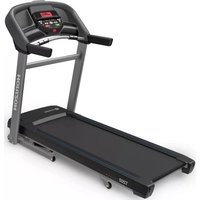
T202 - Treadmills Horizon Fitness - Free user manual and instructions
Find the device manual for free T202 Horizon Fitness in PDF.



User questions about T202 Horizon Fitness
0 question about this device. Answer the ones you know or ask your own.
Ask a new question about this device
Download the instructions for your Treadmills in PDF format for free! Find your manual T202 - Horizon Fitness and take your electronic device back in hand. On this page are published all the documents necessary for the use of your device. T202 by Horizon Fitness.
USER MANUAL T202 Horizon Fitness
Read the TREADMILL GUIDE before using this OWNER'S MANUAL.
SAVE THESE INSTRUCTIONS
When using an electrical product, basic precautions should always be followed, including the following: Read all instructions before using this treadmill. It is the responsibility of the owner to ensure that all users of this treadmill are adequately informed of all warnings and precautions. If you have any questions after reading this guide, contact Customer Tech Support at the number listed on the back panel of the OWNER'S MANUAL.
This treadmill is intended for in-home use only. Do not use this treadmill in any commercial, rental, school or institutional setting. Failure to comply will void the warranty.


DANGER
TO REDUCE THE RISK OF ELECTRICAL SHOCK:
Always unplug the treadmill from the electrical outlet immediately after using, before cleaning, performing maintenance and putting on or taking off parts.

WARNING
TO REDUCE THE RISK OF BURNS, FIRE, ELECTRICAL SHOCK OR INJURY TO PERSONS:
•The equipment shall be installed on a stable and levelled base.
- Never use the treadmill without securing the safety key clip to your clothing. Pull on the safety key clip first to make sure it will not come off your clothing.
- Heart rate monitoring systems may be inaccurate. Over exercising may result in serious injury or death. If you feel faint stop exercising immediately.
- When exercising, always maintain a comfortable pace.
- Do not wear clothes that might catch on any part of the treadmill.
•Always wear athletic shoes while using this equipment. - Do not jump on the treadmill.
- At no time should more than one person be on treadmill while in operation.
- This treadmill should not be used by persons weighing more than specified in the OWNER'S MANUAL WARRANTY SECTION. Failure to comply will void the warranty.
- When lowering the treadmill deck, wait until rear feet are firmly on the floor before stepping on the deck.
- Disconnect all power before servicing or moving the equipment. To clean, wipe surfaces down with soap and slightly damp cloth only; never use solvents. (See MAINTENANCE)
-
The treadmill should never be left unattended when plugged in. Unplug from outlet when not in use, and before putting on or taking off parts.
-
Do not operate under blanket or pillow. Excessive heating can occur and cause fire, electric shock, or injury to persons.
- Connect this exercise product to a properly grounded outlet only.
- If you experience any kind of pain, including but not limited to chest pains, nausea, dizziness, or shortness of breath, stop exercising immediately and consult your physician before continuing. Incorrect or excessive exercise may damage your health.
- Do not remove the protected covers unless instructed by Professional and your local dealer. Service should only be done by and authorized service technician.
- Disconnect the safety key to prevent uncontrolled usage of third parties.
- While exercising, run within the logo printed on belt to prevent possible injury.
- The sound of treadmill is less than 70dB while no user on the machine, it is higher than 70dB while using. When you feel uncomfortable about the noise from treadmill, please stop exercise and take rest. Noise emission under load is higher than without load.
- Make sure the treadmill comes to complete stop before folding. Do not operate the treadmill when it is folded.
- Please note that the plastic parts, such as end caps, are susceptible to wear. The treadmill's safety level can only be maintained, if it is checked regularly for damage and wear.
- Make sure the edge of belt parallel with the lateral position of the side rail, and do not move under the side rail. If you find the belt is not centered, please always adjust it.


WARNING
TO REDUCE THE RISK OF BURNS, FIRE, ELECTRICAL SHOCK OR INJURY TO PERSONS:
- At NO time should pets or children under the age of 13 be closer to the treadmill than 10 feet.
- At NO time should children under the age of 13 use the treadmill.
• Children over the age of 13 or disabled persons should not use the treadmill without adult supervision. - Use the treadmill only for its intended use as described in the treadmill guide and owner's manual.
- Do not use other attachments that are not recommended by the manufacturer. Attachments may cause injury.
- Never operate the treadmill if it has a damaged cord or plug, if it is not working properly, if it has been dropped or damaged, or immersed in water. Return the treadmill to a service center for examination and repair.
- Keep power cord away from heated surfaces. Do not carry this unit by its supply cord or use the cord as a handle.
- Never operate the treadmill with the air opening blocked. Keep the air opening clean, free of lint, hair, and the like.
- To prevent electrical shock, never drop or insert any object into any opening.
- Do not operate where aerosol (spray) products are being used or when oxygen is being administered.
- To disconnect, turn all controls to the off position, then remove plug from outlet.
- Do not use treadmill in any location that is not temperature controlled, such as but not limited to garages, porches, pool rooms, bathrooms, car ports or outdoors. Failure to comply will void the warranty.
- This treadmill is intended for in-home use only. Do not use this treadmill in any commercial, rental, school or institutional setting. Failure to comply will void the warranty.
- Do not remove the console covers unless instructed by Customer Tech Support. Service should only be done by an authorized service a technician.
It is essential that your treadmill is EN CLASS HB certified and use only indoors, in a climate controlled room. If your treadmill has been exposed to colder temperatures or high moisture climates, it is strongly recommended that the treadmill is warmed up to room temperature before first time use. Failure to do so may cause premature electronic failure.
- Place the treadmill on a level and stable surface. There should be one foot of clearance in front of the treadmill for the power cord. Please leave a clear zone behind the treadmill that is at least the width of the treadmill and at least 79" (2 meters) long. This zone must be clear of any obstruction and provide the user a clear exit path from the machine. In case of an emergency, place both hands on the side arm rests to hold yourself up and place your feet onto the side rails. For ease of access, there should be an accessible space preferentially on both sides of the treadmill equal to 2 ft (0.6 meters) to allow a user access to the treadmill from either side. Do not place the treadmill in any area that will block any vent or air openings. The treadmill should not be located in a garage, covered patio, near water or outdoors.
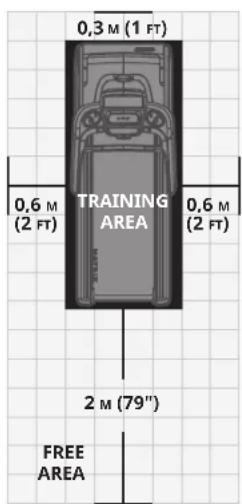
text_image
0,3 M (1 FT) 0,6 M (2 FT) TRAINING AREA 0,6 M (2 FT) 2 M (79") FREE AREA

GROUNDING INSTRUCTIONS
This product must be grounded. If a treadmill should malfunction or breakdown, grounding provides a path of least resistance for electrical current to reduce the risk of electrical shock. This product is equipped with a cord having an equipment-grounding conductor and a grounding plug. The plug must be plugged into an appropriate outlet that is properly installed and grounded in accordance with local codes and ordinances.

DANGER
Improper connection of the equipment-grounding conductor can result in a risk of electric shock. Check with a qualified electrician or service provider if you are in doubt as to whether the product is properly grounded. Do not modify the plug provided with the product. If it will not fit the outlet, have a proper outlet installed by a qualified electrician.
This product is for use on a nominal local voltage circuit and has a grounding plug. No adapter should be used with this product.
This product must be used on a dedicated circuit. To determine if you are on a dedicated circuit, shut off the power to that circuit and observe if any other devices lose power. If so, move devices to a different circuit. Note: There are usually multiple outlets on one circuit.

WARNING
Connect this exercise product to a properly grounded outlet only.
Never operate product with a damaged cord or plug even if it is working properly. Never operate any product if it appears damaged, or has been immersed in water. Contact Customer Tech Support for replacement or repair.
ASSEMBLY

WARNING
There are several areas during the assembly process that special attention must be paid. It is very important to follow the assembly instructions correctly and to make sure all parts are firmly tightened. If the assembly instructions are not followed correctly, the treadmill could have parts that are not tightened and will seem loose and may cause irritating noises. To prevent damage to the treadmill, the assembly instructions must be reviewed and corrective actions should be taken.
Before proceeding, find your treadmill's serial number located on a white barcode sticker near the on/off power switch and power cord and enter it in the space provided below.
ENTER YOUR SERIAL NUMBER AND MODEL NAME IN THE BOXES BELOW:
SERIAL NUMBER:
TM
MODEL NAME: HORIZON
TREADMILL
SERIAL NUMBER LOCATION

natural_image
Technical line drawing of a treadmill with a circular highlight on the side panel (no text or symbols)» Refer to the SERIAL NUMBER and MODEL NAME when calling for service.


text_image
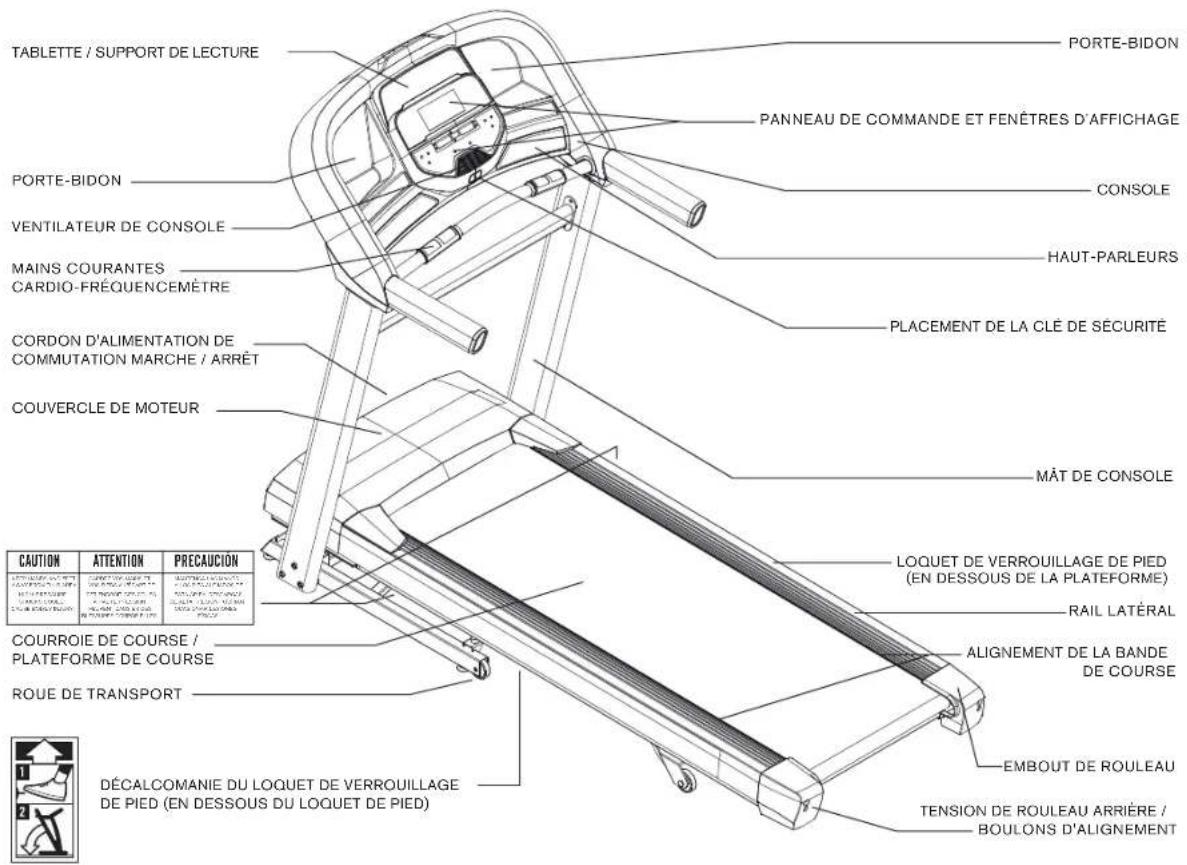
TABLET/READING RACK WATER BOTTLE HOLDER CONTROL PANEL AND DISPLAY WINDOWS WATER BOTTLE HOLDER CONSOLE CONSOLE FAN GRIP PULSE HANDRAILS SPEAKERS ON/OFF SWITCH POWER CORD MOTOR COVER SAFETY KEY PLACEMENT CONSOLE MAST CAUTION ATTENTION PRECAUTION FOOT LOCK LATCH (UNDERNEATH DECK) SIDE RAIL RUNNING BELT/RUNNING DECK FOR CENTERING THE BELT TRANSPORT WHEEL 1 FOOT LOCK LATCH DECAL (UNDERNEATH FOOT LATCH) 2 ROLLER END CAP 1 REAR ROLLER TENSION/ALIGNMENT BOLTS 10 ENGLISHTOOLS INCLUDED:
□ 6 mm T-Wrench
□ 5 mm L-Wrench
PARTS INCLUDED:
□ 1 Console Assembly
□ 2 Console Masts
□ 1 Hardware Kit
□ 1 Safety Key
□ 1 Audio Adapter Cable
□ 1 Bottle of Silicone Lubricant
(for 2 applications)
□ 1 Crossbar
□ 1 Power Cord
□ 2 Console Connection Covers

NEED HELP?
If you have questions or if there are any missing parts, contact Customer Tech Support.
PRE ASSEMBLY
UNPACKING
Place the treadmill carton on a level flat surface. It is recommended that you place a protective covering on your floor. Take CAUTION when handling and transporting this unit. Never open box when it is on its side. Once the banding straps have been removed, do not lift or transport this unit unless it is fully assembled and in the upright folded position, with the lock latch secure. Unpack and assemble the unit where it will be used. The enclosed treadmill is equipped with high-pressure shocks and may spring open if mishandled. Never grab hold of any portion of the incline frame and attempt to lift or move the treadmill.

WARNING
DO NOT ATTEMPT TO LIFT THE TREADMILL! Do not move or lift treadmill from packaging until specified to do so in the assembly instructions. You may remove the plastic wrap from console masts.

WARNING
FAILURE TO FOLLOW THESE INSTRUCTIONS COULD RESULT IN INJURY!
NOTE: During each assembly step, ensure that ALL nuts and bolts are in place and partially threaded in before completely tightening any ONE bolt.
NOTE: A light application of grease may aid in the installation of hardware. Any grease, such as lithium bike grease is recommended.
ASSEMBLY STEP 1
| HARDWARE FOR STEP 1 | |||
| PART TYPE DESCRIPTION QTY | |||
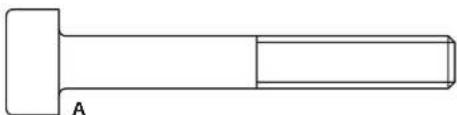
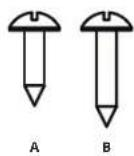
| M8X1.25PX60L 3A HEX SOCKET BOLT | |||
natural_image
Simple line drawing of a mechanical shaft with a flanged end and a rectangular body (no text or symbols)
text_image
Technical diagram of a treadmill with labeled parts 1 and 2, showing structural components and assembly details.A Cut the yellow banding straps and lift the running deck upward from the rear to remove all contents from underneath the running deck.
B Open HARDWARE FOR STEP 1.
C Attach LEFT CONSOLE MAST (1) to MAIN FRAME (2) using 3 BOLTS (A).
NOTE: Do not fully tighten bolts until STEP 5.
ASSEMBLY STEP 2
| HARDWARE FOR STEP 2 | |||
| PART TYPE DESCRIPTION QTY | |||
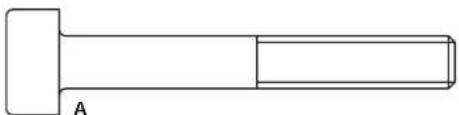
| M8X1.25PX60L 3A HEX SOCKET BOLT | |||
natural_image
Simple line drawing of a mechanical shaft with a gasket and section view (no text or symbols)
text_image
Technical diagram of a treadmill with labeled parts and an inset showing a close-up view of the component.A Open HARDWARE FOR STEP 2.
B Pull the CONSOLE CABLE (3) away from the treadmill base frame. Connect the CONSOLE CABLE (3) from the MAIN FRAME (2) to the CONSOLE CABLE (3) in the bottom of the RIGHT CONSOLE MAST (4). The other end of the CONSOLE CABLE (3) should be located at the top of the mast.
C Attach RIGHT CONSOLE MAST (4) to MAIN FRAME (2) using 3 BOLTS (A).
NOTE: Be careful not to pinch the console cable while attaching the right console mast.
NOTE: Do not fully tighten bolts until STEP 5.

ASSEMBLY STEP 3
| HARDWARE FOR STEP 3 | |||
| PART TYPE DESCRIPTION QTY | |||
| M6X1.0PX15L 4A HEX SOCKET BOLT | |||

text_image
A 1 A 2 3A Open HARDWARE FOR STEP 3.
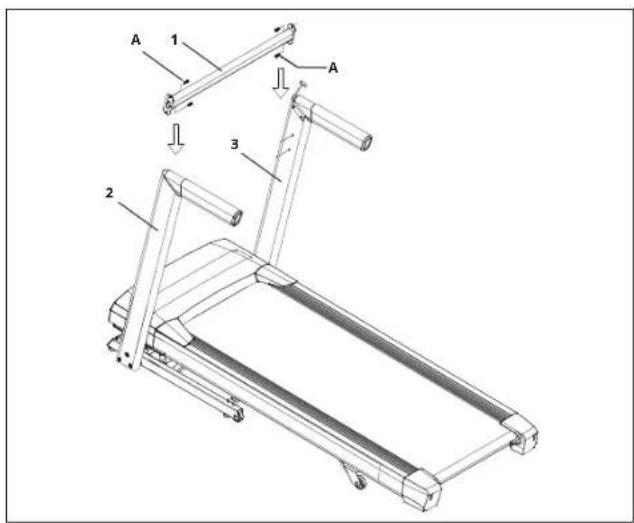
B Attach LEFT SIDE of the CROSSBAR (1) to the UPRIGHT MAST (2) loosely using 2 BOLTS. (A)
C Attach RIGHT SIDE of the CROSSBAR (1) to the UPRIGHT MAST (3) loosely using 2 BOLTS. (A)
NOTE: Do not tighten bolts completely until after the console is assembled.
ASSEMBLY STEP 4
| HARDWARE FOR STEP 4 | |||
| PART TYPE DESCRIPTION QTY | |||
| M8X1.25PX15L 4A BOLT | |||
| 8.2X13.5X2.0T | 4B SP | ||
| 8.2X15.0X1.2T | 4C FL | ||
NOTE: Be careful not to pinch any wires while assembling the console.

text_image
(STEP E) 5 4 A B C 1 4 6RING WASPER HARDWARE FOR STEP 4.
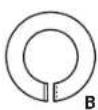
Bently place the CONSOLE (5) on top of the CONSOLE MASTS (1&4). Attach the LEFT SIDE first using 2 BOLTS (A), 2 SPRING WASHERS (B) and 2 FLAT WASHERS (C).
C The CONSOLE CABLES (6) are tucked into the CONSOLE MAST (4). Using the lead wire carefully pull the CONSOLE CABLE (6) out of the CONSOLE MAST (4). Detach and and discard the LEAD WIRE. Connect the CONSOLE CABLES (6) and carefully tuck wires in masts to avoid damage.
D Attach the RIGHT SIDE of the CONSOLE (5) using 2 BOLTS (A), 2 SPRING WASHERS (B) and 2 FLAT WASHERS (C).
E Pull the top of the CONSOLE (5) towards the back of the treadmill and HOLD while TIGHTENING THE LEFT AND RIGHT SIDE BOLTS (A).



ASSEMBLY STEP 5
| HARDWARE FOR STEP 5 | |||
| PART TYPE DESCRIPTION QTY | |||
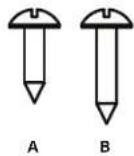
| 4X10L 4A SCREW | |||
| 4X15L 4B SCREW | |||
text_image
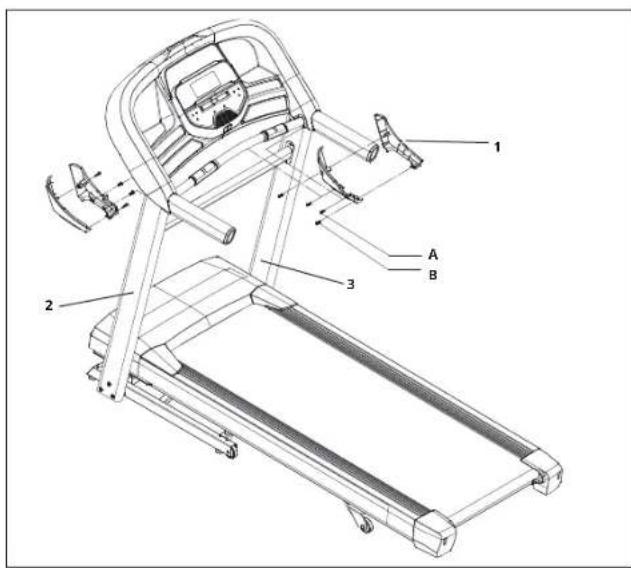
Technical diagram of a treadmill with labeled parts including tread, seat, and legsA Open HARDWARE FOR STEP 5.
B Attach the RIGHT AND LEFT SIDE CONSOLE JOINT COVERS (1) using 8 SCREWS (A & B).
C REMEMBER to tighten CROSSBAR BOLTS into the CONSOLE MASTS (2&3) completely now that assembly is finished.
ASSEMBLY COMPLETE!
Before the first use, lubricate the treadmill deck by following the instructions in the MAINTENANCE section in the TREADMILL GUIDE.
T202
Running Area: 152 × 51 cm / 60" × 20"
Product Weight: 87 kg / 192 lbs.
User Weight Capacity: 147 kg / 325 lbs.
Dimensions (L×W×H): 192 x 85 x 147 cm / 76" x 33" x 58"
TREADMILL OPERATION
This section explains how to use your treadmill's console and programming.
The BASIC OPERATION section in the TREADMILL GUIDE has instructions for the following:
• LOCATION OF THE TREADMILL
• USING THE SAFETY KEY
• FOLDING THE TREADMILL
• MOVING THE TREADMILL
• LEVELING THE TREADMILL
• TENSIONING THE RUNNING BELT
• CENTERING THE RUNNING BELT
• USING THE HEART RATE FUNCTION

text_image
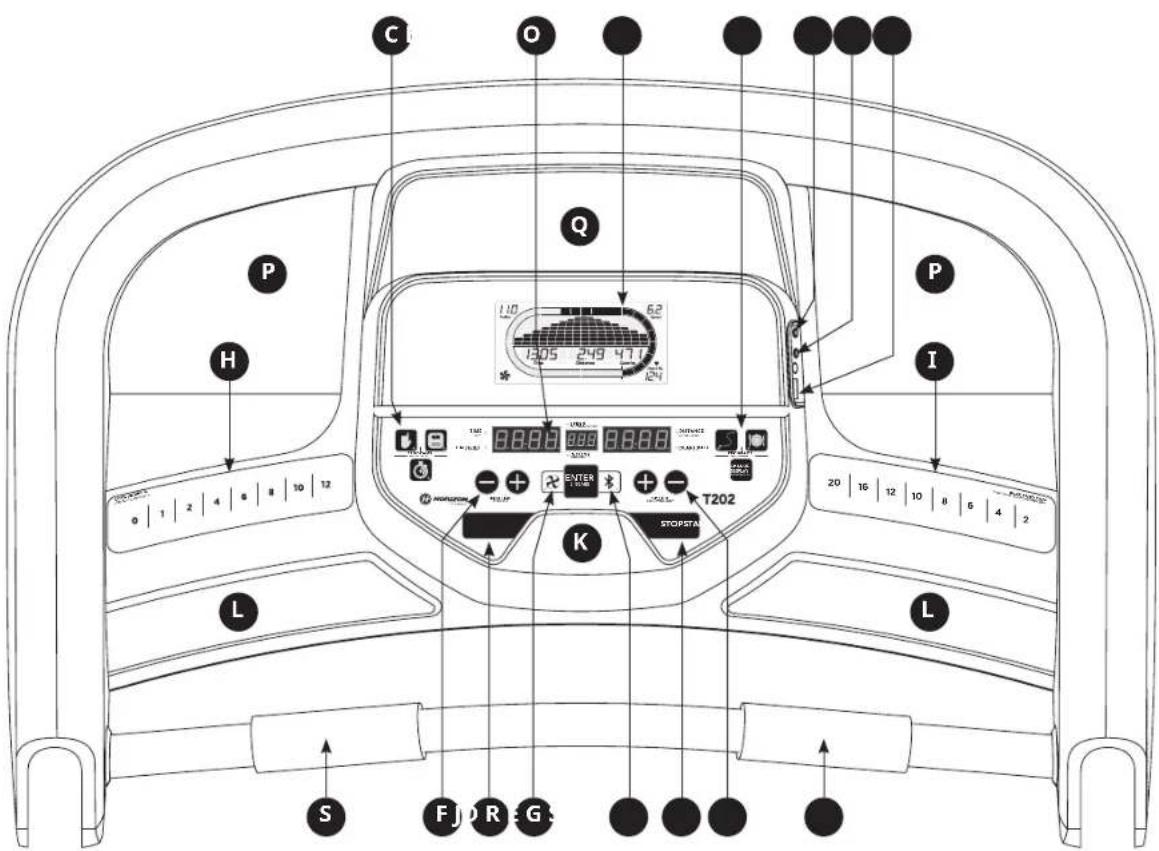
C O P H Q 1:10 62 1305 249 47.1 124 P I D 1:10 88.88 888 88.88 STOPSTN T202 K L S F D R G S 20 16 12 10 8 6 4 2CONSOLE OPERATION
Note: There is a thin protective sheet of clear plastic on the overlay of the console that should be removed before use.
A) LCD DISPLAY WINDOWS: Incline, Speed, Time, Distance, Calories, Heart Rate
B) LED DISPLAY: Incline, Speed, Time, Distance, Calories, Heart Rate
C) WORKOUT QUICK KEYS: press to select your workout.
D) START: press to begin exercising, start your workout, or resume exercising after pause.
E) STOP: press to pause/end your workout. Hold for 3 seconds to reset the console.
F) INCLINE +/- KEYS: used to adjust incline in small increments (0.5% increments).
G) SPEED +/- KEYS: used to adjust speed in small increments (0.1 km/h increments).
H) INCLINE QUICK KEYS: used to reach desired incline more quickly.
I) SPEED QUICK KEYS: used to reach desired speed more quickly.
J) FAN KEY: press to turn fan on and off.
K) FAN: personal workout fan.
L) SPEAKERS: music plays through speakers when your CD / MP3 player is connected to the console.
M) AUDIO IN JACK: plug your CD / MP3 player into the console using the included audio adaptor cable.
N) AUDIO OUT / HEADPHONE JACK: plug your headphones into this jack to listen to your music through the headphones. Note: when headphones are plugged into the headphone jack the sound will no longer come out through the speakers.
O) USB INPUT: 1A/5V USB output power.
P) WATER BOTTLE POCKETS: holds personal workout equipment.
Q) TABLET/READING RACK: holds tablet or reading material.
R) BLUETOOTH INDICATOR LIGHT: informs user that the Bluetooth connection as been made.
S) HEART RATE PULSE GRIPS: used to measure heart rate.

gauge
| Metric | Value | | :--- | :--- | | Time | 1305 | | Distance | 249 | | Calories | 471 | | Heart Rt. | 124 | | Incline | 11.0 | | Speed | 6.2 |
text_image
TIME CALORIES SPEED 8.8.8.8. 8.8.8. INCLINE 8.8.8.8. DISTANCE HEART RATEDISPLAY WINDOWS
• TIME: Shown as minutes : seconds. View the time remaining or the time elapsed in your workout.
• DISTANCE: Shown as kilometers. Indicates distance traveled or distance remaining during your workout.
- SPEED: Shown as km/h. Indicates how fast your walking or running surface is moving.
• INCLINE: Shown as percent. Indicates the incline of your walking or running surface.
• CALORIES: Total calories burned or calories remaining left to burn during your workout.
- HEART RATE: Shown as BPM (beats per minute). Used to monitor your heart rate (displayed when contact is made with both pulse grips).
GETTING STARTED
1) Check to make sure no objects are placed on the belt that will hinder the movement of the treadmill.
2) Plug in the power cord and turn the treadmill ON. (The ON/OFF switch is next to the power cord.)
3) Stand on the side rails of the treadmill.
4) Attach the safety key clip to part of your clothing making sure that it is secure and will not become detached during operation.
5) Insert the safety key into the safety keyhole in the console.
6) You have two options to start your workout:
A) QUICK START UP
Simply press the START key to begin working out.
Time, distance, and calories will all count up from zero. OR...
B) SELECT A WORKOUT OR TARGET
1) Select the USER with the +/- buttons and press ENTER when the desired USER is displayed.
2) Select your WEIGHT with the +/- buttons and press ENTER when your desired WEIGHT is displayed.
3) Select your PROGRAM with the +/- buttons and press ENTER when your desired PROGRAM is displayed.
4) Adjust the SETTING with the +/- buttons and press ENTER when your desired SETTING is displayed.
5) Press START to begin.


WORKOUT PROFILES

1) MANUAL: Adjust your speed and incline manually during your workout.

2) INTERVALS: Improves your strength, speed and endurance by increasing and decreasing the speed throughout your workout to involve your heart and other muscles. Includes 10 levels.
Speed changes and segments repeat 90 seconds and 30 seconds.
(km/h)
| Segment Warm Up 1 2 Cool Down | |||||||||
| Time 4:00 Mins 90 sec 30 sec 4:00 Mins | |||||||||
| Level 1 0.8 | 2.4 | 3 | 2 | 6.4 | 2.4 | 1.6 | |||
| Level 2 0.8 | 2.4 | 3 | 2 | 7.2 | 2.4 | 1.6 | |||
| Level 3 0.8 | 3.0 | 4 | 0 | 8.0 | 3.0 | 2.1 | |||
| Level 4 1.6 | 3.0 | 4 | 0 | 8.8 | 3.0 | 2.1 | |||
| Level 5 1.6 | 3.7 | 4 | 8 | 9.6 | 3.7 | 2.4 | |||
| Level 6 1.6 | 3.7 | 4 | 8 | 10.4 | 3.7 | 2.4 | |||
| Level 7 2.2 | 4.2 | 5 | 6 | 11.2 | 4.2 | 2.9 | |||
| Level 8 2.2 | 4.2 | 5 | 6 | 12.0 | 4.2 | 2.9 | |||
| Level 9 2.2 | 4.8 | 6 | 4 | 12.8 | 4.8 | 3.2 | |||
| Level 10 | 2.2 | 4 | 8 | 6.4 | 13.6 | 4.8 | 3.2 | ||

3) WEIGHT LOSS: A workout designed specifically to target fat. Promotes weight loss by increasing and decreasing the speed and incline, while keeping you in your fat burning zone. Includes 10 levels.
Speed and Incline changes, segments repeat every 30 seconds.
(km/h)
| Segment | Warm Up | Each segment is 30 seconds | Cool Down | |||||||||||||
| Time | 4:00 Mins | 1 | 2 | 3 | 4 | 5 | 6 | 7 | 8 | 4:00 Mins | ||||||
| Level 1 | Incline | 0 | 0.5 | 1.5 | 1.5 | 1 | 0.5 | 0.5 | 0.5 | 1 | 1.5 | 0.5 | 0 | |||
| Speed | 0.8 | 2.4 | 3.2 | 4.0 | 4.8 | 5.6 | 6.4 | 5.6 | 4.8 | 4.0 | 3.7 | 2.4 | ||||
| Level 2 | Incline | 0 | 0.5 | 1.5 | 1.5 | 1 | 0.5 | 1 | 0.5 | 1 | 1.5 | 0.5 | 0 | |||
| Speed | 0.8 | 3.0 | 4.0 | 4.8 | 5.6 | 6.4 | 7.2 | 6.4 | 5.6 | 4.8 | 4.2 | 2.9 | ||||
| Level 3 | Incline | 0.5 | 1 | 2 | 1.5 | 1 | 1 | 1.5 | 2 | 1 | 0.5 | |||||
| Speed | 0.8 | 3.7 | 4.8 | 5.6 | 6.4 | 7.2 | 8.0 | 7.2 | 6.4 | 5.6 | 4.8 | 3.2 | ||||
| Level 4 | Incline | 0.5 | 1 | 2 | 1.5 | 1 | 1 | 1.5 | 2 | 1 | 0.5 | |||||
| Speed | 1.6 | 4.2 | 5.6 | 6.4 | 7.2 | 8.0 | 8.8 | 8.0 | 7.2 | 6.4 | 5.4 | 3.7 | ||||
| Level 5 | Incline | 1 | 1.5 | 2.5 | 2.5 | 2 | 1.5 | 1.5 | 1.5 | 2 | 2.5 | 1.5 | 1 | |||
| Speed | 1.6 | 4.8 | 6.4 | 7.2 | 8.0 | 8.8 | 9.6 | 8.8 | 8.0 | 7.2 | 6.1 | 4.0 | ||||
| Level 6 | Incline | 1 | 1.5 | 2.5 | 2.5 | 2 | 1.5 | 1.5 | 1.5 | 2 | 2.5 | 1.5 | 1 | |||
| Speed | 1.6 | 5.4 | 7.2 | 8.0 | 8.8 | 9.6 | 10.4 | 9.6 | 8.8 | 8.0 | 6.6 | 4.5 | ||||
| Level 7 | Incline | 1.5 | 2 | 3 | 2.5 | 2 | 2 | 2.5 | 3 | 2 | 1.5 | |||||
| Speed | 2.2 | 6.1 | 8.0 | 8.8 | 9.6 | 10.4 | 11.2 | 10.4 | 9.6 | 8.8 | 7.2 | 4.8 | ||||
| Level 8 | Incline | 1.5 | 2 | 3 | 2.5 | 2 | 2 | 2.5 | 3 | 2 | 1.5 | |||||
| Speed | 2.2 | 6.6 | 8.8 | 9.6 | 10.4 | 11.2 | 12.0 | 11.2 | 10.4 | 9.6 | 7.8 | 5.3 | ||||
| Level 9 | Incline | 2 | 2.5 | 3.5 | 3.5 | 3 | 2.5 | 2.5 | 3 | 3.5 | 2.5 | 2 | ||||
| Speed | 2.2 | 7.2 | 9.6 | 10.4 | 11.2 | 12.0 | 12.8 | 12.0 | 11.2 | 10.4 | 8.5 | 5.6 | ||||
| Level 10 | Incline | 2 | 2.5 | 3.5 | 3.5 | 3 | 2.5 | 2.5 | 3 | 3.5 | 2.5 | 2 | ||||
| Speed | 2.2 | 7.8 | 10.4 | 11.2 | 12.0 | 12.8 | 13.6 | 12.8 | 12.0 | 11.2 | 9.0 | 6.1 | ||||
TARGET PROFILES

1) DISTANCE: Push yourself and go further during your workout with 13 distance workouts. Choose from 1K, 3K, 5K, 8K, 10K, 13K, 15K, 16K, 20K, HALF MARATHON, 24K, 32K and MARATHON GOALS. User sets starting speed levels.

2) CALORIES: Set goals for burning calories. Calories burned are calculated using distance and speed.
TO RESET THE CONSOLE
Hold STOP key for 3 seconds.
When your workout is complete, the unit will beep. Your workout information will stay displayed on the console for 30 seconds and then reset.
1) Connect the included AUDIO ADAPTOR CABLE to the AUDIO IN JACK on the top right of the console and the headphone jack on your CD / MP3 player.
2) Use your CD / MP3 player buttons to adjust song settings.
3) Remove the AUDIO ADAPTOR CABLE when not in use.
4) If you don't want to use the SPEAKERS, you can plug your headphones into the AUDIO OUT JACK on the right side of the console.
5) To connect to the Bluetooth speakers open your Bluetooth settings, turn on Bluetooth, scan for new devices, look for Horizon T202 and select connect.
natural_image
Line drawing of a treadmill with a circular highlight on the side panel (no text or symbols)natural_image
Simple line drawing of a bolt with a square head and a rectangular shaft, labeled 'A' at the bottom (no text or symbols on the object itself)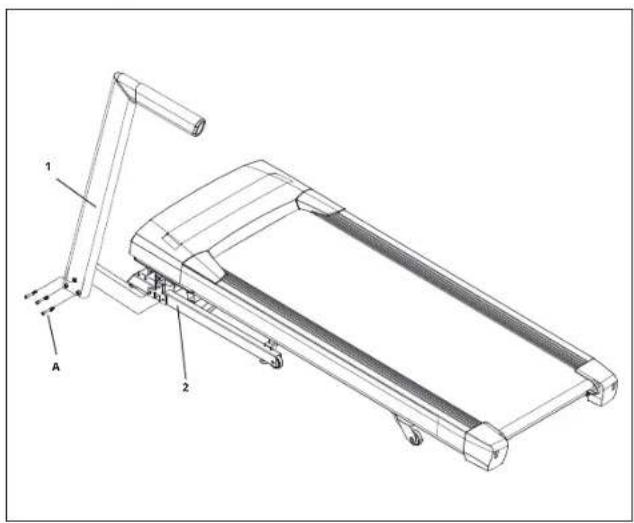
text_image
Technical line drawing of a treadmill with labeled parts 1 and 2natural_image
Simple line drawing of a mechanical shaft with a flanged end and a rectangular body (no text or symbols)
text_image
Technical diagram of a treadmill with labeled parts and an inset showing a close-up view of the handle mechanism.text_image
Technical diagram of a treadmill with labeled parts and directional arrows indicating motion or assembly.text_image
Technical diagram of a treadmill with labeled parts A, B, and numbered components 1, 2, and 3text_image
C B A C N M O P Q H I P 1205 249 47.1 62 124 0 | 1 | 2 | 4 | 6 | 8 | 10 | 12 T202 K STOPSTN 20 | 16 | 12 | 10 | 8 | 6 | 4 | 2 L S F D J R E G SBEDIENUNG DER KONSOLE
natural_image
Technical line drawing of a treadmill with a circular annotation highlighting the base area (no text or symbols present)natural_image
Simple line drawing of a bolt with a rectangular head and a labeled section (A), no text or symbols present.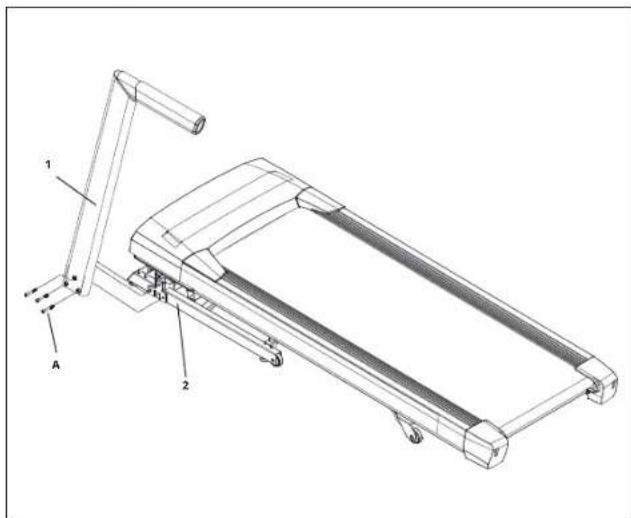
text_image
Technical diagram of a treadmill with labeled parts 1 and 2, showing structural components and assembly details.natural_image
Simple line drawing of a mechanical shaft with a gasket and section view (no text or symbols)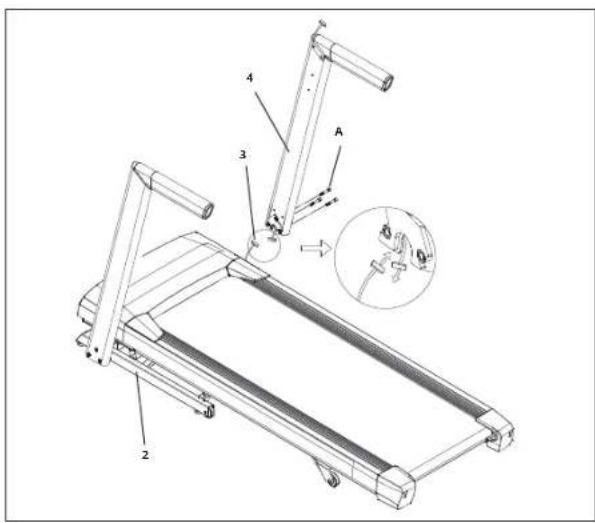
text_image
Technical diagram of a treadmill with labeled parts and an inset showing a close-up view of the device's internal structure.A Open HARDWARE VOOR STAP 2.
text_image
Technical diagram of a treadmill with labeled parts and directional arrows indicating motion or assembly.text_image
Technical diagram of a treadmill with labeled parts including tread, seat, and legsA Open HARDWARE VOOR STAP 5.
B Bevestig de RECHTER EN LINKER AFDEKKINGEN VOOR DE CONSOLEVERBINDINGEN (1) vast met behulp van 8 SCHROEVEN (A & B).
C VERGEET NIET om de CROSSBAR-BOUTEN in de CONSOLEMASTEN (2&3) volledig vast te draalen nu de montage afgerond is.
MONTAGE VOLTOOID!
text_image
C B A C N M O P Q H 120 248 47.1 124 P I 0 | 1 | 2 | 4 | 6 | 8 | 10 | 12 L K T202 STOPSTAN S F D J R E G S 20 16 12 10 | 8 | 6 | 4 | 2 LBEDIENING CONSOLE
natural_image
Line drawing of a treadmill with a circular highlight on the side (no text or symbols)

text_image
TABLETTE / SUPPORT DE LECTURE PORTE-BIDON PANNEAU DE COMMANDE ET FENÊTRES D'AFFICHAGE CONSOLE PORTE-BIDON VENTILATEUR DE CONSOLE MAINS COURANTES CARDIO-FRÉQUENCEMÈTRE HAUT-PARLEURS CORDON D'ALIMENTATION DE COMMUTATION MARCHE / ARRÊT PLACEMENT DE LA CLÉ DE SÉCURITÉ COUVERCLE DE MOTEUR MÂT DE CONSOLE CAUTION ATTENTION PRECAUCIÓN LOQUET DE VERROUILLAGE DE PIED (EN DESSOUS DE LA PLATEFORME) RAIL LATÉRAL COURROIE DE COURSE / PLATEFORME DE COURSE ALIGNEMENT DE LA BANDE DE COURSE ROUE DE TRANSPORT EMBOUT DE ROULEAU TENSION DE ROULEAU ARRIÈRE / BOULONS D'ALIGNEMENT DÉCALCOMANIE DU LOQUET DE VERROUILLAGE DE PIED (EN DESSOUS DU LOQUET DE PIED)OUTILS INCLUS :
natural_image
Simple line drawing of a bolt with labeled section A (no text or symbols on the object itself)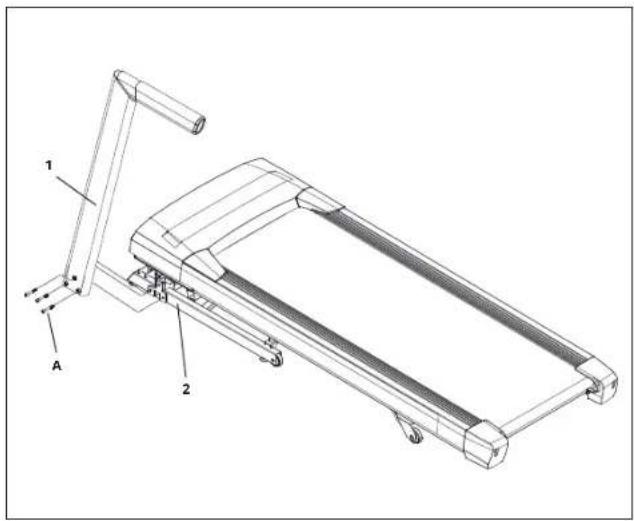
text_image
Technical diagram of a treadmill with labeled parts 1 and 2, showing structural components and assembly details.natural_image
Simple line drawing of a mechanical shaft with a gasket and section view (no text or symbols)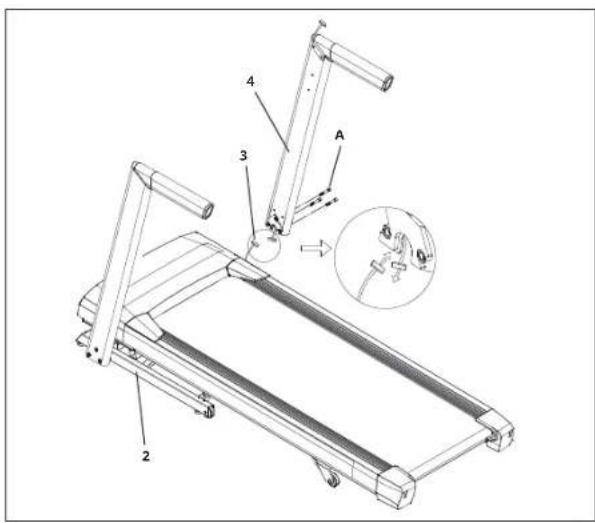
text_image
Technical diagram of a treadmill with labeled parts and an inset showing a close-up view of the component.text_image
Technical diagram of a treadmill with labeled parts including legs, arms, and legs, showing assembly details.text_image
Technical diagram of a treadmill with labeled parts including tread, seat, and legsVISION Fitness / HORIZON Fitness / TEMPO Fitness / TREO Fitness products are recyclable. At the end if its useful life please dispose of this article correctly and safely (local refuse sites).