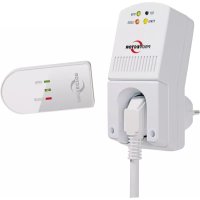
AS5020.3 - Fan Protector - Free user manual and instructions
Find the device manual for free AS5020.3 Protector in PDF.


| Product type | Wireless ventilation regulator (control for fan) |
| Model | AS5020.3 |
| Brand | Protector |
| Receiver power supply | 230 V ~, 50/60 Hz, 1 W |
| Max switching power | 1800 W (8 A, cos φ = 1) |
| Radio frequency | 433.92 MHz |
| Radio range | Approximately 30 m indoors |
| Transmitter battery | 1 x 3 V Lithium CR2477 |
| Battery life | Approximately 2 years |
| Max number of transmitters | 8 |
| Protection rating | IP20 (dry rooms only) |
| Functions | On/off control via window opening/closing; OPEN/CLOSE selector |
| Receiver dimensions (L x W x H) | Approximately 70 x 50 x 30 mm |
| Receiver weight | Approximately 100 g |
| Transmitter dimensions (L x W x H) | Approximately 50 x 20 x 15 mm |
| Transmitter weight | Approximately 20 g |
| Material | Plastic |
| Warranty | 2 years |
| Maintenance and cleaning | Clean with a dry cloth; replace the transmitter battery if necessary |
| Safety | Do not open the receiver; avoid moisture; do not use in hospitals |
| Spare parts and repairability | CR2477 battery; optional additional transmitter |
Frequently Asked Questions - AS5020.3 Protector
User questions about AS5020.3 Protector
0 question about this device. Answer the ones you know or ask your own.
Ask a new question about this device
Download the instructions for your Fan in PDF format for free! Find your manual AS5020.3 - Protector and take your electronic device back in hand. On this page are published all the documents necessary for the use of your device. AS5020.3 by Protector.
USER MANUAL AS5020.3 Protector
text_image
Technical diagram showing exploded view of a device with labeled components including a housing, battery pack, and numbered parts 3a to 3c.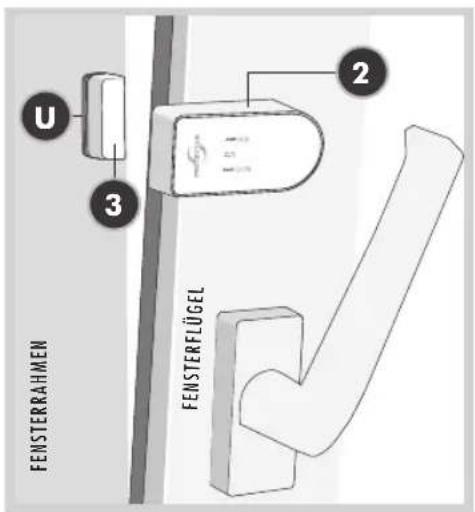
text_image
U 3 2 FENSTERRAHMEN FENSTERFLÜGEL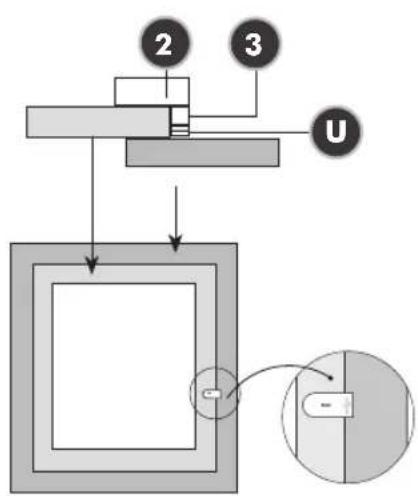
text_image
2 3 UEMPFÄNGER
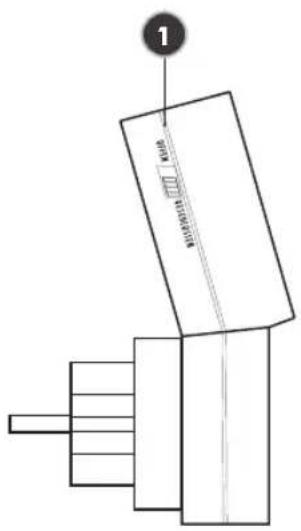
text_image
1 200mm x 100mm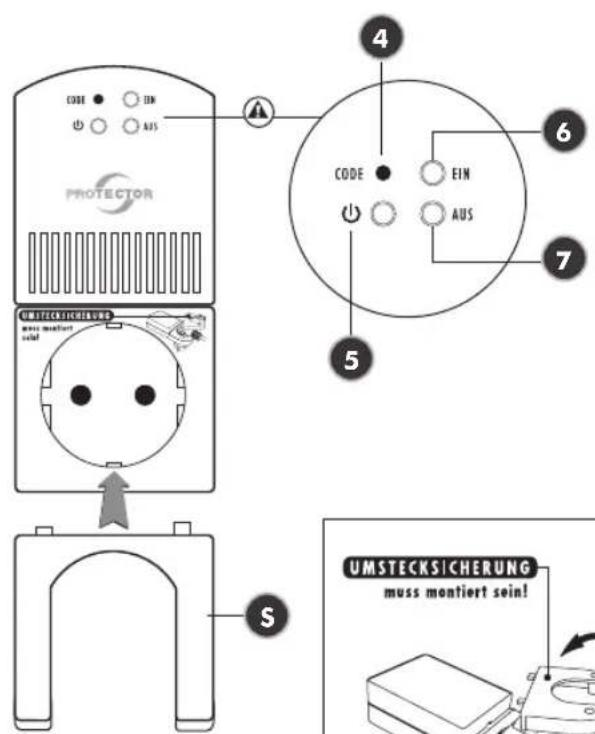
You can fix the window transmitter (2) and the magnet housing (3) with included adhesive pads or screws. When using one or more washers (U) at the magnet housing, e.g. for compensating window frames, we recommend the window transmitter and the magnet housing to be fastened with screws to avoid an unwanted falling off. (See drawing)
text_image
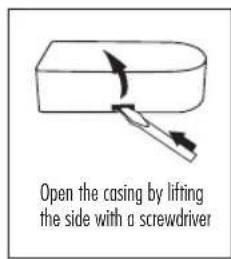
Open the casing by lifting the side with a screwdriver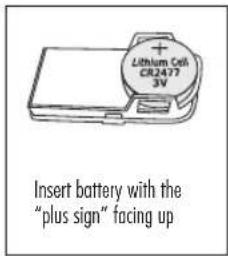
text_image
Lithium Cell CR2477 3V Insert battery with the "plus sign" facing up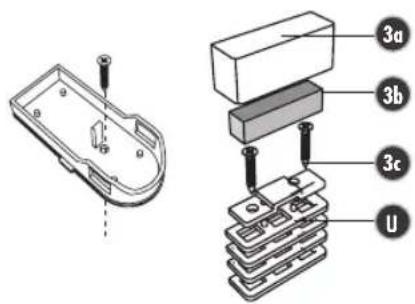
text_image
Technical diagram showing a 3D component with labeled parts and a 2D assembly view with numbered parts (3a, 3b, 3c, U).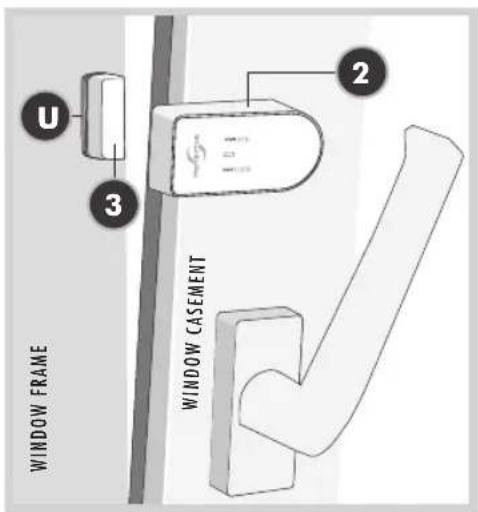
text_image
U 3 2 WINDOW FRAME WINDOW CASEMENT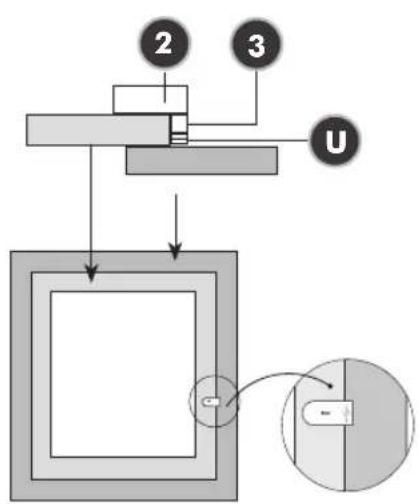
flowchart
graph TD
    A["Component 2"] --> B["Component 3"]
    B --> C["U"]
    D["Component 1"] --> E["Component 4"]
    E --> F["Component 5"]
    F --> G["Component 6"]
    G --> H["Component 7"]
    H --> I["Component 8"]
    style A fill:#f9f,stroke:#333
    style B fill:#f9f,stroke:#333
    style C fill:#f9f,stroke:#333
    style D fill:#f9f,stroke:#333
    style E fill:#f9f,stroke:#333
    style F fill:#f9f,stroke:#333
    style G fill:#f9f,stroke:#333
    style H fill:#f9f,stroke:#333
    style I fill:#f9f,stroke:#333
RECEIVER
text_image
1 M400.0013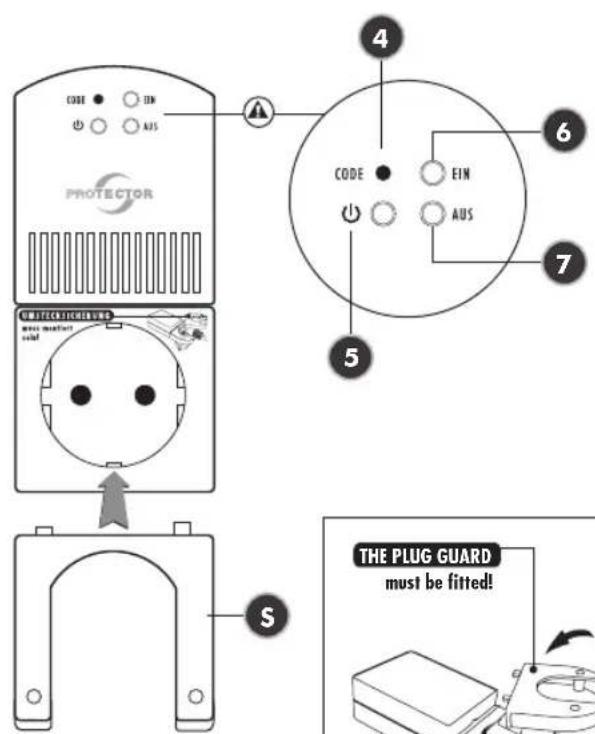
text_image
CODE EN AUS PROTECTOR CODE EIN AUS THE PLUG GUARD must be fitted!RECEIVER for the socket
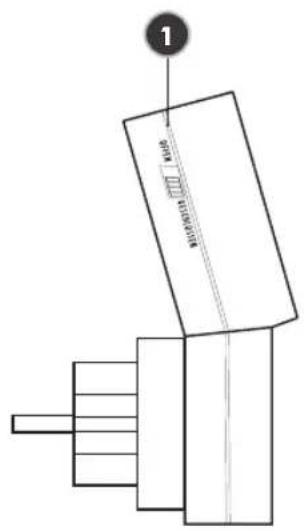
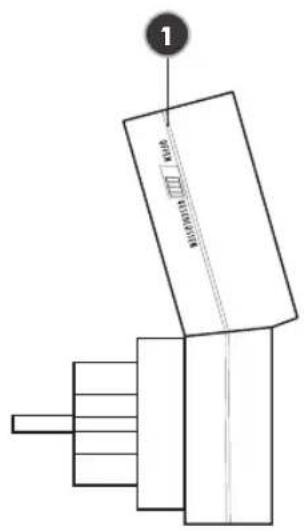
(1) Sliding switch
(4) Test/Code button
(5) Power LED
(6) LED device status on
(7) LED device status off
(S) Tamper-proof plug guard
TRANSMITTER for the window
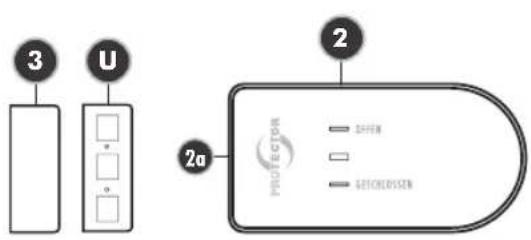
(2) Transmitter (window)
(3) Magnet for window transmitter (3a,b,c)
(U) Washers
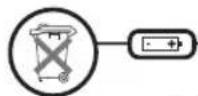
Batteries and accumulators must not be disposed of with household waste!
Every consumer is legally obliged to hand in all batteries and accumulators at a collection point or in the trade so that they can be disposed of in an environment-friendly manner.
Please only dispose of discharged batteries and accumulators.
WIRELESS EXHAUST AIR CONTROL AS-5020.3
Assembly and operating instructions for an exhaust air controller Model AS-5020.3 (radio version)
Thank you for purchasing the PROTECTOR
AS-5020.3. Exhaust Air Controller.
GENERAL
This device can be used as an exhaust air control device, as an aid to monitor fresh air supply when commissioning an exhaust air device (fume extractor hood, fan etc...). This cannot replace self-monitoring to ensure fresh air supply, but it can be supportive. This device only activates the exhaust air system in the event of pressure equalisation when a window or door is opened. The additional fresh air streaming in can thus be drawn in from the outside.
You can also use this device to selectively switch devices or lamps ON or OFF, for instance when a door or a window is closed or opened. This, for example, enables significant reduction of energy costs for heating or air-conditioning devices.
ATTENTION
When using this device for exhaust air control, the shutter must be open to ensure adequate inflow of fresh air!
USE OF ADDITIONAL TRANSMITTERS (MAX. 8 DEVICES)
The device functionality can be extended by adding more transmitters (window contacts) with the result that the extractor hood is not limited to a single window only. Each individual transmitter can activate the exhaust air device.
FUNCTION SELECTOR SWITCH
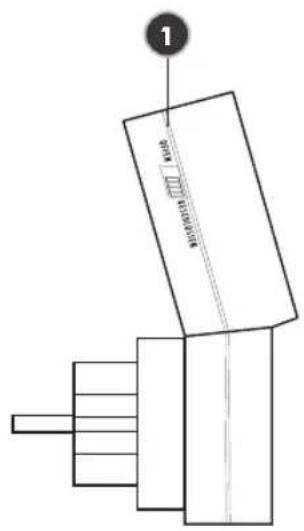
You can select two functions (effective directions) with the sliding switch (1) of the receiver. In the (OPEN) switch position, the connected device is activated when a window is opened (e.g. for exhaust air control use). In the (CLOSE) switch position, the connected device (e.g. air-conditioner, heater) switches off when a window is opened.
i NOTE
As long as the receiver is plugged into the wall socket, a switching is not possible. To reverse the effective direction, the receiver must be removed from the socket, the switch be slid and the receiver be replaced into the socket.
RECEIVER INSTALLATION
Plug the AS-5020. 3 receiver into a socket. Plug the device to be switched into the receiver socket and screw on the additional fuse (S). The power LED on the receiver is now on and the receiver is ready for use.
i NOTE
The receiver should not be mounted behind a metal covering because this can limit the range.
ATTENTION
Always check that the power rating of the connected device is less than or equal to the switching capacity.
TRANSMITTER INSTALLATION
Preparation
Mount transmitter (2) and magnet (3) on the upper window frame and the window sash in such a way that the distance between the two housing components is less than 7 mm. Use the supplied washers (U) for adjustment.
i NOTE
Please put the transmitter battery on the metal flap, do not slide it under the flap.
- Mount the transmitter housing base at the determined position, using the supplied double-sided adhesive pad.
!Alternatively, there is a blanked hole in the bottom of the housing. Remove the circuit board from the bottom of the housing and carefully break open the hole.
Use the hole to screw the transmitter to the window frame. Then replace the circuit board.
- Press the upper part of the housing onto its base.
- Mount the magnet housing bottom in the determined position, using the supplied adhesive pad.
ATTENTION
The distance between the transmitter and the magnet must not exceed 7 mm!
- Insert magnet and close with the housing cover.
i NOTE
Assembly instructions for window contact
| Window area in m^2 | |||||||||||||||
| m^2 | 0,2 | 0,3 | 0,4 | 0,5 | 0,6 | 0,7 | 0,8 | 0,9 | 1 | 1,1 | 1,2 | 1,3 | 1,4 | 1,5 | |
| cm^2 | 2000 | 3000 | 4000 | 5000 | 6000 | 7000 | 8000 | 9000 | 10000 | 11000 | 12000 | 13000 | 14000 | 15000 | |
| Maximum permissible exhaust air performance in m^3/h | |||||||||||||||
| Gap opening measurement in cm | 5 cm | 199 | 252 | 297 | 337 | 373 | 406 | 437 | 466 | 493 | 519 | 544 | 568 | 591 | 613 |
| 6 cm | 246 | 311 | 365 | 413 | 456 | 495 | 532 | 567 | 600 | 631 | 661 | 690 | 717 | 744 | |
| 7 cm | 294 | 369 | 432 | 488 | 538 | 585 | 628 | 668 | 707 | 743 | 778 | 811 | 843 | 874 | |
| 8 cm | 342 | 427 | 500 | 563 | 621 | 674 | 723 | 770 | 813 | 855 | 895 | 933 | 970 | 1005 | |
| 9 cm | 389 | 486 | 567 | 639 | 704 | 763 | 819 | 871 | 920 | 967 | 1012 | 1055 | 1096 | 1136 | |
| 10 cm | 437 | 544 | 635 | 714 | 786 | 852 | 914 | 972 | 1027 | 1079 | 1128 | 1176 | 1222 | 1266 | |
| 11 cm | 485 | 603 | 702 | 790 | 869 | 942 | 1009 | 1073 | 1133 | 1191 | 1245 | 1298 | 1348 | 1397 | |
| 12 cm | 532 | 661 | 770 | 865 | 951 | 1031 | 1105 | 1174 | 1240 | 1302 | 1362 | 1419 | 1475 | 1528 | |
(Table 1) Calculation table to determine the minimum opening of your window
Minimum window opening
These are based on:
a) The power of the exhaust air device in m^3/h
b) The size of the window to be opened in m^2
c) The size of the window opening in cm (see table 1)
Most kitchens have rectangular tilt and pivot windows. If your window is round for example, please ask the installation and heating engineers or electrician to calculate the minimum opening. The minimum opening of rectangular windows is shown as an example in the table for the tilt
Calculation table to determine the minimum opening of your window
- Determine the extraction power of your exhaust air extraction device unit in m^3/h . You can find the exhaust air extraction power on the identification plate or in the operating instructions of your exhaust air device (e.g. extractor hood).
- Measure the inner width and height of the window and calculate the window size in m^2 .
- Using the table, work out the opening size (minimum opening for your window) from the extraction power and window size.
- While the window is in the titled position, measure the upper inner gap size of the window in cm. The gap size of your window must not be below the opening size calculated! The bigger the gap or window opening, the better.
$$ \begin{array}{l} \text {(width x height = m^ {2} ; e.g. 0.8 m x 1.0 m = 0.8 m^ {2})} \ = \text {window size} \end{array} $$
- If the gap size of the window is less than the permissible value for the opening size according to the table, the window may only be able to achieve the required opening size in the pivot position. There must also be a minimum gap when the window is in the pivoted position. The window contact shall be positioned in such a way as to ensure the minimum gap size. We recommend you ensure the minimum gap size using a spacer.
CODING BETWEEN TRANSMITTER AND RECEIVER
The transmitter is not factory encoded and must be trained on the receiver when first operated.
i NOTE
Please follow sequence exactly!
- Insert the battery (CR 2477) into the TRANSMITTER. The LED lights up briefly.
- Insert the plug of the device to be switched on (e.g. fume extractor hood) into the RECEIVER, and mount the tamper-proof plug guard (S).
i NOTE
Without the tamper-proof plug guard (S) the equipment does not function.
-
Next insert the RECEIVER into a mains electrical socket. If the RECEIVER is working correctly, the POWER LED lights up yellow.
-
Press and hold the sensor (4) on the RECEIVER for 2 seconds, until the red CLOSED LED begins to blink.
-
Activate the TRANSMITTER by holding the magnet against the housing once and then removing it. The LED built into the transmitter lights up. The POWER LED on the RECEIVER stops blinking and the tuning-in procedure is completed.
- Now the TRANSMITTER is tuned in to the RECEIVER and the AS-5020.3 is ready for use.
TUNING IN MORE THAN ONE TRANSMITTER (MAX. 8 DEVICES)
- Insert a battery (CR 2477) into the TRANSMITTER to be tuned in.
- Press and hold the sensor (4) on the Receiver for 2 seconds. The CLOSED LED (5) begins to blink.
- Activate the TRANSMITTER by holding the magnet against the housing once and then removing it. The POWER LED on the RECEIVER stops blinking and the tuning-in procedure is completed.
- Repeat steps a), b) and c) for each individual transmitter.
- Once a maximum of 8 TRANSMITTERS is tuned in, it is impossible to add any more.
DELETING ONE OR ALL TRANSMITTERS (MAX. 8 DEVICES)
Deleting individual TRANSMITTERS
- Press and hold the sensor (4) on the receiver for 2 seconds. The CLOSED LED (5) begins to blink.
- Activate the TRANSMITTER to be deleted by holding the magnet against the housing once and then
removing it. The POWER LED on the RECEIVER stops blinking and the deletion procedure is completed.
Deleting all TRANSMITTERS
- Press and hold the sensor (4) on the receiver for 2 seconds. The CLOSED LED (5) begins to blink.
- Press and hold the sensor (4) once more for 2 seconds. The POWER LED on the RECEIVER stops blinking and the deletion procedure for all TRANSMITTERS is completed.
FUNCTIONAL TEST
With (OPEN) switch position:
- Switch exhaust air device ON and open the window > exhaust air device must switch on.
- Close the window > exhaust air device must switch off.
With (CLOSE) switch position:
- Switch connected device ON and open the window > the connected device must switch off.
- Close the window > the connected device must switch on.
i MALFUNCTIONS
In individual cases cross-over with other similar radio devices can cause malfunctions. In the normal case it is sufficient to check the positioning of the components and if necessary, to modify this.
TECHNICAL DATA
Mains voltage: 230 V \~, 50/60 Hz,
approx. 1 W
Mains switching capacity: 1800 W / 8A, at cos phi = 1
Radio range up to: 100 m
Frequency: 433.92 Mhz
Transmitting power: < 5mW
Protection class: IP 20 * only for dry rooms
Batterie (transmitter): 1 x 3V Lithium Typ
CR 2477 (lifetime approx.
2 years)
i NEVER CARRY OUT REPAIRS YOURSELF!
2 YEAR LIMITED GUARANTEE
For two years after the date of purchase, the defect-free condition of the product model and its materials is guaranteed. This guarantee is only valid when the device is used as intended and is subject to regular maintenance checks. The scope of this guarantee is limited to the repair or reinstallation of any part of the device, and is only valid if no unauthorised modifications or attempted repairs have been undertaken. Customer statutory rights are not affected by this guarantee.
i PLEASE NOTE!
No claim can be made under guarantee in the following circumstances:
• Operational malfunction
• Empty batteries or faulty accumulator
- Erroneous coding/channel selection
- Fault through other radio installation (i.e. mobile operation)
• Unauthorised modifications / actions
- Mechanical damage
- Moisture damage
• No proof of guarantee (purchase receipt)
Claims under warranty will be invalidated in the event of damage caused by non-compliance with the operating instructions. We do not accept any responsibility for consequential damage! No liability will be accepted for material damage or personal injury caused by inappropriate operation or failure to observe the safety instructions. In such cases, the guarantee will be rendered void.
Liability limitation
The manufacturer is not liable for loss or damage of any kind including incidental or consequential damage which is the direct or indirect result of a fault to this product.



EN
SAFETY NOTES
The warranty will be null and void in case of damages arising from violations of these operating instructions. We are not liable for consequential damages!
We accept no liability for material damages or injuries arising from inappropriate use or violation of the safety instructions. In such cases all warranty claims are null and void!
Do not use this product in hospitals or other medical facilities. Although this device transmits only relatively weak radio signals, the signals may insuch locations result in malfunctioning of systems critical to life. The same may apply to other areas.
For reasons of safety and licensing (CE), unauthorised conversion and /or modification of the product is prohibited.
The design of the product complies with protection class 1. Only a standard mains socket (230V\~/50Hz) of the public mains supply may be used to power the device. Devices powered by mains voltage must be kept away from children. Please therefore be particularly careful in the presence of children.
Do not take the product apart! There is a danger of lethal electric shock!
Do not leave packaging material lying about since plastic foils and pockets and polystyrene parts etc. could be lethal toys for children.
The device is suitable only for dry interior rooms (not bathrooms and other moist places). Do not allow the device to get moist or wet. There is a danger of lethal electric shock!
These operating instruction are published by
Protector GmbH
An den Kolonaten 37
D-26160 Bad Zwischenahn
The operating instructions reflect the current technical specifications at time of print. We reserve the right to change the technical or physical specifications.
COMMANDE RADIO DE L'AIR éVACUé AS-5020.3
ÉMETTEUR
text_image
3 U 2 2a PROTECTOR OFFEN GESELLER 2text_image
Technical diagram showing exploded view of a device housing with labeled components including U, 3a, 3b, and 3c.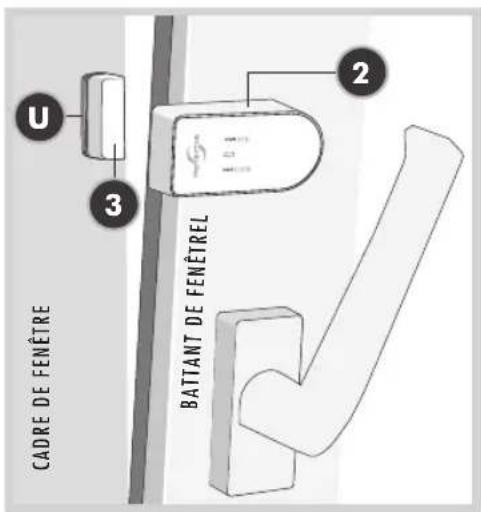
text_image
U 3 2 CADRE DE FENÊTRE BATTANT DE FENÊTREL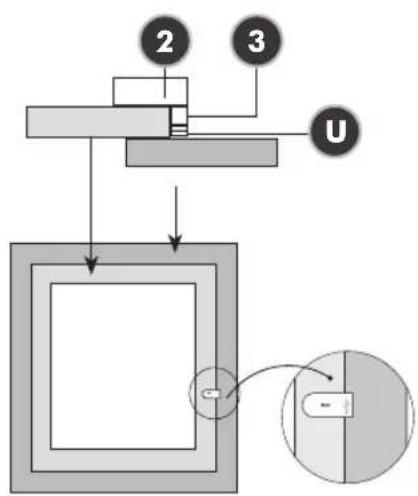
text_image
2 3 URÉCEPTEUR
text_image
1 2025-01-13 W=100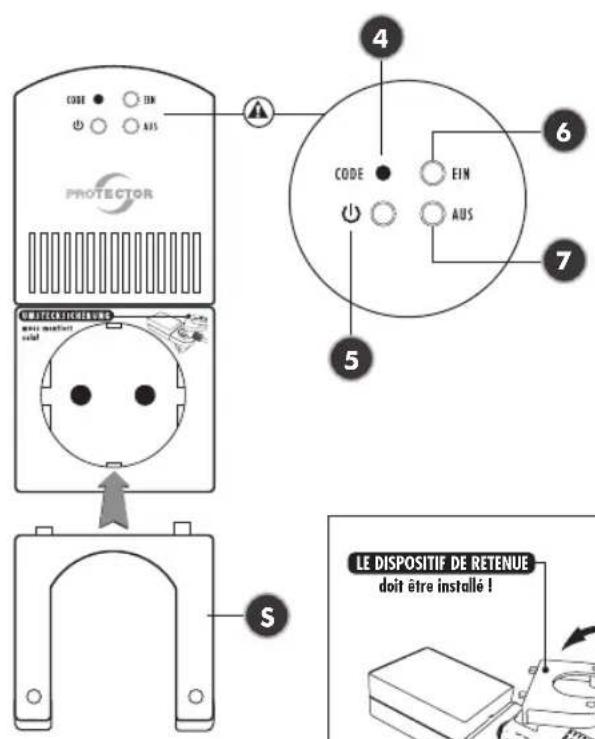
text_image
3 U 2 2a PROFECTOR = OFFEN = = GESELLERSENtext_image
Technical diagram showing a 3D model of an electronic component with labeled parts including pins, blocks, and a stack of components.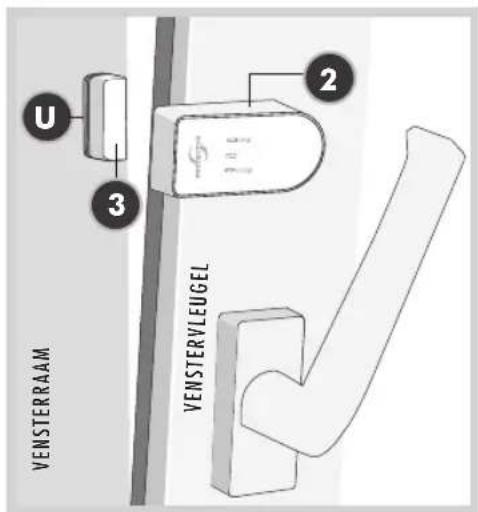
text_image
U 3 2 VENSTERRAAM VENSTERVLEUGEL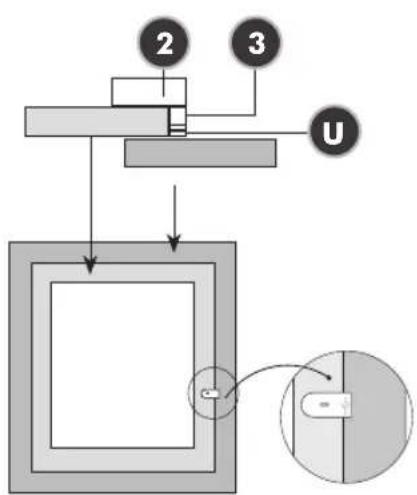
text_image
2 3 UONTVANGER
text_image
1 M2000000000000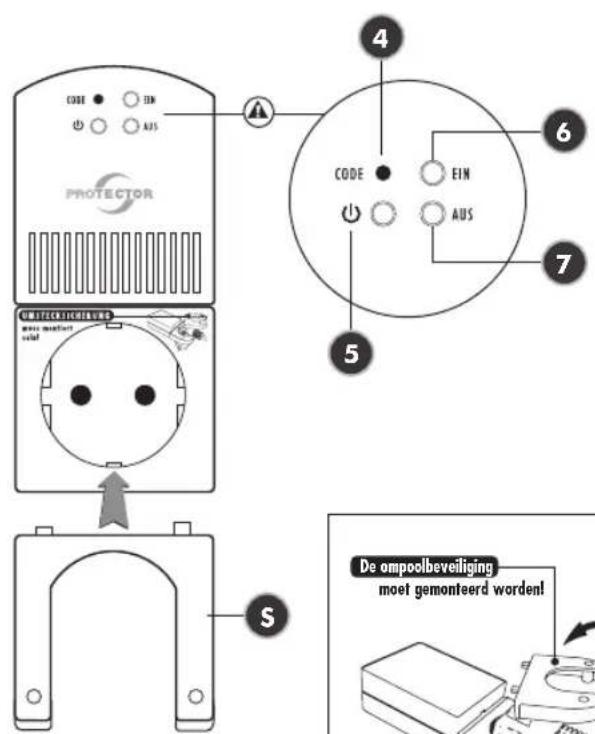
text_image
CODE EN AUS PROTECTOR CODE EIN AUS 6 7 5 S De ompoolbeveiliging moet gemonteerd worden!ONTVANGER
natural_image
Abstract grayscale gradient bar with no text or symbols




natural_image
Color gradient bar transitioning from black to white (no text or symbols)
natural_image
Color palette bar with multiple solid color swatches and a gray rectangle at the bottom (no text or symbols)