DTCTH10WT - Detector NEDIS - Free user manual and instructions
Find the device manual for free DTCTH10WT NEDIS in PDF.


| Product type | Heat detector |
| Brand | Nedis |
| Model | DTCTH10WT |
| Power supply | 9V (PP3) battery - alkaline (6LR61) or zinc-carbon (6F22) |
| Battery life | 1 year |
| Standby current | < 30 μA |
| Alarm current | < 30 mA |
| Alarm volume | > 85 dB(A) at 3 m |
| Ambient temperature | 4 ~ 44 °C |
| Relative humidity | 25 ~ 85 % |
| LED indicator | Flashing red in normal operation (every 60 s) and in alarm (continuous) |
| Main functions | Heat detection, audible alarm, alarm test, low battery warning |
| Installation | Indoors only. Recommended in hallways, rooms, at least 9 m apart |
| Maintenance | Monthly external cleaning with a brush attachment vacuum |
| Safety | Do not use outdoors, do not expose to water, do not block openings |
| Warranty | Void if modified or misused |
| Spare parts / Repairability | No replaceable parts. In case of malfunction, replace the device |
| Disposal | Recycle separately from household waste |
Frequently Asked Questions - DTCTH10WT NEDIS
User questions about DTCTH10WT NEDIS
0 question about this device. Answer the ones you know or ask your own.
Ask a new question about this device
Download the instructions for your Detector in PDF format for free! Find your manual DTCTH10WT - NEDIS and take your electronic device back in hand. On this page are published all the documents necessary for the use of your device. DTCTH10WT by NEDIS.
USER MANUAL DTCTH10WT NEDIS
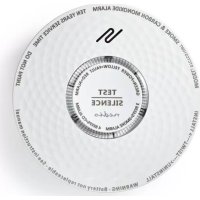
The heat alarm was designed to detect heat. The heat alarm does not detect smoke or gas. Heat alarms are intended to be supplementary to smoke alarms, located in areas where smoke alarms cannot be used. The device is suitable for indoor use only.
If the device detects heat, the alarm will sound and the indicator will flash red continuously until the heat is eliminated.
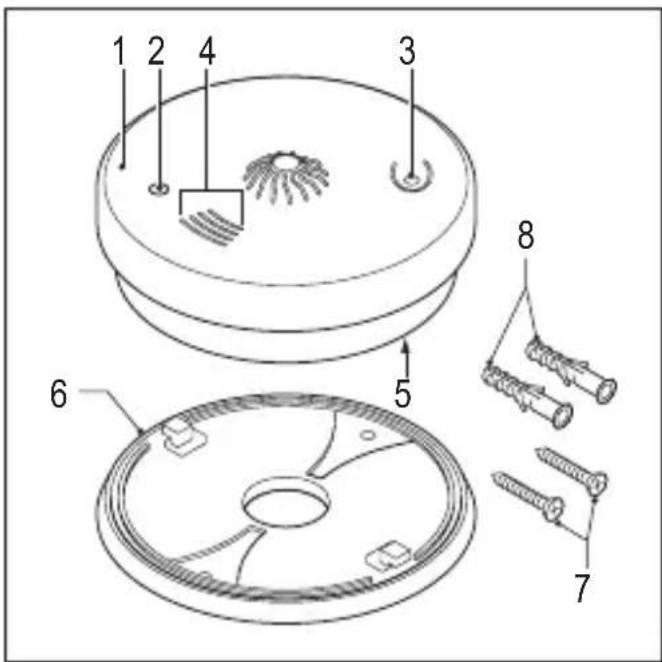
- Heat alarm
- Heat indicator
- Test button
- Ventilation openings
- Battery compartment
- Mounting plate
- Screw
- Plug
nedis
English
Safety
- Read the manual carefully before use. Keep the manual for future reference.
- Only use the device for its intended purposes. Do not use the device for other purposes than described in the manual.
- Do not use the device if any part is damaged or defective. If the device is damaged or defective, replace the device immediately.
Installation
Warning!
- Do not use the device outdoors.
- Do not expose the device to water or moisture.
• Install the device out of the reach of children.
• Install at least one device at each floor level. Preferably install one device in each recommended area.
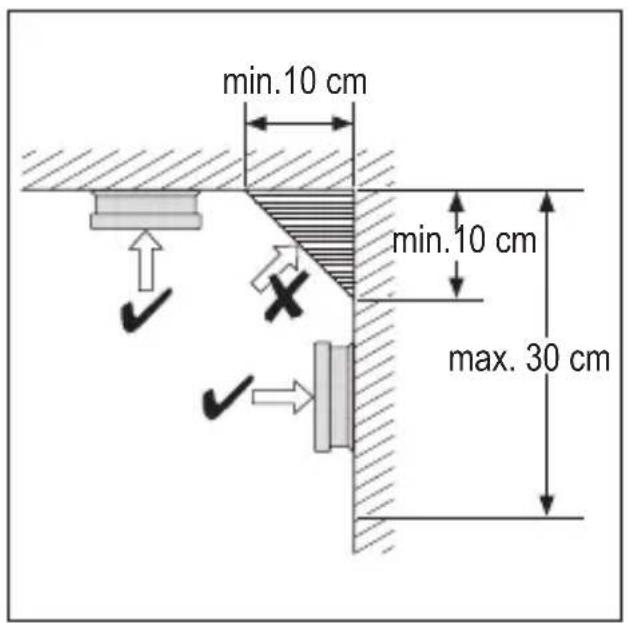
• Install the device in the bedroom or in the hallway adjacent to the bedroom. Make sure that you can hear the alarm in all bedrooms. Install devices at both ends of the hallway or room if the hallway or room is longer than 9 metres.
- Do not install the device in bathrooms, toilets or other rooms where the device can be triggered by steam or condensation.
- Do not install the device in dusty or dirty environments.
- Do not install the device near radiators or air vents in walls or ceilings.
- Do not install the device near doors and windows.
- Do not install the device behind curtains or furniture.
- Do not block the ventilation openings.
- Do not paint the device.
| Area Yes No | ||
| Living room X | ||
| Dining room X | ||
| Kitchen X | ||
| Bathroom / Toilet X | ||
| Bedroom X | ||
| Hallway X | ||
| Attic X | ||
| Basement X | ||
| Garage X | ||
| Boiler room X |
nedis
English
| 1 Normal operation | The indicator will flash red once every 60 seconds. | Action: --- |
| 2 Heat detection | The alarm will sound and the indicator will flash red continuously until the heat is eliminated. | Action: Eliminate the heat. |
| 3 Low-battery warning | The alarm will beep and the indicator will flash red once every 60 seconds. | Action: Replace the battery. |
Testing the alarm
The alarm must be tested weekly to ensure correct operation.
-
Press and hold the test button for 3 seconds. The alarm will sound and the indicator will flash red continuously until the test button is released. Alarm sound: 3 short beeps, 2 seconds pause (repeated).
-
Release the test button.
Cleaning and maintenance
Warning!
- Do not use cleaning solvents or abrasives.
- Do not clean the inside of the device.
- Do not attempt to repair the device. If the device does not operate correctly, replace it with a new device.
-
Replace the battery at least once a year or immediately when the device gives a low-battery warning.
-
Clean the outside of the device at least once a month. Use a vacuum cleaner with brush nozzle to clean the outside of the device.
nedis
English
Technical data
| Battery type | 9V battery (PP3) |
| Alkaline battery:6LR61 (IEC) / 1604A (ANSI/NEDA) | |
| Zinc-carbon battery:6F22 (IEC) / 1604D (ANSI/NEDA) | |
| Battery life 1 year | |
| Standby current < 30 μA | |
| Alarm current < 30 mA | |
| Alarm volume >85 dB(A) (3 m) | |
| Ambient temperature 4~44 °C | |
| Relative humidity 25~85% |
Warranty
Any changes and/or modifications to the product will void the warranty. We cannot accept any liability for damage caused by incorrect use of the product.
Disposal
- The product is designated for separate collection at an appropriate collection point. Do not dispose of the product with household waste.
- For more information, contact the retailer or the local authority responsible for waste management.
nedis
English
Documentation
The product has been manufactured and supplied in compliance with all relevant regulations and directives, valid for all member states of the European Union. The product complies with all applicable specifications and regulations in the country of sales.
Formal documentation is available upon request. The formal documentation includes, but is not limited to the Declaration of Conformity, the Material Safety Data Sheet and the product test report.
Disclaimer
Designs and specifications are subject to change without notice. All logos, brands and product names are trademarks or registered trademarks of their respective holders and are hereby recognized as such.
nedis
Nederlands
DTCTH10WT
Hittemelder
Omschrijving
Brand : NEDIS
Model : DTCTH10WT
Category : Detector