P203TER001 - Heating Beper - Free user manual and instructions
Find the device manual for free P203TER001 Beper in PDF.



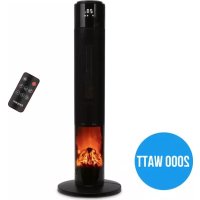
| Product type | Fan heater with flame effect |
| Brand | Beper |
| Model | P203TER001 |
| Power | 2000 W |
| Power supply | 220-240 V ~ 50-60 Hz |
| Adjustable temperature | From 18 °C to 45 °C |
| Timer | 0 to 8 hours (automatic shut-off) |
| Oscillation | Horizontal, enable/disable |
| Flame effect | Yes, can be activated via panel or remote control |
| Remote control | Yes, with built-in lithium battery |
| Fan-only function | Yes (heating elements off) |
| Number of heating levels | 2 (low and high intensity) |
| Safety sensor | Tip-over switch (automatic shut-off if tipped over) |
| Overheat protection | Yes (do not cover the appliance) |
| Display | LED screen |
| Assembly | Base to be assembled with 4 provided ST3x8 screws |
| Heating element material | Special high-efficiency and long-lasting materials |
| Maintenance | Soft, slightly damp cloth; no solvents or abrasive detergents |
| Storage | Dry, clean place, away from dust and heat |
| Warranty | 24 months (material or manufacturing defects) |
| After-sales service | By e-mail: assistenza@beper.com |
Frequently Asked Questions - P203TER001 Beper
User questions about P203TER001 Beper
0 question about this device. Answer the ones you know or ask your own.
Ask a new question about this device
Download the instructions for your Heating in PDF format for free! Find your manual P203TER001 - Beper and take your electronic device back in hand. On this page are published all the documents necessary for the use of your device. P203TER001 by Beper.
USER MANUAL P203TER001 Beper
For further information and/or for instructions for use in other languages, please visit: beper.com
natural_image
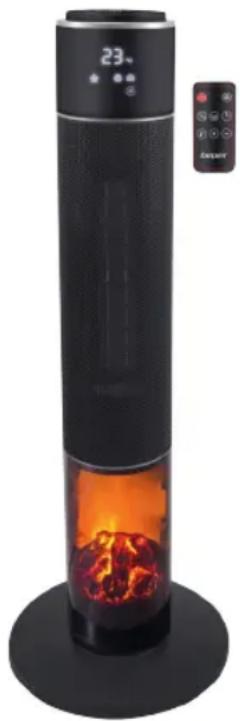
Modern vertical digital tower with black interior and orange flame inside, no visible text or symbols on the device itself.IL PRESENTE PRODOTTO E' ADATTO SOLO A AMBIENTI CORRETTAMENTE ISOLATI O AD UN USO OCCASIONALE THIS PRODUCT IS SUITABLE FOR PROPERLY INSULATED SPACES O FOR OCCASIONAL USE ONLY
Cod.: P203TER001


| REFERENCES TO THE MODEL :CODE: P203TER001 DESCRIPTION: | |||||
| Ceramic tower fan heater | |||||
| ITEM | SYMBOL | VALUE | UNIT | Item | |
| Heat Output | Type of heat input, for electric storage local space heaters only | ||||
| Nominal heat output | P nom | 2.00 | KW | Manual heat charge control, with integrated thermostat | |
| Minimum heat output | P min | 1.00 | KW | Manual heat charge control with room and/or outdoor temperature feedback | |
| Maximum continuos heat output | P Max,c | 2.00 | KW | Electronic heat charge control with room and/or outdoor temperature feedback | |
| Auxiliary electricity consumption | Fan assisted heat output | ||||
| At nominal heat output | el max | N/A | KW | Type of heat output/room temperature control | |
| At minimum heat output | el min | N/A | KW | Single stage heat output and no room temperature control | |
| In standby mode el SB | 0.00068 KW | Two or more manual stages, no room temperature control | |||
| With mechanic thermostat room temperature control | |||||
| With electronic room temperature control | |||||
| Electronic room temperature control plus day timer | |||||
| Electronic room temperature control plus week timer | |||||
| Other control options | |||||
| Room temperature control, with presence detection | |||||
| Room temperature control, with open window detection | |||||
| With distance control option | |||||
| With adaptive start control | |||||
| With working time limitation | |||||
| With black bulb sensor | |||||
| Contact: assistenza@beper.com - Phone: +390457134674Name and address of the factory and/or legal representative: BEPER SRL - Via A.Salieri, 30-37050 Vallese di Oppeano (Verona) Italy | |||||
Fig.A
text_image
1 23 2 3 4 6 5Fig.B
text_image
Technical diagram showing three stages of a mechanical assembly with labeled components and directional arrows indicating process flow.Fig.C
text_image
beperFig.D
text_image
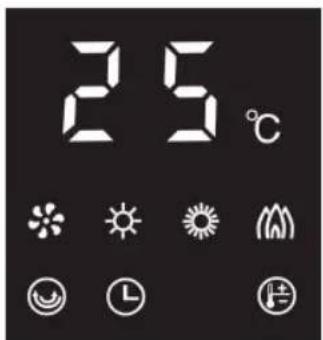
25°CFig.E
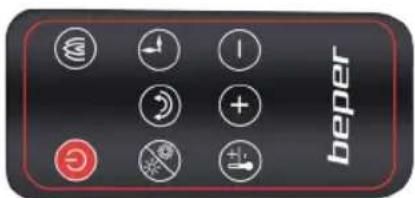
text_image
beperAvvertenze generali
Read the following instructions carefully, since they give you useful safety information about installation, use and maintenance and help you avoid mishaps and possible accidents.
Remove the packing and make sure that the appliance is intact, with special attention to the supply cable.
The elements of the packing (plastic bags, polystyrene, etc) do not have to be accessible to the children, in order to preserve them from danger sources. It is recommended not to throw these packing material in the domestic waste, but to deliver them to the appropriate station of collection or destruction refusals, asking eventually information to the manager of the Sanitation Department of your own municipality.
If the supply cord is damaged, it must be replaced by the manufacturer, its service agent or similarly qualified persons in order to avoid a hazard.
Before connecting the appliance make sure that the mains voltage corresponds to the data specified on the label.
The appliance can be damaged if the voltage is not correct.
If the plug does not suit the socket, let it be replaced with another suitable plug by qualified personnel only, which shall also ensure that the section of the socket cables is suitable for your appliance power absorption.
Generally, the use adaptors multiple plugs and/or extensions is not recommended; should they be necessary, please use only simple or multiple adaptors and extensions in compliance with the safety rules in force, making sure that the capacity absorption limit marked on the simple adaptors and the extensions and the maximum power limit marked on the multiple adaptor are not exceeded.
Do not use the appliance if the cable or the plug shows any damages. Do not use the appliance after a possible irregular working. In this case, switch it off and do not break it open. Refer to an authorized Beper after-sale service for repair and require original spare parts only. Failing to follow these instructions may impair the safety of your appliance.
This appliance is to be destined to its special purpose only. Any other use is to be considered as improper and thus dangerous. The manufacturer cannot be responsible for any damages deriving from improper, wrong or incautious use.
This appliance is for household use only.
To protect against electric shock, do not immerse cord, plug or any parts of the appliance into water or other fluids.
Do not use the appliance near explosives, highly flammable materials, gases or burning flames.
Do not allow children, disabled people or every people without experience or technical ability to use the appliance if they are not properly watched over. Close supervision is necessary when any appliance used by or near children.
Warning for use
This appliance can only be used by children of 8 years of age or older, and by people with reduced physical, sensitive or mental capabilities, or with lack of experience and knowledge, provided that they have been given complete instructions concerning the safe use of the appliance and the risks related to its use.
Children must not play with the appliance. Cleaning and maintenance operations must not be carried out by children without supervision.
Children of 3 year of age or younger cannot play or remain close to the appliance unless they are constantly supervised.
Children of age between 3 and 8 years can only turn the appliance on and off, provided that the appliance has been placed or installed in its normal operating position, and that children are kept under closed surveillance, or they have been given complete instructions concerning the safe use of the appliance and the risks related to its use.
Warning: some parts of the appliance can get really hot during operation, it is necessary to pay extreme attention in the presence of children or vulnerable persons.
Carefully read this manual before operating the appliance. Do not use the appliance near bath tubs, showers, pools or other water basins.

Warning: to avoid overheating, do not cover the appliance.
Do not place the appliance immediately below a wall socket-outlet. It is possible to hear a light noise during operation of appliance, especially during first use; these light noises are normal, and are caused by the expansion and contraction of the new materials, due to heating and following cooling of the appliance.
The heating elements in this appliance are made of special materials, with high efficiency and long life; do not replace them with other materials in order not to compromise the correct operation of the appliance.
Keep inflammable objects and materials (such as furniture, cushions, blankets, paper, cloths, curtains, etc.) at least 1 meter away from the appliance.
Keep air inlets and outlets free from objects and materials (distance of at least 1 meter from front panel and 50 cm from the back outlets) Do not leave the appliance operating unattended: make sure the appliance is off, and disconnect it from the wall socket.
⚠ Warning: the appliance is not equipped with a device to control the room temperature. Do not use the appliance in small rooms, when they are occupied by persons not capable of leaving the room on their own, unless constant supervision is provided.
The remote control provided contains a pre-installed lithium battery. Keep the remote control and its battery away from children.
⚠ Warning: if swallowed, the battery can cause internal burns, perforation of soft tissues, and lead to potentially lethal injuries. Severe burns can occur within 2 hours from swallowing. Seek immediate medical attention if ingestion is suspected.
Do not let children replace the battery without adult supervision.
Do not expose battery to high temperature. Remove it from remote control if it is not used for long time.
Do not dispose of the exhausted battery in regular waste; do not throw it in fire or attempt to burn it. Follow applicable local regulations for the correct disposal of batteries.
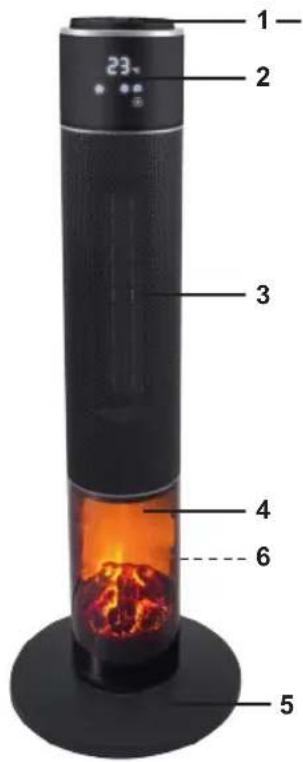
Description of product Fig.A
- Control panel
- LED display
- Heating elements and protection grid
- Light panel with flame effect
- Base
- ON/OFF switch (at the back)
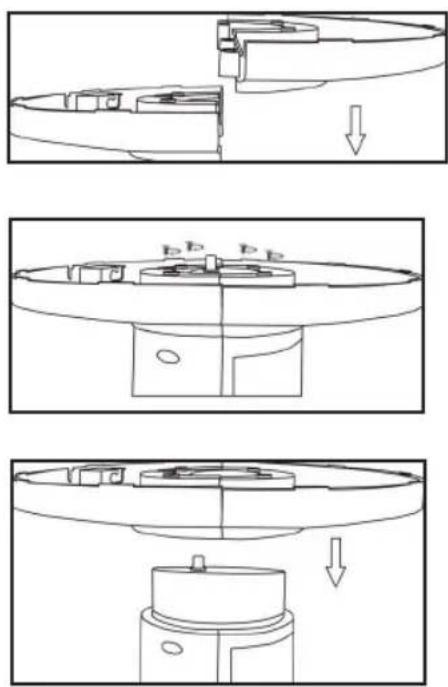
Assembling Fig. B
Remove all packaging material, and check the integrity of the appliance and the power cord. Keep packaging materials away from children.
To assemble the base, connect the 2 semicircular halves following the grooves visible on the flat side; put the appliance upside down, and place the base by sliding the power cord through the center hole, and fix the base with 4 ST3x8 screws (included in the box).
After fixing the base, let the power cord run through the small hole found on the side of the base. Make sure the base is correctly installed and that the appliance is stable before operating it.
Operation by control panel
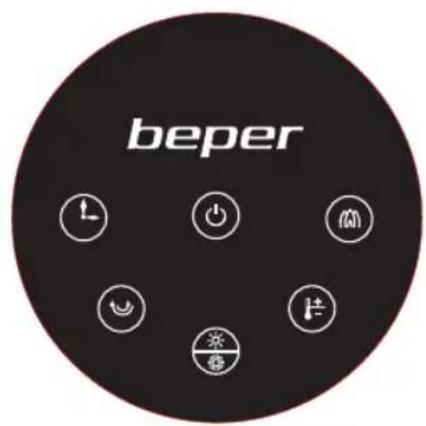
Place the appliance on a dry and stable surface. Connect the appliance to the wall socket; place the ON/OFF switch (at the back) on "I" position, the LED display will turn on showing the room temperature, and the appliance will enter stand-by mode.
On control panel (Fig.C), press ⏻: fan mode is activated, the heating elements are off and on LED display the icon ✦ lights up.
Press ⏻ to activate heating elements: press the button once to select low heating mode (the display will show the icon *), press again the button to select high heating mode (the display will show *)
To set the temperature, press Ⓗ button: the display will show operating temperature; press the button until the desired temperature appears; it is possible to set the temperature between 18°C and 45°C. After a few seconds, display will stop blinking, and temperature selection is confirmed.
To activate swing function, press 😊 button; press it again to stop swing function.
To set the timer for auto shut off, press the ⏻ button: display will show 0H; press the button until the desired option appears on the display (from 0H to 8H); once the display stops blinking, selection is confirmed and timer is set.
To activate flame effect, press Ⓜ button; press it again to turn flame off.
To turn the appliance off, press ⏻ button: after 30 seconds, the appliance stops working (the count down is visible on the display). Place the ON/OFF switch at the back on "O" position.
The appliance is equipped with an automatic system that regulates the heating mode based on room temperature:
If set temperature is equal to or lower than detected room temperature, the appliance will interrupt heating, and will only work in fan mode;
if the set temperature is 1-2^ higher than detected room temperature, the appliance will automatically operate in low heating mode;
if set temperature is at least 3^ C higher than detected room temperature, the appliance will automatically operate in high heating mode.
The appliance is also equipped with a safety tip over switch placed at the base, which automatically interrupts the operation of the appliance in case of accidental tilting or falling of the appliance.
Operation from remote control
Remove the protective film to activate the battery.
All functions that can be selected on the control panel can also be activated with the remote control, see paragraph “Operation by control panel” above.
To set the temperature from remote control, press ⏻ button, and then select the desired temperature by pressing + or - keys.
Cleaning and maintenance
Make sure that the switch at the back is on "O" position and that the appliance is disconnected from the wall socket before carrying out any cleaning or maintenance.
Warning: do not immerse the appliance in water or other liquids.
Use a soft cloth slightly dampened to remove any stain or dust from the appliance.
Do not use solvents or abrasive detergents.
Store the appliance in a cool and dry place, preferably inside its box, away from dust, light and heat.
Technical data
Power: 2000W
Input: 220-240V\~50-60Hz
For any improvement reasons, Beper reserves the right to modify or improve the product without any notice.
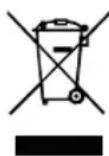
The European directive 2011/65/EU on Waste Electrical and Electronic Equipment (WEEE), requires that old household electrical appliances must not be disposed of in the normal unsorted municipal waste stream. Old appliances must be collected separately in order to optimize the recovery and recycling of the materials they contain, and reduce the impact on human health and the environment. The crossed out “wheeled bin” symbol on the product reminds you of your obligation, that when you dispose of the appliance, it must be separately collected.
GUARANTEE CERTIFICATE
This appliance has been checked in the factory. From the date of original purchase a 24 month guarantee applies to material and production defects. The purchase receipt and the guarantee certificate must be submitted together in case of claim to guarantee.
The guarantee is valid only with a guaranty certificate and proof of purchase (fiscal receipt) indicating the date of purchase and the model of the appliance
For any technical assistance, please contact directly the seller or our head office in order to preserve the appliance's efficiency and NOT TO void the guarantee. Any intervention on this appliance by non-authorized persons will automatically void the guarantee.
GUARANTEE CONDITIONS
If the appliance shows defects as a result of faulty material and/or production during the period of guarantee, we guarantee repair free of charge on condition that:
- The appliance has been used properly and for the purpose for which it has been intended.
- The appliance has not been tampered with, otherwise it is not maintainable.
- The purchase receipt shall be presented.
- The appliance showing a fair wear and tear shall not be covered by this guarantee.
Therefore, any part that could be accidentally broken or having visible signs of use in consumable products (such as lamps, batteries, heating elements...) the aesthetic parts are excluded from the guarantee, and any defect whatsoever resulting from non-respect of the rules for use, negligence in usage and/or maintenance of the appliance, carelessness, wrong or improper installation, damage during transport and any other damage not attributable the supplier.
For every defect that could not be repaired within the guarantee period, the appliance will be replaced free of charge.
In any case, if the part to be replaced for defect, breakage or malfunction is an accessory and/or a detachable part of the product, Beper reserves the right to replace only the very part in question and not the entire product
Contact your distributor in your country or after sales department Beper.
E-mail assistenza@beper.com which will forward your enquiries to your distributor.