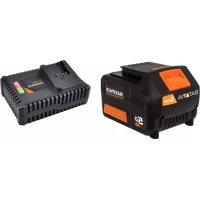
MAXXPACK BTCLB001 - Battery charger Batavia - Free user manual and instructions
Find the device manual for free MAXXPACK BTCLB001 Batavia in PDF.


| Product type | Lithium-ion battery charger |
| Brand | Batavia |
| Model | MAXXPACK BTCLB001 |
| Category | Battery charger |
| Input voltage | 230 V ~ (50/60 Hz) |
| Battery compatibility | Batavia 18 V Li-Ion batteries (2.0 Ah, 4.0 Ah, 5.0 Ah) |
| Charge indicator | Red LED (charging), green LED (fully charged) |
| Charging function | Smart charging with temperature and voltage control |
| Protection | Protection against short circuits, overcharge, excessive discharge and polarity reversal |
| Recommended charging temperature | 10 °C to 40 °C (ideally 20 °C) |
| Supported battery type | Lithium-ion (Li-Ion) |
| Number of batteries charging simultaneously | 1 |
| Maintenance and cleaning | Unplug before cleaning; clean with a dry cloth; do not immerse in water |
| Usage | Indoor only |
| Warranty | 2 years |
Frequently Asked Questions - MAXXPACK BTCLB001 Batavia
User questions about MAXXPACK BTCLB001 Batavia
0 question about this device. Answer the ones you know or ask your own.
Ask a new question about this device
Download the instructions for your Battery charger in PDF format for free! Find your manual MAXXPACK BTCLB001 - Batavia and take your electronic device back in hand. On this page are published all the documents necessary for the use of your device. MAXXPACK BTCLB001 by Batavia.
USER MANUAL MAXXPACK BTCLB001 Batavia
natural_image
Black and yellow portable device with 'BATAVIA' branding and 'MILKMAX' text, no readable text beyond branding
natural_image
Exterior view of a black and yellow electronic device labeled 'EUTATA' and 'MAXPACK', with no visible text beyond branding.
natural_image
Black and yellow electronic device with orange screen and brand logo (no readable text or symbols beyond branding)Operating instructions
BT-CLB002 / BT-CLB004
Item-No.:
7062517/7062518/7063735
www.batavia.eu
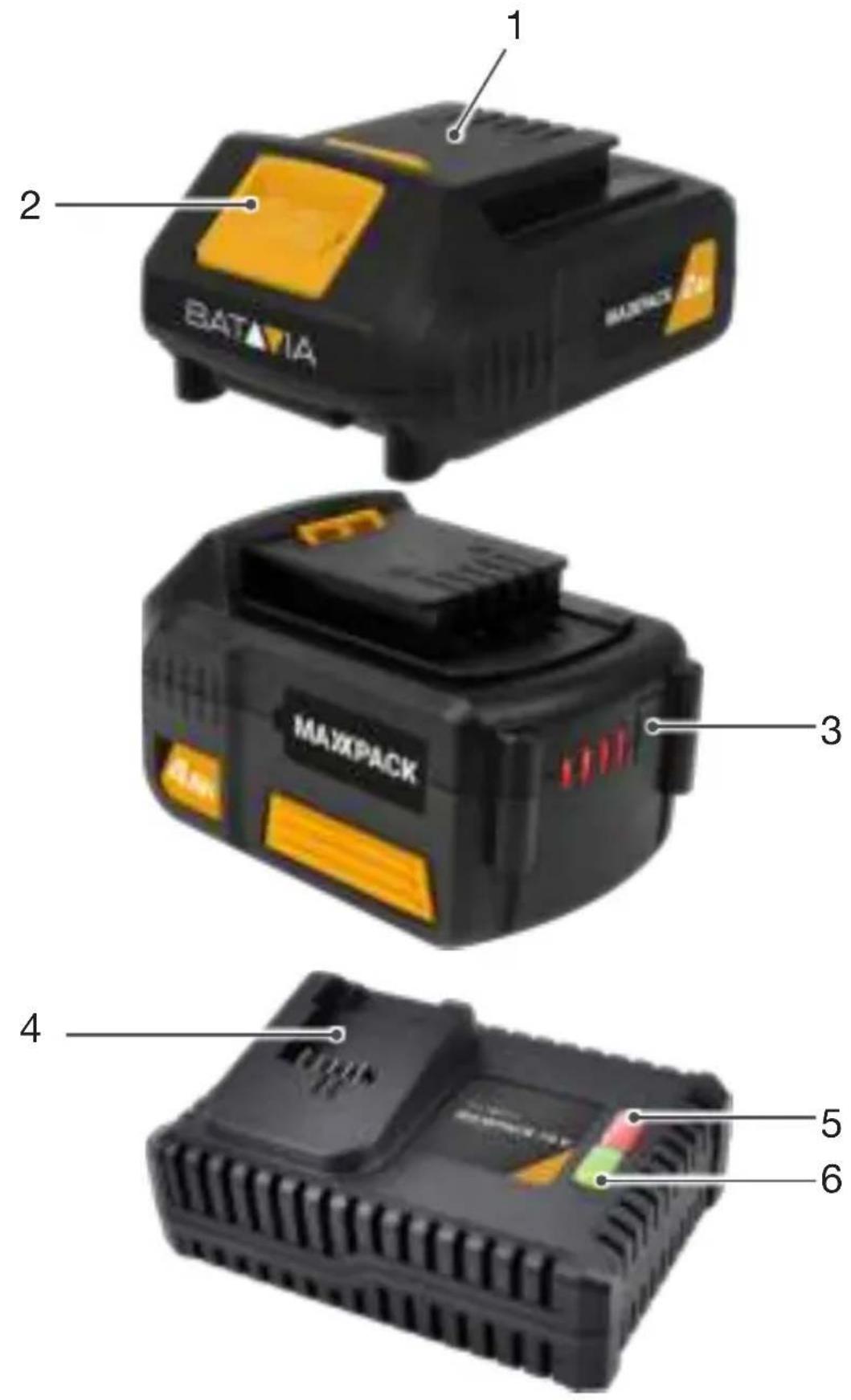

OVERVIEW
- Battery
- Battery release button
- Charge indicator button
- Charger
- Red LED
- Green LED
ÜBERSICHT
Instruction manuals provide valuable hints for using your new device. They enable you to use all functions, and they help you avoid misunderstandings and prevent damage. Please take the time to read this manual carefully and keep it for future reference.
ADDITIONAL SAFETY INSTRUCTIONS FOR BATTERIES AND CHARGERS
Please note the included General Safety Notes and the following safety notes to avoid malfunctions, damage or physical injury:
Batteries
WARNING: Improper battery use may result in a fire, explosion, or other hazard.
WARNING: The battery fluid may cause personal injury or damage to property. In case of skin contact, immediately rinse with water. If redness, pain or irritation occurs seek medical attention. In case of eye contact, rinse immediately with clean water and seek medical attention.
- Never attempt to open for any reason.
- Do not expose the battery to water.
- Do not expose the battery to heat.
- Do not store in locations where the temperature may exceed 40 °C.
- Keep batteries away from children.
- Charge only at ambient temperatures between 10 °C and 40 °C.
- Charge only using the charger provided with the appliance/tool.
- Use power tools only with specifically designated battery packs. Use of any other battery packs may create a risk of injury and fire.


7
English
- When disposing of batteries, follow the instructions given in the section "Disposal".
- Do not damage/deform the battery pack either by puncture or impact, as this may create a risk of injury and fire.
- Do not charge damaged batteries.
- Take special care of the battery. Avoid dropping it onto any hard surface and do not subject it to pressure or any other form of mechanical stress. Keep the battery away from extreme heat and cold.
- Important Danger! Never short-circuit the battery or expose it to moisture. Do not store it together with any metal parts which could short-circuit the contacts. The battery could overheat, start burning or explode.
Under extreme conditions, battery leakage may occur. When you notice liquid on the batteries, proceed as follows: Carefully wipe the liquid off using a cloth. Avoid skin contact. In case of skin or eye contact, follow the instructions below.
Chargers
Your charger has been designed for a specific voltage. Always check that the mains voltage corresponds to the voltage on the rating plate.
WARNING:
- When not in use and before cleaning and servicing, disconnect the battery charger from the power supply.
- Never attempt to replace the charger unit with a regular mains plug.
- Use your charger only to charge the battery in the appliance/tool with which it was supplied. Other batteries could burst, causing personal injury and damage.
- Never attempt to charge non-rechargeable batteries.
- If the supply cord is damaged, it must be replaced by the manufacturer or an authorized Service Centre in order to avoid a hazard.
8


- Do not expose the charger to water.
- Do not open the charger.
- Do not probe the charger.
- The appliance/tool/battery must be placed in a well ventilated area when charging.
- The charger is intended for indoor use only.
OPERATION
Operation of Lithium-Ion Batteries
Lithium-ion batteries share many characteristics with conventional batteries. The major difference is that Lithium-ion batteries do not have a “memory” and do not require to be completely discharged periodically. It is recommended to charge Lithium-ion batteries after each use so they will be fully charged when needed.
Lithium-ion batteries perform best and deliver peak output power at room temperature. When operated in lower temperatures, the battery output will be reduced.
Note: A fully charged battery will lose about 2% of its charge per month during storage.
Before use
The battery must be charged before using it for the first time.
Removing the battery from the machine
- Push the battery release button (2) and pull the battery (1) out of the machine.
WARNING: Do not try to remove the battery without pressing the battery release button. The drill or battery could be damaged.
Inserting the battery into the machine
Ensure that the exterior of the battery is clean and dry before connecting to the charger or machine.
9
English
- Insert the battery (1) into the machine, push the battery further forward until it clicks into place.
Note: Make sure the battery and machine are lined up correctly. If the battery does not slide onto the machine easily, don't force it. Instead, remove the battery; check the top of battery and the machine slot are clean and undamaged and that the contacts are not bent.
Charging the Battery
WARNING: Failure to follow the correct procedure when charging batteries will result in permanent damage.
- Plug the charger plug into an electrical outlet. The red LED indicator (5) on the charger (4) will lighten up.
- Slide a battery (1) onto the battery charger (4).
- Once charging commences, the red LED (5) will illuminate and the green LED (6) will flash.
- When the battery is fully charged, the green LED (6) will illuminate.
Note: Make sure the battery and battery charger are lined up correctly. If the Battery does not slide onto the battery charger easily, don't force it. Instead, remove the battery; check the top of battery and the battery charger slot are clean and undamaged and that the contacts are not bent.
Battery Charge Level
The battery has a built-in charge indicator. Pressing on the button (3) to the right will indicate the charge level. The right LED indicates a high charge level and the left a low charge level that will mean the battery pack will require charging soon.
IMPORTANT: When a low charge level is indicated be aware the tool may stop operating while using the tool. In some instances this may be dangerous. It is recommended to always ensure the battery pack has a good charge level.
Notes about Battery Charging
- Let a hot battery cool down before charging it.
- The battery should be charged at ambient temperatures between 10 °C and 40 °C (ideally around 20 °C).
- After charging, allow 15 minutes for the battery to cool before use.
- Ensure that the charger is disconnected from the mains supply after use, and is stored correctly.
- Do not leave batteries on charge for extended periods and never store batteries on charge.
- The battery charger monitors battery temperature and voltage while charging. Remove the battery once charging has been completed to maximise charge cycles of the battery and not waste power.
- Do not store Lithium-Ion battery packs in a discharged state long term. This can damage the Lithium-Ion cells. For long-term storage, store batteries in a high charge state disconnected from the power tool.
- The capacity of batteries will reduce over time. After 100 charge cycles, the battery's operation time and the maximum torque performance of the tool will slightly reduce. This decline will continue until the battery has minimal capacity after 500 charge cycles. This is normal and not a fault with the battery pack.


English
TECHNICAL DATA
7062517 Li-Ion 2.0 Ah
Rated voltage. 18 V=
Weight 0.37 kg
7062518 Li-Ion 4.0 Ah
Rated voltage. 18 V=
Weight 0.61 kg
7063735 Li-Ion 5.0 Ah
Rated voltage. 18 V=
Weight 0.61 kg
DISPOSAL
Disposing of packaging

Dispose of packaging according to type. Sort the paperboard and cardboard as waste paper and the film as recyclable material.
Disposing of batteries
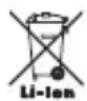
Batteries and rechargeable batteries must not go in domestic waste!
As a consumer you are legally obliged to dispose of all batteries, irrespective of whether they contain harmful substances* or not, at a collection point in your community/district or at a retail outlet, so that they can be disposed of in an environmentally friendly manner.
* Marked with: Cd = Cadmium, Hg = Mercury, Pb = Lead, Li = Lithium.
12


EC-DECLARATION OF CONFORMITY
We, the Batavia B.V., Weth. Wassebaliestraat 6d, NL-7951 SN Staphorst, declare by our own responsibility that the Item-No's 7062517, 7062518 and 7063735 are according to the basic requirements. For the evaluation of conformity, the following harmonized standards were consulted:
EN 62841-1:2015
EN 62133-2:2017
Staphorst, 01 April 2021
natural_image
Abstract line drawing with intersecting curved and dashed lines forming a stylized shape (no text or symbols)Meino Seinen, QA Representative
Batavia B.V., Weth. Wassebaliestraat 6d, 7951 SN Staphorst, Netherlands
The product and the user manual may be subject to changes. Technical data may be changed without prior notice.
Staphorst, 01 April 2021
natural_image
Abstract line drawing with intersecting curved and dashed lines forming a symmetrical shape (no text or symbols)CE-DÉCLARATION DE CONFORMITÉ
natural_image
Abstract line drawing with intersecting curved and dashed lines forming a symmetrical shape (no text or symbols)Staphorst, 01 April 2021
natural_image
Abstract line drawing with intersecting curved and dashed lines forming a stylized shape (no text or symbols)natural_image
Abstract line drawing with intersecting curves and dashed lines, no text or symbols presentnatural_image
Abstract line drawing with intersecting curves and a central arrow (no text or symbols)natural_image
Abstract line drawing with intersecting curves and dashed lines (no text or symbols)Meino Seinen, QA Representative
Batavia B.V., Weth. Wassebaliestraat 6d, 7951 SN Staphorst, Países Baixos
natural_image
Abstract line drawing with intersecting curved and dashed lines forming a symmetrical shape (no text or symbols)This product has got a 2 year warranty
Dear Client, if for any reason this product is not working, please ensure you contact our Client Service Centre. Ensure you have your original receipt of purchase. This warranty covers all defects in workmanship or materials in this Batavia product for a two year period from the date of purchase. The warranty does not cover any malfunction, or defect resulting from misuse, neglect, alteration, or repair.
Other European countries – Customer Services /
Monday till Friday from 8 am until 4 pm /
BT-CLB002 / BT-CLB004
Item-No.:
7062517 / 7062518 / 7063735
www.batavia.eu | info@batavia.eu
BATAVIA B.V. | Weth. Wassebaliestraat 6d | 7951SN Staphorst | Netherlands
ONE BATTERY
FOR 30+ TOOLS
MAXPACK 18 V
18 V Cordless collection
30+ TOOLS
7062517-7062518-7063735/11
natural_image
Collage of four outdoor scenes: hands holding a camera, hands holding a small object, a person in a hard hat, and a large industrial saw (no visible text or symbols)BATAVIA B.V. | Weth.Wassebaliestraat 6d | 7951SN Staphorst
Netherlands | www.batavia.eu | Email: info@batavia.eu