511 - Measuring equipment Testo - Free user manual and instructions
Find the device manual for free 511 Testo in PDF.

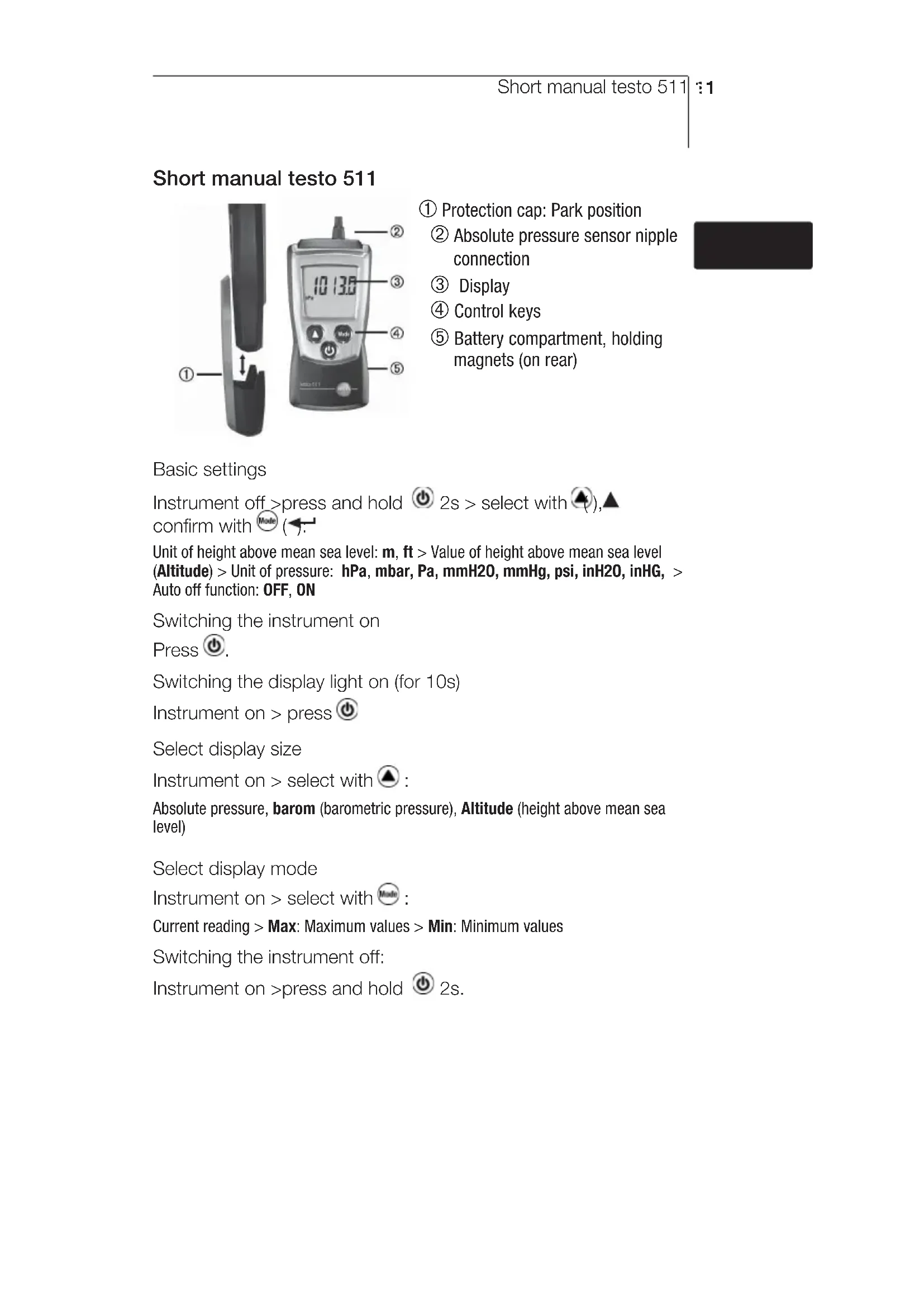


| Product type | Absolute pressure measuring instrument |
| Brand | Testo |
| Model | 511 |
| Category | Measuring equipment |
| Sensor | Absolute pressure sensor |
| Measurable quantities | Absolute pressure, barometric pressure, altitude |
| Measurement range (absolute pressure) | 300 to 1200 hPa (120.4 to 481.8 inH2O) |
| Resolution | 0.1 hPa / 0.01 inH2O |
| Accuracy (at 22°C) | ±3 hPa / ±1.2 inH2O |
| Measurement frequency | 0.5 s |
| Power supply | 2 AAA 1.5 V batteries |
| Battery life | 200 h (without backlight) |
| Protection type | IP40 |
| Dimensions (with cap) | 119 x 46 x 25 mm |
| Weight (with batteries and cap) | 90 g |
| Operating temperature | 0 to 50 °C |
| Storage temperature | -40 to 70 °C |
| Display | Backlit display (10 s) |
| Main functions | Absolute pressure, barometric pressure and altitude measurement; Min/Max modes; unit configuration; auto-off |
| Maintenance and cleaning | Clean the housing with a damp cloth (soapy water); do not use solvents |
| Safety | Magnetic field – keep away from pacemakers (≥10 cm) and sensitive magnetic supports |
| Warranty | 2 years |
| Accessories and spare parts | Available at www.testo.com |
Frequently Asked Questions - 511 Testo
User questions about 511 Testo
0 question about this device. Answer the ones you know or ask your own.
Ask a new question about this device
Download the instructions for your Measuring equipment in PDF format for free! Find your manual 511 - Testo and take your electronic device back in hand. On this page are published all the documents necessary for the use of your device. 511 by Testo.
USER MANUAL 511 Testo
PykoBOCTBO NOIb3ObaTeJra
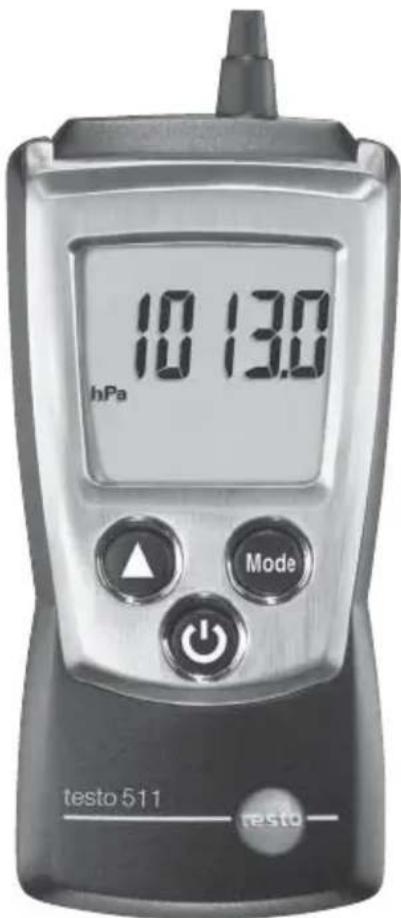
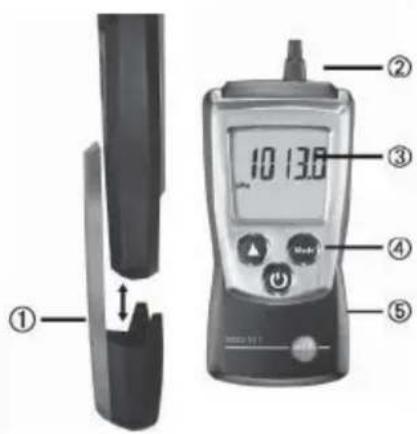
① Protection cap: Park position
② Absolute pressure sensor nipple connection
③ Display
④ Control keys
⑤ Battery compartment, holding magnets (on rear)
Basic settings
Instrument off press and hold 2s > select with (), confirm with Mode
Unit of height above mean sea level: m, ft > Value of height above mean sea level (Altitude) > Unit of pressure: hPa, mbar, Pa, mmH20, mmHg, psi, inH20, inHG, > Auto off function: OFF, ON
Switching the instrument on
Press
Switching the display light on (for 10s)
Instrument on > press
Select display size
Instrument on > select with
Absolute pressure, barom (barometric pressure), Altitude (height above mean sea level)
Select display mode
Instrument on > select with
Current reading > Max: Maximum values > Min: Minimum values
Switching the instrument off:
Instrument on >press and hold 2s.
Safety and the environment
About this document
Please read this documentation through carefully and familiarise yourself with the product before putting it to use. Keep this document to hand so that you can refer to it when necessary. Hand this documentation on to any subsequent users of the product.
Pay particular attention to information emphasised by the following symbols:
Important.
Avoid personal injury/damage to equipment
Only operate the measuring instrument properly, for its intended purpose and within the parameters specified in the technical data. Do not use force.
Never store the product together with solvents, acids or other aggressive substances.
Only carry out the maintenance and repair work that is described in the documentation. Follow the prescribed steps when doing so. Use only OEM spare parts from Testo.

Magneticfield May be harmful to those with pacemakers.
Keep a minimum distance of 10cm between pacemaker and instrument.

Magneticfield Damage to other devices!
Keep a safe distance away from products which could be damaged by the effects of magnetism (e.g. monitors, computers or credit cards).
Protecting the environment
Take faulty rechargeable batteries as well as spent batteries to the collection points provided for them.
Send the product back to Testo at the end of its useful life. We will ensure that it is disposed of in an environmentally friendly manner.
Specifications
Functions and use
The testo 511 is an absolute pressure measuring instrument. It is normally used to measure absolute pressure, e.g. for pressure compensation in velocity measurement in ducts, laboratories and production processes. Further measurement parameters are barometric (surface) pressure (= pressure at sea level) and altitude above sea level.
Technical data
Measurement data
- Sensor:
Absolute pressure sensor - Parameters (absolute/barometric): Pa, hPa, mbar, mmH_2O , mmHg, inHG, inH _2 O, psi
- Measuring ranges: 300...1,200 hPa, 120.4...481.8 inH _2 O
- Resolutions:
0.1 hPa, 0.01 inH2O
Accuracies (Nominal temperature 22^ ± 1 Digit): ± 3hPa ± 1.2 inH2O - Measuring rate: 0.5 s
Further instrument data
Protection class: IP40
- Ambient conditions: 0...50 °C, 32...122 °F
Storage/transport conditions: -40...70 °C, -40...158 °F
Voltage supply: 2x 1.5 V type AAA
- Battery life: 200 h (without display light)
Dimensions: 119 × 46 × 25 ~mm / 4.7 × 1.8 × 1.0 in (inc. protection cap)
Weight: 90g / 3.2 oz (inc. batteries and protection cap)
Directives, standards and tests
EC Directive: 2014/30/EU
Warranty
Duration: 2 years, warranty conditions: see www.testo.com/warranty
Product description
At a glance
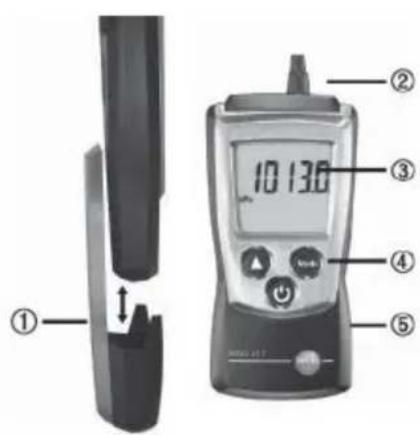
① Protection cap: Park position
② Absolute pressure sensor nipple connection
③ Display
④ Control keys
⑤ Battery compartment, holding magnets (on rear)
First steps
Inserting batteries:
1 To open the battery compartment, push the battery cover down.
2 Insert batteries (2x 1.5 V type AAA). Observe the polarity!
3 To close the battery compartment, push the battery cover back on.
Basic settings (configuration mode):
Adjustable functions
Unit of height above mean sea level: m, ft
- Value of height above mean sea level (Altitude): Set flashing figure with , change to next figure with
Unit of pressure: hPa, mbar, Pa, mmH20, mmHg, psi, inH20, inHG,
- Auto off function: OFF, ON (instrument switches off automatically if no key is pressed for 10 minutes)
1 When switching the instrument on, press and hold until and appear on the display (configuration mode).
- The adjustable function is displayed. The current setting flashes.
2 Press (several times until the desired setting flashes.
3 Press Mode to confirm the input.
4 Repeat steps 2 and 3 for all functions. - The instrument changes to measuring mode.
Using the product
For measuring barometric (surface) pressure barom (= pressure at sea level), the following must be observed:
- the altitude of the measurement site above sea level must be known, and be set in the instrument, see chapter 'First steps', section 'Basic settings (configuration mode)'.
- The barometric pressure displayed is only correct for the altitude set, for a change of altitude, the altitude above sea level must be reset.
For measuring barometric Altitude (= altitude relating to a fixed level), the following must be observed:
- The altitude above sea level at the starting point of the measurement (= Reference altitude) must be known and be set in the instrument, see chapter 'First steps', section 'Basic settings (configuration mode)'. When entering the reference altitude, the current absolute pressure is also stored as a reference pressure.
- When carrying out the measurement at the destination, the weather conditions must be the same as when entering the reference altitude. If the weather has changed (= change of absolute pressure), a new reference value must be entered.
Switching the instrument on:
Press
- Measuring mode is opened.
Switching the display light on:
The instrument is switched on.
Press
- The display light goes out automatically if no key is pressed for 10 seconds.
Changing the parameter:
The parameter can be changed.
Adjustable parameters
- Absolute pressure
- barom (barometric pressure)
- Altitude (height above mean sea level)
Press several times until the desired parameter appears.
Changing the display view:
Adjustable views
Current reading
Max: Maximum values since the instrument was last switched on or last reset.
Min: Minimum values since the instrument was last switched on or last reset.
Press several times until the desired view appears.
Resetting Max/Min values:
1 Press several times until the desired view appears.
2 Press and hold until - - - appears.
3 Repeat steps 1 and 2 for all values that are to be reset.
Switching the instrument off:
Press and hold until the display goes out.
Maintaining the product
Changing batteries:
1 To open the battery compartment, push the battery cover down.
2 Remove used batteries and insert new batteries (2x 1.5 V type AAA). Observe the polarity!
3 To close the battery compartment, push the battery cover back on.
Cleaning the housing:
Clean the housing with a moist cloth (soap suds) if it is dirty. Do not use aggressive cleaning agents or solvents!
Tips and assistance
Questions and answers
| Question | Possible causes/solutions |
| Hi or Lo | · Readings outside the measuring range (too high, too low): Keep to the permitted measuring range. |
| · Residual capacity <10 min: Change batteries. |
If we could not answer your question, please contact your dealer or Testo Customer Service. For contact details, please visit www.testo.com/service-contact
Accessories and spare parts
Accessories and spare parts can be found in the product catalogues and brochures or in the internet at: www.testo.com
Notes18
Instructions succinctes testo 511
PnBkIIOueHHOM np6ope > Bb6op KhoNkoJ
TekyuNe 3NaeHnra > Max: MaKc. 3NaeHnra > Min: MnH. 3NaeHnra>
BbIKIOUeHne np6opa:
PnBkIIOUeHHOM np6ope HaxMITE n ydepxBaIte 2c.
2 Haxmte KhoNk (AHECKoJIbKO pa3, NOKa He haIeTe Heo6xOdmyIO yCTaHOBky.
3 HaxmTe (TnnoTBepeXeHnBb6opa.
4 NOBTOPe NyHKtBi 2 n 3 dJa dpYnx FyHKcui.
- PpI6Op IpeeIeT B pExIM n3MepeHn.
3KcIpyataa np6opa
IДЯИЗМЕРЕНЯ6apOMeTpPueCKOToДaBJIeHn(=ДaBJIeHnHa ypOBHe MOPr),HEo6xOДIMo CO6JIoDaTb CneDyIOUcEe:
Долхна 6ыть ИЗВЕСТHA ВИСОТ TOUКИ ИЗМЕРЕНЯ Над урOB hem MOPЯ, 3TO 3начehné HeOБхОДМВ BVECTN B npIbOp, CM. Галу 'Первile shaRn', pa3дел 'ОсноВе HabTpoiKи (pexIM KOHФИграци)'.
- OTo6paxaemoe 6apometprueckoe daBneHne 6ydet KoppeKTHO TOIbKO DnY UCTaHOBJIeHHo BbICOTbI Hd yPOBHeM MOpR, PnN N3MeHeHH N BbICOTbl, HE06XODIMO BBECTN HOBOE 3HaueHne B np6Op.
ДяиИЗмеренябарометрчecковВьICOTы(=ВьICOTA,CBЯ3аHHаФИКСИРОВАнБIMурВ hem),HEO6XODIMOco6JIOnaTbCleJyIOUe:
- BbICota nad yPOBhem MOpJ dIra CTaPToBOI TOUKN I3MepeHn (= 3TaJIOnHHa BbICota) I0JXHa 6bITb N3BeCTHa N UcTaNBLeHa B IprNBope, CM. rIaby 'IepBbIe IaRn', pa3dJe OChOBHe HacTpoKn (pexim KOHfNpyauu). Ipn BBOe 3TaJIOnHOB NbICOTbI, TeKyuee 3NaueHne a6COJIOTHO TaBJIeHn TAK Jze 6Bydet COxpaHeHO KAc 3TaJIOnHOe.
-Прип пове demи Измерейь Мсесе Ha3haeHn,norOДьe yCIOBnydoJIxHbI 6bITb TAKIMN JKe, KaK pri BBOde 3taJIOHHoB BBICOTbl. EcIn nOrOdaI3MeHnlaCb (= n3MeHne a6COJIOTHOДaBHeHn), HOBOe 3HaueHne3TaJIOHHo BBICOTbl DOJIXHO 6bITb BBEdHO.
BkIIOUeHne np6opa:
Haxmnte KhoNky
- BkIIOuHTcpeXIMn3MepeHn.
BkIIOueHne noDCBeTK nCnpe:
Pn6op BkIIOueH.
Haxmnte KhONky
-ПоDCBETkaДиСплЕаВТOMaTиЧeСКИOTKЛIOчaETсЯ,ecnI npN6Op haxODHTcBA pexIme OxINdAnHn6OJIe 10 cekyHd.
>Изменипапаметров:
BbIMoXeTe N3MeHrTb CJeDyIOUne npaMeTpbl:
NapaametpbI dIaHCTpOKn
A6coJIOTHOe DaBHeHne
barom(6apometprueeckoe daJIeHne)
- Altitude (BbICOTa NaI cpeHem yPOBHeM MOpA)
Haxmnte Heckolbko pa3 KhoIky Kypcopa 品 do OTO6paXeHna HnCJIeE Heo6xOIMoro npaMeTpa.
> N3MeHeHne pexkMa oTo6paXKeHna daHHbIX:
Yexmbl OTO6paXeHn DaHHbIX
Tekyuune noka3aHn
Max: MaKc. 3NaeHnC C MOneHTa HauJa TocJIeIHeFo N3MepeHnA.
·Min:MnH.3NaueHnA C MOMeHTa NaUaIa NocLeJeHero N3MepeHnA.
Haxmnte KhoNky Heckolbko pa3, noka Ha dinCnIee He OTo6pa3ntcHoe6xOIMbI peXIM OTo6paxeHna.
> C6poc MaKc./MnH. noka3aHn:
1 Haxmnte KhoIky HeckoJIbKO pa3, Ioka He oTo6pa3ntcHoe6xOdImbI pexIM oTo6paKeHn DaHHbIX..
2 HaxmTe n ydepxnBaTc KhoNky noka Ha dncnnee He oTo6pa3ntc
3 NOBTOPTE NyKtbi 1 n 2 dIra c6poca ocTaIbHbIX daHHbIX.
BbIKIIOUeHne np6opa:
HaxmTe KhoNky u ydepxnBaIte, noka dncnne He noracHeT.
ОвслужиBaнne рпбopa
>3aMeHa 6aTapei:
1 OtkpoIte oTceK IJIe 6aTapei, CdBnHyB KpbIuKy BHN3.
2 13BLeKInTe NcNoIb3OBAHHbIe 6aTapeN IN BCTaBbTe Ha INx MecTo HOBbIe (2x 1.5 B TnA AAA). Co6JIouaIte noJraPHOCTb!
3 3akpoIte oTceK IJIA6batae.
>YncTka Koprnyca:
YdaJIaIe 3aIrp3HeHne C Kopnyca npu6opa MraKoJ caJIpeTKoJ, CMOueHHoB MbIbHom pactBope. He nCIOJIb3yIte pactBopnten IN dpyrIe aIpceCCNBhIe MOIOUne cpeICTBa!!