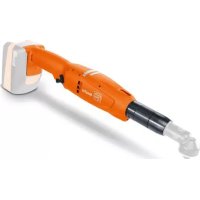
ASW 1845 PC - Screwdriver Fein - Free user manual and instructions
Find the device manual for free ASW 1845 PC Fein in PDF.


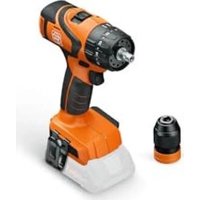
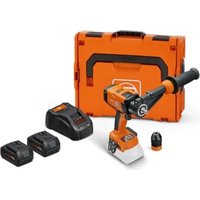
| Brand | Fein |
| Model | ASW 1845 PC |
| Product type | Cordless screwdriver |
| Power supply | Li-Ion battery (MultiVolt) |
| Battery type | Li-Ion, compatible with MultiVolt |
| Weight (according to EPTA-Procedure 01) | Approx. 1.5 kg |
| Clutch | Mechanical cut-off, adjustable torque |
| Direction of rotation | Right/left (switch) |
| No-load speed | Variable depending on software setting |
| Start | Progressive (soft start) |
| LED display | Charge status, faults, screw OK/failure |
| Acoustic signal | Short signal in case of screw failure |
| Thermal protection | Yes (automatic shutdown in case of overheating) |
| Automatic shutdown | In case of deep battery discharge |
| Maintenance | Blow dry compressed air into the ventilation slots |
| Spare parts | Available at www.fein.com |
| Warranty | Statutory warranty + manufacturer’s declaration |
Frequently Asked Questions - ASW 1845 PC Fein
User questions about ASW 1845 PC Fein
0 question about this device. Answer the ones you know or ask your own.
Ask a new question about this device
Download the instructions for your Screwdriver in PDF format for free! Find your manual ASW 1845 PC - Fein and take your electronic device back in hand. On this page are published all the documents necessary for the use of your device. ASW 1845 PC by Fein.
USER MANUAL ASW 1845 PC Fein
natural_image
Technical line drawing of three different electric spray machines (no text or symbols visible)ASW18-6 PC ( ^** ) 7 112 ...
ASW18-12 PC ( ^** ) 7 112 ...
ASW18-18 PC ( ^** ) 7 112 ...
ASW18-30 PC (**) 7 112 ...
ASW18-45 PC (**) 7 112 ...
ASW18-60 PC (**) 7 112 ...
ASM18-3 PC (**) 7 112 ...
ASM18-8 PC ( ^** ) 7 112 ...
ASM18-12 PC ( ^** ) 7 112 ...
ASW18-30PC ( ^ ) ASW18-45PC ( ^ ) ASW18-60PC( ^** )
7 112 ... 7 112 ... 7 112 ...
| U | V--- | 14,4-18,0 | 14,4-18,0 | 14,4-18,0 |
| n_0 | /min, min ^-1 , rpm, r/min 30-420 25-310 20-230 | |||
| n_Reset | /min, min ^-1 , rpm, r/min 180 130 100 | |||
| M... | Nm 30 45 60 |
| kg 1,5 | 1,5 | 1,65 | ||
| L_pA | dB | <81 | <81 | <81 |
| K_pA | dB | 3 | 3 | 3 |
| L_wA | dB | <92 | <92 | <92 |
| K_wA | dB | 3 | 3 | 3 |
| L_pCpeak | dB | <95 | <95 | <95 |
| K_pCpeak | dB | 3 | 3 | 3 |
| _h | m/s ^2 | <1,8 | <1,8 | <1,8 |
| K_u | m/s ^2 | 1,5 | 1,5 1,5 |
| B14A | B14A | B18A | B18A | ||
| Lithium Ion | Lithium Ion | Lithium Ion | Lithium Ion | ||
| U | V= | 14,4 | 14,4 | 18 | 18 |
| kg | 0,40 | 0,60 | 0,45 | 0,70 | |
| ASM18-3PC (**) | ASM18-8PC (**) | ASM18-12PC(**) | ||
| 7 112 ... 7 112 ... 7 112 ... | ||||
| U | V= | 12,0–18,0 | 12,0–18,0 | 12,0–18,0 |
| n_0 | /min, min ^-1 , rpm, r/min | 110–1200 110–1200 80–900 | ||
| n_Reset | /min, min ^-1 , rpm, r/min 600 600 450 | |||
| M... | Nm | 3 | 8 12 | |
| kg | 0,8 | 0,8 | 0,8 | |
| L_pA | dB | < 81 | < 81 | < 77 |
| K_pA | dB | 3 | 3 | 3 |
| L_wA | dB | < 92 | < 92 | < 88 |
| K_wA | dB | 3 | 3 | 3 |
| L_pCpeak | dB | < 94 | < 94 | < 90 |
| K_pCpeak | dB | 3 | 3 | 3 |
| a_h | m/s ^2 | < 1,8 | < 1,8 | < 1,8 |
| K_a | m/s ^2 | 1,5 | 1,5 1,5 | |
| B12A | B12A | B14A | B14A | B18A | B18A | ||
 |  |  |  |  |  | ||
| Lithium Ion | Lithium Ion | Lithium Ion | Lithium Ion | Lithium Ion | Lithium Ion | ||
| U | V= | 12 | 12 | 14,4 | 14,4 | 18 | 18 |
| kg | 0,25 | 0,45 | 0,40 | 0,60 | 0,45 | 0,70 | |
ASW18-6PC (**) ASW18-12PC (**) ASW18-18PC (**)
| 7 112 ... 7 112 ... 7 112 ... | ||||
| U | V--- | 12,0-18,0 | 12,0-18,0 | 12,0-18,0 |
| n_0 | /min, min ^-1 , rpm, r/min 100- 1300 75- 1000 65-900 | |||
| n_Reset | /min, min ^-1 , rpm, r/min 575 430 375 | |||
| M... | Nm 6 12 18 | |||
| kg | 1,0 1,0 1,2 | |||
| L_pA | dB | <81 | <81 | <81 |
| K_pA | dB 3 | 3 | 3 | |
| L_wA | dB | <92 | <92 | <92 |
| K_wA | dB 3 | 3 | 3 | |
| L_pCpeak | dB | <95 | <95 | <95 |
| K_pCpeak | dB 3 | 3 | 3 | |
| _h | m/s ^2 | <1,8 | <1,8 | <1,8 |
| K_a | m/s ^2 | 1,5 1,5 1,5 | ||
| B12A | B12A | B14A | B14A | B18A | B18A | ||
| Lithium Ion | Lithium Ion | Lithium Ion | Lithium Ion | Lithium Ion | Lithium Ion | ||
| U | V--- | 12 | 12 | 14,4 | 14,4 | 18 | 18 |
| kg | 0,25 | 0,45 | 0,40 | 0,60 | 0,45 | 0,70 | |
flowchart
graph TD
    A["ASW 18-6 PC"] --> B["File 10"]
    C["ASW 18-12 PC"] --> D["File 15"]
    E["File 7"] --> F["File 8"]
    G["File 16"] --> H["File 16"]
    I["File 19"] --> J["File 169"]
    K["File 10 9 10"] --> L["File 169"]
    M["File 10"] --> N["Document"]
    O["Document"] --> P["Document"]
    Q["Document"] --> R["Document"]
    S["Document"] --> T["Document"]
natural_image
Diagram showing a connector being inserted into a cylindrical component, with an arrow indicating direction (no text or symbols present)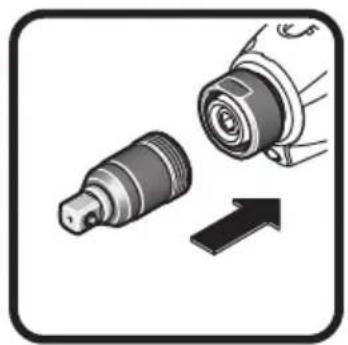
natural_image
Illustration of two mechanical components with an arrow indicating direction (no text or symbols)
ASW 18-6 PC
ASW 18-12 PC
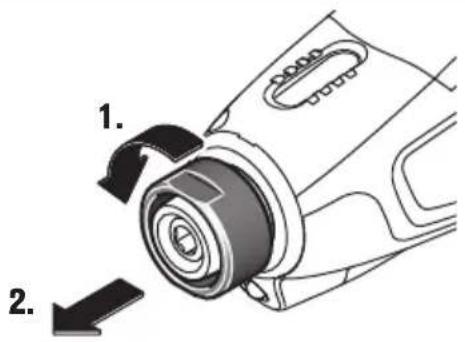
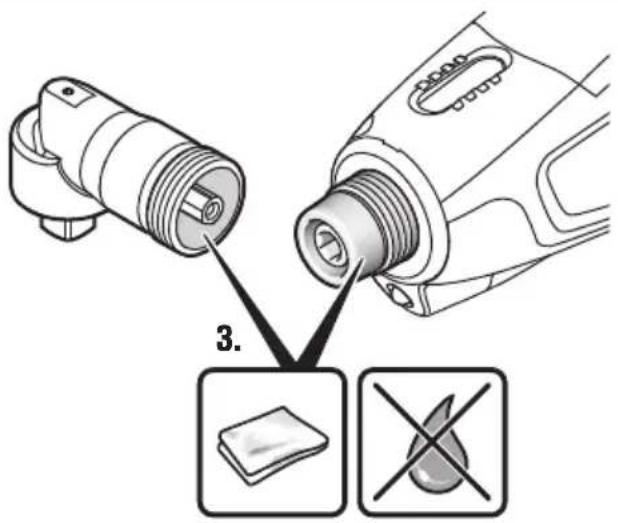
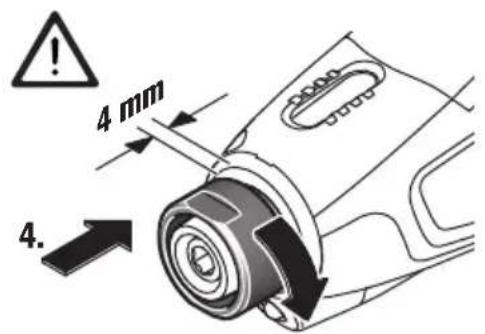
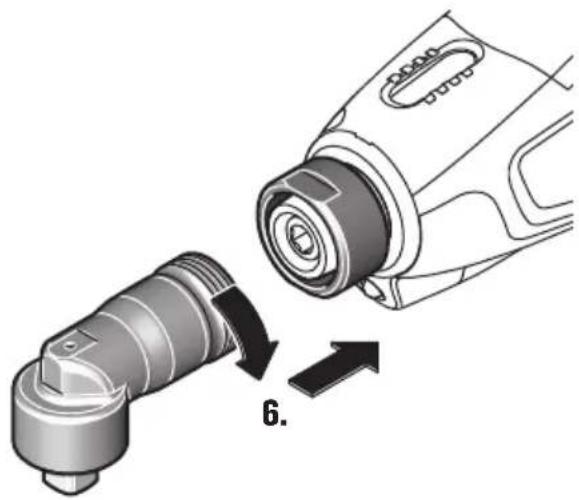
5.
natural_image
Diagram showing a device being inserted into a cylindrical component, with no visible text or symbols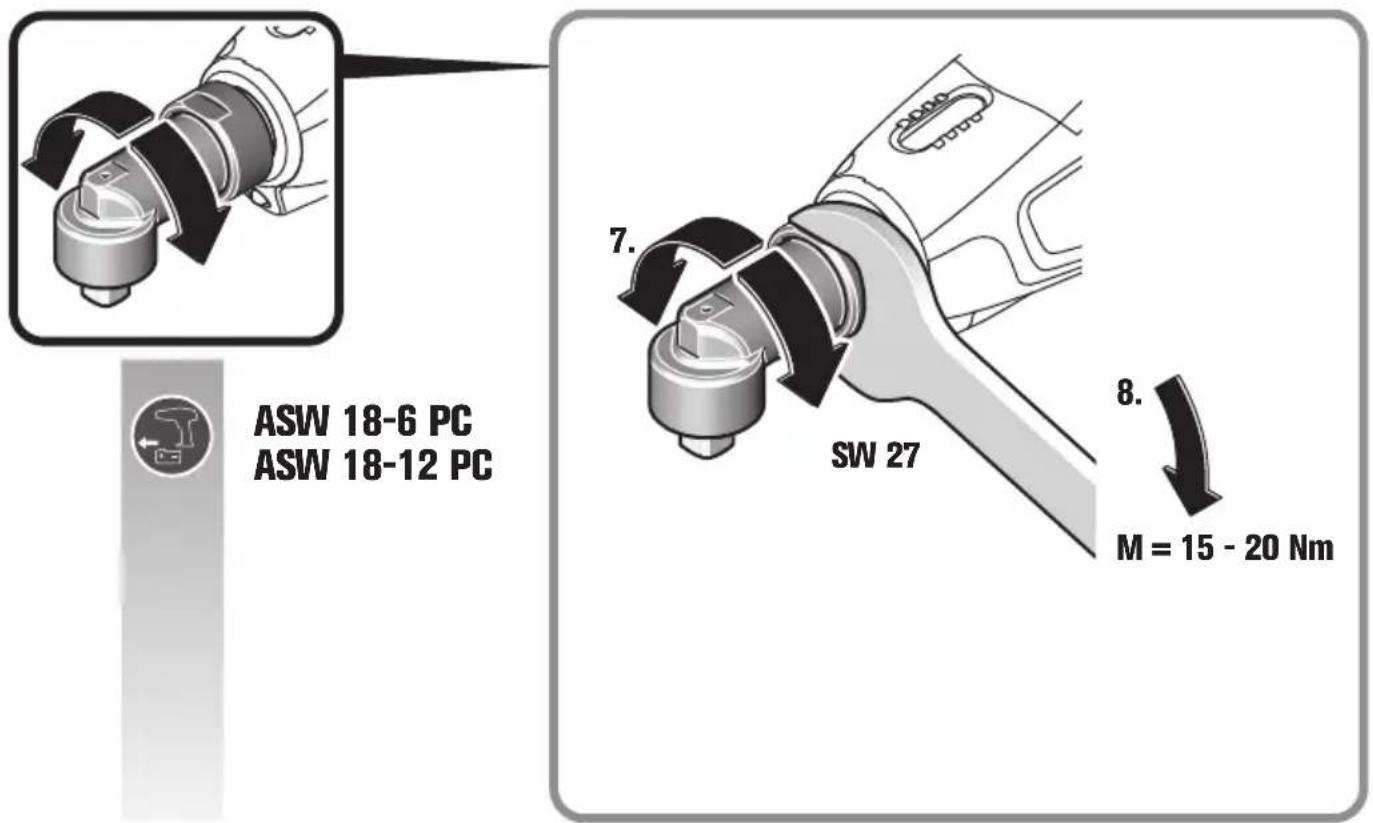
natural_image
Diagram of a mechanical component with an arrow indicating direction, no text or symbols present
ASW 18-18 PC
ASW 18-30 PC
ASW 18-45 PC
ASW 18-60 PC
6 29 08 014 00 0
natural_image
3D diagram showing a cylindrical mechanical component with a separate inset view of its internal structure (no text or symbols)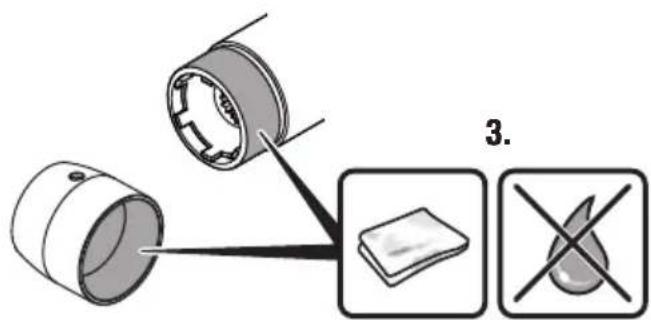
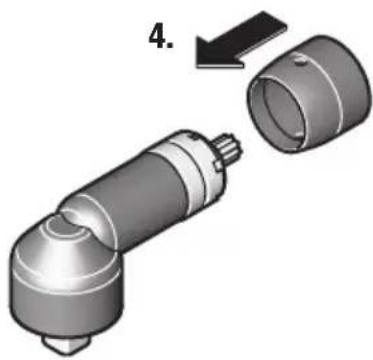
natural_image
3D mechanical component diagram showing a cylindrical assembly with a separate cylindrical housing, labeled with number 4 (no text or symbols on the component itself)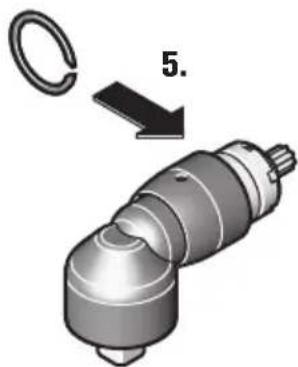
natural_image
Mechanical component diagram showing a cylindrical assembly with a loop and a labeled arrow (no text or symbols present)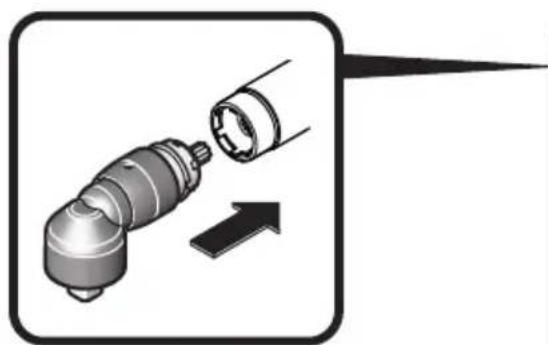
natural_image
Diagram showing a mechanical component being inserted into a cylindrical part, with an arrow indicating direction (no text or symbols present)

ASW 18-18 PC
ASW 18-30 PC
ASW 18-45 PC
ASW 18-60 PC
ASW 18-30 PC
ASW 18-45 PC
ASW 18-60 PC
ASW 18-18 PC
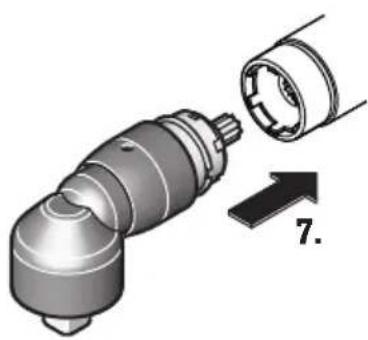
natural_image
Mechanical component diagram showing a cylindrical assembly with a separate cylindrical housing, labeled with number 7 (no text or symbols on the component itself)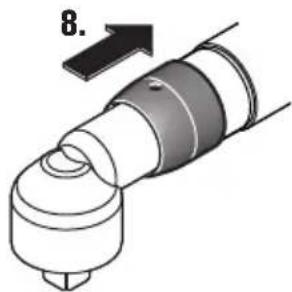
natural_image
Mechanical component diagram showing a cylindrical assembly with a curved shaft and flange, labeled with number 8 (no text or symbols on the part itself)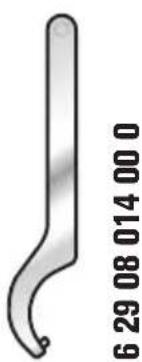
natural_image
Metallic curved object with no visible text or symbols, labeled '6 29 08 014 00 0' on the right side.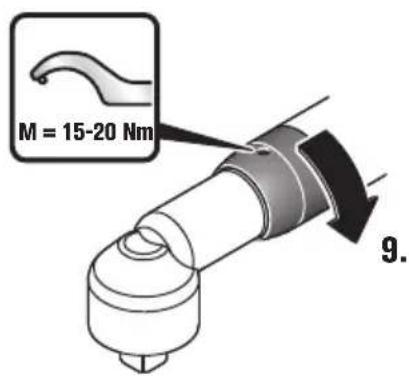
10.
natural_image
3D rendered mechanical component with cylindrical and flanged ends (no text or symbols)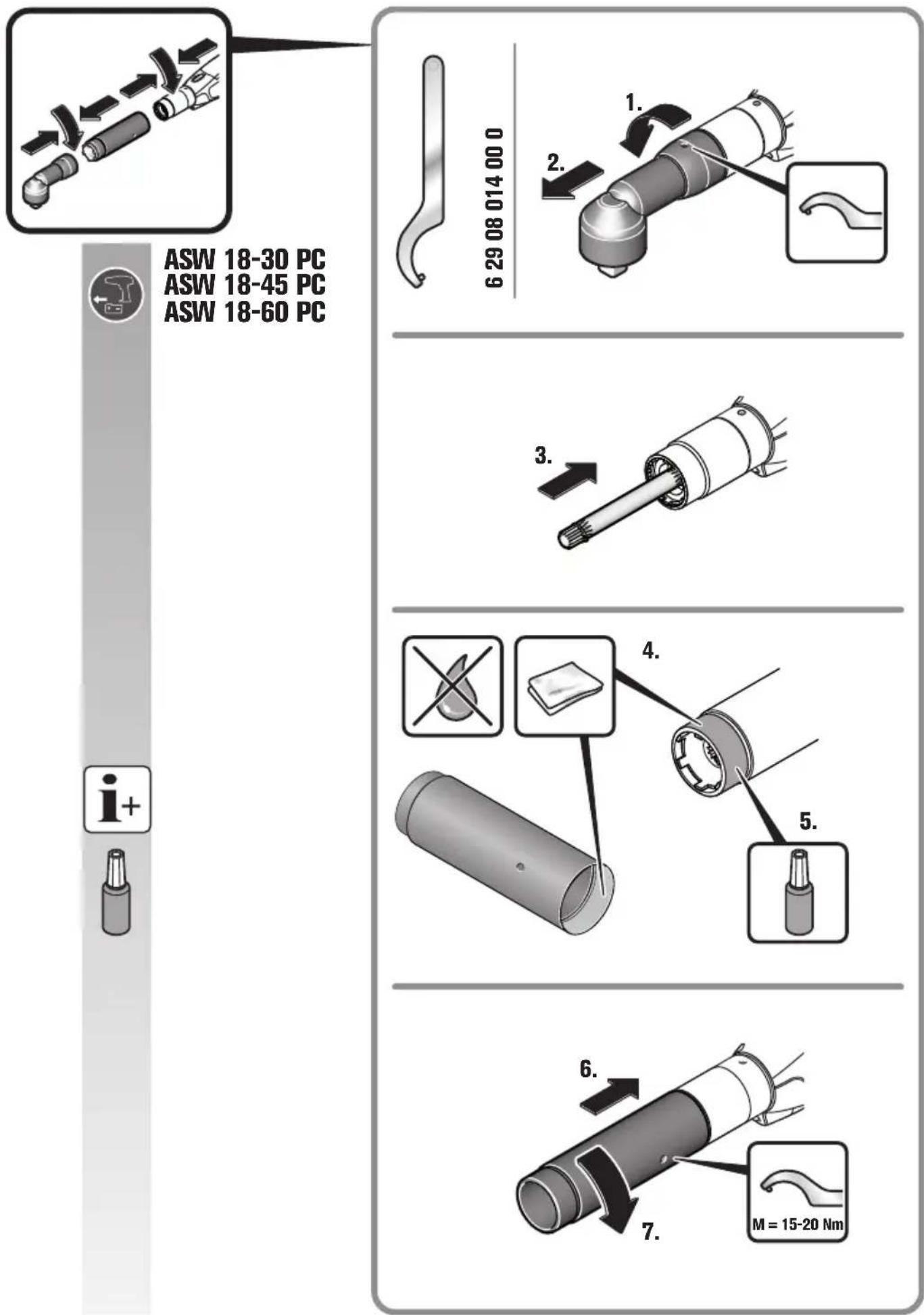
ASW 18-30 PC
ASW 18-45 PC
ASW 18-60 PC
ASW 18-30 PC
ASW 18-45 PC
ASW 18-60 PC
ASM 18-3 PC
ASM 18-8 PC
ASM 18-12 PC
natural_image
Diagram showing a screwdriver inserted into a mechanical component with an arrow indicating direction (no text or symbols present)
ASM 18-3 PC
ASM 18-8 PC
ASM 18-12 PC
Translation of the Original Instructions.
Symbols, abbreviations and terms used.
| Symbol, character Explanation | |
 | Do not touch the rotating parts of the power tool. |
 | Make sure to read the enclosed documents such as the Instruction Manual and the General Safety Instructions. |
 | Observe the instructions in the text or graphic opposite! |
 | Before commencing this working step, remove the battery from the power tool. Otherwise there may be danger of injury caused by unintentional starting of the power tool. |
 | Use eye protection during operation. |
 | Use ear protection during operation. |
 | Use protective gloves during operation. |
 | Caution: Do not view into the switched-on lamp! |
 | General prohibition sign. This action is prohibited. |
 | Do not charge damaged batteries. |
 | Keep the battery away from fire. Protect the battery against heat, e. g. against continuous intense sunlight. |
 | Observe the information in the adjacent text! |
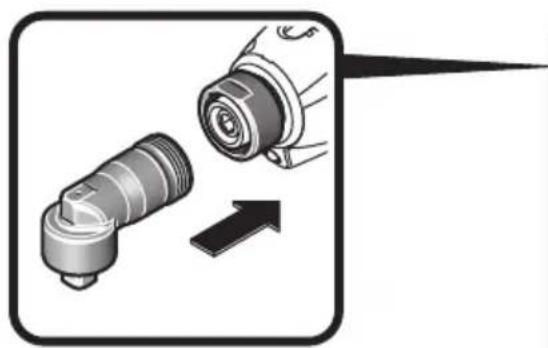
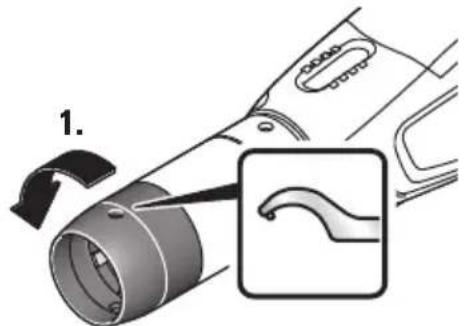
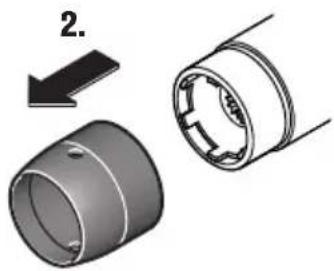
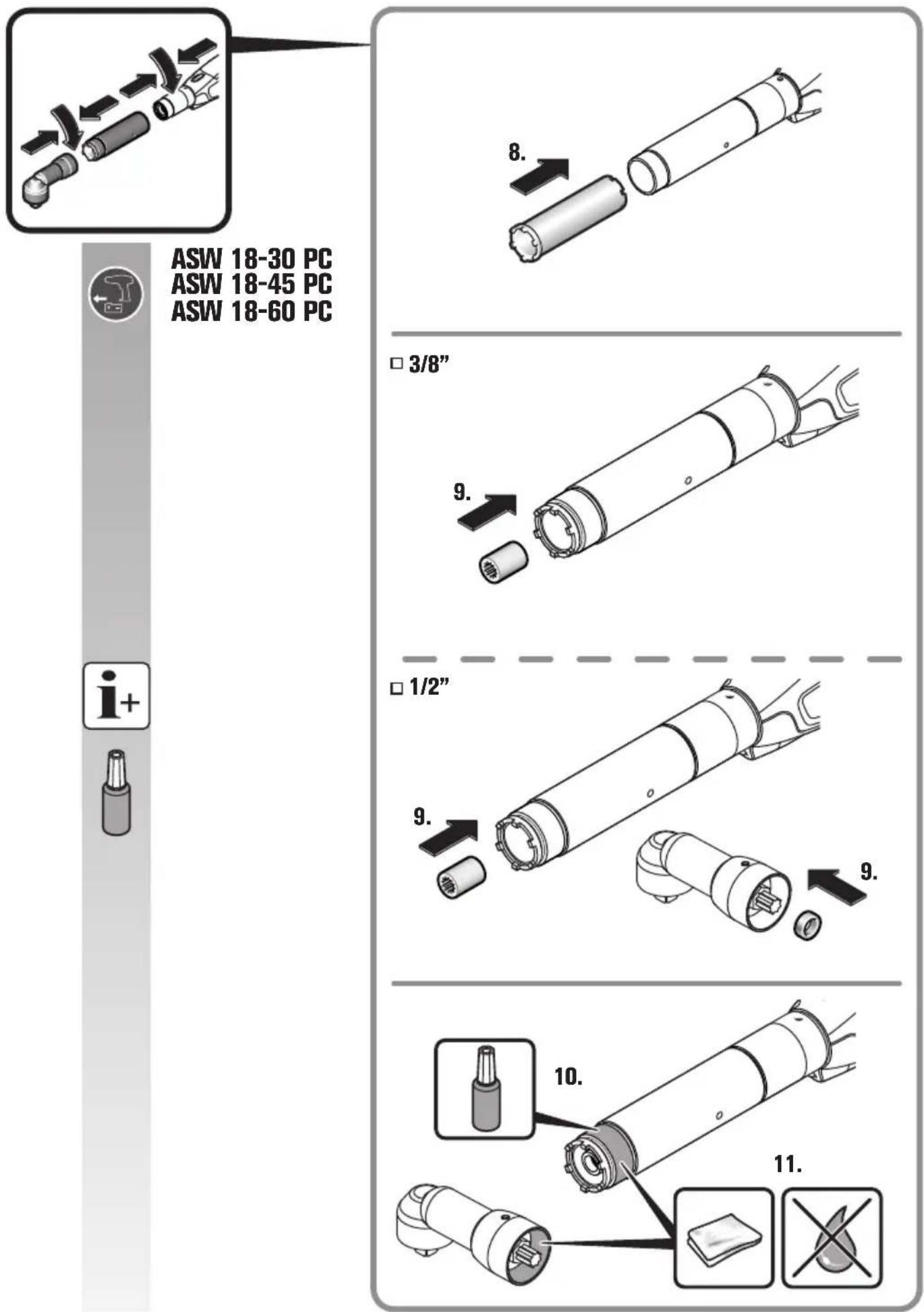
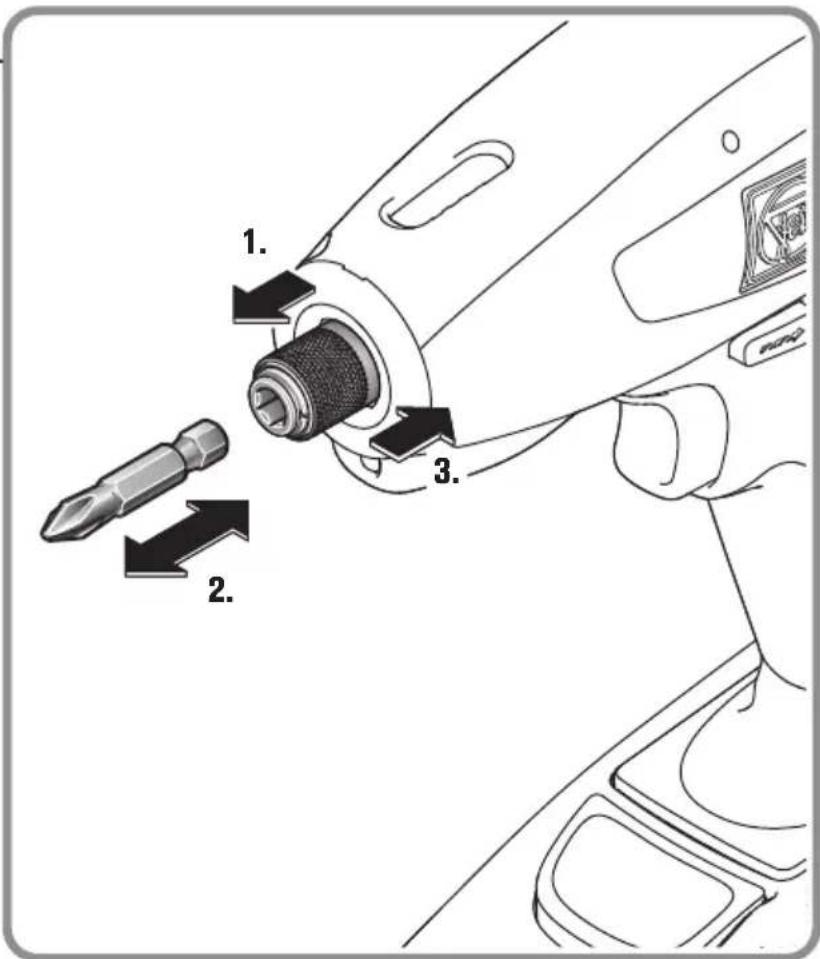
 | Additional information: Further information on replacement of the output can be found on the Internet under www.fein.com. |
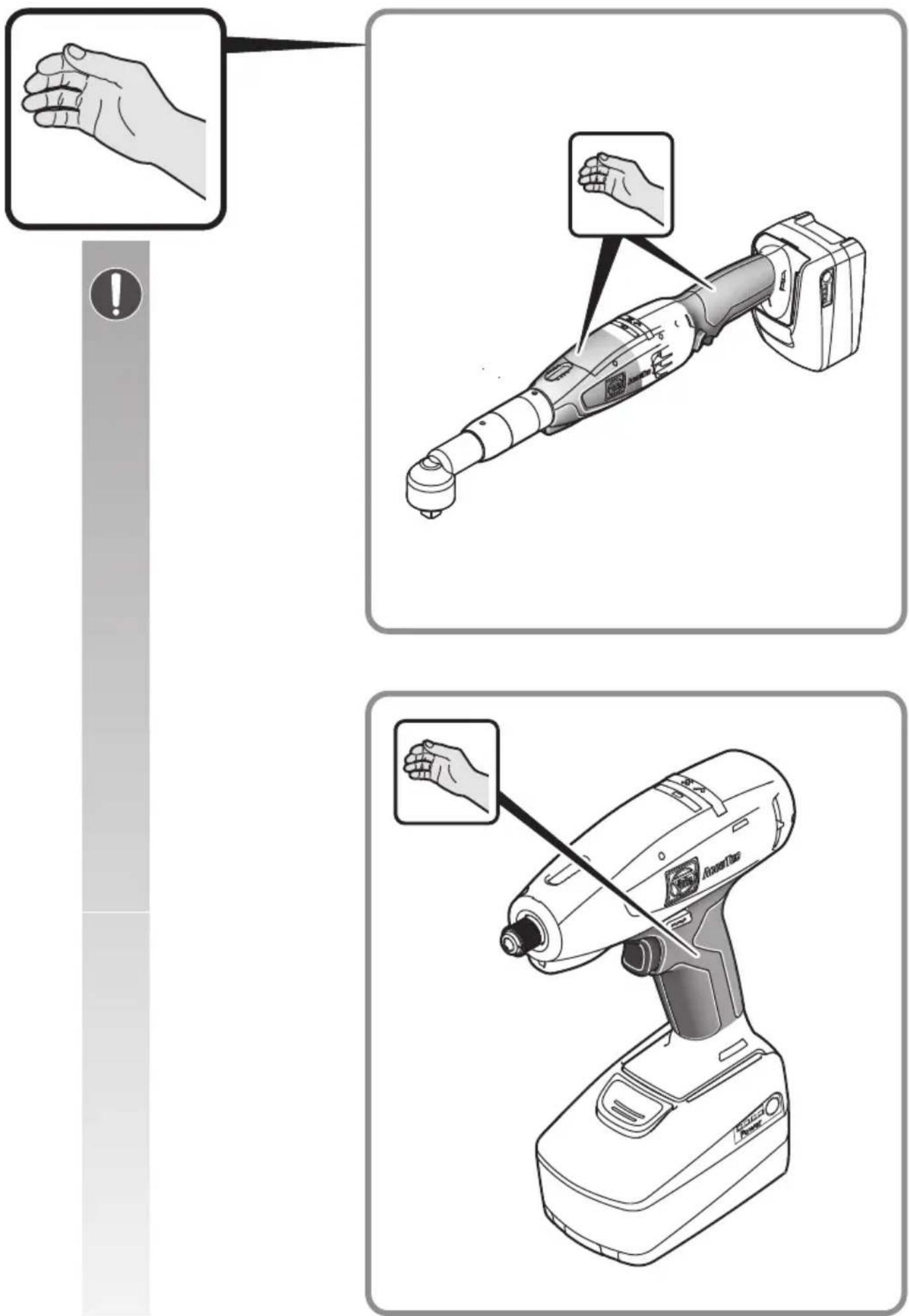
 | Gripping surface |
 | Switching on |
 | Switching off |
 | Confirms the conformity of the power tool with the directives of the European Community. |
 | Confirms the conformity of the power tool with the directives of Great Britain (England, Wales, Scotland). |
  C US Intertek C US Intertek | This symbol confirms the certification of this product for the USA and Canada. |
 | This sign indicates a possible dangerous situation that could cause severe or fatal injury. |
 | Recycling symbol: designates recyclable materials |
 | Worn out power tools and other electrotechnical and electrical products should be sorted separately for environmental-friendly recycling. |
 | Battery type |
 | Reduce torque |
| [K4GS] | Increase torque |
| Symbol, character | Explanation |
| [x3xw] | Apply retaining compound (medium tightness). |
 | Allow retaining compound to cure according to the manufacturer's instructions. |
| (**) May contain numbers and letters | |
| (Ax - Zx) Marking for internal purposes | |
| Character Unit of measurement, international | Unit of measurement, national | Explanation | |
| UV | == V | == D | C v |
| n_0 | /min, min ^-1 , rpm, r/min | rpm No-load speed | (Range adjustable with Parameter Control software (PC)) |
| n_Reset | /min, min ^-1 , rpm, r/min | rpm Speed (factory-set at delivery) | |
| M... | Nm Nm Torque | ||
| [77x7] | kg kg Weight according to EPTA-Procedure level | 01 | |
| L_pA | dB dB Sound pressure level | ||
| L_wA | dB dB Sound power level | ||
| L_pCpeak | dB dB Peak sound pressure level | ||
| K... | Uncertainty | ||
| a_h | m/s ^2 | m/s ^2 | Vibrational emission value (screwdriving) |
| m, s, kg, A, mm, V, W, Hz, N, °C, dB, min, m/s ^2 | m, s, kg, A, mm, V, W, Hz, N, °C, dB, min, m/s ^2 | Basic and derived units of measurement from the international system of units SI. | |
For your safety.
WARNING
Read all safety warnings and all instructions. Failure to follow the
warnings and instructions may result in electric shock, fire and/or serious injury.
Save all warnings and instructions for future reference.

Do not use this power tool before you have thoroughly read and completely understood this Instruction Manual and the enclosed "General
Safety Instructions" (document number 3 41 30 465 06 0). The documents mentioned should be kept for later use and enclosed with the power tool, should it be passed on or sold.
Please also observe the relevant national industrial safety regulations.
Intended use of the power tool:
Hand-held screwdriver for screwing in and unscrewing screws and nuts in weather-protected environments without water supply using the application tools and accessories recommended by FEIN.
Special safety instructions.
Hold power tool by insulated gripping surfaces, when performing an operation where the fastener may contact hidden wiring. Fasteners contacting a "live" wire
may make exposed metal parts of the power tool "live" and could give the operator an electric shock.
Beware of any concealed electric cables, gas or water conduits. Check the working area before commencing work, e. g. with a metal detector.
Secure the work piece firmly. A work piece that is gripped tightly in a clamping device or vice, is more secure than if held by hand.
Hold the power tool firmly. High reaction torque can briefly occur.
Do not work with materials containing magnesium. Danger of fire.
Do not work with CFRP (carbon-fiber-reinforced polymer) and materials containing asbestos. These materials are considered carcinogenic.
Do not rivet or screw any name-plates or signs onto the power tool. If the insulation is damaged, protection against an electric shock will be ineffective. Adhesive labels are recommended.
Do not use accessories which are not specifically designed and recommended by the power tool manufacturer. Safe operation is not ensured merely because an accessory fits your power tool.
Clean the ventilation openings on the power tool at regular intervals using non-metal tools. The blower of the motor draws dust into the housing. An excessive accumulation of metallic dust can cause an electrical hazard.
Never look or stare into the light of the power tool's lamp from a short distance. Never point the light of the lamp into the eyes of other persons in close vicinity.
The radiation produced by the lamp can be harmful for the eye.
Do not direct the power tool against yourself, other persons or animals. Danger of injury from sharp or hot application tools.
Use and handling of the battery (battery pack).
To avoid hazardous situations such as burns, fire, explosion, skin injuries, and other injuries when handling the battery, observe the following instructions:
Batteries must not be disassembled, opened or reduced in size. Do not subject batteries to mechanical impact or shock. Hazardous vapours and fluid can escape in case of damage and improper use of the battery. The vapours can irritate the respiratory system. Liquid ejected from the battery may cause skin irritations or burns.
When battery fluid from a damaged battery has come into contact with objects close by, check the respective components, clean them or replace them as required.
Keep the battery away from heat and fire. Do not store the battery in direct sunlight.
Do not remove the battery from its original packaging until it is going to be used.
Before any work on the machine itself, remove the battery from the power tool. If the power tool accidentally starts, there is danger of injury.
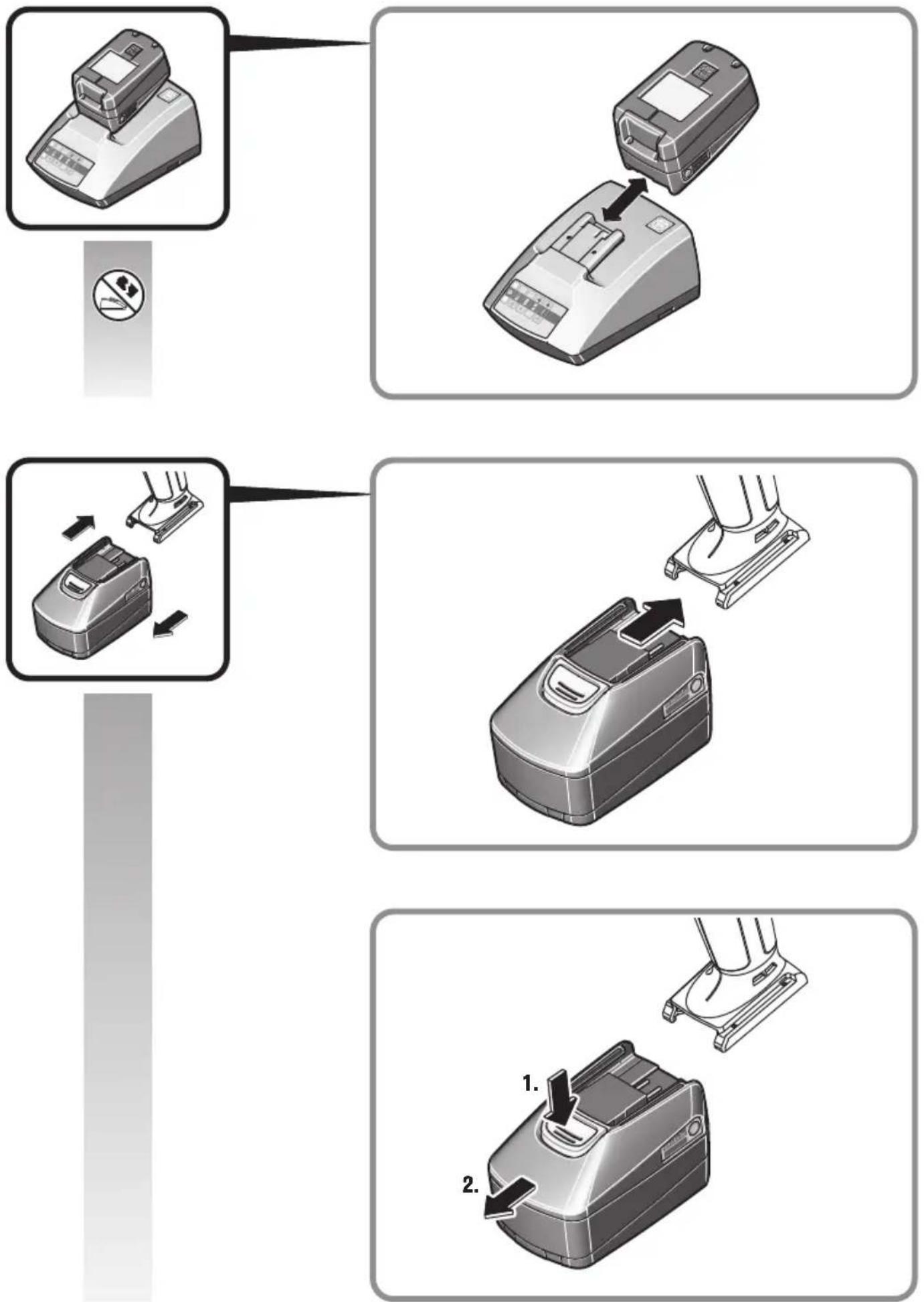
Mount the battery only when the power tool is switched off.
Remove the battery only when the power tool is switched off.
Keep the battery away from children.
Keep the battery clean and protect it against moisture and water. Clean contaminated battery terminals and power tool connections with a dry, clean cloth.
Use only intact original FEIN batteries that are intended for your power tool. When working with and charging incorrect, damaged, repaired or reconditioned batteries, imitations or other brands, there is danger of fire and/or explosion.
Follow the safety warnings in the operating instructions of the battery charger.
Hand/arm vibrations
The vibration emission level given in this information sheet has been measured in accordance with a standardised test given in EN 62841 and may be used to compare one tool with another. It may be used for a preliminary assessment of exposure.
The declared vibration emission level represents the main applications of the tool. However, if the tool is used for different applications, with different accessories or poorly maintained, the vibration emission may differ. This may significantly increase the exposure level over the total working period.
An estimation of the level of exposure to vibration should also take into account the times when the tool is switched off or when it is running but not actually doing the job. This may significantly reduce the exposure level over the total working period.
Identify additional safety measures to protect the operator from the effects of vibration such as: maintain the tool and the accessories, keep the hands warm, organisation of work patterns.
Operating Instructions.
The power tool is not preset by the manufacturer for the intended application case.
Before putting the power tool into operation for the first time, the torque of the mechanical shut-off clutch must be set to the desired value within the permissible test range and checked using a suitable dynamic measuring system.
In the factory setting, the configuration of the machine parameters corresponds to the homologation state (machine-specific homologations can be found on the FEIN website).
Through individual configuration of the machine parametrisation using FEIN ParameterControl software, the operating behavior of the machine can change.
The power tool has a “MultiVolt” battery interface, which allows for operation with different battery types. Depending on the type of battery used, the operating behaviour of the machine can change.
Before starting operation, compliance with the required process parameters must always be checked individually for the respective application under consideration of real operating conditions.
Regular control of the operating behaviour as well as compliance with the required process parameters shall be carried out to an appropriate extent.
The power tool is equipped with a soft-starting feature. If the motor switches off after a proper screwdriving operation, restarting is not possible until after 0.8 seconds. This prevents accidental retightening of already tightened screws.
In left-hand running mode, the power tool switches off with significantly increased torque.
During operation, pay attention to optical and acoustic signals of the power tool as described in the section "Meaning of the LED indicators and the beeps of the power tool".
Handling the battery.
Store, operate and charge the battery only using FEIN battery chargers within the battery operating-temperature range between 5°C – 45 °C
(41 °F – 113 °F). At the beginning of the charging procedure, the battery temperature must be within the battery operating-temperature range.
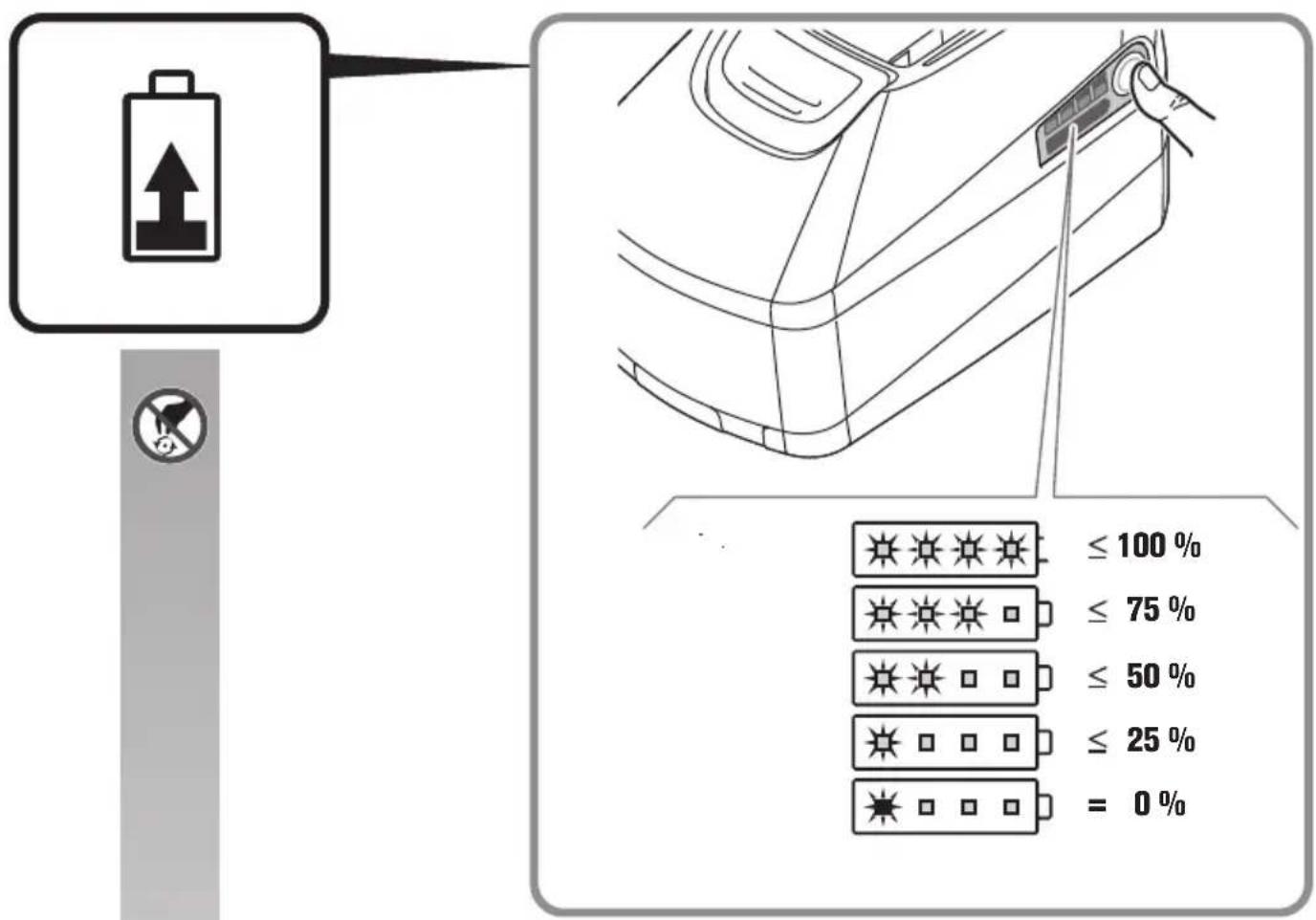
| LED indicator | Meaning Activity | |
| 1 – 4 green LED | Percentage of charge condition | Operation |
| Continuous red light | Battery is almost empty | Charge battery |
| Red flashing light | Battery is not ready for operation | Bring the battery into the battery operating-temperature range, then charge |
The real percentage of the battery charge condition is only indicated when the power tool motor is stopped. The electronics automatically switch off the motor prior to the battery being deep discharged.
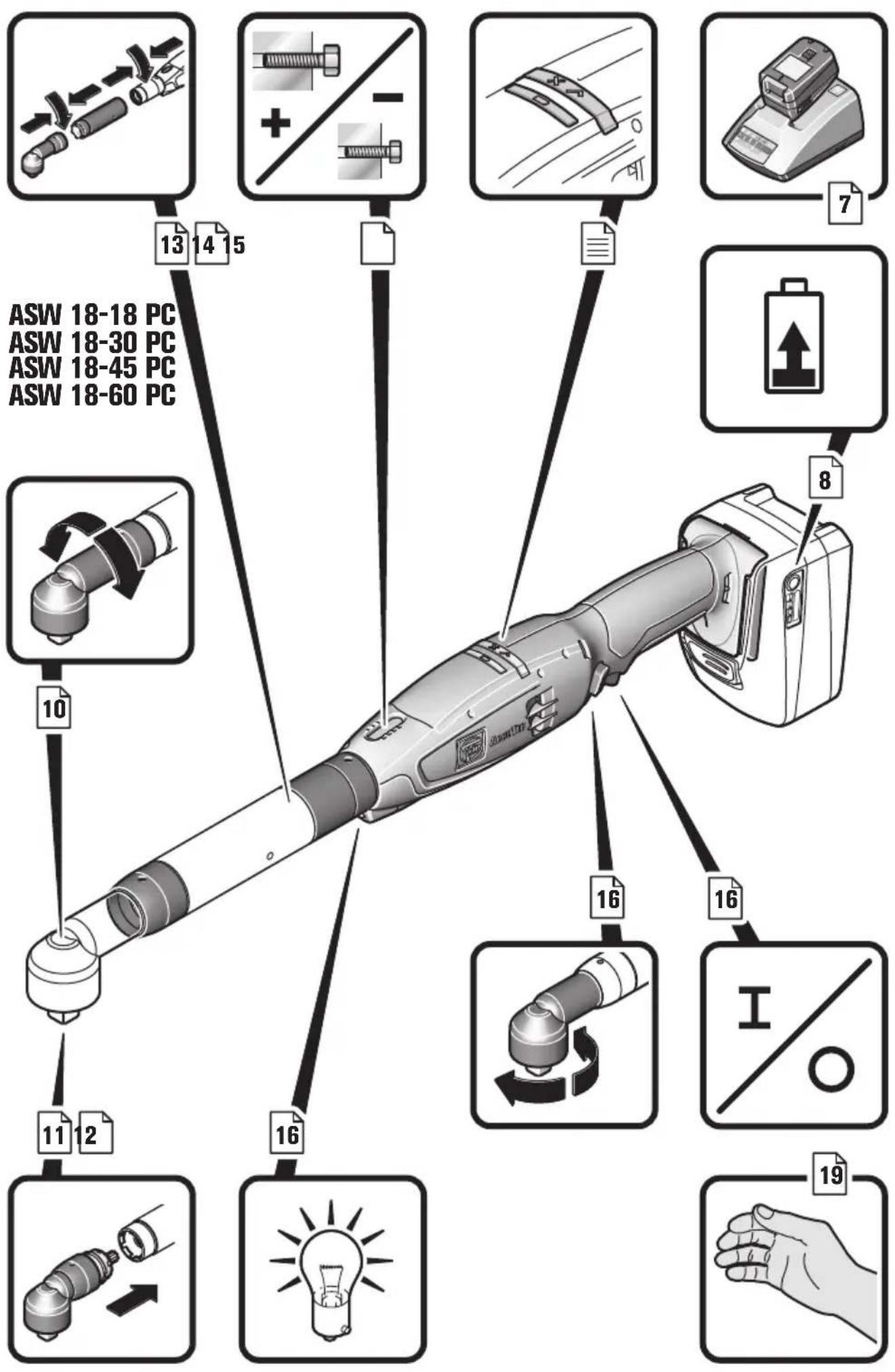
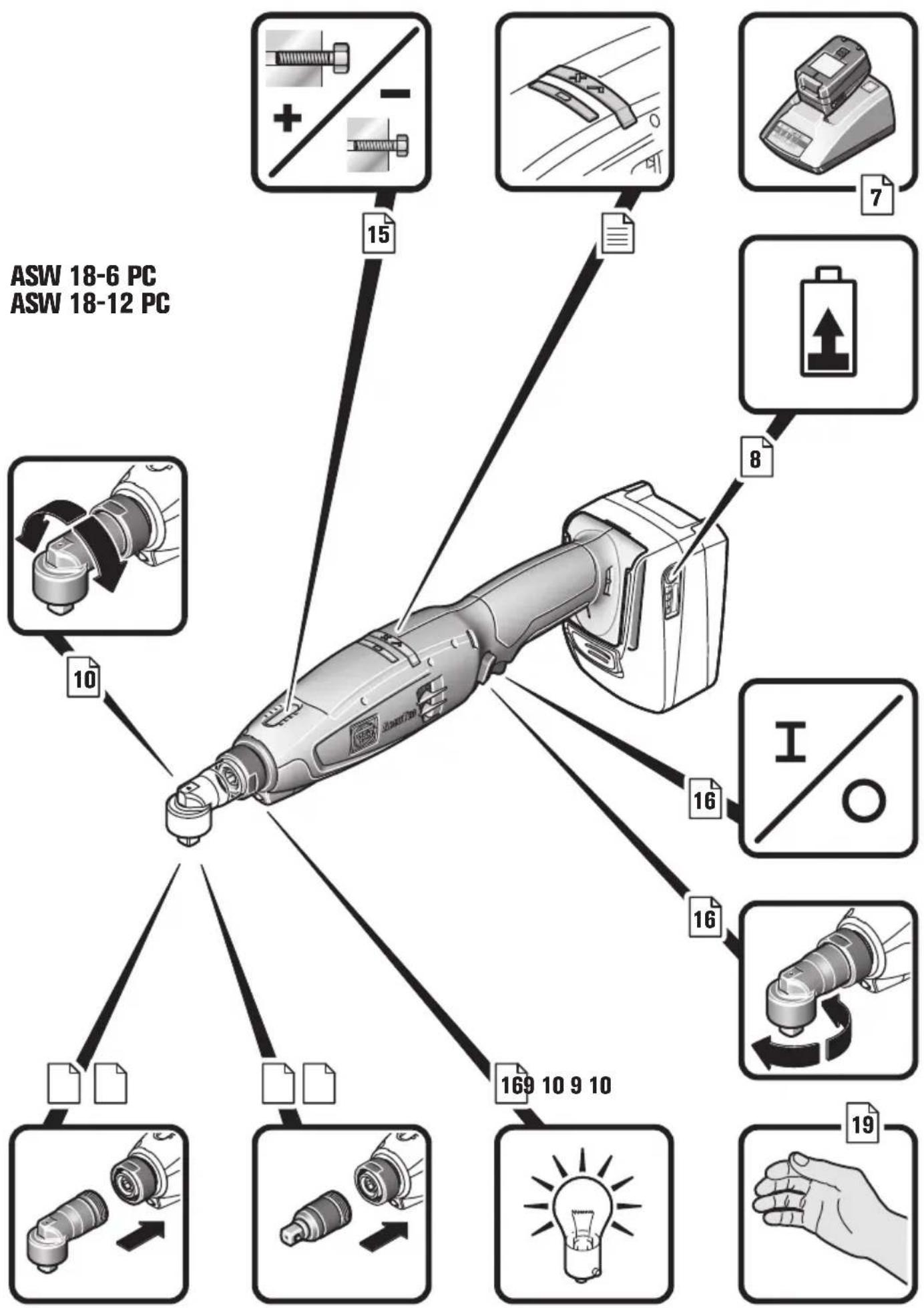
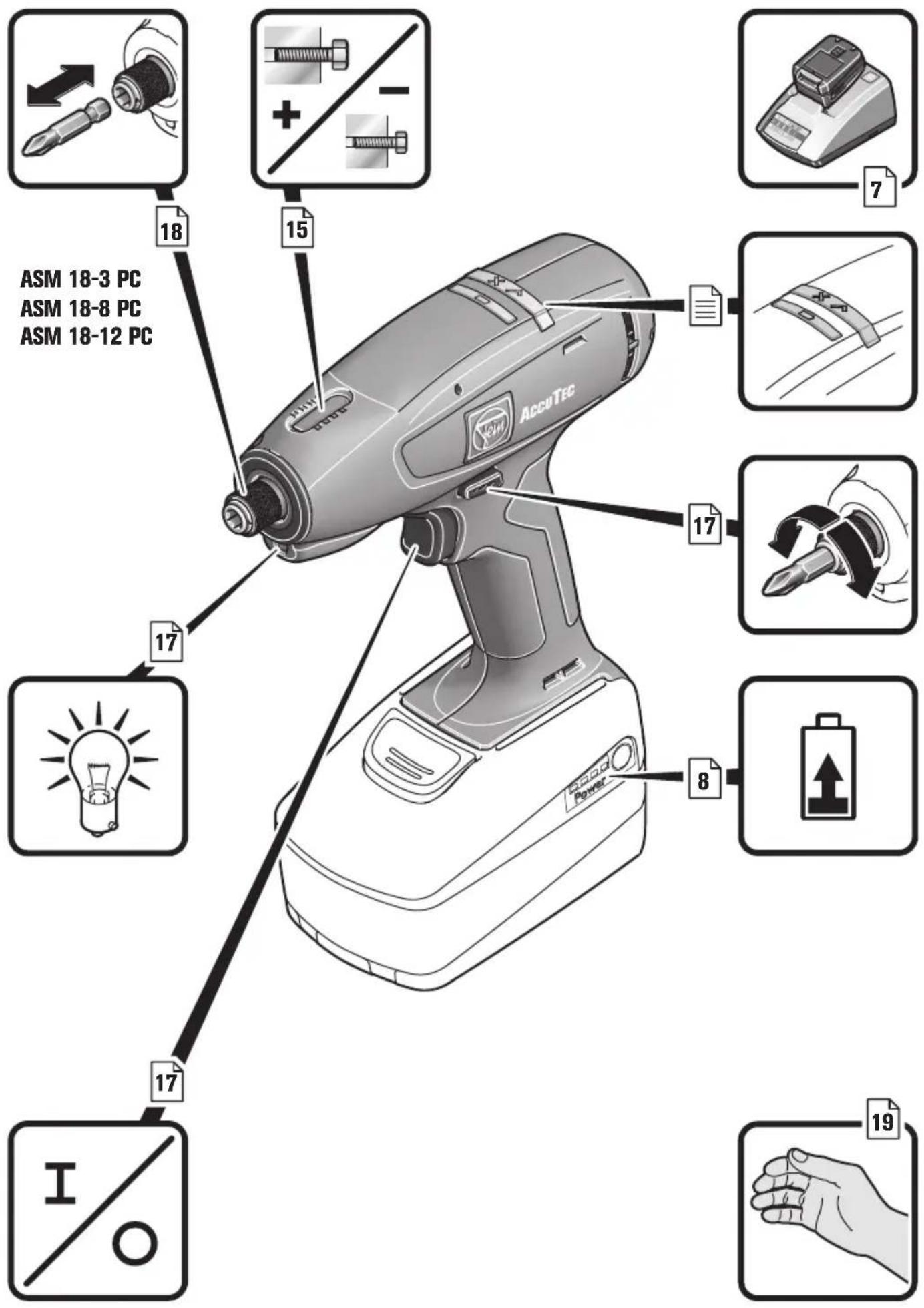
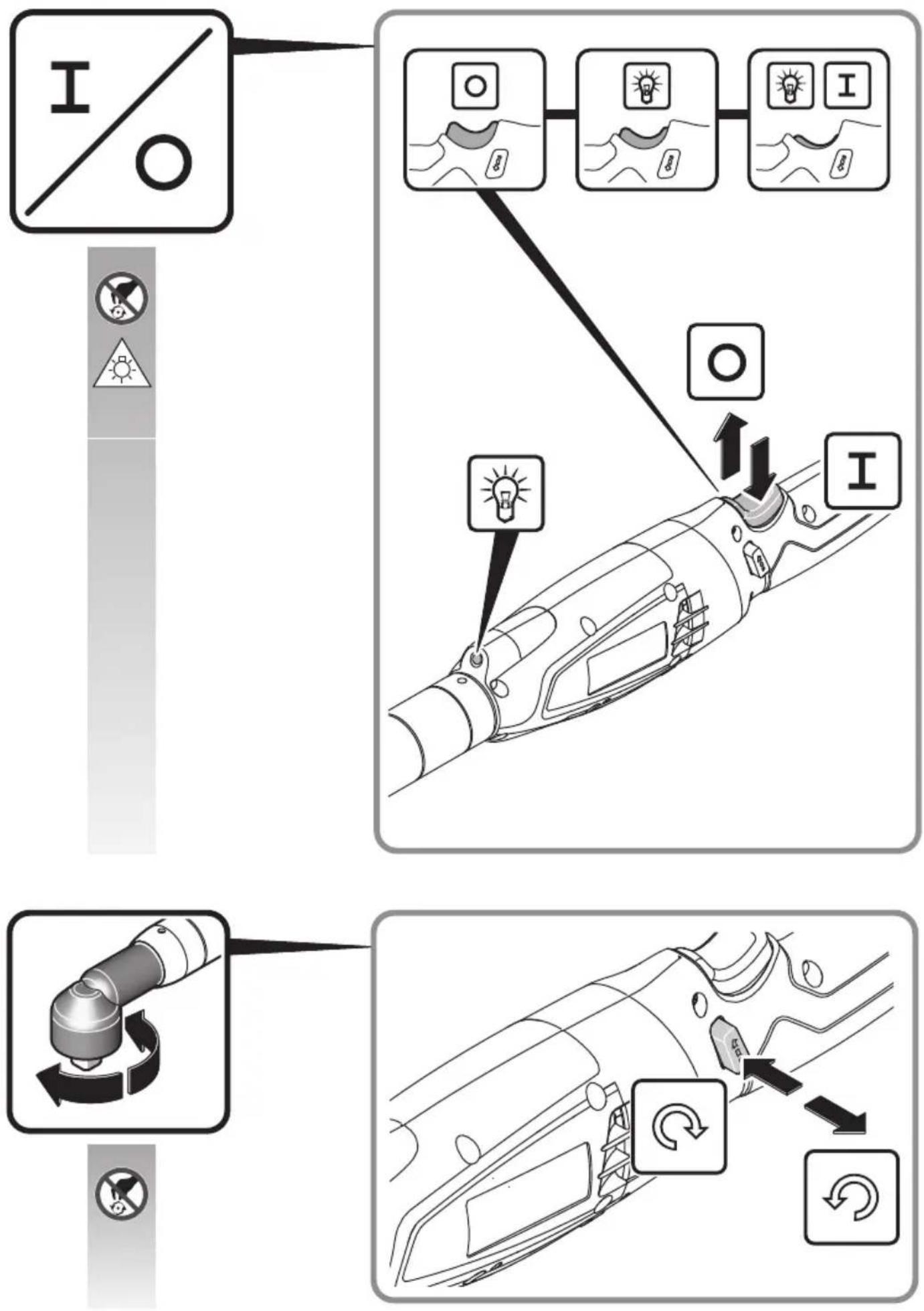
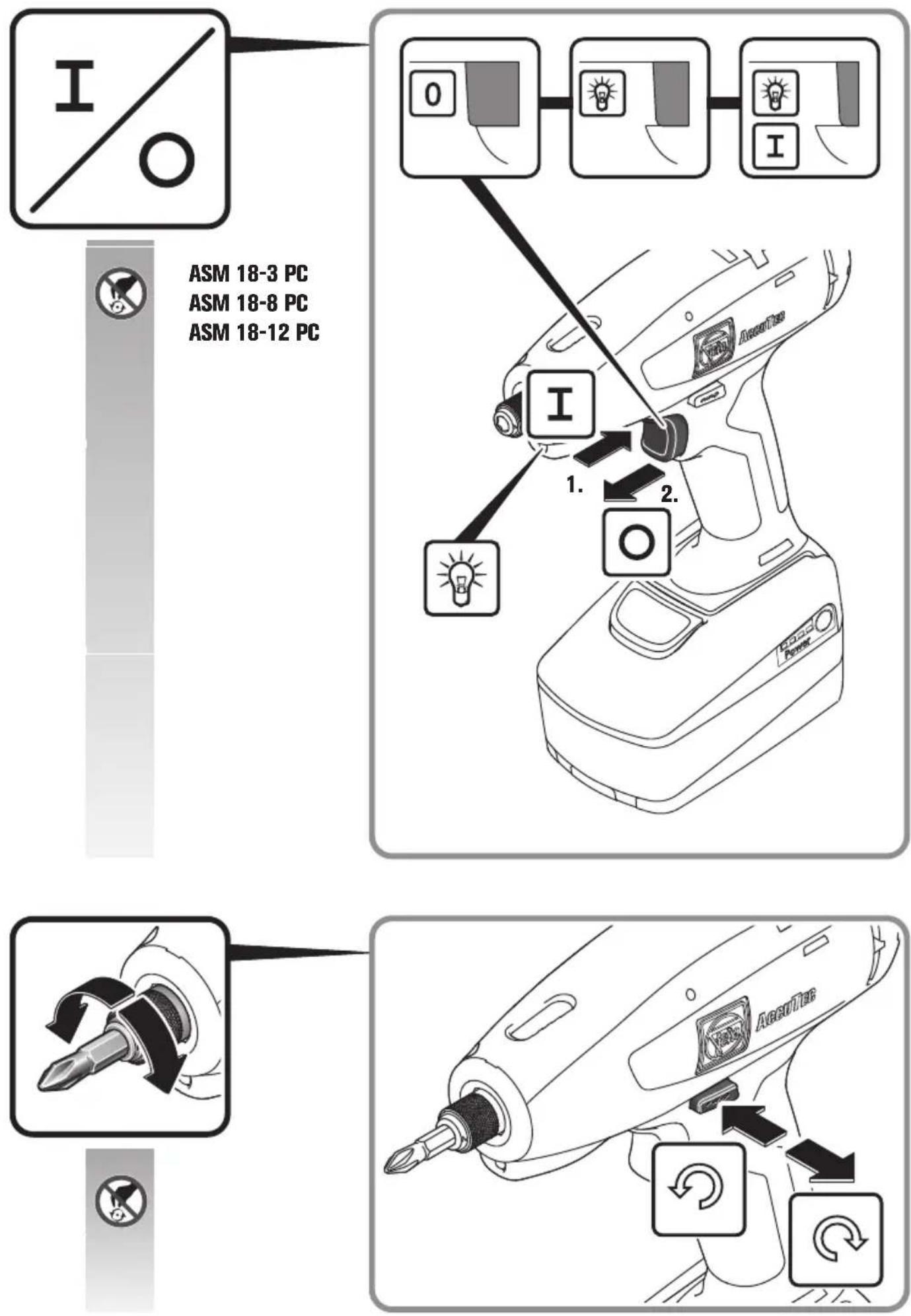
Selecting the Rotation Direction (see page 16/17).
Adjust the rotation selector switch only when the machine is at a complete stop.
To avoid accidental starting, e. g., during transport, set the rotation selector switch to the centre position.
Use of straight output (ASW18-6/12-PC)
Before using the power tool, make sure that the maximum torque of 8 Nm is not exceeded.
Shut-off procedure of the machine
The power tool switches off approx. 30 min after the last switch actuation, meaning, the power tool can only be reactivated again by switching on.
Meaning of the LED indicators and the beeps of the power tool.
The following conditions apply as factory-set. Further indication options are possible via Parameter Control (see PC software).
| LED indicator Meaning Explanation | ||
| √X | Green LED indicator lights up (for 1 second). | The screwdriving operation has been carried out properly. The preset switch-off criteria (e. g. the torque) has been reached. |
| √X | The red LED indicator lights up (for 1 sec-ond) and a short beep sounds. | The screwdriving operation has not been carried out properly. The required switch-off criteria (e. g. the torque) has not been reached. Alternatively, a pre-set error criterion (e. g. too large rotation angle) has been reached. |
| Yellow LED indicator lights up continuously. | The remaining battery capacity is less than 25 %. The battery must be replaced of the battery in the near future. | |
| √X | The red LED indicator flashes (1 time per second) and the yellow LED indicator lights up continuously. | The battery is discharged and must be replaced. |
| √X | Red LED indicator lights up permanently. The | machine has an irreversible error. The machine must be repaired by the after-sales serv-ice. |
| √X | Red and yellow LED indicators light up per-manently. | - Battery error/defect. Please contact the after-sales service.- The power tool cannot be operated with the battery type being used. |
| √X | Red LED indicator flashes (1 time per sec-ond). | - The machine has an irreversible error, such as blockage of the motor. The machine is blocked in order to protect interior components. Remove the battery and then insert it again. Ensure correct operation for the next screw-driving application.- The predefined service interval has been reached (LED indicator flashes 3 times after each screwdriving operation). |
 | Red LED indicator flashes (2 times per second). | The machine is overheated, the over-temperature protection has responded. After cooling down, the machine is ready for operation again. If the over-temperature protection responds several times briefly after each other, have the power tool checked by the after-sales service. |
  | Red LED indicator flashes (1 times per second).Yellow LED indicator flashes (1 time per second). | The battery type is not suitable for this screw-driving application.Recommendation: For soft screwdriving applications at high torque, use a battery with higher capacity. |
 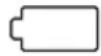 | Brief flashing of all LED indicators. The cordless screwdriver switches to the Energy Saving Mode. | |
Parameter assignment
Differing to the existing standard programs, the AccuTec screwdrivers can be freely programmed in some ranges. To realise these special solutions, an additional PC program is required for assignment of the parameters. Afterwards, the data can be transferred to the screwdriver with the programming adapter. The current software can be downloaded from FEIN via the Internet under www.fein.com. It can be found in the country-specific AccuTec sector. A link to this section is provided on the included USB card of the separately available programming adapter.
We recommend that you keep the firmware on your AccuTec screwdrivers up-to-date.
Repair and customer service.


When working metal under extreme operating conditions, it is possible for conductive dust to settle in the interior of the power
tool. Blow out the interior of the power tool via the ventilation slots frequently with dry and oil-free compressed air.
Regularly check the condition of the power tool and arrange for necessary maintenance or repair work in good time.
The service life of the machine, battery and accessories (e.g. angle head and application tool) depends on the load and application of the machine.
Products that have come into contact with asbestos may not be sent in for repair. Dispose of products contaminated with asbestos according to the applicable country-specific regulations for such disposal.
The current spares parts list for this power tool can be found on our website at www.fein.com.
Use only original spare parts.
If required, you can change the following parts yourself:
Application tools, battery pack, accessories
Warranty and liability.
The warranty for the product is valid in accordance with the legal regulations in the country where it is marketed. In addition, FEIN also provides a guarantee in accordance with the FEIN manufacturer's warranty declaration.
The delivery scope of your power tool may include only a part of the accessories described or shown in this Instruction Manual.
Declaration of conformity.
This CE declaration is only valid for European Union and EFTA (European Free Trade Association) countries and only for products intended for the EU- or EFTA market. After placing the product on the EU market the UKCA mark loses its mark validity.
The UKCA declaration is only valid for the Great Britain market (England, Wales and Scotland) and only for products intended for the Great Britain market.
After placing the product on the Great Britain market the CE mark loses its mark validity.
FEIN declares itself solely responsible for this product conforming with the relevant provisions given on the last page of this Instruction Manual.
Technical documents at: C. & E. Fein GmbH, D-73529 Schwäbisch Gmünd
Environmental protection, disposal.
Packaging, worn out power tools and accessories should be sorted for environmental-friendly recycling. Dispose of batteries only when discharged.
For batteries that are not completely discharged, insulate the terminals with tape as a protective measure against short-circuiting.
This CE declaration is only valid for European Union and EFTA (European Free Trade Association) countries and only for products intended for the EU or EFTA market. After placing the product on the EU market the UKCA mark loses its mark validity.

EN 62841-1:2015 + AC:2015
EN 62841-2-2:2014 + AC:2015
EN 55014-1:2017 + A11:2020
EN 55014-2:2015
EN 55014-2:1997 + A1:2001 + A2:2008 + AC:1997
2006/42/EG, 2014/30/EU, 2011/65/EU
U. Hergosell
i. V. S. Böhm i. V. Dr. M. Hergesell Director of Quality Director of Product Management Development
The UKCA declaration is only valid for the Great Britain market (England, Wales and Scotland) and only for products intended for the Great Britain market. After placing the product on the Great Britain market the CE mark loses its mark validity.

EN 62841-1:2015 + AC:2015
EN 62841-2-2:2014 + AC:2015
EN 55014-1:2017 + A11:2020
EN 55014-2:2015
EN 55014-2:1997 + A1:2001 + A2:2008 + AC:1997
Supply of Machinery Regulations 2008,
EMC Regulations 2016, The Restriction of the Use of Certain Hazardous Substances in Electrical and Electronic Equipment Regulations 2012
U. Hergosell
i. V. S. Böhm i. V. Dr. M. Hergesell Director of Quality Director of Product Management Development


- Symbols, abbreviations and terms used.
- For your safety.
- WARNING
- Intended use of the power tool:
- Special safety instructions.
- Never look or stare into the light of the power tool's lamp from a short distance. Never point the light of the lamp into the eyes of other persons in close vicinity.
- Use and handling of the battery (battery pack).
- Hand/arm vibrations
- Operating Instructions.
- Handling the battery.
- Selecting the Rotation Direction (see page 16/17).
- Use of straight output (ASW18-6/12-PC)
- Shut-off procedure of the machine
- Meaning of the LED indicators and the beeps of the power tool.
- Parameter assignment
- Repair and customer service.
- Warranty and liability.
- Declaration of conformity.
- Environmental protection, disposal.
Brand : Fein
Model : ASW 1845 PC
Category : Screwdriver