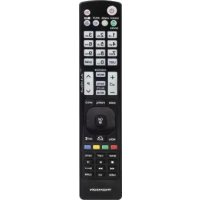
ROC 250 - Remote control THOMSON - Free user manual and instructions
Find the device manual for free ROC 250 THOMSON in PDF.



| Product Type | Universal remote control |
| Brand | THOMSON |
| Model | ROC 250 |
| Compatibility | TVs, VCRs, laser disc players, satellite and cable receivers controlled by infrared |
| Power supply | 2 AAA batteries (not included) |
| Infrared range | Approximately 8 to 10 meters |
| Dimensions (approx.) | 200 x 50 x 25 mm |
| Weight (approx.) | 100 g (with batteries) |
| Navigation keys | Up, down, left, right and OK |
| Numeric keys | 0 to 9 |
| Color keys | For teletext or specific functions |
| Special functions | ShowView / Videoplus+, all modes OFF, volume control in satellite/cable mode |
| Navigation system | THOMSON NAVILIGHT |
| Programming methods | A (sub-code), B (3-digit code), C (code search), D (automatic search), E (COMBO) |
| Indicator light | Red, lights up when a key is pressed |
| Maintenance and cleaning | Clean with a soft, dry cloth. Do not use abrasive products. |
| Battery safety | Only use batteries of the specified type. Observe polarity. Do not mix new and used batteries. Remove batteries if not used for an extended period. Do not dispose of in fire. |
| Spare parts and repairability | Not available separately. In case of malfunction, replace the device. |
Frequently Asked Questions - ROC 250 THOMSON
User questions about ROC 250 THOMSON
0 question about this device. Answer the ones you know or ask your own.
Ask a new question about this device
Download the instructions for your Remote control in PDF format for free! Find your manual ROC 250 - THOMSON and take your electronic device back in hand. On this page are published all the documents necessary for the use of your device. ROC 250 by THOMSON.
USER MANUAL ROC 250 THOMSON
ENGLISH - Do not mix different types of batteries or new and old batteries. Do not use rechargeable batteries. In order to avoid any risk of explosion, observe polarities indicated inside the battery compartment. Replace only with the type of batteries specified above. Do not throw them into fire, do not recharge them. If you are not using the remote control for a long period of time, remove the batteries. Please respect the environment and prevailing regulations. Before you dispose of batteries or accumulators, ask your dealer whether they are subject to special recycling and if they will accept them for disposal.
This Universal Remote Control is compatible with most models of infrared-controlled TV sets, video recorders, LVD players, satellite and cable TV receivers.
This remote control was programmed in the factory, so that you can use it to control most of the sets of the THOMSON group's make. For this reason, we recommend that prior to attempting to programme the remote control, you try it out by means of one of the methods described in this user manual. However, first of all, you must install 2 batteries (AAA, not supplied) in the remote control.
Please keep this guide along with the code list (provided separately), so that you can subsequently programme your remote control for use with other sets.
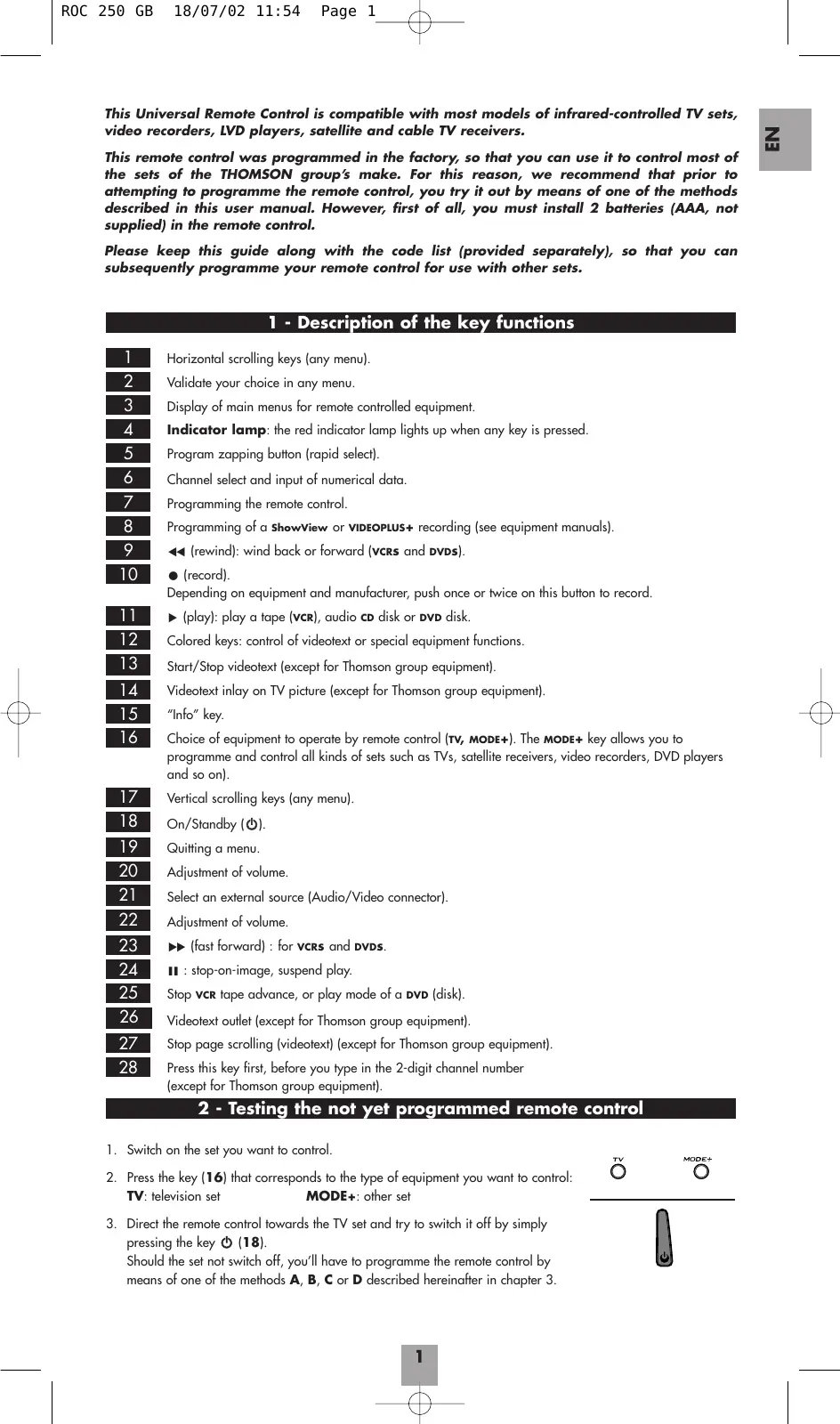
1 - Description of the key functions
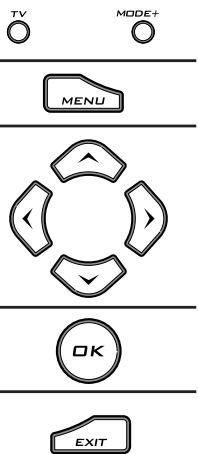
Horizontal scrolling keys (any menu).
2 Validate your choice in any menu.
3 Display of main menus for remote controlled equipment.
Indicator lamp: the red indicator lamp lights up when any key is pressed.
5 Program zapping button (rapid select).
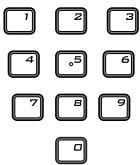
6 Channel select and input of numerical data.
7 Programming the remote control.
8 Programming of a ShowView or VIDEOPLUS+ recording (see equipment manuals).
9 (rewind): wind back or forward (VCRs and DVDs).
10 (record).
Depending on equipment and manufacturer, push once or twice on this button to record.
[1] (play): play a tape (VCR), audio CD disk or DVD disk.
12 Colored keys: control of videotext or special equipment functions.
13 Start/Stop videotext (except for Thomson group equipment).
14 Videotext inlay on TV picture (except for Thomson group equipment).
15 "Info" key.
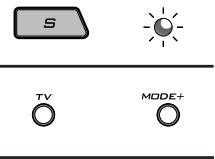
16 Choice of equipment to operate by remote control (TV, MODE+). The MODE+ key allows you to programme and control all kinds of sets such as TVs, satellite receivers, video recorders, DVD players and so on).
17 Vertical scrolling keys (any menu).
18 On/Standby (O).
19 Quitting a menu.
20 Adjustment of volume.
21 Select an external source (Audio/Video connector).
22 Adjustment of volume.
23 (fast forward): for VCRS and DVDs.
24 1:stop-on-image,suspend play.
25 Stop vCR tape advance, or play mode of a DVD (disk).
26 Videotext outlet (except for Thomson group equipment).
27 Stop page scrolling (videotext) (except for Thomson group equipment).
28 Press this key first, before you type in the 2-digit channel number (except for Thomson group equipment).
2 - Testing the not yet programmed remote control
- Switch on the set you want to control.
- Press the key (16) that corresponds to the type of equipment you want to control:
TV: television set MODE+: other set
- Direct the remote control towards the TV set and try to switch it off by simply pressing the key (18).
Should the set not switch off, you'll have to programme the remote control by means of one of the methods A, B, C or D described hereinafter in chapter 3.


3 - Programming the remote control
Method A - Fast programming with 1-digit subcode
Before you start programming, you must find the subcode of the set to be controlled (Television, VCR, satellite receiver, cable receiver or DVD player).
Refer to the list provided with these instructions, page 1 of the subcodes.
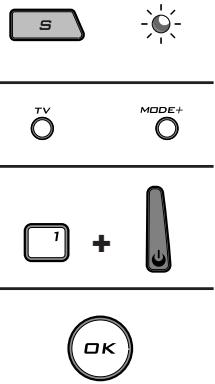
- Switch on the set you want to control.
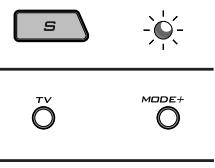
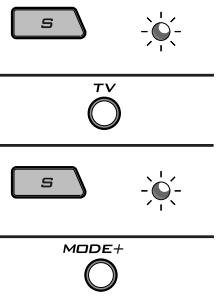
- Hold down the key S (7) until the red indicator lamp (4) remains lit (the indicator light remains on for a few seconds to give you the time to proceed with the following steps. The indicator lamp flashes to signal that this time is almost up, and then goes off).
- Press the key (16) that corresponds to the type of equipment you want to control: TV: television set, MODE+: other set
- While the indicator is lit, type in the subcode (example: 1 for THOMSON).
- Direct the remote control towards the set and try to switch it off by pressing the key (18).
- If the set you want to control switches off, press OK (2) to memorise the subcode.
- Should the set not switch off, press key (18) repeatedly, until the set switches off. Between two subsequent key depressions, give the red indicator lamp (4) enough time to extinguish and light up again (about 1 second). Proceeding this way will enable you to see whether the set responds or not.
- Immediately upon the switching-off of the set to be controlled, press OK (2) to store the subcode.
Note:
When programming the MODE+ key, begin by entering a code corresponding to the set you want to programme (a 3-digit code that you will find in the code booklet, see method B). Then begin the automatic search (method D).
Example: if you want to control a satellite receiver with the MODE+ key, begin by entering a satellite code (any satellite code that you find in the code list, for example: 603 for a Thomson satellite receiver) then begin the automatic search procedure. The remote control will then test all the satellite codes for the selected make.
Check of the programming:
In principle, your set is ready for receiving the remote control commands.
Check your remote control for proper functioning by performing the test described on page 4.
Method B - 3-digit codes programming
Before you start programming, you must find the code of the set to be controlled (Television, VCR, satellite receiver, cable receiver or DVD player).
Refer to the list provided with these instructions, page II of the codes.
- Switch on the set you want to control.
- Hold down the key S (7) until the red indicator lamp (4) remains lit (the indicator light remains on for a few seconds to give you the time to proceed with the following steps. The indicator lamp flashes to signal that this time is almost up, and then goes off).
- Press the key (16) that corresponds to the type of equipment you want to control: TV: television set, MODE+: other set
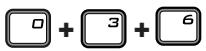
- While the indicator is lit, enter the first digit of the 3-digit code proposed for the set to be controlled (example: 036 for Thomson). The red indicator then goes off or flashes, if the code is not on the list.
- Direct the remote control towards the set and try to switch it off by pressing the key (18).
- Should the set not switch off, repeat step 2. Then type in the next 3-digit code. Try to switch off the set by pressing key 0 (18) once. Repeat this procedure by trying out each of the 3-digit codes.

Check of the programming:
In principle, your set is ready for receiving the remote control commands.
Check your remote control for proper functioning by performing the test described on page 4.

Method C - Programming by means of code retrieval
Should none of the codes work, you still have the possibility of retrieving the appropriate code without having to perform any input.
- Switch on the set you want to control.
- Hold down the key S (7) until the red indicator lamp (4) remains lit (the indicator light remains on for a few seconds to give you the time to proceed with the following steps. The indicator lamp flashes to signal that this time is almost up, and then goes off).
- Press the key (16) that corresponds to the type of equipment you want to control: TV: television set, MODE+: other set
- Direct the remote control towards the set and try to switch it off by pressing the key (18).
- If the set you want to control switches off, press OK (2) to memorise the subcode.
- Should the set not switch off, press key (18) as many times as required (up to 200 times), until the set switches off. Between two subsequent key depressions, give the red indicator lamp (4) enough time to extinguish and light up again (about 1 second). Proceeding this way will enable you to see whether the set responds or not.
- Immediately upon the switching-off of the set to be controlled, press OK (2) to store the code.
Note:
When programming the MODE+ key, begin by entering a code corresponding to the set you want to programme (a 3-digit code that you will find in the code booklet, see method B). Then begin the automatic search (method D).
Example: if you want to control a satellite receiver with the MODE+ key, begin by entering a satellite code (any satellite code that you find in the code list, for example: 603 for a Thomson satellite receiver) then begin the automatic search procedure. The remote control will then test all the satellite codes for the selected make.
Check of the programming:
In principle, your set is ready for receiving the remote control commands.
Check your remote control for proper functioning by performing the test described on page 4.
Method D - Automatic code search
With this method, the remote control scrolls through the full code list by sending an IR signal to the set to be controlled remotely. Proceed as follows:
- Check that your equipment is on. If not, switch it on manually.
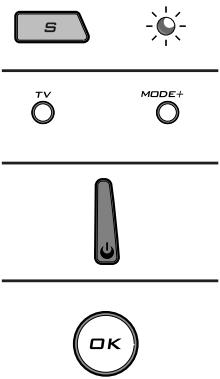
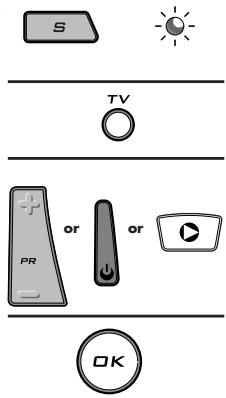
- Hold down the key S(7) until the red indicator lamp (4) remains lit (the indicator light remains on for a few seconds to give you the time to proceed with the following steps. The indicator lamp flashes to signal that this time is almost up, and then goes off).
- Release the S key.
- Press the key corresponding to the type of equipment (for example TV).
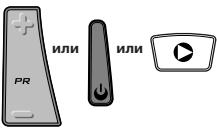
- Press the PR + or standby (18) or PLAY (▶-VCR only) key. After a few seconds, the remote control begins to scroll through the whole code list included in the library (at a rate of roughly 1 code per second).
Press the PR + key once again to slow down the test speed (1 code every 3 seconds). As soon as the set changes channels, you must press OK (2) to save the code and stop the remote control scrolling through the list. If you do not react quickly enough, you can go back to the previous code by pressing PR - (5) or REW (▲) as many times as necessary (you can go forward by pressing ♂ (18), PR + (5) or PLAY (▶) if you have gone back too far). As soon as the set responds again, press OK (2) to save the code.
Note:
When programming the MODE+ key, begin by entering a code corresponding to the set you want to programme (a 3-digit code that you will find in the code booklet, see method B). Then begin the automatic search (method D).
Example: if you want to control a satellite receiver with the MODE+ key, begin by entering a satellite code (any satellite code that you find in the code list, for example: 603 for a Thomson satellite receiver) then begin the automatic search procedure. The remote control will then test all the satellite codes for the selected make.

Method E - Programming for control of a COMBO (combined TV-VCR set)
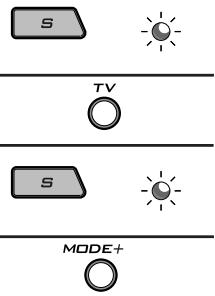
Setting up the remote control for control of a COMBO means that you first programme the television and then the video recorder subset, the combination of which makes up the COMBO set.
Before you start programming, you must find the subcode or code of the subset to be controlled (television or video recorder).
Refer to the list supplied with this user manual (see page subcodes or codes).
- Switch on the COMBO you want to control.
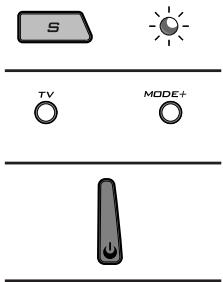
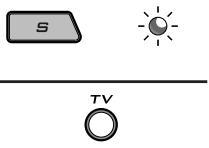
- Hold down the key S (7) until the red indicator lamp (4) remains lit (the indicator light remains on for a few seconds to give you the time to proceed with the following steps. The indicator lamp flashes to signal that this time is almost up, and then goes off).
- Press the TV (16) key, then follow one of the programming methods (A, B, C or D) described earlier.
- Hold down the key S (7) until the red indicator lamp (4) remains lit (the indicator light remains on for a few seconds to give you the time to proceed with the following steps. The indicator lamp flashes to signal that this time is almost up, and then goes off).
- Press the MODE+ (16) key, then follow one of the programming methods (A, B, C or D) described earlier.
4 - How to retrieve a programmed code
It may be useful to retrieve the code programmed in the remote control.
- Hold down the key S (7) until the red indicator lamp (4) remains lit (the indicator light remains on for a few seconds to give you the time to proceed with the following steps. The indicator lamp flashes to signal that this time is almost up, and then goes off).
- Press the key (16) that corresponds to the type of equipment you want to control: TV: television set, MODE+: other set
- Press S (7) again briefly. The red indicator lamp flashes once.
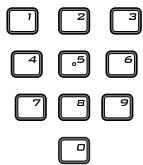
- Press the number keys (0 to 9) in ascending order until the red indicator lamp (4) flashes once.
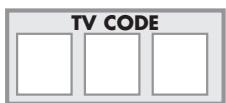
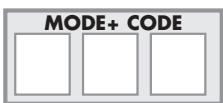
- The digit which made the red indicator lamp (4) flash, is the first number of the 3-digit code. Please note it down below.
- Repeat step 4 to find out the two other numbers of the code.
- When the third number is found, the red indicator lamp (4) goes off.
5 - Check of the programming
- For a television or a satellite receiver: switch on and, for example, press 2 to change channels.
- Video recorder: load a tape and then press PLAY (▶).
- DVD player: load a DVD and then press PLAY (▶).
Try other remote control keys to find out the range of functions you can control. If you think that not all of the keys are active, try the programming Method B or C.
When you have retrieved the code of your set, jot it down so that you can use it whenever needed.
After battery replacement, you'll have to programme the remote control again.
6 - Other function: All modes OFF
If the O (18) key is pressed twice within one second, and is held down for more than 2 seconds the second time, then the remote control will send the OFF code for all modes.

7 - Controlling volume in satellite and cable mode
Since some satellite and cable receivers have no volume control, the ROC 250 remote control allows you to control the television's volume in satellite or cable mode. For satellite systems with a volume control, it is possible to choose the set that the MUTE (22) and VOL (20) keys will control in each of these modes: the television volume or the volume of the satellite or cable receiver.
To choose, proceed as follows:
- Press the TV key (the remote control must be in TV mode for this procedure).
- Hold down the key S (7) until the red indicator lamp (4) remains lit (the indicator light remains on for a few seconds to give you the time to proceed with the following steps. The indicator lamp flashes to signal that this time is almost up, and then goes off).
- Release the S key.
- Press the MUTE (22) key for around 8 seconds. The indicator light will blink and then go off for about 8 seconds before blinking once more and then staying off.
- If the remote control previously controlled the television volume in SAT (MODE+) mode, it will now control the volume of the satellite receiver; if it previously controlled the volume of the satellite receiver, it will now control the television volume.


8 - The NAVILIGHT system
The THOMSON NAVILIGHT system allows you easy access to the settings of your television (TV) or video recorder (VCR) including this feature.
- Switch on the set you want to control.
- Press the key corresponding to the type of set you want to use (TV or MODE+). In the MODE+ position, make sure that the AV mode is activated for the TV set (the SCART socket must be selected).
- Press key MENU (3) once.
- Navigate through the setting menus with the keys up, down, left, right (1 and 17).
- Validate with OK (2).
- To leave the menus, press key EXIT (19) once.

THOMSON HELPLINE
You can contact THOMSON by dialling: 0845 601 3093
(For Great-Britain, all calls will be charged at local rate)
www.thomson-europe.com
EcnHn OoHn H3 KOOB He cyHKuOHpye, CyueCTByeT BO3MOxHocTh HaHTN KOD, I36erar erO haBOp Ha npIbTe.
- BkIIOHTe npedHa3NaeHHb ynpaBHeHIO annapaT.
- Пдержьаite В нахатом сotingун Кноку S (7)do tex nop, noka Kapch布局ураэтей (4)CBETTCT, (индкатор 6dET ropeb HeckolboKo ckyHД, ДягTOYTOБыдТВамВремпешиКсLEdYuOSeMy 3aTny.CBETOBU ykaэтейЗamIRAeT, O6OЗHAчЯОКOHuaHHe OTBeDEHORO BAM BpeMeHn, 3aTeM nOrachet).
- HaxMMTE KhoNky (16) COOTBETCTBYUOyU TIny ynpaBnE moTo np60pa: TV: TeLeBn3Op MODE+:dpyrne np60pbI
- HanpaBte npIbI ynpaBHeHn B CToPOHy annapata n nonbItaTecb BbIKIOHTb erO, HaxkAB OmIH pa3 Ha KHOJIky (18).
- EcniynpnaBnemblnpbOpOTKJIouaetcna,HaXMnTe OK(2)IpycoxpaHeHnnoKDokaB namrtn.
- Ecnn annapat He noraueH, haximmaTe 3aHOBO HA KhoNky (18) cToIbko pa3, ckOBKO noHaO6Bntcra (do 200 pa3), noka annapat He norachet. MeJy dYbmy Haxatmni NIOOXnTe. noka kpaChbI yKa3aTeIb (4) He norachet, a 3aTEM 3aOrpITc (okono 1 ceK.). 3TO nO3BONIT Bam yOCTOBepITc B peakun annapata.
- KaK TOnbKO npEHa3HaeHbI ynpaBHeHIO annapat noraueH, haxMnte Ha KhoNkO K (2)ДЯЗаHeCHeN B NaMaTb KoJa.
PnmuMeuHaHHe:
Ipeed hauanom nporpaMMNPOBaHnK HONKn MODE+CneJeT Chaana BBecTN KOD, COOTBETCTByoUnn Tnny Pnp6oRa, KOtOpBbl XOTHTe 3aONpOraPOMBaTb (3x-3HaHbYkOD, yka3aHHb B b6poWIOpe C KoJAMM, MeTOD B). Daane, 3aYcNTe NOnC B ABOTMaTHueCKOM pexnme (MeTOD D).
Ppimep: ecn BbXOTNeYnpaBnTb CnyTHNKOBbIM npneMHNKOM pni NOMOuN KHONK MODE+, CNEyET BBeCTn KOD CnyTHNa (JIOBOI KOd CNYTHNa, COePjAunCBy CnNCke KoOB, HApnPmEP, 603 - CnyTHNK Thomson), 3a TEM HeoBOxIDMO 3AnyCTnb NOCK B ABTOMATNUeCKOM pexnme. TaKIM o6pa3OM, PynbTynpaBHeNIN PpOBEPNT Bce KOD BcI CyTNHKO Bbl6paHHoM MapKn
PpOBepka nporpamMnpoBaHnA:
BaannapaT, B npnHnne, roTOB nIyueHnKOMMaHd nybTa ynpaBHeHn. IpoBepte dyHKuHOHPOBaHnE, BblONHHB TcT, yka3aHHbHa cTpaHnE 74.
MetoD D - ABTomatnueckn nonck kOda
B pamkax daHHoro MeToDa, npIbT npuPAJIeHnI npOCMaTPBAET noJIbHb cnICCK KOOB, noCbIaR IR cunHaN ha ynpAJIeMbI npIbOp. Daane, BInOJIHnTe CneJyUoUme DeIeCTBnI:
- Y6eIntecb TOM, UTO npi6op BKJIOueH. EcIn Het, BKJIIOHTe erO BpyHyIO.
- Пдержьаite В нахатом сotingун Кноку S (7) Do tex nop, по Красьи указаел (4) CBETTCT, (Индikatop 6dET ropetb HeckobkoceYHД, Дял.TOTUTOБыдтВамВремппeшТКСсLEДУОЧЕМЗэту. CBetobу Yka3aTeB 3amiraet, O6OЗнчаг OkOHuaHne OTBeDEHOROBamВpeMeHn,ЗatemorIgachet).
- OTnyctntb KhoNky S.
- Haxmte KhoNky, COOTBeTcTByIOuIyO HyxHOMy TnIy npin6opa (HaNPmep, TV).
- Odn haxmte KONK PR +,NONCK (18) nnn PLAY (ToIbKO dnn -VCR).Yepe3 Heckobko cekyHn PnBt HauHET npocmatPmbaT CnIOCK KOOB, xpanhuiXscn B naMnTn (1 K0D B cekyHny). NObTPOHe Haxatne KONKPR + CHN3NT cKOPoCTb NONcA (1 K0D KAKDbIe 3 cekHydK).KOrDa np6bOp nepeKlIOHaetc H a Dpyro KaHAn, CneJyET HEmeJIeHNO HaxaTb OK (2) Ira 3aNNC KoDA u OCTaHOBKn NOncA. EcInn Bam He ydaNoCB 6blcTpo CpeaHPOBaTb, Y Bac Ectb BO3MOxKHOCTb BepHyTcR K npedbUdEmyeKOy, Haxab Ha PR- (5) nnn REW (<4) CTOnkO paa CKoBko nOTpe6byTe (ecInn Bbl BepHylnCb CnIIuKOM DaJIeKO, Bbl MOKeTe npOdBHNbYbC bpePe, Haxab Ha KONKy (18), PR + (5) nnn PLAY (▶). KorDa np6bOp cHOba NepeKlIOHaetc Ha HyXhbl KaHAn, Haxmte OK (2) TTOb3aNNCaTb KOD B NaMnTb NpTa.
PnmuMeaHne:
Ipeed hauanom nporpaMMNPOBAHnK HonkM MODE+ cneJeT cchaIa BBeCTn KOD, COOTBETCTByuounn Tnny PnpbOpa, KOtOpb BBx OTHTE 3aPpOpaMMNPOBaTb (3x-3NaHbN KOyka3aHbN B6poUOpke C KOaAMM, MeTOB B). Danee, 3aYcTnCe nOncB A botOMATNUeCKOM pexnime (MeTOD). Ipnmep: ecnbl bXoTnE ynpabNtB cnyTHNKOBbIM npinemNHKUM npi NOMOUs KNOHKN MODE+, cneJeT BBeCTN KOD cnyTHNkA (JIObO KoC cNYTHNkA, CoepjKaunC Bcncke KoOnB, Hapnimep, 603 - cnyTHNK Thomson), 3a Tem HeoobXoDMO 3aNyctNTb nONcB A botOMATNUeCKOM pexnime. Taikm Obpa3Om, nyltbTynpaBNeHn PnoBepNT Bce KoDb CnyTHNKBbB6paHNo MapKn.


Metod E - Пограмmarpoване за уразьгени COMBO (komroent TV/VR)
IporpamnpoBaHne npbTa ynpaBHeHn dJa COMBO cBountc K erO nporpaMmPobAHHo Ondn pa3 dJe TeneBnOpa N dpyroJ pa3 - JnMaHHTOCKOna; 3tn Dea anapara coeDmeHb B COMBO.
Ipeep nauanom nporpaMMPOBaHnB BbInoNHTe NOCK noKoJa nn KoJa npedha3NaeeHHoro Bamu npaBHeHIO annapata (TebeBnOpa nn MaHHTOCKa).
ObpaaIeBc K npHnaeMOMy K daHNO IHCTpyKUn cNcCKY Ha cTpaHnIe NpKOdOBu Hn HA cTpaHnIe KOdOB.
- Nycntte B DeiectBne npedHa3HaeeHHBamynpapBneHIO COMBO.
2.Поджьиье ВнжатOM COCTOHN KHONKY S (7)do tex nop, noka Kapch布局уka3aTeNB (4)CBETNCR, (NHДИКATOP 6yIet ROPET HeCKOBKOCeKNH,ДггTORO YTObI DaTb Bam BpemЯ NepeHTN K CnEDyIOSeMу 3aTany. CBETOBOY yka3aTeNB 3aAMrAeT, O6O3HaJau OKOHuaHne OTBedeHHORO Bam BpemeHn, 3aTEM NorachET). - Haxmnte KhoNky TV (16), n BbINOHnTe npoRpaMMnpObaHncaGorlaCHO MeToDAM A, B, C nIIN D OnncAHbIM paHee.
- Пдоржьаве В нахатом сotingу S (7)do tex nop, noka kpa(chy yka3aTeB (4) cBeTnTc, (HnDnKATOp 6yDet ropeTb HeckOblkO cekyH,ДгТоRTO YTO6bI DaTb Bam Bpemr NepeHTN K CJIeDyUoMeMy 3aTany. CBetOBO yka3aTeB 3aAMiraet, O6O3Haay OOKHuaHne OTbeDeHHoro Bam BpemeH, 3aTeM Norachet).
- Haxmnte KhoNky MODE+ (16), n BbIOnHnTe npOrpamMPOBaHna corlaacHO metoJAM A, B, C nIi D OnilcaHHbIM paHee.
4 - KaK haTn 3aPpOrpaMMNPOBaHHbI KOd
Bam moxet nohaobntbca 3aHOBO HauTN KOJ, 3aPpOrpaMnpoBaHHb B npIbTe ynpablenia.
- Пдерхьайтевнаковсоctогин Кноку S (7)do tex nop, noka kpaань указаелы (4)CBETNTca, (Индатор Будет ratob Heckolko CekyHД, Дял тюгчобддь Bam Времп пошten K cneуioшу My 3anly. CBetobov ykaataelь заимагeT, oboЗнчая OkOHuaHne OTbeDeHHORO Bam BpeMeHn, 3aTeM norachet).
- Haxmnte KhoNky (16) COOTBeTCTBlyUOy TnIy ynpaBnE moTo npbOpa: TV: TeNeBn3Op MODE+: npyIe npbOpbl
- Haxmte 3aHOBO KpaTko Ha KhoNky S (7), KpacbI yka3aTeIb MInrae T oIN pa3.
- HaximaiTe Ha cnΦpObIe KhoIKN B BOCXoJaIe m npaKe (OT 0 do 9) Do Tex nop, noka KpaChbI yka3aTeIb (4) He MmHrTc Odn pa3.
- Lüφpa, cπρούπρονabwāa Mīrānhe Kpachoro yka3aTeIe (4), ybIaIeTc npBoi n3 Tpex Κμφ, coCTaBλIouxN BαI KoD, 3aπιIηte ee HIXe.
- Повторе заюпосka дугнх сфк кда.
- KaK toJbKO TpeTbY uHdHa, KpaHbY yKa3aTeB (4) norachET.