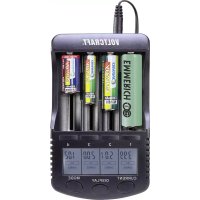
CC2 - Battery charger VOLTCRAFT - Free user manual and instructions
Find the device manual for free CC2 VOLTCRAFT in PDF.


| Product type | Battery charger |
| Brand | Voltcraft |
| Model | CC2 |
| Power supply | 12 V/DC via provided power adapter |
| Adjustable charging current | 300 mA, 500 mA, 700 mA, 1000 mA |
| Compatible battery types | NiCd/NiMH: AA, AAA, Sub-C, C (1.2 V); Li-Ion: 26650, 22650, 26500, 18650, 17670, 18490, 17500, 17335, 16340/123A, 14500, 10440 (3.7 V) |
| Number of slots | 4 |
| Operating modes | CHARGE (simple charge) and CHARGE TEST (charge, discharge, recharge) |
| USB output | 5 V/1 A for charging a smartphone |
| Display | Backlit LCD screen showing voltage, current, capacity, duration, internal resistance |
| Current setting | Individual per slot or global via buttons |
| Test function | Measurement of actual battery capacity |
| Safety | Protection against short circuits, overcharging, overheating; reverse polarity detection |
| Maintenance | Disconnect before cleaning; use a dry, lint-free cloth |
| Cleaning | Do not use abrasive materials, alcohol, or solvents |
| Safety instructions | Use only indoors; do not expose to moisture; do not cover during operation |
| Intended use | Charging of rechargeable NiCd/NiMH and Li-Ion batteries |
| Package contents | Charger, power adapter, instruction manual |
Frequently Asked Questions - CC2 VOLTCRAFT
User questions about CC2 VOLTCRAFT
0 question about this device. Answer the ones you know or ask your own.
Ask a new question about this device
Download the instructions for your Battery charger in PDF format for free! Find your manual CC2 - VOLTCRAFT and take your electronic device back in hand. On this page are published all the documents necessary for the use of your device. CC2 by VOLTCRAFT.
USER MANUAL CC2 VOLTCRAFT
www.business.conrad.at
a) General information. 22
b) Power adapter 24
c) Setup location. 24
d) Operation 25
- Notes on rechargeable batteries 27
- General information 28
- Product overview 29
- Operation 30
a) Operation 30
b) Available operating modes 30
c) Inserting the battery, selecting the operating mode, setting the charging current....31
d) Subsequently changing the operating mode or charging current for a single battery slot.31
e) Subsequently changing the operating mode or charging current for all battery slots.32
f) Switching display indicators 32
- USB output 32
- Care and cleaning 33
- Disposal 33
a) Product 33
b) Rechargeable batteries 33
- Troubleshooting 34
- Technical data 35
a) General information. 35
b) Charger 35
c) Power adapter 35
1. Introduction
Dear customer,
Thank you for purchasing this Voltcraft® product.
Voltcraft® produces premium, innovative measuring, charging and network devices that offer outstanding performance.
From the ambitious electronics enthusiast to the professional user, Voltcraft® products provide the optimal solution for the most demanding tasks. And, in particular, we offer sophisticated technology and reliable quality in our Voltcraft® products for an almost unique cost-performance ratio. We have created the basis for long, prosperous and successful cooperation.
We hope that you enjoy using your new Voltcraft® product.
All company and product names are trademarks of their respective owners. All rights reserved.
For technical queries, please contact:
International: www.conrad.com/contact
United Kingdom: www.conrad-electronic.co.uk/contact
2. Explanation of symbols

The symbol with the lightning in a triangle indicates that there is a risk to your health, e.g. due to an electric shock.

The symbol with an exclamation mark in a triangle is used to highlight important information in these operating instructions. Always read this information carefully.

The arrow symbol indicates special information and advice on how to use the product.
3. Intended use
The product has been designed to charge NiCd and NiMH rechargeable batteries (types AA/ Mignon, AAA/micro, sub-C, C) with the DeltaU charging process. The product can also be used to charge lithium-ion round cells (types 26650, 22650, 26500, 18650, 17670, 18490, 17500, 17335, 16340/123A, 14500 and 10440). Charging currents of 300mA , 500mA , 700mA and 1000mA can be selected.
In addition, the product also offers a test function for inserted rechargeable batteries.
Various safety features are integrated, such as short-circuit protection, overload protection and overheat protection.
A USB power output can be used, for example, to charge a smartphone.
Operation is with 7 control keys and an easy-to-read LC display (lights up when a key is pressed).
The external power adapter enclosed is used to supply the power.
This product is intended for indoor use only. Do not use it outdoors. Contact with moisture (e.g. in bathrooms) must be avoided under all circumstances.
This product complies with statutory national and European regulations.
To ensure that the product remains in this state and to guarantee safe operation, always follow the information in these operating instructions.
For safety and approval purposes, you must not rebuild and/or modify this product. Using the product for purposes other than those described above may damage the product. In addition, improper use can cause hazards such as a short circuit, fire or electric shock. Read the operating instructions carefully and store them in a safe place. Only make this product available to third parties together with its operating instructions.
4. Package contents
- Charger
Power adapter - Operating instructions
Up-to-date operating instructions
Download the latest operating instructions via the link www.conrad.com/downloads or scan the QR code. Follow the instructions on the website.
5. Safety information
Read the operating instructions and safety information carefully. If you do not follow the safety instructions and information on proper handling in these operation instructions, we will assume no liability for any resulting personal injury or damage to property. Such cases will invalidate the warranty/guarantee.
a) General information
- The unauthorised conversion and/or modification of the product is prohibited for safety and approval reasons. Never dismantle the product.
- This product is not a toy and must be kept out of the reach of children. The product must be installed, used and stored in areas that are inaccessible to children. The same applies to rechargeable batteries.
Exercise particular caution when children are present. Children may accidentally short-circuit the rechargeable battery/batteries, which can cause a fire or explosion. Danger of death!
- Maintenance and repair work may only be carried out by a technician/specialist repair centre. This product does not contain any components that require maintenance.
- In schools, educational facilities, hobby and DIY workshops, the product must be operated under the supervision of qualified personnel.
- Always comply with the accident prevention regulations for electrical equipment when using the product in commercial facilities.
- Protect the product from extreme temperatures, direct sunlight, strong jolts, high humidity, moisture, dust, dirt, flammable gases, vapours and solvents. Do not place the product under any mechanical stress.
- Do not leave packaging material lying around carelessly. It may become a dangerous toy for children.
- Always handle the product carefully. Jolts, impacts or a fall even from a low height may damage the product.
-
If it is no longer possible to operate the product safely, stop using it and prevent unauthorised use. Safe operation can no longer be guaranteed if the product:
-
is visibly damaged,
- is no longer working properly,
- has been stored for extended periods in poor ambient conditions or
-
has been subjected to any serious transport-related stress.
-
Consult an expert when in doubt about the operation, safety or connection of the product.
- Maintenance, modifications and repairs may only be carried out by a technician or a specialist repair centre.
- If you have questions which remain unanswered by these operating instructions, contact our technical support service or other technical personnel.
b) Power adapter
-
The power adapter is constructed according to protection class II. Only connect the power adapter to a standard mains socket.
-
The mains socket must be easily accessible.
-
Use only the power adapter enclosed to power the charger.
-
Do not unplug the power adapter by pulling on the cable. Grip the sides of the plug, and then remove the plug from the socket.
-
Do not touch the power adapter if there are any signs of damage, as this may cause a fatal electric shock!
Switch off the mains voltage to the socket containing the power adapter (switch off at the corresponding circuit breaker or remove the safety fuse, and then switch off at the corresponding RCCB).
You can then unplug the power adapter from the mains socket. Dispose of the faulty power adapter in an environmentally friendly manner and discontinue use. Replace it with an identical model.
c) Setup location
- The product may only be used in dry, enclosed spaces. The product must be protected from damp and wet as there is a risk of a fatal electric shock at the power adapter!
- Select a stable, flat, clean, sufficiently large place for the charger.
Do not place the charger on flammable materials (e.g. a carpet or tablecloth). Always use a non-flammable, heatproof surface. Keep the charger away from flammable or combustible materials (e.g. curtains).
- Ensure that the connection cable of the power adapter is not pinched or damaged by sharp edges. Route the connection cable between the power adapter and charger in such a way that it is not a trip hazard.
- Do not place any containers filled with liquid, e.g. vases or plants, on or next to the charger. If these liquids manage to get inside the charger, the charger will be ruined, and besides this, it also carries the highest risk of fire or explosion.
In this case, immediately disconnect the charger from the power supply and remove any inserted batteries. Discontinue use and take the charger to a specialist repair centre.
If liquids get into the power adapter, switch off at the mains socket to which the power adapter is connected. To do this, switch the corresponding circuit breakers off or unscrew the fuse. In addition, switch the residual current circuit breaker off in order to disconnect all poles of the socket from the mains voltage. Then, disconnect the power adapter from the mains socket. Discontinue use of the power adapter and take it to a specialised workshop or dispose of it in an environmentally friendly manner.
- Do not place the battery charger on valuable furniture without using suitable protection. Otherwise, there is a risk of scratches, pressure points and discolouration.
d) Operation
- This charger can be used to charge up to four NiCd or NiMH rechargeable batteries of types AA/Mignon, AAA/micro, sub-C or C (rated voltage 1.2 V) at the same time. The product can also be used to charge lithium-ion round cells (types 26650, 22650, 26500, 18650, 17670, 18490, 17500, 17335, 16340/123A, 14500 and 10440).
- Never insert other rechargeable batteries or non-rechargeable batteries into the charger. There is a high risk of fire or explosion!
- Ensure that there is sufficient ventilation during operation; never cover the charger or power adapter. Leave sufficient distance (at least 20~cm ) between the charger and other objects. Overheating poses a risk of fire!
- The power supply is only intended to be used with a stabilised direct current of 12 V/DC (using the power adapter enclosed).
- Never leave the product unattended during use. The charger comes with a range of safety mechanisms to ensure safe use. However, malfunctions may still occur from time to time.
- When handling the charger or rechargeable batteries, never wear metal or conductive objects (e.g. jewellery such as necklaces, bracelets or rings), as these may cause a short circuit and result in a fire or explosion.
- Placing metallic leads and contacts between a rechargeable battery and the charging slot is not permitted. Insert the two rechargeable batteries into the battery charger.
-
Do not interconnect the charging channels of the charger.
-
Only use the product in temperate climates. It is not suitable for use in tropical climates. Refer to the "Technical data" for information on the permitted ambient conditions.
-
Do not use the charger in the immediate vicinity of strong magnetic or electromagnetic fields, transmitter aerials or HF generators. These may affect the electronic control system.
-
Never use the product immediately after it has been brought from a cold room into a warm one. This may generate condensation, which can cause the charger to malfunction or damage the interior components. The mains adapter poses a risk of a fatal electric shock.
Allow the product to reach room temperature before using it. This may take several hours.
- If the product is not going to be used for an extended period of time (e.g. storage), disconnect it from the mains by removing the power adapter from the mains socket.
6. Notes on rechargeable batteries

- Keep rechargeable batteries out of the reach of children.
- Do not leave batteries lying around, as they constitute a choking hazard for children and pets. Seek immediate medical advice if a battery is swallowed.
- Rechargeable batteries must never be short-circuited, dismantled or thrown into fire. Risk of explosion!
- Remove the rechargeable batteries from the charger at the end of the charging/ discharging process.
- When handling leaking or damaged batteries, always use suitable protective gloves to avoid burning your skin.
- Liquids leaking from rechargeable batteries are very chemically aggressive. Objects or surfaces coming into contact with these liquids could be severely damaged. Thus, store batteries/rechargeable batteries in a suitable location.
- Do not attempt to recharge disposable, non-rechargeable batteries. This may cause a fire or explosion! Only recharge batteries that are marked as rechargeable.
- Please always observe the correct polarity (positive/+ and negative/-) when inserting the rechargeable batteries.
- The product is only suitable for NiCd and NiMH rechargeable batteries (types AA/ Mignon, AAA/micro, Sub-C, C, rated voltage 1.2 V) and lithium-ion round cells (types 26650, 22650, 26500, 18650, 17670, 18490, 17500, 17335, 16340/123A, 14500 and 10440).
7. General information
Rechargeable batteries consist of two electrodes placed into an electrolyte; thus, a rechargeable battery is a chemical element. Chemical processes take place inside this element. As these processes are reversible, rechargeable batteries can be recharged.
A charge voltage is required to recharge batteries. This voltage must be higher than the cell voltage. In addition, the energy (mAh) supplied for the charging process must be higher than the energy that can be drawn afterwards. This ratio of the energy supplied to the energy drawn is called efficiency.
The capacity that can be taken mainly depends on the discharging current; it is decisive for the condition of the battery. The supplied charge cannot be used as a measure, because a proportion of it will be lost (for example converted into heat).
The capacity data given by the manufacturer is the maximum theoretic quantity of current which can be delivered by the battery. That means that, for example, a battery of 2000 mAh can theoretically deliver a current of 1000 mA (= 1 A) for two hours. This value depends heavily on many factors (condition of the battery, discharging current, temperature, etc.).
Selecting the charging current
The charger offers several practice-oriented charging currents (300 mA, 500 mA, 700 mA, 1000 mA).
The charging current must be selected according to the information on the rechargeable battery.
Example 1: The label "Standard charge: 12 - 15 hours at xxx mA"
Example 2: The label "Fast charge: 4 - 5 hours at xxx mA"
Example 3: The label "Fast rechargeable" or "Quick charging possible"
The charger does not always offer precisely the right charging current. In such cases, the next lower current range is the correct choice.
For rechargeable batteries without information on the charging current, a charging current of approximately 1/10 of the battery capacity should be used (e.g. battery capacity 2500mAh , charging current 300mA ).
The discharging current in the "CHARGE TEST" operating mode is set automatically according to the charging current:
- Charging current 300mA or 500mA : Discharging current 250mA
- Charging current 700mA or 1000mA : Discharging current 500mA
8. Product overview
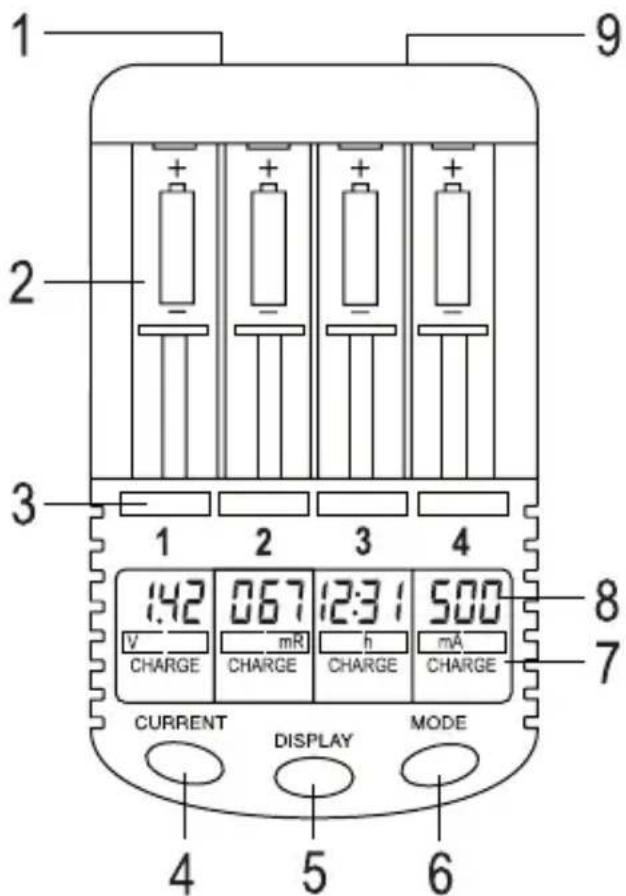
1 Round socket for power supply
2 Battery compartment (4x)
3 Control keys "1", "2", "3", "4" (press the corresponding key to select a certain battery compartment for setting and displaying the operating mode and/or information)
4 "CURRENT" key (setting the charging current)
5 "DISPLAY" key (switching the display between charging current (mA), battery voltage (V), charged capacity (mAh), elapsed charging time (h) and internal resistance (mR)
6 "MODE" key (selecting the operating mode "CHARGE" and "CHARGE TEST")
7 Operating mode display
8 Display area for charging current (mA), battery voltage (V), charged capacity (mAh), elapsed charging time (HH:MM) and internal resistance (mR)
9 USB socket (voltage/current output, for example, to charge a smartphone)
9. Operation
a) Operation
- Insert the low-voltage round connector of the power adapter into the round socket (1) on the rear of the charger.
- Plug the power adapter into a standard mains socket.
- The backlight of the display is activated and all display segments appear briefly on the display. "null" is then displayed in the upper display area (8) for each of the four channels. The charger is now ready for operation.
b) Available operating modes
The charger offers two different operating modes:
- "CHARGE" operating mode
The charger starts the charging process; after completing battery charging, the charger switches to trickle charging automatically.
- "CHARGE TEST" operating mode
The charger tests the capacity of the battery by fully charging and then discharging the battery. A charging process takes place after a break of approx. 5 minutes.
Note that setting the charging current too high can lead to the battery not being fully charged and to large deviations between the measured battery capacity and the capacity indicated on the battery. We recommend setting a charging current approx. 1/10 of the battery capacity (for a 2700mAh battery, a charging current of 300mA ).
The discharging current in the "CHARGE TEST" operating mode is set automatically according to the charging current:
Charging current 300mA or 500mA : Discharging current 250mA
Charging current 700mA or 1000mA : Discharging current 500mA
c) Inserting the battery, selecting the operating mode, setting the charging current
- Insert a suitable rechargeable battery into any battery slot (2), observing the correct polarity (note positive/+ and negative/-, see the label in the battery compartment and on the battery).
Due to the design/size of batteries of type C, only two of the four battery slots can be used.
- The voltage of the battery appears on the corresponding LC display and the "CHARGE" operating mode flashes for four seconds. During this time, you can press the "MODE" key (6) repeatedly to select the operating mode.
- "300 mA" is then displayed as the charging current and the operating mode "CHARGE" or "CHARGE TEST" flashes. During this time, you can press the "CURRENT" key (4) repeatedly to select the charging current.
- When no button has been pressed for a few seconds, the charging process starts.
If, after inserting the battery, no voltage is displayed, either the battery contacts have oxidised or are highly resistive, or the battery has discharged deeply or is faulty.
Whether or not a different operating mode can be selected or the charging current can be changed, please refer to Chapter 8. d) and 8. e).
d) Subsequently changing the operating mode or charging current for a single battery slot
- Press the control key (3) for the respective battery slot whose operating mode or charging/discharging current you want to change. The corresponding indicator on the LC display flashes (press the control key for the battery slot 2x, if necessary).
- Select the operating mode by briefly pressing the "MODE" key (6).
- Change the charging current by briefly pressing the "CURRENT" key (4).
- Wait a few seconds, the settings are applied.
e) Subsequently changing the operating mode or charging current for all battery slots
- Press and hold the "MODE" key (6) for approx. 1 second. The operating mode ("CHARGE" or "CHARGE TEST") flashes on the LC display.
- Select the operating mode by briefly pressing the "MODE" key (6).
- Change the charging current by briefly pressing the "CURRENT" key (4).
- Wait a few seconds, the settings are applied.
f) Switching display indicators
By pressing the "DISPLAY" key (5) repeatedly, you can display various data on the display during the charging/discharging process (if the data for only one battery slot is required, select the battery slot beforehand with the "1" to "4" control key so that the indicator flashes).
- Battery voltage (V)
- Charging current (mA)
- Charged capacity (mAh)
- Elapsed charge/discharge time (h; displayed in HH:MM, hours:minutes)
If a duration of 20 hours has been reached and exceeded, the indicator will start again at "0:00".
- Internal resistance (mR, milli-ohm); a low internal resistance indicates a high-quality battery cell; an increasing internal resistance for a battery may be a sign of ageing
10. USB output
The USB output (9) on the rear of the charger can be used, for example, to charge a smartphone. The USB output has a usual voltage of 5 V/DC; it provides a current of up to 1 A.
11. Care and cleaning
Always disconnect the product from the power supply before cleaning, unplug the power adapter from the mains socket. Remove any batteries from the charger.
Use a dry, lint-free cloth to clean the product.
Never use aggressive detergents, rubbing alcohol or other chemical solutions, as these may damage the casing or cause the product to malfunction.
12. Disposal
a) Product

Electronic devices are recyclable waste and must not be placed in household waste. Always dispose of the product according to the relevant statutory regulations.
-ove any inserted rechargeable batteries and dispose of them separately from the product.
b) Rechargeable batteries
As the end user, you are required by law to return all used rechargeable batteries. They must not be placed in household waste.

Rechargeable batteries containing hazardous substances are labelled with the symbol shown to indicate that disposal in household waste is forbidden. The abbreviations for heavy metals in batteries are: Cd = Cadmium, Hg = Mercury, Pb = Lead (indicated on the battery, e.g. below the waste bin icon on the left).
Used batteries can be returned to local collection points, our stores or battery retailers. You thus fulfil your statutory obligations and contribute to protection of the environment.
13. Troubleshooting
No function or no display
- Has the round connector of the power adapter be inserted into the socket on the charger?
- Is the power adapter correctly inserted into the mains socket, is mains voltage available?
The inserted battery is not recognised ("null" on the display)
- The battery contacts are oxidised/highly resistive. Clean the battery contacts.
- The battery has discharged deeply or is faulty.
- Check whether the battery has been inserted correctly; try a different battery slot as a test.
After the charging process, the battery runs flat again quickly when used
- Use a lower charging current. Depending on the battery quality, the charger may end the charging process at a high charging current, even though the battery is not full. Note the battery manufacturer's instructions, if applicable.
- The battery has aged.
- With NiCd batteries, there may be a memory effect in partially discharged batteries. This causes the battery to lose capacity. Use the "CHARGE TEST" operating mode for the battery. Here, the battery is first charged, then discharged and finally recharged again.
The displayed capacity is too low.
- The battery was not completely empty before charging.
- Use a lower charging current. Depending on the battery quality, the charger may end the charging process at a high charging current, even though the battery is not full.
The battery gets warm during charging or discharging
- This is normal, especially when using higher charging/discharging currents.
The display illumination is off
- The display illumination automatically goes out after several seconds. It comes back on when a key is pressed.
14. Technical data
a) General information
Operating conditions.Temperature 0^ to +40^ air humidity < 85% relative, non-condensing
b) Charger
Operating voltage 12 V/DC
Battery slots. 4
Suitable rechargeable batteries.....NiCd or NiMH batteries, type AA/Mignon, AAA/micro, Sub-C or C (rated voltage each 1.2 V)
Lithium-ion, type 26650, 22650, 26500, 18650, 17670, 18490, 17500, 17335, 16340/123A, 14500 and 10440 (rated voltage each 3.7V )
Charging current....Adjustable: 300mA 500mA 700mA 1000mA
Discharging current . The discharging current for the "CHARGE TEST" operating mode is set automatically according to the charging current (^**)
Charging current 300mA or 500mA : Discharging current 250mA
Charging current 700mA or 1000mA : Discharging current 500mA
Discharging end voltage.. NiCd or NiMH: 0.9 V
Lithium-ion: 2.8V
Charging technology.. NiCd or NiMH: DeltaU
USB output. .5V/DC,1A
Dimensions. 157× 93× 35mm (L× W× H)
Weight approx. 201 g
c) Power adapter
Operating voltage 100 - 240 V/AC, 50/60 Hz
Output voltage/current. 12 V/DC, 3 A
Sommaire
F
Page
Chere cliente, cher client,
France (email): technique@conrad-france.fr
Port USB. 5 V/CC, 1 A
Dimensions. 157 x 93 x 35 mm (L x H x P)
Poids. env. 201 g
c) Bloc secteur
Tension de service. 100 - 240 V/CA, 50/60Hz
Copyright 2020 by Conrad Electronic SE.
This is a publication by Conrad Electronic SE, Klaus-Conrad-Str. 1, D-92240 Hirschau (www.conrad.com).
All rights including translation reserved. Reproduction by any method, e.g. photocopy, microfilming, or the capture in electronic data processing systems require the prior written approval by the editor. Reprinting, also in part, is prohibited. This publication represent the technical status at the time of printing.
Copyright 2020 by Conrad Electronic SE.
Copyright 2020 by Conrad Electronic SE.
Copyright 2020 by Conrad Electronic SE.
- Introduction
- Explanation of symbols
- Intended use
- Package contents
- Up-to-date operating instructions
- Safety information
- a) General information
- b) Power adapter
- c) Setup location
- d) Operation
- Notes on rechargeable batteries
- General information
- Selecting the charging current
- Product overview
- Operation
- a) Operation
- b) Available operating modes
- c) Inserting the battery, selecting the operating mode, setting the charging current
- d) Subsequently changing the operating mode or charging current for a single battery slot
- e) Subsequently changing the operating mode or charging current for all battery slots
- f) Switching display indicators
- USB output
- Care and cleaning
- Disposal
- a) Product
- b) Rechargeable batteries
- Troubleshooting
- No function or no display
- The inserted battery is not recognised ("null" on the display)
- After the charging process, the battery runs flat again quickly when used
- The displayed capacity is too low.
- The battery gets warm during charging or discharging
- The display illumination is off
- Technical data
- b) Charger
- c) Power adapter
- Sommaire
- F
- Page
- c) Bloc secteur
Brand : VOLTCRAFT
Model : CC2
Category : Battery charger