RT1400 - Vacuum Cleaner RIDGID - Free user manual and instructions
Find the device manual for free RT1400 RIDGID in PDF.



| Brand | Ridgid |
| Model | RT1400 |
| Product Type | Wet/Dry Vacuum on Cart |
| Capacity | 53 liters (14 US gallons) |
| Supply Voltage | 120 V |
| Rated Current | 10.5 A |
| Frequency | 60 Hz |
| Approximate Power | 1260 W |
| Insulation | Double insulation (grounding not required) |
| Dimensions (L x W x H) | Approximately 56 x 46 x 76 cm |
| Empty Weight | Approximately 11 kg |
| Main Functions | Dry and liquid waste suction, blower |
| Filtration System | Qwik Lock™ paper filter (removable and washable) |
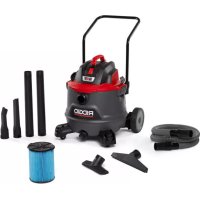
| Included Accessories | Professional locking hose (2.4 m), 2 extension wands, crevice tool, wet nozzle, universal nozzle, vehicle nozzle |
| Wheels | 2 rear wheels 20 cm (8 in) and 2 front swivel casters |
| Warranty | Limited lifetime warranty (conditions at RIDGID.com/VacWarranty) |
| Maintenance and Cleaning | Clean filter regularly (dry or wet); empty drum via drain or by removing motor head |
| Safety | Double insulation, ON/OFF switch, float shut-off in liquid suction |
| Spare Parts and Repairability | Parts available at store.ridgid.com; repairs by authorized center |
| Additional Information | Residential use only; manual provided |
Frequently Asked Questions - RT1400 RIDGID
User questions about RT1400 RIDGID
0 question about this device. Answer the ones you know or ask your own.
Ask a new question about this device
Download the instructions for your Vacuum Cleaner in PDF format for free! Find your manual RT1400 - RIDGID and take your electronic device back in hand. On this page are published all the documents necessary for the use of your device. RT1400 by RIDGID.
USER MANUAL RT1400 RIDGID
FOR QUESTIONS OR INFORMATION CONTACT US AT
1-800-4-RIDGID (1-800-474-3443) from the US and Canada
For service parts visit store.ridgid.com/provacs
TABLE OF CONTENTS
************************
• SAFETY INSTRUCTIONS....2
• INTRODUCTION 4
• ASSEMBLY....6
• OPERATION 12
- STORAGE 16
• MAINTENANCE....18
• REPAIR PARTS 20
WARNING:
To reduce the risk of injury, the user must read and understand the owner's manual before using this product.
SAVE THIS MANUAL FOR FUTURE REFERENCE
Part No. SP7080
ÍNDICE DE CONTENIDO
**********************************************************************
IMPORTANT SAFETY INSTRUCTIONS
Safety is a combination of using common sense, staying alert, and knowing how your Wet/Dry Vacuum Cleaner ("Vac") works.
Safety Signal Words
⚠️ DANGER: Indicates a hazardous situation which, if not avoided, will result in death or serious injury.
WARNING: Indicates a hazardous situation which, if not avoided, could result in death or serious injury.
CAUTION: Indicates a hazardous situation which, if not avoided, could result in minor or moderate injury or property damage.
When using your Vac, always follow basic safety precautions including the following:
WARNING:
- To reduce the risk of fire, electric shock, or injury:
- Read and understand this manual and all labels on the Wet/Dry Vac before operating.
- Use only as described in this manual.
- Do not leave Vac running while unattended - you may fail to notice important signs indicating abnormal operation such as loss of suction, debris/liquid exiting exhaust, or abnormal motor noises. Immediately stop using Vac if you notice these signs.
- Do not leave Vac when plugged in. Unplug from outlet when not in use and before servicing.
- Sparks inside the motor can ignite flammable vapors or dust. To reduce the risk of fire or explosion, do not use near combustible liquids, gases, or dusts, such as gasoline or other fuels, lighter fluid, cleaners, oil-based paints, natural gas, coal dust, magnesium dust, grain dust, aluminum dust, or gun powder.
- Do not vacuum anything that is burning or smoking, such as cigarettes, matches, or hot ashes.
- To avoid the risk of self-ignition of drum debris, empty drum after each use. Combustible materials, such as rags or
sawdust containing stain or urethane, can be a source of such overheating.
- Do not vacuum drywall dust, cold fireplace ash, or other fine dusts with standard filter. These may pass through the filter and be exhausted back into the air. Use a fine dust filter instead.
- To reduce the risk of inhaling toxic vapors, do not vacuum or use near toxic or hazardous materials.
- To reduce the risk of electric shock, do not expose to rain or allow liquid to enter motor compartment. Store indoors.
- This Wet/Dry Vac is not intended for use by persons (including children) with reduced physical, sensory, or mental capabilities, or lack of experience and knowledge, unless they have been given supervision or instruction concerning use of the appliance by a person responsible for their safety.
- Do not allow to be used as a toy. Close attention is necessary when used by or near children.
- Do not use with a torn filter or without filter installed except when vacuuming liquids as described in this manual. Dry debris ingested by the impeller may damage the motor or be exhausted into the air.
- Turn off Vac before unplugging.
- To reduce the risk of injury from accidental starting, unplug power cord before changing or cleaning filter.
- Do not unplug by pulling on cord. To unplug, grasp the plug, not the cord.
- Do not use with damaged cord, plug or other parts. If your Vac is not working as it should, has missing parts, has been dropped, damaged, left outdoors, or dropped into water, call customer service.
- Do not pull or carry by cord, use cord as handle, close a door on cord, or pull cord around sharp edges or corners. Do not run Vac over cord. Keep cord away from heated surfaces.
- Do not handle plug, switch, or the Vac with wet hands.
IMPORTANT SAFETY INSTRUCTIONS
- Use only extension cords that are rated for outdoor use. Extension cords in poor condition or too small in wire size can pose fire and shock hazards. To reduce the risk of these hazards, be sure the cord is in good condition and that liquid does not contact the connection. Do not use an extension cord with conductors smaller than 1,3 mm ^2 (16 AWG).
- This Wet/Dry Vac is double-insulated, eliminating the need for a separate grounding system. Use only identical replacement parts. Read the instructions for Servicing Double-Insulated Wet/Dry Vacs before servicing.
- Do not put any object into ventilation openings. Do not vacuum with any ventilation openings blocked; keep free of dust, lint, hair or anything that may reduce air flow.
- Keep hair, loose clothing, fingers, and all parts of body away from openings and moving parts.
- To reduce the risk of falls, use extra care when cleaning on stairs.
- To reduce the risk of back injury or falls, do not lift a Vac that is heavy with liquid or debris. Partially empty by scooping debris or draining liquid.
• To reduce the risk of personal injury or damage to Vac, use only RIDGID recommended accessories. -
When using as a blower:
-
Direct air discharge only at work area.
- Do not direct air at bystanders.
- Keep children away when blowing.
- Do not use blower for any job except blowing dirt and debris.
-
Do not use as a sprayer.
-
To reduce the risk of eye injury, wear safety eyewear. The operation of any utility Vac or blower can result in foreign objects being blown into the eyes, which can result in severe eye damage.
- To reduce the risk of being struck by, or pulled down by, a rolling Vac, block the casters when using on any uneven or sloped surface.
SAVE THIS MANUAL
CAUTION:
- To reduce the risk of hearing damage, wear ear protectors when using for extended hours or in a noisy area.
- For dusty operations, wear dust mask.
- Static shocks are common when the relative humidity of the air is low. Vacuuming fine debris with your Vac can deposit static charge on the hose or Vac. To reduce the frequency of static shocks in your home or when using this Vac, add moisture to the air with a humidifier.
Observe the following warnings that appear on the motor housing of your Vac:

DOUBLE INSULATED - GROUNDING NOT REQUIRED. WHEN SERVICING USE ONLY IDENTICAL REPLACEMENT PARTS.
WARNING:
- For your own safety, read and understand owner's manual.
- Do not run unattended.
- Do not pick up hot ashes, coals, flammable, combustible / self-igniting, toxic, or other hazardous materials.
- Do not use around explosive liquids or vapors.
WARNING:
To reduce the risk of electric shock - do not expose to rain - store indoors.
INTRODUCTION
This Cart Wet/Dry Vac is intended for house-hold use. It may be used for vacuuming wet or dry media and may be used as a blower.
Read this Owner's Manual to familiarize yourself with the product features and to understand the specific usage of your new Vac.
Getting to Know Your Wet/Dry Vac
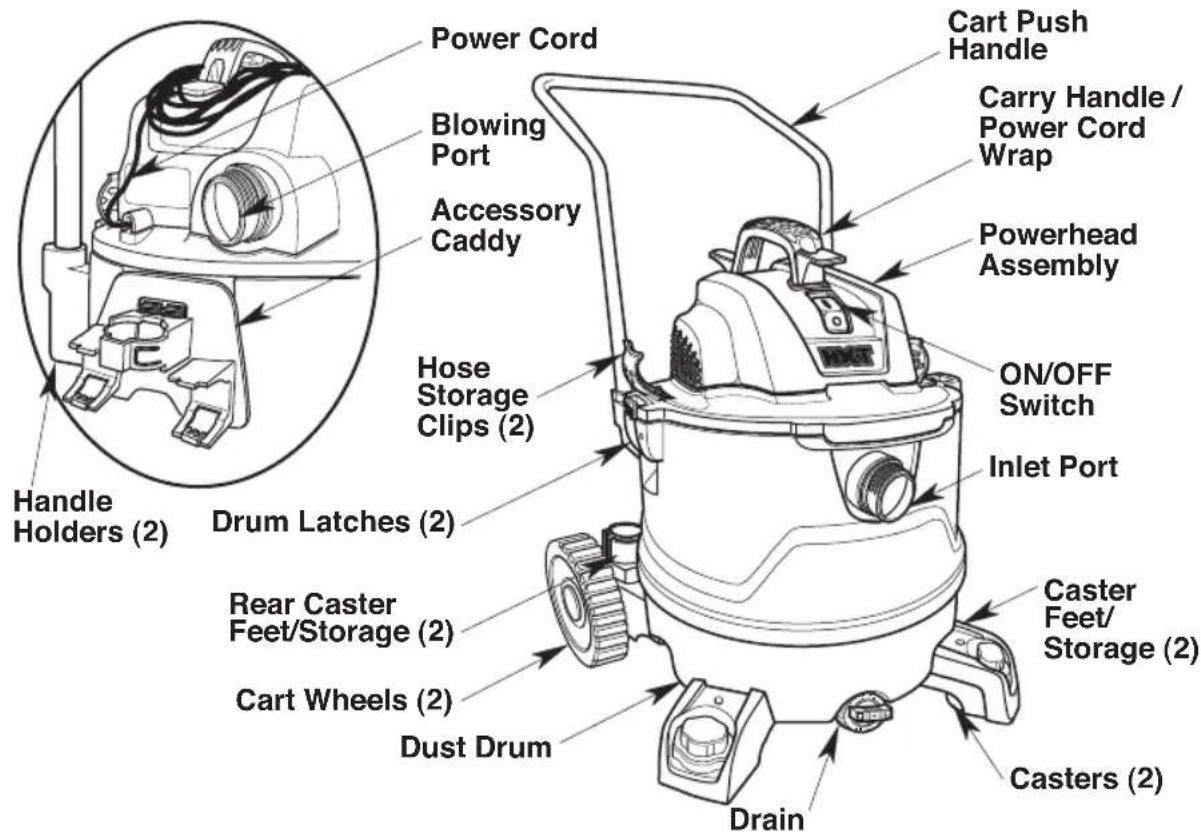
text_image
Power Cord Blowing Port Accessory Caddy Handle Holders (2) Drum Latches (2) Rear Caster Feet/Storage (2) Cart Wheels (2) Dust Drum Drain Caster Feet/Storage (2) Casters (2) Drain Hose Storage Clips (2) Carry Handle / Power Cord Wrap Powerhead Assembly ON/OFF Switch Inlet Port Cart Push HandleFamiliarize yourself with the accessories included with the Vac. Each accessory may be used in various ways for vacuuming and blowing debris. Here is a list of the accessories and their uses.
Professional Locking Hose - Provides transfer of vacuum or blowing capability to work site. Provides the means of attaching extension wands and nozzles. Locking Hose 48mm (1-7/8") x 2.4m (8') - Fits 2-1/2" Accessories.
Extension Wands - These wands can be connected together and provide additional length.
Crevice Tool - Used to pick up debris in hard to reach places.
Wet Nozzle - Used for wet pickup on smooth surfaces to pick up liquid and dry the surface in one stroke.
Utility Nozzle - General purpose nozzle for most vacuuming applications.
Car Nozzle - Dry pickup nozzle for car interiors and most upholstery cleaning.
INTRODUCTION
Tools Required

Phillips Screwdriver
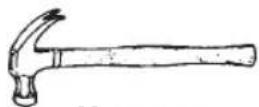
Hammer
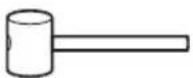
Mallet
Recommended:

5/8" (16mm)
Socket
Unpacking
This Product Requires Assembly.
Check all parts from carton against the Carton Contents Parts list.
If any parts are damaged or missing contact 1-800-4-RIDGID (US and Canada), or by email at info@ridgidvacs.com.
Carton Contents List
Key Description Qty
A Wet/Dry Vac 1
B Professional Locking Hose ......1
C Front Caster Feet w/Storage .....2
D Casters....2
E Rear Axle Foot w/Storage (Right)..1
F Rear Axle Foot w/Storage (Left) ....1
G Axle....1
H 8" (20cm) Wheels....2
I 1/2" (13mm) Cap Nuts ....2
J Wheel Caps 2
K Cart Push Handle....1
L Carry Handle/Cord Wrap ......1
M Hose Storage Clips....2
N* Qwik Lock™ Filter....1
O Crevice Tool....1
P Utility Nozzle ....1
Q Wet Nozzle....1
R Car Nozzle ....1
S Extension Wands....2
T Accessory Caddy....1
U Pan Head Screws #10 x 3/4" (19mm).8
V Owner's Manual....1
* The Filter comes preassembled.
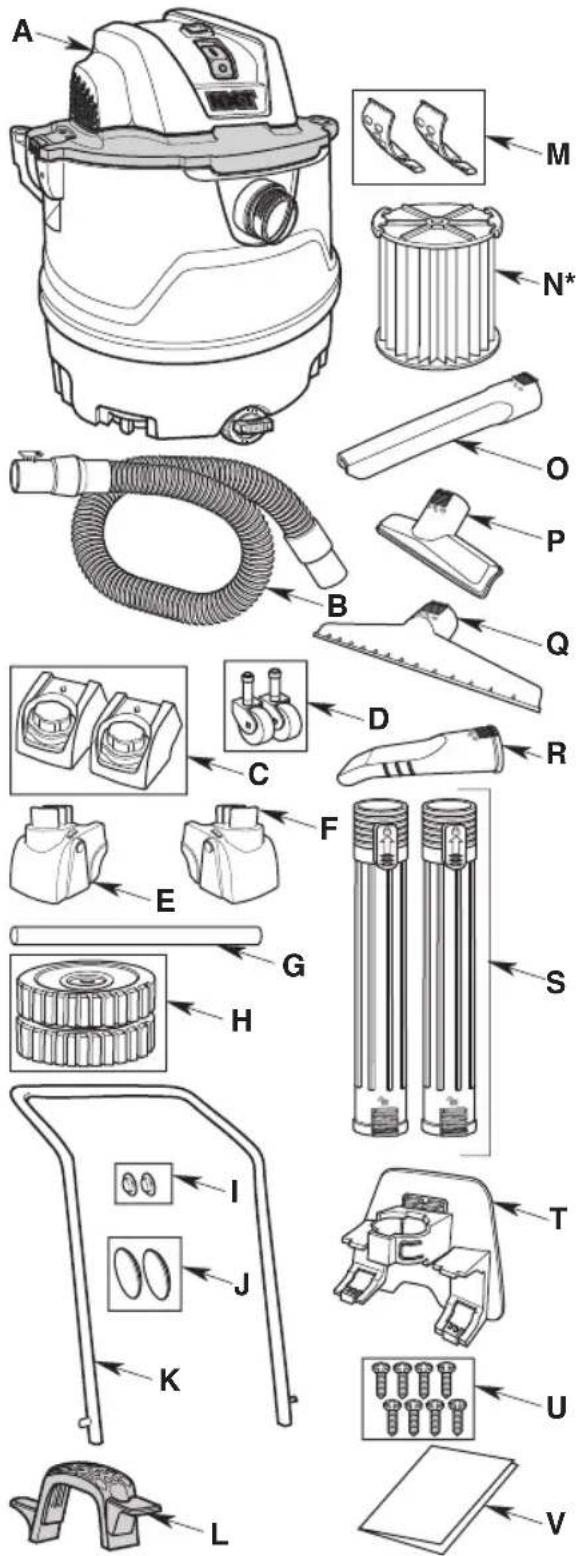
text_image
Technical diagram of a vacuum cleaner with labeled parts and exploded view5
Front Caster/Caster Foot Assembly
NOTE: Remove Powerhead Assembly from Dust Drum prior to assembly of the Caster Feet and Casters (See Attaching/Removing Powerhead Assembly to Dust Drum section, if needed).
- Turn Dust Drum upside down on floor.
- Place Caster Foot on floor, as shown. Insert the Stem of a Caster into Socket of Caster Foot.
- Push on the Caster until the Caster ball end snaps fully into the Socket and the Caster swivel freely. Repeat for the other Caster and Caster Foot.
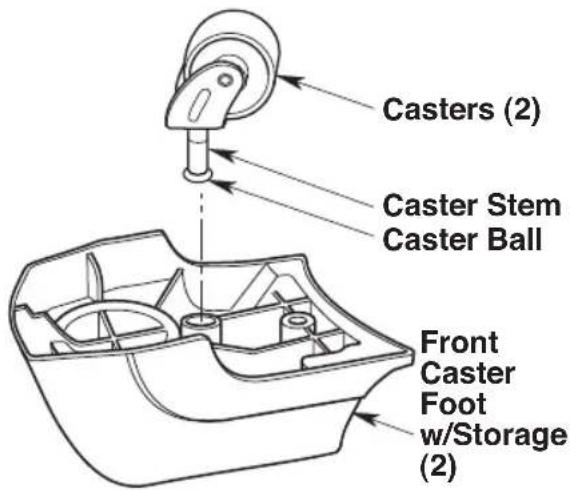
text_image
Casters (2) Caster Stem Caster Ball Front Caster Foot w/Storage (2)- Place Caster Foot with Caster over post on bottom of Dust Drum and press firmly in place, as shown.
- Repeat for the other Caster/Caster Foot Assembly.
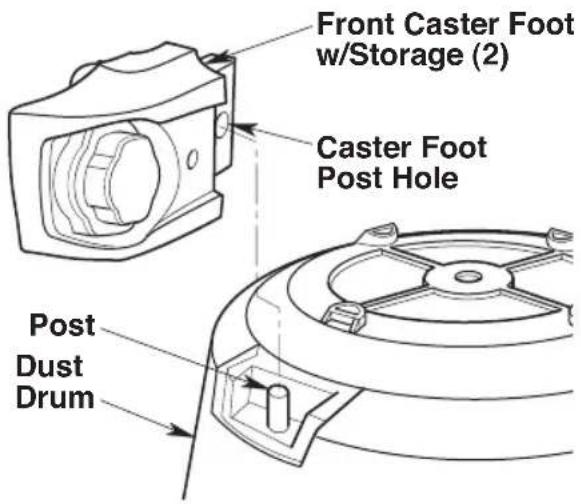
text_image
Front Caster Foot w/Storage (2) Caster Foot Post Hole Post Dust DrumRear Feet, Axle and Wheel Assembly
- While facing the rear of the Dust Drum, place the Right Rear Axle Foot w/ Storage over the Left Post and press firmly in place.
- Repeat for the Left Rear Axle Foot w/ Storage on the Right Post. The Axle slots in the Rear Axle Feet w/Storage should be aligned
- Use a #10 x 3/4" (19mm) Pan Head Screw (supplied) to secure each Rear Axle Foot w/Storage to the Drum.
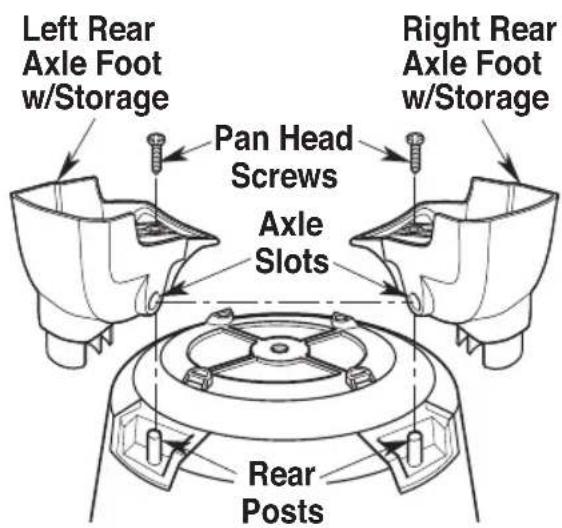
text_image
Left Rear Axle Foot w/Storage Pan Head Screws Axle Slots Right Rear Axle Foot w/Storage Rear PostsASSEMBLY
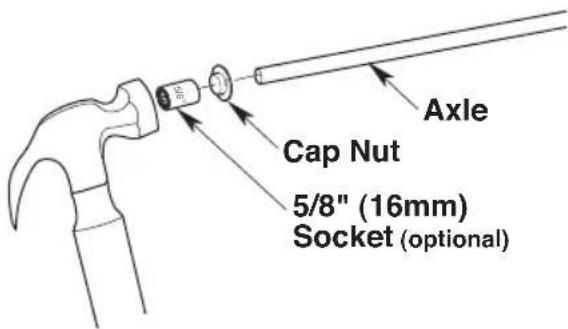
- Locate the Axle and one Cap Nut. Place the Cap Nut on one end of the Axle and tap gently with hammer until fully seated.
*Tip: Use a 5/8" (16mm) Socket to securely hold the Cap Nut while hammering the Axle.
text_image
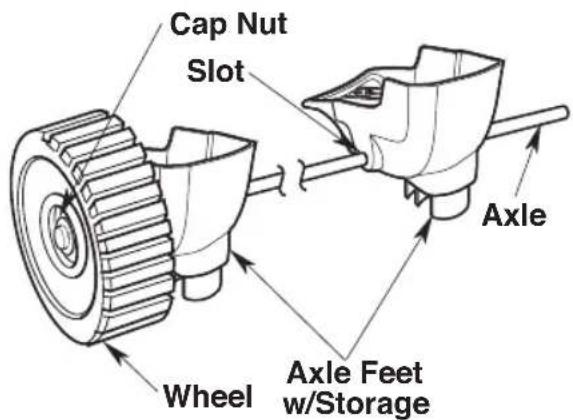
Cap Nut 5/8" (16mm) Socket (optional) Axle- Slide a Wheel onto the Axle making sure the smooth side of the Wheel faces the Cap Nut.
- Slide the open end of the Axle through the Axle Slot in one of the Rear Axle Feet w/Storage and continue until the Axle open end extends through the other Rear Axle Foot w/Storage Slot.
text_image
Cap Nut Slot Wheel Axle Feet w/Storage AxleDRUM NOT SHOWN FOR CLARITY
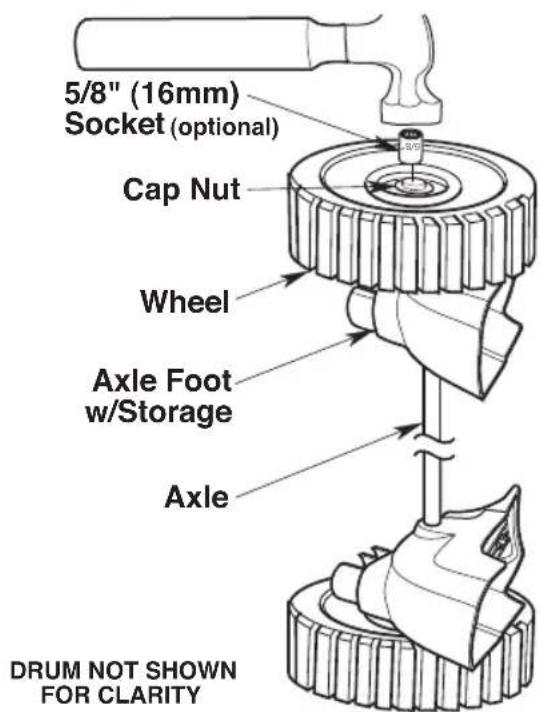
- Reposition the Dust Drum so the already assembled Wheel is against the floor.
- Install the second Wheel onto the Axle making sure the smooth side of the Wheel faces upward.
- Using a hammer, gently tap the remaining Cap Nut onto the open end of the Axle.
text_image
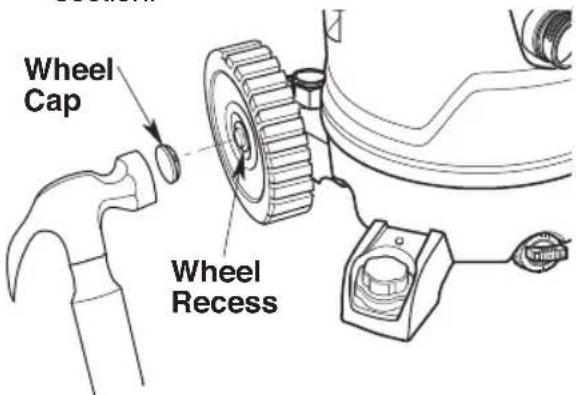
5/8" (16mm) Socket (optional) Cap Nut Wheel Axle Foot w/Storage Axle DRUM NOT SHOWN FOR CLARITY- Turn the Dust Drum with Rear Axle Feet w/Storage and Wheel Assembly upright.
- Using a mallet or hammer gently tap the Wheel Caps into the Wheel recesses.
- Continue to the Wet/Dry Vac Assembly section.
text_image
Wheel Cap Wheel Recess7
Wet/Dry Vac Assembly:
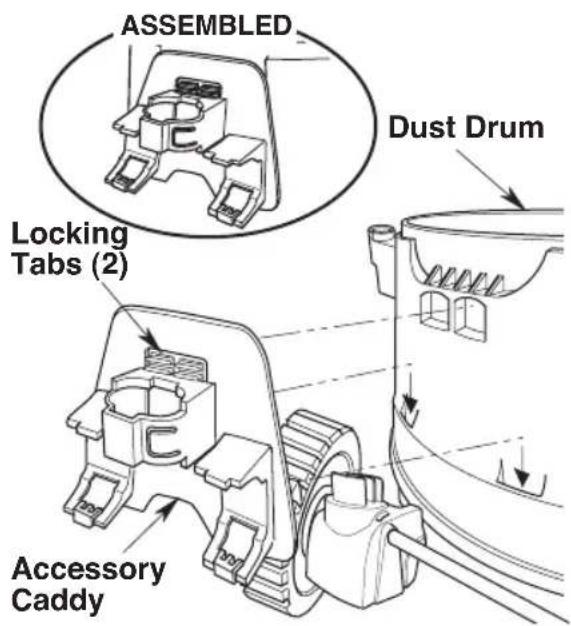
Accessory Caddy Installation
- Position the Accessory Caddy on the back of the Dust Drum and align the Locking Tabs.
- Slide the Accessory Caddy Tabs into the Dust Drum and push the Locking Tabs in until you hear a click. Pull on the Accessory Caddy to confirm it has locked into place.
text_image
ASSEMBLED Dust Drum Locking Tabs (2) Accessory CaddyAttaching/Removing Powerhead Assembly to Dust Drum
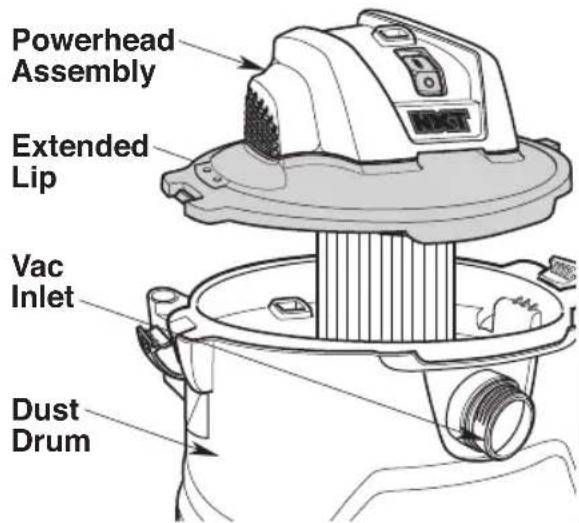
- Place Powerhead Assembly on top of Dust Drum with the Extended Lip of the Lid aligned with the Inlet. Be sure Powerhead Assembly is fully seated on the Dust Drum.
text_image
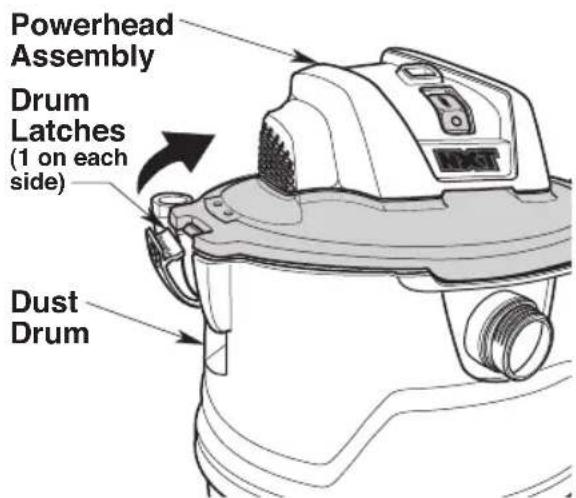
Powerhead Assembly Extended Lip Vac Inlet Dust Drum- Press in on the two Latches located on either side of the Dust Drum until they snap into place, securing the Powerhead Assembly to the Dust Drum.
- To remove the Powerhead Assembly, pull out on the two Latches and lift Powerhead Assembly from the Dust Drum. Do not force the Latches to rotate more than slightly outside Drum flange.
text_image
Powerhead Assembly Drum Latches (1 on each side) Dust DrumASSEMBLY
Carry Handle/Cord Wrap Assembly
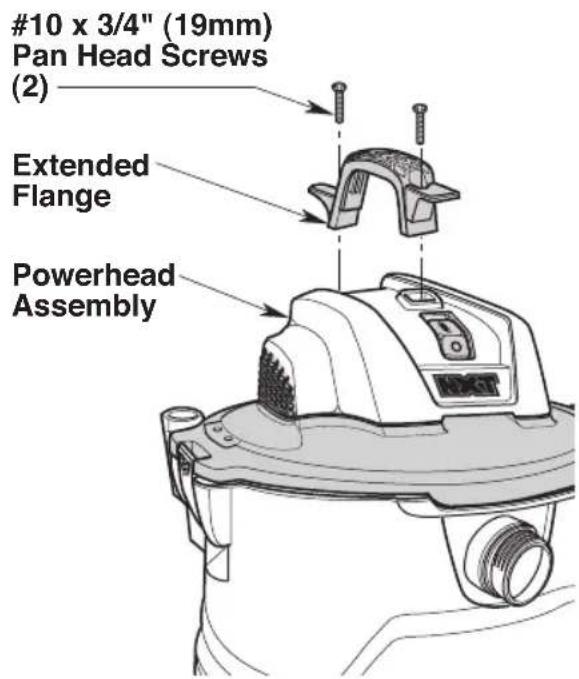
- Locate the Carry Handle/Cord Wrap and the two (2) #10 x 3/4" (19mm) Pan Head Screws in loose parts bag.
- Position the Carry Handle/Cord Wrap on top of the Powerhead Assembly, with the Carry Handle/Cord Wrap Extended Flange to the rear of the Powerhead Assembly, as shown.
- Insert a #10 x 3/4" (19mm) Pan Head Screw through the hole at each end of the Carry Handle/Cord Wrap and into the Powerhead Assembly. Tighten securely.
text_image
#10 x 3/4" (19mm) Pan Head Screws (2) Extended Flange Powerhead AssemblyHose Storage Clips Assembly
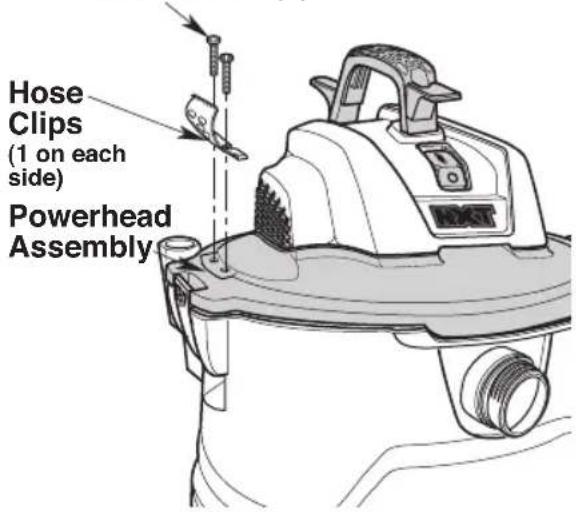
- Locate the two (2) Hose Storage Clips and four (4) #10 x 3/4" (19mm) Pan Head Screws in the loose parts.
- Place a Clip into the recess next to one of the Latches. The Curve of the Clip should face outward.
- Insert a #10 x 3/4" (19mm) Pan Head Screw into each mounting hole and tighten securely.
- Repeat on the other side.
10 x 3/4" (19mm)
Pan Head Screws (2)
text_image
Hose Clips (1 on each side) Powerhead AssemblyASSEMBLY
Installing/Removing Cart Push Handle
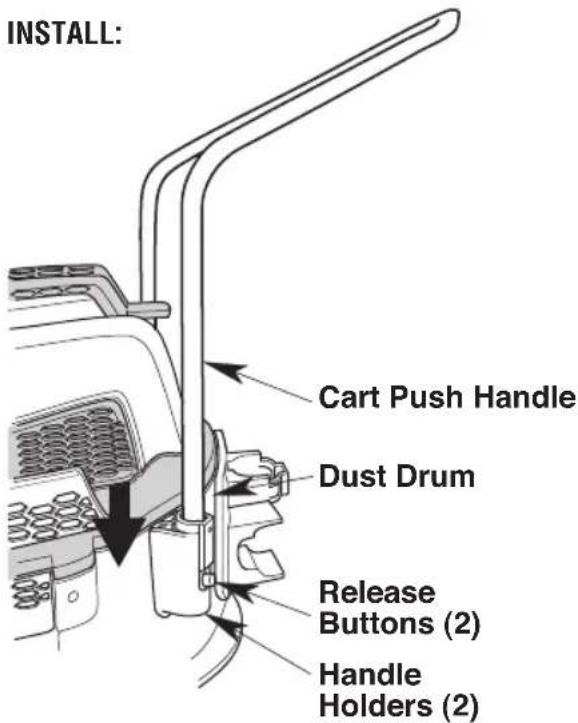
- To Install Handle: Slide the Cart Push Handle into the two Handle Holders found on the rear of the Dust Drum.
- Press down evenly on the Cart Push Handle until both sides are fully seated in the Handle Holders. The Release Buttons should audibly snap into the Locking Holes.
text_image
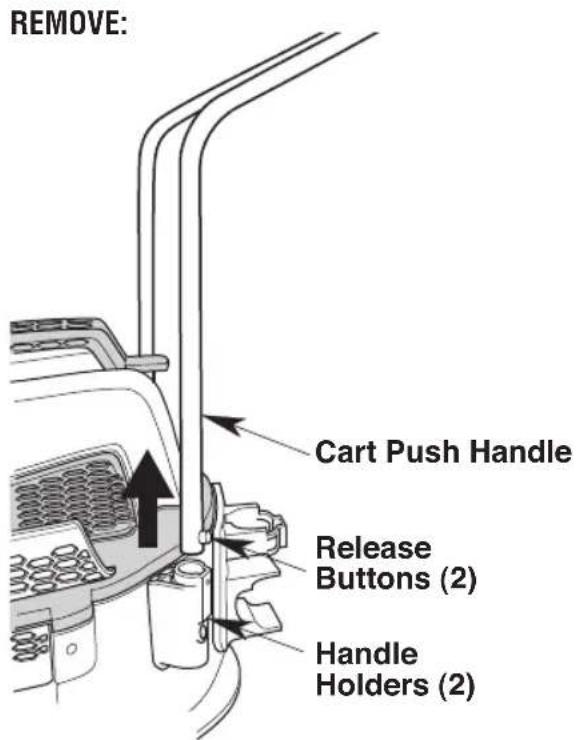
INSTALL: Cart Push Handle Dust Drum Release Buttons (2) Handle Holders (2)- To Remove Handle: Grasp both sides of the Handle just above the Handle Holders. Press in firmly on the two Release Buttons using the index fingers while pulling up on the Cart Push Handle. It may help to place a foot on one of the rear feet to secure the Vac.
text_image
REMOVE: Cart Push Handle Release Buttons (2) Handle Holders (2)Inserting/Removing the Professional Locking Hose
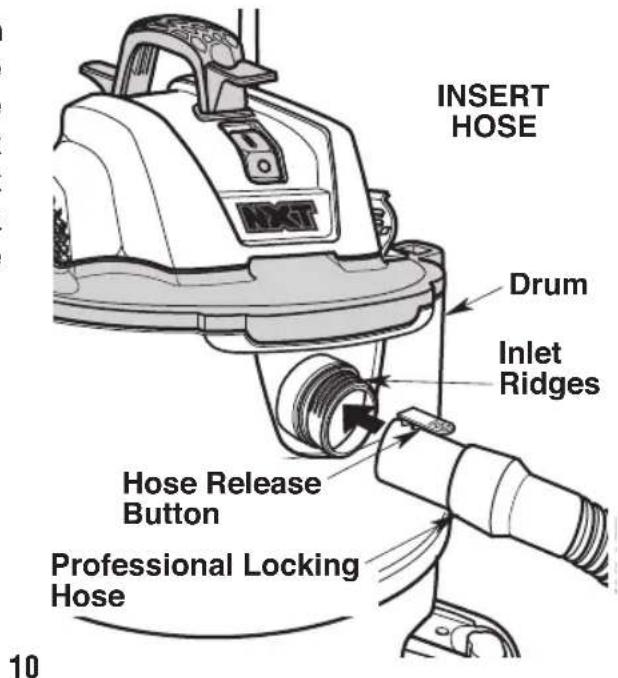
- To Insert Hose: Locate the end of the Professional Locking Hose and align it with the Drum Inlet. Position the Hose Release Button with the Ridges on the Vac Inlet. Push the Hose end straight into the Vac Inlet until the Hose Release Button fully engages the Inlet Ridges.
text_image
INSERT HOSE Drum Inlet Ridges Hose Release Button Professional Locking Hose 10ASSEMBLY
- To Remove Hose: Rotate the end of the Professional Locking Hose in either direction to release the Hose Latch from the Inlet Ridges. Press the Hose Release Button and pull the Hose end straight out of the Vac Inlet.
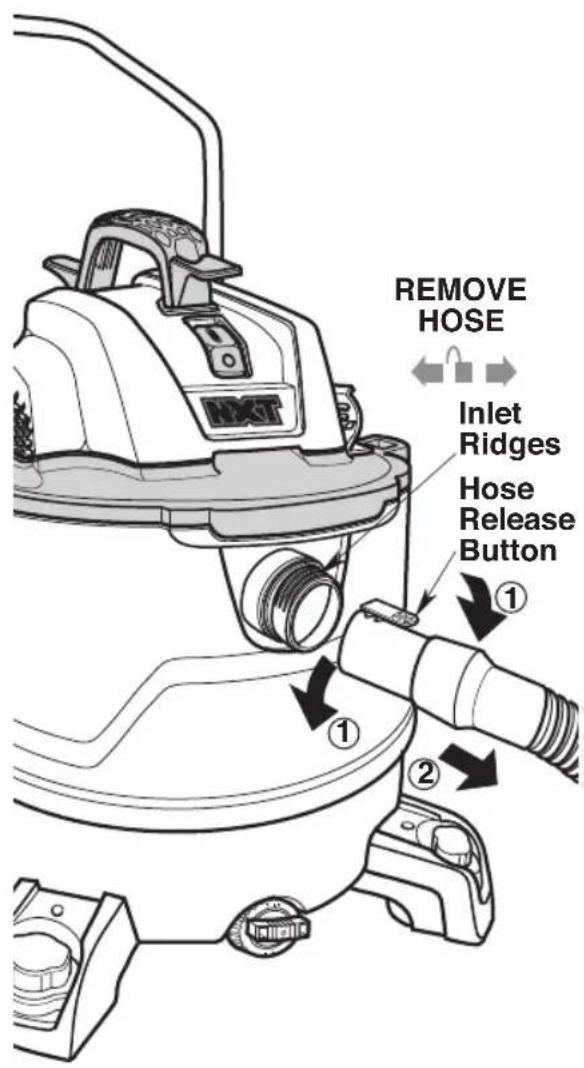
text_image
REMOVE HOSE Inlet Ridges Hose Release Button ① ② ①Locking Accessories
- To Connect Accessory: Your RIDGID Wet/Dry Vac includes Locking Accessories to prevent the Accessories from falling off when in use. To connect the Accessories, align the Nozzle Ridges of the Accessory with the Release Button of your Extension Wand. Press to secure the Nozzle to the Extension Wand.
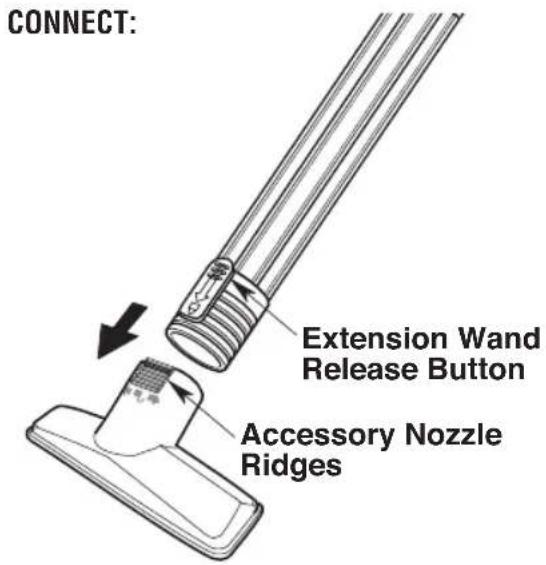
text_image
CONNECT: Extension Wand Release Button Accessory Nozzle Ridges- To Disconnect Accessory: Twist the Nozzle and Extension Wand to disengage the Nozzle Ridges and pull. You may also press the Release Button and pull to disengage.
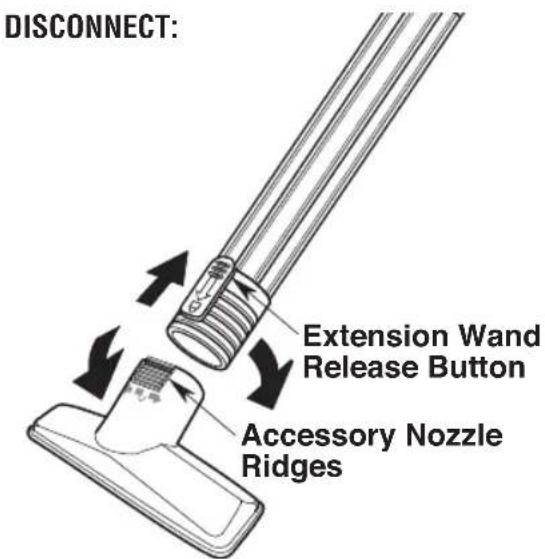
text_image
DISCONNECT: Extension Wand Release Button Accessory Nozzle RidgesWARNING:
To reduce the risk of fire, explosion, or damage to Vac:
- Do not leave Vac running while unattended - you may fail to notice important signs indicating abnormal operation such as loss of suction, debris/liquid exiting the exhaust, or abnormal motor noises. Immediately stop using Vac if you notice these signs.
- Do not leave Vac plugged in when not in use.
- Do not continue running when float has cut off suction.
- Sparks inside the motor can ignite airborne flammables. Do not operate Vac near flammable liquids or in areas with flammable gases, vapors, or explosive/airborne dust. Flammable liquids, gases, and vapors include: lighter fluid, solvent-type cleaners, oil-based paints, gasoline, alcohol, and aerosol sprays. Explosive dusts include: coal, magnesium, aluminum, grain, and gun powder.
- Do not vacuum up explosive dusts, flammable liquids, or hot ashes.
- Do not leave sawdust or rags with stain or polyurethane residue inside Vac. Empty drum after picking up these potentially self-heating materials.
WARNING:
To reduce the risk of electric shock or injury:
- Do not expose to rain or allow liquid to enter motor compartment. Store indoors.
- Do not handle plug, switch, or Vac with wet hands.
- Unplug Vac before servicing. If your Vac is not working as it should, has missing parts, has been dropped, damaged, left outdoors, or dropped into water, return it to an authorized service center or call customer service.
- When using an extension cord, use only outdoor-rated cords that are in good condition. Do not allow the connection to come into contact with liquid.
CAUTION:
To reduce the risk of hearing damage, wear ear protectors when using the Vac/Blower for extended time or in a noisy area.
Polarized Plug
To reduce the risk of electric shock, this Vac has a Polarized Plug (one blade is wider than the other). This Plug will fit in a Polarized Outlet only one way. If the Plug does not fit fully in the Outlet, reverse the Plug. If it still does not fit, contact a qualified electrician to install the proper Outlet. Do not change the Plug in any way.
With Power Cord plugged in, turn the Vac "ON" by pressing in on the "I" (top) on the Power Switch. To turn "OFF" press the "O" (bottom) of the Power Switch. The symbols used on the Switch Actuator are international "On & Off" symbols.
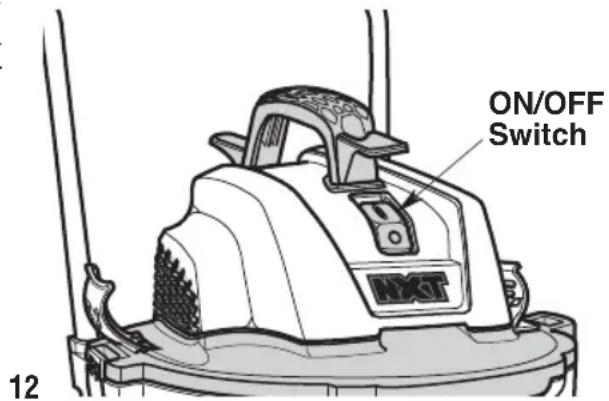
text_image
ON/OFF Switch 12OPERATION
Vacuuming Dry Materials
- The Filter must always be correctly installed to avoid leaks and possible Vac damage.
- To maintain peak performance when vacuuming fine dust, clean the Drum and Filter regularly.
NOTE: Do not use a wet Filter when picking up dry material. The Filter will quickly clog and be difficult to clean.
- If the Filter is wet, you must allow it to dry completely or replace it with a dry Filter before using the Vac to pick up dry material.
Vacuuming Liquids
- Vacuuming up small amounts of liquid (less than 2" (5cm) collected in Dust Drum) does not require Filter removal.
-
When larger amounts of liquid are to be picked up, remove the Filter, but not the Filter Cage or Float, to prevent the Filter from becoming saturated with liquid. If the Filter becomes saturated, you may see "mist" coming from the Blowing Port.
-
When the Drum is "full" the Float will rise and cut off airflow. The motor sound will rise in pitch and its speed will increase indicating the Drum is "full". Turn OFF the Vac and unplug the power cord before emptying the Drum.
WARNING:
Do not operate without filter cage and float, as they prevent liquid from entering the impeller and damaging the motor.
- Following use of Vac for wet pick up, allow Filter to dry completely to avoid mildew and Filter damage.
IMPORTANT: To reduce the risk of damage to the Vac, do not run Motor with Float in raised position.
Emptying the Dust Drum
WARNING:
To reduce the risk of injury from accidental starting, unplug power cord before emptying the drum.
- Unplug Power Cord from power source.
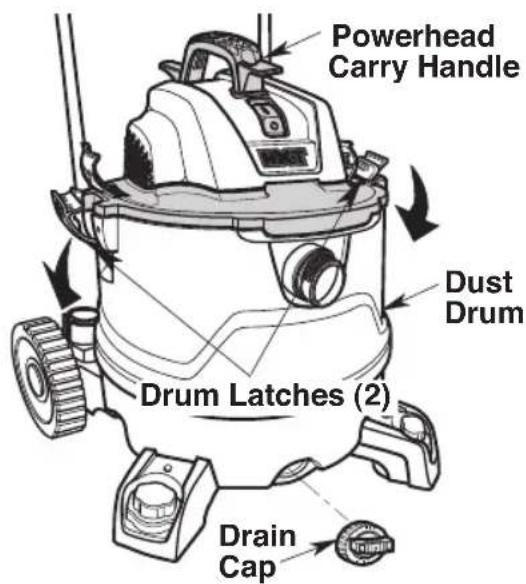
- The Vac comes equipped with a Drain for easy emptying of liquids. Position the Vac near a suitable drain or receptacle and remove the Drain Cap.
- Remove the Powerhead Assembly by pulling outward at the top of the two Latches.
- Lift Powerhead Assembly from the Dust Drum and set aside.
- Use the Dust Drum Handles located at the bottom of the Dust Drum to lift and empty into a proper waste disposal container.
NOTE: Do not carry the Vac by the Powerhead Carry Handle when the Vac is full.
text_image
Powerhead Carry Handle Dust Drum Drum Latches (2) Drain CapWARNING:
To reduce the risk of back injury or falls, do not lift a Vac heavy with liquid or debris. Scoop or drain enough contents out to make the Vac light enough to lift comfortably
OPERATION
Moving the Wet/Dry Vac
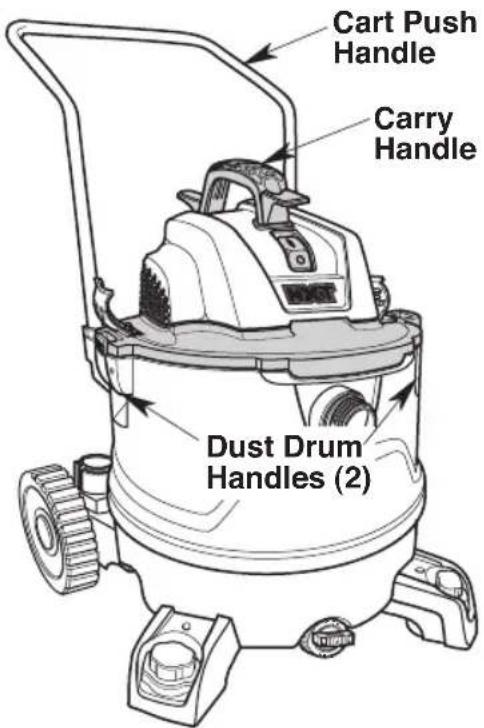
Should it become necessary to pick the Vac up to move it, the Handles on each side of the Dust Drum or the Powerhead Carry Handle should be used to lift.
To maneuver the Vac, the Cart Push Handle in the rear of the Vac should be used.
text_image
Cart Push Handle Carry Handle Dust Drum Handles (2)Blowing Feature
Your Vac features a Blowing Port. It can blow sawdust and other debris. Follow the steps below to use your Vac as a Blower.
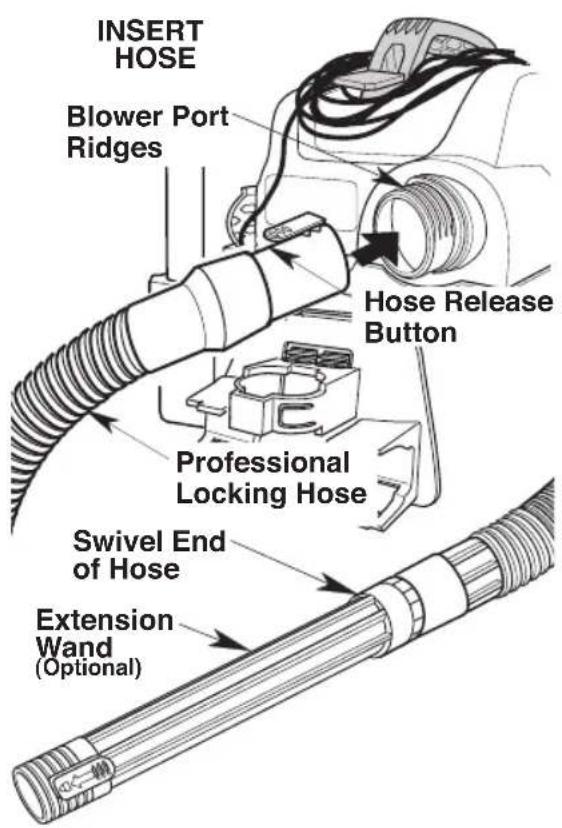
- Locate the Blowing Port, at the rear of the Powerhead of your Wet/Dry Vac.
- Align the Hose Release Button of the Professional Locking Hose End with the Ridges on the Blower Port. Push the Hose End straight into the Blower Port until the Hose Release Button fully engages the Blower Port Ridges.
- (Optional) Attach the Extension Wand to swivel end of the Hose. See Locking Accessories section of this manual for instructions on connecting the Locking Accessories.
- Turn the Vac on and you are ready to use your Vac as a Blower.
WARNING:
Always wear safety eyewear complying with ANSI Z87.1 (or in Canada, CSA Z94.3) before using as a blower.
WARNING:
To reduce the risk of injury to bystanders, keep them clear of blowing debris.
CAUTION:
Wear a dust mask if blowing creates dust which might be inhaled.
CAUTION:
To reduce the risk of hearing damage, wear ear protectors when using the Vac/Blower for extended time or in a noisy area.
OPERATION
text_image
INSERT HOSE Blower Port Ridges Hose Release Button Professional Locking Hose Swivel End of Hose Extension Wand (Optional)Remove Hose:
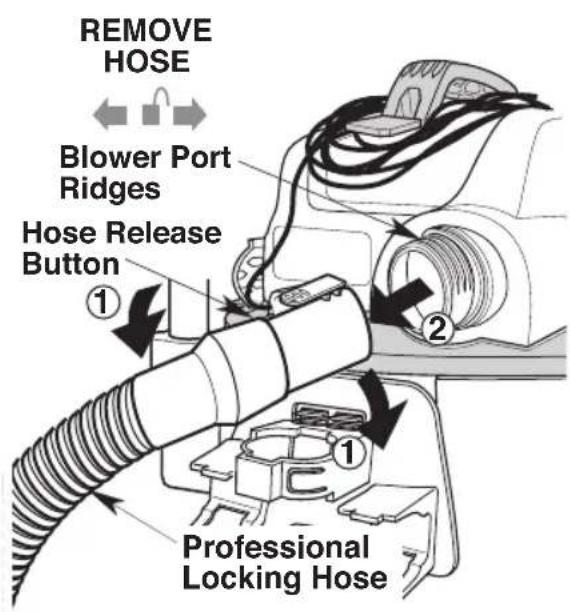
- Rotate Hose End in either direction to disengage Blower Port Ridges.
- Press the Hose Release Button and pull the Hose End straight out of the Blower Port.
text_image
REMOVE HOSE Blower Port Ridges Hose Release Button ① ② Professional Locking HoseACCESSORY & HOSE STORAGE
Accessory Storage
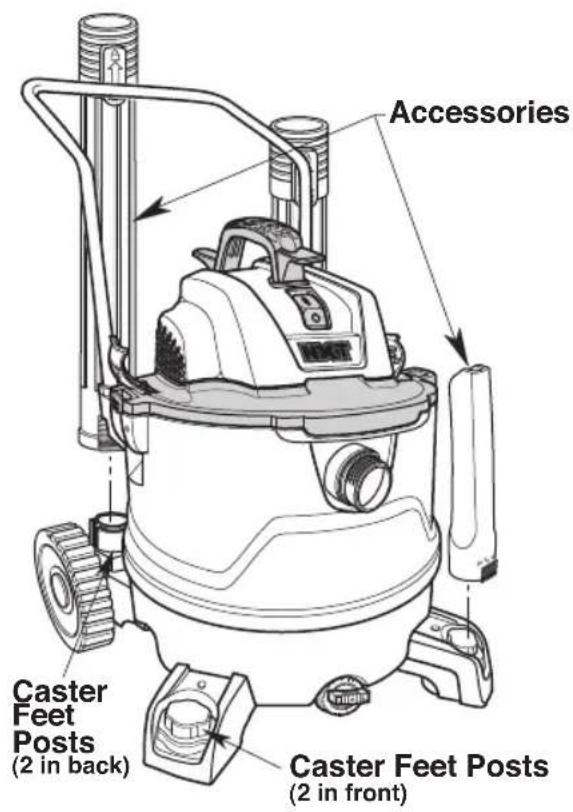
- The Extension Wands and other Accessories can be stored by placing them over the Posts on the Two Caster Feet.
- To remove, twist and pull up on the Extension Wand or Accessory.
- Snap additional Accessories onto the Accessory Caddy.
text_image
Accessories Caster Feet Posts (2 in back) Caster Feet Posts (2 in front)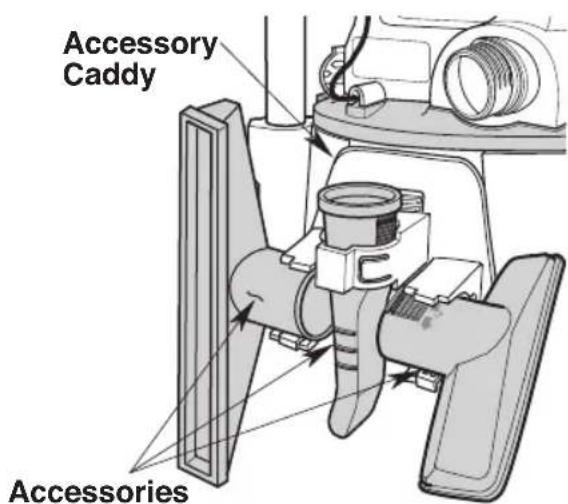
text_image
Accessory Caddy AccessoriesCord Storage
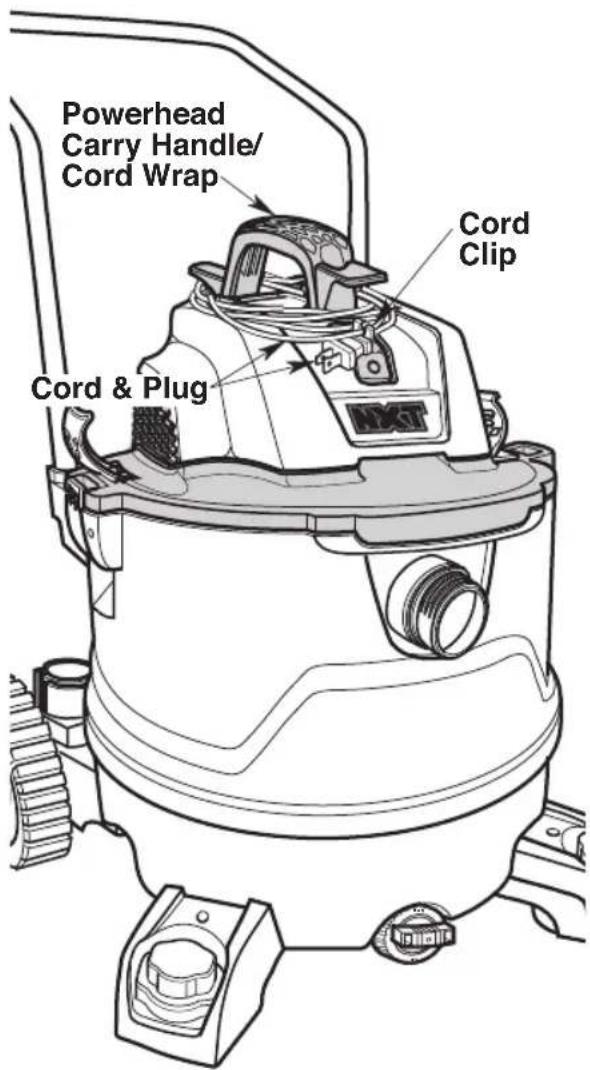
To store the Cord, wrap it around the Powerhead Carry Handle / Cord Wrap beneath the two Tabs. Secure the Cord using the Cord Clip on the Plug.
text_image
Powerhead Carry Handle/ Cord Wrap Cord Clip Cord & PlugACCESSORY & HOSE STORAGE
Hose Storage
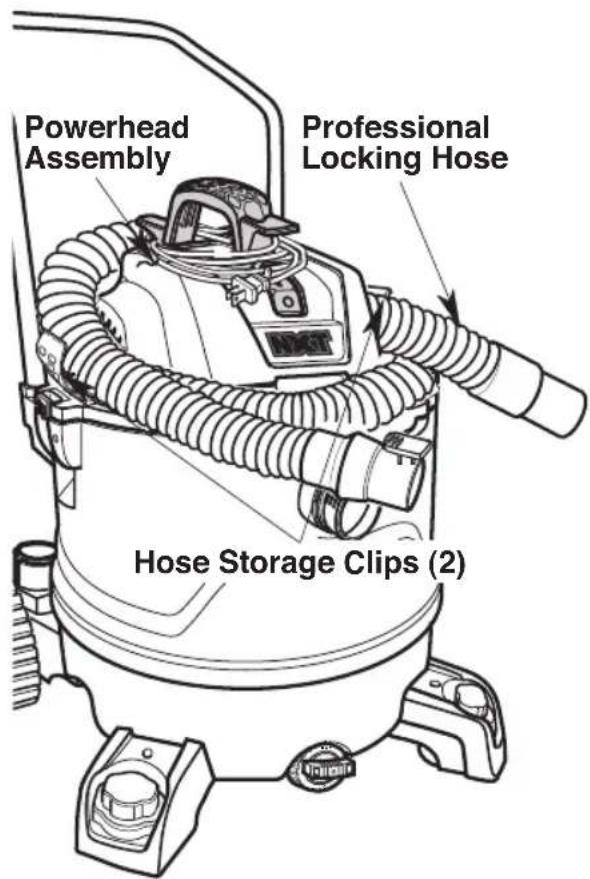
The Professional Locking Hose may be stored around the Powerhead Assembly by tucking it between the Motor Housing and Hose Storage Clips.
CAUTION:
Do not operate vacuum while the hose is still wrapped around the powerhead assembly in the storage position.
WARNING:
Do not put any object into ventilation openings. Do not vacuum with any ventilation openings blocked; keep free of dust, lint, hair or anything that may reduce air flow.
text_image
Powerhead Assembly Professional Locking Hose Hose Storage Clips (2)MAINTENANCE
Filter
WARNING:
To reduce the risk of injury from accidental starting, unplug power cord before changing or cleaning filter.
NOTE: The Filter is made of high quality paper designed to stop small particles of dust. The Filter can be used for dry pick up or small amounts of liquid. Handle the Filter carefully when removing or installing it. Creases in the Filter Pleats may occur from installation but will not affect the performance of the Filter.
Removal & Installation of the Qwik Lock™ Filter
Filter Removal:
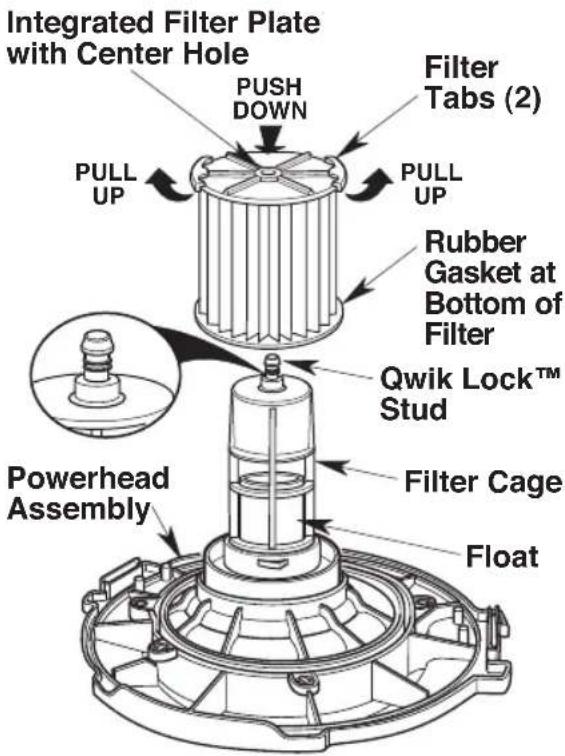
- Place fingers under the two Filter Tabs.
- While pressing down with one thumb on the Qwik Lock™ Stud that protrudes through the center of the Filter Plate, lift up on the Tabs until Filter releases.
- Slide Filter off Filter Cage.
IMPORTANT: To avoid blower wheel and motor damage always reinstall filter before using Vac for dry pickup.
Filter Installation:
- Slide the Qwik Lock™ Filter over the Filter Cage while aligning the Qwik Lock™ Stud on the Filter Cage with the center hole in the Qwik Lock™ Integrated Filter Plate.
- Make sure the Rubber Gasket at the bottom of the Qwik Lock™ Filter seats around the base of the Filter Cage.
- Firmly press the Qwik Lock™ Integrated Filter Plate down around the Qwik Lock™ Stud until it snaps into place.
NOTE: Failure to properly seat the bottom Gasket and Integrated Filter Plate to the Filter Cage could result in debris bypassing the Filter.
WARNING:
Do not operate without filter cage and float, as they prevent liquid from entering the impeller and damaging the motor.
text_image
Integrated Filter Plate with Center Hole PUSH DOWN Filter Tabs (2) PULL UP PULL UP Rubber Gasket at Bottom of Filter Qwik Lock™ Stud Powerhead Assembly Filter Cage FloatYour Filter should be cleaned often to maintain peak Vac performance.
MAINTENANCE
Cleaning A Dry Filter
- Some removal of dry debris can be accomplished without removing the Filter from the Vac. Slap your hand on top of the Lid while the Vac is turned off.
- For best cleaning results due to accumulated dust, clean the Filter in an open area. Cleaning SHOULD be done outdoors and not in the living quarters.
- After Filter removal from Vac, remove the dry debris by gently tapping Filter against the inside wall of your Dust Drum. The debris will loosen and fall.
- For thorough cleaning of Dry Filter with fine dust (no debris), run water through it as described under "Cleaning A Wet Filter".
Cleaning A Wet Filter
After Filter is removed, run water through the Filter from a hose or spigot. Take care that water pressure from the hose is not strong enough to damage Filter.
IMPORTANT: After cleaning, check the Filter for tears or small holes. Do not use a Filter with holes or tears in it. Even a small hole can allow dust to come out of your Vac. Replace it immediately.
Allow the Filter to dry completely before reinstalling and storing the Vac or picking up dry debris.
WARNING:
To assure product SAFETY and RELIABILITY, any other maintenance, repairs and adjustments should be performed by Authorized Service Centers, always using RIDGID replacement parts.
14 U.S. Gallon (53 Liter) Cart Wet/Dry Vac Model Number RT14000
Electrical Ratings:
120 V 10.5 A 60 Hz
RIDGID parts are available on-line at store.ridgid.com/provacs
Always order by Part Number - Not by Key Number
WARNING:
SERVICING OF DOUBLE-INSULATED WET/DRY VAC
In a double-insulated Wet/Dry Vac, two systems of insulation are provided instead of grounding. No grounding means is provided on a double-insulated appliance, nor should a means for grounding be added. Servicing a double-insulated Wet/Dry Vac requires extreme care and knowledge of the system, and should be done only by qualified service personnel. Replacement parts for a double-insulated Wet/Dry Vac must be identical to the parts they replace. Your double-insulated Wet/Dry Vac is marked with the words “DOUBLE INSULATED” and the symbol (square within a square) may also be marked on the appliance.
To reduce the risk of injury from electrical shock, unplug power cord before servicing the electrical parts of the Wet/Dry Vac.
WARNING:
To reduce the risk of injury from electrical shock, unplug power cord before servicing the electrical parts of the Wet/Dry Vac.
WARNING:
All disassembly and repairs should be performed by qualified personnel.
This product has a 90 day Satisfaction Guarantee Policy as well as a Limited Lifetime Warranty.
For Warranty and Policy details go to RIDGID.com/VacWarranty or call 1-800-4-RIDGID.

EMERSON™
www.RIDGID.com
© 2019 Emerson
Part No. SP7080 Form No. SP7080-1 Printed in Mexico 04/19
text_image
Technical diagram of a vacuum cleaner with labeled parts and exploded view, including airbag, hose, and cleaning components.ENSAMBLAJE
text_image
Accessory Supported parts accessories Accessories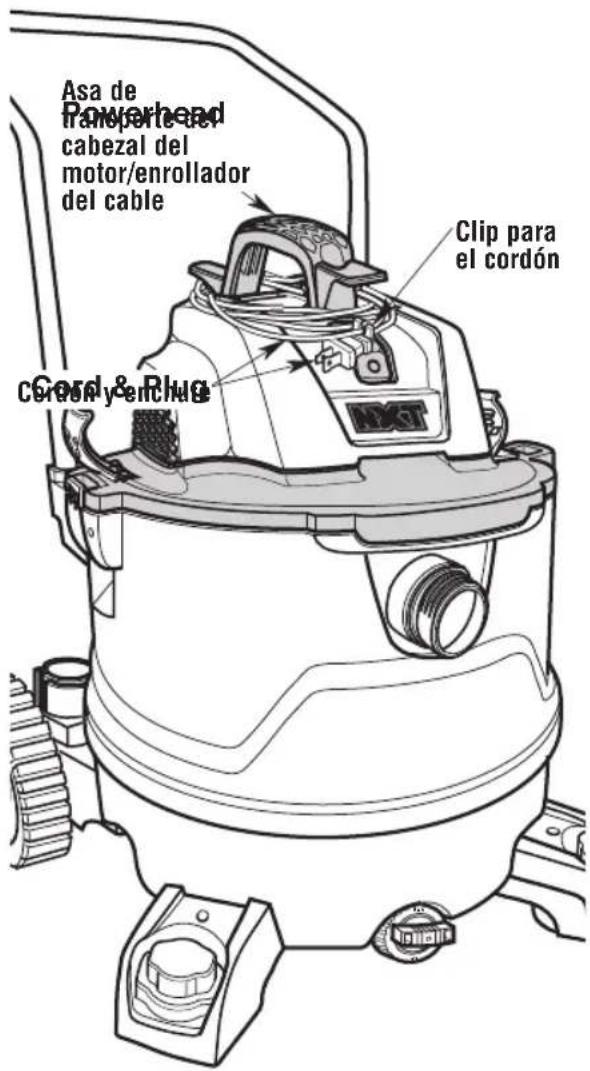
text_image
A Qté M N* O P Q B C D R E F G H S I J K T U V L43