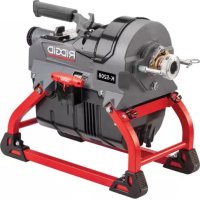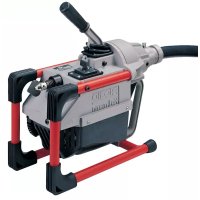
K3800 - Drain cleaning machine RIDGID - Free user manual and instructions
Find the device manual for free K3800 RIDGID in PDF.

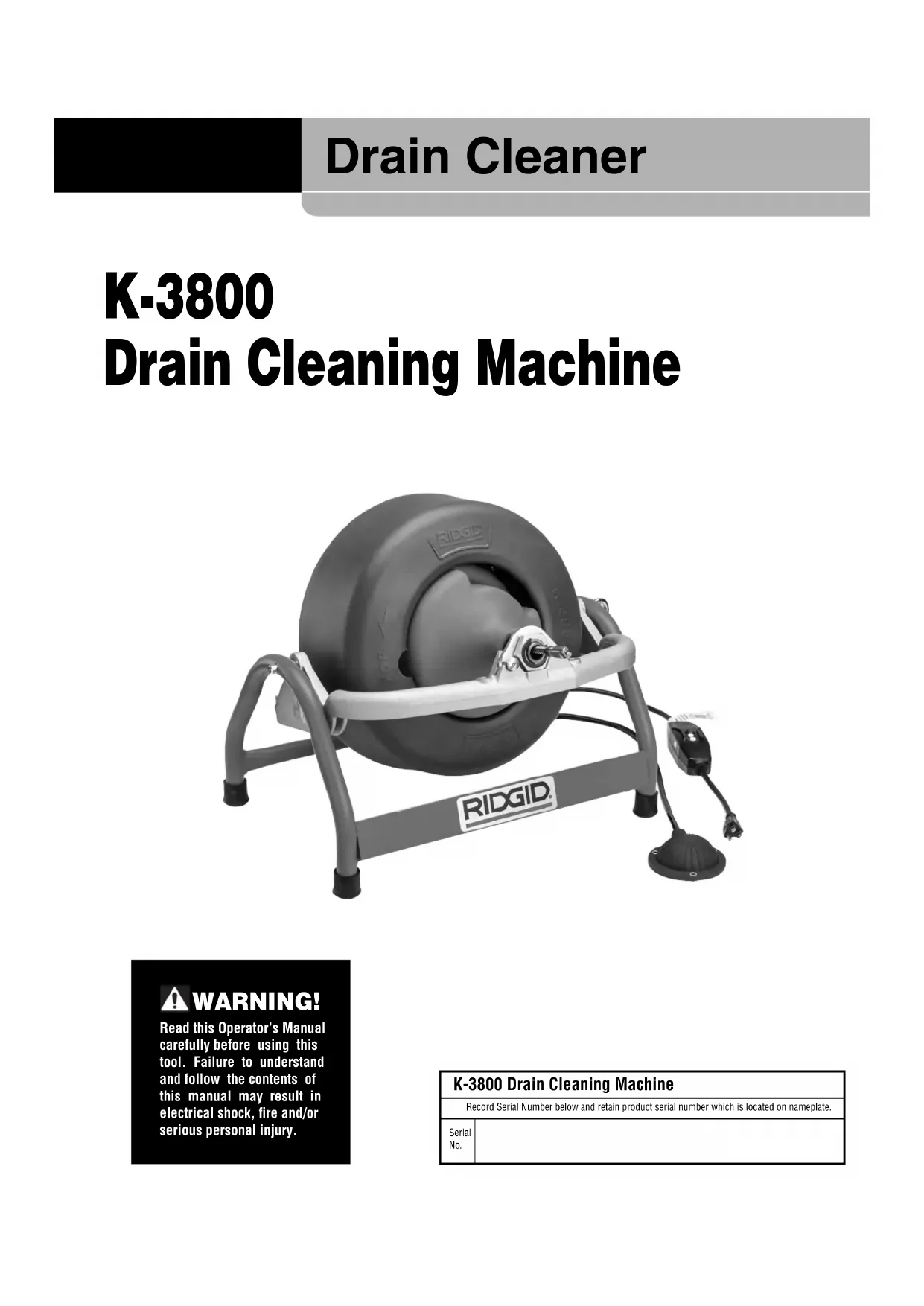


| Brand | RIDGID |
| Model | K3800 |
| Type | Drain cleaning machine (electric drain auger) |
| Cleaning capacity | Max diameter 4 in (100 mm), max length 100 ft (30 m) |
| Compatible cable diameters | 1/4 in, 5/16 in, 3/8 in, 1/2 in |
| Standard drum | 100 ft of 3/8 in cable or 90 ft of 1/2 in cable |
| Sink drum (optional) | 50 ft of 5/16 in cable |
| Motor | Universal reversible 120 V, 50-60 Hz, 1/10 HP, 1.5 A |
| Power supply | 120 V AC, 50-60 Hz (220-240 V version available on request) |
| Dimensions (L x H x W) | 48 cm x 43 cm x 36 cm |
| Sound level (pressure) | 76.1 dB(A), K=3 |
| Sound level (power) | 80.01 dB(A), K=3 |
| Safety | Built-in GFCI circuit breaker, foot pedal, gloves included |
| Included accessories (depending on version) | Cables, cutting tools (auger, cutter), decoupling key, gloves |
| Feed system | Standard manual; optional AUTOFEED® automatic system |
| Warranty | Lifetime warranty (FULL LIFETIME WARRANTY) on defects in materials and workmanship |
| Maintenance | Regular lubrication, rinse cables with water, indoor storage |
| After-sales service | Authorized RIDGID service center, factory return possible |
Frequently Asked Questions - K3800 RIDGID
User questions about K3800 RIDGID
0 question about this device. Answer the ones you know or ask your own.
Ask a new question about this device
Download the instructions for your Drain cleaning machine in PDF format for free! Find your manual K3800 - RIDGID and take your electronic device back in hand. On this page are published all the documents necessary for the use of your device. K3800 by RIDGID.
USER MANUAL K3800 RIDGID
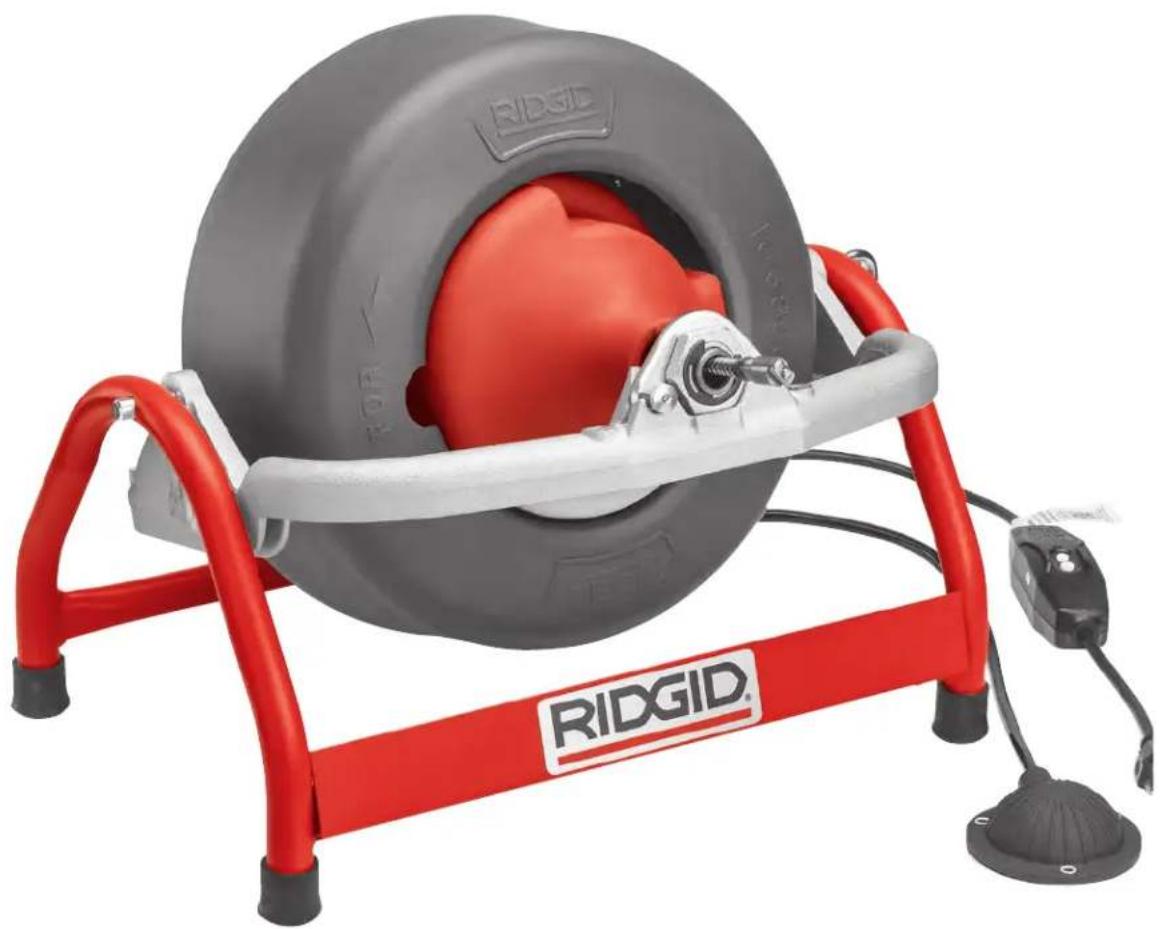
K-3800 Drain Cleaning Machine
natural_image
Ridgid motor stand with red and gray components, no visible text or symbols on the device itself.Table of Contents
Recording Form for Machine Serial Number....1
Safety Symbols 2
General Safety Information
Work Area Safety....2
Electrical Safety 2
Personal Safety 2
Tool Use and Care....3
Service....3
Specific Safety Information
Machine Safety ....3
Description, Specifications and Standard Equipment
Description....4
Specifications....4
Standard Equipment 4
Accessories 4
Machine Assembly
Installing Drum ....5
Instructions For Mounting AUTOFEED ^® 5
Machine Inspection ....6
Machine Set Up 6
Operating Instructions
Using Manual Feed Machine....8
Using AUTOFEED Machine 8
Special Procedures
Reverse Operating Instructions....10
Removing Drum 10
Machine Transport 10
Draining Water From Drum 10
Installing Replacement Cable
To Remove Damaged or Worn Cables....10
To Install Replacement Cables 11
Accessories
Replacement Cables & Tools....12
Maintenance Instructions
Lubrication....13
AUTOFEED Assembly 13
Cables 13
Machine Storage....13
Service and Repair ....13
Troubleshooting ....14
EC Declaration of Conformity....Inside Back Cover
Lifetime Warranty....Back Cover
*Original Instructions - English
Drain Cleaner
K-3800
Drain Cleaning Machine
natural_image
Ridgid electric motor stand with attached cable and sensor, no visible text or symbols on the device itself.
WARNING!
Read this Operator's Manual carefully before using this tool. Failure to understand and follow the contents of this manual may result in electrical shock, fire and/or serious personal injury.
K-3800 Drain Cleaning Machine
| Record Serial Number below and retain product serial number which is located on nameplate. | |
| Serial No. | |
Safety Symbols
In this operator's manual and on the product, safety symbols and signal words are used to communicate important safety information. This section is provided to improve understanding of these signal words and symbols.

This is the safety alert symbol. It is used to alert you to potential personal injury hazards. Obey all safety messages that follow this symbol to avoid possible injury or death.

DANGER
DANGER indicates a hazardous situation which, if not avoided, will result in death or serious injury.

WARNING
WARNING indicates a hazardous situation which, if not avoided, could result in death or serious injury.

CAUTION
CAUTION indicates a hazardous situation which, if not avoided, could result in minor or moderate injury.
NOTICE
NOTICE indicates information that relates to the protection of property.

This symbol means read the operator's manual carefully before using the equipment to reduce the risk of injury. The operator's manual contains important information on the safe and proper operation of the equipment.

This symbol means always wear safety glasses with side shields or goggles when handling or using this equipment to reduce the risk of eye injury.

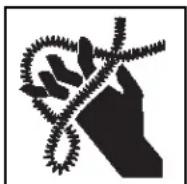
This symbol indicates the risk of hands, fingers or other body parts being caught, wrapped or crushed in the drain cleaning cable.

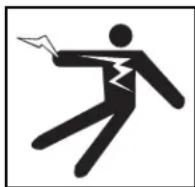
This symbol indicates a risk of electrical shock.
General Power Tool Safety Warnings\*
WARNING
Read all safety warnings, instructions, illustrations and specifications provided with this power tool. Failure to follow all instructions listed below may result in electric shock, fire, and/or serious injury.
SAVE ALL WARNINGS AND INSTRUCTIONS FOR FUTURE REFERENCE!
The term "power tool" in the warnings refers to your mains-operated (corded) power tool or battery-operated (cordless) power tool.
Work Area Safety
- Keep work area clean and well lit. Cluttered or dark areas invite accidents.
- Do not operate power tools in explosive atmospheres, such as in the presence of flammable liquids, gases, or dust. Power tools create sparks which may ignite the dust or fumes.
- Keep children and by-standers away while operating a power tool. Distractions can cause you to lose control.
Electrical Safety
- Power tool plugs must match the outlet. Never modify the plug in any way. Do not use any adapter plugs with earthed (grounded) power tools. Unmodi fied plugs and matching outlets will reduce risk of electric shock.
- Avoid body contact with earthed or grounded surfaces such as pipes, radiators, ranges and refrigerators. There is an increased risk of electrical shock if your body is earthed or grounded.
- Do not expose power tools to rain or wet conditions. Water entering a power tool will increase the risk of electrical shock.
- Do not abuse the cord. Never use the cord for carrying, pulling or unplugging the power tool. Keep cord away from heat, oil, sharp edges or moving parts. Damaged or entangled cords increase the risk of electric shock.
- When operating a power tool outdoors, use an extension cord suitable for outdoor use. Use of a cord suitable for outdoor use reduces the risk of electric shock.
- If operating a power tool in a damp location is unavoidable, use a ground fault circuit interrupter (GFCI) protected supply. Use of a GFCI reduces the risk of electric shock.
Personal Safety
- Stay alert, watch what you are doing and use common sense when operating a power tool. Do not use a power tool while you are tired or under the influence of drugs, alcohol, or medication. A moment of inattention while operating power tools may result in serious personal injury.
- Use personal protective equipment. Always wear eye protection. Protective equipment such as dust mask, non-skid safety shoes, hard hat, or hearing protection used for appropriate conditions will reduce personal injuries.
- Prevent unintentional starting. Ensure the switch is in the OFF position before connecting to power source and/or battery pack, picking up or carrying the tool. Carrying power tools with your finger on the switch or energizing power tools that have the switch ON invites accidents.
- Remove any adjusting key or wrench before turning the power tool ON. A wrench or a key left attached to a rotating part of the power tool may result in personal injury.
- Do not overreach. Keep proper footing and balance at all times. This enables better control of the power tool in unexpected situations.
- Dress properly. Do not wear loose clothing or jewelry. Keep your hair, and clothing away from moving parts. Loose clothes, jewelry, or long hair can be caught in moving parts.
- If devices are provided for the connection of dust extraction and collection facilities, ensure these are connected and properly used. Use of dust collection can reduce dust-related hazards.
- Do not let familiarity gained from frequent use of tools allow you to become complacent and ignore tool safety principles. A careless action can cause severe injury within a fraction of a second.
Power Tool Use and Care
- Do not force power tool. Use the correct power tool for your application. The correct power tool will do the job better and safer at the rate for which it is designed.
- Do not use power tool if the switch does not turn it ON and OFF. Any power tool that cannot be controlled with the switch is dangerous and must be repaired.
- Disconnect the plug from the power source and/or
remove the battery pack, if detachable, from the power tool before making any adjustments, changing accessories, or storing power tools. Such preventive safety measures reduce the risk of starting the power tool accidentally.
- Store idle power tools out of the reach of children and do not allow persons unfamiliar with the power tool or these instructions to operate the tool. Power tools are dangerous in the hands of untrained users.
- Maintain power tools and accessories. Check for misalignment or binding of moving parts, breakage of parts and any other condition that may affect the power tool's operation. If damaged, have the power tool repaired before use. Many accidents are caused by poorly maintained power tools.
- Keep cutting tools sharp and clean. Properly maintained cutting tools with sharp cutting edges are less likely to bind and are easier to control.
- Use the power tool, accessories and tool bits etc. in accordance with these instructions, taking into account the working conditions and the work to be performed. The use of the power tool for operations different from those intended could result in a hazardous situation.
- Keep handles and grasping surfaces dry, clean and free from oil and grease. Slippery handles and grasping surfaces do not allow for safe handling and control of the tool in unexpected situations.
Service
- Have your power tool serviced by a qualified repair person using only identical replacement parts. This will ensure that the safety of the power tool is maintained.
Specific Safety Information
WARNING
Read this operator's manual carefully before using the K-3800 Drain Cleaner. Failure to understand and follow the contents of this manual may result in electrical shock, fire and/or serious personal injury.
Call the Ridge Tool Company, Technical Service Department at (800) 519-3456 if you have any questions.
Drain Cleaner Safety
- Wear gloves provided with the machine. Never grasp a rotating cable with a rag or loose fitting cloth glove. Could become wrapped around the cable and cause serious injury.
- Do not overstress cables. Keep two hands on the cable for control when machine is running. Over-stressing cables because of obstruction may cause twisting, kinking or breaking of the cable and result in serious injury.
- Position machine within two feet of inlet. Greater distances can result in cable twisting or kinking.
- Machine is designed for one person operation. Operator must control foot switch and cable.
- Use foot switch to operate machine while maintaining good footing and balance. Do not operate machine in (REV) reverse. Operating machine in reverse can result in cable damage and is used only to back tool out of an obstruction.
- Keep hands away from rotating drum and guide tube. Do not reach into drum unless machine is unplugged. Hand may be caught in the moving parts resulting in serious injury.
- Be careful when cleaning drains where cleaning compounds have been used. Avoid direct contact with skin and eyes. Serious burns can result from some drain cleaning compounds.
- Do not operate machine if operator or machine is standing in water. This will increase the risk of electrical shock.
- Wear safety glasses and rubber soled, non-slip shoes. Use of this safety equipment may prevent serious injury.
- Only use the K-3800 to clean drain lines up to 4" in diameter. Follow instructions on the use of the machine. Other uses or modifying the drain cleaner for other applications may increase the risk of injury.
Description, Specifications And Standard Equipment
Description
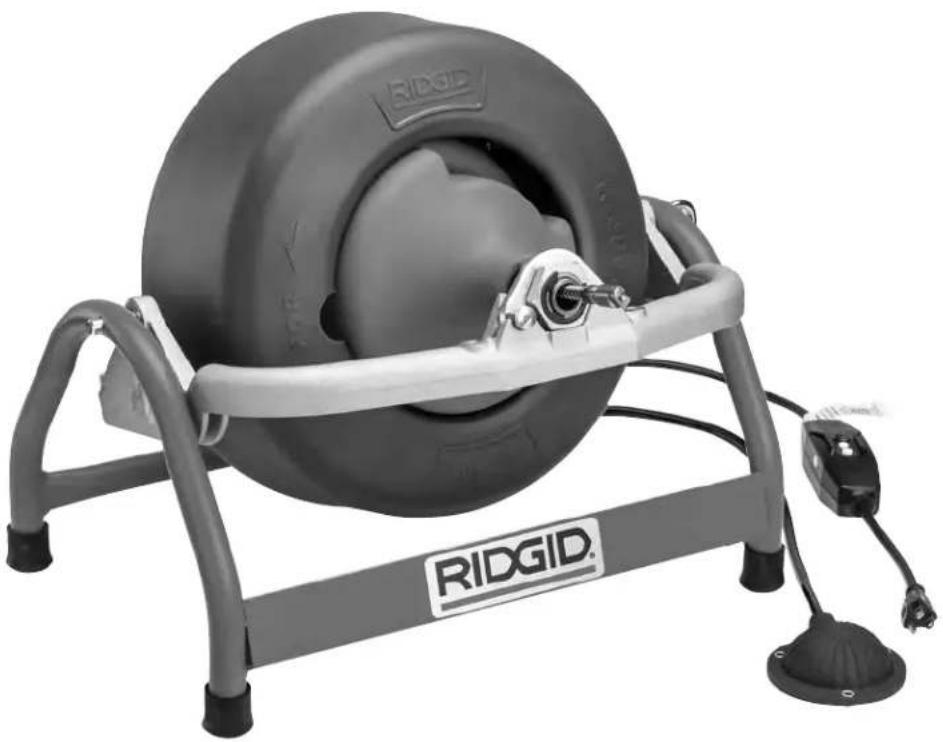
The RIDGID® K-3800 Drain Cleaning Machine will clean drain lines up to 4" in diameter and 100 feet in length. Drum provided with the machine holds up to 100 feet of cable or 90 feet of 52 " cable. An optional sink drum holds 50 feet of 516 " cable. Both drums include an inner-drum to guard against cable flip-over. Designed to clean sink lines, floor drains and roof vents.
The drum is driven by /_10 HP universal series motor that has a grounded electrical system. An integral Ground Fault Interrupter (GFCI) is built into the line cord and a pneumatic foot actuator provides ON/OFF control of the motor. When the cable hits a blockage, the motor gears down automatically to provide more power and greater operator control.
The cable is manually fed in and out of the drain. An optional AUTOFEE® is available that will advance or retract the cable. Drum tilt-adjusts to provide proper cable feed angle. The cable has a quick change coupling system for connecting tools. The drum separates from the motor frame for two-hand transport.
Specifications
Line Capacity ....Depends on choice of cable. Refer to the following chart for recommendations.
Recommended Line Size and Distance
| Cable Size in. | Line Size Distance | |||
| mm ft. | m | |||
| ^1/_4'' Cable | ^3/_4 - 1^1/_4 | 19 - 32 | 35 | 10.6 |
| ^5/_16'' Cable | ^3/_4 - 1^1/_2 | 19 - 38 | 50 | 15.2 |
| ^3/_3'' Cable | 1^1/_2 - 3 | 38 - 75 | 100 | 30.0 |
| ^1/_2'' Cable | 2 - 4 | 50 - 100 | 90 | 27.0 |
Drum Capacity
Standard Cable Drum....100' of 38 " Cable 90' of 12 " Cable
Sink Drum....50' of 516 " Cable
Motor
Type ....120V/50-60 Hz, Reversible, Universal AC Motor. 220-240V Available Upon Request
Rating 1/10 HP
Amps 1.5A
Weight (machine only) ...42 lbs. (19 kg)
Length 19" (48 cm)
Height 17" (43 cm)
Width 14" (36 cm)
Sound Pressure ( L_A )*.....76.1 dB(A), K=3
Sound Power ( I_WA )*......80.01 dB(A), K=3
* Sound measurements are measured in accordance with a standardized test per Standard EN 62481-1.
- Sound emissions may vary due to your location and specific use of these tools.
- Daily exposure levels for sound need to be evaluated for each application and appropriate safety measures taken when needed. Evaluation of exposure levels should consider the time a tool is switched off and not in use. This may significantly reduce the exposure level over the total working period.
Standard Equipment
K-3800 w/C-31 Cable, Cat. No. 53112 includes:
- K-3800 Machine
• C-31, 38 " x 50' Inner Core Cable
• T-202 Bulb Auger
• T-205 "C" Cutter 1 ^3 / _8 "
• T-211 Spade Cutter
- A-13 Pin Key
- Pair Gloves
K-3800 w/C-32, Cat. No. 53117 includes:
• K-3800 Machine
• C-32, 38 " x 75' Inner-Core Cable
• T-202 Bulb Auger
• T-205 "C" Cutter
• T-211 Spade Cutter
- A-13 Pin Key
- Pair Gloves
K-3800 w/C-45, Cat. No. 53122 includes:
• K-3800 Machine
• C-45, 12 " x 75' Inner-Core Cable
• T-102 Funnel Auger
• T-142 Blade Cutter
• T-107 Spade Cutter
- A-12 Pin Key
- Pair Gloves
K-3800 w/C-46, Cat. No. 53127 includes:
• K-3800 Machine
• C-46, 1/2" x 90' Inner-Core Cable
• T-102 Funnel Auger
• T-142 Blade Cutter
• T-107 Spade Cutter
- A-12 Pin Key
- Pair Gloves
Accessories
| Catalog ModelNo. No. | Description | |
| 55002 A-380 Std Drum for ^3/_8 ", ^1/_2 " Cable55007 A-381 Sink Drum for ^5/_16 ", ^1/_4 " Cable41937 — Pair of Gloves59230 A-13 Pin Key for ^3/_8 " Cable59225 A-12 Pin Key for ^1/_2 " Cable55017 — Transport Cart55012 A-381-A Sink Drum w/25' x ^5 / _16 " InnerCore Cable60087 — K3800 AUTOFEED | ||
Machine Assembly
WARNING
To prevent serious injury, proper assembly of the Drain Cleaner is required. The following procedures should be followed:
To Install Drum
- Loosen adjusting knob and pivot yoke assembly to a slight angle (15 degrees) above horizontal, then retighten knob (Figure 1).
- Pull locking pin to release nose bracket and swing bracket open.
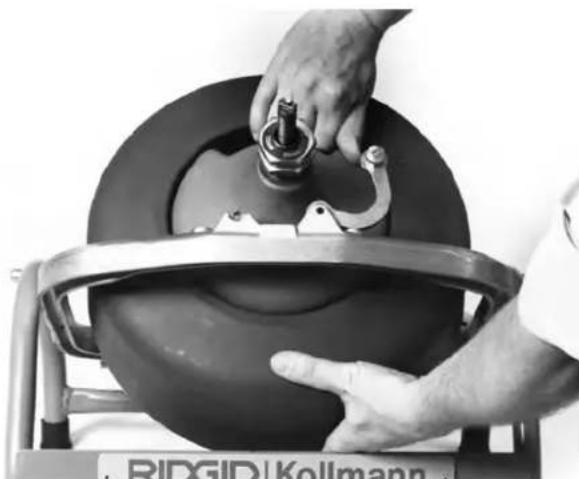
- Grasp drum at hand-hold and steady it with your free hand. Align drum drive shaft with mounting bore
on gearbox. Then slide shaft home. Bearing assembly (on front of drum) should rest flat on its mount on yoke (Figure 2).
- Slowly rotate drum until drive shaft engages with drive lug on gearbox. Drum should drop back slightly as drive engages.
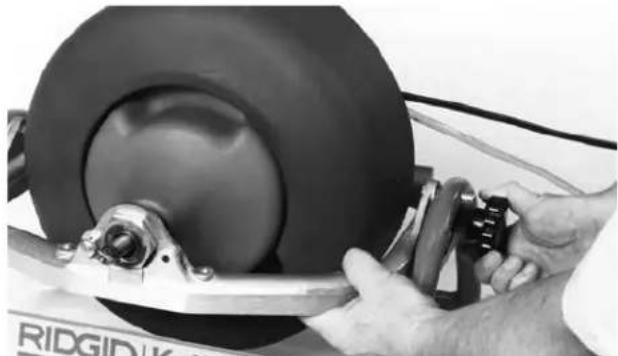
natural_image
Close-up of hands using a tool to adjust or install a car tire component (no visible text or symbols)Figure 1 – Pivoting Yoke Assembly
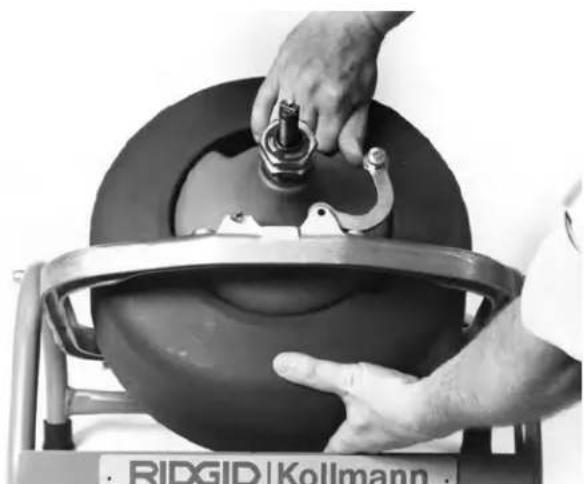
natural_image
Close-up of hands operating a mechanical device with a knob, no visible text or symbols on the device itself.Figure 2 – Aligning Drum and Gearbox Bore
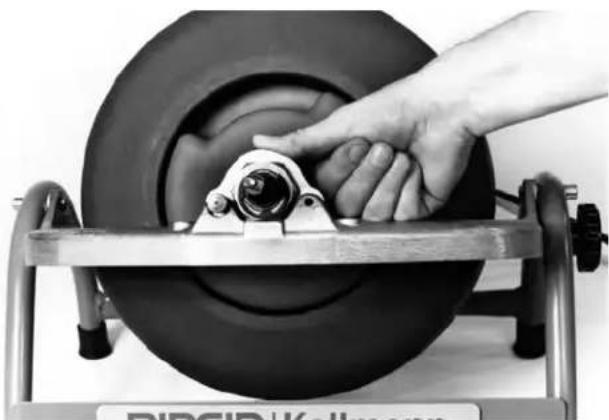
natural_image
Close-up of a hand operating a tire on a metal frame (no visible text or symbols)Figure 3 – Locking Front Bracket
- Close bracket over bearing assembly, push down on bracket until push pin clicks into locked position in yoke (Figure 3).
NOTE! If bracket does not align with groove in bearing assembly, drive bracket is not engaged. Rotate drum for proper engagement.
Instructions For Mounting AUTOFEED®
(Optional Accessory)
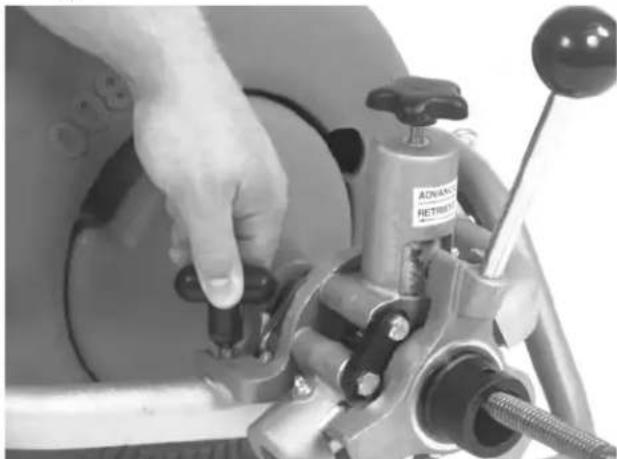
- Screw handle into the AUTOFEED.
NOTE! The AUTOFEED comes from the factory set-up to run both 12 " and 38 " cable. No addition or removal of spacers is necessary.
-
Turn feed knob up to allow cable to pass through the AUTOFEED.
-
Attach the AUTOFEED onto the front frame of the K-3800 using the two T-shaped mounting knobs (Figure 4).
natural_image
Close-up of a hand operating a mechanical device with a labeled component (no readable text or symbols)Figure 4 – Mounting the AUTOFEED Onto the Frame
Machine Inspection
WARNING
To prevent serious injury, inspect your Drain Cleaning Machine. The following inspection procedures should be performed before each use.
-
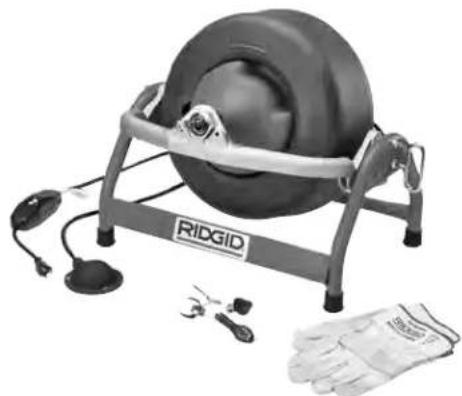
Make sure the Drain Cleaning Machine is unplugged and the directional switch is set to the OFF position (Figure 5).
-
Make sure the foot switch is present and attached to the Drain Cleaning Machine (Figure 5). Do not operate the machine without a foot switch.
natural_image
Ridgid portable electric motor stand with attached sensors and gloves (no visible text or symbols)Figure 5 – K-3800 Drum Machine
-
Inspect the power cord, Ground Fault Circuit Inter-rupter (GFCI) and plug for damage. If the plug has been modified, is missing the grounding prong or if the cord is damaged, do not use the Drain Cleaning Machine until the cord has been replaced.
-
Inspect the Drain Cleaning Machine for any broken, missing, misaligned or binding parts as well as any other conditions which may affect the safe and normal operation of the machine. If any of these conditions are present, do not use the Drain Cleaning Machine until any problem has been repaired.
-
Lubricate the Drain Cleaning Machine, if necessary, according to the Maintenance Instructions.
-
Use tools and accessories that are designed for your drain cleaner and meet the needs of your application. The correct tools and accessories allow you to do the job successfully and safely. Accessories suitable for use with other equipment may be hazardous when used with this drain cleaner.
-
Clean any oil, grease or dirt from all equipment handles and controls. This reduces the risk of injury due to a tool or control slipping from your grip.
-
Inspect the cutting edges of your tools. If necessary, have them sharpened or replaced prior to using the Drain Cleaning Machine. Dull or damaged cutting tools can lead to binding and cable breakage.
-
Inspect cables and couplings for wear and damage. Cables should be replaced when they become severely worn or corroded. A worn cable can be identified when the outside coils become flat.
WARNING Worn or damaged cables can break causing serious injury.
Machine Set-Up
WARNING

To prevent serious injury, proper set-up of the machine and work area is required. The following procedures should be followed to set-up the machine:
-
Check work area for:
-
Adequate lighting
• Grounded electrical outlet - Clear path to the electrical outlet that does not contain any sources of heat or oil, sharp edges or moving parts that may damage electrical cord.
- Dry place for machine and operator. Do not place the machine in water.
-
Flammable liquids, vapors or dust that may ignite.
-
Position the Drain Cleaning Machine within 2' of sewer inlet. Greater distance can result in cable twisting or kinking.
- Position the air foot switch pedal for easy operator accessibility. Machine is designed for one person operation.
- Make sure FOR/OFF/REV switch is in the OFF position.
- Adjust drum and pivot yoke assembly to a convenient position above the sewer inlet.
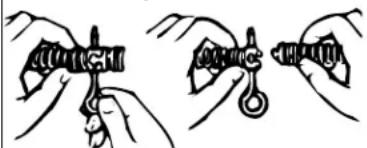
- Select and install the proper tool to the end of the cable. The T-Slot Coupler allows the tool to be snapped into the cable coupler (Figure 6). To remove tool, use the pin key to depress the plunger and slide the coupling apart.
To Couple Cable and Tools
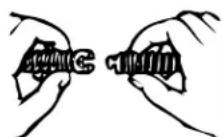
Snap Together Insert Pin Slide Apart
To Uncouple Cable and Tools
natural_image
Illustration of two hands holding a mechanical component, no text or symbols presentFigure 6 – Coupling and Uncoupling Tools
NOTE! Proper Tool Selection
A good rule of thumb is to use a tool at least 1" smaller than the line to be cleaned. The style of the
tool is determined by the nature of the job and is left up to the operator.
- Plug the Drain Cleaning Machine into the electrical outlet, making sure to position the power cord along the clear path selected earlier. If the power cord does not reach the outlet, use an extension cord in good condition.
⚠ WARNING To avoid electric shock and electrical fires, never use an extension cord that is damaged or does not meet the following requirements:
- The cord has a three-prong plug similar to shown in Electrical Safety section.
- The cord is rated as "W" or "W-A" if being used outdoors.
- The cord has sufficient wire thickness (16 AWG - 100'). If the wire thickness is too small, the cord may overheat, melting the cord's insulation or causing nearby objects to ignite.
⚠ WARNING To reduce risk of electrical shock, keep all electrical connections dry and off the ground. Do not touch plug with wet hands. Test the Ground Fault Circuit Interrupter (GFCI) provided with the electric cord to insure it is operating correctly. When test button is pushed in, the indicator light should go off. Reactivate by pushing the reset button in. If indicator light goes on, the machine is ready to use. If the GFCI does not function correctly, do not use the machine.
Operating Instructions
WARNING

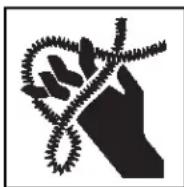
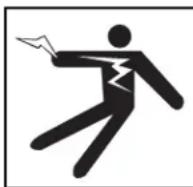
Wear gloves provided with machine. Never grasp a rotating cable with a rag or loose fitting cloth glove that may become wrapped around the cable, causing serious injury.
Always wear eye protection to protect your eyes against dirt and other foreign objects. Wear rubber soled, non-slip shoes.
Be very careful when cleaning drains where cleaning compounds have been used. Wear gloves when handling cable and avoid direct contact to the skin and especially the eyes and facial area as serious burns can result.
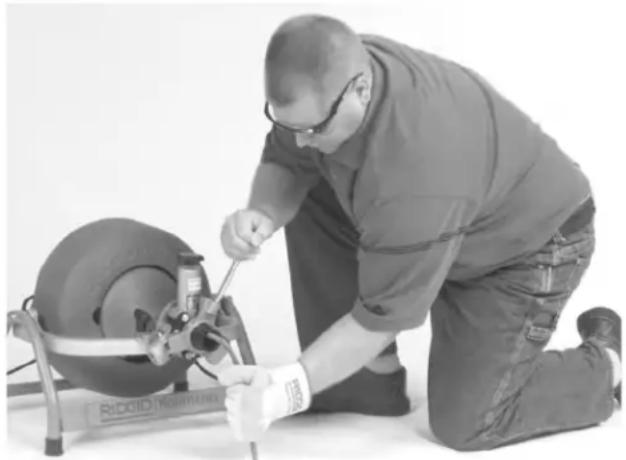
⚠ WARNING Always assume the correct operating posture in order to maintain proper balance (Figure 7). Should an unexpected situation arise, this posture provides you
with the opportunity to safely keep control of the machine and cable.
- Be sure you can quickly remove your foot from the foot switch.
- Hand must be on the cable to control its twisting action when it hits an obstruction.
- Keep hands away from rotating drum. Do not reach into drum unless machine is unplugged.
natural_image
Mechanic kneeling beside a tire-mounted device, wearing safety gear and gloves (no visible text or symbols)Figure 7 – Proper Operating Position
Using Manual Feed Machines
- Pull sufficient cable out of the drum to start tool and cable into the sewer inlet. Push cable into inlet as far as it will go.
- Move FOR/OFF/REV switch into FOR (forward) position. Grasp cable with two gloved hands and pull approximately 1 foot of additional cable out of machine, building a slight loop of cable between machine and sewer inlet (Figure 7).
WARNING Before starting machine, both operator's gloved hands must be on the cable.
- While depressing foot switch to start machine, use both gloved hands to grasp and push cable into sewer inlet. Rotating cable will slowly work its way into line as operator applies downward pressure with gloved hands on cable loop.
- Continue to feed the cable into the line until resistance or obstruction is encountered. This will become apparent to operator as the motor will "lug" down and/or the cable will have a tendency to twist sideways in operator's hands.
- If cable loads down in the obstruction, relieve load by pulling back on cable with short, quick jerks to free cutter (the drum speed will increase). Slowly advance cable back into the obstruction. Repeat this process until the obstruction is clear. Remember,
make sure the cutter is rotating at all times and never force the cable.
WARNING
Do not allow tension to build up in the cable. This will happen if the cutting tool hits a snag and stops turning, but the motor and its drum continue to rotate. Torque builds until the cable suddenly twists, potentially wrapping around your hand or arm. This can happen quickly and without warning, so proceed slowly and carefully as you feed the cable into the drain. If tool gets hung up in an obstruction, refer to Reverse Operating Instructions in the “Special Procedures” section.
- Once obstruction is cleared, it is recommended to flush debris from line with running water. Repeat Step 5 several times if necessary for a thorough cleaning job and then work cable through additional stoppages as required.
- To retrieve cable from sewer line, pull one to two feet of cable from sewer while continuing to run machine in forward rotation. This excess cable should then be manually pushed back into machine. This pull and push procedure should be continued until it is apparent that tool is just inside sewer inlet.
⚠ WARNING Never retract tool from sewer inlet while cable is rotating. Tool can whip causing serious injury.
- Release foot actuator and allow machine to come to a complete stop.
NOTE! It is recommended that a continuous flush of water be used to clean the cable and tool as they are retrieved.
-
Turn FOR/OFF/REV Switch to OFF position and remove cord from power source.
-
Pull remaining cable and tool from sewer and hand feed cable back into machine.
Using AUTOFEED® Machines
- Manually pull sufficient cable out of the drum to start tool and cable into the sewer inlet. Push cable into inlet as far as it will go.
- Turn feed knob down until front bearing makes contact with the cable.
- Move FOR/OFF/REV switch into FOR (forward) position. Do not step on the air foot switch pedal at this time.
-
Loosely grasp cable with gloved hand and place right hand on the feed lever. Feed lever should be in the neutral position (vertical or 12 o'clock). Exert sufficient downward pressure on cable to maintain control while depressing foot actuator to start drum rotation. Do not force the cable. Allow it to feed itself into the drain.
-
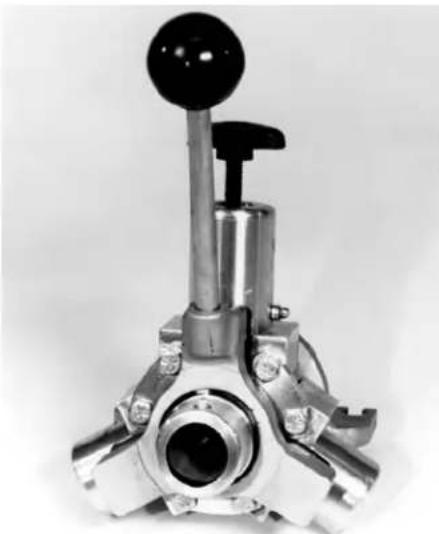
Move the feeder lever in the opposite direction of the rotating drum to advance the cable (Figure 8). The rate at which the cable is fed (0-20 feet per minute) into the sewer is controlled by the position of the feed lever away from neutral (vertical) position. The farther from vertical, the faster the feed rate. Always keep one hand on the cable to feel tension.
WARNING Before starting machine, operator's gloved hands must be on the cable.
WARNING Always keep hand on the cable to feel tension.
natural_image
Mechanical lever assembly with black head and metallic shaft (no visible text or symbols)Figure 8 – AUTOFEED
- Continue to feed the cable into the line until resistance or obstruction is encountered. The condition will generally become apparent to the operator as the cable will have a tendency to twist sideways in the operator's hands.
NOTE! When encountering an obstruction or an elbow, the motor/gearbox will audibly "gear down", indicating the presence of resistance.
-
Operator should immediately respond to this condition by moving feed lever into full reverse (same direction of drum rotation). This should release the twist in cable and reduce size of cable loop.
-
Once free of this obstruction and the load is relieved from the cable, gradually feed cable forward. Remember, when using the feed mechanism the rate of cable advance is controlled by the AUTOFEED handle. Allow cutter to advance slowly and work through the obstruction. If cable shows signs of loading (generally apparent by growing loop between machine and drain), immediately back cutter from obstruction by reversing feed.
NOTE! At this point, progress depends upon the sharpness of the tool and the nature of the obstruction. Continued operation may require manual feed mode until the obstruction has been cleared.
- Manually pull back sharply on the cable to free the cutter and relieve the load on the cable. Slowly advance cable back into the obstruction. Repeat this process until the obstruction is clear. Remember, make sure the cutter is rotating at all times and never force the cable. Occasionally move AUTOFEED lever to neutral to allow cutter to work through the obstruction.
WARNING
Do not allow tension to build up in the cable. This will happen if the cutting tool hits a snag and stops turning, but the motor and its drum continue to rotate. Torque builds until the cable suddenly twists, potentially wrapping around your hand or arm. This can happen quickly and without warning so proceed slowly and carefully as you feed the cable into the drain. If tool gets hung up in an obstruction, refer to Reverse Operating Instructions in the "Special Procedures" section.
- Several passes at a thoroughly blocked drain line are recommended. After establishing flow, increase cutter size to thoroughly clean line. Flush with strong flow of water.
text_image
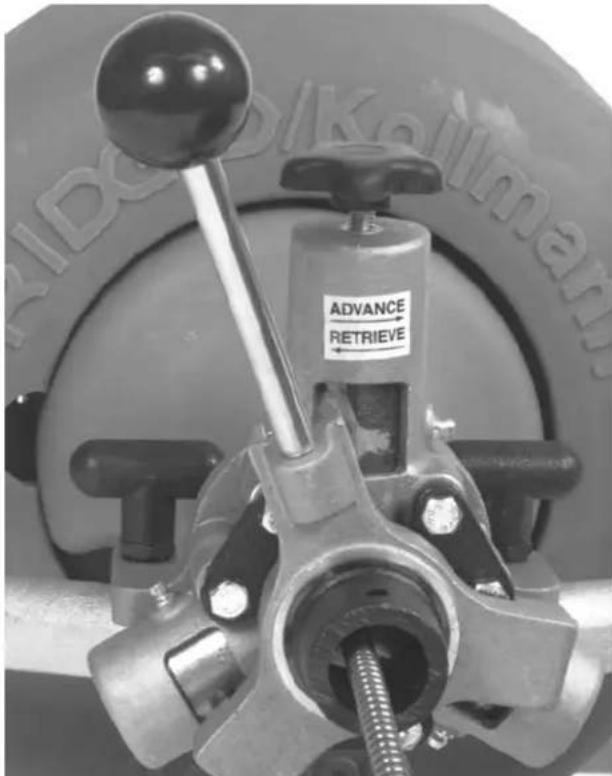
ADVANCE RETRIEVEFigure 9 – AUTOFEED in Reverse Position
- To retrieve cable from sewer line, move the feed
lever in same direction of drum rotation (Figure 9). The cable should now feed itself back into machine. The retrieval process is greatly aided by manually pulling the cable from the drain a foot at a time as the AUTOFEED is used.
NOTE! It is recommended that a continuous flush of water be used to clean cable and tool as they are retrieved.
- When the tool is just inside the sewer inlet, release the air foot switch pedal and allow the machine to come to a complete stop.
WARNING Never retract tool from sewer inlet while cable is rotating. Tool can whip causing serious injury.
-
Turn FOR/OFF/REV switch to OFF position.
-
Loosen the feed knob and pull remaining cable and tool from the sewer. Hand feed the cable into the machine.
-
Remove cord from power source.
Special Procedures Reverse Operation
Running machine in reverse will cause premature failure of cable. Use reverse only to free a tool caught in an obstruction. If this should occur, immediately remove foot from air foot switch pedal and allow machine to come to a full and complete stop. Place FOR/OFF/REV switch to REV (reverse) position.
Tighten screw on nose of machine so that it firmly captures cable to avoid kinks occurring inside the drum. If machine has automatic feed, move feed knob to neutral position. Grasp cable with gloved hands and pull while jogging air foot switch pedal. When tool is dislodged and drum has stopped rotating, place FOR/OFF/REV switch in FOR (forward) position, loosen set screw on nose of machine and follow normal operating procedure.
⚠ WARNING Never operate this machine in REV (reverse) for any other purpose. Operating in reverse can damage a cable and cause serious injury.
To Remove Drum
WARNING FOR/OFF/REV switch should be OFF and machine unplugged before removing or installing drum.
-
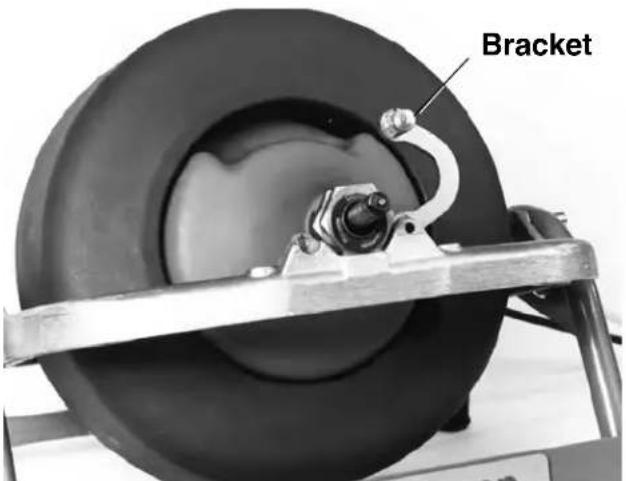
Pull locking pin to release bracket – swing bracket open (Figure 10).
-
Grasp drum at hand hold and pull slightly forward to disengage drive, then lift free of yoke.
text_image
BracketFigure 10 - Open Front Bracket
Machine Transport
The K-3800 is easier to transport with the drum removed. Separating the drum from the frame creates balanced, easy to carry assemblies.
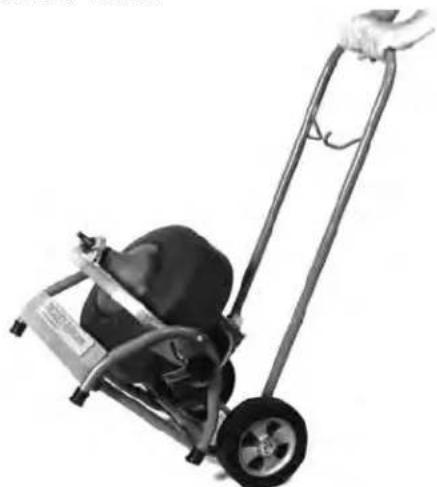
An optional two-wheel cart is also available (Figure 11) Cat. No. 55017.
natural_image
Black-and-white photo of a manual push cart with wheels and a handle, no visible text or symbolsFigure 11 - Optional Transport Cart
Draining Water From Drum
Rotate drum so that drain hole is at lowest point – the six o'clock position. Remove plug and drain drum, then replace plug.
Installing Replacement Cable
⚠ WARNING FOR/OFF/REV switch should be OFF and machine unplugged before removing or installing cable.
To Remove Damaged or Worn Cable
- Remove drum from machine as outlined.
- Pull out loose cable from drum. End of cable is fastened to back wall of drum.
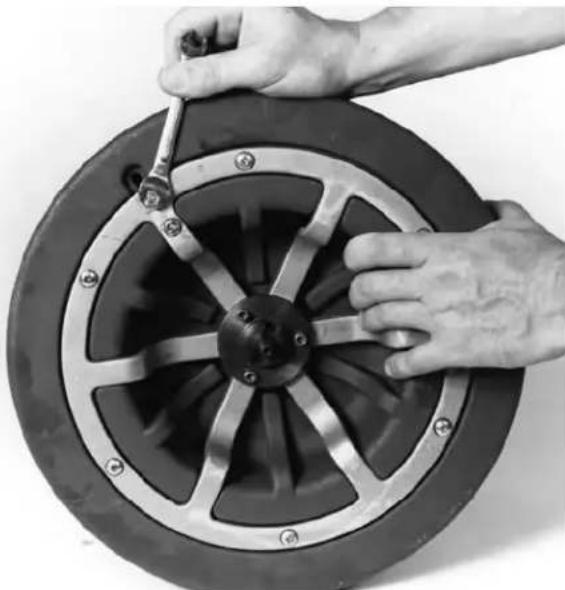
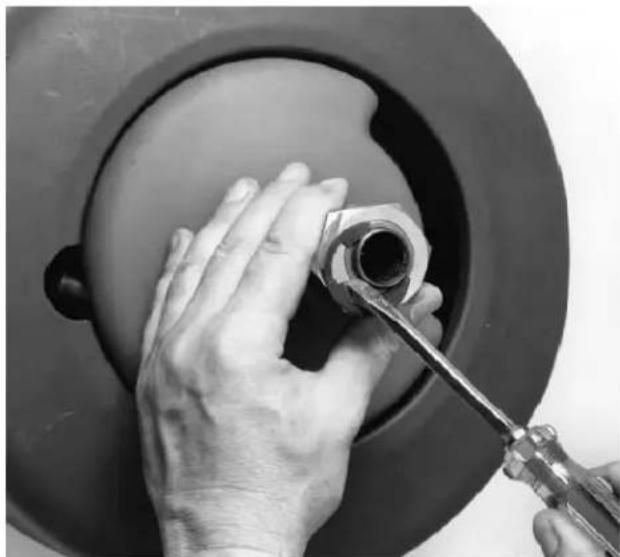
- To free cable end, loosen two bolts on drum back that clamp the cable's end against the back wall of the drum (Figure 12).
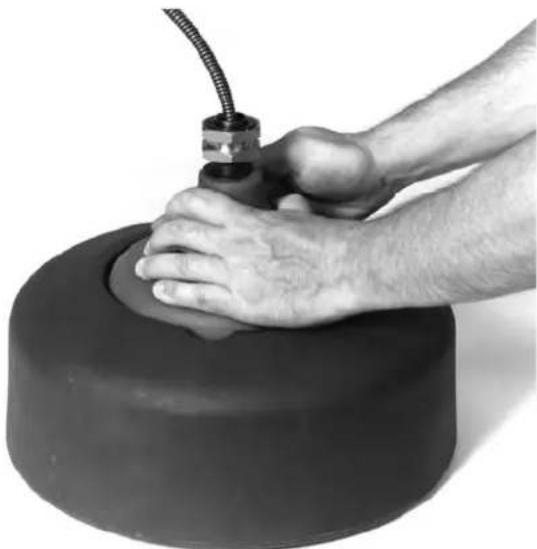
- Grasp the neck of the inner-drum and rotate it counter-clockwise to pull cable end from under bracket (Figure 13).
- Pull remaining length of cable from drum and discard.
natural_image
Close-up of hands adjusting a car wheel rim with a wrench (no text or symbols visible)Figure 12 – Loosen Cable Bracket
natural_image
Close-up of a hand pressing a cylindrical mechanical component with a coiled cable (no text or symbols visible)Figure 13 – Removing Cable End
natural_image
Close-up of hands adjusting a mechanical component with a wrench, no visible text or symbolsFigure 14 – Removing E-Clips
To Install Replacement Cable
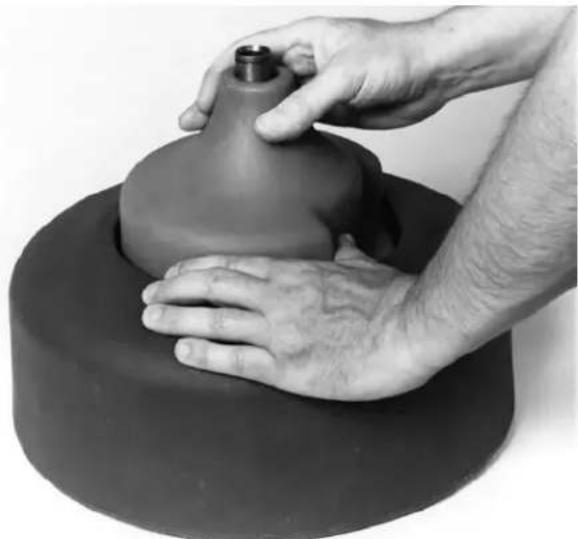
- Remove two E-Clips, front bearing assembly, and inner-drum from guide tube shaft (Figure 14 and Figure 15).
- Insert approximately two feet of cable through the guide tube into drum. Let cable follow natural sweep of guide tube.
natural_image
Close-up of hands shaping a clay pot on a smooth pottery wheel (no text or symbols visible)Figure 15 – Removing Inner Drum
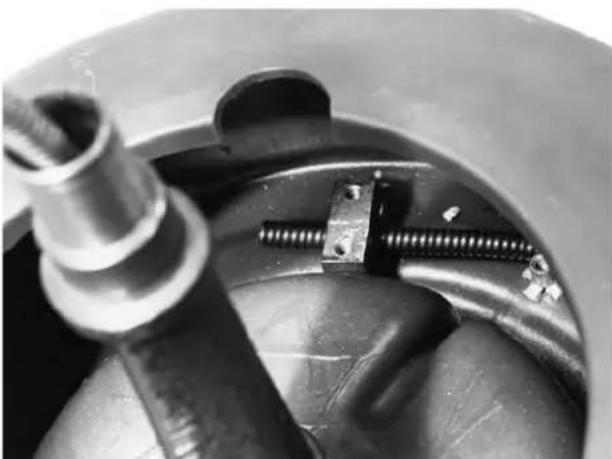
- Reach inside drum and grasp cable near end. Position cable end under cable bracket. Allow 2" of cable to protrude past clamp bracket (Figure 16).
natural_image
Close-up of mechanical components including a cylindrical shaft, threaded fasteners, and a metallic housing (no visible text or symbols)Figure 16 – Position New Cable Under Bracket
NOTE! If cable will not fit under bracket, loosen the two bolts at the drum back.
- With cable end under bracket, retighten bolts to clamp cable firmly against the back wall of the drum.
- Lay drum on its back and push cable into drum. Guide tube will evenly distribute the cable around the drum.
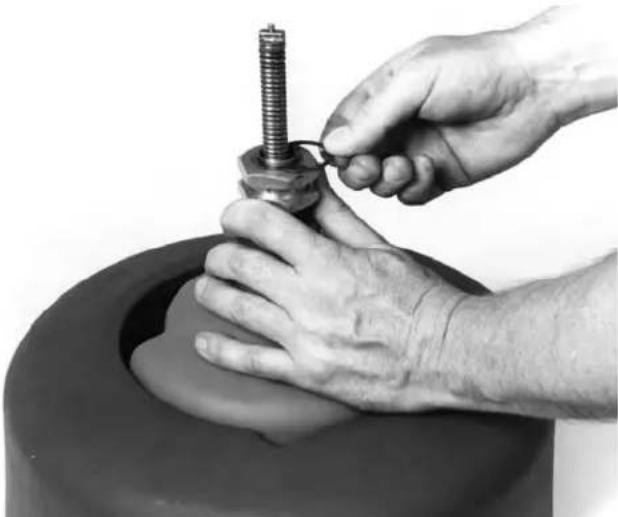
- Reassemble inner drum, front bearing and E-clips (Figure 17).
- Mount drum on machine as outlined previously.
natural_image
Close-up of hands assembling a mechanical component into a cylindrical container (no text or symbols visible)Figure 17 – Reassemble Inner Drum, Front Bracket and E-Clips
Accessories
WARNING Only the following RIDGID products have been designed to function with the K-3800 Drain Cleaning Machine. Other accessories suitable for use with other tools may become hazardous when used on the K-3800. To prevent serious injury, use only the accessories listed below.
Accessories
| Catalog ModelNo. | No. | Description |
| 55002 A-380 | Std | Drum for ^3/_8 , ^1/_2 " Cable |
| 55007 A-381 | Sink | Drum for ^5/_16 ", ^1/_4 " Cable |
| 41937 | — | Pair of Gloves |
| 59230 | A-13 | Pin Key for ^3/_8 " Cable |
| 59225 | A-12 | Pin Key for ^1/_2 " Cable |
| 55017 | — | Transport Cart |
| 55012 | A-381-A | Sink Drum w/25' x ^5/_16 " InnerCore Cable |
| 60087 | — | K3800 AUTOFEED |
Sink Drum Cables
| Catalog No. | Model No. | Description |
| 56782 | C-1IC | ^5/_15" × 25' (7.6m) Inner Core w/Bulb Auger |
| 56787 | C-2IC | ^5/_15" × 25' (7.6m) Inner Core w/Drop Head Auger |
| 56792 | C-13IC | ^5/_16" × 35' (10.7m) w/Funnel Auger |
| 50652 | S-2 | ^1/_4" × 25' (7.6m) w/Funnel Auger |
| 50657 | S-3 | ^1/_4" × 35' (10.7m) w/Funnel Auger |
3/8" Cables (10mm)
| Catalog ModelNo. No. Description | |
| 37842 C-31 50' (15m) I.C. Cable37847 C-32 75' (23m) I.C. Cable37852 C-33 100' (30m) I.C. Cable |
1/2" Cable (12mm)
| Catalog ModelNo. No. Description | |
| 37857 C-44 50' (15m) I.C. Cable37862 C-45 75' (23m) I.C. Cable55467 C-46 90' (27m) I.C. Cable | CableCableCable |
Tools - Fit C-31, C-32 and C-33 Cables
| Catalog No. | Model No. | Description |
| 62990 | T-201 Straight | Auger, 5" Long 18 " O.D. |
| 62995 | T-202 Bulb Auger, 1 | |
| 63000 | T-203 Bulb Auger, | |
| 63065 | T-217 Drop Head, 4" Long | |
| 54837 | T-204 "C" Cutter - 1" | |
| 63005 | T-205 "C" Cutter - 1 | |
| 63010 | T-206 Funnel Auger, 3" Long | |
| 63015 | T-207 Spiral Cutter, 1 | |
| 63020 | T-208 Spiral Cutter, 1 | |
| 63025 | T-209 Spiral Cutter, 2" | |
| 63030 | T-210 Spade Cutter, 1" | |
| 63035 | T-211 Spade Cutter, 1 | |
| 63040 | T-212 Spade Cutter, 1 | |
| 63045 | T-213 4-Blade Cutter, 1" | |
| 63050 | T-214 4-Blade Cutter, 1 | |
| 63055 | T-215 4-Blade Cutter, 1 | |
| 63060 | T-216 Chain Knocker, 2" | |
| 49002 | T-260 Tool Set: | |
| - T-202 Bulb Auger- T-205 "C" Cutter- T-211 Spade Cutter- A-13 Pin Key |
Tools - Fits C-44, C-45, and C-46 Cables
| Catalog No. | Model No. | Description |
| 62850 | T-101 Straight | Auger |
| 62855 | T-102 Funnel | Auger |
| 27642 | T-125 Retrieving | Auger |
| 62865 | T-104 “H” | Cutter, 2 ^1/2 |
| 62870 | T-105 Grease | Cutter, 2 ^1/2 |
| 62875 | T-106 Grease | Cutter, 3 ^1/2 |
| 62880 | T-107 Spade | Cutter, 1 ^3/4 |
| 62930 | T-112 4-Blade | Cutter, 1 ^3/4 |
| 62935 | T-113 4-Blade | Cutter, 3" |
| 62940 | T-114 Chain | Knocker |
| 54842 | T-141 Knife | Blade Cutter, 1 ^1/2 |
| 54852 | T-142 Knife | Blade Cutter, 2 ^1/2 |
| 54992 | T-270 Tool Set: | |
| - T-102 Funnel Auger- T-142 Knife Blade Cutter- T-107 Grease Cutter- A-12 Pin Key |
Refer to Ridge Tool catalog for complete listing of tools and accessories.
Maintenance Instructions
WARNING
Make sure machine is unplugged from electrical system before making any adjustment.
Lubrication
Grease all exposed moving and rotating parts such as guide tube assembly as required.
AUTOFEED Assembly
Proper cleaning and lubrication of the AUTOFEED assembly is advised for long, trouble-free operation. After each use, hose out AUTOFEED assembly with water and lubricate with lightweight machine oil.
Cables
Cables should be thoroughly flushed with water to prevent damaging effects of sediment and drain cleaning compounds. Periodically lubricate cables and couplings with RIDGID Cable Rust Inhibitor.
When not in use, store cables indoors to prevent deterioration by the elements.
Cables should be replaced when they become severely corroded or worn. A worn cable can be identified when outside coils of cable become flat.
Machine Storage
⚠ WARNING Motor-driven equipment must be kept in-doors or well covered in rainy weather. Store the machine in a locked area that is out of reach of children and people unfamiliar with drain cleaners. This machine can cause serious injury in the hands of untrained users.
Service and Repair
WARNING

The “Maintenance Instructions” will take care of most of the service needs of this machine. Any problems not addressed by this section should only be handled by an authorized RIDGID service technician.
Tool should be taken to a RIDGID Authorized Independent Service Center or returned to the factory. All re pairs made by Ridge service facilities are warranted against defects in material and workmanship.
When servicing this machine, only identical replacement parts should be used. Failure to follow these instructions may create a risk of electrical shock or other serious injury.
If you have any questions regarding the service or repair of this machine, call or write to:
Ridge Tool Company
Technical Service Department
400 Clark Street
Elyria, Ohio 44035-6001
Tel: (800) 519-3456
E-mail: rtctechservices@emerson.com
For name and address of your nearest Authorized Independent Service Center, contact the Ridge Tool Company at (800) 519-3456 or RIDGID.com.
Chart 1. Troubleshooting
| PROBLEM CAUSE CORRECTION | ||
| Cable kinking or breaking. | Cable is being forced. | Do Not Force Cable! Let the cutter do the work. |
| Cable used is incorrect pipe diameter. | Use 1/2" cables in 3" to 4" lines. | |
| Motor switched to reverse. | Use REVERSE only if cable gets caught in pipe. | |
| Cable exposed to acid. | Clean and oil cables routinely. | |
| Cable worn out. | If cable is worn, replace it. | |
| Drum stops while pedal is depressed. Restarts when pedal is re-pressed. | Hole in pedal or hose. | Replace damaged component. |
| Hole in diaphragm switch. | If no problem found with pedal or hose, replace diaphragm switch. | |
| Drum turns in one direc-tion but not the other. | Faulty reverse switch. | Replace switch. |
| Ground fault Interrupter trips when machine is plugged in or when foot pedal is depressed. | Damaged power cord. | Replace cord set. |
| Short circuit in motor. | Take motor to authorized service center. | |
| Faulty Ground Fault Circuit Interrupter. | Replace cord set that includes a Ground Fault Circuit Interrupter. | |
Dégorgeoir
K-3800
natural_image
Ridgid motor stand with attached cable and sensor, no visible text or symbols on the device itself.
AVERTISSEMENT !
(machine uniquement) ...19 kg (42 lb)
natural_image
Close-up of hands using a tool to adjust a car tire on a metal frame (no visible text or symbols)natural_image
Close-up of hands operating a mechanical device with a central knob (no visible text or symbols)natural_image
Close-up of a hand operating a tire on a metal frame (no visible text or symbols)natural_image
Close-up of a hand operating a mechanical clamp or fixture with a label (no readable text or symbols)natural_image
Ridgid portable electric motor stand with attached sensors and gloves (no visible text or symbols)natural_image
Illustration of two hands holding a mechanical component, no text or symbols presentnatural_image
Man kneeling beside a mechanical testing device with a tool, no visible text or symbolsnatural_image
Mechanical lever assembly with metallic components and a black head (no visible text or symbols)natural_image
Black-and-white photo of a hand pulling a small wheeled cart with a black seat and wheels (no text or symbols visible)natural_image
Close-up of hands adjusting a car wheel rim with a wrench (no text or symbols visible)natural_image
Close-up of a hand using a tool to press or install a large cylindrical object, no visible text or symbols.natural_image
Close-up of hands adjusting a mechanical component with a wrench, no visible text or symbolsnatural_image
Close-up of hands shaping a clay pot on a smooth, circular object (no text or symbols visible)natural_image
Close-up of mechanical components including a cylindrical shaft and threaded fasteners inside a circular housing (no visible text or symbols)natural_image
Close-up of hands assembling a mechanical component into a cylindrical container (no text or symbols visible)Câbles 10 mm (3/8 po)
Technical Service Department
400 Clark Street
Elyria, Ohio 44035-6001
Tél. (800) 519-3456
Courriel:rtctechservices@emerson.com
natural_image
Ridgid electric motor stand with attached cable and sensor, no visible text or symbols on the device itself.
ADVERTENCIA
natural_image
Close-up of hands using a mechanical clamp to adjust a car tire on a flat surface (no visible text or symbols)Figura 1 – Conjunto de horquilla pivotante
natural_image
Close-up of hands operating a mechanical device with a knob, no visible text or symbols on the device itself.natural_image
Close-up of a hand operating a tire on a metal frame (no visible text or symbols)natural_image
Close-up of a hand operating a mechanical device with a labeled clamp (no visible text or symbols)natural_image
Ridgid portable water heater with attached sensors and gloves (no visible text or symbols)natural_image
Man kneeling beside a large cylindrical device with a tool, wearing safety gear (no visible text or symbols)natural_image
Mechanical lever assembly with a black knob and metallic shaft (no visible text or symbols)Figura 8 – Alimentador AUTOFEED
natural_image
Black-and-white photo of a manual push cart with a black bucket and wheels, no visible text or symbolsnatural_image
Close-up of hands adjusting a car wheel rim with a wrench (no text or symbols visible)natural_image
Close-up of a hand pressing a rubber hose onto a large cylindrical object (no text or symbols visible)natural_image
Close-up of hands using a wrench to adjust a mechanical component (no visible text or symbols)natural_image
Close-up of hands shaping a ceramic pot on a smooth pottery wheel (no text or symbols visible)natural_image
Close-up of mechanical components including a cylindrical shaft and two screws mounted on a metal plate (no visible text or symbols)natural_image
Close-up of hands assembling a mechanical component into a circular basin (no text or symbols visible)Elyria, Ohio 44035-6001
Tel: (800) 519-3456
RIDGID® K-3800 Drain Cleaning Machine
MANUFACTURER AUTHORIZED REPRESENTATIVE
RIDGE TOOL COMPANY Ridge Tool Europe NV (RIDGID)
EC DECLARATION OF CONFORMITY
We declare that the machines listed above, when used in accordance with the operator's manual, meet the relevant requirements of the Directives and Standards listed below.
DÉCLARATION DE CONFORMITÉ CE
DEKLARACJA ZGODNOŚCI WE
Conforms to UL 62841-1/UL 62841-3-14
Certified to CSA C22.2#62841-1/CSA C22.2#62841-3-14

Signature
Qualification: V.P. Engineering
Date: 02/01/2022
What is covered
RIDGID® tools are warranted to be free of defects in workmanship and material.
How long coverage lasts
This warranty lasts for the lifetime of the RIDGID ^® tool. Warranty coverage ends when the product becomes unusable for reasons other than defects in workmanship or material.
How you can get service
To obtain the benefit of this warranty, deliver via prepaid transportation the complete product to RIDGE TOOL COMPANY, Elyria, Ohio, or any RIDGID® AUTHORIZED INDEPENDENT SERVICE CENTER. Pipe wrenches and other hand tools should be returned to the place of purchase.
What we will do to correct problems
Warranted products will be repaired or replaced, at RIDGE TOOL'S option, and returned at no charge; or, if after three attempts to repair or replace during the warranty period the product is still defective, you can elect to receive a full refund of your purchase price.
What is not covered
Failures due to misuse, abuse or normal wear and tear are not covered by this warranty. RIDGE TOOL shall not be responsible for any incidental or consequential damages.
How local law relates to the warranty
Some states do not allow the exclusion or limitation of incidental or consequential damages, so the above limitation or exclusion may not apply to you. This warranty gives you specific rights, and you may also have other rights, which vary, from state to state, province to province, or country to country.
No other express warranty applies
This FULL LIFETIME WARRANTY is the sole and exclusive warranty for RIDGID® products. No employee, agent, dealer, or other person is authorized to alter this warranty or make any other warranty on behalf of the RIDGE TOOL COMPANY.

text_image
RIDGID FULL LIFETIME WARRANTY Against Material Defects & WorkmanshipParts are available online at Store.RIDGID.com
Ridge Tool Company
400 Clark Street
Elyria, Ohio 44035-6001
U.S.A.