ITLM02 - Massage device Maxxmee - Free user manual and instructions
Find the device manual for free ITLM02 Maxxmee in PDF.



User questions about ITLM02 Maxxmee
0 question about this device. Answer the ones you know or ask your own.
Ask a new question about this device
Download the instructions for your Massage device in PDF format for free! Find your manual ITLM02 - Maxxmee and take your electronic device back in hand. On this page are published all the documents necessary for the use of your device. ITLM02 by Maxxmee.
USER MANUAL ITLM02 Maxxmee
Ausgang: 5,0 V DC 1,0 A 5,0 W
Schutzklasse: II
Schutzart: IP20
Charging the Battery 11
Use 12
Cleaning and Storage 13
Troubleshooting 13
Disposal 13
Technical Data 14
ITEMS SUPPLIED
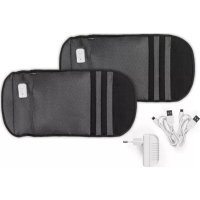
- Cuffs 2 x
- USB cable (A-connector to micro-B connector) 2 x
- USB mains adapter 1 x
- Operating instructions 1 x
Check the items supplied for completeness and the components for transport damage. If you find any damage, do not use the device but contact our customer service department.
Remove any fi lm, stickers or transport protection from the device. Never remove the rating plate and any possible warnings!
Key numbers are displayed as follows: (1) Image references are shown as follows: (Fig. A)
AT A GLANCE
(Fig. A)
1 Cuff
2 Air chambers
3 USB cable
4 Connecting socket
5 Hook-and-loop fastener
6 + / - switch (increasing / decreasing massage intensity)
7 ⏻ On/Off switch
8 Control lamp
Dear Customer,
We are delighted that you have chosen the MAXXMEE Air Compression Massage Cuffs.
Simply put them on, adjust them to your individual size with the hook-and-loop fastener and switch on. The integrated air cushions immediately begin to exert gentle pressure on the muscles from below, which stimulates the circulation and helps to regenerate your tired arms or legs. There are 2 intensity levels, which you can adjust to your personal requirements.
If you have any questions about the device and about spare parts/accessories, contact the customer service department via our website: www.dspro.de/kundenservice
We hope you will enjoy using your MAXXMEE Air Compression Massage Cuffs.
Information About the Operating Instructions
Before using the cuffs for the first time, please read through these operating instructions carefully and keep them for future reference and other users. They form an integral part of the cuffs. The manufacturer and importer do not accept any liability if the information in these operating instructions is not complied with.
SYMBOLS


Danger symbols: These symbols indicate possible dangers. Read the associated safety notices carefully and follow them.
Supplementary information
Read operating instructions before use!
Symbol for direct current
Polarity of the barrel connector


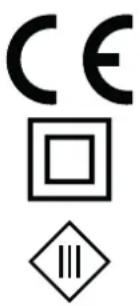
Protection class II
Protection class III

Only use indoors.
SIGNAL WORDS
Signal words indicate hazards if the associated notices are not followed.
DANGER–high risk, results in serious injury or death
WARNING – medium risk, may result in serious injury or death
CAUTION – low risk, may result in minor or moderate injury
NOTICE – may result in risk of damage to material
INTENDED USE
■ The cuffs are intended for massaging and stimulating your arm and leg muscles, and are used for relaxation.
■ The cuffs are not designed for medical or therapeutic purposes.
■ People
- with physical illnesses,
- with medical implants,
- with health problems or
- who are vulnerable
should discuss the use with their doctor BEFORE using the device.
■ The device is for personal use only and is not intended for commercial applications.
■ Use the device only for the specified purpose and only as described in the operating instructions. Any other use is deemed to be improper.
■ The warranty does not cover faults caused by incorrect handling, damage or attempted repairs. The same applies to normal wear and tear.
SAFETY NOTICES

WARNING: Note all safety notices, instructions, illustrations and technical data provided with this device. Failure to follow the safety notices and instructions may result in electric shock, fire and / or injuries.
This device may be used by children aged 8 and over and by people with reduced physical, sensory or mental abilities or a lack of experience and/or knowledge if they are supervised or have received instruction on how to use the device safely and have understood the dangers resulting from failure to comply with the relevant safety precautions.
■ Children must not play with the device.
■ Cleaning and user maintenance must not be carried out by children without supervision.
■ Children younger than 8 years of age and animals must be kept away from the device and the connecting cable.
■ The device must always be disconnected from the mains power before cleaning it.
■ Only use the included USB mains adapter or proper USB mains adapters with the same technical specifications as the cuffs.
If the connecting cable of this device is damaged, it must be replaced with a connecting cable which is approved for the device and is available from the manufacturer or its customer service department.
- Do not make any modifications to the device. If the device is damaged, it must be replaced by the manufacturer or customer service department or a similarly qualified person (e.g. specialist workshop) in order to avoid any hazards.

DANGER – Danger of Electric Shock
- Charge and store the cuffs only in closed rooms.
■ Do not use, charge or store the cuffs in rooms with high humidity.
■ Never immerse the cuffs, the USB mains adapter and the USB cable in water or other liquids and ensure that they cannot fall into water or become wet.
If the cuffs fall into water while they are connected to the mains power, switch off the power supply immediately. Only after this should you pull the device out of the water and dispose of it.
■ Never touch the USB mains adapter and the USB cable with wet hands when they are connected to the mains.
■ Disconnect the cuffs from the mains before cleaning.

WARNING – Danger of Fire
■ Do not operate the cuffs in the vicinity of combustible material.
- Do not cover the cuff during operation or charging in order to prevent them from catching fire.

WARNING – Danger of Injury
- Keep children and animals away from the packaging material. There is a danger of suffocation.
■ The cuffs are not a toy!
■ If the battery leaks, do not allow your skin, eyes and mucous membranes to come into contact with the battery
acid. If you touch battery acid, rinse the affected areas with abundant clear water straight away and seek medical assistance immediately. There is a danger of burns from battery acid!
■ Make sure that the connected USB cable does not present a trip hazard.
NOTICE – Risk of Damage to Material and Property
- Do not charge up the cuffs via a computer because the computer might be damaged by the high charging current.
■ Pull the mains adapter out of the socket if an error occurs during charging or before a thunderstorm.
■ When you pull it out of the socket, always pull on the USB mains adapter and never the USB cable.
■ Do not place anything on the cuffs so that they are not damaged.
■ Protect the cuffs, USB cable and USB mains adapter from heat, naked flames, sub-zero temperatures, persistent moisture, wet conditions, direct sunlight and impacts.
CHARGING THE BATTERY
Please Note!
■ Only connect the mains adapter to a socket that is properly installed and matches the technical data of the mains adapter. The socket must also be readily accessible after connection so that the connection to the mains can quickly be isolated.
■ Lay the connecting cable in such a way that it does not become squashed or kinked and does not come into contact with hot surfaces.

It is essential that you charge up the battery fully before you first use the device in order to achieve the maximum charging capacity. If the battery is fully discharged during use, it must be fully charged up again before it is next used.
- Connect the USB cable (3) to the connecting socket (4) of a cuff (1) and to the connecting socket of the USB mains adapter.
- Only then should you connect the mains adapter to an easily accessible socket.
The lamp (8) in the control unit lights up red. The battery is charging.
-
When the control lamp lights up green, the battery is fully charged.
-
First disconnect the mains adapter from the power supply and then the USB cable from the mains adapter and the cuff.
USE
Please Note!
■ A tingling sensation / itching during or after the massage is normal due to the circulation-boosting effect.
■ Do not use the cuffs for longer than 20 minutes without a break.

Start with the slowest level and gradually increase the level of intensity.
- Place the cuffs (1) around the arms, feet or legs (Fig. B) and fasten them with the kook-and-loop fasteners (5). Make sure that they are not applied too tightly so that they do not become too tight during operation.
- Press the On/Off switch (7) on the control unit to activate the massage. The control lamp (8) lights up. The air chambers in the cuffs are slowly inflated in two stages and emptied again after a few seconds.
- Depending on your requirements, set a higher level using the +/- switch (6). Please Note: When switched off and on the massage starts again at the lowest level.
- After 10 minutes the massage stops automatically. It can be stopped at any time by pressing the ⏻On/Off switch.

The cuffs should not be used before going to sleep. The massage has a stimulating effect, which may lead to problems getting to sleep.
CLEANING AND STORAGE
Please Note!
■ Do not use any sharp or abrasive cleaning agents or cleaning pads to clean the device. They can damage the material.
- Wipe down the cuffs (1) with a damp, soft cloth and a little mild cleaning agent if required. Then dry it thoroughly.
- Store the cuffs, USB cable and USB mains adapter in a dry, frost-free place that is protected from direct sunlight and cannot be accessed by children or animals.
TROUBLESHOOTING
If the cuffs do not work properly, check whether you are able to rectify the problem yourself. If the problem cannot be solved with the steps below, contact the customer service department.

Do not attempt to repair an electrical device yourself!
The cuffs can't be switched on. The control lamp (8) fl ashes.
The battery is empty.
▶ Charge the battery.
The battery is not charging. The control lamp (8) in the control unit does not light up.
The USB cable (3) is not properly plugged into the connecting sockets on the control unit and USB power adapter, or the mains adapter is not properly plugged into the socket.
▶ Check the fit of the cable or the adapter.
The socket is defective.
▶ Try another socket.
There is no mains voltage.
▶ Check the fuse of the mains connection.
DISPOSAL

Dispose of the packaging material in an environmentally friendly manner so that it can be recycled.

This device is governed by the European Directive 2012/19/EU on waste electrical and electronic equipment (WEEE). Do not dispose of the cuffs with a built-in battery as normal domestic waste, but rather in an environmentally friendly manner via an offi cially approved waste disposal company.
TECHNICAL DATA
Article number: 08805
ID of the operating instructions: Z 08805 M DS V1 0820 uh
Cuffs
Model number: ITLM-02
Power supply: 3.7 V DC (Li-ion battery, 1500mAh)
Power: 5.0 W
Protection class: III
Levels: 2
USB mains adapter
Output: 5.0 V DC 1.0 A 5.0 W
Protection class: II
Type of protection: IP20
∅ effi ciency in operation: 75.09 %
Efficiency on low load (10%): 68.59%
Power consumption on no-load: 0.06 W
All rights reserved.
text_image
CE □ ◇SOMMAIRE
Composition 15
Aperçu général 15
Symboles 16
WAARSCHUWING – Brandgevaar
WAARSCHUWING – Verwon- dingsgevaar
De contactdoos is defect.
Uitgang: 5,0 V DC 1,0 A 5,0 W