DH201 - Dehumidifier PureGuardian - Free user manual and instructions
Find the device manual for free DH201 PureGuardian in PDF.


| Brand | PureGuardian |
| Model | DH201 |
| Product Type | Small Space Dehumidifier |
| Dehumidification Technology | Peltier (thermoelectric) |
| Power Supply | 12 V DC, 60 Hz, 5 A, 60 W (adapted for 120 V AC outlet) |
| Dimensions (L × D × H) | 13.30 × 20.59 × 34.01 cm |
| Weight | 1.88 kg (without packaging) |
| Condensation Tank Capacity | Approximately 0.5 L (estimated) |
| Main Function | Condensation Dehumidification |
| Automatic Shut-off | Yes (tank full) |
| Tank Full Indicator | Yes (green/red LED indicator) |
| Carrying Handle | Yes (on the back) |
| Minimum Distance from Walls | 30 cm (1 foot) |
| Care and Cleaning | Dry cloth for exterior, vacuum cleaner or soft brush for vents |
| Important Safety Instructions | Do not use an extension cord; do not immerse; do not use outdoors; unplug before cleaning |
| Warranty | 3-year limited warranty (subject to conditions) |
| Intended Use | Dehumidification of small enclosed rooms in residential indoor spaces |
Frequently Asked Questions - DH201 PureGuardian
User questions about DH201 PureGuardian
0 question about this device. Answer the ones you know or ask your own.
Ask a new question about this device
Download the instructions for your Dehumidifier in PDF format for free! Find your manual DH201 - PureGuardian and take your electronic device back in hand. On this page are published all the documents necessary for the use of your device. DH201 by PureGuardian.
USER MANUAL DH201 PureGuardian
To the consumer, Guardian Technologies LLC warrants this product to be free of defects in materials or workmanship commencing upon the date of the original purchase. Save your original sales receipt to validate start of warranty period. Warranty is not valid without receipt. If this product should become defective within the warranty period, we will repair or replace any defective parts free of charge. All warranty repairs must be completed by Guardian Technologies LLC. This warranty does not cover unauthorized repairs. The warranty does not include unusual wear, damage resulting from accident, or unreasonable use of the product. This warranty only covers the product when used with genuine Guardian Technologies accessories. The product warranty will be invalid if any non-genuine parts have been fitted or used. This warranty covers product that was purchased from authorized distributors. This warranty gives you specific legal rights and you may also have other rights (other rights may vary from state to state in the U.S.A.)
The product warranty registration can be completed online at
www.guardiantechnologies.com. We consider the registration process important to ensuring superior service to our customers, however submitting the warranty registration is optional and does not affect your rights to utilize this warranty according to the conditions stated above. To submit product under warranty the complete machine must be delivered pre-paid to Guardian Technologies LLC. Please include complete information including: the problem, the model number of the product, the day of purchase, and a copy of the original sales receipt along with your name, address, and telephone (email optional). Address returns to the attention of: Customer Service, at the address below. Additional questions or comments can be made toll free to the number listed below.
Guardian Technologies LLC
26251 Bluestone Blvd.
Euclid, Ohio 44132
1.866.603.5900
www.guardiantechnologies.com
Additional copies of the instruction manual can be obtained by accessing and printing directly from our website or calling customer service.

guardian
technologies™
Guardian Technologies LLC
26251 Bluestone Blvd. • Euclid, OH 44132
1.866.603.5900 • www.guardiantechnologies.com
©2016 Guardian Technologies LLC

guardian
technologies™
USE & CARE INSTRUCTIONS
natural_image
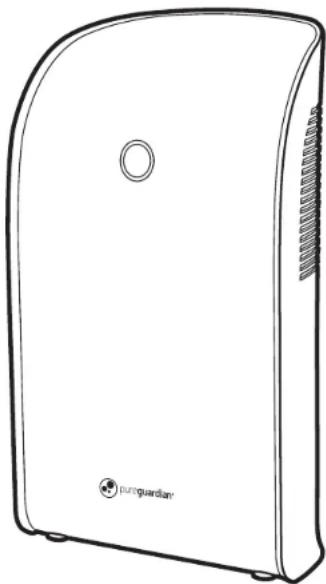
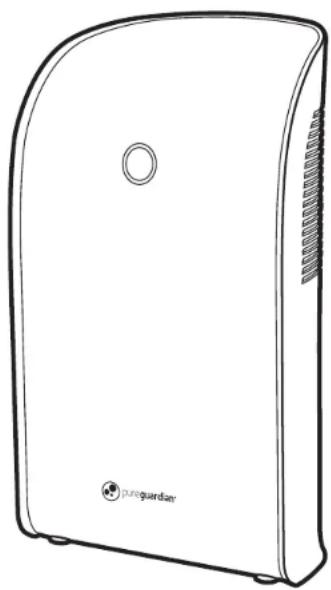
Line drawing of a portable electronic device with a circular button and label 'purguardian' (no other text or symbols)Small Space Dehumidifier
Model No. DH201
1-Year Limited Warranty
www.guardiantechnologies.com
1.866.603.5900
REV0816
English E-1
French F - 1
Spanish S - 1
Date Purchased
month ____
year ____
READ AND SAVE THESE INSTRUCTIONS WARNINGS
Failure to comply with the warnings listed below may result in electric shock or serious injury.

This product should be used only in accordance with the specifications outlined in this manual. Usage other than what has been specified here may result in serious injury.
SAFETY PRECAUTIONS
When using this dehumidifier, always follow basic safety precautions, including the following:
- Keep this product out of the reach of children and pets.
- Use this appliance only for its intended purpose as described in the instruction manual.
- Never operate this dehumidifier in an area that is likely to accumulate standing water. If this condition develops, for your safety disconnect the power supply before stepping into the water.
- Never unplug your dehumidifier by pulling on the power cord. Always grip plug firmly and pull straight out from the receptacle.
- Replace immediately all electric service cords that have become frayed or otherwise damaged. A damaged power supply cord must be replaced with a new power supply cord obtained from the manufacturer and not repaired. Do no use a cord that shows cracks or abrasion damage along its length or at either the plug or connector end.
- Do not handle the plug with wet hands.
- If the receptacle does not match the plug, the receptacle must be changed out by a qualified electrician.
- Tum the dehumidifier OFF and unplug it before cleaning.
- Do not submerse this product in water. Do not clean the unit or tank with detergents or chemicals of any kind. Do not use sharp-edged objects to clean the product.
- Do not treat the tank with any chemicals, oils, fragrances, etc. They will damage the unit and void the manufacturer's warranty.
- Always place this dehumidifier on a firm, flat & level surface. Do not place this product directly against a wall or undemeath a wall cupboard or similar. The device needs sufficient clearance.
- Disassembly, repair or remodeling by an unauthorized person may result in serious harm and will void the manufactures warranty.
- For your safety, do not store or use combustible materials, gasoline or other flammable vapors or liquids in the vicinity of this or any other appliance.
- Do not use outdoors.
- This dehumidifier is intended for indoor residential applications only. This dehumidifier should not be used for commercial or industrial applications.
- This dehumidifier should always be plugged into its own individual electric outlet, which has a voltage rating matching the rating plate.
- DO NOT use an extension cord with this dehumidifier.
- DO NOT use surge protectors or multi-outlet adaptors with this dehumidifier.
WARNING: The cords, wires and/or cables supplied with this product contain chemicals, including lead or lead compounds, known to the state of California to cause cancer and birth defects or other reproductive harm. Wash hands after using. (California code of regulations Proposition 65)
PRODUCT SPECIFICATIONS AND PARTS
MODEL NUMBER: DH201
DEHUMIDIFYING TECHNOLOGY: Peltier (thermo-electric)
POWER SUPPLY: 12V DC, 60Hz, 5A
POWER CONSUMPTION: 60W
DIMENSIONS: 5.24" L x 8.11" W x 13.39" H
WEIGHT: 4.15 lbs. (not including packaging)
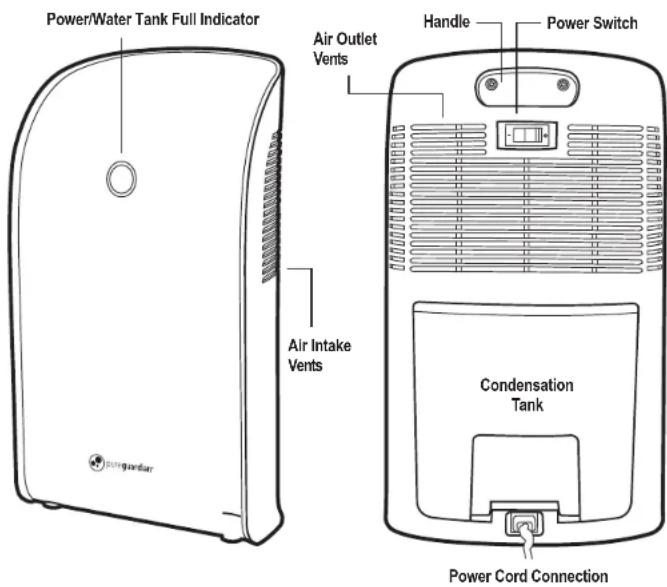
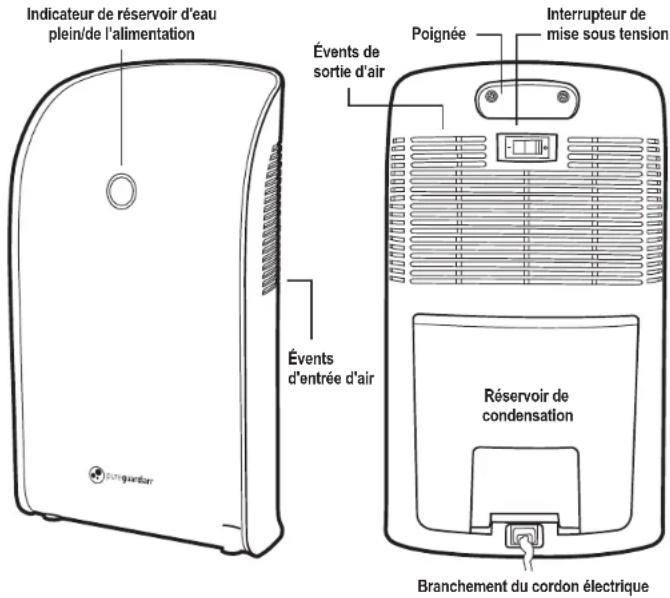
PRODUCT COMPONENTS
INTENDED USE:
This device is intended for the dehumidification of small, closed rooms. Your dehumidifier operates according to the condensation principle. A fan inside the device blow air over a chiller, this causes the humidity contained in the air to condense and drip into the condensation tank. Then the chilled air exits the device.
DIRECTIONS FOR USE
- Select a firm, level and flat location for the dehumidifier
CAUTION: For proper air flow, locate the unit at least 1 foot from any wall or furniture. - Make sure the vents on the back of the product free of dirt and are not blocked.
- Connect the power cord to the dehumidifier then plug the power cord into a 120V AC outlet.
IMPORTANT:
Your device is fitted with an interlock and will only work properly if the condensation tank is inserted correctly.
TIP
Best results will be obtained when the windows and doors are closed in the room where the dehumidifier is being used.
IMPORTANT:
When moving the dehumidifier, always lift unit by the carrying handle located on the back.
- Turn the unit power ON.
- The green power-on light shows that the device is operating.
- To switch off the device, press the ON/OFF switch.
EMPTYING THE CONDENSATION TANK:
The green power-on light will turn to red when the condensation tank is full.
- Turn off the device and disconnect from the power supply.
- Remove and empty the condensation tank.
- Replace the tank and plug it back in.
NOTE:
To prevent the water tank from becoming accidentally dislodged, once fitted into the housing, it is secured to prevent any possible movement. When removing the tank, grip the two hand holds provided and then pull the tank away from the body to release it from the housing. In this way you reduce the amount of force necessary to overcome the locking device and then you can remove the water tank in one motion.
MAINTENANCE & CLEANING
IMPORTANT:
Always turn off then disconnect the power supply when not in use or before cleaning or storing. Allow the device to cool down to room temperature before you clean it and or/stow it away. Always empty the condensation tank. Risk of Electric Shock!
Cleaning
-
Disconnect the power supply.
-
Allow device to cool down.
- Use a dry cloth to remove dust on the outside of the device.
- Clean the ventilation slots at regular intervals with vacuum or soft brush to remove dust and dirt.
- Make sure to remove all water from the condensation tank before storing.
TROUBLE SHOOTING GUIDE
| PROBLEM | CAUSE | SOLUTION |
| The device does not seem to be working. | The main plug is not connected with the main power supply.The condensation tank is full or not inserted correctly. | Insert the main plug into the main power supply.Empty the condensation tank. Insert into the device correctly. |
| The device has switched off during operation. | The condensation tank is full. | Empty the condensation tank. |
GARANTIE LIMITÉE
Guardian Technologies LLC
26251 Bluestone Blvd.
Euclid, Ohio 44132
1.866.603.5900
www.guardiantechnologies.com
Guardian Technologies LLC
26251 Bluestone Blvd. • Euclid, OH 44132
1.866.603.5900 • www.guardiantechnologies.com
©2016 Guardian Technologies LLC

guardian technologies™
UTILISATION ET INSTRUCTIONS D'ENTRETIEN
natural_image
Line drawing of a Juroguardan air purifier device (no text or symbols on body)COMPOSANTES DU PRODUIT
Guardian Technologies LLC
26251 Bluestone Blvd.
Euclid, Ohio 44132
1.866.603.5900
www.guardiantechnologies.com
Guardian Technologies LLC
26251 Bluestone Blvd. • Euclid, OH 44132
1.866.603.5900 • www.guardiantechnologies.com
©2016 Guardian Technologies LLC