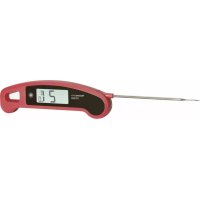
30.1060.05 - Thermometer TFA - Free user manual and instructions
Find the device manual for free 30.1060.05 TFA in PDF.



| Product Type | Professional kitchen thermometer (Thermo Jack Gourmet) |
| Brand | TFA |
| Model | 30.1060.05 |
| Housing dimensions | 160 (275) x 48 x 20 mm (probe unfolded) |
| Power supply | 1 CR2032 button cell battery |
| Measuring range | -50 °C to +250 °C (probe) |
| Protection rating | IP65 (splash resistant) |
| Main functions | Display with automatic orientation, HOLD function, MIN/MAX function, backlight, foldable probe (180° angle), magnetic bracket, touch key, auto-off (energy saving mode), stable temperature beep |
| Display | LCD with indicator in Celsius or Fahrenheit, display option in tenths of a degree or whole |
| Maintenance and cleaning | Clean with a soft, damp cloth; do not use solvents or abrasives; do not immerse the display; do not wash in dishwasher |
| Safety | Do not use for medical applications; do not expose the device to extreme temperatures (except probe); do not use in microwave, oven or grill; do not place the probe directly on fire; keep out of reach of children; risk of injury from probe |
| Spare parts and repairability | User-replaceable battery; no other spare parts supplied; repair by the seller in case of defect |
| General information | Universal use, ideal for food according to HACCP; manufactured with recyclable materials; compliant with EU standards (WEEE) |
Frequently Asked Questions - 30.1060.05 TFA
User questions about 30.1060.05 TFA
0 question about this device. Answer the ones you know or ask your own.
Ask a new question about this device
Download the instructions for your Thermometer in PDF format for free! Find your manual 30.1060.05 - TFA and take your electronic device back in hand. On this page are published all the documents necessary for the use of your device. 30.1060.05 by TFA.
USER MANUAL 30.1060.05 TFA
Gr68:160(275)×48×20mm
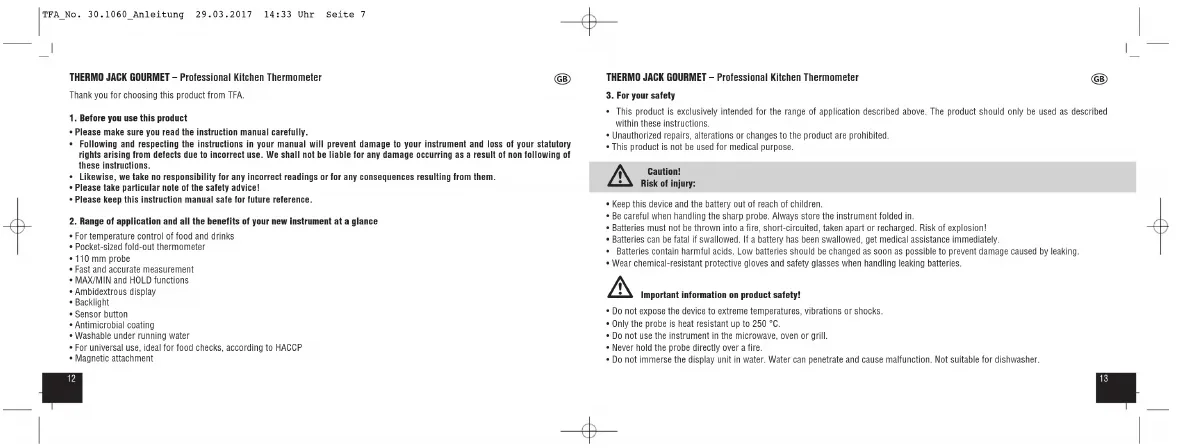
Thank you for choosing this product from TFA.
1. Before you use this product
- Please make sure you read the instruction manual carefully.
- Following and respecting the instructions in your manual will prevent damage to your instrument and loss of your statutory rights arising from defects due to incorrect use. We shall not be liable for any damage occurring as a result of non following of these instructions.
Likewise, we take no responsibility for any Incorrect readings or for any consequences resulting from them. - Please take particular note of the safety advice!
- Please keep this instruction manual safe for future reference.
2. Range of application and all the benefits of your new instrument at a glance
For temperature control of food and drinks
- Pockat-sized fold-out thermometer
- 110 mm probe
- Fast and accurate measurement
·MAXMINAN
- Ambidextrous display
-Backlight
SAR
Antigeninobit
- Wastable under running water
For universal use, ideal for food checks, according to HACCP.
Magnetic attachment


THERMO JACK GOURMET - Professional Kitchen Thermometer
3. For your safety
This product is exclusively intended for the range of application described above. The product should only be used as described within these instructions.
Unauthorized repairs, alterations or changes to the product are prohibited.
This product is not be used for medical purpose.

Caution!
Risk of injury:
- Keep this device and the battery out of reach of children
- Be careful when handling the sharp probe. Always store the instrument folded in.
Batteries must not be thrown into a fire, short-circuited, taken apart or recharged. Risk of explosion!
Batteries can be fatal if swallowed. If a battery has been swallowed, get medical assistance immediately - Batteries contain harmful acids. Low batteries should be changed as soon as possible to prevent damage caused by leaking.
- Wear chemical-resistant protective gloves and safety glasses when handling leaking batteries

Important information on product safety!
Do not expase the device to extreme temperatures, vibrations or shocks.
Only the probe is heat resistant up to 250 °C.
Do not use the Instrument in the microwave oven or grill.
- Never hold the probe directly over a fire.
Do not immerse the display unit in water. Water can penetrate and cause malfunction. Not suitable for dishwasher.


- fold out the probe.
The instrument automatically turns on at an apple of 45^ The instrument has a total angle of 180
The device is ready for use and the temperature is displayed.
The ambidextrous display rotates according to the display. - The sensor is located at the probe tip. To measure the temperature, insert the probe at least 5 mm deep into the object.
- For measuring the core temperature of meat: Plunge the probe at least 2 cm into the middle of the thickest part of the meat; for poultry, between the torso and the thigh - it should not touch bones or cartilage and it should not protrude from the meat.
- Turn off the instrument by retracting the probe. Insert the probe with a slight pressure into the provided slit.

GIB THERMO JACK GOURMET - Professional Kitchen Thermometer
GB
6. Operation
6.1 Sensor button
6.1.1 Backlight
- Press the sensor button once to activate the backlight for 10 seconds.
6.1.2 HOLD function
- Press and hold the sensor button. HOLD will be flashing, If the temperature remains stable, an alarm tone will sound twice and HOLD is no longer flashing. The hold-function for the current temperature is activated.
- PARES 105
6.1.3 Max-Min function
- Press the sensor button twice. The instrument is now in the MAX/MIN mode.
MAX appears on the display. The highest temperature is displayed since the instrument is switched on. - Press the button again. MIN appears on the display. The lowest temperature is displayed since the instrument is switched on.
- Press the sensor button again to exit the MAX/MIN mode
- Press and hold the sensor button in the MAX or MIN mode to clear the recorded reading. "CL" appears on the display.
6.24 Switches in the battery compartment
- Slide the switches in the battery compartment upwards ("C/OFF") or downwards ("F/ON") using a pin. Start a new measurement process.
Switch1:"G" - Slide the switch 1 to change between ^ C (Celsius) or ^ F (Fahrenheit) as temperature unit.
14

- The sleep mode is activated when the instrument is not in use (approx. 10 minutes) and the probe is unfolded. Move the instrument slightly and the temperature concerns are on the display. Slide the switch 0 to activate or deactivate the sleep mode.
Switch 3:Stabilization alert
- Slide the switch 3 to activate and deactivate the alert indicating a stabilized temperature.
Switch 4: Numerical display
- Slide the switch 4 to toggle between the whole degree or tenth degree indication.
7. Care and maintenance
Clean the device with a soft damp cloth. Do not use solvents or scouring agents. The device is washable under running water.
-
Remove the battery if you do not use the device for a long period of time.
-
Keep the device in a dry place.
7.1 Battery replacement
- Change the battery when the empty battery symbol and "LO" appear on the display.
- Open the battery compartment by turning the lid to the left (in the arrow direction) using a coin and insert a new CR 2032 battery
Close the battery compartment by turning the lid to the right using a coin.
Note: The instrument must be switched off before changing the battery (i.e. the temperature probe should be folded).
THERMO JACK GOURMET - Professional Kitchen Thermometer
8. Troubleshooting
Problem Solution
No display Fold the probe first then fold it out again.
Ensure that the battery polarity is correct (+pole above)
Change the battery
Display "Lo" and Change the battery
Incorrect indication Check the position of the sensor
→Change the battery
If your device fails to work despite these measures contact the retailer where you purchased the product.
9. Waste disposal
This product has been manufactured using high-grade materials and components which can be recycled and reused.

Never dispose of empty batteries and rechargeable batteries with ordinary household waste. As a consumer, you are required by law to take them to your retail store or to an appropriate collection site depending on national or local regulations in order to protect the environment.
The symbols for the contained heavy metals are:
Cd = cadmium, Hg = mercury, Pb = lead
GB
一
一
(1)
17
m = 311
This product is labelled in accordance with the EU Waste Electrical and Electronic Equipment Directive (WEEE). Please do not dispose of this product in ordinary household waste. As a consumer, you are required to take end-of-life devices to a designated collection point for the disposal of electrical and electronic equipment, in order to ensure environmentally-compatible disposal.
10. Specifications
Measuring range
Temperature -10oC...250oC/-10...+82oF
Accuraty +0.5^ from -20^ 150^
0.9"F from -4F...302 F. otherwise 1%
Reaction time 3...4 sec.
Operating environment -20°C...50°C / -4...122°F
Protection class Protected against water jets (IP 65 standard)
Power consumption Button cell battery CR2032
Dimensio 160 (275) x 48 x 20 mm
Weight 79 g (device only)
THERMO JACK GOURMET - Professional Kitchen Thermometer

no part of this manuall may be reproduced without written consent of TAA Dostmann. The technical data are correct at the time of going to print and may
change without prior notice
The latest technical data and information about your product can be found by entering your product number on our homepage.
www.tfa-dostmann.de 03/1


B1:Compartment a pile
B2:4interrupteurs
1:Unite de igemnolarue *F
2:Modee eomee denerole actoe on desacbe
3: Sinul de stabilite de temperaturactue ou desactive
4: Affichange dixirige dege activy ou desactivi
5. Mise en service
Temperature -40°C...250°C/-40...+482°F
Resolution 0.1°C/0.1°F
Precislon ± 0.5^ de-20°C...150°C
=0.9°F de -4°F...302°F, ±1% au-de-à
Temps de reponse 3...4 sec.
Plage de temperature de travail -20"C...50°C / 4...122 F
Poids 79 g (apparil selument)
B1: Vano battery
2.4interructor
MAXMIN eoHOLD function
7. Schoenmaken on underhood
Rn rnnrnrnnn nnnn nnrnnn nnnn nnnn nnnn nnnn nnnn nnnn nnnn nnnn nnnn nnnn nnnn nnnn nnnn nnnn nnnn nnnn nnnn nnnn nnnn nnnn nnnn nnnn nnnn nnnn nnnn nnnn nnnn nnnn nnnn nnnn nnnn nnnn nnnn nann
www.lfa-destmann.de 03:17
m = 311
一
和
图10
49
13/14
Resolunio 0.1oC/0.1F
Precislon:+5"Ga-2D"G-150"G
-0.9°Fa-4°F 302°F, sino-1%
Tiempo de responses 3...4 sec.
Tarnperatura de servicio-20°C,50°C/-4.122°F


- Before you use this product
- Range of application and all the benefits of your new instrument at a glance
- THERMO JACK GOURMET - Professional Kitchen Thermometer
- For your safety
- Caution!
- Risk of injury:
- Important information on product safety!
- Operation
- HOLD function
- Max-Min function
- Switches in the battery compartment
- Switch 3:Stabilization alert
- Switch 4: Numerical display
- Care and maintenance
- Battery replacement
- Troubleshooting
- Problem Solution
- Waste disposal
- Specifications
- Mise en service
- Schoenmaken on underhood
Brand : TFA
Model : 30.1060.05
Category : Thermometer