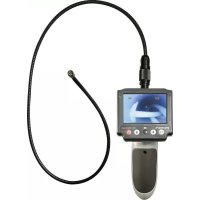
BS300XRSD - Endoscope VOLTCRAFT - Free user manual and instructions
Find the device manual for free BS300XRSD VOLTCRAFT in PDF.



| Product type | Endoscope |
| Brand | VOLTCRAFT |
| Model | BS300XRSD |
| Screen | TFT monitor 3.5" (8.9 cm) |
| Screen resolution | 320 x 240 pixels |
| Camera resolution | 640 x 480 pixels |
| Camera head diameter | 8.0 mm |
| Gooseneck length | 1800 mm |
| Minimum bending radius | > 45 mm |
| Lighting | 4 white LEDs, up to 950 Lux at 20 mm |
| Power supply | 4 AA batteries (not included) + built-in Li-Po accumulator 1000 mAh |
| Main functions | Photo, video, digital zoom, 180° image rotation, adjustable lighting, removable monitor (RF link) |
| Storage | micro SD / micro SDHC card up to 32 GB (not included) |
| Video output | PAL / NTSC (via included jack-RCA cable) |
| Connections | Mini USB (charging/transfer), video output jack |
| RF range (monitor/base) | Up to 5 m |
| Camera waterproof | IP67 (submersible up to the mark, no acids or bases) |
| Included accessories | Magnet, hook, mirror, storage case, wrist strap, USB cable, video cable, instruction manual |
| Operating conditions | 0 to +45 °C, 15 – 85% RH |
| Maintenance and cleaning | Clean the exterior with a dry cloth; rinse the camera with clean water after use in a liquid; do not use harsh chemicals |
| Safety | Use only on de-energized installations; do not expose the base to moisture; observe safety instructions for batteries/rechargeable batteries |
| Spare parts and repairability | Camera and gooseneck available separately (ref. 123121, etc.); no user repair |
| General information | Manual available in FR, DE, EN, NL; CE conformity; manufacturer: Conrad Electronic SE |
Frequently Asked Questions - BS300XRSD VOLTCRAFT
User questions about BS300XRSD VOLTCRAFT
0 question about this device. Answer the ones you know or ask your own.
Ask a new question about this device
Download the instructions for your Endoscope in PDF format for free! Find your manual BS300XRSD - VOLTCRAFT and take your electronic device back in hand. On this page are published all the documents necessary for the use of your device. BS300XRSD by VOLTCRAFT.
USER MANUAL BS300XRSD VOLTCRAFT
www.business.conrad.at
1 Schwanenhals
2 Batterie-LED
3 Power-LED
4 Monitor
5 Batteriefach
6 Helligkeitsregler
7 Taste MENU
natural_image
Close-up of a device component with two arrows pointing to a button (no visible text or symbols)Monitor: Li-Po Akku, 1000 mAh
- Introduction......21
- Intended use....22
- Delivery content....22
- Features and functions....23
- Explanations of symbols....23
- Safety instructions ....24
- Notes on (rechargeable) batteries 26
a) General 26
b) Li-Po battery....26
- Operating elements ......27
- Inserting / replacing batteries .....28
- Recharging the detachable monitor....28
- Connect camera 29
- Insert micro SD card....29
- Operation....29
a) Basic functions....29
b) Settings 30
c) Photo /video function....32
d) Detachable monitor....32
e) Monitor arm band....33
f) Connection to a PC 33
g) Connection to a TV....33
h) RESET button ....34
- Maintenance and care 34
- Declaration of Conformity (DOC)....34
- Disposal....35
a) Product....35
b) Batteries/rechargeable batteries 35
- Technical data....36
a) Endoscope ....36
b) Power adapter....36
- Suitable accessory ....37
1. INTRODUCTION
Dear customer,
Thank you for purchasing a Voltcraft® product. You have made an excellent decision.
Voltcraft® – This name stands for outstanding quality products in the fields of measurement, charging and network technology, products that stand out due to their professional competence, exceptional performance and permanent innovation.
Whether you are an ambitious electronics hobbyist or a professional in the field, with a product from the Voltcraft® family, you have the optimum solution at hand at all times, even for the most challenging tasks. And it gets even better: We make the sophisticated technology and reliable quality of our Voltcraft® products available to you at a nearly unbeatably low price-performance ratio. In this way, we create the basis for lengthy, good and successful cooperation.
We hope you will enjoy your new Voltcraft® product!
All company names and product names are trademarks of their respective owners. All rights reserved.
If there are any technical questions, contact:
International: www.conrad.com/contact
United Kingdom: www.conrad-electronic.co.uk/contact
2. INTENDED USE
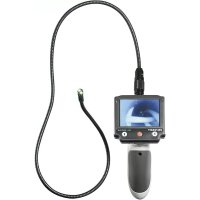
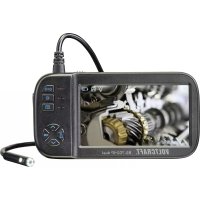
The endoscope is a visual aid for troubleshooting or inspection of voltage-free systems and installations. The camera picture is displayed on a detachable TFT monitor. The lighting can be controlled at the camera point. A PAL/NTSC video output is available. Photos and videos can be stored on an optional microSD card and can be transferred to PC. The goose neck camera is water tight and can be used in watery liquids (no acids or alkaline solutions). The main unit may not be exposed to or submerged in moisture. Power supply is via four AA batteries (not included). Operation in potentially explosive areas and/or use on persons or animals is not permitted.
For safety and approval purposes (CE), you must not rebuild and/or modify this product. If you use the product for purposes other than those described above, the product may be damaged. In addition, improper use can cause hazards such as short circuiting, fire, electric shock etc. Read the instructions carefully and keep them. Make this product available to third parties only together with its operating instructions.
This product complies with the statutory national and European requirements.
3. DELIVERY CONTENT
- Endoscope • USB cable
- Goose neck with camera • 3 x attachments (magnet, hook, mirror)
- Storage case • Monitor bracelet
• Video cable • Operating instructions
4. FEATURES AND FUNCTIONS
- Micro SD card slot
- Detachable monitor
- Wireless transmission from endoscope to the monitor
• Video and photo function - LED lamp
- Attachment consisting of magnet, hook and mirror
- Operate with power supply or batteries
5. EXPLANATIONS OF SYMBOLS

This symbol indicates health risks e.g. due to electric shock.

This symbol informs you about specific risks when handling, operating or using the product.

The “arrow” symbol indicates special remarks and notes for operation.

Read the operating instructions carefully and especially observe the safety information. If you do not follow the safety instructions and information on proper handling in these operating instructions, we assume no liability for any resulting personal injury or damage to property. Such cases will invalidate the warranty/guarantee.
a) Persons / Product
- The device is not a toy. Keep it out of the reach of children and pets.
- Do not leave packaging material lying around carelessly. These may become dangerous playing material for children.
- Protect the product from extreme temperatures, direct sunlight, strong jolts, high humidity, moisture, flammable gases, vapours and solvents.
- Do not place the product under any mechanical stress.
-
If it is no longer possible to operate the product safely, take it out of operation and protect it from any accidental use. Safe operation can no longer be guaranteed if the product:
-
is visibly damaged,
- is no longer working properly,
- has been stored for extended periods in poor ambient conditions or
- has been subjected to any serious transport-related stresses.
- Please handle the product carefully. Jolts, impacts or a fall even from a low height can damage the product.
- Also observe the safety and operating instructions of any other devices which are connected to the product.
- This product is a precision instrument. Do not drop it or subject it to any blows.
- The basic unit is not water tight. Do not use under water.
- The endoscope is suited for inspection only in voltage-free systems. The camera head is made of metal and can cause short-circuiting.
- For safety reasons, make sure all system components are voltage-free before inspection.
• Always store the endoscope and all accessories in the case for periods of disuse.
- Sensitive surfaces (with furniture polish, etc.) may react chemically when exposed to the housing.

- For installations in industrial facilities, follow the accident prevention regulations for electrical systems and equipment of the government safety organization or the corresponding authority for your country.
- Do not operate the device immediately after transferring it from a cold to a warm room. This can cause condensation which may, under adverse circumstances, destroy the device. Leave the device turned off until it has reached room temperature.
- If you wish to charge the battery with a power adaptor, it must be compatible with the product. See Technical Data.
b) Miscellaneous
- Consult a professional if you require assistance with product operation, safety or connection.
- Maintenance work, adjustments and repairs may be carried out only by a professional or at a specialist workshop.
- If you have questions which remain unanswered by these operating instructions, contact our technical support service or other technical personnel.
a) General
- Correct polarity must be observed while inserting the (rechargeable) batteries.
- Rechargeable batteries should be removed from the device if it is not used for a long period of time to avoid damage through leaking. Leaking or damaged (rechargeable) batteries might cause acid burns when in contact with skin, Therefore use suitable protective gloves to handle corrupted (rechargeable) batteries.
- (Rechargeable) batteries must be kept out of reach of children. Do not leave (rechargeable) batteries lying around, as there is risk, that children or pets swallow them.
- All (rechargeable) batteries should be replaced at the same time. Mixing old and new (rechargeable) batteries in the device can lead to (rechargeable) battery leakage and device damage.
- (Rechargeable) batteries must not be dismantled, short-circuited or thrown into fire. Never recharge non-rechargeable batteries. There is a risk of explosion!
b) Li-Po battery
- The rechargeable battery is permanently built into the product and cannot be replaced.
- Never damage the rechargeable battery. Damaging the casing of the rechargeable battery might cause an explosion or a fire! Unlike conventional batteries/rechargeable batteries (e.g. AA or AAA type), the casing of the LiPo rechargeable battery does not consist of a thin sheet but rather a sensitive plastic film only.
- Never short-circuit the contacts of the rechargeable battery. Do not throw the rechargeable battery or the product into fire. There is a danger of fire and explosion!
- Charge the rechargeable battery regularly, even if you are not using the product. Due to the rechargeable battery technology being used, you do not need to discharge the rechargeable battery first.
- Never charge the rechargeable battery of the product unattended.
- When charging, place the product on a surface that is not heat-sensitive. It is normal that a certain amount of heat is generated during charging.
8. OPERATING ELEMENTS

1 Goose neck
2 Battery LED
3 Power LED
4 Monitor
5 Battery compartment
6 Brightness control
7 MENU button
8 ↓ button
9 Trigger button
10 ↑ button
11 On/off button
12 mini USB connection
13 micro SD insert
14 Video output
9. INSERTING / REPLACING BATTERIES
- Loosen the screw on the battery compartment cover using a Phillips screw driver and remove the battery compartment cover.
- Remove the battery holder from the battery compartment (5).
- Insert four type AA batteries into the battery holder and please note the polarity details in the shafts of the battery holder.
- Reinsert the battery holder into the battery compartment and please note the polarity details on the upper side of the battery holder and within the battery compartment.
- Close the battery compartment again.

Change the batteries if the goose neck camera does not work properly or the LED on the camera does not light up completely.
10. RECHARGING THE DETACHABLE MONITOR
The internal battery status of the detachable monitor (4) is low if the battery LED flashes red or if the battery symbol (screen display) indicates empty during operation. Proceed as follows to recharge it.
- Do not detach the monitor from the product while the battery is charged.
- Open the cover on the right side of the monitor.
- The monitor can be charged using the included USB cable via a computer or using a compatible USB power adaptor. The battery can be charged using a mobile phone/tablet power adaptor and the included USB cable. The power adaptor/the USB port must supply the required charging current (see Technical Data).
- Connect the mini USB plug of the USB cable / power supply to the mini USB connection (12).
- When using a power adaptor, connect the power adaptor to a suitable power outlet.
- When using the USB cable, connect the other end of the USB cable to the USB port of a computer (5 V / 500 mA).
- The battery LED lights up orange if the detachable monitor is recharged. The LED goes out if it is fully charged. The battery symbol flashes if the detachable monitor is switched on.
- Remove the USB cable after the charging process. The battery symbol now shows the battery status if you switch on the endoscope.

Do not remove the monitor while the battery is charged. Otherwise the system is stopped and the product needs to be reset by pressing the RESET button at the rear of the monitor.
11. CONNECT CAMERA
- Connect the plug of the gooseneck camera to the connector socket on the monitor. At the same time the protruding metal tongue on the plug of the camera should be aligned to the slot at the front of the socket.
- Push the screw cap upwards in the direction of the camera and turn the screw cap anticlockwise to attach the camera.
- Reverse these steps to disconnect the camera from the main unit.
12. INSERT MICRO SD CARD
You must first insert a microSD card (not included) to be able to use the photo /video function. Proceed as follows to do so:
- Open the cover on the right next to the monitor.
- Insert a microSD card into the microSD slot (13). The contacts of the card must point in the direction of the monitor. The card must be locked into position.
- Close the cover.
13. OPERATION
a) Basic functions

Only keep the camera head and goose neck (1) in voltage free liquid. The goose neck should not be immersed on the other side of the "IP67 max. water level" marking.
The endoscope is suited for inspection only in voltage-free systems. The camera head is made of metal and can cause short-circuiting. For safety reasons, make sure all system components are voltage-free before inspection.
Avoid heavy mechanical loads and/or vibrations. Do not exceed the minimum bending radius of 45 mm.
- Press the on/off button (11) to switch on the device. The Power LED (3) is switched on. Then scroll the brightness control (6) in the "ON" direction. The camera picture appears on the screen.
- Four LEDs are integrated into the camera head.
- Adjust the brightness control in the "ON" direction to increase the brightness of the LEDs.
- Adjust the brightness control in the "OFF" direction to reduce the brightness of the LEDs or to completely switch off the lighting and the endoscope. Please ensure that the camera is switched off when adjusting the brightness control up to the end.

Switch the lighting on so that the camera picture displayed is not over or under exposed.
- Keep the ↑ button pressed for approximately two seconds to rotate the picture by 180°.
- Keep the ↓ button pressed to zoom in.
Attachments
- Fix one of the three attachments (magnet, hook, mirror) if needed to the narrow indentation under the camera head.
- Make sure that the attachment's fastening ring is closed before use.
Triangle attachment point
A triangle attachment point is attached above the screen. Attach it to a carrying strap if needed (not included in the delivery scope) to enable freehand operation.
b) Settings
The following buttons have the following functions within the menu.
| Button Function | |
| MENU • Select menu | • Navigate from the sub menu back to the main menu.• Leave main menu |
| ↓ • Move cursor downwards | • Reduce value |
| ↑ • Move cursor upwards | • Enlarge value |
| Release button Confirm selection |
Video output format
- Press the MENU (7) button, to select the menu.
- Select the menu point "Setting" with the ↓ (8) or ↑ (10) buttons and press it to activate the release button (9).
-
Select the "TV output" menu point and confirm your selection.
-
Select the desired format (NTSC or PAL) and confirm your selection.
- Leave the menu while pressing the MENU button.
Frame rate
- Press the MENU button to select the menu.
- Select the menu point "Setting" with the ↓ or ↑ buttons and press it to activate the release button
- Select the "Frame Rate" menu point and confirm your selection.
- Select the desired frame rate (20 fps / 25 fps / 30 fps) and confirm your selection.
- Leave the menu while pressing the MENU button.
Format micro SD card
- Press the MENU button to select the menu.
- Select the menu point "Setting" with the ↓ or ↑ buttons and press it to activate the release button
- Select the "Format" menu point and confirm your selection.
- Select "YES" and confirm your selection. Subsequently the micro SD card is formatted.
- Select "NO" to interrupt the process.
Set language
- Press the MENU button to select the menu.
- Select the menu point "Setting" with the ↓ or ↑ buttons and press it to activate the release button
- Select the menu point "Language" and confirm your selection.
- Select the desired language and confirm your selection.
- Leave the menu while pressing the MENU button.
Set date /time
- Press the MENU button to select the menu.
- Select the menu point "Setting" with the ↓ or ↑ buttons and press it to activate the release button
- Select the menu point "Time/Date" and confirm your selection. The day indicator starts flashing.
- Set the date with the ↓ or ↑ buttons and confirm your selection. The month indicator starts flashing.
- Proceed in the same way to set the month, year, hours, minutes and seconds.
c) Photo /video function
Photo
- Press the MENU button to select the menu.
- Select the menu point "Camera" with the ↓ or ↑ buttons and press it to activate the release button. The photo camera symbol appears on the top left of the monitor.
- Now press the release button to take a photo.
Video
- Press the MENU button to select the menu.
- Select the menu point "DVR" with the ↓ or ↑ buttons and press it to activate the release button. The video camera symbol appears on the top left of the monitor.
- Now press the release button to record a video.
- Press the release button again to end the video recording.
Playback
- Press the MENU button to select the menu.
- Select the menu point "Playback" with the ↓ or ↑ buttons and press it to activate the release button.
- The photo/video last taken is displayed on the monitor.
- Select the desired photo/video with the ↓ or ↑ button.

The video playback is automatically started. Press the trigger button during the playback if you want to interrupt the video. Press the trigger button again to keep the video running.
d) Detachable monitor
If required you can re move the monitor from the endoscope. The camera picture is then transmitted wirelessly to the monitor. Proceed as follows to do so:
- Push the monitor upwards in the direction of the goose neck and remove the monitor.
- Now switch on the endoscope. The camera picture appears on the monitor.
- Push the monitor to be installed downwards.

Do not remove the monitor if the battery is charged. Otherwise the system is stopped and the product should be reset by pressing the reset button at the rear of the monitor.
e) Monitor arm band
- Unpack the arm band and attach it to the arm.
- Attach the removable monitor to the metal plate. Please note the correct direction. The metal point on the monitor should fit into the hole on the plate. Push the monitor downwards to fix it onto the arm band.

natural_image
Close-up of a camera module with two arrows pointing to a button (no text or symbols visible)f) Connection to a PC
- Open the cover on the right next to the monitor.
- Connect the mini USB plug to the appropriate socket and connect the USB A plug to a free USB interface of your computer.
- The endoscope is now used as a card reading device. This enables you to read stored data from the micro SD card on the PC.
- First disconnect the connection via the operating system before unplugging the USB cable.

The LED battery lights up orange and the battery of the monitor is charged when connecting the monitor to a PC with the USB cable.
It is possible to connect the monitor to a PC if the monitor is separated from the endoscope.

Do not connect the endoscope basic unit to a PC if you have removed the monitor from the endoscope.
g) Connection to a TV
- First set the video output format (see chapter "Settings").
- Open the cover on the right next to the monitor.
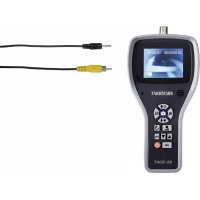
- Connect the jack plug of the video cable to the video output (14) on the endoscope and connect the cinch plug to the video input of the TV.
- As a result the picture on the monitor turns off and the camera picture is displayed on the TV. Press the MENU button to display the menu on the TV. The device is operated with the buttons on the monitor.
- Recorded videos can be played on the TV.
h) RESET button
- If the monitor does not function correctly or if the monitor picture no longer moves press the RESET button on the back of the monitor. Use a paper clip or something similar for this purpose.
Position of the opening for the RESET button.

14. MAINTENANCE AND CARE
- The product does not require any maintenance, do not disassemble it. Maintenance or repairs may be carried out by a professional only.
- Do not clean the product if the rechargeable battery of the monitor is charged.
- First remove all the batteries/rechargeable batteries from the charging slots.
- Clean the exterior of the product using a clean, soft, dry cloth only. You can easily remove dust using a clean, soft brush or a vacuum cleaner.
- After use in liquids, always thoroughly rinse the camera neck with clean water and dry before storing the product in the case.
- To clean the camera lens, use a small brush or cotton swabs.
- Do not use any aggressive cleaning agents or chemical solutions as these may damage the housing causing discoloration and/or malfunction.
15. DECLARATION OF CONFORMITY (DOC)
We, Conrad Electronic, Klaus-Conrad-Straße 1, D-92240 Hirschau, hereby declare that this product conforms to the fundamental requirements and the other relevant regulations of the directive 1999/5/EC.

The Declaration of Conformity for this product can be found at www.conrad.com.
a) Product

Electronic devices are recyclable waste and must not be disposed of in the household waste.
Dispose of the product in accordance with applicable regulatory guidelines at the end of its service life,
Remove any inserted (rechargeable) batteries and dispose of them separately from the product.
The built-in rechargeable battery must be disposed of by a specialist.
b) Batteries/rechargeable batteries
You as the end user are required by law (Battery Ordinance) to return all used batteries/rechargeable batteries. Disposing of them in the household waste is prohibited.
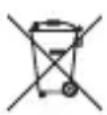
Contaminated (rechargeable) batteries are labeled with this symbol to indicate that disposal in the domestic waste is forbidden. The designations for the heavy metals involved are: Cd = Cadmium, Hg = Mercury, Pb = Lead (name on (rechargeable) batteries, e.g. below the trash icon on the left).
Used batteries/rechargeable batteries can be returned to collection points in your municipality, our stores or wherever batteries/rechargeable batteries are sold.
You thus fulfill your statutory obligations and contribute to the protection of the environment.
a) Endoscope
Operational voltage 4 x 1.5 V AA- battery (not included),
Monitor: Li-Po battery, 1000 mAh
Power consumption ....max. 450 mA
SD card type....microSD (max. 2 GB), micro SDHC (max. 32 GB)
Monitor....8,9 cm (3,5") TFT
Resolution 320 x 240 Pixel (Monitor), 640 x 480 Pixel (Camera)
White balance......automatic
Exposure ......automatic
Video format....PAL/NTSC
Video recording format ......AVI
Camera lighting ....4 LEDs, white
LED lighting strength ....max. 950 Lux, ± 150 Lux (at 20 mm distance)
Bending radius.....>45 mm
Camera head ∅ 8.0 mm
Field of vision....54° (diagonal)
Focus....60 mm-∞
Gooseneck measurements (L x ∅)......1800 x 8 mm
Wireless range ......max. 5 m
Operating conditions....0 to +45 °C, 15 – 85 % RH
Storage conditions....-10 to 50 °C, 15 – 85 % RH
Dimensions (W x H x D) 90 x 205 x 222 mm
Weight ....approx. 560 g (without attachments)
b) Power adapter (not included)
Output voltage / current....5 V/DC, 0.5 A
18. SUITABLE ACCESSORY
Goose neck camera
| Order no.: 123121 123123 123142 123141 | ||
| Camera ∅: 5.5 mm 5.9 mm 9.8 mm 9.8 mm | ||
| Length 1 m 1 m 1 m 1 m |
Goose neck extension
| Order no.: 123126 123130 | |
| Length 1 m 3 m |
Miscellaneous
| Rechargeable batteries | Carry strap Attachments (magnet, hooks, mirror) for 9.8 mm camera | |
| Order no.: 251020 123096 | 123097 | |
Page
France (email): technique@conrad-france.fr
Suisse:
www.conrad.ch
www.biz-conrad.ch
2. UTILISATION CONFORME AUX PRESCRIPTIONS
9. INSERTION/REEMPLACEMENT DES PILES
natural_image
Close-up of a device component with arrows pointing to a button and a connector (no visible text or symbols)Tension de service :......4 piles de AA (non incluses)
Dimensions (L x H x P)....90 x 205 x 222 mm
Poids....env. 560 g (sans accessoires)
natural_image
Close-up of a camera module with two arrows pointing to a button (no text or symbols visible)14. ONDERHOUD EN REINIGING
Doorsnede camerakop 8,0 mm
© Copyright 2015 by Conrad Electronic SE.

Legal Notice
This is a publication by Conrad Electronic SE, Klaus-Conrad-Str. 1, D-92240 Hirschau (www.conrad.com).
All rights including translation reserved. Reproduction by any method, e.g. photocopy, microfilming, or the capture in electronic data processing systems require the prior written approval by the editor. Reprinting, also in part, is prohibited. This publication represents the technical status at the time of printing.
© Copyright 2015 by Conrad Electronic SE.

Information légales
© Copyright 2015 by Conrad Electronic SE. V3_0615_02_JH
- INTRODUCTION
- INTENDED USE
- DELIVERY CONTENT
- FEATURES AND FUNCTIONS
- EXPLANATIONS OF SYMBOLS
- a) Persons / Product
- b) Miscellaneous
- a) General
- b) Li-Po battery
- OPERATING ELEMENTS
- INSERTING / REPLACING BATTERIES
- RECHARGING THE DETACHABLE MONITOR
- CONNECT CAMERA
- INSERT MICRO SD CARD
- OPERATION
- a) Basic functions
- Attachments
- Triangle attachment point
- b) Settings
- Video output format
- Frame rate
- Format micro SD card
- Set language
- Set date /time
- c) Photo /video function
- Photo
- Video
- Playback
- d) Detachable monitor
- e) Monitor arm band
- f) Connection to a PC
- g) Connection to a TV
- h) RESET button
- MAINTENANCE AND CARE
- DECLARATION OF CONFORMITY (DOC)
- a) Product
- b) Batteries/rechargeable batteries
- a) Endoscope
- b) Power adapter (not included)
- SUITABLE ACCESSORY
- Page
- UTILISATION CONFORME AUX PRESCRIPTIONS
- INSERTION/REEMPLACEMENT DES PILES
- ONDERHOUD EN REINIGING
- Legal Notice
- Information légales
Brand : VOLTCRAFT
Model : BS300XRSD
Category : Endoscope