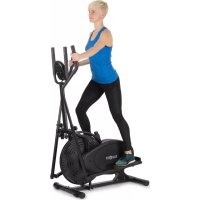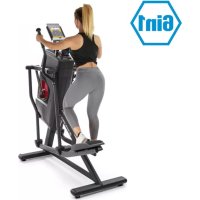
Helix Stride - Elliptical bike Capital Sports - Free user manual and instructions
Find the device manual for free Helix Stride Capital Sports in PDF.


User questions about Helix Stride Capital Sports
0 question about this device. Answer the ones you know or ask your own.
Ask a new question about this device
Download the instructions for your Elliptical bike in PDF format for free! Find your manual Helix Stride - Capital Sports and take your electronic device back in hand. On this page are published all the documents necessary for the use of your device. Helix Stride by Capital Sports.
USER MANUAL Helix Stride Capital Sports
Training per Kinomap App 46
| Multitool Inbusschlüssel (5 & 6 mm) | Inbusschlüssel (17 mm) | Schlüssel |
ZUSAMMENBAU
- Cardio-Trainingsphase
Congratulations on purchasing this equipment. Please read this manual carefully and take care of the following hints to avoid damages. Any failure caused by ignoring the items and cautions mentioned in the instruction manual is not covered by our warranty and any liability. Scan the QR code to get access to the latest user mannaual and other information about the product:
CONTENT
Safety Instructions 54
Single Parts 56
Assembly 58
Device Overview 75
Possible Uses 76
Console and Functions 79
Programs 84
Overview of Cardio Training 90
Warming Up before a Workout 93
Training via Kinomap App 96
Care and Maintenance 98
Disposal Considerations 99
Declaration of Conformity 99
TECHNICAL DATA
| Item number | 10034037 |
| Power supply | 220-240 V ~ 50/60 Hz |
| Dimensions (width x height x depth) | 139x74x169 cm |
WARNING
This stationary training device is not suitable for high accuracy purposes. The heart rate monitoring system may be faulty. Excessive exercise may result in dangerous injury or death. If your performance deteriorates abnormally, stop training immediately.
SAFETY INSTRUCTIONS
Before operating this unit, please read this manual carefully to ensure optimum performance and safety. This is manual should be kept available for future reference. For product improvement, the company reserves the right to change the design and specification at any time without prior notice. Pictures are for reference use only and may differ from the actual product.
- Please keep this manual in a safe place for your reference when necessary.
- Please do not assembly or use this equipment until you read this manual thoroughly & carefully. The safety and efficiency only can be achieved when the equipment is assembled, maintained and used properly. It is your responsibility to ensure that all the users are informed of all the warnings and precautions.
- For totally safe use, a stable, leveled surface is required. Protect your floor with a mat. Do not use the equipment in a damp areas such as swimming pool sauna, etc. For safety space, the equipment must have at least 0.6 meter of free space all around it.
- Before starting any exercise program you must consult your doctor to determine if you have any physical or health conditions that could create a risk to your health and safety, or prevent you from using the equipment properly. Your doctor's advice is essential if you are taking medication that affects your heart rate, blood pressure or cholesterol level.
- Be aware of your body's signals. Incorrect or excessive exercise can damage your health. Stop exercising if you experienced any of the following symptoms: pain, tightness in your chest, irregular heartbeat, extreme shortness of breath, feeling light headed, dizzy or nauseous. If you do experience any of these conditions you must consult your doctor before continuing with your exercise program.
- Do not workout immediately after meals.
- Keep children and pets away from the equipment, the equipment must be assembled and used by adults only.
- The equipment is designed for home use only.
- The equipment is not suitable for therapeutic use, may only be used for exercises indicated in the training instructions
- Wearing proper clothing and athletic shoes while using the equipment, Avoid wearing loose clothing that may get caught in the equipment or that may restrict or prevent movements.
-
Keep your back straight while exercising.
-
Before using the equipment, check the handle bar, seat, and the nuts & bolts are securely tightened.
- For adjustable parts, bear the maximum position in your mind, do not exceed the mark "stop", otherwise will cause risk.
- Always use the equipment as indicated. If you find any defective components while assembling or checking the equipment, or if you hear any unusual noises coming from the equipment during use, stop immediately. Do not use the equipment until the problem has been solved.
- Care must be taken when lifting or moving the equipment so as not to injure your back. always use proper lifting techniques and/or seek assistance if necessary.
- All moveable accessories (e.g. pedal, handlebar, saddle...etc.) require weekly maintenance. Check them before use every time. If anything broken or loose, please fix them immediately. You may continue using them only after they return to good conditions.
- Pay attention to the absence of a free wheel system which will cause serious risk.
- Keep power cord away from heat sources.
- Do not insert or drop any object into any opening.
- Unplug exercise bike before moving or cleaning it. To clean, wipe surfaces down with mild detergents and a slightly damp cloth only; never use solvents.
- Do not use the exercise bike in any location that is not temperature controlled, such as, but not limited to, garages, porches, pool rooms, bathrooms, car ports or outdoors.
- Use the bike only as described in this manual.
- Incorrect repair and structural modifications (e.g. removal or replacement of original parts) may endanger the safety of the user.
- The rotating disk flywheel will get hot during the operation.
- Lock the equipment when stop using.
- This product is not designed for use by persons (including children) who have reduced physical, sensory or mental capacities or persons with no experience or knowledge, unless they are instructed and supervised in the use of the appliance by a person responsible for their safety.
- Children should be supervised to ensure that they do not play with the appliance.
- Before use, check the voltage on the device badge. Only connect the device to sockets that correspond to the voltage of the device.
Note: Maximum weight of the user is 136kg
SINGLE PARTS
| Console (53) | Handlebar (54) | Tube cap (46) Handlebars (59/60) | ||
| Feet (31) | Support tube (34) | Front stabilizer (32) | ||
| Pedal (61) | Adaptor (71) | Swing arm (51) Swing joint (52) Cover (64) | ||
| Rear stabilizer (29) | Pedal arm (63) Main frame (1) | |||
Small parts
| No. | Description Pc. No. Description Pc. | ||||
| 97 | Allen screw(M8 x 1.25 x 20 mm) | 3 | 74 | Lock washer M8 | 3 |
| 98 | Allen screw(M8 x 1.25 x 25 mm) | 6 | 76 | Washer(8 x 16 x 2.0) | 3 |
| 99 | Allen screw(M8 x 1.25 x 30 mm) | 8 | 77 | Washer(8 x 30 x 2.0) | 6 |
| 84 | Nylon nut(M6 x 1.0) | 4 | 94 | Screw(M5 x 0.8 x 15 mm) | 4 |
| 103 | Allen screw(M6 x 1.0 x 35 mm) | 4 | |||
Tools
| Multitool Allen key (5 & 6 mm) | Allen key (17 mm) | Wrench |
ASSEMBLY
Step 1: Mounting the adjustable feet
| 032 031 031 | Mount the adjustable feet (31) to the front stabilizer (32) as shown in the illustration. |
| Stabilizer Adjustment plate Foot | First turn the adjustable feet completely into the adjustment plate. |
| Stabilizer Adjustment plate Foot | If the crosstrainer is not in a straight position, level out the unevenness with the adjustable feet. |
| Adjustment plate Foot | How to adjust the feet correctly: 1 Loosen the foot and the adjustment plate. 2 Turn the foot out. 3 As soon as the device is level, tighten the adjustment plate to fix the adjustable foot in this position. |
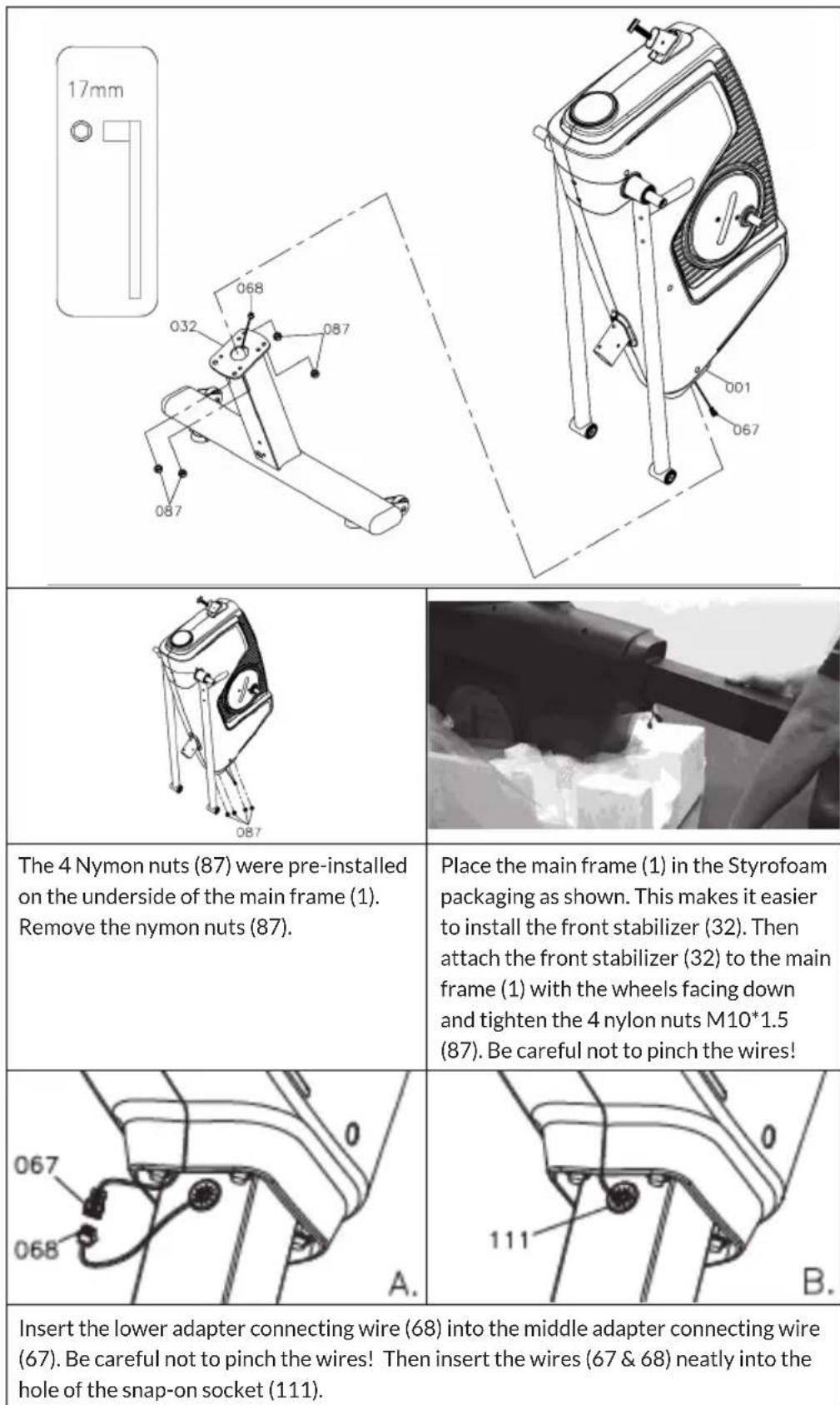
Step 2: Mounting the front stabilizer
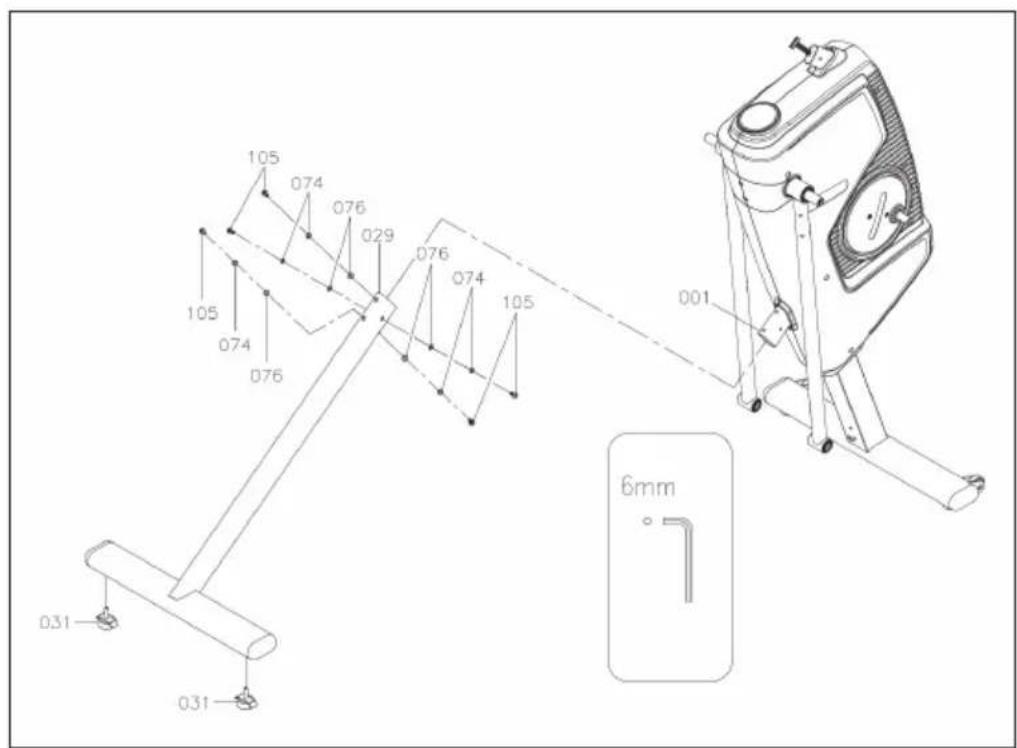
Step 3: Mounting the rear stabilizer
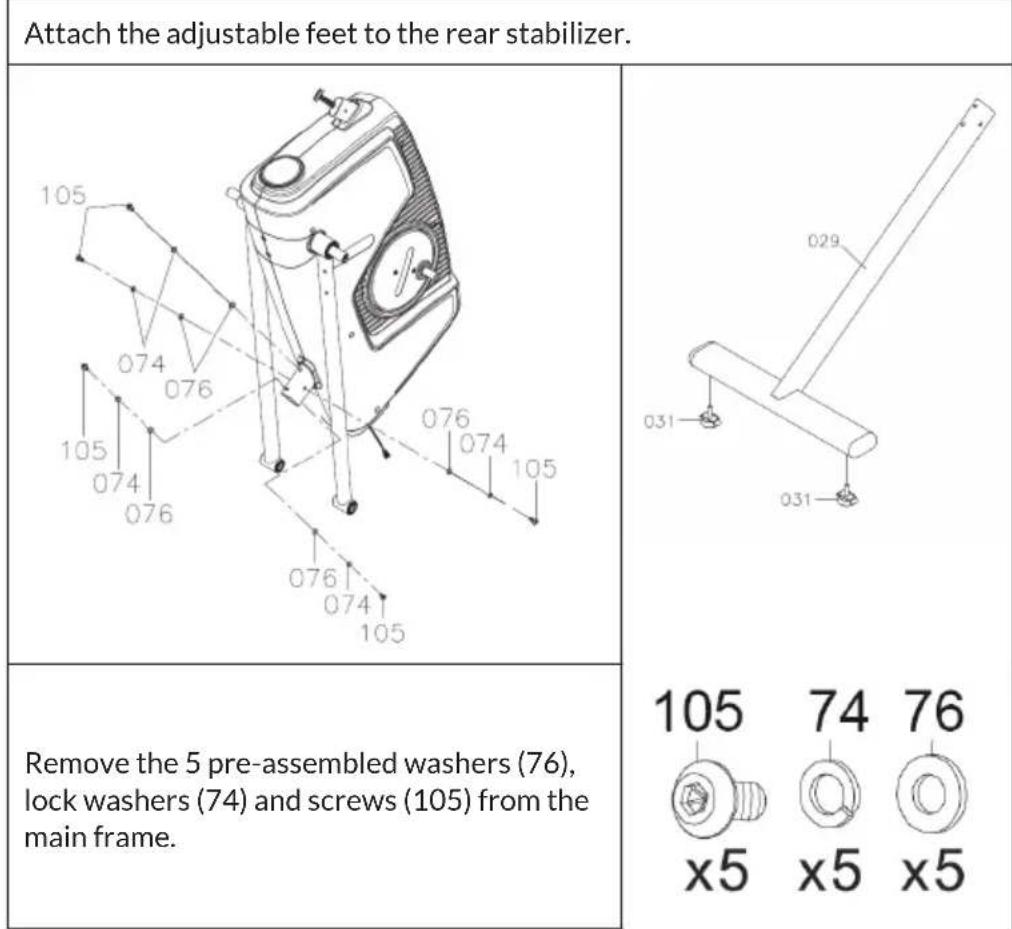
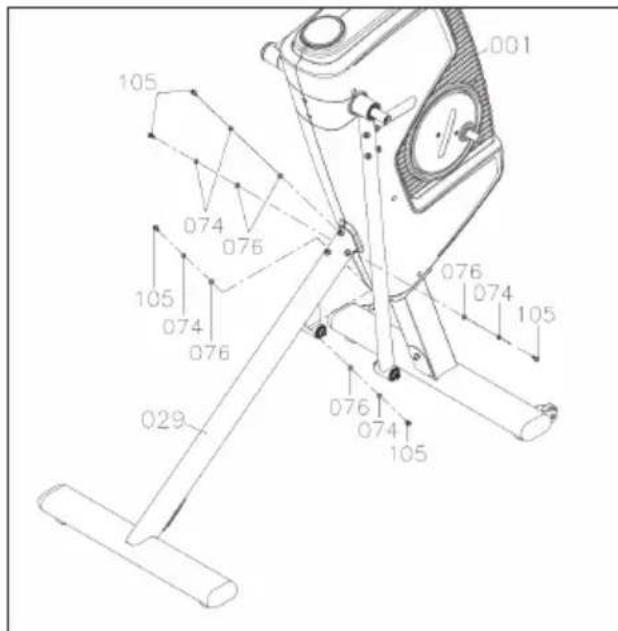
Then attach the rear stabilizer to the main frame with the washers (76), lock washers (74) and screws (105) just removed.
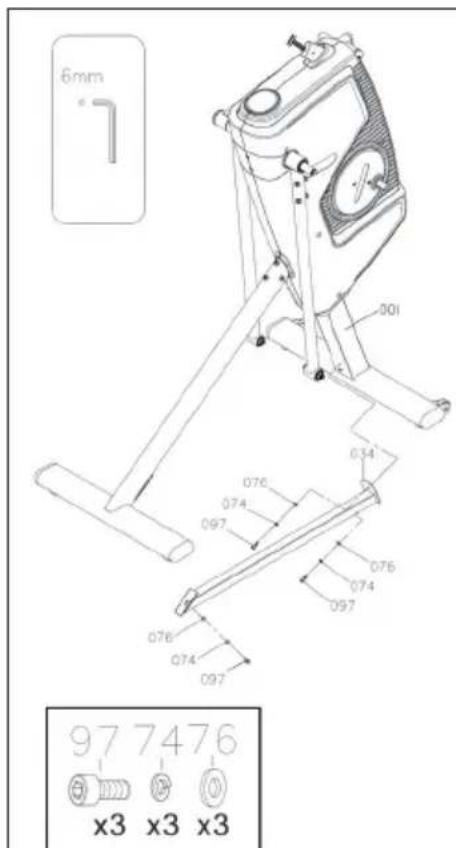
Step 4: Mounting the support tube
| Place the main frame on the polystyrene packaging. Attach the support tube (34) to the main frame using washers (76), lock washers (74) and screws (97). Do not tighten the screws completely at this stage! | |
| Attach a washer (76), lock washer (74) and screw (97) to the bottom of the support tube. Do not tighten the screw completely at this point! | |
| Fix the support tube to the rear stabilizer with a washer (76), lock washer (74) and screw (97). |
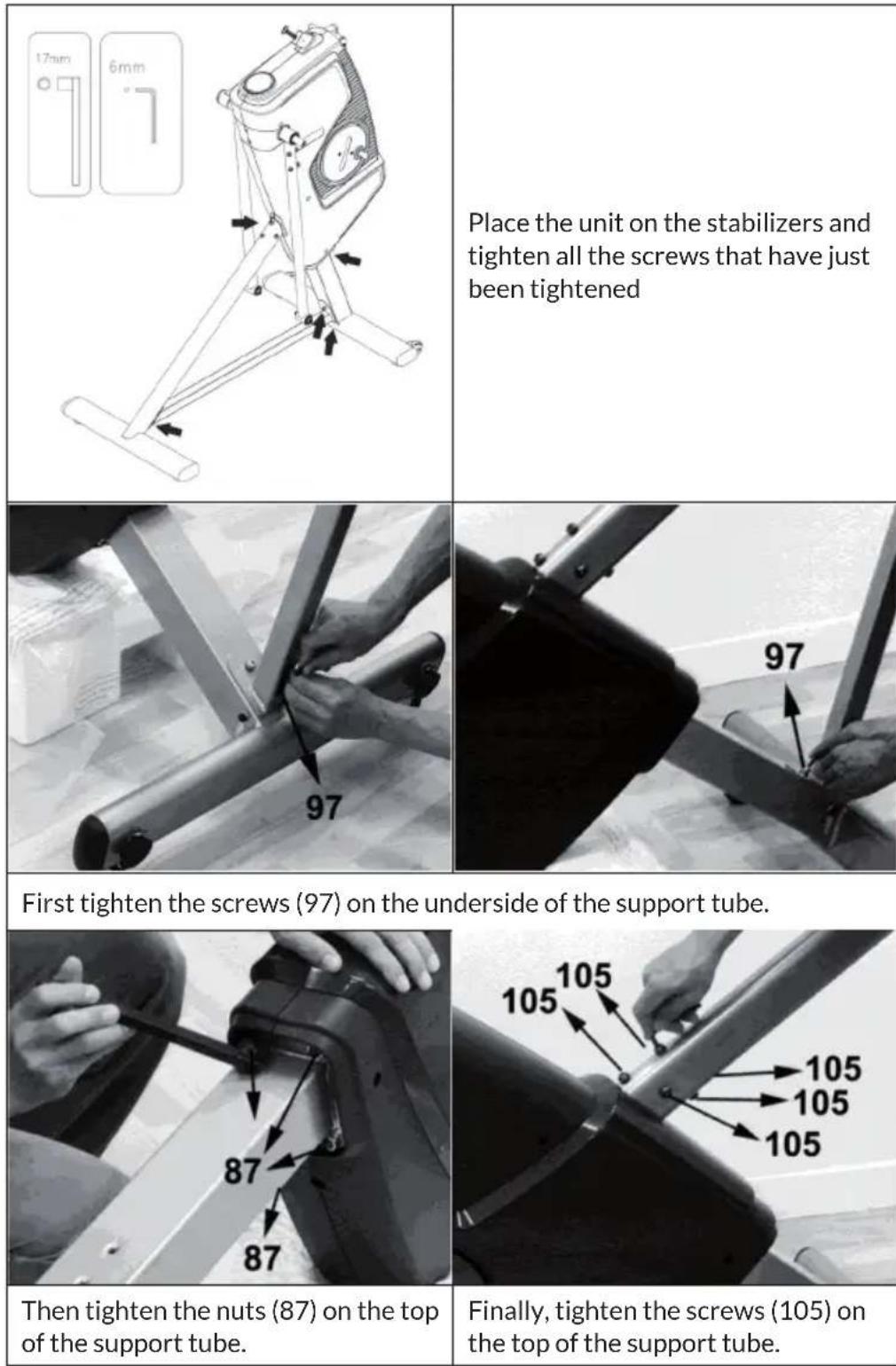
Step 5: Tightening the bolts and nuts
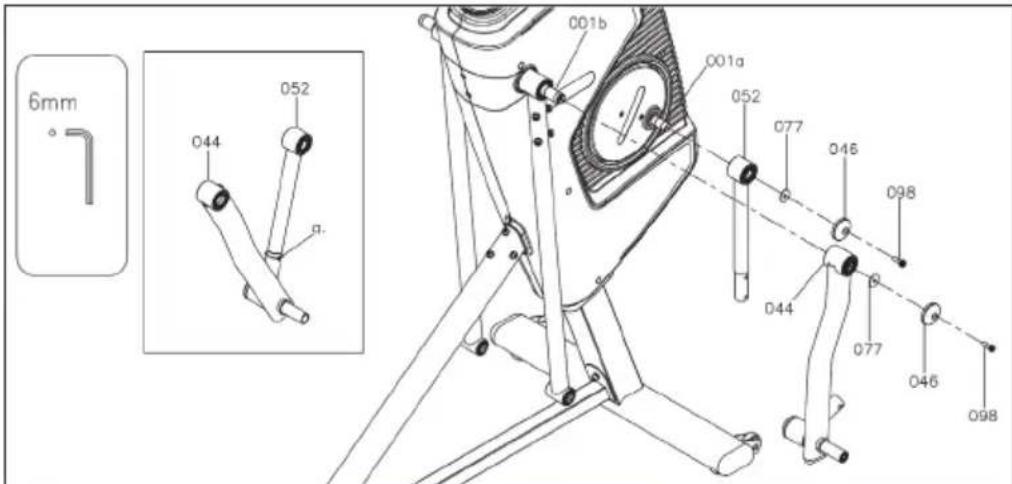
Step 6: swing linkage assembly
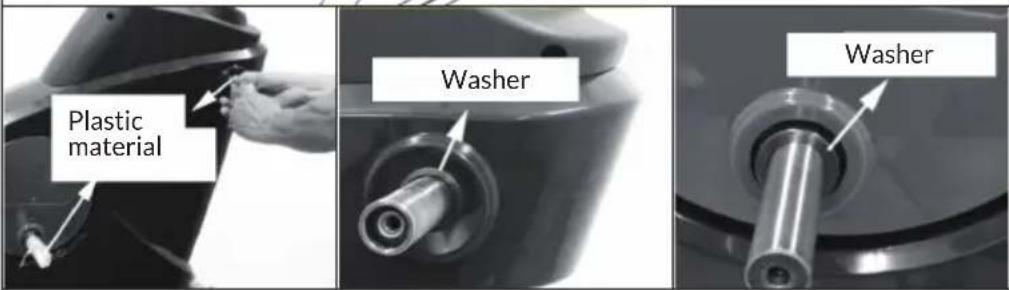
Refer to left, gently remove plastic packaging material from two Axles. Be sure not to remove the washers that already installed inside while removing packaging material.
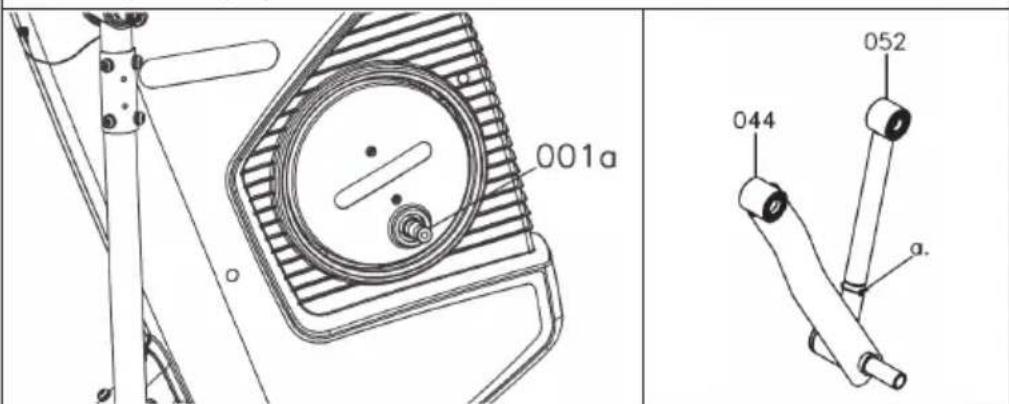
Remove the Cable Tie (a) from the Crank & Swing Linkage (44/52).
Follow the left image to adjust the Crank Axle (001a) to the bottom, this will make the Crank and Swing Linkage (44/52) easy to assemble.
| Refer to left, the Swing Linkage (52) has left and right side. There is “F” decal on each side. Make sure “F” decal faces to the item while assembly. Attach the Swing Linkage (52) to the Crank Axle (001a). | |
| Attach the Crank Linkage (44) to the Swing Arm (01b). Refer to below, make sure the Axle surface is lower than the Bearing surface. | |
| Axle Bearing Bearing Axle | |
| Fully tighten 2 pcs Washers (77), 2 pcs Tube Caps (46) and 2 pcs Socket Bolts (98) onto Crank and Swing Linkage (44/52). | |
| 77 46 98 x2 x2 x2 | |
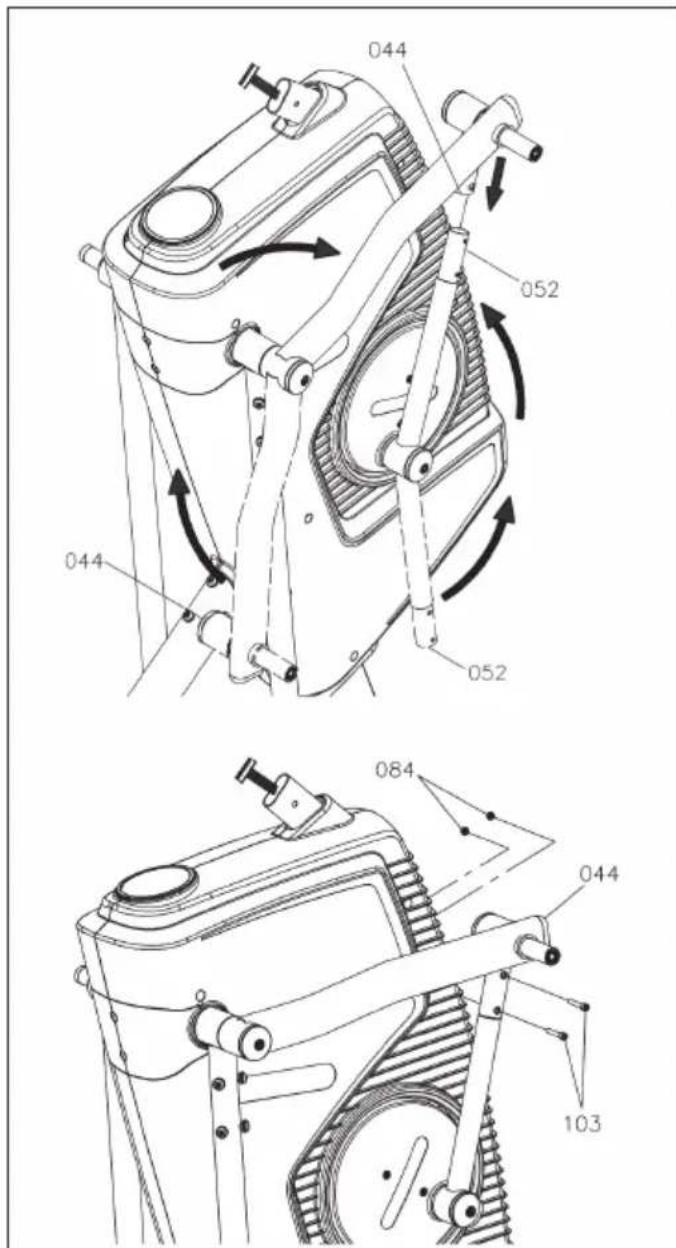
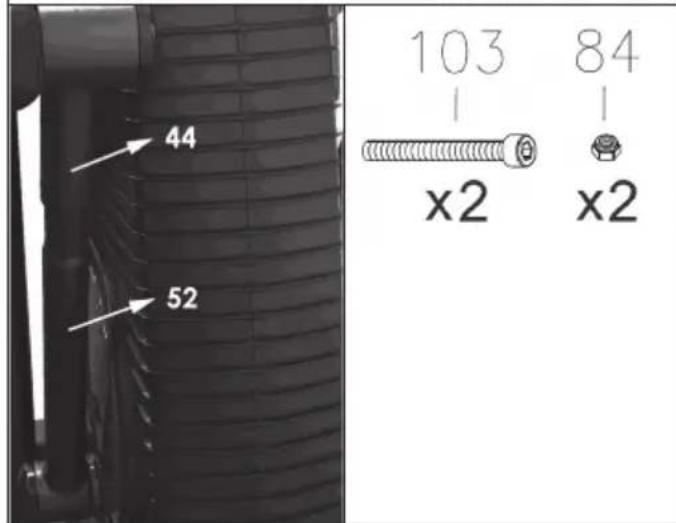
Refer to left, attach the Crank and Swing Linkage (44/52).
Note: You can slightly rotate the Crank Linkage (44) until it is in the same line with Swing Linkage (52).
Fully tighten 2 pcs
Nylon Nuts (84) and
2 pcs Socket
Bolts (103).
Note: Make sure Nylon Nut faces inside.
Repeat the above same procedure for the other side.
Step 7: Mounting the swing arms
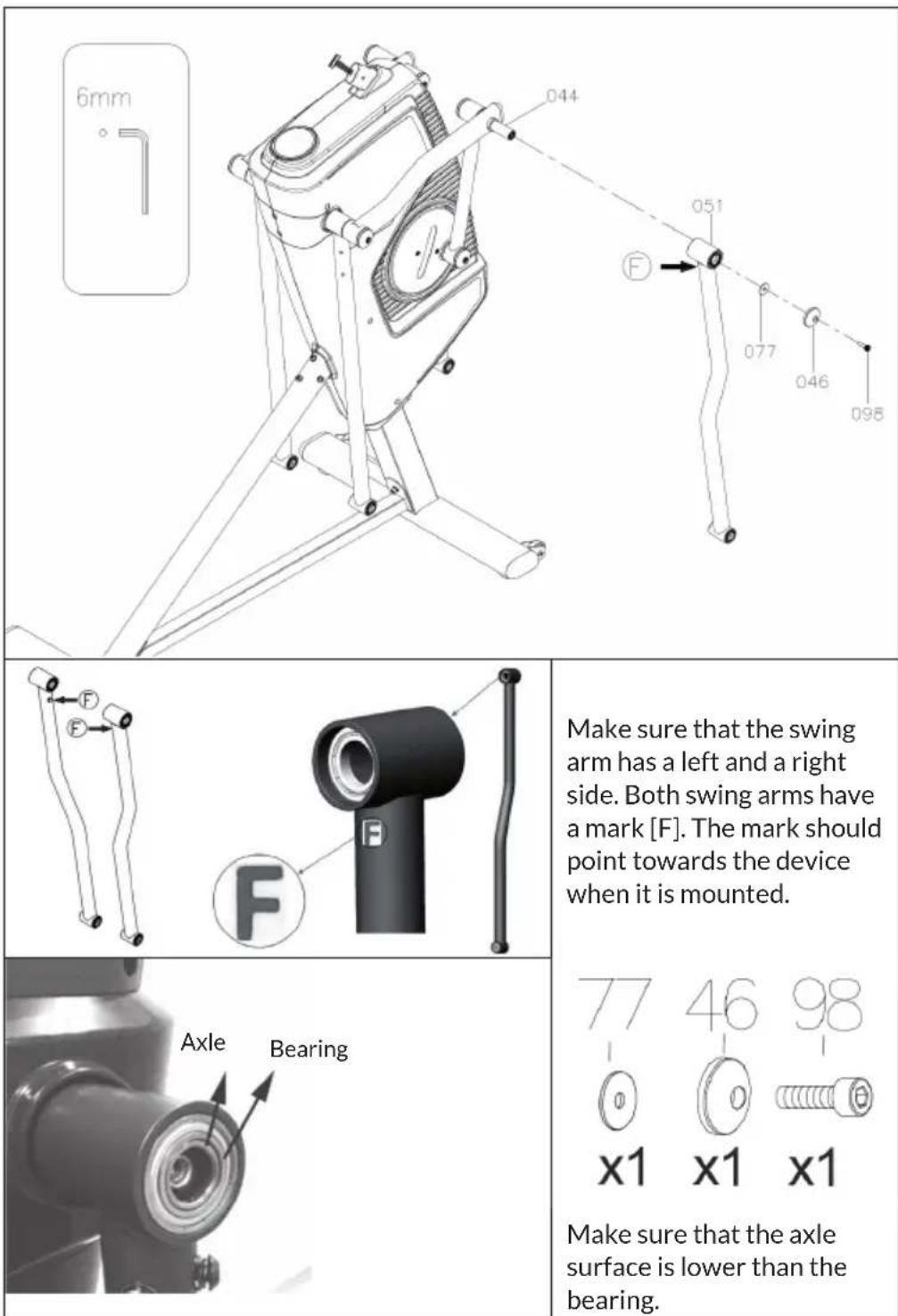
Slide the flywheel arm (51) onto the crank joint (44) and fix it with washer (77), tube cap (46) and screw (98). Repeat this step on the other side.
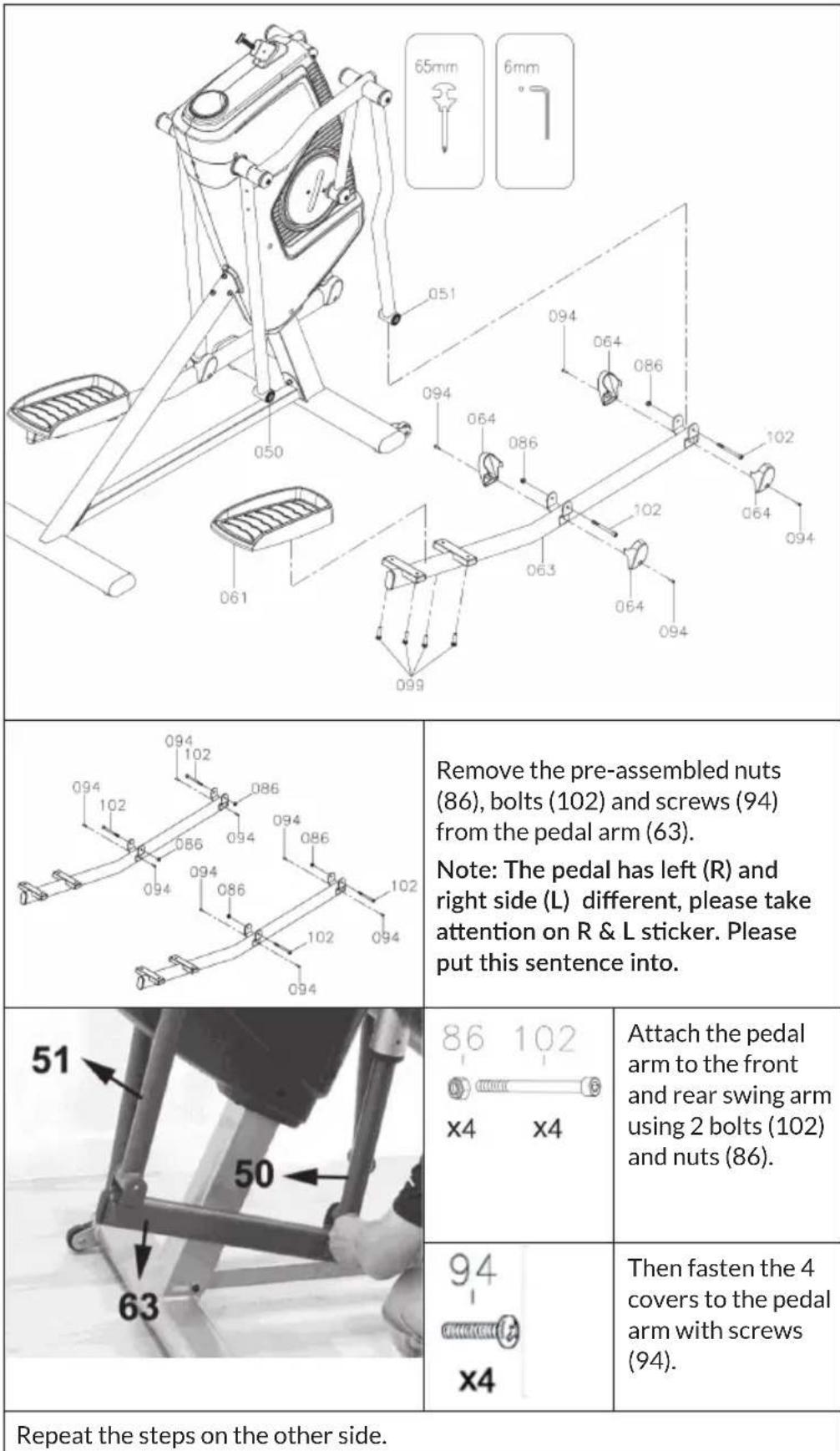
Step 8: Mounting the pedal arms

Step 9: Fixing the pedals
Step 10: Mounting the handlebar
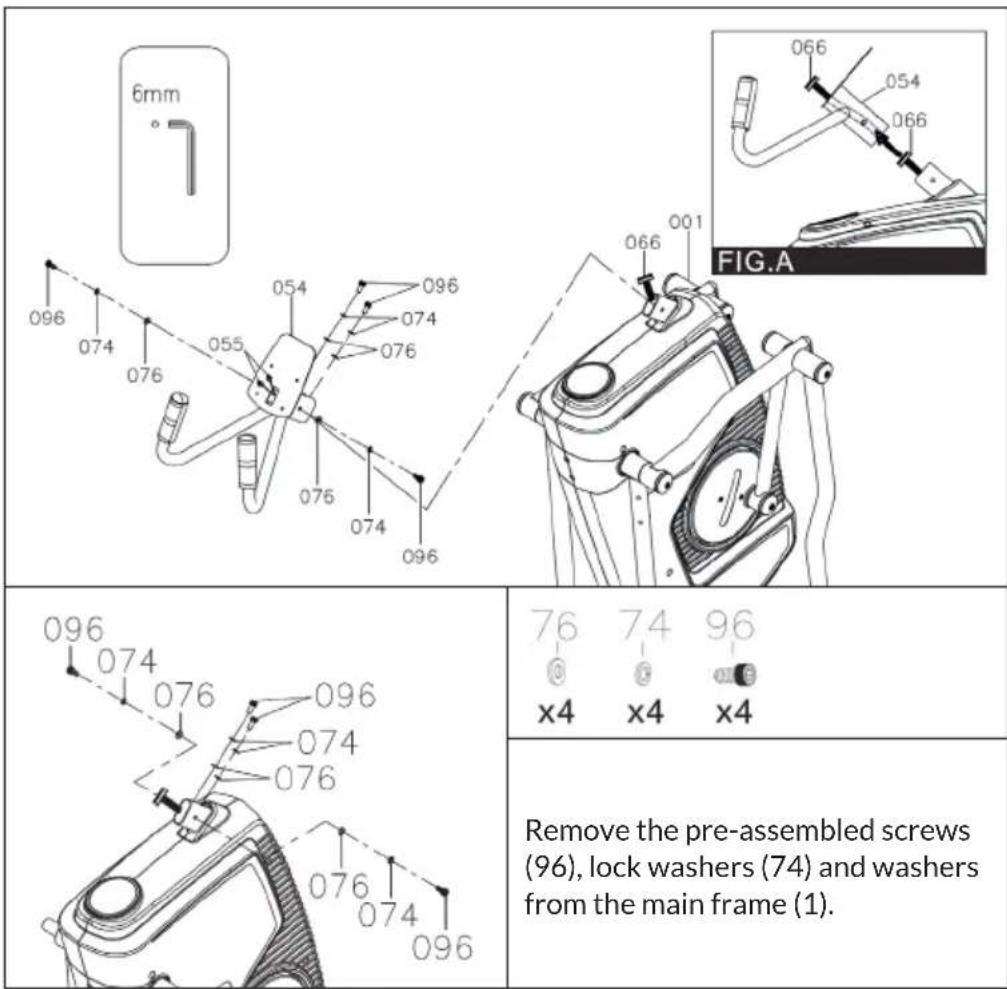
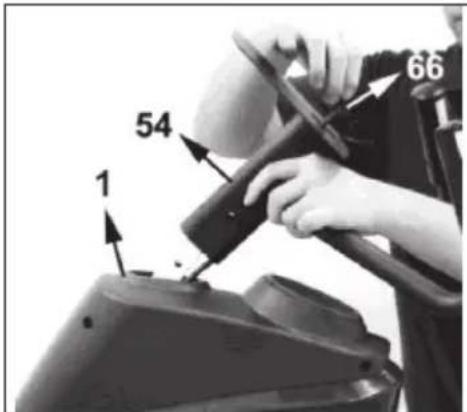
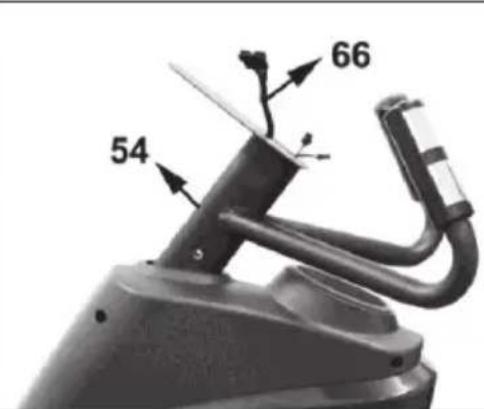
Carefully insert the upper connection cable (66) into the handlebar (54).
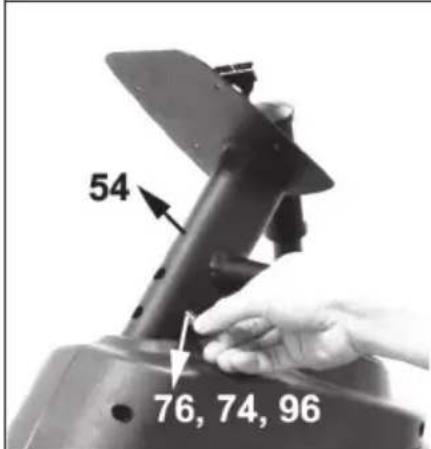
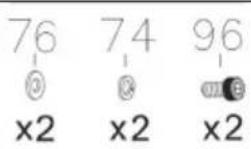
Secure both sides of the handle (54) with 2 washers (74), lock washers (76) and screws (96). Tighten the screws tightly.

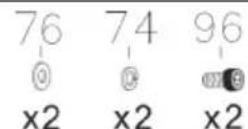
Fasten the front of the handle (54) with 2 washers (74), lock washers (76) and screws (96). Tighten the screws tightly.
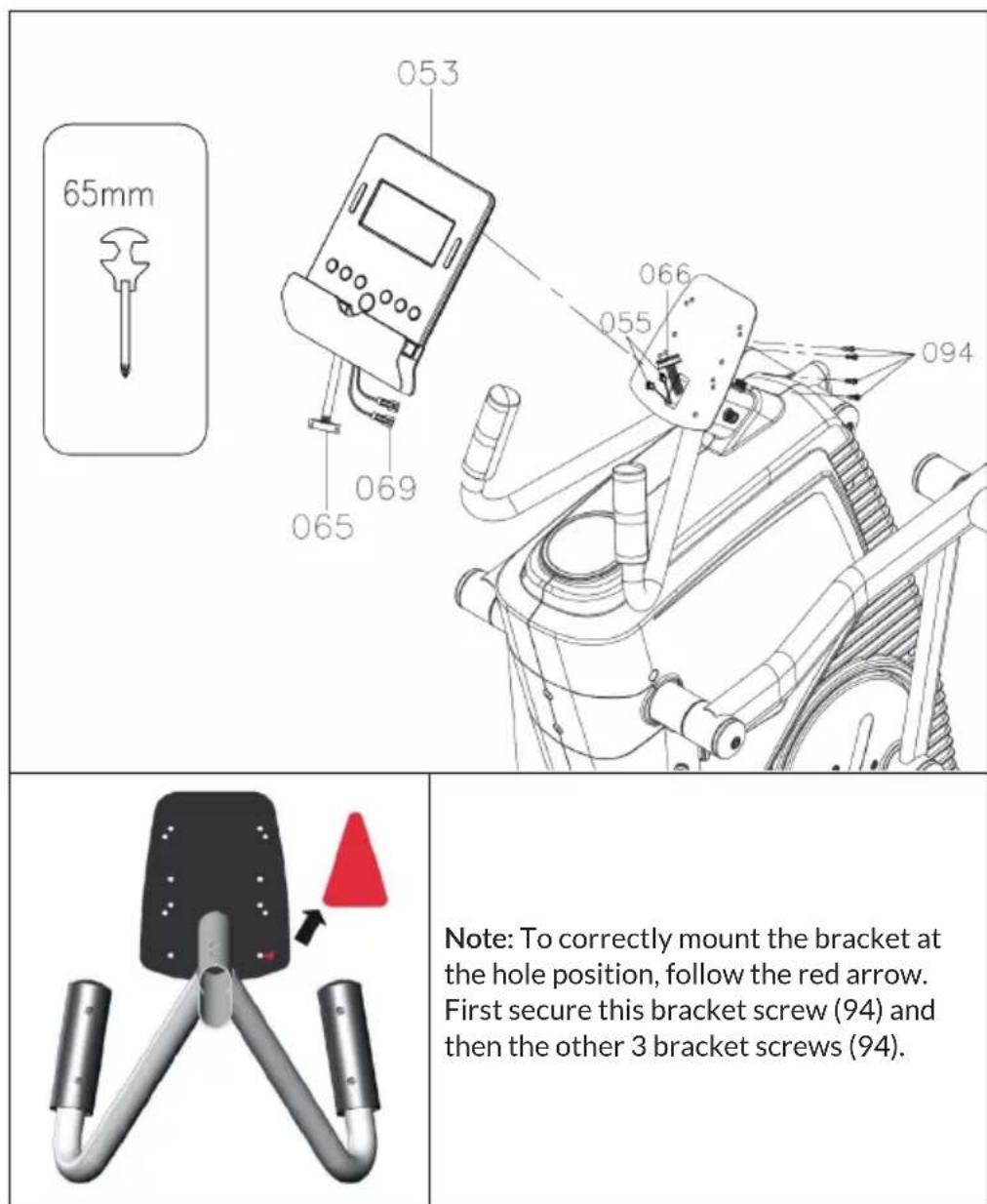
Note: Make sure the following screws all attach, then fully tighten. Because the handlebar screw holes are in very correct size, so making sure all screws all put into before tightening.
Step 11: Mounting the console
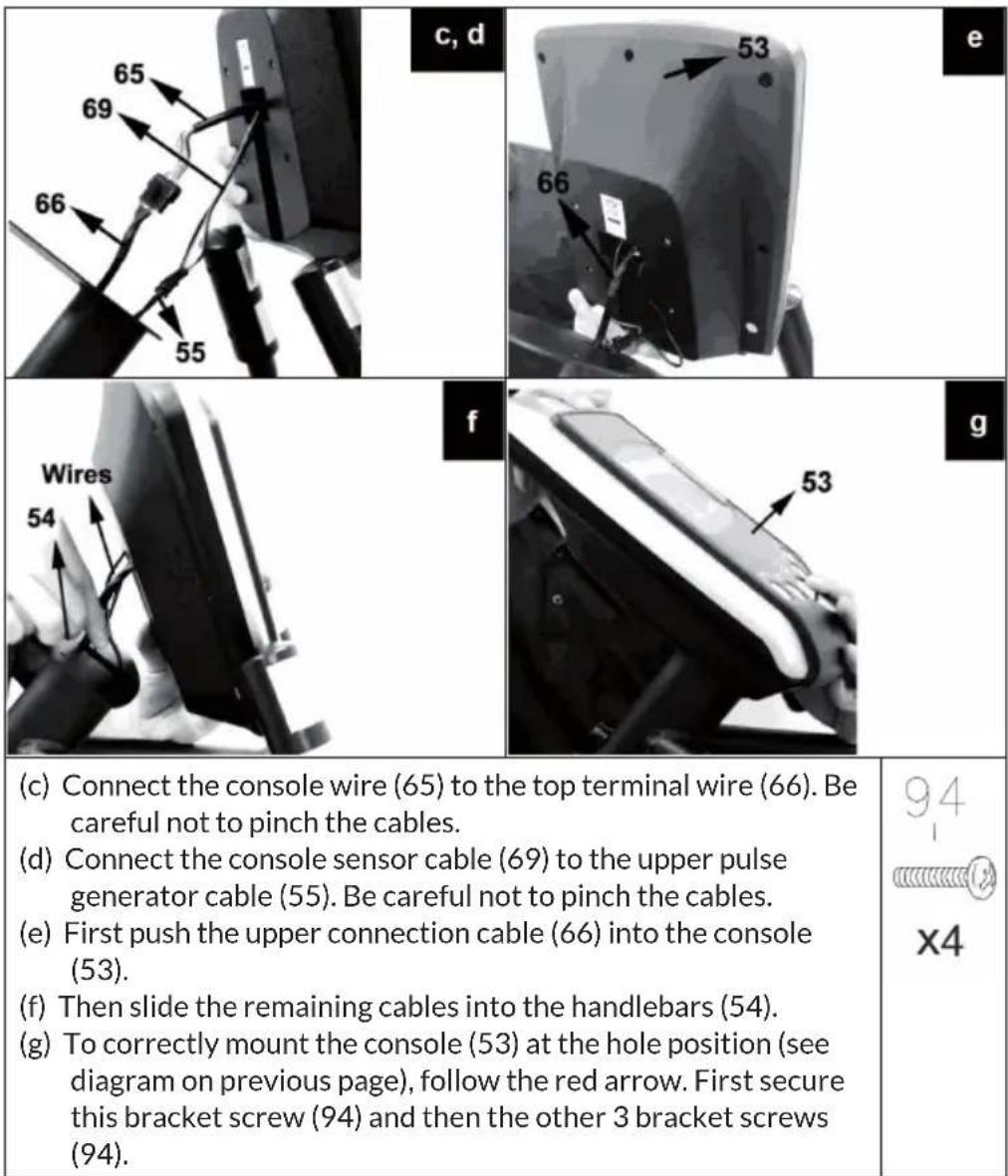
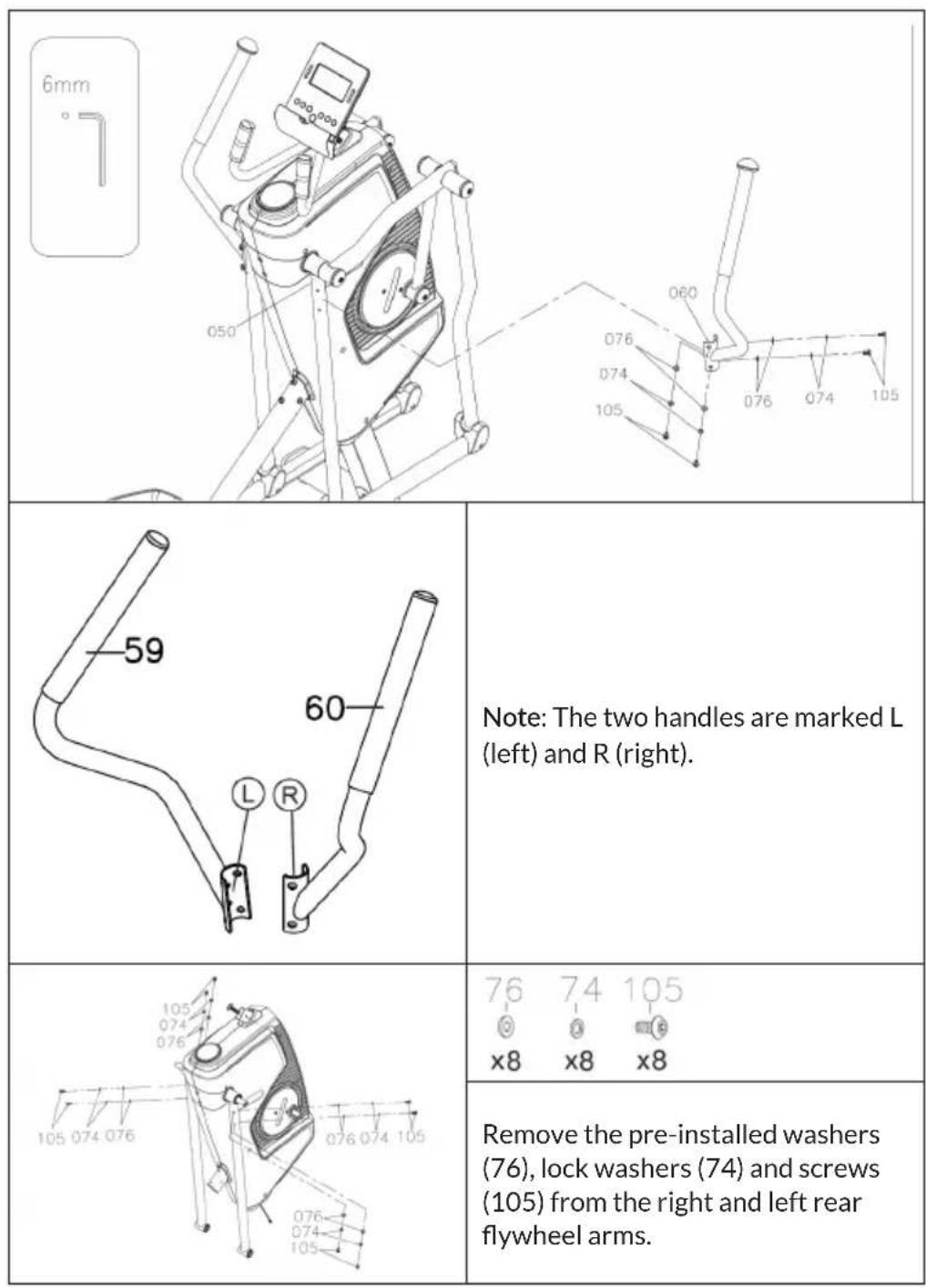
Step 12: Attaching the handles
| 76 74 105 x4 x4 x4 | |
| Attach the right handle (60) with washers (76), lock washers (74) and screws (105) to the right rear flywheel arm (50). Repeat this step on the other side. | |
| Make sure all screws are tight and the unit is level. First plug the power cord into the power inlet on the lower left side of the main frame. Then plug the AC adapter into the wall outlet. |
Dimensions
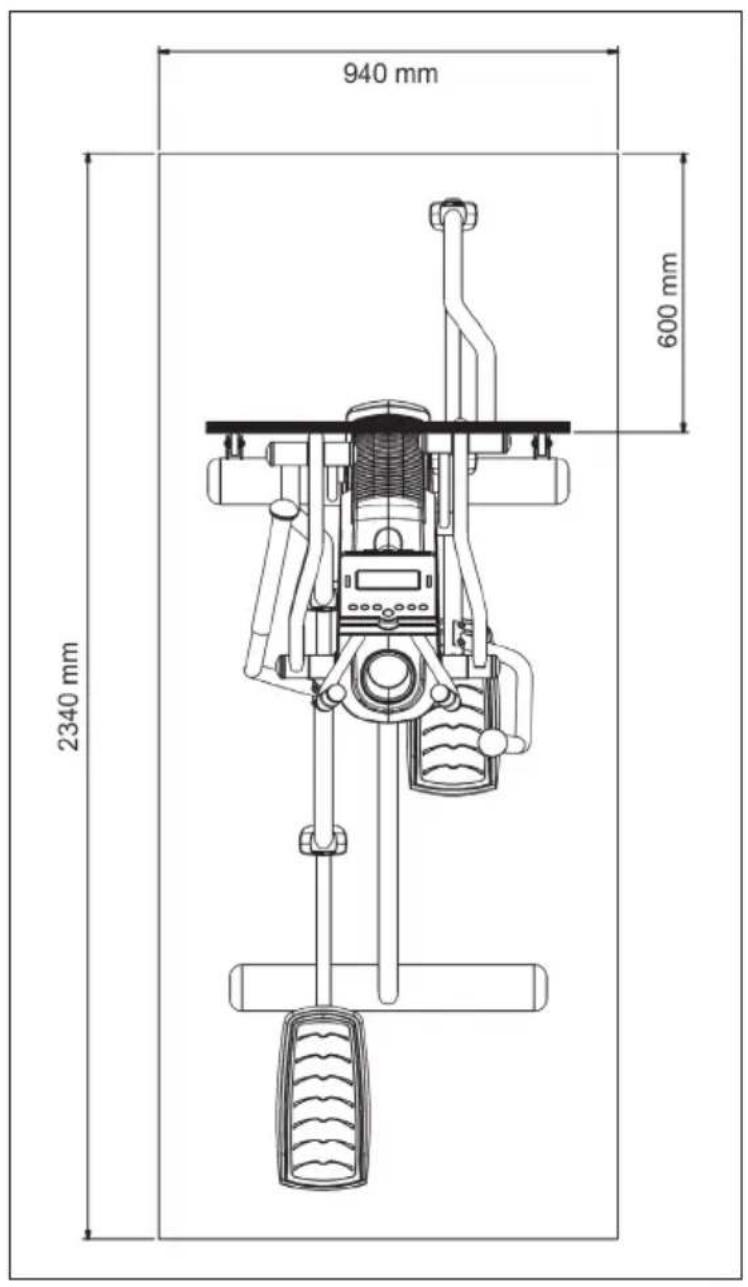
Place the item in the area where you want to use it. The maximum usable dimensions of the item are approximately 2140mm (L) × 740 mm (W).
An area of 2340mm (L) × 940mm (B) is required for safe operation of the article. Ensure that there is sufficient space at the front for at least 600mm for access and passage around the part.
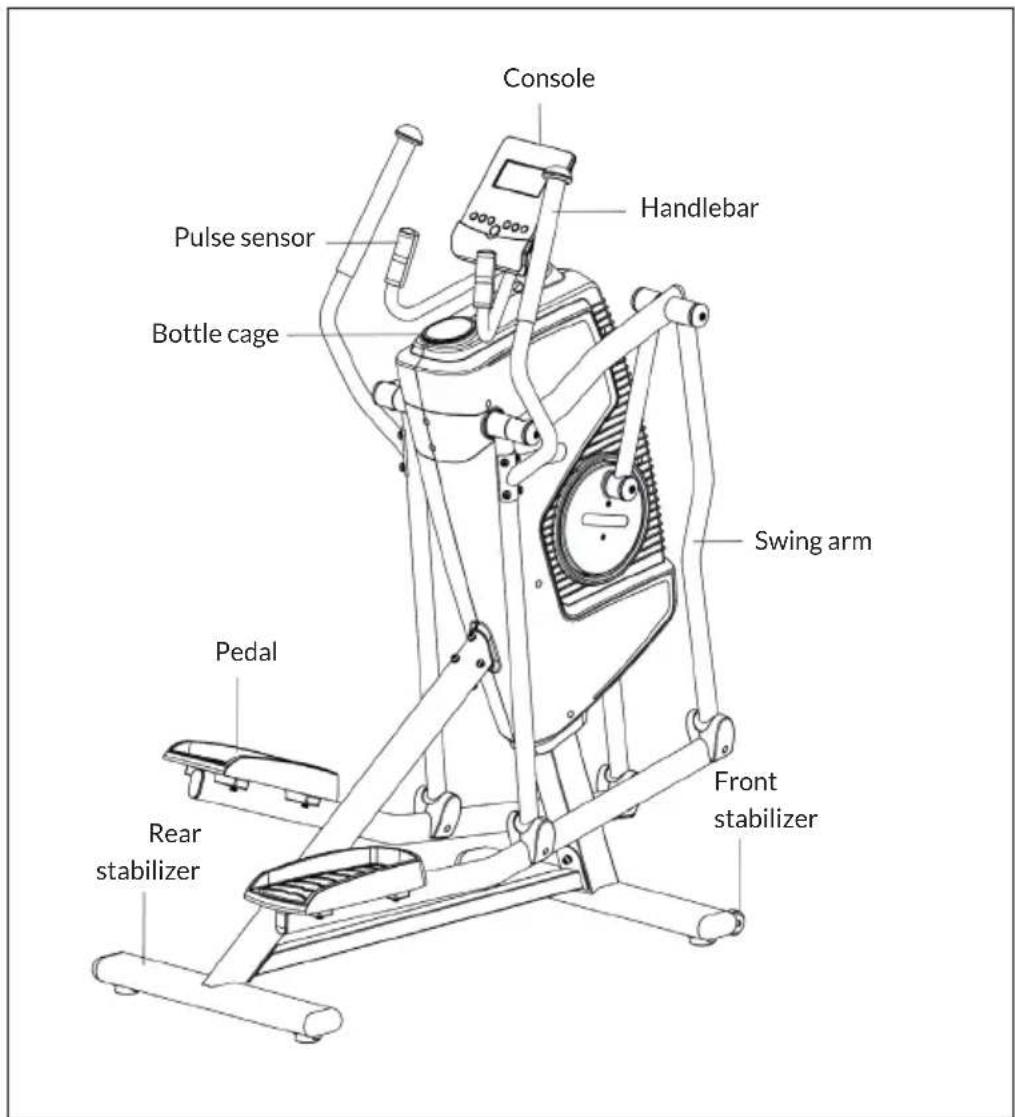
How to move the device
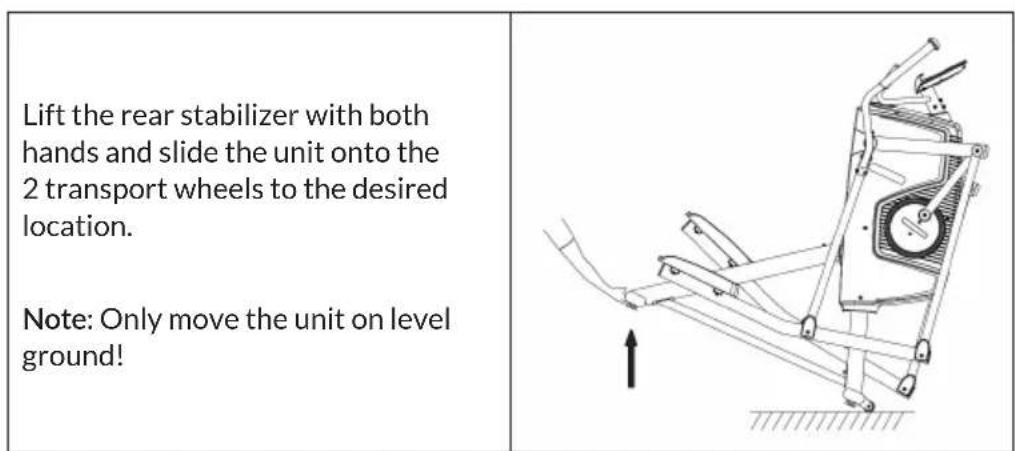
POSSIBLE USES
Capital Sports Helix Stride is the innovative cardio machine that allows you 6 different movement patterns. Familiarise yourself slowly with the controls. Depending on the angle at which you move on the foot platforms, the steering of the Helix Stride will adjust accordingly. Use the additional handrails (Grie) for each movement. Due to the high flywheel mass a round motion run is set and you can concentrate completely on the workout.
You should internalize the following movement patterns:
| Stepper Cycling | |
| Stepper - the classic up and down movement. | Cycling - corresponds to indoor bike training in a standing position. |
| Crosstrainer Running | |
| Crosstrainer - use the movable handrails for the classic crosstrainer workout. | Running - You can use the rigid Grie and run with a wide stride length. |
| Mountainclimber Airwalker | |
| Mountainclimber - you go uphill diagonally, determine the angle and thus the intensity yourself. | Airwalker - swinging movements for a hip-joint gentle training. |
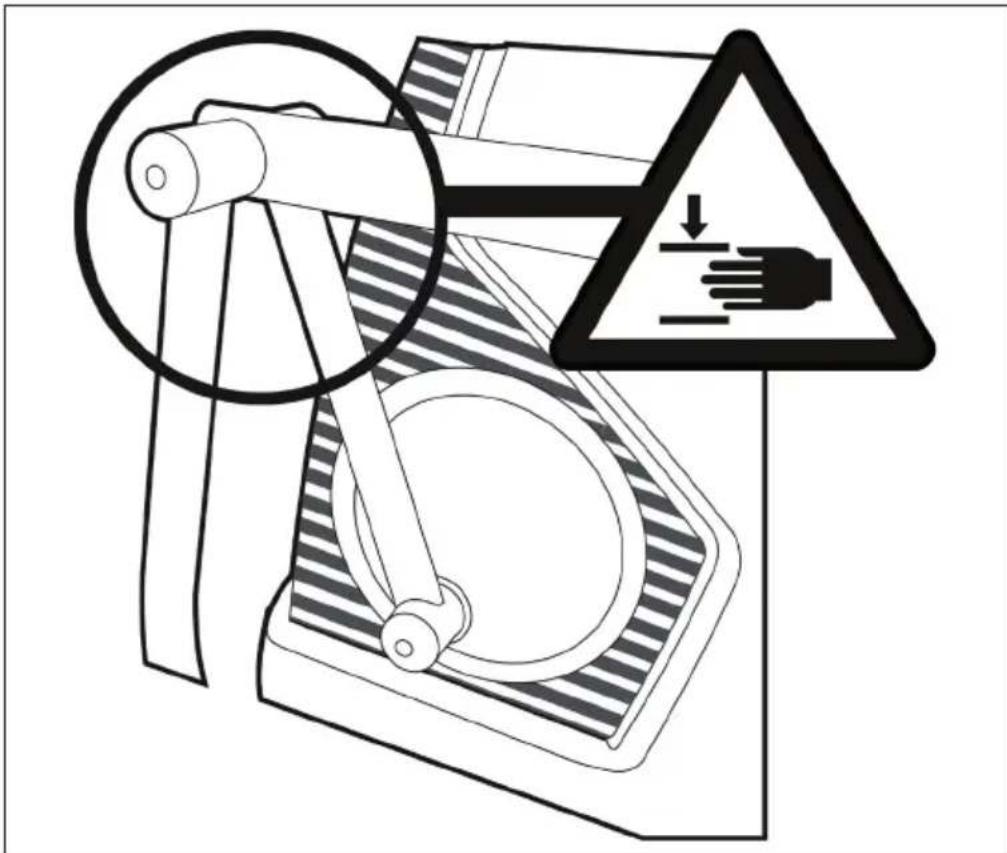

CAUTION
Risk of injury! This piece of sports equipment develops dynamic forces during active use. The movement of the mechanical elements (handles, castors, moving frame parts) can pose a risk to third persons in the immediate vicinity of the sports equipment. Therefore, make sure that third parties (persons and in particular children) do not come into close proximity to the device when it is in use. In addition, make sure that each new user of the device is made familiar with the functioning of the device (through an introduction or the provision of this operating manual).
CONSOLE AND FUNCTIONS
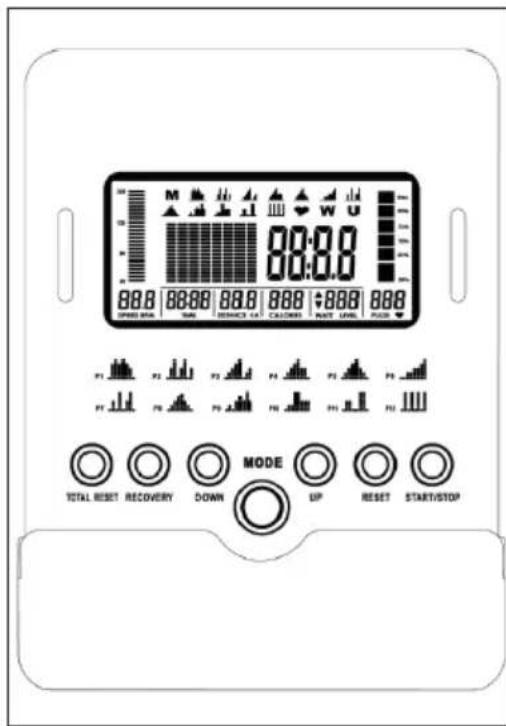
Launch console
- Plug the AC adapter into the wall outlet.
- Press any button on the console or start pedalling to turn on the console. After a few seconds, the display will light up briefly and a beep will sound. The console is now ready to use.
- Press TOTAL RESET to turn on the console and reset all values.
The console will automatically turn off after 4 minutes of inactivity.
Program List
| M P1 P2 P3 | |||
| M | |||
| Manual Glute Blast Physical Ramp | |||
| P4 P5 P6 P7 | |||
| Plateau Climb Mountain Climb 1 Fitness Test Iron Man | |||
| P8 P9 P10 P11 | |||
| Mountain Climb 2 Far Burn Hill Climb Valley | |||
| P12 P13 P14 P15 | |||
| W | U | ||
| Interval | H.R.C. 55% / 75% / 90% | Watt Control | User |
Key functions
| START/STOP | Press START/STOP to start the exercise. Press START/STOP again to stop and pause all functions during the workout. |
| RESET | In pause mode, press to return to the main menu. Press and hold the RESET button for more than 2 seconds to turn the console back on. |
| RECOVERY | The RECOVERY button allows you to measure how quickly you return to a resting heart rate after training. This button can only be used in pause mode and when the heart symbol is displayed. The console measures your heart rate for 60 seconds and then calculates your heart rate. A value from F1 (bad) to F6 (very good) is displayed. The value only serves as a comparison between the training sessions. We recommend that you measure your heart rate after each training session. Finish the workout before starting the function. The heart rate is displayed above the heart sign. Press the RECOVERY button again to return to the main menu after the test. |
| Note: If you do not hold the heart rate sensors correctly with both hands, the pulse value [P] will be output and F6 will be displayed on the screen after the console has counted down, meaning that your heart rate could not be determined. In this case, restart the test. | |
| TOTAL RESET | Press TOTAL RESET to turn on the console and reset all values. |
| UP DOWN | Press UP or DOWN to select programs, set resistance or function value. |
| MODE | Press the MODE button to confirm. |
Display indicators
| 88.8 SPEED RPM | • SPEED: Displays your current pedaling speed as km/mile per hour. • RPM: Displays your current pedaling speed as revolutions per minute. |
| 88.88 TIME | • If no target time is set, TIME counts up from 0:00 to a maximum of 99:59 minutes. • If a destination time is set (1:00 to 99:00 minutes in 1-minute increments), the console counts down from the set destination time to 0:00. |
| 88.8 DISTANCE | • If no target distance is set, the total distance travelled from 0.00 to 99.9 km/mile is displayed. • If a target distance has been set (1.0 to 99.0 km/ mile in 1 km/mile increments), the console will count down from the set target distance to 0. |
| 888 CALORIES | • If no target calories have been set, the total calories from 0 to 999 calories are displayed. • If target calories have been set (10 to 990 kcal in 10 kcal increments), the console will count down from the set target calories to 0. |
| ▲888 WATT LEVEL | • WATT: Shows the current power you are producing at a specific resistance value or the current value in watts during training. Display range: 0 to 999. • LEVEL: Displays the torque/resistance of the current program, from level 1 to 32, in 1-step increments. |
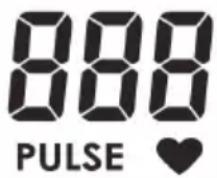
Note: If you have set the target heart rate (30 to 230 bpm = beats per minute in 1 bpm increments) and the console buzzer sounds, the heart rate will be above the target during the workout!
- To be able to measure your heart rate, you must place both hands on the pulse sensors on the handlebars. Your heart rate will be displayed a few seconds after the heart symbol is displayed.
- If you do not hold your hands correctly and a few seconds pass without pulse input, the console switches off the pulse circuit. Place your hands correctly back on the pulse sensors and the pulse display will reappear.
PROGRAMS
Launch console
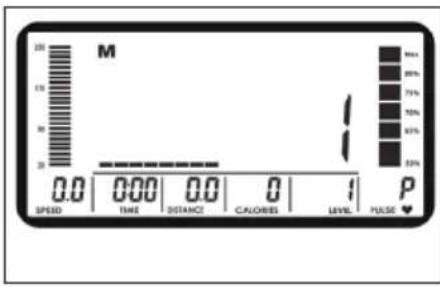
- Press TOTAL RESET to turn on the console and reset all values.
- Select U1/U2/U3 or U4 by pressing the UP or DOWN key.
- Then enter your personal data (gender, age, height, weight) and press MODE to confirm.
Manual Program
- When the machine is turned on, the Manual Program is selected, press START/STOP to start training.
- Press START/STOP to interrupt the current program.
- Press RESET to return to the main menu.
- Then press UP or DOWN to select the Manual Program. Press MODE to enter the program.
Set Level:
LEVEL
Press UP or DOWN to select the level (from 1 to 32) and press MODE to confirm.
Set time:
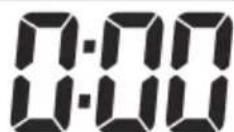
TIME
Press the UP or DOWN to set the desired time (1:00 to 99:00 minutes) and press MODE to confirm.
Set the distance:
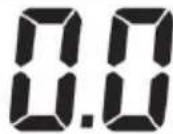
DISTANCE
Press the UP or DOWN to set the desired distance (1.0 to 99.0km / mile ) and press MODE to confirm.
Set calories:
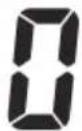
CALORIES
Press the UP or DOWN to set the desired calories (10 to 990 kcal) and press MODE to confirm.
Set target heart rate:
PULSE
Press the UP or DOWN to set the desired target heart rate (30 to 230 bpm) and press MODE to confirm.
- Press START/STOP to start the exercise.
- During the workout, you can press UP or DOWN to increase or decrease the tension level (from 1 to 32).
- During training, press MODE to display the current training value by category (SPEED, RPM, TIME, DISTANCE, CALORIES, WATT, PULSE).
Heart Rate Note: You must place both hands on the heart rate sensors on the handlebars. Your heart rate will be displayed a few seconds after the heart symbol is displayed. If you do not hold your hands correctly and a few seconds pass without pulse input, the console will turn off the pulse circuit and display an error message [P]. Place your hands correctly on the pulse sensors and the pulse display will reappear.
Programs P1-P12
- Press TOTAL RESET to turn on the console and reset all values.
- Select U1/U2/U3 or U4 by pressing the UP or DOWN key.
- Then enter your personal data (gender, age, height, weight) and press MODE to confirm.
Program selection:
- Press START/STOP to interrupt the current program.
- Press RESET to return to the main menu.
- Then press UP or DOWN to select the Manual Program. Press MODE to enter the desired program.
Set Level:
Press UP or DOWN to select the level (from 1 to 32) and press MODE to confirm.
Set time:
Press the UP or DOWN to set the desired time (1:00 to 99:00 minutes) and press MODE to confirm.
- Press START/STOP to start the exercise.
- During exercise, you can press UP or DOWN to increase or decrease the resistance level (from 1 to 16).
- During training, press MODE to display the current training value by category (SPEED, RPM, TIME, DISTANCE, CALORIES, WATT, PULSE).

- Press START/STOP to interrupt the current program.
- Press RESET to return to the main menu.
- Then press UP or DOWN to select the Manual Program. Press MODE to enter the P13 program.
- Then press UP or DOWN to select a target heart rate (55%, 75%, 90%) and press MODE to confirm.
- The target heart rate can be set between 30 bs 230 bpm in 1 bpm increments.
Set time:
TIME
Press the UP or DOWN to set the desired time (1:00 to 99:00 minutes) and press MODE to confirm.
- Press START/STOP to start the exercise.
- During training, press MODE to display the current training value by category (SPEED, RPM, TIME, DISTANCE, CALORIES, WATT, PULSE).
Important information about the H.R.C. program:
- The console monitors your current heart rate and automatically adjusts the resistance to keep your heart rate within your target zone.
- If the current pulse is above the target heart rate, the console automatically reduces the resistance. The console buzzer will continue to beep to remind you to slow down your workout.
- If the current heart rate is below the target heart rate, the console automatically increases the resistance.
Watt Program P14
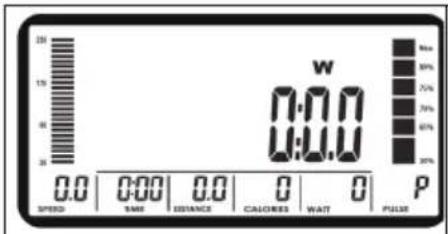
Press the UP or DOWN to set the desired time (1:00 to 99:00 minutes) and press MODE to confirm.
User-defined program P15
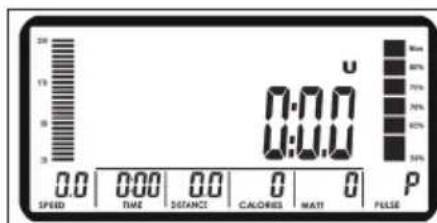
- Press TOTAL RESET to turn on the console and reset all values.
- Select U1/U2/U3 or U4 by pressing the UP or DOWN key.
- Then enter your personal data (gender, age, height, weight) and press MODE to confirm.
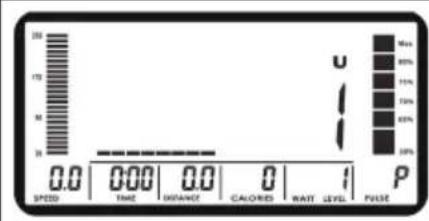
- The custom program allows the user to set the resistance manually, the console divides the time into 8 intervals. The user could set the desired resistance for each time interval individually.
- Press UP or DOWN to set the resistance (level 1 to 32) for the first interval. Press MODE to confirm.
-
Continue with the above process to set the resistance for the other intervals. The program profile will be stored in memory after commissioning. You can change the profile at any time in STOP mode.
-
Press START/STOP to start the exercise.
- During training, press MODE to display the current training value by category (SPEED, RPM, TIME, DISTANCE, CALORIES, WATT, PULSE).
Regular cardio training stimulates the cardiovascular (heart and blood vessels) and respiratory system. It improves your general health and helps you to burn fat. It is the recommended workout if you want to lose weight. When exercising, glucose is burned off first, then the fat stored in the body.
Intensive cardio training (e.g. circuit training, training with high resistance and long duration training) requires a greater amount of effort and also trains the muscular system and your endurance. As a rule, the more regular you train, the more effective the training is (even with short training sessions of 20 minutes).
During the Training
The level of resistance used during the workout determines the training intensity and the associated results.
An optimal training session includes (1) a warm-up phase, (2) an intensive cardio training phase and finally (3) a cool down phase. If you want to progress or burn calories, you should go through these 3 phases as well as exercise for at least 20-30 minutes on the ergometer.
1. Warm-up Phase
Always start your training session with a low resistance level. A warm-up phase of 5-10 minutes is important because your muscles need to be warmed up. During the warm-up phase, you should give your circulatory system and muscles time to prepare for the subsequent workout. As a beginner, you can train for the first 3 minutes at the easiest level and then gradually increase the level to where you feel most comfortable.
2. Cardio Training Phase
After about 10 minutes, you can then begin the cardio training phase. When using the interval training program, the computer controls the resistance depending on the type of interval chosen and thus simulates changing intensities.
The cardio training phase is considered aerobic or anaerobic training depending on the energy expenditure. These two types of training are defined as follows:
Aerobic Training Zone
While you are in this zone, you are improving your cardiovascular system and burning fat.
Despite an increased heart rate, deeper breathing and light sweating, the body is not in a very stressed state, breathing is not significantly accelerated—you could still talk to someone without going out of breath—and you feel that you could sustain the physical exertion for a long time. It's similar to when you briskly walk uphill.
The muscles and heart work more intensely than when the body is at rest and can get most of their energy needs met via aerobic energy production, which utilizes oxygen to facilitate energy production. At the same time, the anaerobic production of energy is also active, but only to a small extent. The lactic acid produced in this process can be broken down to produce energy. Most of your training should be aerobic training.
If you continue to increase the intensity, you will eventually come to the threshold where aerobic energy production is no longer able to increase its output. At this point, there is a shift towards anaerobic energy production being used to a greater extent. You are now doing anaerobic training.
Anaerobic Training
When in this zone, you are improving your performance and speed. When you increase the intensity while in this zone, the training becomes much more strenuous because of the rising lactate level in the body; you start sweating more; your breathing gets faster; and after some time depending on your fitness level, your muscles tire and you feel totally exhausted and that you can no longer continue at this level of intensity.
3. Cool-down Phase
At the end of the cardio training phase, you begin the cool-down phase, which should last for at least 5 minutes. Here, you use low levels of resistance. The recovery or cool-down phase is also helpful with regard to preventing possible muscle soreness. It is also advisable to do active recuperation after an intensive training session, such as a hot bath, a sauna session or a massage.
Training Progress
Each month you can make the training more challenging by extending the duration of the cardio training phase, by using a higher level of resistance within that phase or by doing a more demanding interval training.
Eating and Drinking
- Drink before, during and after training.
- Drink at least 2 sips of water (10 to 20 cl) every 10-15 minutes during a training session.
- If your workout lasts for more than 1 hour, you should drink a sports drink to protect the body from dehydration while training.
- For optimal cardio training, suitable nutrition before and after any physical activity is very important.
Before training, it is best to eat carbohydrates, such as those found in rice and pasta, as they provide the body with an important source of energy.
After training, you need to refuel with proteins, such as those found in eggs, yoghurt and dried fruits. Even if you want to lose weight, it is absolutely necessary to eat after training in order for your body to recuperate.
WARMING UP BEFORE A WORKOUT
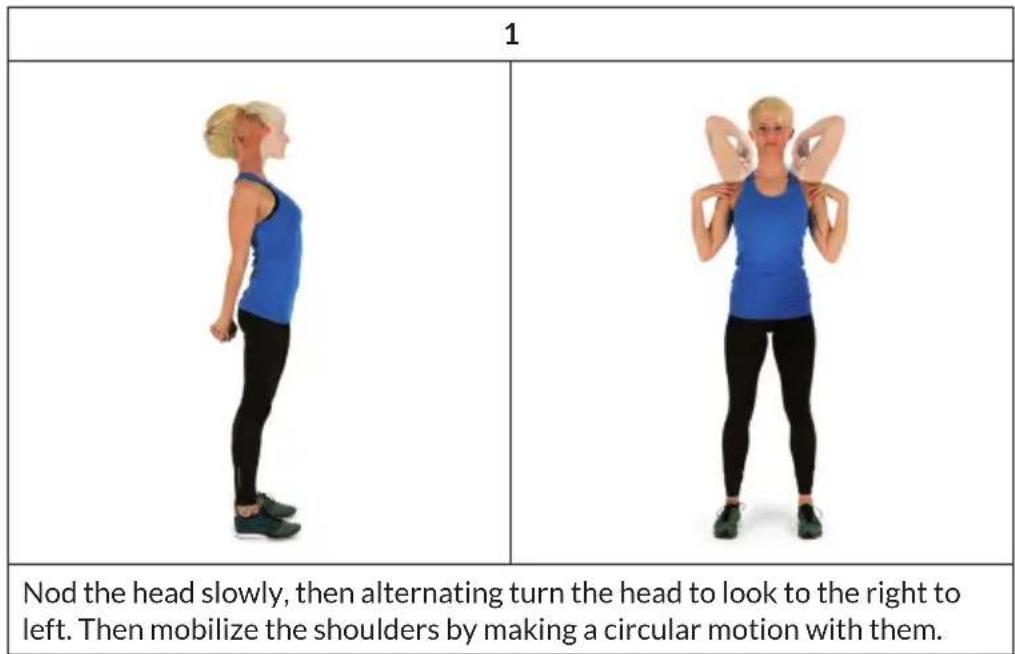
Perform the movements before each workout to mobilize your joints and activate your muscles.
Should a movement be uncomfortable or painful, skip this movement and consult your doctor or fitness instructor about suitable warm-up movements.
Each movement should be repeated (right and left) so that you can start the cardio training relaxed.
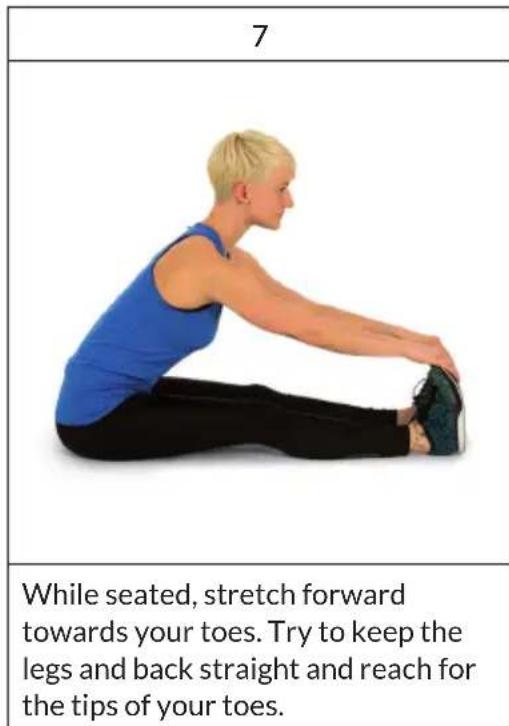
Take about 5 minutes to do the following CapitalSports training routine:
| 2 | 3 |
| Turn the hips while the arms are stretched. The feet are not firmly fixed to the ground; the ankles follow the body's rotation. | Bend at the hip with one arm stretched upward. Stay in this position for a few seconds on each side. |
| 4 | |
| Stand on one leg and hold the instep of the other leg with your hand. While in this position, mobilize your ankle so as to stretch the thigh slightly. If necessary, hold on to something to keep your balance. Then Stand on one leg and draw a circle in both directions (clockwise and counterclockwise) with the ankle. | |
| 5 | 6 |
| When squatting, place your feet about shoulder-width apart and lower your hips while keeping your arms straight. Try to also keep your back straight. | Sit with your legs bent so that the soles of your feet touch. Slightly flap the knees by moving the knees up and down while keeping the feet on the floor. Hold your ankles and keep your back straight. |
TRAINING VIA KINOMAP APP
Kinomap turns your bike trainer, exercise bike, treadmill or rowing machine into a powerful and fun fitness device.
Choose a video and train on the Kinomap app. Watch your icon progress on the map as you follow the video. The app will change incline or resistance on your equipment to follow each video you choose in real time.
Join for FREE and get started now!

How to connect to Kinomap
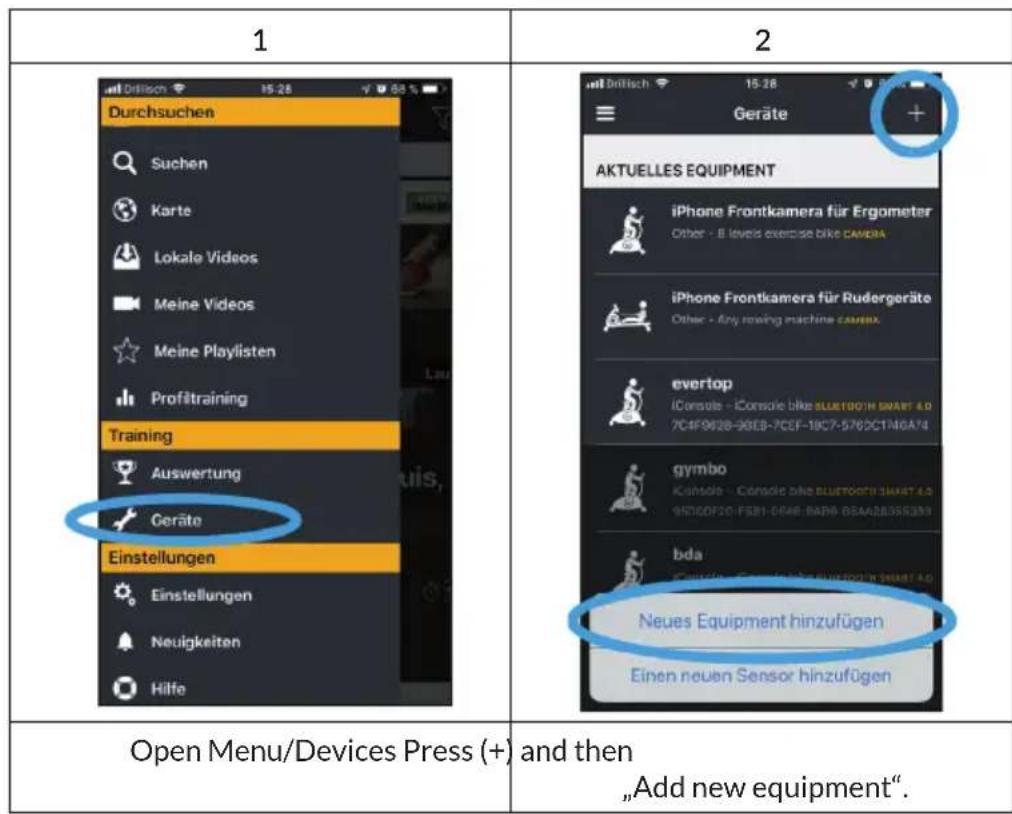
| 3 | 4 | |||
| Stufe 1/4 Wähle dein richtig Fitness Equipment. Ergometer Laufband Crosstrainer Rudermaschine | Stufe 2/4 Ergometer Wähle dein richtig Fitness Equipments. Camera | Stufe 2/4 Ergometer Wähle dein richtig Fitness Equipments. Camera | Stufe 2/4 Ergometer Wähle deinzigte Fitness Equipments. Bodily BIKE | Bayer Sportel Beter Sport |
| BH Fitness | BODY BIKE | Body Flex | ||
| CS Cape Verde | CARDIO FITNESS CardioFitness | Cardiostrong | ||
| Cape Verde | CardioFitness | Cardiostrong | ||
| CARE FITNESS | CICLOTTE | Cinqueveso | ||
| Care Fitness | Ciclette | Concept 2 | ||
| OKN | TOMVOS | |||
| Select the appropriate device (Ergometer = bicycle) | Select the brand | |||
| 5 | 6 | |||
| Stufe 3/4 Ergometer > Capital Sports Wähle das Model deines Fitnes Equipments. CS Cape Verde, sports | Stufe 4/4 Ergometer > Capital Sports > Evo Pro (Bluetooth Smart 4.0)... | |||
| erkannot | ||||
| interaktiv + Evo Deluxe -Evo Pro BLUETOOTH SMART 4.0 + Evo Series + Evo Track mit Sensor Für diese Marke ist kein Sensor verfügbar | The Bluetooth search starts. Wait until the console is displayed and select it (the name is usually „iConsole"). | |||
| Select the model, then press Bluetooth Smart 4.0. | The Bluetooth search starts. Wait until the console is displayed and select it (the name is usually „iConsole“). | |||
CARE AND MAINTENANCE
Note: As with all training machines with mechanical, moving components, screws may loosen due to frequent use. We therefore recommend that you check them regularly and, if necessary, retighten them with a suitable key. Clean your training device regularly with a damp cloth to clean the surfaces from sweat and dust.
- When you don't use the exercise bike for a long time, please take out the console battery to avoid running out of battery.
- Often clean the exercise bike with clean cloth to keep the clean appearance.
- The safety level of the equipment only can be maintained if it is regularly examined for damage and or /wear and tear.(e.g. handle bar, pedals and seat ...etc.). It is vital that any faulty parts are replaced and the it is not used until completed repaired.
- Regularly check that the elements fastened with nuts and bolts are correctly tightened.
- Remember regularly to grease moving parts.
- Special attention to the component, most of them are susceptible to wear like brake system, foot pad etc.
- As sweat is very corrosive, do not allow it to come into contact with the enameled or chromed parts of the equipment, particularly the computer. Immediately wipe the equipment after using. The enameled parts can be cleaned using a damp sponge. All aggressive or corrosive products must be avoided.
- Storing the equipment in a clean and dry environment away from children.
DISPOSAL CONSIDERATIONS
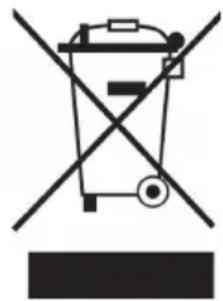
If there is a legal regulation for the disposal of electrical and electronic devices in your country, this symbol on the product or on the packaging indicates that this product must not be disposed of with household waste. Instead, it must be taken to a collection point for the recycling of electrical and electronic equipment. By disposing of it in accordance with the rules, you are protecting the environment and the health of your fellow human beings from negative consequences. For information about the recycling and disposal of this product, please contact your local authority or your household waste disposal service.
DECLARATION OF CONFORMITY
CE UK CA
Manufacturer:
Chal-Tec GmbH, Wallstrasse 16, 10179 Berlin, Germany.
Importer for Great Britain:
Berlin Brands Group UK Ltd
PO Box 1145
Oxford,OX1 9UW
United Kingdom
Hereby, Chal-Tec GmbH declares that the radio equipment
type Helix Stride is in compliance with Directive 2014/53/
EU. The full text of the EU declaration of conformity
is available at the following internet address: use.
berlin/10034037
For Great Britain: Hereby, Chal-Tec GmbH declares that the radio equipment type Helix Stride is in compliance
with the relevant statutory requirements. The full text of
the declaration of conformity is available at the following
internet address: use.berlin/10034037
Chere cliente, cher client,
Berlin Brands Group UK Ltd
PO Box 1145
Oxford,OX19UW
United Kingdom
Berlin Brands Group UK Ltd
PO Box 1145
Oxford,OX19UW
United Kingdom