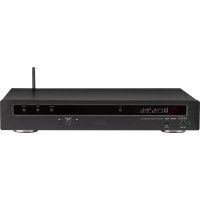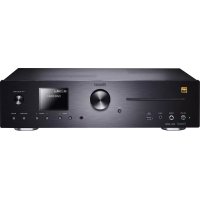
MC 400 - Music receiver MAGNAT - Free user manual and instructions
Find the device manual for free MC 400 MAGNAT in PDF.


| Product Type | Network Music Receiver |
| Brand | Magnat |
| Model | MC 400 |
| Dimensions (W x H x D) | 433 x 115 x 301 mm |
| Power Supply | 230 V~, 50 Hz, max. power consumption 300 W, standby < 0.5 W |
| Network Input | Wi-Fi 2.4 GHz (802.11 b/g/n) and LAN RJ45 |
| Bluetooth | Bluetooth 5.0 with Qualcomm® aptX™ HD |
| Supported Audio Formats | MP3, WMA, AAC, FLAC, APE, WAV (up to 192 kHz/24-bit) |
| CD Player | CD, CD-R, CD-RW, MP3, WMA |
| Tuner | FM (87.5-108 MHz) and DAB/DAB+ (174.92-239.2 MHz) |
| USB Input | USB-A 1.1, 5V/1000 mA, FAT16/32, up to 8 GB, MP3 and WMA formats |
| Digital Inputs | 1 x optical (Toslink), 1 x coaxial (Cinch), HDMI ARC |
| Analog Inputs | 2 x AUX (Cinch), 1 x front Line In (3.5 mm jack), Phono MM |
| Outputs | Speakers (4-8 Ω), Subwoofer (Cinch), Headphone (6.3 mm jack) |
| Connectivity | Wi-Fi, LAN, Bluetooth, USB, HDMI ARC, optical, coaxial, Phono |
| Main Functions | Network streaming (via Magnat Audio Stream app), Webradio (TuneIn), Spotify Connect, Bluetooth, CD, DAB+, FM, USB, HDMI ARC, Phono, EQ settings (bass, treble, balance, loudness), CD programming, sleep timer |
| Care and Cleaning | Use a soft, dry cloth. Avoid any cleaning products, sprays or chemical solvents. |
| Safety | Do not expose to water or moisture. Ensure adequate ventilation. Disconnect during storms or prolonged non-use. Batteries out of reach of children. |
| Spare Parts and Repairability | Repairs by a specialist with original parts. Contact the dealer or Magnat Audio-Produkte GmbH. |
| General Information | User manual included. Remote control with batteries supplied. DAB/FM antenna included. Mains cable supplied. CE compliant. |
Frequently Asked Questions - MC 400 MAGNAT
User questions about MC 400 MAGNAT
0 question about this device. Answer the ones you know or ask your own.
Ask a new question about this device
Download the instructions for your Music receiver in PDF format for free! Find your manual MC 400 - MAGNAT and take your electronic device back in hand. On this page are published all the documents necessary for the use of your device. MC 400 by MAGNAT.
USER MANUAL MC 400 MAGNAT
Important notes for installation / warranty card
Use your phone, tablet or computer as a remote control for Spotipy. Go to spotipy.com/connect to learn how.
The Spotify Software is subject to third party licenses found here: https://www.spotfly.com/cannet/third-party-licenses.

The Bluetooth® word mark and logos are registered trademarks owned by Bluetooth SIG, Inc. and any use of such marks by Magnat Audio-Produkte GmbH is under license. Other trademarks and trade names are those of their respective owners.

Qualcomm aptX is a product of Qualcomm Technologies, Inc. and/or its subsidiaries.
Qualcomm is a trademark of Qualcomm Incorporated, registered in the United States and other countries, aptx is a trademark of Qualcomm Technologies International, Ltd., registered in the United States and other countries.

At the end of the product's useful life, please dispose of it at appropriate collection points provided in your country.
The equipments are checked and tested continuously during the entire production process. In case you have problems with
y
- During the warranty period we will notify any defects due to faulty material or relationship by replacing or repairing the defective part at our discretion. Further claims, and in particular those for price reduction, cancellation or sale, compensation for damages or subsequent damages, are excluded.
3.Unauthorized tampering with the equipment will invalidate this warranty.
-
Consult your authorized dealer first, it warranty says needle is needed. Should it prove necessary to return the component to the factory, please ensure that the component is packed in original factory packing in good condition . Your excuse our reject as proof of your partfication
-
Excluded from the warranty are: - Illuminates - Velass - Batteries - Wear parts - Salping damages, either readily apparent or consolidated (causes for such damages must be indeed immediately with forwarding agent), the railway express office or past office, - Scratch in cases, metal components, front panels, etc. (You must notify your dealer directly of such defects within three days of purchase). - Defects caused by incorrect installation or connection, by operation errors (see ordering instructions), by overloading or unfastening of equipment which have been repaired incorrectly or modification where the case has been opened by passengers other than us. - Consequential damages to other equipments. - Reimbursement of costs, without our prior consent, when repairing damages by third parties.
Toules rois felicissions!
Name and address of the dealer/stamp
Käufer/Customer
Name/Name
StraBe/Street
PLZ,Orl/City
Land/Country
Kaufdatum/buying date
No warranty without receipt!
INHALT
DIGITAL OPT, DIGITAL COAX
Search/Sklp(vorwarts)
Search/Sklp (vorwarts)
The Spotify Software is subject to third party licenses found here: www.spotify.com/connect/third-party-licenses
UPGRADE
14 Accessories
14 Before starting
14 Important Safety precautions
15 Instructions for disposal
15 Declaration of conformity
15 Use as directed
16-19 Operational elements and connections
Front panel
Rear panel
Remote control
20 Initial Operation
20 The MC 400's menu
21 Network set-up
21 Music playback via network
21 Musik playback via net radio
21 Spotty
22 Upgrade
22 Connecting the device to a Bluetooth audio source
22 Presel Memory
22 RDS function of the tune
22 DAB function of the tuner
22 Service and technical problems
23 Specifications
ACCESSIONS
1) Instruction manual
2) Remote control incl. battery (2x AAA)
3) Mains cable
4) DAB/FM antenna
BEFORE STARTING
Dear customer,
Thank you for choosing the Magnat MC 400. Please read the following information carefully before starting to use the MC 400.
IMPORTANT SAFETY PRECAUTIONS
Please read through the instruction manual carefully before starting to use the device. This manual contains important information concerning operation and safety aspects. It is imperative you observe all of the information. Keep the manual in a safe location.
WARNING NOTICES: All of the warning symbols on the device, accessories and in the instruction manual itself must be adhered to.
- EXPOSURE TO HEAT: Only operate the device and accessories in a temperature range from 10^ to 40^ .
- The device should not be positioned near heat sources (heaters, ovens, radiant heaters, naked flames, etc.). When setting up close to an amplifier a minimum distance of 10cm must be maintained.
No naked flame sources, such as lighted candles, should be placed on the device.
Pay attention to a sufficient ventilation of the device. The device may not be covered, e.g. by drapes, curtains, Maintain a distance of 20~cm to walls.
- EFFECT OF MOISTURE: The device should not be exposed to dripping or splash water. Neither should it be used to support vases or other containers filled with liquid. Do not expose the device to water or high levels of humidity. There is a danger of electric shock. In the event of contact with moisture or liquid, the device should be disconnected from the mains immediately...
- FOREIGN MATERIAL: Ensure that no foreign material enters through the device openings and into the interior. This could trigger short circuits and even result in electric shock and fire.
- CLEANING: Please use a soft, dry cloth with no cleaning agents, sprays or chemical solvents, as these could damage the surfaces.
- ELECTRICAL CONNECTION: Please note the voltage levels on the information signs. The device should only be operated with the voltage and frequency values specified on the signs.
LIGHTNING PROTECTION/PREVENTIVE MEASURES: If the device is not going to be used for a prolonged period (e.g. when on holiday), it should be disconnected from the mains by removing the plug. The device should also be disconnected from the mains in the event of a thunderstorm. Doing this will prevent damage caused by lightning and overvoltage.
- MAINS CABLE: The mains cable must always be suitable for operation and it should only ever be laid out in a manner that prevents it from being trodden on. It should not be pinched by objects either, as this can damage the cable. When using plugs and power strips it must be ensured that the cable is not kinked at the point where it emerges from the socket. Do not connect or remove the mains cable with damp hands.
- The mains plug is used as the disconnecting device. Disconnecting devices shall remain readily operable.
- OVERLOAD: Sockets, power strips and extension cables should not be overloaded. If an overload occurs, there is a risk of electric shock and fire. Observe the information on sockets and extension cables.
- SETTING UP: Please read the installation instructions.
- The device should only be positioned or mounted on a solid surface and not on moving base frames, otherwise there is a risk of injury.
- Only use attachments/accessories specified by the manufacturer.
- BATTERIES (battery pack or batteries installed) shall not be exposed to excessive heat, such as sunshine, fire and the like.
- CAUTION: Danger of explosion if battery is incorrectly replaced. Replace only with the same or equivalent type.

RISK OF SWALLOWING BATTERIES!
- The product/remote control may contain a coin/button type battery, which can be swallowed. Keep the battery out of reach of children at all times if swallowed, the battery can cause serious injury or death. Severe internal burns can occur within two hours of ingestion.
If you suspect that a battery has been swallowed or placed inside any part of the body, seek immediate medical attention. - When you change the batteries, always keep all new and used batteries out of reach of children. Ensure that the battery compartment is completely secure after you replace the battery.
- If the battery compartment cannot be completely secured, discontinue use of the product. Keep out of reach of children and contact the manufacturer.
DAMAGE THAT MUST BE RECTIFIED BY A SPECIALIST:
If any of the following damage occurs, disconnect the device from the mains immediately and contact a specialist to conduct the repair work:
- The device should not continue to be operated if there is visible damage to the mains cable. A damaged cable should not be repaired, but must be replaced.
- Damage to the mains socket at the device.
If moisture or water has entered the device or foreign objects have fallen into the device.
If the device has fallen and the housing is damaged. - If the device does not work properly, even though all of the information in the instruction manual has been observed.
Only those subsequent alterations approved by the manufacturer may be conducted.
Only original spare parts should be used for repair.
After conducting any repairs the safety of device should be checked to ensure it is functioning correctly and safely.
Repairs must always be conducted by qualified specialists, as you might otherwise be exposed to dangerous high voltage levels or other hazards.

This symbol warns the user that high voltage is used within the device which can result in electric shock.

This symbol makes the user aware that there are important notes in the enclosed instruction manual which must be observed.

WARNING:DO NOT OPENI RISK OF ELECTRIC SHOCK
To reduce the risk of fire or electric shock, do not expose this unit to rain or moisture.
WARNING:
The unit is of Class 1 construction and must be connected to a mains socket outlet with a protective earthing connection.
INSTRUCTIONS FOR DISPOSAL
In accordance with European Directive 2012/19/EU all electrical and electronic appliances must be disposed of separately via local collection points. Please observe the local regulations and do not dispose of your old appliances with normal household waste.
Battery disposal
Old batteries are hazardous waste and must be disposed of in accordance with current regulations.
DECLARATION OF CONFORMITY

Hereby, Magnat Audio-Produkte GmbH declares that the device Magnat MC 400 is in compliance with the essential requirements and other relevant provisions of directive 2014/53/EU. The Declaration of Conformity can be found at www.magnat.de in the download area of the device.
USE AS DIRECTED

This device is designed for Indoor use only.
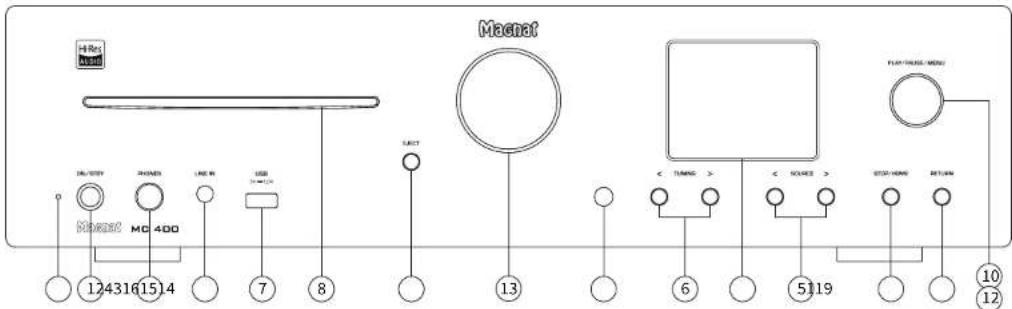
OPERATIONAL ELEMENTS AND CONNECTIONS - FRONT PANEL
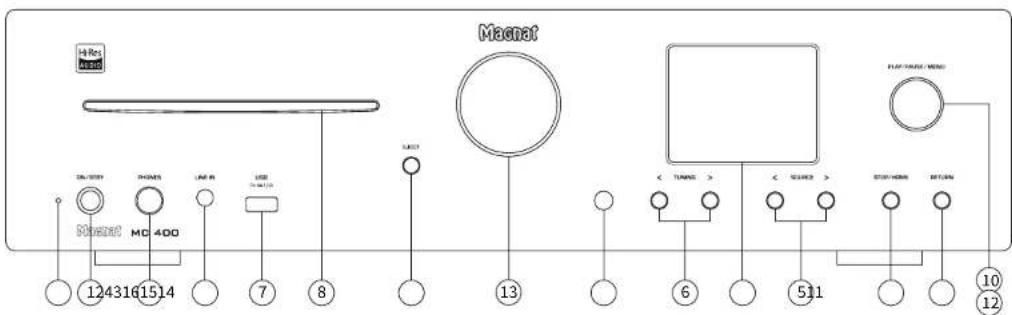
1 ON/STBY
Switches the device on when it is in the standby mode. If the LED does not illuminate, actuate the power switch located on the rear of the device. Conversely the device can be switched from power operation to the standby mode.
2 LED STATUS INDICATION
This illuminated display indicates the MC 400's 2 possible states:
- LED is illuminated green: The MC 400 is switched on. The device is ready for use.
LED is illuminated red; the MC400 is in the standby mode.
3 LINEIN
3.5 mm stereo input jack for an auxiliary audio device (e.g. MP3 player, etc.).
4 HEADPHONES
6.3 mm stereo output jack for headphones. The speakers are deactivated when this jack is used. Set the volume to a low level before connecting headphones.
5 SOURCE (INPUT SELECTOR SWITCH)
Switches between the different audio sources:
- CD:CD player.
- BT: Connection to a Bluetooth device
DAB INPUT:Selection of the DAB/DAB+tuner
FM INPUT: Selection of the FM tuner
AUX 1/2: Other audio devices
HDMI: HMI (ARC) input
DIGITAL OPT, DIGITAL COAX
Connecting to digital audio sources.
LINE IN: Front input for portable devices
- NETWORK: Network/Streaming input, control via the app
- NET RADIO: Internet radio input, control via the remote control
PHONO: Record player with a moving magnet system (MM)
6 TUNING · /+
EM model:
- Brief press: Changes the receiving frequency in 50kHz increments (FM) (manual station search).
- Press and hold: Searches for the next station (automatic station search).
DAE mode:
- Selects the next or previous station in the DAB brand.
7 USB INPUT
For connecting USB storage media up to
8 GB (FAT 16/32). (MP3 and WMA files)
8 CD SLOT
Insert a CD into the slot with the label facing upwards. The CD will be drawn in automatically.
9 STOP/HOME
Stops a CD that is playing.
Home for NET RADIO mode
10 PLAY/PAUSE
Press to start and pause playback of a CD.
11 EJECT
Opens or closes the CD compartment.
12 SEARCH/SKIP/MENU
CD/USB mode:
Search/Sklp backwards
- Rotated briefly to the left; Playback starts at the beginning of the current track.
- Rotated briefly to the left x2: Playback starts at the beginning of the previous track.
- Rotated to the left and held: High-speed rewind.
Remains active for as long as the knob is held.
(only in CD mode)
SEARCH/SKIPFORWARD
- Rotated briefly to the right: Playback starts at the beginning of the next track. 9
- Rotated to the right and held: Fast forward.
Remains active for as long as the knob is held.
(only in CD mode)
MENUs settings
Press the knob (for a few seconds) to access the menu for setting the sound and adjusting further parameters. Turn the knob to navigate through the menu. Press the knob again to confirm the set parameters.
For further information see also the following chapters:
THE MC 400'S MENU
- NETWORK SETUP
13 VOLUME
For adjusting the overall volume of the music. can be adjusted between -57 dB and 0 dB
14 RETURN
Press the Return button to revert back to the previous Settings menu.

15 DISPLAY/STATUS INDICATOR
General symbols and information appear in the display depending on the source selected.
General display symbols:


Bluetooth
CD inserted

FM/DAB+ signal strength

Wi-Fi signal strength

DAB/ADB made

Headphone mode

Spleen function activated

Spotify Connect

Speaker active or mute function

Stereo mode:
Stereo reception (FM only)
Other displays are described in the following chapters.
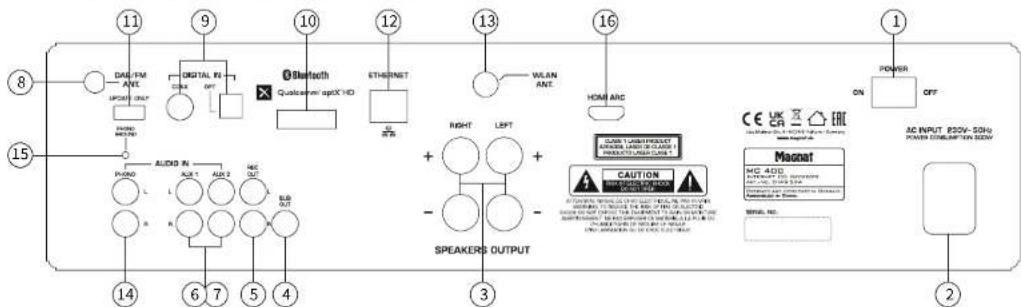
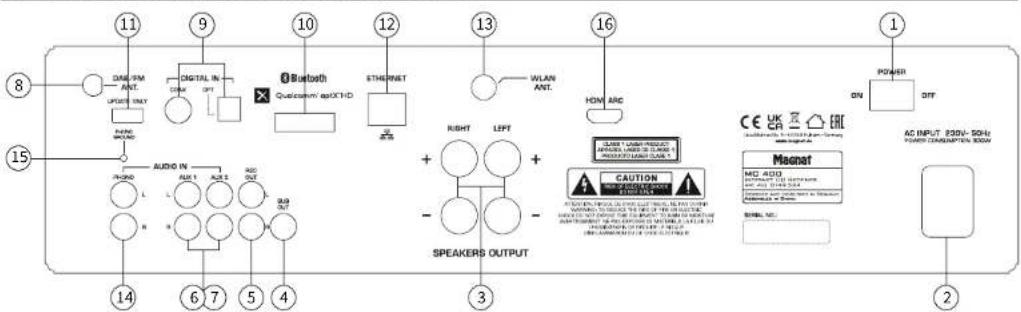
OPERATIONAL ELEMENTS AND CONNECTIONS - REAR PANEL
1 POWER SWITCH
Switches the device on and sets it in the standby mode. If the switch is set to the "OFF" position, the device is disconnected from the mains supply.
2 MAINS CONNECTION
For connecting the supplied mains cable. The safety fuse should only be changed by qualified service personnel.
3 SPEAKER TERMINALS
For the connection of stereo speakers with an impedance rating of 4-8 ohms (the correct polarity must be taken into account). (See also INITIAL OPERATION).
ANALOGUE RCA CONNECTIONS (4-7)
For connecting analogue audio sources. Please observe the coloured marking of the sockets and connectors. Red is always the right channel.
4 SUB OUT
Output for connecting an active subwoofer.
5RECOUT
For connecting devices for analogic sound recording (e.g. tape recorder). The signal for the selected audio source with fixed level applies for this output, i.e. it is independent of the position of the volume knob.
6.7 AUX INPUTS
Connecting other audio sources (e.g., MP3 or Minidisc player).
S DAB/FM ANTENNA CONNECTION
For connecting the supplied DAB/FM antenna or a house antenna.
9 DIGITAL IN OPT, COAX
Connect the MC 400 to the digital output on your CD player/computer/games console/network player, etc. by using an optical or coaxial digital audio cable.
10 BLUETOOTH ANTENNA
11 UPDATE
This connection is intended exclusively for system updates.
12 LAN SOCKET
For connection to the router or the network.
13 Wlan ANTENNA
180° rotable WLAN antenna.
14PHONOIN
Connection of a record player.
15 PHONO GROUND
Connection of the phono cable's earth wire to prevent humming.
16 HDMI INPUT
Connect your TV to this input if it has an HDMI port with ARC support (Audio Return Channel, HDMI 1.4 standard). Only certain functions such as volume and mute can be controlled via your TV's remote control. The necessary HDMI cable is not supplied.
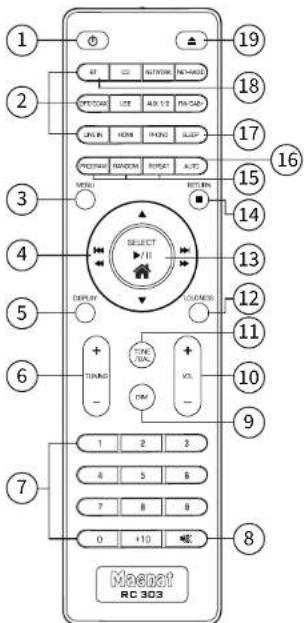
OPERATIONAL ELEMENTS AND CONNECTIONS - REMOTE CONTROL
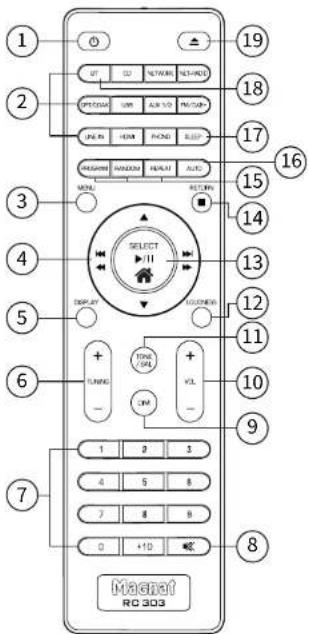
Before using the remote control the supplied batteries must be inserted into the battery compartment located at the rear of the remote control.
- If the batteries have run out after prolonged use, please replace them (Type 2 x AAA).
- To prevent causing damage to the remote control please remove the batteries if the device is not going to be used for a prolonged period.
1 POWER
Switches the device on when it is in the standby mode. If the LED does not illuminate, actuate the power switch located on the rear of the device. Conversely the device can be switched from power operation to the standby mode.
2 INPUT SELECTON
These buttons enable direct selection of the individual audio inputs. The active input is indicated in the display.
3 MENU
Calls up the system menu. Use the buttons to navigate through the menu. Press the SELECT button (13) to confirm the set parameters.
See also THE MC 400'S MENU.
4SKIP/SEARCH/NAVIGATIONBUTTONS
Search/Sklp backwards
- Brief process: Playback starts at the beginning of the current track.
- Two brief presses: Playback starts at the beginning of the previous track.
- Press and hold: High-speed rewind. Remains active as long as the button is depressed. (only in CD mode)
- Menu: Navigation and adjustment of parameters.
Search/Sklp forwards
- Brief press: Playback starts at the beginning of the next track
Press and hold: Fast forward. Remains active as long as the button is depressed. [only in CD mode] - Menu: Navigation and adjustment of parameters.
and
Menu: Adjustment of parameters.
5 DISPLAY
EM mode:
Retrieving RDS information (if supported by the station).
Further details about the ROS station Information can be found in the 'RDS functions of the Tuner' section.
DAE mode:
Retrieval of additional DAB station information (where supported by the station).
Further details about the DAB station information can be found in the *DAB functions of the tune" section.
6 TUNING
FM mode:
- Brief press: Changes the receiving frequency in 50kHz increments {FM} {manual station search}.
Press and hold; Searches for the next station (automatic station search).
DAB mode:
Selects the next or previous station in the DAB band.
7 NUMERICAL BUTTONS
CDmode:
Direct selection of a track.
FMmode
Direct selection of a preset station.
8 MUTE
Switches the sound on and off.
9 DIM
This button can be used to adjust the brightness of the display in three stages.
10 VOLUME
Increases (+) or decreases (-) the volume.
11 TONE/BAL
BASS (TONE pressed once):
Bass playback may be ramped either up or down In 7 steps. Use the and▼ buttons to adjust the value.
TREBLE (TONE pressed twice):
The treble setting may be ramped either up or down in 5 steps. Use the and buttons to adjust the value.
BALANCE:
The stereo balance may be adjusted either to the right or left in 20 steps. Use the and buttons to adjust the value.
12 LOUDNESS
Selection of the Loudness function (aurally compensated volume correction).
OPERATIONAL ELEMENTS AND CONNECTIONS - REMOTE CONTROL
13 HOME/PLAY/PAUSE/SELECT
CD/USB mode:
Starts or pauses the playback.
Menu:
Confirm the entry.
Home (net radio model):
Press and hold to return to the main menu.
14 STOP/RETURN
CD/USBmode:
Stops the playback.
Net radio mode:
Jumps one step backwards in the selection menu.
15 CD CONTROL: PROGRAM/RANDOM/ REPEAT
PROGRAM
Programming tracks on a CD in a particular order.
The Stop mode must be activated to programme tracks.
- Press the PROG button.
Display:PPG01-00
Now assign the desired track to memory location O1 by selecting the track number via the numeric keypad or the SKIP button. Display e.g: PPG 01-08 - Press the PROG button again. Display: PROG 02-0
-
Now enter the desired track for memory location 02.
-
Repeat these steps until all of the desired tracks have been programmed. After the last title, press the STOP button. The number of programmed titles and the total playing time of the programme list are displayed.
- Start playback of the program list by pressing PLAY. A_PRG symbol is displayed, along with the current track number and elapsed time of the track.
- You can manipulate playback within the programmed list by pressing SKIP, SEARCH and PAUSE/PLAY.
- The programme is erased after pressing the STOP or EJECT button.
NET RADIO MODE
Saves your Internet radio favours (see also MUSIC PLAYBACK VIA NET RADIO)..
RANDOM
Playback of tracks in a random order when CD or USB mode is selected.
Press once: The function is activated. The following appears in the display:
REPEAT
Repeat playback of a track/CD/USB medium
Press once: The current track is repeated. The following appears in the display:
- Press twice: The entire CD is repeated.
The following appears in the display:
Press again: The repeat function is deactivated.
- The following appears in the display when simple playback is selected:
16 AUTO (DAB MODE)
This function scans the DAB frequency range (band III) for stations. These can then be accesses via the TUNING buttons. When the MC 400 is switched on for the first time, it will automatically start searching for stations. The stations that are found can then be called up by using the TUNING buttons.
17 SLEEP
The MC 400 has a SLEEP function that will switch off the device after a set time. A time can be set between 0 - 240 minutes in 30-minute increments. INFO: The sleep function will remain activated until it is switched off again! The following appears in the display:
18 BT (DISCONNECT BLUETOOTH MODE)
Pressing and holding this button for a few seconds will disconnect an existing Bluetooth connection and start the pairing mode.
19 EJECT
Ejects or retracts the inserted CD.
INITIAL OPERATION
- Place the MC 400 on an even surface. Observe the relevant clearance gaps as specified under
"Important safety instructions".
IMPORTANT: Do not place any objects on top of the device (magazines, CD/record cases, etc.). The ventilation slots located on top of the device must be unobstructed at all times! - Connect your speakers:
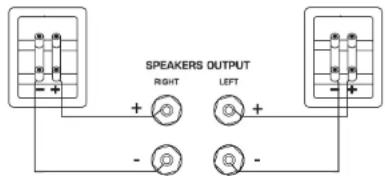
The stereo speakers (impedance of 4 to 8 ohms) are connected to the rear as follows:
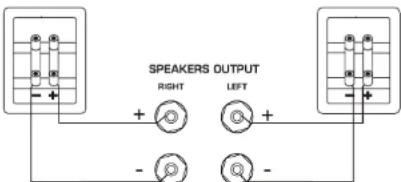
Only use high quality audio speaker cables with a conductor cross section of min. 1.5 - 2.5mm^2 Strip approx. 10mm from the cables and twist the ends. Loosen the terminal screws one after the other and insert the stripped ends into the holes. Re-tighten the terminal screws. Make sure you pay attention to the correct polarity.
You can also use prefabricated cables with 4mm banana plugs or forked fittings.
Also observe the operating instructions for the speakers you are using.
- Connect your audio sources.
- Connect the DAB/FM antenna to the antenna connection point at the rear of the device. For later operation, the position of the antenna should then be determined according to where the best reception is. The end of antenna should then be secured in the appropriate position, e.g. using a drawing pin. Reception can be improved by a suitable indoor or outdoor household antenna if the reception is not so good.
- Connect the supplied mains cable to the rear and then insert the other end into a 230V socket.
- Actuate the on/off switch on the rear side, the device is now in the standby mode.
- Now switch on the device using the remote control or with the ON/STBY key on the front.
- Select your desired audio source using the Input selector switch.

THE MC 400'S MENU
The tone and further parameters may be comfortably adjusted via a menu.
- The menu is launched with the MENU key on the remote control or by pressing the knob SEARCH/SKIP/MENU on the front.
- The menu may be navigated and settings changed with the keys , , and on the remote control or by turning the knob SEARCH/SKIP/MENU.
- The individual menu items may be confirmed with the SELECT key on the remote control or by pressing the knob SEARCH/SKIP/MENU.
The following settings are possible:
Bass adjustment:
Select BASS in the menu. Bass playback may be ramped either up or down in 5 steps.
- Treble adjustment:
Select TREBLE in the menu. The treble setting may be ramped either up or down in 5 steps.
Balance adjustment:
Select BALANCE in the menu. The stereo balance may be adjusted either to the right or left in 20°
- Loudness (urally compensated volume correction);
- Select LOUDNESS in the menu. The function may now be
- Auto standby function:
The unit has an auto standby function that automatically switches the device to standby mode around 3 1/2 hours after the last time it was operated (via the controls on the unit or via the remote control). This function implements an EU energy-saving regulation (1275/2008 EC), reducing power consumption if
Select APO SETTING in the menu. The function can now be activated or deactivated. When leaving the factory, the function is activated.
- Sleep function: This function enables you to set a time after which the device will switch off automatically and change to the standby mode. The time can be set between 0 and 240 minutes by using the and buttons. After exiting the menu, the active Sleep function is permanently indicated by a symbol at the bottom right of the display. After exiting the menu, the active Sleep function is indicated by an alarm clock symbol in the display. The following appears in the display:
System information:
Select SYSTEM INFO in the menu. The individual firmware versions of the device can be displayed for service purposes by pressing the and buttons.
Network Wizard (see "CONNECTING TO THE NETWORK VIA W-LAN") Upgrade (see chapter UPGRADE)
Available product update are available at our home page including detailed installation description. System Reset:
The SYSTEM RESET menu item will restore the basic settings (clear all station presets, set all tone controls to 0, disable loudness function and sleep timer, auto standby on, clear Network settings, clear favourites).
The menu is exited automatically if there is no input for approx. 15 seconds.
NETWORK SET-UP
CONNECTION TO THE NETWORK VIA LAN (CABLE):
Connect the MC 400 to your LAN network with a LAN cable (not supplied). The MC 400 automatically obtains a network address from your router within approx. 5 minutes and can then be used.
CONNECTION TO THE NETWORK VIA W LAN (WIRELESS):
There are two options to connect the MC 400 to your W-LAN network:
1 Network setup with the NETWORK WIZARD:
- Select NETWORK WIZARD from the MC 400 menu
- The W-LAN search starts automatically, SCANNING appears in the display.
- When the search is finished, use the SEARCH/SKIP buttons (remote control (4) or the SEARCH/SKIP
button (device (12)) to display the available networks. - Press the SELECT button (remote control (13)) or the MENU button (unit (12)) to select the desired network.
Now enter the W-LAN password
Navigate through the alphabet and numbers using the SEARCH/SKIP buttons or the SEARCH/SKIP button. Confirm each digit of the password with the SELECT button or the MENU button. Use the button to delete the last digit entered.
- When the password has been entered completely, confirm it with the button
The MC 400 now connects to your W-LAN network. After successful connection, CONNECTED appears in the display.
If the connection fails, CONNECT FAIL is displayed. In this case, please check the password and repeat the entry.
2. Network setup with the MAGNAT AUDIO STREAM App:
Download the MAGNAT AUDIO STREAM App from the Apple Store or Google Play Store and install it on your tablet/mobile phone.
- Once the app has started, available devices are searched for.
During the initial set up, select "Add device". Then select MAGNAT.
- Follow the instructions on the next page of the app and switch to the W-LAN settings of your mobile device. Select the network MC400 XXXX.
- When connection is successful, switch back to the MAGNAT AUDIO STREAM App. The app connects to the MC 400 and guides you through the installation process.
- Alternatively, other "MUZO" based apps can be used.
MUSIC PLAYBACK VIA NETWORK
The audio streaming function of the MC 400 allows you to play music via Internet services. You can also access audio files stored on your local network. The functions can be controlled via the MAGNAT AUDIO STREAM App.
Select the NETWORK input.
MAGNAT AUDIO STREAM App:
The following functionalities are available:
- My Music: For playing local music from your tablet or mobile phone as well as from network hard disks or USB storage media connected to the router.
Tuneln: Internet radio
Note: The network functions can be controlled via the app only. In group mode via app only the „Master" unit display correctly current playback, source and further information! By using the app for volumen adjustment MC 400 and mobile phone are synchronized between each other after first volumen click. This can result in a volumen jump!
MUSIC PLAYBACK VIA NET-RADIO (INTERNET RADIO)
The MC 400 has a built-in internet radio tuner that can be controlled directly on the device or via the remote control - independent of the MAGNAT AUDIO STREAM App.
Select the NET RADIO input.
- Use the SEARCH/SKIP buttons (remote control 4) or the SEARCH/SKIP button (unit 12) to navigate through the internet radio menus.
- Use the SELECT button (remote control 13) or the MENU button (unit 12) to confirm your selection.
- Press the RETURN button (remote control 14) to go back one step in the menu.
- Press and hold the SELECT button (remote control 13) to return to the main menu.
The following options are available in the main menu:
-
Location: Sort radio stations by continent/country/city,...
Genre: Sort radio stations by genre.
-Podcasts: Displays podcast content. Sorting e.g. Country, Genre, Show All,... -
Favorites:
You can store your favourite radio stations in a list:
- Save favorites: Briefly press the PROGRAM button (remote control 15)
- Delete favorites: Press and hold the PROGRAM button.
Note: A total of 99 stations can be stored in the memory. Deleting of favorites is only possible at
favors menu. The sequence of the stored radio stations cannot be edited.
Note: The stored stations cannot be accessed via the Internet radio function (Tunnel) of the MAGNAT AUDIO STREAM App..
Note: The available radio stations are provided by Tuneln.
Spotify:
Use your phone, tablet or computer as a remote control for Spotify. Go to Spotify.com/connect to learn how.
Licenses:
The Spotify Software is subject to third party licenses found here:
https://developer.spoity.com/esdk-third-party-licenses/
UPGRADE
The MC 400 Include a OTA (Over The Air) upgrade opportunity. The App show if a update is available and let you choose to Install. Please follow the App instructions for Installation. Note: The OTA upgrade is only for WIAN and LAN functionalities.
CONNECTING THE DEVICE TO A BLUETOOTH AUDIO SOURCE
Select Bluetooth input. If you have previously connected a Bluetooth device, the MC 400 will automatically attempt to re-establish a connection with this device. If this is the case, you may be required to manually confirm the connection on the source device.
If a connection has not already been made or the connection cannot be re-established, the MC 400 will automatically activate the ,pairing mode', Bluetooth Pairing appears in the display.
Now activate the Bluetooth mode on your source device. The MC 400 will appear in the list of Bluetooth devices as "MC 400". If it is not displayed in the list, set your source device to search for Bluetooth devices manually and make sure that the MC 400 has been switched to the pairing mode.
Depending on the source device, you may be asked whether the password is to be accepted during the pairing procedure. You can confirm this by simply pressing Accept. If you are still asked for a password, use the default passwords .0000" or .1234". If you are asked if you want to establish a connection after pairing, please select .Yes". After successful pairing and connection, the name of your paired device, for example, will be displayed.
The MC 400 supports the .Qualcomm® aptX™ HD high quality audio transmission standard. If your source device also supports this standard, .Qualcomm® aptX™ HD will be selected automatically as the transfer mode when establishing a Bluetooth connection.
PRESET MEMORY
The device is equipped with two independent PRESET memories for FM and DAB stations. Each memory can store up to 40 stations.
Staring stations:
Set the desired DAB or FM stations using the TUNING buttons on the unit or via the remote control.
- Select the desired storage location by holding down the corresponding key on the numeric keypad.
- In the case of two-digit storage location numbers (10 - 40), the +10 key first has to be pressed for a longer time and the desired digits then entered.
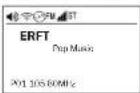
- Successful storage is confirmed on the display with the appearance of STORED PRESET. In the first line, the storage location number is played permanently before the station frequency.
E.g. "Program slot 01 for FM RDS"
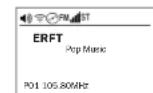

Select a station from the list of stations:
Select the desired storage location via the numerical keyboard (by pressing briefly).
RDS (RADIO DATA SYSTEM)-FUNCTION OF THE TUNER (FM ONLY)
RDS is a system which provides information about FM stations that is broadcast together with the station's signal. The MC 400 can also present this information (about the station, broadcast, etc.) in the display.
DAB FUNCTIONS OF THE TUNERS (DAB ONLY)
The DAB transmission system provides further data and information that can be displayed by pressing the DISPLAY button (on the remote control):
- Station name (always displayed)
- DLS (Dynamic Label Segment): Shows station information and messages (e.g. title and artist of the
current song, news messages, other information about the current programme or station)
Programme type (e.g. pop, news, classical)
DAB multiplex number and frequency of the current station
Time/Date - Bit rate of the current audio signal
DAB multiplex name
SERVICE AND TECHNICAL PROBLEMS
If you should encounter any technical problems, please contact your specialist dealer or Magnat Audio-Produkte GmbH, www.magnat.de.

SPECIFICATIONS
FM Tuner
Frequency range: FM:87.5-108 MHz DAB/DAB+:174.928-239.200MHz (Band III)
Sensitivity DAB/DAB:+-100 dBm
CD Player
Playable formats:
CD-Audio, CD-R, CD-RW, MP3, WMA
Phono
USB Input
Playable formats: MP3, WMA
USB A Ver.: 1.1 5V/DC 1000 mA; up to 8GB FAT 16/32
HDMI
Version 1.4 (PCM)
Ampilfler
Power output: Rated power Peak power:
20 Hz - 20 kHz, THD < 1.0%, 4 ohm 2 x 60 W
20 Hz - 20 kHz, THD < 1.0%, 8 ohm 2 x 40 W
1 kHz, 4 ohm 2 x 100 W
Frequency response:
CD/Streamer/AUX/Line/Tape 10 Hz -80 kHz (-3 dB)
20 Hz -20 kHz (+/-0.5 dB)
Phono 20 Hz -20 kHz (+/-0.5 dB)
Subsonic filter 16 Hz, 18 dB/octave
Signal to noise ratio:
CD/Streamer/AUX/Line/Tape/ Digital Inputs 98 dB (A) Phono (MM) 82 dB (A)
Input sensitivity/Impedance:
AUX/Line 500 mV/100 kohm
Phono (MM) 5 mV/47 kohm
Digital inputs 1x optical (Toslink)
1x coaxial (cinch)
Supported sampling frequencies: 44.1/48/88.2/96/176.4/192kHz
Supported bit depths: 16/24bits
Network input:
WLAN: 2.4GHz, 802.11 b/g/n, WPA2, 300MBps (up to 192kHz / 24Bit)
LAN: RJ45 Supported formats: MP3, WMA, AAC, FLAC, APE, WAV
Bluetooth® input Bluetooth® 5.0 / Qualcomm® aptXTM HD
Operating frequency: 2402 - 2480 MHz
Maximum emitted power according to EN 62479:
Electricity consumption: Max. 300 W Standby < 0.5 W
Dimensions (wxhxd):
Main device: 433 x 115 x 301 mm
Main device incl. operational elements/connecting terminals: 433 x 115 x 349 mm
Remote Control: 45 x 175 x 20 n
Weight: 6.9 kg
Subject to technical change.
For further information please visit our website: http://www.magnat.de.
SOMMAIRE
RISQUE D'INGESTION DES PILES!
INSTRUCTIONS POUR LA MISE AU REBUT
5 SOURCE (SELECTEURD'ENTREE)
9 DIGITAL IN OPT, COAX
| Tone Setting | |
| Bass | DAB |
| Treat: DAB | |
| Balance: DAB | |
| Looseness: ON | |
APPLICATION MAGNAT AUDIO STREAM:
The Spotify Software is subject to third party licenses found here: https://developer-spanystock-third-party-licenses/
UPGRADE
20 Hz-20 kHz, THD < 1.0%, 4 Ohm 2 x 60 W
20 Hz-20 kHz,THD<1.0%,8 Ohm
40W
1 kHz, 4 Ohm
2x100W
CD/Streamer/AUX/Iine/Tape
10 Hz - 80 kHz (-3 dB)
20 Hz - 20 kHz (+/-0,5 dB)
Phono Subsonic filter
26 Hz 20 Hz(+8) 16 Hz, 18 dBoctave
Ecart signal/bruit:
CD/Streamer/AUX/Line/Tape
Entres numériques
98dB
Phono (MM)
82 dB (A)
raccordements inclus:
433x115x349mm
Télécommande:
45 × 175 × 20 mm
Poids: 6,9 kg
Home (modality NET-RADIO):
App MAGNAT AUDIO STREAM:
The Spotify Software is subject to third party licenses found here: https://developer-spanf.com/esdk-third-party-licenses/
UPGRADE
DAB/DAB+: 174.928 - 239.200 MHz (banda III)
Sonsibilita:
FM: -108 dBm
DAB/DAB+:-100 dBm
Lettore CD
20 Hz - 20 kHz, THD < 1.0%, 4 Ohm
2 × 60 ~W
20 Hz - 20 kHz, THD < 1.0%,
2x40W
1 kHz, 4 Ohm
2 × 100W
CD/Streamer/AUX/Line/Tape
10Hz-80kHz(-3dB)
CD/Streamer/AUX/Line/Tape/
Ingressi digitali
98dB(A)
Phono (MM)
82dB(A)
supportate: 44.1/48/88.2/96/176.4/192kHz
Profondàdi bit supportale:16/24bits
Ingresso direto:
WLAN:2.4GHz,802.11 b/g/n,WPA2,300MBps
(fino a 192kHz / 24Bit)
LAN: RJ45 Fornati di fili sponseti MP2 WAM 110 FL10 AP5 WIM
Format di file supportati: MP3, WMA, AAC, FLAC, APE, WAV
Ingresso Bluetooth®: Bluetooth® 5.0 / Qualcomm® aptX™ HD
CONEXIONES RCA ANALOGICAS (4-7)
9 DIGITAL IN OPT, COAX
Antenna WiFi girable 180°
14 ENTRADA PHONO
Network Wizard (aslstente de red)
- Upgrade (actualzacion):
Licenses: The Spotify Software is subject to third party licenses found here: https://developer.spoity.com/esdk-third-party-licenses/
UPGRADE
- ONACHOCTb IPOIATbIBAHN BATAPEH!
IcHbA3yBteTTOBkoBXOxAJIHBEKOMANBKTNCTOBKHNYkA3aHHePON3BO4TE6AMOPHTINAHBbHE PIIHADMAEXHOCHT.
BatapeHAnKHYMArTObplHOHOAOHbIHOaeparcSbOaOHCTNBOuCOKHXTEMnepatyp,HNpHMep, COaHEHQoCBeTb,OTHaHtN.
CyuECTSYEROTANOCHTEBPSBIB,ECN6BATEPER3MENHHEHNPABHBHO,3MENHTe 8aTpeIOToBAKO HAKYIOKIIHBAIORHUYIO.
YTOPOCTBO/NTyABT NCTAHUHMOHHO YTPBAAHNA MORYCOTDPKATyPBOHHBHe/HCIOBBBe BtAPeHHK, KOTOPBE MOKOHO PpOAtNTH. XpAHNE BATAPEN HEDOCTYTHOM ADRET EHTE MeCTe. IPOrAaBBAHHe BApTeMOKET PnHECTN TKAKEBM TpAAMM HCMPTH. Ype3 2 CACA NOCAI pRITADABHMA BATEMOKY BDOHNNHBYTKHEMEB BYHTPEHHDE OKOH.
PnI pOa3pHNN H naPrao1aBbHN MA HIOBaDnHg BApTeB pOraTnHM HeMeAeHNHO bOpArTHcB 3a MeNduHckN oMOnuBu.
-Пиг Замене Батаров XPANHTE HOBNIE И NGIOAb30aBHNe BatapeIN B HEDOCYTHOMДАД ETER MECTE.
Pocme 3amEnb6atapey y6eHTecb B TOM,TOOTCEK D8 6atapeynnoHOCTbIO 3akpBT.
EcMOTC4A BATAPeH HeBOSMOXHO NAOCTbHO 3aKpbTb,He HIOAB3yIte H3dEmHe PMECHTHE H3dEmE HEDOCYTHIOE DAEETEO METO HOBpTBeC K pOHO3oDlTeAO.
NOBPEXDAEHNA, KOTOPBIE DOAXKbI YCTPAHrbcnCNEUAAHCTOM:
PnI cAeDHOHx npoeEHXHx, pnpOo HeoEOXoHMO HeMeDeHHO OTOcEHNb OTcEHNTa HNPepdAeTcHApMnHpNpOeHEepeMHo
EACH NCTCBOB KABe6 6dy6t6bHAp9KHei 10nepAChHa,3KcXyTA8HpOBA7yctpOIOCTO 6oAbeU EHOaB. PNOBaeHINHbKAbEepeMOTHOHbPbOeHbAe3B, ETOHYKO3MHmY
PDBEXHnPA3bMaNTAHHaYCTPOICTBe
ECN BHYTPb yCTPOHCTBA NONAA BAATA HNN NOCTOPOHHE PDEAMTb.
ECAH yCTPOHCTBO ONPOKHHYACb H pRn 3OM NOBPCAMCR KOPNYC.
ECN YCTOPONCTBO HENPAHNAHBO FOYHKHOHNHYBET, XOTI CO6AIODEHN BCE YKASABHH NPYKOBAOCTBA NO 3KJNTAYATUIN.
AIOYTHMOI INPINHMMATbTOAkoTgDIOAHHIEAHHNEIMHOHH,KOITOpBtePaePHEHNAIHTOBTBEHAMEM
ApaemOnHa Heo6xHMO HcnoAaSObaTb ToaBko OpunHbHbte 3anaChBe dTaann.
NPOE POMHOTI KOHOAIMO POIBEPHT YCTPOCACTBO HA 6e3OHAACOHCT, T06BH O6BCEHNHT HADAEKAUBE HADAEKHOE FyHKHNOHPOAGHIHE.
PeMOHThbpeB06TbOAnDkBbCBeTaBbBaNtBcBAKmHnHPOBHHBMnCnEhLHAcHTAM, TAK KAK HHEAeMOKTe SO3HHKHTbONACHe BbKOKe HApNKeHHe NAp DYrTe BbDiN ANOCHTi.

3TOT CHMOSA pnpDpypKd8et N0b30BaeT O MTO VTHyHTN yTOPOCTRS 1HNOA3yETCR B6COKEH PBNKHEENO, KOTOPOE MOEPII INSESHTEK NOIBCHM YABPMTR OKS.

370CINVBOA YK83BIBETT AOB3BOATEOY CTOPTCTB8A HTO, YO B PIPNAIBAEMOM PYKOBDCBTBE NO 3KNGAYTBIHMMIOBOR BAKHHUC KOTOPUBG OGBATSAHOU HYHXO CAGDABHAI.

He oKpbibat! Onachoctb 3eKtpnueckoro yapa!
TcBmybHMHbHbTHIOACCHbTOBOPAHm HMAEKMHTPHECKDg YAba, HHOOxHOHMO3AaHsUdYCTPOBCTO ToXDAHmBAATG.
BHIMAHHE:
PnB64 OTHOCHTK KOHCTpyuCHN KACCA 1 N DAJSEH NOAOMUHTBH K CETEOI POZETKE C3aUNHTHM 33AEMAHHEM.
YKA3AHNIOYTHAN3AUHN
Cormaeho Epebnckocn Dnepkntb 2012/19/EU BCE nektpnckne H nektpnboHne pnpbopn dnyTmna3Bn DOHNH CaaBcBcO TdAeBHO B MeCht-bc OcbpHcN PyTHK, PNOKaYCTa, BOnHOHRe MeCht-bie PnpdaHnH N He BpuBaCpaBte CTapBe YcpOCTa BMeCTe CobHbM DonBthH M MyCOPoM.
YTHAM3aHn6bTaapeek
Cstape BatapeHKOnOcTcK OOCbIM OTOaDM HNOAeXAT yHNA3aUNCnGARACHO DePCTBOUOMn PnpEINAHm.
DAKLAAPAUNCOTBETCTBNA

DAHBMKOMPAHNA Magnat Audio Produkte GmbH yOCTOBEPER,TOy cTPOIEBO MC 400 OTBeAeO CIOHOBIM TpeoBAHnM IN ApyTN pEmaBHm HOpMaI DnPKTHb2b 2014/53/EU. DEkApauHAO COOTBCTBn HxADHTCR HA CAIRE Ww.magnat.de B pAaDe Downloads (MATEPNAI DA KcAHBaHNA) KAKDOYcTPOIECTBA...
HADAEKAUEE HNPOA30BAHME

3TOYCTPOINCTBO INPDAHSAHAHEHO TOA BKO DAMOABHIHERIO HNOIAB30BAHHRA

3AEMEHTbI yPABAHHn PA3bEMbl-NEPEAHn PAHEB
1 ON/STBY
BKAHOAHETYPOOCTBO,ECN OHIO HAOKDTHC B PEKHMG OKHAAHH. ECAH CetDAHO Hc ROHP, HXYKO BKAHOHTC CTeBOB BBAOKOTBEb Ha 38HNH CTOPOE YTOOPCTBa.Ha BOOPOT, YTOPIKTBO MOXHO NEKAKOHITb Hs PEXKIMBA POWER BYPCKM OKHAAHH.
2 CHN HANKAUH COCTORHH
3OTHIMDKTOPNOKDIAUBBCT2OCDKTHHH, B KOTDPXKMQKTOHADKBAIIBKNCHIKMH MC 40C:
CHADGROTH 3AEBHMSUBETMC:MC400 BXAOKOH, YCTOPACTDTOFOBKO KKKNATSYLAMIN
CHaPHTOPKXbSHMJSUeOMC400 HAXOdHCTCRB Pekhme OXkBaHJH.
3 LINE-IN
BDOA DMOKHTAIHORO UTEKEPA 3,5 MM CTpeo
DAOONMHTAHBOI BAOHNCHOTNUKA MP3
PNOHPYBIBATCBA H.T.N.
4 HAYUHKNK
BbOa DA KOBHKAHOIOTIEKepo 6.3 MM CTepeO OHTAHUYHKIO. PNOCTAOBAHBO HAYUHKOO DHAHMKAMCMAOCTOAEBOHOTKHOIAOTCR. ECM Bn NOAHOAeBEHAYHKIOYCTAKOHIOE rPOKMOCTBb HAHHNYYPOSEb
5. SOURCE (NEPEKAIQATEAb BXOAHbIX NCTOHIKOB)
PnIbHbAITpeKcKHOeHHNMeKdYpa3HbMAYaHAcOHTHHKAMi
- CD:ПргсьагаБСD
BT:CoedHHHeHHe yCtpoRcTa b c
aydnohctouhhkom Bluetooth:
DAB INPUT: Bb6np DAB/DAB+ Honepa
FMINPUT:Bb6op FMnhepa
AUX1/2:EeOaHHayanOpnpbOp
HDMI: BxogA HDMI (ARC)
DIGITAL OPT, DIGITAL COAX:
NoKaOueHnKuHpOBBm ayDHOHCTOHnKAM
LINE IN: IpeEduIN BxO AAD IpeEHOCHx yctpOCTB.
- NETWORK: Ceteboh / notokobbl BXOA
ynpaaehnhepe3 npnoxehne
NET RADIO: BXDA, YN HINHEHET-PAHO, ynpBAAeHNEpe3 NpAET DACHTAHNOHORO ynpANMENHO
- PHONO: IpoHrPbIaBeBaI PaAaTHHOK C ChCTEMOH pAnBHKHOO MArHHa (MM)
6 TUNING/
PEKIMFM:
Kopoktoke HataTne: HsmeHert HactOry npHema 105xF (FM) (pyHnHacHTPOHa 3aTHU
- PtoDcKHTeBbHO HAcHTHe: HtET cHcyuOyTO CTAnuO (ABToMaTHueckA HACrpoH 0 TaHnU)
PeximDAB:
BbBpaRat CmDyUOuNnHnnpeBdEyUO uBTHIOH B aHaIaTOE DAB.
7 USB-BX0A
AaNnKHeHbB 186FAT16/32).(PMP3WnMFA)
8 THE3AOAARCD
NomeCTeRcDEC B P I ETOO CTOPONH C H A TIOH C BEEX, CD BYECTBAGAEN BTOMATKNECK.
9 STOP/AM
OCTAHAMBAET BOCPOKABAOAISHIa CD. DOMAIIHRA CTpaHIMa a pckHMHe HHTEPHT- PADIHO
10 PLAY/PAUSE
PIM HAXAKHAN HAHNAHOTAO HOO OCTAHOBHAERTC BACIPIN03BDEHE CD.
11EJECT
OTKpbBaet MM 3aKpbBaet AOTOK DA CD.
12 SEARCH/SKIP/MENU
Pekum CD/USB:
Search/Skip (nouck/nponycnttb) (ha3a):
KpatrihnoHOPoT HnAeBc:OPOpN3B4BHeHNE HuaHHeHBeC HnAeBA TckyUaB DApOxKs.
AaBbKoBnKoBnNosOpHnBCO: Bocpoa3eaeHHe HnHBeTc nHaa npdeBauw duopoxk.
PpdaaknIeHbHIOBOPHT HAMEHO BcTpaH NpeMOTKa H3aA, OCTaTeC AHTKIIbM Do TEX nop, NOKAyDEpHXBaET KNOKNB (TOMKBO B pexmke CD)
Search/Sp1p (Pnonk/nponyctHTb) (BnepeA)
- KpatknTIONBOPOT HAPBAGO;BOCPNOHBAZENHEHNAHTCHC NCHAA CEAUYOUDEP DOPKOKH.
IpoaoknhtbHnBNOBOPHTNABPO:BGCTPARNEKMOETBA BNEPOC.0CTAECRAKTHIBMDO TEX NPO, NOAeepkHAeTcR KHOTKA, (TOKBK G pexkMH CD)
Hacptponk MEHIO
HaKMMTe Ha KONKy (npoOAnXtAeBHO), 006bI
BbBbBbMeHIOA DnEpyIPOOBDBHbBbYBEaEBHbN HbTOeOyDnONHOtAEbTHbXbNPBmEToPbO.
Habirnai B Meho CcyeIeBteBaHaxaHekm Hk Honky, HkNtme K Honky epe q, T0bbl no4beptnly yctahOaehnHe npAmeTbpl.
DonoHHTeAHyIO HHOpMaHIO Bb MoKTe HaHr
BCAEyKouHxTAABAX
MEHIO MC 400
HACTPOIKA CETN
13 VOLUME
AaepyTcIpyoBaanHOboiPrrMOKCTN BocPiO3BdEeBNyMnBHy.
OctaBbIbOTo6PakBcMbIe CMBoBI OFIOCBH BIOPOAeYIOXIIABAOx
16. DAHTM K D A NCTAHUNHNOHORI YIPABAHNY
TbOBoI HcOaBd8PbYbA DcHbUHIOHO YnpBaAeBb, YBaBcBbH B b3 ToYkOH.
3AEMEHTbI YTPABAEHH N PA3bEMbl -3ADHRA CTPOHA
1 CETEBOB BblKAIQUATEA
BKAOKAETYCTPOPTOHO NEPEOADHTERO BPEKHM OKDHHM. ECM BHKMOHCTAOHB HXADHTCBN ONDAKCHAM "OFF", YCTPOCTBOOTDAECHOATCEN
2 NOAKAIIOUeyHNEK CETM
AIAIIOKMOCHINBXOJAIOTOB KOMIAKTCCCTBOGBAKDAI, PIPAOxAOPHNAIEAOXEN MOHHTB TOAIBKKAANMADN000BBHNEEPCEBHNTEKHHK
3.PA3bEMbI DAI NOKAIHOEHHR AHAMHKOB
DAI NOKAIHOEHNR IaCtepeDINHAMKOB C
mneAdcmB 4-8cm C yetom npabnboh
noPAHOCTC. CMOTPH TAKCE SKAOHEHE.
AHANOTOBBLE THIObIaHHBIE PA3bEMbl (4-7)
AIAIPOKMOHcHINRAHANOTOBXb AymOHTONHOIKOB.
CAeIhTe 3a 8eToaOaM MapnIOBko Pa3bMoN a
tsekoob. Kpacsh-To 30 ceraDa npabKa hAnA.
4 SUB OUT
BixoDAI NOxHHeHHA KTHBHOrO ca6yepa.
5RECOUT
AANIOKIMENHINIINIOBOPM DAB HAMOTOBO BYK03AaONHn (HAnP,AENHOHN MANTHTOFOH, KACCHESN MANTHTOFOH)
Ha tOM 8bXoae CHIRHA B6paHHORO ayHOHc0THHnHKaOBAdAeNCTOHOHm yPOHcH. To eCt He 3aBHCHT ONoKKeHHpeyARTOBp IOMKcHt.
6.7 BXODA AUX
IADKAOCHENHEHIXBAXDHYONCHOHTIKHO (HAPN,HPQYBHPTBME3PMSHHMHHNKHOK)
8 AHTEHbB BBOA DAB/FM
npkAChuehEnn pnnpAeaeon BtHbBn DBF/Mn nAnD0mBn AHTHeNOn ytaObKn.
9 DIGITAL IN OPT. COAX
PNOOCHMHTME MC 400 C NOMOIO OTNHKEOKOM HAKOBHABHO HNPOPOAOI yAMKO6AER K NPOPOBOMY BxOy NOPMRpBbATEAR KOMAKTHKOKo/KOMBIOTepa/npROB pNCTABHK/C cTeBOG NOPNrPBbATEAR.
10 BLUETOOTH-AHTEHHA
AIAIIOAIXAHHEINIIIPNAHDMOIMBTBHNNDB/PMNAMOMOIBHTHOHNYCTBHSOKM
11 UPDATE
310132b6mIpycMOMPHTHCKMOHNHEHOAHOOBOHAAHCHTcMb.
12 LAN-NOPT
DA naKaHcHnK poyepy mN cTn.
13 WLAN-AHTEHHA
NoopothaHa 180 WLn-ahTeHHa
14 BXOAPHONO
PNOKAOUCHNE npOHrpBbATEA NACTHOK
15 3EMAR PHONO
PNDKAOUHNE MABCC Na FOOKABeE, CHNKKAUHSEIKKHNKBEBHYAHUN
16 BXOHDMI
PiH Hm Hm Hm Hm Hm Hm Hm Hm Hm Hm Hm Hm Hm Hm Hm Hm Hm Hm Hm Hm Hm Hm Hm Hm Hm Hm Hm Hm Hm Hm Hm Hm Hm Hm Hm Hm Hm Hm Hm Hm Hm Hm Hm Hm Hm Hm Hm Hm Hm Hm Hn Hm Hm Hm Hm Hm Hm Hm Hm Hm Hm Hm Hm Hm Hm Hm Hm Hm Hm Hm Hm Hm Hm Hm Hm Hm Hm Hm Hm Hm Hm Hm Hm Hm Hm Hm Hm Hm Hm Hm Hm Hm Hm Hm Hm Hm Hm Hm Hm Hm HmeH mHmeH mHmeH mHmeH mHmeH mHmeH mHmeH mHmeH mHmeH mHmeH mHmeH mHmeH mHmeH mHmeH mHmeH mHmeH mHmeH mHmeH mHmeH mHmeH mHmeH mHmeH mHmeH mHmeH mHmeH mHmeH mHaMeH mHaMeH mHaMeH mHaMeH mHaMeH mHaMeH mHaMeH mHaMeH mHaMeH mHaMeH mHaMeH mHaMeH mHaMeH mHaMeH mHaMeH mHaMeH mHaMeH mHaMeH mHaMeH mHaMeH mHaMeH mHaMeH mHaMeH mHaMeH mHaMeH mHa MeH mHa MeH mHa MeH mHa MeH mHa MeH mHa MeH mHa MeH mHa MeH mHa MeH mHa MeH mHa MeH mHa MeH mHa MeH mHa MeH mHa MeH mHa MeH mHa MeH mHa MeH mHa MeH mHa MeH mHa MeH mHa MeH mHa MeH mHa MeH mHa MeH mHa MoA A A A A A A A A A A A A A A A A A A A A A A A A A A A A A A A A A A A A A A A A A A A A A A A A A A A A A A A A A A A A A A A A A A A A A A A A A A A A A A A A A A A A A A A A A A A A A A A A A A A A 1. C M O M O M O N P I M T B Y P N P B D R M T B L T C B D M P O M M O M O M O M O M O M O M O M O M O M O M O M O M O M O M O M O M O M O M O M O M O M O M O M O M O M O M O M O M O M O M O M O M O M O M O M O M O M O M O M O M O M O M O M O M O M O M O M O M O M O M oM oM oM oM oM oM oM oM oM oM oM oM oM oM oM oM oM oM oM oM oM oM oM oM oM oM oM oM oM oM oM oM oM oM oM oM oM oM oM oM oM oM oM oM oM oM oM oM oM oM o
3AEMEHTbI YNPABAEHHN PA3bEMbl -NYbT dy
PepeKIOAIOBHOYnBaT BACHTAOHYPbABAHHEHMOIOHcB KOMTAKE3AEMENTbNTHTHHCAeYET BACTMBtBTOAEHEHgAaBATEeepK, PAcNOAOKEHHOHe TaMSHOBCTOPHOyBaT.
ECAHBATEPAKINOCAE PPODAOKTEBAHORTO HCTOMB03B1HRAAYI KHXHYHO BYET 2AMOHHTO (TIN AAA).
B LIXKI PNDTBDHINCHN HNOYIYBAI BACHCTAHMOHORTO YPBBAEBHHB BHNMBTE AEMHTBI TINAHN H3 YCPTPOCTBA,BCM HIIHAPHYCIEHCNOBbBATcFOAANTCbHOC BPEWNI.
1 POWER
BIXHOAeYCTPOHBO,ecAOHO HAXOAMTCB PekHMKe OKDAHN. EcmCSEODAOHE R HOPRT, HXHYK BIXHOHTCB TcEBOTB BbIKHOATBEs HA 3aHJrE CTOpOE YCTPOHDB. N HAOOBOP, YcTOPCHTO MOHXNpeKIOOHHTb H3 peKMn Power B pKHM KOKAHIN
2Bbl0P BXODA
PIMI MIOOMI EITX KHOIOK KOHO HAIPIHMOY BBA6BPATbOtCAkBHeAe yAOHOBxD. AKTIHNBMN BXOy 6dBT ot06paxbCnHa dAcIcMe.
3 MEHIO
OTOkPteCtHcHMe MeHO. HABIRIA B MEHO OUCHEBETCAE KHNKAMK ▲ ▲ ▲ H N. HAKIMITE KHONKY SELECT (12). 1006by NOATeepHbY tcyAeHOENHbY napMertby. CmOpT Aakke MEHO MC 400
4. NOKCH, NPOYCNYTb/ BKHONK HABRAGUIN
Pexmm INHTEPHET-PAAHO
BepHHTeCb B MeHb BblOpa.
15 YTPABAEHME CD: PROGRAM/RANDOM/ REPEAT
PROGRAM
PnIpyAMMPOBHEKOMOHOHcI CD B kO60IIOAEOBATELAHbHOHcI.
AARI pORrMMMPOBHBN YC TPORCTBO ADOXHO HAXAOHBCN B PEXINME Stop.
HaxMMTe KHOINy PROG.
HnHnKaHn:PPG 1-00
TeHepnI pHcnsOHTy HKeKHN KOMIO3NHN HOMEP B NMRTH O1,DAr STFOH KHOYB HbAbaPb HOMEP KOMIO3NHN pR nMOUH KAABbATpyb CcHpFAMH KNHOKOK SKIP.
HnHaKaun, Happ: PPG 01-08
-Eupe pa3 HaxMMTe KhoNky PROG.
HHHKAH:PRG02-00
Tepebu pncsOte HyKHOH KOmnozHUM HOMEP BIMMIOZ
- TIOPIOPNTO68 ⅢAAT DAAIPOPTAMMPOBSAHIN BOCX HUKHBXK KOMN03HJUM. HekmHTIE NOCAE NOCAEDH KOMN03HJ NKHOKI STOP.
OTo6paKaTaC KOnuCTBO
3AOTPAMMPOBAHHSKOMPOHCHNIOBUEDEBMOPCNOPISEBEHINNAPEIMCTA.
HaHHTeBOCnPOH3BeAehne
JARpOrrPMAHPOBAAHORHO KAXTHAEM KHOKI PLAY.BH3yOtOpaKsAETC+PRG, H8aBaHDe DOPOKNn H PPOUeUe BPEM BocPPOBABCDECHH DOPOKNk
Bocnpn3BeHem BipdeEx
aannpammmnpoabHOrO cnnck MoXHOynpaMtb npn moOnm HKnONK SKIP,SEARCHn PAUSE/PLAY.
- Nocae Haxataa Khoonk STOP HJ EJECT
COeepxHmoe namrnydarnetra
Pekm INHTEPHET-PAHO
CoxpaHnIeNbPAHIOHO HHTEPHT-PADHO (CM, TaKke IaBMy BOCPINOMBEDEHEMYE MY3bKNH NPE3E HHTEPHT-PADHO).
RANDOM
Bocpnoun3eHne npoxek B pexnme CD nn
USB CayauHOM nopAKe
- ODHOKpHoe HaxaTHe BkHuae TpyHKUHO.
HaHnnaee noRaeTcR:
REPEAT
Nostop dopoxk/CD/USB (Repeat):
OAnHouHoe HaxaTHe: NOBrop Tekyue
00
Ha dncnnee oTo6paXaTeTcR:
- Dapohoe Haxatne: TOBTOBCero CD.
Ha dncnnee oTo6paXaETCA
Piocaehyooue HaxhTe:HyiknHn NostpHoro aocpnroabdecHna OTKAOKaHTc. - Ha icnne pnn npocTm BocnpH3eEHN H0to6paKaTaC:
16 AUTO (PEKHM DAB)
C nomoubIO tOy KnuHIO pOcMOTPAaBCTCA nnAHO3NACTOT DAB (nAnHO3NIO) B noHCIXK TaCHNI. OH NOCTyNHBI C nOMOIO KHONOK TUNING.
18 BT (OTKAIOUOYEHME B PEXHMSE
BLUETOOTH)
PnH DAHHHOH HaxaTN OTKHOAE
CyueCTByoue coeHHeHne Bluetooth
BKAOKaOeTcpeXmCOPPaeHn.
19 EJECT
Bbdaet BCTaBHeHHbI CD An6o BCTaBAreT erO
3AHOB0.
19 EJECT
OTKPSBACT AOTOKAAR CD.
BKAIOUOHEHNE
YCTAHOBHTe MC 400 HA POHIN M Cte. Co6hOaIae PaCtOHHM, KOtOpBle yka3Ha H BgKbHx Yk8a3HKn No Be3oJAnOHn.
BAXHO: He p3aMeJIaT KeKHe M6o PnepdMeTb (KyPhaHb). CD DHCKN/PACTHINKN H T..) Ha cyTOPbTe. BEHmIAIOHbIe OTEbpETBa BBePHei cactn yctPOcTBa DomXbI bceTa oCtabatbc CBO6DbHM!
- POKAIIOHTO DAHAMMHN:
ZEOEHEHMMN(MNEBHO 04a8O)PiADKNOAHTCH H3aHDnEOTPOHEYCTPOHTBA CEAUYDAM6OB2AO:
INOBaJIyTbTOKBAKOHcTeBHeHbYBaOkaeBdAANHIMOKC BcEHHmHMMM1.5-2.5MM², 3BaHcNTeIHOARoHbHAKBeMAxHbYAACTePnMIePHoB 10 MM&CKyPTyTH KOHbL. OCAbSNeB0 NOCHepD3A3HbIMNBIHTbNtBCTBBtBIOHcOJIaHbO3E3AOHJIuBOTBEpCTNRNo6OKM. CHOBA3ATRHTHe 3B3HmHNBHITb. OB3A3HbAeDAeTE3aIPBbHbNOIPOACHOHbTI.
Bbl TkoE MOKETE 80CIOBA3OBBITCSB 3PBOBBE PA3A2A2AHBM K6EABM C 5BAHOHBMUIIITEKPOM H4 4MM NIK 33KIAHMM.
CobnDaaTae TaKke pyKOBOCTBO no 3KnMyataun HcnoaB3yEmbix DnHaMVKOB.
- POKIOHTE ayHONCTOHNK.
IaKIOKIOHTe AHTEHY DAB/ FM K AHTEHOMO BXOy HA 06patthcTOPOE YCTPOIOBIA. PnnpoN OIOLOUHJI pRbOdoAHOXb5bTIOPEDAEHOIOIOIOHNIHAIANTHEHIN, PnN KOITOP BOET HAMAYUHNI pHmE.3ATe KOHcE AHTEHBI DOXKHe b4bT 3AKpennEe BCOOTCTBEOUIOe NIOHNI, HANHPMeC, C NOIOOJI KHNUEAPCKO KHONIK.
COOTBETCTBYOUIBAMDAHUR BHTENHA HAN SHEUHUR AHTENHA MORYT pRn He6aIorponrNtBuX yCAOBHX yuHNHbPnEM.
PdKaIOHIOHE cTeBcB K 3aAChE CTPOHO YEPTOHTBA, a 3aTOM BCTABte ORO B COTeBYIO pOETKHY A 230 B.
AJI PIIIEBEEBHN IINI BIO63 B INEKM HOKDANH NIIIEPBEIDHTE BILMOHOATEB MKEKPOITBTHN H3 ETO TMbHNO CTOPOHE B NMOXEOHNE "BAK".
BKAOKHNEIOTICPOCTBOEPE3IYABTIINCTAUBIOHOHOOYOUPNABENHHMMCNDMOUHKOKNONON/STBY HnepaehneHaeAH.
Pnacea3bnporpeBaHHAAMHbYcTPOCTBO rTOBO KkCmayataHH.
Bb6epnre HxhBn Bam ayHnctOuHK c nmoouk nepeKaoyateA.

MEHKO MC 400
PerynpoBAHHE 3ByaHn HacpOHNn DOONHHeAHBHX npaMeTPOB MoryydoHO BbINOMHrbcpee MeHO.
MENIO BISBAIEAETC PERSKHOKNHUMNENA PyhBte DCTAHCHNOHORO YpnaAMENIA HINYIHTEM HAKATRAHONKHNSEARCH/SKIP/MENU HNEpeHNeHNAE.
HabraaBnpedeax MeHO H3MeHeHne yCTAHOBOKOCyueCTBAHOTcpe3KONK
HaIyBteAHTaHIOHOHOr ynpabHeHH Hm BpaueHHem peryArTopa SEARCH / SKIP / MENU
IIOEeepKHeHnOteAbeHbX NpHToK MeNoepe KHOyK SELECT HnPyBe DAcTHaONHOHOro ynpaBaeHHnMo nnoepoeHny pkySEARCH / SKIP / MENU.
Bo3MOXHbI CmDyIOUHc yCTaHOBKM:
Ba3OBa yctAHOBKa: Bb6epHte B MeHIO BASS.
Bocnpn3BeHHe H3Kx YactO TMOXHO
COOTBETCTBEHHIOBBHbATbMn yMeHbAtb 5 warrnn.
- YctahOBKa BOCnpon3BeAeHHBbICOKHX qACTOT:
BbIepeHTE MeHIO TREBLE, Bocnpou3BeHeHne
BbCOKX YACOT MOKHO COOTETCTBEHNO NOBbTaBn MMyHMHBaTb5uAMr.
- YctaHObKa 6aHaHcA: BbIbepHeB MeHIO BALANCE.
LcHTP cTepeosByaHn MOxHO yCTaHbAHBaTaB BAEBO HN BnPaBO COOTBeTCTBeHHO 20 WArAM
- Tohkonmeena Cha (OTAMHUYCKER KOPKETKOOKA TEMPOPA) Bupegebi B MOHIO LODNESS. OYHKUH MOKEK BMOKHATCAH MA
-Функшг АТOMATMueckoro OxHdAHnR:YcTpoHCTBO Cha6KeHo fHyKlneH AITOMATMueckoro
OKHDAHHKOTOPARABOMTAECHCNPEKHOAETYPOHTCBOPMHEPOOe35HAACB CAYNAOTCYCTIBN KOMBAHCNOMOHBOAEMENTOBYPTABPAEBHNAHBYPOTTCTHBNCOMOHNIOCTAHNDHNOHYOTPABEAMENB POKHMOKXADHNA.37aOyHUNCOOTBTBETIpyDANHCNHC EOC 6b HROPC6EPEKHN (1275/2008 EG) BmHnBtAaNTpOeAeHNE AAKTKPOEPHRIN, C BYAAeCCN YTOPTCBOE HOKMKNHO NOHEDCMOTPNOCAHONBOBBNN
Bb6BpIe B mHNO APO SETTING (BOMATUMNCKOB OKMADKHE), DHYKUNI MOKET BKAIOUATCBN HAM BHKMOHATC. YCTOPBOCT NOCTABAROT C BKKIOHCHF OYKHINJ.
Функьязблары:Бьбергь M MeHIO SLEEP TIME.3aФункьяи NO3OBAETYCTAHOBHTB BPEM, NOODA KOTOPORO YIPOCTOB BbYbHKHABETR H ABOTMATHECHK NPEPEOXH BYPEXM OXHANDAH,BPEMR MOKET 6bUTyCTAHBOHKO HOKHIMK △▼BbHnO3DEO T O O 240 MHNIT. NOCE BbXoDAH KEN MEOK AKTINHBA FyHKnA BOTAMTHUCKEOTKMOHEIN NOCTOBH OTOOxPAEETCR 3HAKOM B nPABOM HKKHM EYAY DcHmER.10Cae BbXoDA K MEHO AKTBHKA OYFHyK INA BOTAMTHCCKO T OAKHKNH NOCTOBH OTOOpaEKETCR.
Hhopmaunnoocnteme:
BaeBte Hne MYSOH SYSTEMINFO.CnMOUbHOHNOKA TAAeAeOBcXyKBHBAHMOYTOObaKbTaOaBbHeBepcnPpIbnIKHvTcyPOTHBa.
MacTepeTH
- 06HOBAHNE: DcctyHbHe O6HOBAHNA YCTPOHCTB, BkAIOHRA ONCAHNE, PpEaTbAeHbHa HaaewoDAMUHbE CTPAHNE.
C6Poc CnCTEmb MyHcMeHO SYSTEM RESET (CBPOC CnCTEMbl) BACCTAHABAABAET OCHOBHbue HAcPTOHKu (OcHTKcBex CCCPncdctAHoBOK pAaHOCaTHUIN, yCTAHOBKa BEXC HAcTPOeK TemBa HA O, 0yHKNUrPGmKOTK T NAIIEMOPKMOHCRN KTOAHOCh, ABOTMAITHCECKN PEKMH OXHHADHH, CeTEBHe HAcPTOHKu ydaAHeH, AIOOMMAMNTMBY DAHAHE).
MeHIO AROMATueckn 3akpBbAeTcpee315cekyHa6es BBOda.
HACTPOIKA CETN
PnKCHHcK cTHpe3 LAN (ka6eMb)
PNOKHOHRE MC 400 K BAeH ANAHOH cem LAN, AaT aTO HcNbMyte LAN Ka6ae (He BxOHTB KOMAKTH) PnMnEPBO H T CENH5 MEyH MC 400 AOTAMnHcckno NnYATCETCBQH APDCB OATBUO MauPPyTHATOPA MOKET 6bTuNc308BH
PdKaHcHMeKcTHYepe3 W-LAN (PAAIO)
CcyecByeAa cnooc6a noKBaew 6cnpoBHOHcT
- Hactpoika cetn c nomoubIO MACTEPACETN:
B MCHIO MC 400 Bb6pnte MACTEP CETN.
- PONCK W-LAN HauHaeBcR AROMaHueckn,Ha JmChIe OTObpaXBeRCH CoO6JIeHNCE CKAHIPPOBAHNE.
P0Ae 38BEPENH NOKOKA KNOBByTE KABUHNIOCK / PNPOTCYTb (nytAb dtAHHOHHOR ypnnBNN (4) KNKNY NOCK / PNPOTCYTb (ycrpOCTBO (12)), 06b5 ot6p3b cyuechbyoume cetn Hd nCnne e aee 38aoy.
Hakimme kiony BbBpAt (nayt dacthauho horo npaebna 13) Hkiony MEHO (ycptnocto 12) aIra T0, 06b6 b6pa8 kyaemaoy cero
Bnepnoa no amabhy n kmpam c nmoaibk Kaabni NIOCK / IPOOTYCTNTb Hnn KhoHnNIOHK /IPOITCYTNTb. OraeAbehme CmBOAIB npoar NOBtBpeKDAOTc KHNOK Bbl5PbT (ymbT AHTAHUHOHOTO ypaBnH3(13) Hnn KhoNk MEHO (yTOpCBO (12). C nmoaio NOAR Bbopa NoocdHn BcchHHB CmHOA MOKET 6bTv YAMEL
KoTaBbBnAaNpOaBnONIOCTbE,NOIeepHteEEOcNMOUIOARbIOB08. TenePbMC4OO NOAHOHTC K BAeHc eem cW LAN. Iocoe yceuHOrO NOAHOHHe HNOBHTC coOBHHe COOEAHHEY ECTAHOBAEHO.
ECAOODHEHNOYTHOBHO,OTB6PAC0AeCOOJIHEHOCEADHHEHNEYCTAHOBHBO.3STOM CAYNAE,NANXIAI,PPOIEHPABAOHIOBPHRTO EROBD
-
HactpoKa cetncn mooubno npnaoxeHHa MAGNAT AUDIO STREAM:
-
34yrrnne prrnoknernnng MAGNAT AUDIO STREAM nAe Apple Store xnn Google Play Store yctbnohre ero k
- pny 3anyckne npnwokeHne bdyer nckarb doctynhble yctpoNCTBa.
AaepnoabHbOy TcHOBnB BBepeT AobBbYcypoCTBO.3aTeM BBepeT MGNAT. CmeyHe HtCpKHMn HA cNoDyIe cTpaHnE pNHOKeHH npeKMOHoe yCpHCTBO HnHapToH W LAN.BBepeT cEB MC400.XXXX
Iocne yueHIOHO NOKHOENE BepHEeB E pnoKHeMe Magnat Audio Stream. OIO noKaHOaETcK MC 400NnpoBDtB aecpeAamHIOHNpOeCCyTbHOAN.
B KaueCTBe aIbTePHaTINbbl MoXHO hCnOa3oBaTaBdpYrne pWoxEnHn Ha bSe MUZO.
BOCnPOH3BEdENHE MY3bIKI YEPE3 CETb (CETb)
MC 400 HMMET AYHNNIO Audio-Streaming, KOTOPA NIOBIOB NOCPON3BDIOB MYSBYK UEP3 HINTHPETCEPBCB. Bu TAKKECBCTOYK AAYDPOHMA, XPAHRAUMC B BAIOE KANAMHO CTH.NYPABMHCN OUYTCCATRCER CEPE PNIKXNEG MAGNAT AUDIO STREAM.
BbIepeTe CETEBO BxoA.

PnnoKeHHe MAGNAT AUDIO STREAM
DocyHbCnDyOuHne dyHHm
Mour Mybka:DAA OTOPON3EBAHIA KAOJIABHO MYBskn C MHAJIHTA /NOOHIBO TEO TEEHOHA,ATAKOCECTeBbX JECTHO IM USB HAKHOHEIA NOOKOHOHbK M8pUpyTHATOpy.
Tuneln:HTcpeHcTpaHNO
PnmeaHHe: FyHKHOHaHbOCTb CETH MOKET KOHTPOAHPoBaTcR ToBko Hepees PnHOKeHHe.
Pn rpnnoBOM Bocpo3BcHHe Hpeep npoKHe He KTHH NTOHHBOCpO3BcHHe H
HOHOHbHMy HOHPOHMIO HOHBAET ToMkNCHIMYCPTPOTHA-MaHEp-1 Pn HNOHO3BOHHH
PnMOKeHr pRmOKCT CHKOHOHPyETCA NOAE NEpBOrKNAKKA MEKdy MC 400 N TeMeFOHOM.
30M KOt npRbEeT C KsKaHBMoKoRc
BOCPPOH3BEDEHNE MY3bIKI YEPE3 HHTEPHET-PAHO (BEB-PAHO)
MC 400 HKETT NIOHEI AINHIEHTA RINO, KOPTO TYPABIMETRA HENOPCTEBAHIO C YCPOCTA BMM C POMMOLOY TAYBIA DNTAHNHO-ORI YIBPAEBAHIN - HE3BACMHONP PUMOHJEMIK MAGNAT AUDIO STREAM.
BbIbePrrBxOaHHTEPHTPAADNO.
PepexoHnTe no MeHO HnRHeTPOB a c moNoMbK bAaHIOHC / IPOYCTNTb (yBaIb CTAHNOHO HpyaENAE 4) Hm KnoHb POIKC / IPOYCTNTb (cypoe12.0).
-1023Bepahe Bb6o KhoKoi BB5PAtb (ny7 4ctAHUHHO ynpabHe 13) HnKor MEHO (ycpoieTc0 12).
HcHnOyIeKHOBCBPTN (YnAaDHTAHIOHOYrPbABCHIN33,UTo6bApBHyNCHbOAMHUBHbA,BMHO HnAeHnE HnAeHNHnE
BABHOM MEHOOIOOIOIOIOIOIOIOIOIOIOIOIOIOIOIOIOIOIOIOIOIOIOIOIOIOIOIOIOIOIOIOIOIOIOIOIOIOIOIOIOIOIOIOIOIOIOIOIOIOIOIOIOIOIOIOIOIOIOIOIOIOIOIOIOIOIO
-PacnoaoKeHHe: CoptpoBka paHocTaHn no KOHTHeHtAM /ctpaHAM /rpoaAM,
XaHpbc:CopThpOBAKa pAdHOCTAHmNo XaHaPam
- Pnokactb: OTo6paKHeHc coepKaHH NoKcbra. COpHpoBkA, HApHMeP, cTpHa, KaHp, noKa3aIb BCE
-36paHHoe:
BmyoKTe CoXpaHnBaun AOpMbne paAIOCTAHm BCHNCKE:
CoxpaHbBn36paHHOM;Kopotko Haxmte KhoNky PPOPAMMA (nyabTnctaHooHHoro ynpbaeHn 15)
- YdaHnB n3 H6paHnHO; YdepKbBaIte HaKaToI KwAbuIy IPOPAMMA.
PnmeaHHe:OCTyTHo 99 CANTOB NAMrT. YdAeHMe BO3MOXHO TOASKO B MEHO I3sbpHoe
Nopraok coxpanenHHbIX CTAHH He MOKet 6bIb OTpeaktnpoBaH.
BHIMAHNE: K COXAHPHHEHM CTUHUM HCSBAI POYNHTOCTOYPCEHKBIOHINTEPHOT-DEAO (Tunein) PIPKMOKHE MAGNAT AUDIO STREAM.
PINMEAHHE: PpdaaraembIe Kn Bbippaemblc nncn paoctanu nppeoactaiaotc Tunel.
Spolity: INOMATYME BGBC MCAPTFOH, NAMIBHTI KUMKIMOTOP B KUPCTBIE BYATA DIACTAHUHOHOTO YIPINMHEN DA Spolity.
Y3HaIte 6bIbe Ha spotity.com/connect.
Licenses: The Spotify Software is subject to third party licenses found here: https://developer.spotify.com/edsk-third-party-licenses/
OBHOBAEHNE
MC 400 IMeHT cyHkuHIO obHMHeHRA OTA (Over The Air). ECAN DOctyHNO obHMHeHNE, OHO bEyET OTO6pKaBtBa a PnHOxCHH M MoKET 6bIb YCTaHOHcHc HcpeCa Hero. CcayHyte HcTpyuHrM pIMoKHeH
PpmeaHHe:O6HOBACHEOTAOTHOICHTC TMOK K OyHKUHOHAHOCTH WLAN H LAN.
COEANHEHNEYCTPOHCTBA CAYDNOCTOHNKOM BLUETOOTH
BbBepTe NIOOCHHNE NO BluHToE, Eoc panhue CNBn C 3 TmN yTPOAeTHOM BLuHToWyKxye YCTAOHBAHAAAC, PpIINPIMHHMIE BAOIAMATHECEN HOITN KBOXTAHOAHBEHNE COOEHNHNE. PpI 3OTM MOKET NPTe60BaTaCB BpyHyNO POIIEBAPNTBOCCCTAOHOBHNE COOEHNHNE HA yCTPOAeTBcOCTHOHNE.
ECAMPAHIE COAHEHIE HEYCTAHABMBAOCN HHOHO HNOE HNOB6b2oBCCTBOHEHO,MC400 BBTOMATBEKMKBAOEBETPEMHCOEHHHOBKOTPBIKAKAEHBAAEBIOPEHMMGNAPBHANH,Ha MAMME 6yEDMTMRHBAHARHADHT-BT. Ha CIMMEN BBAHDMCHHNHn,Bluteoth Paining.
Tenepe BKAUHTPE PekHM Bluetooth yctpOCTBA-HCTOCHNA, MC 400 BBIOHOTCR B CNTCKE YCTPOBTE BILTOOK KMC 400^ .ECM DN HE BBUHOON B CNTCKE YCTPOBTE,AKINBVPUYE BAPHYK NONGC KYCTPOBTE BILTOOK H YA cPTOCTBE HCTOCHNA H pOBePbke, BKAUHN HA HA MC 400 PEXMH CNBPBHNAH.
B 8BCHMOCHTOCTPOCTBAHCTHO BSPBMAPOECCAYCTHOAHENHEMOE60ETHEHNOBTB4AEBHBOPDCNAPBbOTBEHTbH BONOPCMOPOTOKAKHTAEKOHNIH"PCINHRTb".ECANBOPcO nAPONE NOBTOPTHC,NCMOBAYeTCAHADTPHe NAOAPH.0000'HN1234".ECANCOEHHEYE7BAAHAMCbPaeHe,MOKETABAOBcPocHTHe bHcyTACOBcCOEHNEHnHaHoTAEHNOHPoHnHOH.
MC 400 nopeepkbae oocbo kaneetehn hcn thcnaapt nepaedha ayhao , Qualcomm @ aptXH H. ECan yctpohtbTOHCTOHNK TAKNE nopeepkbae 3yTexhoLoHHo , npy cTAYoBHeNcoDHeNH Bliueth. B KaujbeTB Pekma nepaedah automatueckn bubipraon , QuaIcomm @ aptXH H
3ANOMMHAIOLUEEYCTPOUCTBOAARCTAHUH
YQTOCTHOOBOOyADBOBMyEHEBCHMHNMAMDpyOTAPNYA3HMOHNAIOUINYCETPOTRTBMMNAA 7aTcHNI FM HDAKaoDe3AoHMOHUAooeeCTyPOCTHOEOB MBEATuO40 CTaHNI.
CoxpaHHeHHe cHaHm
YOTAHOSHIKO HMOHNOO CHUHO DAB HAH FM C ROMOIO HOHONK TUNING HA YCTPORCBC HA NOMOIOI HNCTHNOHIOHOYPTABENHO.
BbCepHrKcAeMaIyRnEkyIaOHmHaCoTHMHaCoTETCTAYIOHO KHONIKUkPbOaIK KABAHTyob.
PnIyAByHbHuHOMCPOXRAFCIKI(10-40)HOOxMO CHAHAMA HKAKtBn YACpKHBtB KHOHkY+1O, a3aTeBmEeXeMaMeUKfDh.
YcneHnOe coXaHHeN NOtBrrkAaTeT HnAChnE NOBmHnEM HnAhnS TSORED PRESET. B nepeo strpoe nepd aocntoH noctnoHH OtpxraHte Honep vneki

HenpHmep, "PporpaMMa 01 FM RDS"
Bb6op.ctaHmHa cnaCKa ctaHm
BbIbePHTe KcAemMyIO RHeKy Hepe3 UHpOaByIO KMaBHAtypy (KOpOTKe HaxKaTHe).
ФУHKUH RDS (RADIO DATA SERVICE) TIOHEPA (TOAБKO FM)
RDS-30CKTREM, c NOMOHBKOTOPB8 BPEHNEPENPAH HAMBAHOYE KKBMEcCCHAHOM CTANMNEPENAEPAHDOHNHEMHHPFOMAHA. HMC400DAHHAHHOPMAHA (OCTAHN, PEPNAHNTA) TaKae MOKET BIBBOATCB HA CHIN
DAB ΦHKUH TIOHEPA (TOBKO DAB)
Cttema nepea dAB npeoactabet aonoohtbe bA hno hopmaio npin hakattnn Hknonn DISPLAY (Ha nptte hctanohnoro npaamhen)
Ha3BaHnCtAHmO(To6paKaTcR Bcerda)
DLS(HANMMNECKHN CETMEHT METHN):TOKAHBAET HINOPMENKIO COO6EHHN CTAHHN(HENPHMep,H3BNNHC NCOAHLNTAE TCKYMOY3KBAHBOHOPOINBCEDCHNR HOOBCTHNC COO6EHHAR,NDPO6HAR HHOPMAUHO HOOCTX4HMM CTAHN)
TN nporpamM (HanpHmep, non, HOBOCT, Kkaccnka)
MybntnAekChH Hmep DAB n qactoTekyueen cTAHnn
Bpem/daata
Ckopoocb nepeaun b6ntax Tekyuero aynochrrnna
MybMaekChoe HMA DAB
CEPBNC ITEXHNUECKNE IPO6AEMBI
EANB03NHTYETNHNECKNEPOBAEMBEOBAPMAEBC BCHNAHNNPBOABHHMMAARINHMMHaDPMMy Magnat Audio Produkte GmbH, TEA: www.magnat.de
TEXMHHECKHXAPAKTEPHCTHNI
| Tühep Дианалон чатот: FM: 87,5 - 108 MHz DAB/DAB+: 174.928 - 239.200 MHz (Дианалон III) | Hygustnetальноctь на вхODE / ВхODE поалон с的对象化 AUX/Line 500 MB / 100 KM Phono (MM) 5 MB / 47 KM | |
| Чувстенлесь: Борисьоюнные Форматы: Ф�о: Bociprosьоюнные Форматы: USB A Ver.: 1.1 В��д USB | FM: -108 dBM DAB/DAB+: -100 dBM CD-Audio, CD-R, CD-RW, MP3, WMA Дам симетим робopa MM MP3, WMA 5V/DC 1000 mA; до 8GB FAT 16/32 Версан 1.4 (PCM) | |
| Спспнгелов мочность: Номиньгай мочosity: 20 Г-20 кг. THD < 1.0%, 8 OM Плельгай мочosity: 20 Ω-20 кг (+/-0,5 dB) Phono | 20 Г-20 кг, THD < 1.0%, 4 OM 1 кг, 4 OM 6 Г-90 кг (-3 dB) 20 Hz - 20 KHz (+/-0,8 dB) 16 Hz, 18 dB/OKtaba | Cerево Бхod: WLAN: 2.4GHz, 802.11 b/g/n, WPA2, 300MBps (а 192KHz / 24Bil) LAN: RJ45 Пораджныфальский Форматы: Мр3, WMA, AAC, FLAC, APE, WAV Бхod Bluetooth®:Bluetooth® 5.0 / Qualcomm® aptX™ HD Равочая с的对象化: 2402 - 2480 Mц Сошточ EO 62479: 1.02 ABM |
| Частенлесь наразкетерstknke: CD/Streamer/AUX/Line/Tape 20 Г-20 кг (+/-0,5 dB) Phono | 20 Hz - 20 KHz (+/-0,8 dB) 16 Hz, 18 dB/OKtaba | |
| Онистенлесь у探测ьш汞: CD/Streamer/AUX/Line/Tape/ Дифpondье в��д Phono (MM) S2 λb | 98 λb | Вас: 6,9 к |
| ВОЗMOЖны ТЕХИССКЕ ИЗMEHEHЯ. С дадларгий пошений можho ознakомпьсь на нашем сaite: http://www.magnat.de. | ||
Lise-Meitner-Str. 9 - D-50259 Pulheim - Germany
Tel. +49 (0) 2234 / 807 - 0 • Fax +49 (0) 2234 / 807 - 399