EasyManual
Comfortsafe 99742 - Browser TREBS - Free user manual and instructions
Find the device manual for free Comfortsafe 99742 TREBS in PDF.



Download the instructions for your Browser in PDF format for free! Find your manual Comfortsafe 99742 - TREBS and take your electronic device back in hand. On this page are published all the documents necessary for the use of your device. Comfortsafe 99742 by TREBS.
USER MANUAL Comfortsafe 99742 TREBS
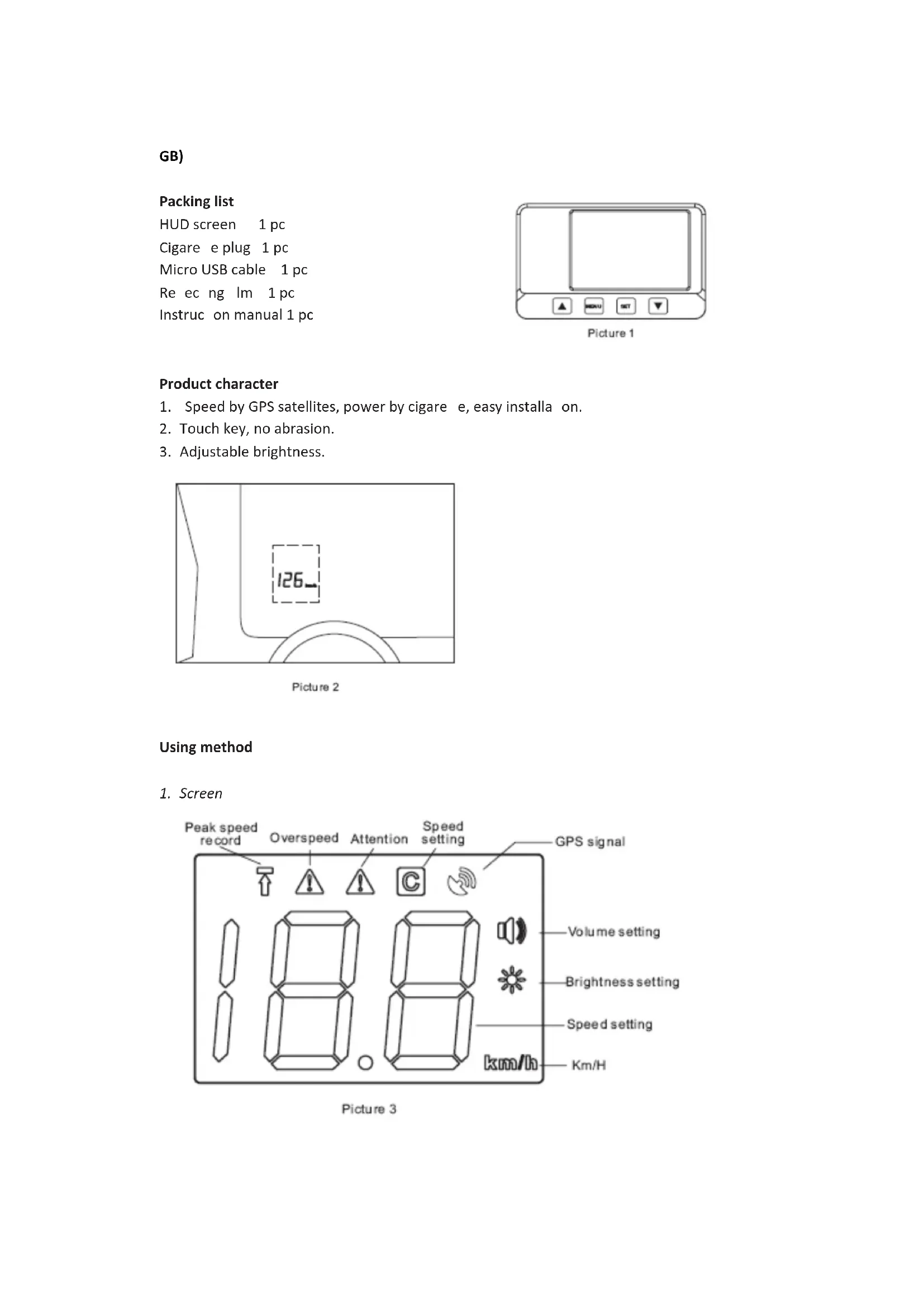
1. Speed by GPS satellites, power by cigarette, easy installation.
2. Touch key, no abrasion.
3. Adjustable brightness.
1. When GSP signal is weak,
will be lighted in red, the screen display “--” and flash.
2. When GPS signal is OK, the screen displays running speed.
3. Overspeed attention(ATTN) and alarm
a) When running speed is up to ATTN value, will be lighted in yellow, and sound “BI” once. b) When running speed is up to ALARM value, will be lighted in red, and sound “BI” twice.
4. Peak speed setting
Press by 2 seconds, will be lighted in red, display Max Speed during running. Press MENU”, “SET” or exit to confirm.
Press “SET” by 2 seconds, all LEDs will be lighted one by one. Exit testing by press “MENU” or “SET”, or no press within 20 seconds. Setting method Press “MENU” and “SET” to set, the setting data will be flashing, then press “ ” and “ ” to revise parameter, press “SET” and sound “BI” to finish setting. No press within 20 seconds, exit setting automatically.
Press “MENU” and lighten , start setting by press “SET”. Press or to revise value, finish setting by press “SET”. Brightness range is 0~7, 0 is the most darkness, 7 is the most brightness.
Press “MENU” and lighten , start setting by press “SET”. Press or to revise value, finish setting by press “SET”. Volume range is 0~3, 0 is silence, 3 is the max.
3. Speed calibration
Press “MENU” and lighten , start setting by press “SET”. Press or to revise value, finish setting by press “SET”. Range is 0~3, 0 is silence, 3 is the max.4. Overspeed value setting Press “MENU” and lighten in red, start setting by press “SET”. Press or to revise value, finish setting by press “SET”. Overspeed value range is 60~195km/h, and should be bigger than Attention Speed Value.
5. Attention value setting
Press “MENU” and lighten in yellow, start setting by press “SET”. Press to revise value, finish setting by press . or . Attention speed value is 40~195km/h, and should be smaller than overspeed value. HUD connection HUD screen installation Turn on the power, then seek the best position of reflecting film and HUD screen. The method is similar to sticking window film. Spraying some soap water on the windshield, remove two sides protective tape covered on the reflecting film carefully, then sticking the film at a suitable position on the inside of windshield. Remove unnecessary bubble or moisture, do not leave the air bubble and the fingerprint. Place the HUD screen in a suitable location, ensure the lightest projection on the windshield, please see picture 6.Technical parameter
3. Circuit protection: wrong connection, overvoltage, transient high voltage
Pin assignment of main unit Service If you have any further questions about the product after reading this manual, please contact the Trebs customer service: Phone: 0900-TREBSbv (0900-873 27 28), € 0.30 per minute. Trebs BV Thermiekstraat 1a 6361 HB, Nuth Nederland Email: info@trebs.nl Internet: www.trebs.nlCE The symbol on the product means that at the end of its life, the appliance has not to be considered a common waste. It is a special waste and has to be demolished in specific recovery and disposal area, as prescribed by the EC Directive 2002/96/EC(WEEE). By disposing this product correctly, you can avoid negative consequences for the environment and for the human health, due to the presence of potentially dangerous substances in the product.