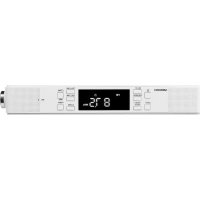
E66550 (MD 43550) - Radio MEDION - Free user manual and instructions
Find the device manual for free E66550 (MD 43550) MEDION in PDF.


| Product type | Recessed radio with Bluetooth |
| Brand | Medion |
| Model | E66550 (MD 43550) |
| Dimensions (W x H x D) | 272 x 48 x 113 mm (mounting bracket included) |
| Weight | 568 g |
| Power supply | DC 5 V, 2 A mains adapter (included) |
| Radio bands | FM 87.5 – 108 MHz |
| Bluetooth | Version 4.1, Class 2, range up to 10 m |
| Bluetooth profiles | A2DP, AVRCP, HFP |
| Output power | 2 x 2.7 W RMS |
| Station memory | 40 presets (P01-P40) |
| Functions | FM radio, Bluetooth, alarm (alarm 1 and 2), timer, integrated light, hands-free function |
| Display | Screen showing time, frequency, mode, alarms |
| Time setting | Automatic via RDS or manual |
| Time formats | 12h or 24h |
| Alarms | 2 independent alarms (buzzer or radio), snooze possible |
| Timer | Up to 300 minutes |
| Lighting | Integrated lamp for ambient lighting (under the device) |
| Mounting | Under a wall unit or shelf (mounting screws included) |
| Antenna | Wire antenna |
| Maintenance and cleaning | Disconnect before cleaning; use a soft, dry cloth; avoid solvents |
| Operating temperature | 0 °C to +40 °C |
| Relative humidity | < 85 % (non-condensing) |
| Protection class | II |
| Repairability | Repairs by authorized professional only; do not open the housing |
Frequently Asked Questions - E66550 (MD 43550) MEDION
User questions about E66550 (MD 43550) MEDION
0 question about this device. Answer the ones you know or ask your own.
Ask a new question about this device
Download the instructions for your Radio in PDF format for free! Find your manual E66550 (MD 43550) - MEDION and take your electronic device back in hand. On this page are published all the documents necessary for the use of your device. E66550 (MD 43550) by MEDION.
USER MANUAL E66550 (MD 43550) MEDION
Under-cabinet radio with Bluetooth®
function
1. Information about these operating instructions .... 31
1.1. Key to symbols....31
-
Proper use
-
EU Declaration of Conformity 33
-
Safety information
4.1. Operating safety....33
4.2. Installation location ....33
4.3. Repairs....34
4.4. Ambient temperature 35
4.5. Power supply 35
4.6. Mains adapter....36
-
Package contents
-
Device overview
-
Mounting the device 39
7.1. Adjusting the aerial 40
7.2. Mains connection 4
-
Volume 4
-
Lighting 4
-
Setting the time 40
10.1. Manual setting 41
- Using the alarm 41
11.1. Setting/activating the alarm 41
11.2. Deactivating the alarm....41
11.3. Stopping the alarm / activating the snooze function .....42
11.4. Timer....42
- Radio....42
12.1. Switching the radio on/off....42
12.2. Setting/searching for stations....42
12.3. Stereo/mono....43
12.4. Storing and selecting stations....43
- Bluetooth mode....44
13.1. Connecting Bluetooth devices....44
13.2. Control 44
-
Resetting the device.... 45
-
Troubleshooting 45
-
Cleaning 46
-
Disposal 46
-
Privacy statement...... 46
-
Technical specifications 47
-
Service information.... 48
-
Legal Notice......
1. Information about these operating instructions

Thank you for choosing our product. We hope you enjoy using this device.
Read the safety instructions and all other instructions carefully before using the device for the first time. Note the warnings on the device and in the operating instructions.
Always keep the operating instructions close to hand. If you sell the device or give it away, please ensure that you also pass on these operating instructions. They are an essential component of the product.
1.1. Key to symbols
If a block of text is marked with one of the warning symbols listed below, the hazard described in that text must be avoided to prevent the potential consequences described there from occurring.

DANGER!
Warning: risk of fatal injury!

WARNING!
Warning: risk of possible fatal injury and/or serious irreversible injuries!

CAUTION!
Warning: risk of minor and/or moderate injuries!

NOTICE!
Follow these instructions to prevent damage to the device!

Additional information on using the device.

Comply with the notes in the operating instructions.
WARNING!
Warning: risk of electric shock!
- Bullet point/information on steps during operation
▶ Instruction to be carried out

Declaration of conformity (see "Declaration of conformity" section): Products that feature this symbol meet the requirements of the EC directives.
Protection class II

Electrical devices in protection class II are devices that have double and/or reinforced insulation throughout, and do not have the option of connecting a protective earth. The housing of an electrical device in protection class II, with surrounding insulating material, may either form all of the additional or reinforced insulation, or part of it.
Indoor use
Devices with this symbol are intended solely for indoor use.
2. Proper use
The device is designed for the reception of radio programmes, sounding an alarm as a wake-up call, displaying the time and as a light.
The device is only intended for private use and not for industrial/commercial use. Note that no liability will be accepted if the device is not used for its intended purpose:
- Do not modify the device without our express agreement and do not use any accessories that have not been supplied or approved by us.
- Only use replacement parts or accessories that we have supplied or approved.
- Comply with all the information in these operating instructions, especially the safety information. Any other use is considered improper and can cause personal injury or property damage.
- Do not use the device in extreme environmental conditions.
3. EU Declaration of Conformity
MEDION AG hereby declares that this device complies with the fundamental requirements and the other relevant provisions of:
• RE Directive 2014/53/EU
• Ecodesign Directive 2009/125/EC
• RoHS Directive 2011/65/EU.
You can download the complete EU Declaration of Conformity at www.medion.com/conformity.
4. Safety information
4.1. Operating safety
- This device may be used by children over the age of 8 and by persons with limited physical, sensory or mental abilities or by those without experience and knowledge, if they are supervised or have been instructed in the safe use of the device and have understood the dangers that result from it.
- Children must not be allowed to play with the device. Cleaning and user maintenance may not be carried out by children unless they are supervised.

DANGER!
Risk of choking and suffocation!
Packaging film can be swallowed or used improperly, creating a risk of choking and suffocation.
- Keep packaging material such as plastic film or plastic bags away from children.
4.2.Installationlocation
- Keep your device and all connected components away from moisture and avoid dust, heat and direct sunlight. Non-compliance with these instructions can lead to faults or damage to the device.
-
Do not place naked flames, such as lit candles, on or near the device, as this poses a fire hazard.
-
Do not use the device outdoors as it could be damaged by weather such as rain, snow, etc.
- Avoid exposing the device and the power pack to water droplets or spray and do not place any liquid-filled containers (vases or similar) on or next to the device or the power pack. Liquids penetrating the device may impair the electrical safety of the product.
- The slots and openings on the device are for ventilation purposes. Do not cover these openings (risk of overheating, fire hazard)!
- Position the cable so that no-one can tread on them or trip over them.
- Make sure that there is enough clearance between the device and any surrounding furniture or walls. Ensure a minimum clearance of 10 cm around the device for sufficient ventilation.
- Place and operate all the components on a stable, level and vibration-free surface in order to prevent the device from falling.
4.3. Repairs
- Contact customer services if:
–the mains adapter cable is burnt or damaged
–liquid has penetrated the device
–the device is not operating correctly
–the device has fallen or the housing is damaged.
- Repairs to your device should only be carried out by qualified specialists.
- If a repair must be carried out, please contact only our authorised service partners.
4.4. Ambient temperature
- The device can be operated at an ambient temperature of 0ircC to +40ircC and at a relative humidity of < 85% (non-condensing).
- When switched off, the device can be stored at temperatures of between -10ircC and +50ircC .
DANGER!
Risk of electric shock!
Major changes in temperature or fluctuations in humidity can cause moisture to build up within the device due to condensation – this can cause an electrical short circuit.
▶ After transporting the device, wait until it has reached ambient temperature before switching it on.
4.5. Power supply
DANGER!
Risk of electric shock!
Even when the device is switched off, some components are live.
In order to disconnect the power to your device or to completely isolate the device from voltage sources, remove the mains adapter from the outlet.
- Operate the device only from a 230 V\~, 50 Hz earthed power outlet that is close by and easy to access.
DANGER!
Risk of electric shock!
The device contains live parts. They pose a risk of electric shock or fire if an unintentional short circuit occurs.
▶ Never open the housing and never insert any objects through the slots and openings into the device!
- Do not place any objects on the cables as they may be damaged.
- Keep the device at a distance of at least one metre from sources of high-frequency or magnetic interference (televisions, speakers, mobile telephones, etc.) to avoid malfunctions and data loss.
4.6. Mains adapter
- Use only the mains adapter supplied.
- If the housing of the mains adapter or the power cable is damaged, the mains adapter must be disposed of and replaced with a new mains adapter of the same type.
- The mains adapter may only be used in dry rooms.
5. Package contents
Please check your purchase to ensure that all items are included. If anything is missing, please contact us within 14 days of purchase. The following items are supplied with your device:
• Under-cabinet radio
- Mains adapter
- Documentation

DANGER!
Risk of choking and suffocation!
Packaging film can be swallowed or used improperly, creating a risk of choking and suffocation.
- Keep packaging material such as plastic film or plastic bags away from children.
6. Device overview
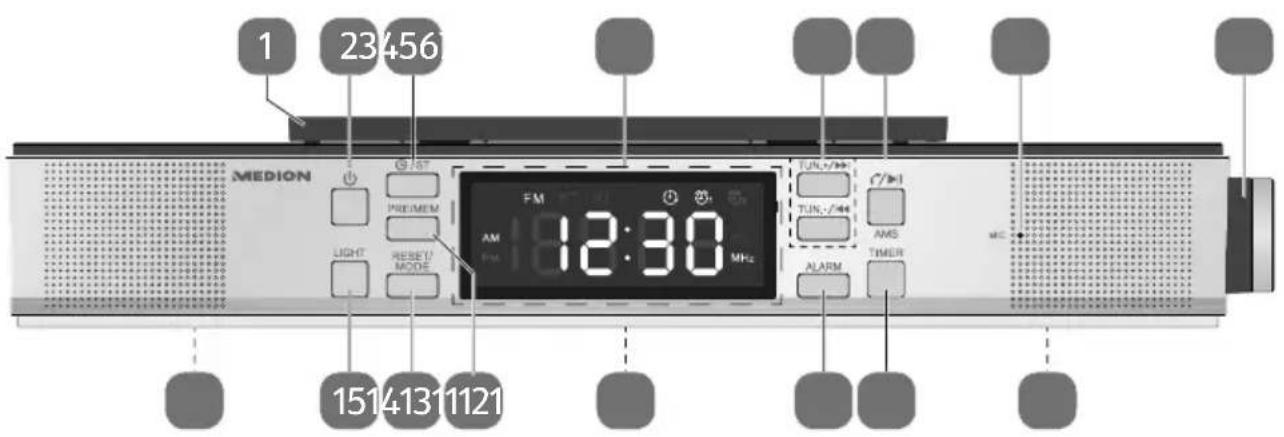
1) Mounting plate for wall cupboards
2) - Switch radio on/off
3) - Set-time manually / ST - Mono/stereo reception
4) Display
FM – FM radio activated
ST – Stereo reception activated
BT – Bluetooth activated
- Timer activated
①1/②2 Alarm 1/2 activated
MHz – Unit of frequency for FM
AM/PM – Indicator for morning/afternoon (12-hour time format)
5) TUN-/+ - Select frequency/search for radio station
/ Fast forward/rewind/previous/next track
6) - Accept/end call / redial
▶ II – Start/stop playback
AMS – Automatically store stations
7) MIC - Microphone
8) -/+ - Loudspeaker's volume control / adjusting controller / confirm input
SNOOZE – Snooze function
9) Loudspeaker (on the underside)
10) TIMER – Timer function
11) ALARM – Set/activate/deactivate alarm
12) DC IN 5V——2A – Mains adapter connection (on the back)
13) PRE/MEM – Select stored radio station/store station
14) RESET/MODE – Change between radio/Bluetooth mode/reset device
15) LIGHT – Switch lighting on/off
16) Lighting (on the underside)
7. Mounting the device
The device is designed to be mounted on the underside of a wall cupboard or shelf unit. You will need the four supplied screws to mount the device.
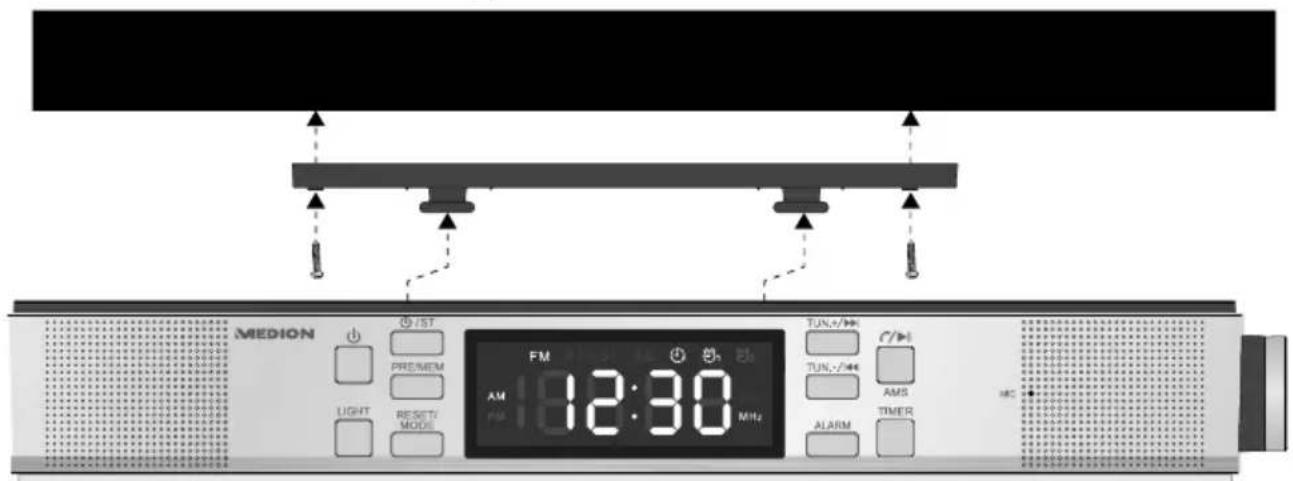
▶ Select a space close to a mains power socket.
Remove the bracket from the device by pulling it to the rear.
▶ Use the bracket to mark the drill holes.
▶ Check that the position is correct using the device.
Drill four holes where you made your markings on the underside of the shelf unit in order to fix the screws.
▶ Screw the mounting bracket to the bottom of the cupboard or shelf.
Now place the device onto the mounting bracket retaining pins and carefully push it back until it stops.

WARNING!
Risk of fire/short circuit!
Rising steam or heat can pose a risk of electric shock or fire if a short circuit occurs.
▶ Never mount the device above a hob or any other heat or steam source (for example, electric kettles, etc.).
▶ Never allow the mains cable to hang over a cooker hob or other heat source.
7.1. Adjusting the aerial
A wire aerial has already been connected to the device for radio reception. Fully unwind the aerial and arrange it for optimum reception.
7.2. Mains connection
Connect the mains adapter.
To do this, place the connection cable plug in the socket DC IN 5V-2A and the mains adapter into a properly installed 230V \~ 50 Hz earthed power socket which is accessible at all times.
8. Volume
▶ Turn the control knob on the side of the device -/+ to set the volume. The current volume is shown in the display.
9. Lighting
- Pressing the LIGHT button switches the integrated lighting on the underside of the device on or off.

This light is only designed to light up foodstuffs and not for room lighting.
10. Setting the time
The device is equipped with the Radio Data System that sets the time automatically. The correct time is synchronised after the device has been connected to the power supply. In this process — flashes on the display. The time will appear once the process has been completed.
In some cases, the time cannot be set if the radio signal is too weak. In this case, 00:00 is shown on the display and the time must be set manually.
10.1. Manual setting
When the device is switched off, press the ⏻ button. 24H flashes on the display.
▶ Turn the controller to select 24 or 12-hour time format. Then press the controller to confirm the selection.
▶ Turn the controller to adjust the hours. Press the controller to confirm the setting.
▶ Turn the controller to adjust the minutes. Press the controller to confirm the setting.
▶ Turn the controller to select CT ON or CT OFF to switch the automatic time setting on or off each night at 2 am.
In a final step, press the controller to confirm the selection.
The time is now set.
11. Using the alarm
The device has two alarm functions, using either an alarm tone or the radio as a wake-up call.
11.1. Setting/activating the alarm
If you wish to be woken by the radio, first select a radio frequency (as described in „12. Radio“ auf Seite 42).
▶ Press ALARM and use the controller to select which alarm you would like to set.
-Alarm 1 (4)
-Alarm 2 (Φ)2
▶ Then press the controller to set the alarm time of the corresponding alarm.
The hour flashes. Turn the controller to set the hours and confirm by pressing the controller.
The minutes flash. Turn the controller to set the minutes and confirm by pressing the controller.
▶ Turn the controller to change between the alarm sound (bu) or waking up with the radio (tu).
In a final step press the controller to complete setting the alarm time.
11.2. Deactivating the alarm
▶ Press the ALARM button.
▶ Use the controller to select which alarm you would like to deactivate.
-Alarm 1 (♀1
-Alarm 2 (Φ)2
▶ Press and hold the ALARM button until the alarm symbol goes out.
11.3. Stopping the alarm / activating the snooze function
When the alarm sounds, you can:
The alarm sound is output for 5 minutes. Press the ALARM button to stop the alarm or press the controller to activate the snooze function. After approx. 9 minutes, the alarm sounds again. This can be repeated up to three times.
If the alarm is sounded using the radio, you can switch it off by pressing ⏻. The snooze function is not possible.
11.4. Timer
You can set a timer to start in up to 300 minutes.
▶ Press the TIMER button. ⏻ flashes on the display.
▶ Turn the controller to select the duration until the timer starts.
▶ Press the TIMER button to confirm.
The alarm starts 30 seconds before the set period of time has expired with the volume increasing gradually.
▶ Press the TIMER button to stop the alarm.
If the timer has been activated, you can check the remaining time until the alarm will sound:
▶ Press TIMER. The remaining time is shown.
If you wish to cancel the timer, proceed as follows:
▶ Press the TIMER button. ⏻ flashes on the display.
▶ Turn the controller to select the duration 000.
▶ Press the TIMER button again and the ⏻ symbol goes out.
12. Radio
12.1. Switching the radio on/off
▶ Press the button to switch the radio on/off.
You can receive analogue FM radio signal with this device. The display shows FM as well as the frequency and time alternately. Adjust the wire aerial for optimal FM reception.
12.2. Setting/searching for stations
▶ Press the TUN- or TUN+ button to set a station manually.
▶ Press and hold the TUN- or TUN+ button to search for stations. The search stops automatically at the next station found.
12.3. Stereo/mono
If a radio signal is not sufficient, you can improve the reception, if necessary, by switching the radio station to mono. Radio stations broadcasting in stereo are shown with ST on the display.
▶ Press the ST button to switch off the stereo signal. ST no longer appears on the display.
▶ Press the button again to switch the stereo signal back on. ST will once again appear on the display.
12.4. Storing and selecting stations
The radio has 40 memory slots where you can save your favourite stations. To perform the functions described below, first switch on the radio.
12.4.1. Automatic storage
▶ Press and hold the AMS button until automatic saving starts. All stations found are stored successively.
12.4.2. Manual storage
To store a preset station, press and hold the PRE/MEM button until P01 flashes on the display.
Now press TUN- or TUN+ to select the desired memory slot P01-P40.
▶ Press the PRE/MEM button again to confirm.
12.4.3. Selecting station slots
To select a preset station, press the PRE/MEM button and then use the TUN- or TUN+ buttons to select the desired memory slot P01-P40.
The stored radio station will be played.
13. Bluetooth mode
You can use Bluetooth to play tracks wirelessly from external devices such as MP3 players or mobile phones with Bluetooth on this device. Furthermore, you can also make phone calls using the hands-free function.
When the device is switched on, press the MODE button several times until BT appears in the display.
13.1. Connecting Bluetooth devices
Switch on Bluetooth mode as described above. Enable the Bluetooth function on your external device and carry out the pairing process. Refer to the instructions for your external device for more information. The audio system's name is "MD 43550".
The pairing process is now complete and the external device can now be used with the kitchen radio.
▶ If you want to stop data transfer via Bluetooth, either switch off the Bluetooth function on the external device or press MODE to return to radio mode.
13.2. Control
You can control how tracks are played, the volume and a range of special functions on your external device and on the kitchen radio. What functions are available is dependent on your external device and the software that you use. In principle, these buttons on the device are intended for control via Bluetooth:
| -/+ (controller) | Reduce/increase volume |
| |◄ / ►| | Previous track/next track |
| ► II | Start/pause playback |
| Incoming callLong press: reject callShort press: accept, end call,Without phone callPress twice: redial the last phone number |
14. Resetting the device
To reset the device, press and hold the RESET button for several seconds until F0001 appears on the display. Then all stored radio stations, set alarms and timers will be deleted and the time will be re-synchronised.
15. Troubleshooting
If a fault occurs, first see whether you can resolve the problem yourself. You might find this overview useful.

CAUTION!
Risk of injury!
Opening the device can cause injuries.
▶ Never attempt to repair the device yourself. If a repair is necessary, please contact our Service Center or a suitable authorised repair workshop.
| Fault Possible cause/action | |
| No function If the device | vice has been disrupted by a thunderstorm, a static charge or another external factor, follow this procedure to resolve the problem: Disconnect the mains adapter and then plug it in again. |
| No sound Has the volume | In Bluetooth mode: Set the volume of the external device to the maximum and then control the volume using the kitchen radio. |
| No radio signal for the time/no radio reception | If necessary, select another location to improve the radio signal for the time. Adjust the wire aerial to optimise the radio reception. |
16. Cleaning
Always pull the mains adapter out from the socket before cleaning the device. Only use a dry, soft cloth to clean the device. Do not use chemical solutions or cleaning products because these may damage the device's surface and/or inscriptions.
17. Disposal

PACKAGING
Your device has been packaged to protect it from damage in transit. The packaging is made of materials that can be recycled in an environmentally friendly manner.
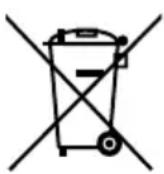
DEVICE
Do not dispose of old devices in normal household waste.
In accordance with Directive 2012/19/EU, the device must be properly disposed of at the end of its service life.
This involves separating the materials in the device for the purpose of recycling and minimising the environmental impact.
Take old devices to a collection point for electrical scrap or a recycling centre. Contact your local waste disposal company or your local authority for more information on this subject.
18. Privacy statement
Dear Customer,
We wish to inform you that we, MEDION AG, Am Zehnthof 77, 45307 Essen, Germany process your personal data as a data controller.
For matters regarding data protection, we are supported by our company data protection officer, who can be contacted at MEDION AG, Datenschutz, Am Zehnthof 77, D – 45307 Essen; datenschutz@medion.com. We process your data for the purpose of warranty processing and associated processes (e.g. repairs) and therefore rely on processing your data for the sales contract concluded with us.
Your data will be provided to repair service providers contracted by us for the purpose of warranty processing and associated processes (e.g. repairs). We generally store your personal data for a period of three years in order to fulfil your legal warranty rights.
You have the right to be informed of the personal data concerned as well as the right to rectification, deletion, restriction of processing, the right to object to processing and the right to data portability.
In case of access and cancellation rights, restrictions apply according to paragraphs 34 and 35 of the BDSG (Federal Data Protection Act) (Art. 23 GDPR). In addition, there is a right of appeal to a competent data protection supervisory authority (Article 77 GDPR in conjunction with paragraph 19 BDSG). For MEDION AG, this is the
state official for data protection and freedom of information North Rhine-Westphalia, PO box 200444, 40212 Düsseldorf, Germany. www.ldi.nrw.de.
The processing of your data is necessary for warranty processing: it is not possible to process the warranty without the provision of the required data.
19. Technical specifications
Mains adapter
Manufacturer KPTEC
Model K12S050200G
Input voltage AC 100-240 V \~ 50/60 Hz 0.35 A
Output voltage DC 5.0 V 2.0 A ---

Power supply DC 5.0 V 2.0 A
Output 2x 2.7 W RMS
FM frequency band 87.5 - 108 MHz
Station memory 40
Connection Mains adapter connection
Dimensions (W x H x D) 272 x 48 x 113 mm (includes bracket)
Weight 568 g
Bluetooth
Version 4.1
Profiles A2DP v1.2, AVRCP v1.4, HFP v1.5
Class 2, up to 10 metres radius
Frequency 2.4 GHz - 2.48 GHz
Transmission power 2.53 dBm

20. Service information
Please contact our Customer Service team if your device ever stops working the way you want or expect it to. There are several ways for you to contact us:
- In our Service Community, you can meet other users, as well as our staff, and you can exchange your experiences and pass on your knowledge there.
You will find our Service Community at http://community.medion.com.
• Alternatively, use our contact form at www.medion.com/contact.
- You can also contact our Service team via our hotline or by post.
| Opening times Hotline number UK | |
| Mon – Fri: 08.00 – 20.00Sat – Sun: 10.00 – 16.00 | 0333 3213106 |
| Hotline number Ireland | |
| 1 800 992508 | |
Service address
MEDION Electronics Ltd. 120 Faraday Park, Faraday Road, Dorcan Swindon SN3 5JF, Wiltshire United Kingdom

You can download this and many other sets of operating instructions from our service portal at www.medion.com/gb/service/start/.
You will also find drivers and other software for a wide range of devices there.
You can also scan the QR code on the side of the screen, to download the operating instructions onto your mobile device from the service portal.
21. Legal Notice
Copyright © 2019
Date: 28.06.2019
All rights reserved.
These operating instructions are protected by copyright.
Mechanical, electronic and any other forms of reproduction are prohibited without the written permission of the manufacturer.
Copyright is owned by the company:
MEDION AG
Am Zehnthof 77
45307 Essen
Germany
Please note that you cannot use the address above for returns. Please always contact our Customer Service team first.
Sommaire
• Directive RoHS 2011/65/UE.
Mémoire de stations 40
FM – Radio FM attivata
Tensione in uscita DC 5,0 V
= 2,0 A

Dispositivo


- Information about these operating instructions .... 31
- Information about these operating instructions
- Key to symbols
- DANGER!
- WARNING!
- CAUTION!
- NOTICE!
- Protection class II
- Indoor use
- Proper use
- EU Declaration of Conformity
- Safety information
- Operating safety
- 4.2.Installationlocation
- Repairs
- Ambient temperature
- Risk of electric shock!
- Power supply
- Mains adapter
- Package contents
- Risk of choking and suffocation!
- Device overview
- Mounting the device
- Risk of fire/short circuit!
- Adjusting the aerial
- Mains connection
- Volume
- Lighting
- Setting the time
- Manual setting
- Using the alarm
- Setting/activating the alarm
- Deactivating the alarm
- Stopping the alarm / activating the snooze function
- Timer
- Radio
- Switching the radio on/off
- Setting/searching for stations
- Stereo/mono
- Storing and selecting stations
- Automatic storage
- Manual storage
- Selecting station slots
- Bluetooth mode
- Connecting Bluetooth devices
- Control
- Resetting the device
- Troubleshooting
- Risk of injury!
- Cleaning
- Disposal
- PACKAGING
- DEVICE
- Privacy statement
- Technical specifications
- Mains adapter
- Bluetooth
- Service information
- Service address
- Legal Notice
- MEDION AG
- Sommaire
- Dispositivo
Brand : MEDION
Model : E66550 (MD 43550)
Category : Radio