FT200 - Effect machine Antari - Free user manual and instructions
Find the device manual for free FT200 Antari in PDF.


User questions about FT200 Antari
0 question about this device. Answer the ones you know or ask your own.
Ask a new question about this device
Download the instructions for your Effect machine in PDF format for free! Find your manual FT200 - Antari and take your electronic device back in hand. On this page are published all the documents necessary for the use of your device. FT200 by Antari.
USER MANUAL FT200 Antari
FT-200 Fire Training Fog Machine User Manual
FIRE TRAINING FT-200 FIRE MACHINE
User Manual - English
Safety Information

Please read the following safety information carefully before operating the machine. This information includes important safeguards about installation, usage, and maintenance. Pay attention to all warning labels and instructions in this manual and printed on the machine.
If you have questions about how to operate the machine safely, please contact your local Antari dealer for help.
- Keep this device dry.
• Always connect to a grounded circuit to avoid risk of electrocution. - Before connecting machine to power, always check voltage indicate on machine match to your local AC voltage. Do not use the machine if AC power voltage does not match.
- Disconnect the machine from AC power before servicing and when not in use.
- This product is for indoor use only! Do not expose to rain or moisture. If fluid is spilled, disconnect AC power and clean with a damp cloth. If fluid is spilled onto electronic parts, immediately unplug the machine and contact your local Antari dealer for advice.
- No user serviceable and modifiable parts inside. Never try to repair this product, an unauthorized technician may cause damage or malfunction to the machine.
• For adult use only. Never leave the machine running unattended. - Installed the machine in a well-ventilated area. Provide at least 50 cm space around the machine.
- Never add flammable liquid of any kind to the machine.
• Make sure there are no flammable materials close to the machine while operating.
• Only use Antari fluid. Other fluid may lead to heater clog and malfunction.
• If the machine fails to work, unplug the machine and stop operation immediately.
Contact your local Antari dealer for advise.
• Before transporting the machine, make sure the fluid tank is completely drained.
- Fog fluid may present health risks if swallowed. Do not drink fog fluid. Store it securely. In case of eye contact or if fluid is swallowed, immediately look for medical advice.
Unpacking and Inspection
Immediately upon receiving the machine, carefully unpack the carton, check the content to ensure that all parts are present and have been received in good condition. If any parts appear damaged or mishandled from shipping, notify the shipper immediately and retrain the packing material for inspection.
What is included: 1 x FT-200 Fog Machine
1 x W-2 Wireless Remote
1 x Power Cord
1 x User Manual
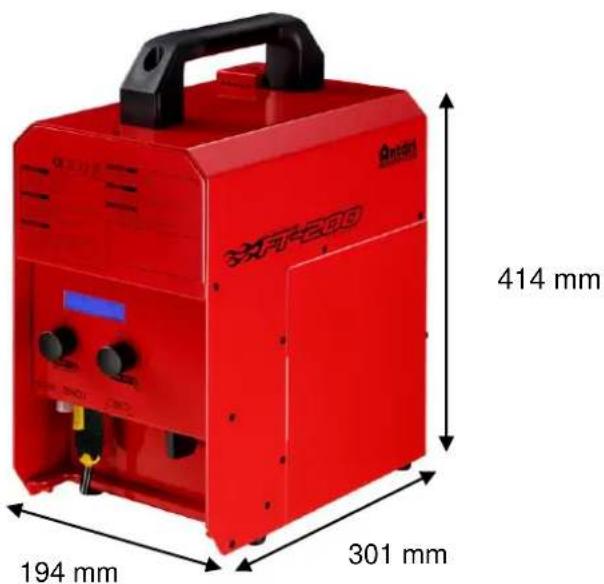
Product Dimensions
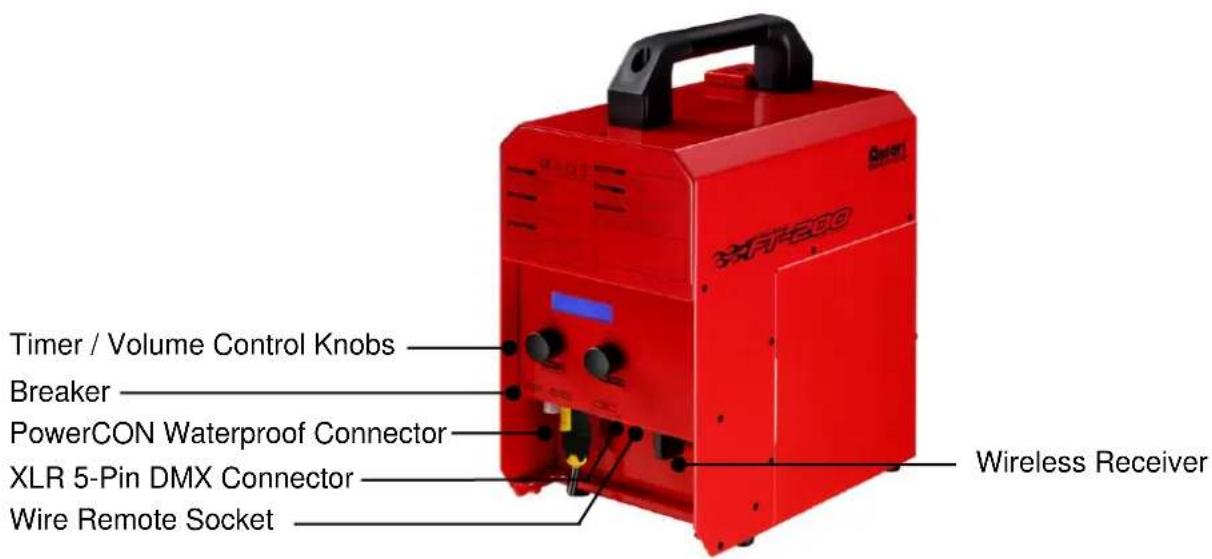
Product Overview
Setting Up
Step 1: Place the machine on a flat surface and in a suitable large area with at least 50 cm open space around the machine.
Step 2: Fill the fluid tank with Antari approved fluid.
Step 3: Connect the machine to suitable rated power supply. To determine the power requirement for the machine refer to the label on the back of the machine.

Always connect the machine to a protected circuit and ensure it is properly grounded to avoid risk of electrocution.
Step 4: Turn on the machine and allow it to heat up. Heat up takes approximately 7.5 mintues. Once the machine has reached operating temperature, the LCD display will show "Ready To Fog". Now the machine is ready for operation.
Step 5: To start making fog, locate the rotary knob on the right side of control panel, and press the rotary knob to start making fog.
Step 6: To turn off the machine, press rotary knob button again and turn Powercon to the OFF position.
Operation
Control Panel Operation
The machine can be operated with the onboard digital control interface.
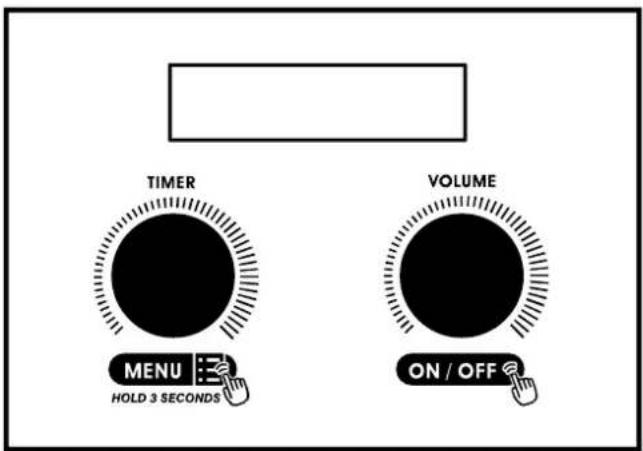
Operation - Timer Mode
| Rotary knob | Action | Description |
| Left | Press once | Activate timer mode |
| Right | Press second time | Deactivate timer mode |
| Right | Rotate | Adjust output volume |
Operation – Volume Mode
| Rotary knob | Action | Description |
| Right | Press once | Activate volume mode |
| Right | Press second time | Deactivate volume mode |
| Right | Rotate | Adjust output volume |
Setting
| Rotary knob | Action | Description |
| Left | Press and hold for 3 seconds | Enter setting menu |
| Left | Rotate | Scroll through menus |
| Left | Press | Press once to enter |
| Left | Rotate | Adjust for preferred value |
| Right | Press | Escape from menu |
Control Menu
| Interval SetXXX S | Set interval time from 5 to 200 seconds |
| Duration SetXXX S | Set duration time from 1 to 200 seconds |
| Timer OutputXXX % | Set output volume from 1 to 100% |
| Volume OutputXXX % | Set output volume from 1 to 100% |
| DMX512Address:XXX | Set DMX address from 1 to 512 |
| WirelessON | Turn ON or OFF wireless remote feature |
| Run Last SettingOFF | Turn ON or OFF memory setting. When turned “ON”, the machine will return to its original state before last shut off. |
Keypad Sound Turn ON or OFF rotary knob sound
ON
Wireless Detect Pair or unpair wireless remote
Pair
Nonstop Burst Turn ON or OFF nonstop burst function. Once the machine is OFF turned on, it can produce output continuously without reheating.
Wireless Operation
Wireless remote control system W-2 consists of a transmitter equipped with four buttons to activate, deactivate, increase and decrease fog output and an onboard receiver attached to the rear panel of FT-200 fog machine.
W-2 Wireless Transmitter
Press [A] button to emit fog. Press [B] button to stop. Press [C] button to increase output volume. Press [D] button to decrease output volume.
In a free open space the effective distance is 50 meters, actual usage depending on obstacle level the effective distance is 10-25 meters.
Registering a transmitter
Transmitters can be paired or deleted from the receiver. Each receiver can pair up to 5 transmitters. Follow the steps below to pair or delete a transmitter from a receiver.
Step 1: Press and hold the left rotary knob for 3 seconds to enter setting menu.
Step 2: Rotate the rotary knob to find the "Wireless Detect" menu.
Step 3: Follow the menu instruction to pair or delete a transmitter.
Transmitter battery replacement
If the effective distance seems to decrease, it is possible the battery level is low and requires replacement. In order to replace the battery, undo the three screws on the back of transmitter to release the cover. Replace with same type and specification of battery which is 27A 12V
DMX Connector Pin Assignment
The machine provides 5-pin XLR connectors for DMX connection. The diagram below indicates pin assignment information.
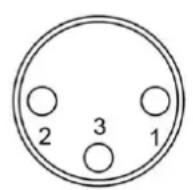
3 Pin XLR
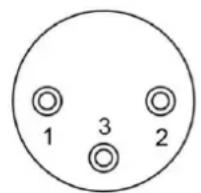

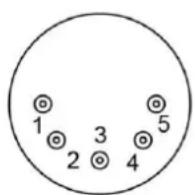
5 Pin XLR
| Pin | Function |
| 1 | Ground |
| 2 | Data- |
| 3 | Data+ |
DMX Channel Function
| Channel 1 | DMX Value Range | Function |
| Fog | 0 – 4 | Fog Off |
| 5 – 255 | Output 1-100% |
Fluid

Only use Antari FLP water-based liquid for the FT-200 Fire Training Fog Machine. The machine is tested and calibrated with this liquid to get the best output performance. Warranty will be void if any other type of liquid is used, improper use of liquid may lead to machine failure and malfunction.
Service and Maintenance
- Do not allow the machine to become contaminated.
- Remove dust from air vents with air compressor, vacuum or a soft brush.
- Only use a damp cloth to clean the casing.
- Before storing run distilled water through the system to help avoid condensing the pump or heater.
- It is recommended to run the machine on a monthly basis in order to achieve best performance and output condition.
• Excessive dust, liquid and dirt built up will degrade performance and cause overheating.
Breaker Reset

Disconnect AC power before resetting the breaker. Only replace fuse with same type and rating.
Step 1: Disconnect AC power.
Step 2: Flip breaker to ON position.
Step 3: Turn on machine for testing.
Breaker
$$ 1 2 0 \mathrm{V} = 1 3. 5 \mathrm{A} 2 5 0 \mathrm{V} $$
$$ 2 3 0 \mathrm{V} = 7 \mathrm{A} 2 5 0 \mathrm{V} $$
Technical Specifications
Input voltage
US 120V
EU 230V
UK 240V
JP 100V
Breaker 120V = 13.5A 250V
$$ 2 3 0 \mathrm{V} = 7 \mathrm{A} 2 5 0 \mathrm{V} $$
Heater 1600W
Warm-up time 7.5 min. (approx.)
Max. operating time 8 min. at 100% output
Fluid tank capacity 2.4 L
Fluid consumption 270 ml/min
Compatible fluid Antari FLP water-based fluid
Control option DMX 512, Manual, Timer, W-2 Wireless remote, Z-3 Remote (optional)
DMX channels 1 channel
Power connection Neutrik Powercon TRUE1
DMX data connection 5-pin XLR
Dimension L 301 x W 194 x H 414 mm
Dry weight 16 kg
FIRE TRAINING FT-200 FIRE MACHINE
Run Last Setting OFF
natural_image
Close-up of a metallic remote control with four buttons (A, B, C, D) and a blue indicator light on the left (no text or symbols beyond icons)natural_image
Black plastic object with engraved markings, no visible text or symbolsRécepteur sans fil
natural_image
Close-up of a silver remote control with four buttons (A, B, C, D) and a blue indicator light (no text or symbols visible)W-2 Sendeeinheit
natural_image
Black plastic object with engraved markings, no visible text or symbolsFunkempfänger
natural_image
Close-up of a silver remote control with four buttons (A, B, C, D) and a blue indicator light (no text or symbols beyond icons)W-2 無線發射器
*無線接收器
natural_image
Black plastic electronic device casing with a flat top and side slots (no visible text or symbols)無線接收器
\*設定功能
For current product information visit Antari at:www.antari.com For information requests please contact us at:sales@antari.com