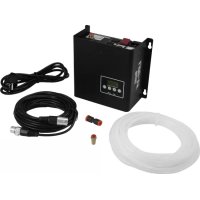
LCU1SE - Effect machine Antari - Free user manual and instructions
Find the device manual for free LCU1SE Antari in PDF.


| Product Type | Effect machine (fluid controller) |
| Brand | Antari |
| Model | LCU1SE |
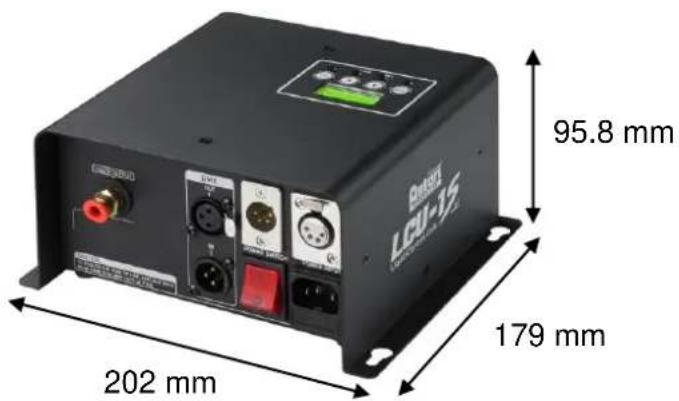
| Dimensions (L x W x H) | 202 x 179 x 95.8 mm |
| Net weight | 3.3 kg |
| Power supply | AC 100-240V, 50/60Hz (depending on version) |
| Fuse | 100V: T12A 250V / 240V: T1A 250V |
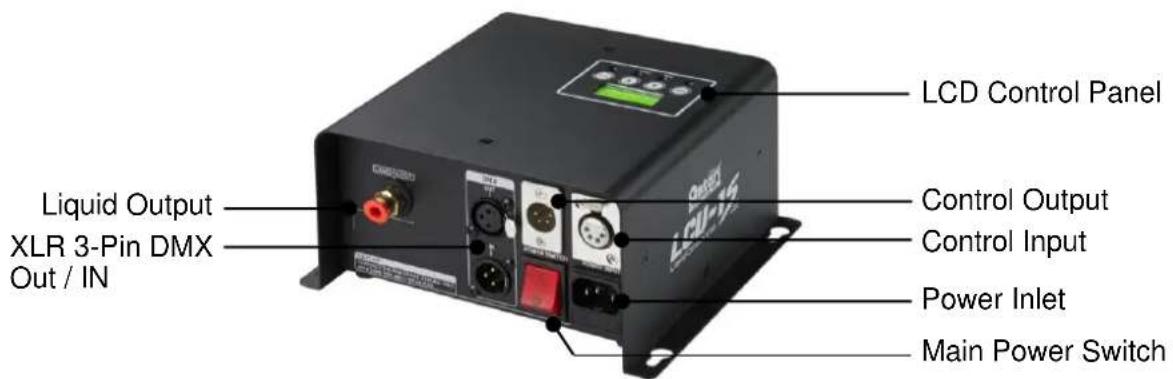
| Power connection | IEC |
| DMX connection | 3-pin XLR |
| Remote control connection | 4-pin XLR |
| DMX channels | 1 channel |
| Control | DMX512, remote control, LCD panel |
| Functions | Timer (interval 5-200s, duration 1-200s), adjustable volume (1-100%), continuous mode |
| Compatible models | Z-1200II, S-100X, S-200X, SW-250 |
| Box contents | LCU-1S, power cable, 4-pin data cable, fluid hose, fluid filter, user manual |
| Optional accessories | Z-8 remote control, SC-2 remote control |
| Maintenance | Clean with dry cloth; use Antari FLG fluid; drain before transport; replace fuse with same type |
| Safety | Keep away from moisture; maintain 50 cm distance from flammable materials; do not mix flammable liquids; disconnect before maintenance; do not open |
Frequently Asked Questions - LCU1SE Antari
User questions about LCU1SE Antari
0 question about this device. Answer the ones you know or ask your own.
Ask a new question about this device
Download the instructions for your Effect machine in PDF format for free! Find your manual LCU1SE - Antari and take your electronic device back in hand. On this page are published all the documents necessary for the use of your device. LCU1SE by Antari.
USER MANUAL LCU1SE Antari
Please read the following safety information carefully before operating the machine. This information includes important safeguards about installation, usage, and maintenance. Pay attention to all warning labels and instructions in this manual and printed on the machine.
If you have questions about how to operate the machine safely, please contact your local Antari dealer for help.
- Keep this device dry.
• Always connect to a grounded circuit to avoid risk of electrocution. - Before connecting machine to power, always check voltage indicate on machine match to your local AC voltage. Do not use the machine if AC power voltage does not match.
- Disconnect the machine from AC power before servicing and when not in use.
- This product is for indoor use only! Do not expose to rain or moisture. If fluid is spilled, disconnect AC power and clean with a damp cloth. If fluid is spilled onto electronic parts, immediately unplug the machine and contact your local Antari dealer for advice.
- No user serviceable and modifiable parts inside. Never try to repair this product, an unauthorized technician may cause damage or malfunction to the machine.
• For adult use only. Never leave the machine running unattended.
- Never add flammable liquid of any kind to the machine.
• Make sure there are no flammable materials close to the machine while operating.
• Only use Antari fluid. Other fluid may lead to machine malfunction.
- If the machine fails to work, unplug the machine and stop operation immediately. Contact your local Antari dealer for advise.
• Before transporting the machine, make sure the fluid tank is completely drained.
- Fog/Snow fluid may present health risks if swallowed. Do not drink fog fluid. Store it securely. In case of eye contact or if fluid is swallowed, immediately look for medical advice.
Unpacking and Inspection
Immediately upon receiving the machine, carefully unpack the carton, check the content to ensure that all parts are present and have been received in good condition. If any parts appear damaged or mishandled from shipping, notify the shipper immediately and retrain the packing material for inspection.
What is included: 1 x LCU-1S Liquid Control Unit
1 x Power Cord
1 x 4 Pin Data Connection Cable
1 x Fluid Tube
1 x Fluid Filter
1 x User Manual
Product Dimensions
Product Overview
Setup and Installation
Compatible Models
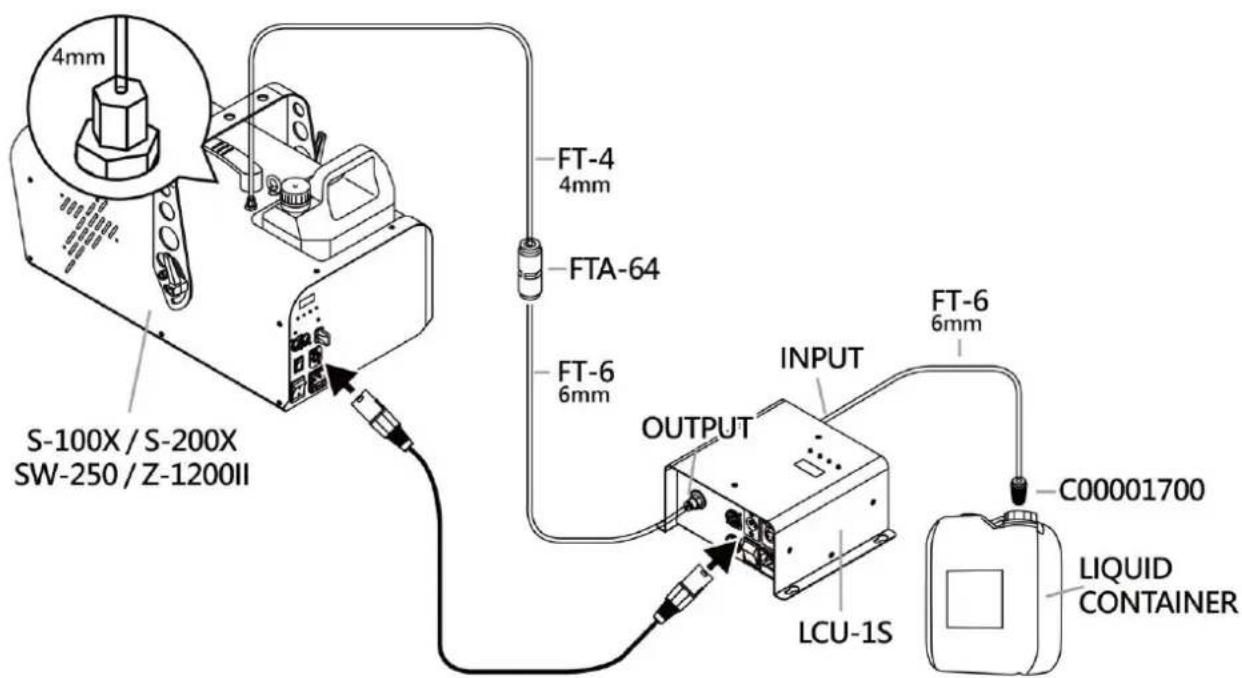
LCU-1S is designed to use with Z-1200II, S-100X, S-200X and SW-250. Each model has a pre-programmed fluid flow rate to reach best performance.
Fluid Connection
From control unit to machines the fluid flow through 6mm tube. The machine is equipped with 4mm tube, use supplied 6 to 4mm adaptor to connect from end of fluid tube to machin fluid inlet. On the input of fluid to control unit fit provided filter to the end of fluid tube prevent obstacle entering the fluid line.
Data Connection
For data connection 4-pin connector is used. Connect the output of control unit with input of remote on the machine.
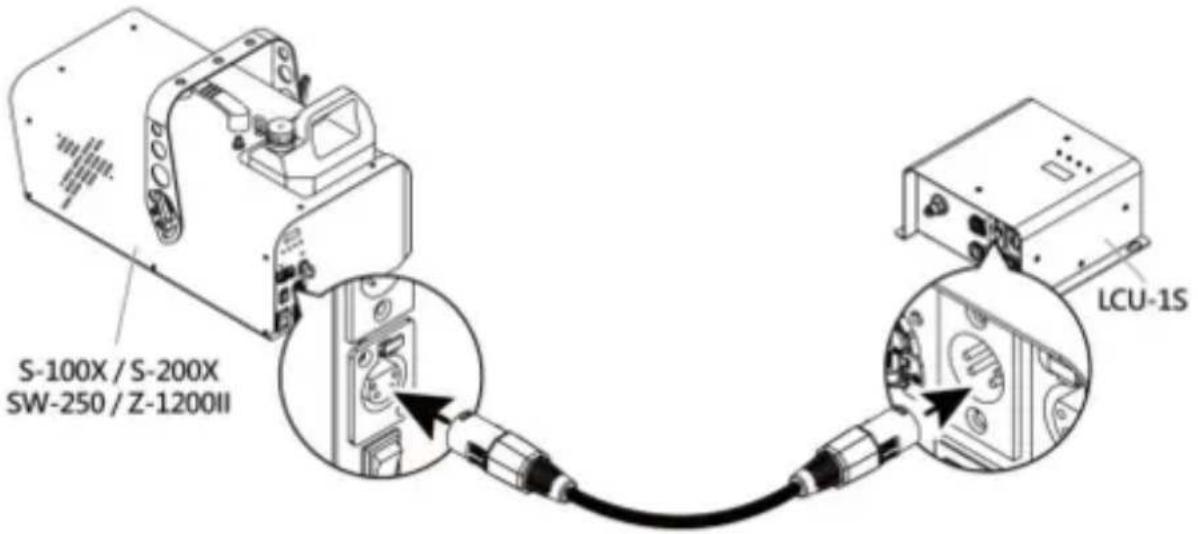
***Note: LCU-1S is designed to use with Z-1200II, S-100X, S-200X and SW-250. Can supply to one machine at a time.
Operation
Control Panel Operation
The control unit can be operated with the onboard digital control interface.
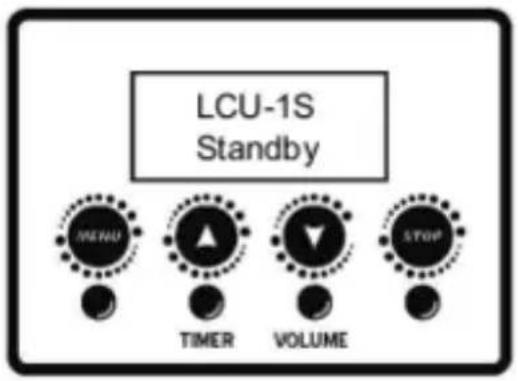
| Button | Function |
| [MENU] | Scroll through setting menu |
| ▲ [UP]/[TIMER] | Up/Activate Timer function |
| ▼ [DOWN]/[VOLUME] | Down/Activate Volume function |
| [STOP] | Deactivate Timer/Volume function |
Control Menu
Interval
XXX Sec
Set interval from 5 to 200 seconds
Duration
XXX Sec
Set duration from 1 to 200 seconds
Timer
Out 100%
Set timer output from 1 to 100%
Volume
Out 100%
Set output volume from 1 to 100%
DMX512
Add:XXX
Set DMX address from 1 to 512
Remote
Type XXX
Select remote SC-2 or Z-8
Model
XXXX
Select model to operate with S-100X, S-200X, SW-250, Z-1200II
IMPORTANT: “Null” can be used with any machine required supplying of liquid, and possible to supply multiple machines. In this mode the fluid pump is program to run at full capacity, which the output volume can be adjusted manually to match the supplied machines.
Z-8 Remote Control Operation (Optional)
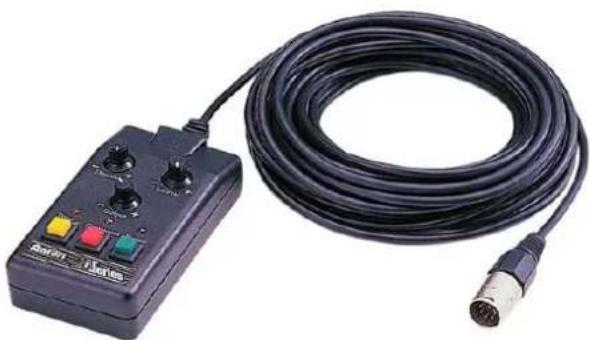
To operate the Z-1200II by remote control, connect the remote to the 4 pin control input located on the rear of control unit. Z-8 remote offers manual, continuous and timer operation. For timer mode use rotary knob on top to set interval, duration and output volume.
natural_image
Black electronic device with attached black cable and connector, no visible text or symbolsSC-2 Remote Control Operation (Optional)
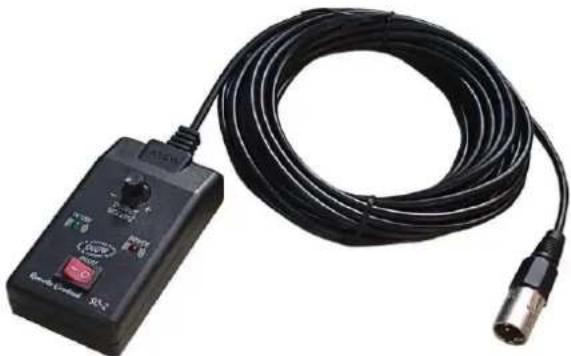
Use SC-2 remote control for operation with S-100X/S-200X/SW-250. Set switch to on position to activate, and adjust the output volume by turning the rotary knob.
natural_image
Black handheld electronic device with coiled cable and connector (no visible text or symbols)DMX Connector Pin Assignment
The machine provides a 3-pin XLR connector for DMX connection. The diagram below indicates pin assignment information.
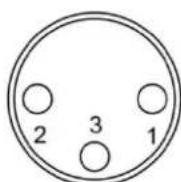
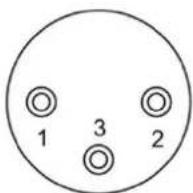
3 Pin XLR
| Pin | Function |
| 1 | Ground |
| 2 | Data- |
| 3 | Data+ |
DMX Operation
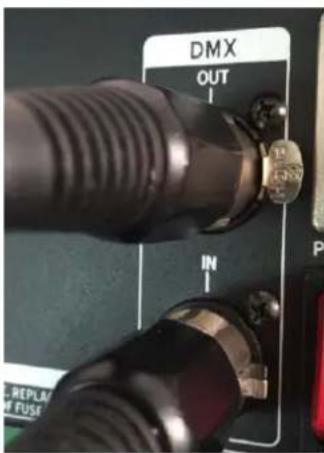
Making the DMX Connection – Connect the machine to a DMX controller or to one of the machines in the DMX chain. The machine uses a 3-pin XLR connector for DMX connection, the connector is located on the front of the machine.
DMX Channel Function
| Channel Mode | Channel | Value | Function |
| 1 | 1 | 0-4 | Off |
| 5-255 | Output volume from 1-100% |
Service and Maintenance
- Do not allow the machine to become contaminated.
- Only use a damp cloth to clean the casing.
- It is recommended to run the machine on a monthly basis in order to achieve best performance and output condition.
Fuse Replacement

Disconnect AC power before replacing fuse. Only replace fuse with same type and rating.
Step 1: Disconnect power cord from supply.
Step 2: Use a flat-head screwdriver to release fuse holder.
Step 3: Replace fuse with exact same type and rating as indicated below.
Step 4: Reinsert fuse holder.
Fuse
$$ 1 2 0 \mathrm{V} = \mathrm{T} 2 \mathrm{A} 2 5 0 \mathrm{V} $$
$$ 2 3 0 \mathrm{V} = \mathrm{T1A} 2 5 0 \mathrm{V} $$
Error Messages
System
Error
Indicates the power is not switch on.
If above message shows on the display, switch on the power of control unit or contact your local Antari dealer for advise
Technical Specifications
Input voltage AC120V, 50/60Hz
AC240V, 50/60Hz
Fuse 120V = T2A 250V
240V = T1A 250V
Control option DMX 512, Cable remote, Manual,
DMX channels 1 channels, Output volume
Power connection IEC
DMX data connection 3-pin XLR
Remote control connection 4-pin XLR
Dimension L 202 x W 179 x H 95.8 mm
Dry weight 3.30 kg
Accessories (Optional) Z-8 remote control, SC-2 remote control
Mode d'emploi
Notices de sécurité

natural_image
Black electronic device with a coiled black cable and two ports, no visible text or symbols.natural_image
Close-up of a black wireless signal testing device with a coiled cable and connector (no visible text or symbols)Configuration de la connexion DMX
natural_image
Black electronic device with coiled black cable and control buttons (no visible text or symbols)natural_image
Close-up of a black wireless signal testing device with a coiled cable and connector (no visible text or symbols)LCU-1S Liquid Control Unit
natural_image
Black electronic device with coiled cable and ports, no visible text or symbolsSC-2 控制器 (選配)
natural_image
Close-up of a black wireless signal testing device with a coiled cable and connector (no visible text or symbols)DMX 連接 Pin 點說明
For current product information visit Antari at:www.antari.com For information requests please contact us at:sales@antari.com