
UAKCP100E - Air purifier SHARP - Free user manual and instructions
Find the device manual for free UAKCP100E SHARP in PDF.
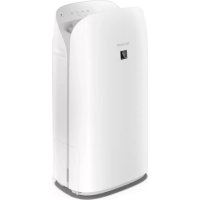



| Brand | SHARP |
| Model | UAKCP100E |
| Product Type | Air Purifier with Humidification |
| Dimensions (W × D × H) | 402 × 315 × 727 mm |
| Weight | Approx. 10.1 kg |
| Power Supply | 220-240 V ~ 50/60 Hz |
| Power Consumption (max) | 79 W |
| Standby Power Consumption | 1.6 W (Wi-Fi on) / 1.2 W (Wi-Fi off) |
| Max Airflow | 600 m³/h |
| Max Noise Level | 53 dBA |
| Max Humidification Capacity | 320 mL/h |
| Recommended Room Size (purification) | Up to 75 m² |
| Recommended Room Size (ions) | Up to 30 m² |
| Water Tank Capacity | Approx. 2.0 L |
| Built-in Sensors | Fine Dust (PM2.5), Odor, Light, Temperature and Humidity |
| Filters Used | Pre-filter, HEPA Filter, Deodorizing Filter, Humidification Filter |
| HEPA Filter Efficiency | 99.97% of particles ≥ 0.3 µm |
| Replacement Filter References | HEPA: UZ-KCP1HF, Deodorizing: UZ-KCP1DF, Humidification: UZ-KCP1MF |
| Power Cord Length | 2.0 m |
| Special Functions | Plasmacluster (ions), Auto/Pollen/Sleep modes, timer, weekly scheduler |
| Connectivity | Wi-Fi 2.4 GHz, smartphone app (iOS/Android) |
| Child Safety | Control panel lock |
Frequently Asked Questions - UAKCP100E SHARP
User questions about UAKCP100E SHARP
0 question about this device. Answer the ones you know or ask your own.
Ask a new question about this device
Download the instructions for your Air purifier in PDF format for free! Find your manual UAKCP100E - SHARP and take your electronic device back in hand. On this page are published all the documents necessary for the use of your device. UAKCP100E by SHARP.
USER MANUAL UAKCP100E SHARP
Air Purifier with Humidifying Function
EN FR DE IT ES PL NL
ENGLISH
Thank you for purchasing this SHARP Air Purifier. Please read this manual carefully before using the product. This manual should be kept in a safe place for handy reference.
CONTENTS
IMPORTANT SAFETY INSTRUCTIONS . THE CURRENT PAGE
IMPORTANT SAFETY INSTRUCTIONS
READ AND SAVE THESE INSTRUCTIONS before using this product.
When using electrical appliances, basic safety precautions should always be followed to reduce the risk of fire, electric shock, and injury to persons, including the following:
WARNING
- Read all instructions before using the product.
- Use the product only for intended household use as described in this manual. Any other use not recommended by the manufacturer may cause fire, electric shock, or injury to persons.
- This appliance can be used by children aged from 8 years and above and persons with reduced physical, sensory or mental capabilities or lack of experience and knowledge if they have
been given supervision or instruction concerning use of the appliance in a safe way and understand the hazards involved. Children shall not play with the appliance. Cleaning and user maintenance shall not be made by children without supervision.
- Never operate the product if the power cord or plug is damaged or the product is malfunctioning or damaged.
- If the power cord or plug is damaged, it must be replaced by the manufacturer, its service agent, a Sharp authorized Service Centre or similarly qualified persons in order to avoid a hazard. Contact the nearest Service Centre for any problems, adjustments, or repairs.
- Do not repair or disassemble the product yourself.
- Follow the instructions "a" to "h" below for the power cord or plug. It may cause short circuit, excessive heat, electric shock or fire. a. Use only AC 220-240 volt outlet.
b. Do not use the product if the power cord or plug is damaged or the connection to the wall outlet is loose or damaged. c. Always turn off the product before unplugging the power plug. d. Always unplug the product in the following cases.
Before moving the product. - When replacing the filter. (Even when opening the Back Panel) - When refilling water. - Before maintenance of the product. - When the product is not in use.
e. Be sure to pull the power plug and not the power cord.
f. Do not touch the power plug with wet hands when inserting or unplugging from the wall outlet. g. Periodically remove dust from the power plug. h. Always observe the following as to not damage the power cord.
- Do not damage cord with Caster Wheels when moving the product.
- Do not run cord under carpeting. Do not cover the power cord with throw rugs, runners, or similar coverings.
- Do not put heavy things on the power cord or pinch it.
- Do not run the power cord under furniture or other appliances.
- Run the power cord away from traffic area and where it will not be tripped over.
- Do not use this product near gas appliances, fire places, candle fire, incense or sparks from lit cigarettes. When the product is operated with gas appliances in the same room, Ventilate a room periodically, otherwise it may cause carbon monoxide poisoning.
- Do not operate the product in a room with flammable gas, such as oily residue or chemical fumes.
- Do not expose the product to rain, or use near water, in a bathroom, laundry area or other damp location.
- Do not insert fingers or foreign objects into the air inlets or air outlets.
- Do not look into the air outlets.
- Do not drink the water in the Humidifying Tray.
- Replace the water in the Humidifying Tray daily with fresh tap water, and regularly clean it. When the product is not in use, dispose of the water in the Humidifying Tray. Leaving water in the Humidifying Tray can cause mold, bacteria, and bad odours. In rare cases, such bacteria can be a health hazard.
NOTE
- Radio or TV Interference -
If the product should cause interference to radio or television reception, try to correct the interference by one or more of the following measures:
- Reorient or relocate the receiving antenna.
- Increase the separation between the product and radio/TV receiver.
- Connect the product into an outlet on a circuit different from that to which the receiver is connected.
- Consult the dealer or an experienced radio/TV technician for help.
CAUTIONS CONCERNING INSTALLATION
- Place the product on a level and stable surface with sufficient air circulation. Strong wind or dust through the window may prevent the product's air purifying performance and efficacy. When placed on heavy carpet, the product may vibrate slightly. Place the product on a level surface to avoid water leakage from the Humidifying Tray.
- Avoid a location where the sensors are exposed to direct breeze or draft if the product has sensors. The product may not operate properly.
- Avoid use in locations where furniture, fabrics, or other items may come in contact with and restrict the air inlets and/or outlets.
- Avoid locations exposed to direct sunlight. It may cause to change shape or colour of the product.
- Avoid locations where the product is exposed to condensation or drastic changes in temperature. Use under appropriate conditions between 0°C - 35°C.
- Avoid use in locations where greasy or oily smoke is generated (such as in a kitchen, etc.). The Main Body surface may crack and the sensors may malfunction as a result.
- The dust collecting ability of the product is effective even when the product is up to 3 cm from the wall, but the surrounding walls or floor may get dirty. Please place the product at a distance from the wall. The wall directly behind the air outlets and the floor or rug on which the product is placed may become dirty over time. When using the product for an extended period of time at the same location, periodically clean the walls, the floor, or the rug.
- Do not place the product near or on hot objects, such as stoves or heaters, or where it may come into contact with steam.
CAUTIONS CONCERNING FILTER
- Follow the instructions in this manual for filter installation and maintenance. (Page 8, 21)
- Take out the filters from the plastic bag before placing the filter in the Main Body.
- Do not operate the product without the filters properly installed.
- Do not wash and reuse the HEPA Filter and the Deodorizing Filter. Washing will not improve filter performance and can also cause electric shock or operating malfunctions.
- Do not operate the product in rooms where aerosol insecticides are present. It may cause the odour of insecticide to remain in the product and be emitted from the air outlets.
CAUTIONS CONCERNING OPERATION
- Do not block the air inlets or air outlets.
- Always operate the product in an upright position.
- When carrying the product, first remove the Humidifying Tray to avoid spilling water, and then hold the product by the handles on both sides.
- Always lift up the product when moving it on easily damaged flooring, an uneven surface, or carpet.
- Do not change the direction of the product while moving it using the Caster Wheels.
- When moving the product by its Caster Wheels, move it slowly and in a horizontal direction.
- Do not operate the product without the Humidifying Tray properly installed.
- When refilling the Humidifying Tray, make sure no water leaks from the Humidifying Tray.
- Be sure to wipe off any excess water on the outside of the Humidifying Tray.
- Do not use hot water (40°C or more), chemical agents, aromatic substances, dirty water, or other damaging substances. Doing so can deform the product or cause it to malfunction.
- Use only fresh tap water. Using other water sources risks the growth of molds, fungi, or bacteria.
- Do not shake the Humidifying Tray while holding the Tray Handle.
CAUTIONS CONCERNING MAINTENANCE
- Follow the instructions in this manual for maintenance. (Pages 18-21)
- Clean the exterior with a soft cloth only.
- Do not use detergents other than those mentioned in this manual (Page 20). Do not use volatile fluids and/or detergents. The main body surface may be damaged or cracked by strong corrosive cleansers, benzine, paint thinner, polishing powder, or grease. The humidifying tray may cause deformation, tarnishing, or cracking (water leakage). In addition, the sensors may malfunction as a result if the product has sensors.
leakage). In addition, the sensors may malfunction as a result if the product has sensors.
- The frequency of the following maintenance will depend on the hardness of and the impurities in the water you use; the harder the water, the more often descaling will be necessary.
- The frequency of descending maintenance will depend on the hardness of and the impurities in the water that you use;
The harder the water, the more often descaling will be necessary.
- Do not remove the Humidifier Float. If the Humidifier Float comes off, refer to page 20.
- When replacing filters or any accessories, use specified parts in this manual.
When remotely controlling the air purifier
In case of remote operation from outside, you may not be able to check the air purifier's current condition or the area around it and the situation concerning anyone possibly staying there, so please adequately confirm safety before use.
Make sure the electric plug is fully inserted into a power socket, and there is no dust on the plug or in the socket hole. (It may cause heat, combustion, fire, etc., due to poor contact or contact failure)
In case of remote operation from outside, you may not be able to check the air purifier's current condition, the area around it, or the situation concerning anyone possibly staying there, so please adequately confirm safety before use.
- Make sure the electric plug is fully inserted into a power socket, and there is no dust on the plug or in the socket hole. (It may cause heat, combustion, fire, etc., due to poor contact or contact failure)
- Before use, check the ambient environment of the product, because the air flow from the product may cause unexpected phenomena (such as unstable items falling), and may result in fires, injuries, or damage to household belongings.
CAUTION FOR USE
- Agreement with the "Terms of Service" is required to use the App.
- Ensure that the App is up to date.
- Screens and illustrations in this manual are for explanation purposes; there may be some differences from the actual product.
- In the case of a bad connection, the App may not be able to control the air purifier. The current operation of the air purifier may not be accurately reflected
on the App.
- Locking the smart device display is recommended to avoid incorrect operation.
- Communication charges will be incurred by the download and use of the App.
CAUTION FOR WI-FI
Caution for usage regarding electrical waves
- Usage of the application is not guaranteed under the following environments:
a. Near Bluetooth® wireless communication devices using the same frequency (2.4GHz) as this product. * The Bluetooth® word mark is a registered trademark owned by Bluetooth SIG., Inc. b. Near products that emit magnetic fields (e.g., microwave ovens). c. Near places with static electricity. d. Near places where radio disturbance occurs. e. Near other wireless communication devices.
- Wireless connection and performance cannot be guaranteed for all routers or environmental conditions.
At the following places, Wi-Fi connection might be unstable:
a. Inside of the building made with concrete, reinforcing steel or metal. b. Near the obstruction. c. Near the wireless communications device using the same frequency.
- Wi-Fi of this product corresponds to
channel 1 - 13. It's not available to communicate with the routers set up to other channels.
Caution for personal information (related to Security)
- Using Wi-Fi device has the possibility of interception regardless of secret code setting.
- Make sure to use the network under your management.
- Initialize the device when sold, disposed or handover from/to a third person. See page 16 on how to initialize.
OPERATION PRINCIPLE
FEATURES
Unique Combination of Air Treatment Technologies
Plasmacluster
Plasmacluster treats the air similar to the way nature cleans the environment by emitting a balance of positive and negative ions.

"Plasmacluster" and "Device of a cluster of grapes" are trademarks of Sharp Corporation.
- The number in this technology mark indicates an approximate number of ions supplied into air of 1cm3 , which is measured around the centre of a room applicable floor area (at 1.2m height above the floor) when the product is placed close to a wall at the MED mode setting.
Triple Filtering System + Humidification
Pre-Filter
Pre-filter traps dust larger than approximately 240 micron particles.
Deodorizing Filter
Deodorizing filter absorbs many common household odours.
HEPA Filter
HEPA filter traps 99.97% of particles as small as 0.3 microns.
Humidifying Function
Comfortable Humidity Indoors Keeps Your Skin and Throat Moisturized and Healthy.

Unique Airflow
Powerful air suction and unique airflow quickly and efficiently collect dust and other particles.

Faster airflow at a 20° angle collects dust at lower levels in the room for more effective cleaning.
Plasmacluster can remove static electricity and can thus prevent dust from attaching to walls and other surfaces.
Product information and accessories
Scan the QR code for more information about the Sharp Air Purifiers.

Please Read Before Operating Your Air Purifier
The air purifier draws in room air through the air inlet, circulates it through a Pre-Filter, a Deodorizing Filter and a HEPA Filter inside the product, and then discharges it through the air outlet. The HEPA Filter can remove 99.97% of dust particles as small as 0.3 microns that pass through the filter and also helps absorb odours.
The Deodorizing Filter gradually absorbs odours as they pass through the filter.
Some odours absorbed by the filters will break down over time, causing additional odours. Depending on usage conditions, and especially if the product is used in environments significantly more severe than a normal household, these odours may become noticeable sooner than expected. If these odours persist, replace the filters.
When minerals in tap water adhere to the filters and become hard and white, they absorb odours in the room that can cause the emission of an unpleasant odour when the Humidifying Filter is dry. (Varies depending on water quality and other environmental factors)
If this occurs, perform the Humidifying Filter maintenance. (Page 19)
NOTE
- The air purifier is designed to remove air-suspended dust and the odours.
The air purifier is not designed to remove harmful gases such as carbon monoxide contained in cigarette smoke.
The air purifier may not completely remove an odour if the source of the odour is still present.
MAIN BODY
| 1 | Operation Panel / Display |
| 2 | Main Body |
| 3 | Caster Wheels (4 Locations) |
| 4 | Caster Stopper (Right & Left) |
| 5 | Humidifying Tray |
| 6 | Humidifying Filter |
| 7 | Tray Handle |
| 8 | Humidifier Float |
| 9 | Air Outlet |
| 10 | Handle (2 Locations) |
| 11 | Sensor Filter |
| Sensor (Internal) Sensitive Dust / Odour / Temperature / Humidity | |
| 12 | HEPA Filter |
| 13 | Deodorizing Filter |
| 14 | Back Panel (Pre-Filter) |
| 15 | Air Inlet |
| 16 | Power Cord |
| 17 | Power Plug |

LIGHT SENSOR
When the Light Control (Display Brightness) is set to "Auto", the Display and Cleanliness Indicator will automatically switch ON or OFF based on room brightness. (Page 15)
NOTE
Detection range of Light sensor
Do not install the product in the following places. The Light Sensor may not sense correctly.
Directly under a light fixture.
In shadow.

ENGLISH
| 1 Light Sensor | |
| 2 Power ON/OFF Button | |
| 3 Mode Button, Lamps (White) | |
| 4 Clean Ion Shower Button, Lamp (White) | |
| Child-Lock Button (Press 3 sec.) *2 | |
| 5 Wi-Fi Button | |
| 6 Switching Display Button | |
| Filter Reset Button, Lamp (White) (Press 3 sec.) *2 | |
| 7 Display *3 | |
| • Temperature Temperature 0 °C to 50 °C is displayed. -1 °C or less L° C ↔ 25 °C ↔ H °C 51 °C or more | |
| • Humidity Humidity 25 % to 75 % is displayed. 24 % or less L% ↔ 55 % ↔ H % 76 % or more | |
| • PM2.5 Concentration *4 PM2.5 10 μg/m³ (micrograms per cubic metre air) to 499 μg/m³ is displayed. 9 μg/m³ or less L% ↔ 34 % ↔ H % 500 μg/m³ or more | |
| • Wattage Indicates wattage of current operation. 20 w | |
| 8 PM2.5 Indicator (White) Indicates the Sensitive Dust Sensor detects microscopic dust. Pm 2.5 | |
| 9 Dust Indicator (White) Indicates the Sensitive Dust Sensor detects usual dust. | |
| 10 Odour Indicator (White) Indicates the Odour Sensor detects odours. | |
| 11 OFF Timer Indicator (White) *1 OFF | |
| 12 ON Timer Indicator (White) *1 ON | |
| 13 Child-Lock Indicator (White) |
| 14 | Filter Maintenance Indicator (Orange) |
| 15 | Plasmacluster Ion Indicator (White) |
| 16 | Humidifying Indicator (White) |
| ·Illuminates: Humidify ON ·OFF: Humidify OFF ·Flashing: the product needs water (The indicator flashes for 10 minutes and then goes off.) | |
| 17 | Wi-Fi Indicator (White) Illuminates when air purifier is connected to a router. |
| 18 | Cloud Service Indicator (White) *1 Illuminates when air purifier is connected to Sharp's cloud service. |
| 19 | Cleanliness Indicator Indicates the air purity of the room in 5 levels with colour changes. Clean Blue Impure Yellow (Flashing) Red (Flashing fast) |
1: The lamps of No. 11, 12 and 18 light up only when using the App. 2: Press and hold 3 seconds or longer. 3: The displayed numbers are approximate. 4: Particulate matter, particles with diameter of size 2.5 micrometres or less.
FILTER INSTALLATION
- To maintain the quality of the filter, it is installed in the product and packaged in a plastic bag.
- Be sure to stop operation and unplug the product before filter installation or replacement.

- Remove the Back Panel.

- Take out the filters from the plastic bag.

- Install the filters in the correct order as shown.

- Install the Back Panel.

NOTE
If the Back Panel is not installed correctly, "UN" will be displayed and the operation will be stopped. (Page 22) - When replacing the filters, making a memo of the start of use date is recommended. - Do not operate the product without the filters.
- When humidifying, fill the Humidifying Tray with water.
- When not humidifying, discard the water in the Humidifying Tray.
- Pull out the Humidifying Tray.

NOTE
- When removing and installing the Humidifying Tray, be careful not to spill any water.
- Fill the Humidifying Tray with tap water using method "A" or "B".


NOTE
- The Humidifier Float will float up when tray is filled with water.
- Slowly fill it with water to avoid splashing.
- Do not fill beyond the "FULL" indicator.
- When carrying the Humidifying Tray, hold it with both hands or grip the Tray Handle.
- Clean the Humidifying Tray if it becomes dirty or there is a noticeable odour.
- Carefully install the Humidifying Tray.

About Tray Handle
- When holding and carrying the Humidifying Tray, use tray handle

- When cleaning the Humidifying Filter, you can turn the Tray Handle down on its side.

After cleaning, install the Tray Handle back in its original position.

NOTE
- Return the Tray Handle to its original position before installing.
Wi-Fi SETTINGS
BEFORE YOU BEGIN
- By connecting your air purifier with your smart device, you can use the air purifier more conveniently.
Ensure your smart device is connected to a 2.4 GHz Wi-Fi Network.
Wi-Fi Protected Setup (WPS) Access Point (Router)
- The recommended encryption method is WPA2 (AES).
Ensure your smart device meets minimum software requirements (as of September 2022):
- Smartphones / tablets of Android 8 or later
- iPhones, iPod touch, iPads of iOS 12 or later
Product Wi-Fi specifications
Wireless LAN: IEEE802.11b/g/n Frequency range: 2.4GHz frequency band
Trademarks
- "Wi-Fi®" is a registered trademark of Wi-Fi Alliance®.
- "Android" is the trademark of Google Inc.
- "iPhone", "iPod touch", "iPad" are the registered trademarks or trademarks of Apple Inc.
- The other company names, corporate names, product names mentioned in the handling instructions are trademarks and registered trademarks of each company.
INITIAL SET UP
NOTE
- When pairing the smart device to the air purifier, please ensure they are both connected to the same router.
① DOWNLOAD & SIGN UP
1. Install the designated App to your smart device.
Available to download from the Apple Store or Google Play. - Scan the QR code on page 5 for product information.
2. Connect your smart device to the router and launch the App.
Follow instructions on the App.
i. Review the "Privacy and Data Utilization Policy" and "Terms of Use". ii. Enter Your Date of Birth. iii. Sign in using your Sharp account (SHARP ID).
If you do not have a SHARP ID, please register to create a SHARP ID.
iv. Enter a name for your smart device.
2 CONNECTION OF THE AIR PURIFIER AND A ROUTER
NOTE
- If you have stealth settings or MAC filtering settings on the router, please cancel them.
- The product network ID is displayed as "AP-SHARP-XX" (where XX is a 2-digit number below the product MAC address).
1. Tap "≡" at the upper left part of the "Home" screen, and select "Pairing" → "Connection with a router".

2. Follow instructions on the App.
- If the Wi-Fi Indicator lights up after the notification sound, the connection is successfully completed.
Tap "NEXT".

3 CONNECTION BETWEEN THE AIR PURIFIER AND A SMART DEVICE
1. Tap "Pair" for the air purifier you would like to pair.

- If you do not see the screen above, tap "≡" at the "Home" screen, and select "Pairing" ⇒ "Already connected with a router".

2. Follow the instructions on the App.
- If the Wi-Fi Indicator lights up after the notification sound, the connection is successfully completed.

The INITIAL SET UP is completed.
How to set Wi-Fi ON / OFF after completing the INITIAL SET UP
If you would like to turn the Wi-Fi OFF:
Press for 3 sec.
NOTE
- Turning the Wi-Fi off will result in not being able to control the air purifier with the designated App.
If you would like to turn the Wi-Fi ON again:
(How to restore the Wi-Fi connection to the original network.)
Press for 3 sec.
The Wi-Fi Indicator will flash after you press the Wi-Fi Button. And within about 3 minutes, you will hear four short beeps. Some time after this beep sounds, the Wi-Fi Indicator lights up and the Wi-Fi connection will be restored to the original network. The designated App can now be used again to control the Air Purifier.
NOTE
Wi-Fi ON/OFF can also be set from "R:Wi-Fi adapter ON/OFF". (Page 14, 16) In this case, Wi-Fi connection with the router will be automatically restored. - Reconnection to the Wireless Router may take a few minutes to complete, after turning Wi-Fi on again.
START/STOP
START STOP
NOTE
- When the product starts operation, the operation starts in the previous mode it was operated in.
CLEAN ION SHOWER MODE
The product releases Plasmacluster ions at max air flow for 10 minutes. After that, the air purifier operates for 50 minutes on high fan speed.

NOTE
- When the operation finishes after 60 minutes, the product will return to the prior operation mode. It is able to change to other modes during this operation.
- The Plasmacluster ion cannot be turned "OFF".
SELECT AIR VOLUME AND MODE

AUTO:

The fan speed is automatically controlled depending on the six detections. (PM2.5 / Usual dust / Odour / Temperature / Humidity / Light)
POLLEN:

The Sensitive Dust Sensor sensitivity is automatically increased, and the Sensitive Dust Sensor quickly detects impurities such as dust and pollen and cleans the air powerfully.
SLEEP:

The product will operate quietly, and the fan speed will automatically switch depending on the amount of impurities in the air and room brightness. When the Light Control is set to "Auto", the Display and Cleanliness Indicator will automatically go off.
SWITCH DISPLAY

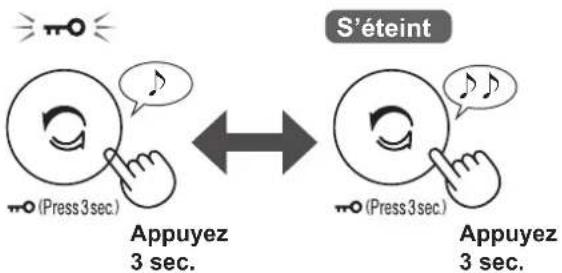
CHILD LOCK
The operation panel will be locked.
(with the product ON or OFF)
ON CANCELLATION
NOTE
It is possible to turn Wi-Fi off while in Child Lock Mode.
WEEKLY SCHEDULER: APP ONLY
ON TIMER:

You can set a weekly scheduler for the air purifier to start a specific mode on a specific day and time. The ON Timer Indicator will turn on while there is a schedule set.
OFF TIMER:

You can set a weekly scheduler for the air purifier to stop operation on a specific day and time. The OFF Timer Indicator will turn on while there is a schedule set.
HOW TO CHANGE VARIOUS SETTINGS
- You can change the product and Wi-Fi functions on pages 15-18.
1. Turn the product OFF.


3. Select "Function number (F1-F7 or A1-A8)" on pages 15-18.


4. When Wi-Fi setting
Refer to pages 16-18 for the details of each function.
When Product setting
Select "Setting number (01-03)" on page 15.


5. Finish the setting.

PRODUCT FUNCTIONS (F1-F7)
| Function Setting | |
| F1LightControlYou can select the brightness of the Display and Cleanliness Indicator. | 01 OFFWhen set to “OFF”, the “Dim” light illuminates for 8 seconds after operation starts and then the light goes off.However, some indicators that need notification will remain dim.02 Dim03 Auto (default)Light automatically switches ON or OFF based on room brightness. · Room is bright: light is ON· Room is dark: light is OFFEven though room is bright, the light will turn off when operating in sleep mode. |
| F2Plasmacluster Ion ON/OFF | 01 OFF02 ON (default) |
| F3Auto RestartIf the product is unplugged or if there is a power failure, the product will resume operation with the previous settings after power is restored. | 01 Cancellation02 ON (default) |
| Adjusting sensor sensitivity (F4 - F6)F4 Light Sensor Low | 0102 (default) |
| F5Sensitive Dust Sensor Standard | |
| F6 Odour Sensor High | 03 |
| FNSound Indicator SettingYou can set the product to make a beeping sound when the Humidifying Tray is empty. | 01 Cancellation (default)02 ON |
Wi-Fi FUNCTIONS (A1-A8)
| Function Setting | |
| RI Wi-Fiadapter ON/OFF | 1. Select “R” by following Steps 1 - 3 on page 14. 2. Press "Clean Ion Shower" Button to select Setting "0" or "02 01 Wi-Fi OFF 02 Wi-Fi ON 3. Complete NOTE ·When Setting number ("0" or "0") changed, the square rotates on the display until the setting is completed. When setting is completed, "R" is displayed. |
| R2 Wi-Ficonnection with a router (with the WPS Button) | 1. Select “R” by following Steps 1 - 3 on page 14. 2. After “R”s displayed, press the WPS (Wi-Fi Protected Setup) Button of the router. 01 02 03 Blink Light up 06 b1 b2 b3 Once connected, receiver level will be displayed. A connection error is occurring if “R”s displayed. Please confirm that the router is operating correctly and try again. 3. Complete 04 05 06 07 08 09 10 11 12 13 14. An error is occurring if “R”s displayed. Please try again. Initialize Complete 01 02 03 04 05 06 07 08 09 10 11 12 13 14 15 16 17 18 19 20 21 22 23 24 25 26 27 28 29 30 31 32 33 34 35 36 37 38 39 40 41 42 43 44 45 46 47 48 49 50 51 52 53 54 55 56 57 58 59 60 61 62 63 64 65 66 67 68 69 70 71 72 73 74 75 76 77 78 79 80 81 82 83 84 85 86 87 88 89 90 91 92 93 94 95 96 97 98 99 100 101 102 103 104 105 106 107 108 109 110 111 112 113 114 115 116 117 118 119 120 121 122 123 124 125 126 127 128 129 130 131 132 133 134 135 136 137 138 139 140 141 142 143 144 145 146 147 148 149 150 151 152 153 154 155 156 157 158 159 160 161 162 163 164 165 166 167 168 169 170 171 172 173 174 175 176 177 178 179 180 181 182 183 184 185 186 187 188 189 190 191 192 193 194 195 196 197 198 199 200 201 202 203 204 205 206 207 208 209 210 211 212 213 214 215 216 217 218 219 220 221 222 223 224 225 226 227 228 229 230 231 232 233 234 235 236 237 238 239 240 241 242 243 244 245 246 247 248 249 250 251 252 253 254 255 256 257 258 259 260 261 262 263 264 265 266 267 268 269 270 271 272 273 274 275 276 277 278 279 280 281 282 283 284 285 286 287 288 289 290 291 292 293 294 295 296 297 298 299 300 301 302 303 304 305 306 307 308 309 310 311 312 313 314 315 316 317 318 319 320 321 322 323 324 325 326 327 328 329 330 331 332 333 334 335 336 337 338 339 340 341 342 343 344 345 346 347 348 349 350 351 352 353 354 355 356 357 358 359 360 361 362 363 364 365 366 367 368 369 370 371 372 373 374 375 376 377 378 379 380 381 382 383 384 385 386 387 388 389 390 391 392 393 394 395 396 397 398 399 400 401 402 403 404 405 406 407 408 409 410 411 412 413 414 415 416 417 418 419 420 421 422 423 424 425 426 427 428 429 430 431 432 433 434 435 436 437 438 439 440 441 442 443 444 445 446 447 448 449 450 451 452 453 454 455 456 457 458 459 460 461 462 463 464 465 466 467 468 469 470 471 472 473 474 475 476 477 478 479 480 481 482 483 484 485 486 487 488 489 490 491 492 493 494 495 496 497 498 499 500 501 502 503 504 505 506 507 508 509 510 511 512 513 514 515 516 517 518 519 520 521 522 523 524 525 526 527 528 529 530 531 532 533 534 535 536 537 538 539 540 541 542 543 544 545 546 547 548 549 550 551 552 553 554 555 556 557 558 559 560 561 562 563 564 565 566 567 568 569 570 571 572 573 574 575 576 577 578 579 580 581 582 583 584 585 586 587 588 589 590 591 592 593 594 595 596 597 598 599 600 601 602 603 604 605 606 607 608 609 610 611 612 613 614 615 616 617 618 619 620 621 622 623 624 625 626 627 628 629 630 631 632 633 634 635 636 637 638 639 640 641 642 643 644 645 646 647 648 649 650 651 652 653 654 655 656 657 658 659 660 661 662 663 664 665 666 667 668 669 670 671 672 673 674 675 676 677 678 679 680 681 682 683 684 685 686 687 688 689 690 691 692 693 694 695 696 697 698 699 700 701 702 703 704 705 706 707 708 709 710 711 712 713 714 715 716 717 718 719 720 721 722 723 724 725 726 727 728 729 730 731 732 733 734 735 736 737 738 739 740 741 742 743 744 745 746 747 748 749 750 751 752 753 754 755 756 757 758 759 760 761 762 763 764 765 766 767 768 769 770 771 772 773 774 775 776 777 778 779 780 781 782 783 784 785 786 787 788 789 790 791 792 793 794 795 796 797 798 799 800 801 802 803 804 805 806 807 808 809 810 811 812 813 814 815 816 817 818 819 820 821 822 823 824 825 826 827 828 829 830 831 832 833 834 835 836 837 838 839 840 841 842 843 844 845 846 847 848 849 850 851 852 853 854 855 856 857 858 859 860 861 862 863 864 865 866 867 868 869 870 871 872 873 874 875 876 877 878 879 880 881 882 883 884 885 886 887 888 889 890 891 892 893 894 895 896 897 898 899 900 901 902 903 904 905 906 907 908 909 910 911 912 913 914 915 916 917 918 919 920 921 922 923 924 925 926 927 928 929 930 931 932 933 934 935 936 937 938 939 940 941 942 943 944 945 946 947 948 949 950 951 952 953 954 955 956 957 958 959 960 961 962 963 964 965 966 967 968 969 970 971 972 973 974 975 976 977 978 979 980 981 982 983 984 985 986 987 988 989 990 991 992 993 994 995 996 997 998 999 |
| R6 Confirmationof MAC address | 1. Select “R”by following Steps 1 - 3 on page 14. 2. Press “Clean Ion Shower” Button to display MAC address. For example: In case MAC address is “12:34:56:AB:CD:EF". 3. Complete |
| R7 DisplayWi-Fi network status | 1. Select “R”by following Steps 1 - 3 on page 14. 2. After displaying “_”for a few seconds, network status of Wi-Fi adapter will be displayed. Connection is stable Wi-Fi adapter is off → Please turn on Wi-Fi adapter. Router is not registered → Please perform the Wi-Fi connection with the router. Link settings with the App is not performed → Please perform the link setting with the smart device. Wi-Fi adapter network error → Please turn off Wi-Fi adapter and turn on again after a while. Network error between the air purifier and the router → Please confirm the network status of the router. Network service error → Please turn off the air purifier and confirm the internet status, then try again. 3. Complete |
| Function Setting | |
| R8 Wi-Ficonnection with a router (without the WPS Button) - AP (Access Point) mode - | 1. Select “R8by following the Steps 1 - 3 on page 14. 2. Perform Wi-Fi connection of the air purifier and the router based on the App screen. Refer to the App for further operations. “R8and “blinks while setting the connection between the product and the router. 60 weak←→strong Light up Once connected, receiver level will be displayed. A connection error is occurring if “BE” is displayed. Please confirm the router and try again. |
CARE AND MAINTENANCE
CARE
To maintain optimum performance of this air purifier, please clean the product including the filter periodically. Be sure to stop operation and unplug the product before any maintenance or replacing accessories.


| Place Page | |
| 1 | Humidifying Filter / Humidifying Tray 19 |
| 2 | Back Panel / Sensor Filter 20 |
| 3 | Main Body 20 |
| 4 | HEPA Filter / Deodorizing Filter 21 |
FILTER MAINTENANCE INDICATOR
When the cumulative operation period or the water containing period is more than approximately 720 hours, the Filter Maintenance Indicator will turn on.
- It will not calculate the time when the product is unplugged.
- 30 days × 24 hours = 720 hours
This is a reminder to perform the maintenance described in the sections on Humidifying Filter and Tray, Main Body, Back Panel, and Sensors.
After maintenance, connect the power plug to the wall outlet and press the Power ON/OFF Button, then press and hold the Filter Reset Button for 3 seconds to reset the Filter Maintenance Indicator.
Press for 3 sec.
HUMIDIFYING FILTER/HUMIDIFYING TRAY
REPLACEMENT AND MAINTENANCE CYCLE
| Parts Name Main | tenance Cycle Max Service Life Replacement | Component Filter Model | |
| Humidifying Filter | When odour emanates from the air outlet, or once a month. | 5 years*1 | UZ-KCP1MF |
*1: The Designated App notifies when each replacement part should be replaced according to usage.
MAINTENANCE
1. Remove the Humidifying Filter and Tray.

2. Rinse with plenty of water.
- Do not remove the Humidifier Float. If it comes off, refer to page 20. Refer to page 20 for how to clean the Humidifying Filter when it is very dirty.
Humidifier Float
3. Attach the Humidifying Filter and Tray.
After maintenance, correctly reattach the parts.

REPLACEMENT
See this page for directions on how to install the filter when replacing.
- Please consult your dealer for purchase of replacement filter.
- Use only filter designed for this product.
- Scan the QR code on page 5 for product information and accessories.
When replacing the filter, making a memo of the start of use date is recommended.
UZ-KCP1MF (1 unit)
Disposal of Filters
Please dispose of the replaced filter according to the local disposal laws and regulations.
Humidifying Filter materials: Polyester, Rayon
NOTE
How to Clean Hard-to-Remove Dirt.
| Mild Kitchen Detergent (only Humidifying tray) | Citric Acid (available at some drugstores) | 100% Bottled Lemon Juice with No Pulp | |
| 1 | 1. Fill the tray half-way with water. 2. Add a small amount of mild kitchen detergent. | 2 1/2 cups of water 3 teaspoons | 3 cups of water 1/4 cup |
| 2 | Soak for 30 minutes. | Soak for 30 minutes. (When using lemon juice as your descending solution, allow for more soak time.) | |
| 3 | Rinse off the mild kitchen detergent or the descending solution with clean water. | ||
NOTE
How to install the Humidifier Float.
- Insert the Humidifier Float under this tab.

- Insert the tab of the Humidifier Float into the hole.
- Insert the tab on the other side of the Humidifier Float into the hole.
MAIN BODY / BACK PANEL / SENSOR FILTER
Wipe with a dry, soft cloth.

Remove the dust gently with a cleaning tool such as a vacuum cleaner.
Back Panel (Pre-Filter)
NOTE
How to Clean Hard-to-Remove Dirt.
Back Panel
- Add a small amount of mild kitchen detergent to water and soak for about 10 minutes.
- Rinse off the mild kitchen detergent with clean water.
- Completely dry the filter in a well vented area.
Back Panel
Sensor Filter
- Remove the Back Panel.
- Remove the Sensor Filter.
- If the Sensor Filter is very dirty, wash it with water and dry it thoroughly.
Sensor Filter
NOTE
- Do not apply excessive pressure when scrubbing the Back Panel.
HEPA FILTER / DEODORIZING FILTER
REPLACEMENT AND MAINTENANCE CYCLE
| Filter Name Main | Inte nance Cycle Max Service Life Replacement | e m p l e n t F i l t e r M o d e l | |
| HEPA Filter | Whenever dust accumulates, when odour emanates from the air outlet, or Z-KCP1DF once a month. | 10 years*1,2 | UZ-KCP1HF |
| Deodorizing Filter U |
1: According to Japan Electric Manufacture's Association JEM 1467, the Max service life is based on the equivalent condition of the smoke from 5 cigarettes per day whereby the dust collection/deodorization power is reduced by half compared with that of new filter. It is recommended to replace the filter more frequently under more severe conditions. 2: Designated App notifies when each replacement part should be replaced according to usage.
Filter life varies depending on the room environment, usage conditions, and location of the product. We recommend replacing the filter more frequently if the product is used in conditions significantly more severe (PM2.5 etc.,) than a normal household.
MAINTENANCE
Remove the dust on the filters.
HEPA FILTER DEODORIZING FILTER

Maintain and clean only the tagged surface. Do not clean up the opposite surface. The filter is fragile, so be careful not to apply too much pressure.
NOTE
- Do not wash the filters. Do not expose to sunlight. (Otherwise these filters may lose efficacy.)

Both surfaces can be maintained and cleaned. The filter is fragile, so be careful not to apply too much pressure.
Some odours absorbed by the filters will break down over time, causing additional odours. Depending on usage conditions, and especially if the product is used in environments significantly more severe than a normal household, these odours may become noticeable sooner than expected.
Replace the filter in those cases or if dust is unable to be removed after maintenance.
REPLACEMENT
See page 8 for directions on how to install the filter when replacing.
- Please consult your dealer for purchase of replacement filter.
- Use only filter designed for this product.
- Scan the QR code on page 5 for product information and accessories.
When replacing the filters, making a memo of the start of use date is recommended.
UZ-KCP1HF (1 unit)
UZ-KCP1DF (1 unit)
Disposal of Filters
Please dispose of the replaced filter according to the local disposal laws and regulations.
HEPA Filter materials: Polypropylene, Polyethylene
Deodorizing Filter materials: Polypropylene, Polyester, Activated carbon
NOTE
- Do not wash and reuse replaced filter.
- Before calling for service, please review the Troubleshooting list below, since the problem may not be the product malfunction.
ABOUT THE PRODUCT
Odour and smoke persists.
- Check the filters. If they appear to be extremely dirty, clean or replace them.
Air discharged from the product has an odour.
- Check to see if the filters are extremely dirty.
- Clean or replace the filters.
- Use only fresh tap water. Using other water sources risks the growth of mold, fungi, or bacteria.
The product does not operate when cigarette smoke is in the air.
- Make sure the product is installed in a location in which the sensors can detect cigarette smoke.
- Check to see if the Sensitive Dust Sensor openings are blocked or clogged. If they are blocked or clogged, clean the Sensor Filter or the Back Panel.
Smell from a new product and/or filter.
- Immediately after removing the plastic bag, a slight odour may occur. This odour is not harmful for filter performance or human exposure.
The product makes a clicking or ticking sound.
- The product may make clicking or ticking sounds when it is generating ions.
The Cleanliness Indicator is blue even when the air is not clean.
- The air may have been dirty when the product was plugged in. Unplug the product, wait one minute, and then plug the product in again.
The Cleanliness Indicator is red even when the air is clean.
- Dirty or clogged Sensitive Dust Sensor openings interfere with sensor operation. Gently clean the Sensor Filter or the Back Panel.
The Cleanliness Indicator changes colour frequently.
- The Cleanliness Indicator automatically changes colour when the Sensitive Dust Sensor and Odour Sensor detect impurities. If you are concerned about the change, you can change sensor sensitivity. (Page 14, 15)
Filter Maintenance Indicator is on.
- Whenever after performing maintenance or replacing the Humidifying Filter, connect the power cord to an outlet and then press the Filter Reset Button for more than 3 seconds. (Page 18)
The Display goes off.
- When the Light Control is set to "Auto", the light automatically turns off when the room is dark or operating in sleep mode. Moreover, when the Light Control is set to "OFF", the light is always off. If you do not want the light to be off, set the Light Control to the "Dim" setting. (Page 14, 15)
The display does not match the weather report or another hygrometer or thermometer in the room.
- Outdoor and indoor conditions, as well as the home environment (e.g., volume of traffic nearby, number of stories in the home), may cause readings to differ from those data. There is also a difference in humidity levels within the same room.
The humidify indicator on the display does not light up when the humidifying tray is empty.
- The room has reached the appropriate level of humidity and has stopped humidifying.
- Check the humidifier float for impurities. Clean the humidifying tray. Make sure that the product is on a level surface.
The water level in the humidifying tray does not decrease or decreases slowly.
- Check to see if the humidifying tray is correctly installed.
- Check the humidifying filter. If the filter is extremely dirty, clean or replace it.
is displayed.
- If the back panel is not installed correctly, "UN" will be displayed and the operation will be stopped. After installing the back panel correctly, press the power ON/OFF button to cancel the "UN" display.
One of the following is displayed.
C1, C4, C6
- Unplug the product, wait one minute, and then plug the product in again.
ABOUT THE Wi-Fi FUNCTION
Wi-Fi connection of the air purifier and the router cannot be performed.
- Check the specifications of the router in use.
- Adjust the router and antenna direction, move the router and antenna closer, and so on. After that, reswitch to turn on the router and perform the INITIAL SET UP again.
The connection between the air purifier and your smart device cannot be established.
- Are the air purifier and your smart device connecting to the same router? ⇒ Connect the air purifier and your smart device to the same router. If you still can't connect, try connecting your smart device to the 2.4GHz band of the router.
- Is the total number of smart devices being in use exceeding the maximum number for registration on one air purifier? The maximum number of smart devices that can be registered on one air purifier is 10.
- Is the total number of products (air conditioners, air purifiers, etc.) to be registered with one smart device exceeding the maximum designated number? The maximum number of products to be registered with one smart device is 30.
Remote operation from a smart device cannot be performed.
- Is the Wi-Fi Indicator of the air purifier on? If the Wi-Fi Indicator is off, please perform "A1: Wi-Fi adapter ON/OFF" to turn on the product Wi-Fi. (Page 16)
- Have the connection between the air purifier and your smart device been completed? ⇒ Set up the connection between the air purifier and your smart device. (Page 11)
When changing the router
- It is necessary to reconnect the air purifier to the router.
- Hold down the "Wi-Fi" Button for 3 seconds to stop the Wi-Fi function.
- Perform "INITIAL SET UP: ② Connection of the air purifier and a router". (Page 10)
When changing the smart device
- Perform the following steps.
- Delete the registration of the old smart device from the designated App.
- Use the new smart device to perform "INITIAL SET UP:
① Download & Sign up, and ③ Connection between the air purifier and a smart device". (Page 10, 11)
When going to dispose or hand over the air purifier
Perform the following steps, to prevent leak of personal information. 1. Delete the registration of the air purifier from the designated App. 2. Perform "A4: Initialization of Wi-Fi function". (Page 16)
In case of being handed over from a third party
- To prevent unauthorized access from a third party, perform "A4: Initialization of Wi-Fi function". (Page 16)
Wi-Fi Indicator blinks slowly

It is one of the following status.
A. The Wi-Fi connection of the air purifier and a router is in setup. B. The connection of the air purifier and a smart device is in setup. C. The software for the Wi-Fi function in the air purifier is being updated.
Wi-Fi Indicator blinks fast

Network error. Please confirm the Wi-Fi network status from "A7: Display Wi-Fi network status". (Page 17)
Wi-Fi Indicator goes off
The air purifier cannot connect to the router. Check the following.
A. Is the power plug correctly connected? B. Has the Wi-Fi function been stopped? Confirm the Wi-Fi network status from "A7: Display Wi-Fi network status". (Page 17)
One of "A2" to "A6" cannot be selected in the Wi-Fi setting mode. (Page 16 - 17)
- If the Wi-Fi adapter is off, one of "A2" to "A6" may not be selectable.
| Model UA-KCP100E | ||||
| Power supply 220-240 V ~ 50-60 Hz | ||||
| Fan Speed Adjustment MAX MED LOW | ||||
| CLEAN AIR | Fan Speed (m3 / hour) 600 3 | 24 108 | ||
| Rated Power (W) 79 20 5 | 5 | |||
| Noise Level (dBA)*1 | 53 39 21 | |||
| CLEAN AIR & HUMIDIFY | Fan Speed (m3 / hour) 600 3 | 24 108 | ||
| Rated Power (W) 79 20 5 | 5 | |||
| Noise Level (dBA)*1 | 53 39 21 | |||
| Humidification (mL / hour)*2 | 320 190 70 | |||
| Standby power (W) | 1.6 (When Wi-Fi adapter is ON.)1.2 (When Wi-Fi adapter is OFF.) | |||
| Recommended Room Size (m2)*3 | ~ 75 | |||
| High density Plasmacluster ion recommended room size (m2)*4 | ~ 30 | |||
| Humidifying Tray Capacity (L) | Approx. 2.0 | |||
| Sensors | Sensitive Dust / Odour / Light / Temperature / Humidity | |||
| Filter Type | HEPA*5 / Deodorizing / Humidifying | |||
| Cord Length (m) | 2.0 | |||
| Dimensions (mm) | 402 (W) × 315 (D) × 727 (H) | |||
| Weight (kg) | Approx. 10.1 | |||
1 • Noise level is measured based on the JEM1467 standard of the Japan Electrical Manufactures' Association. 2 The amount of humidification changes in accordance with indoor and outdoor temperature and humidity. The amount of humidification increases as temperatures rises or humidity decreases. The amount of humidification decreases as temperatures decrease or humidity rises. - Measurement Conditions: 20°C , 30% humidity (according to JEM1426). 3 The recommended room size is appropriate for operating the product of maximum fan speed. - The recommended room size is an area in which a given amount of dust particles can be removed in 30 minutes (according to JEM1467). 4 - Room size in which approximately 7000 ions per cubic centimetre can be measured in the centre of the room when the product is placed next to a wall, is running at MED mode settings, and is at a height of approximately 1.2 metres from the floor. *5 The filter removes more than 99.97% of particles at least 0.3 microns in size (according to JEM1467).
Standby Power When the product's power plug is inserted in a wall outlet it consumes standby power in order to operate electrical circuits. To conserve energy, unplug the power cord when the product is not in use.
INTELLECTUAL PROPERTY RIGHTS FOR THIS PRODUCT
Software structure
Software installed in this product is structured with multiple independent software components, each of them has our or third-party's copyright.
Software of our development and free software
Among the software components of this product, for software we developed or created and incidental documents has our copyright. And they are protected by copyright law, international regulation and other related laws.
Also this product uses software components distributed as free software with third-party's copyright.
Obligation of license indication
Some software components installed in this product are required to indicate the license by those copyright holders.
License indications of such software components can be found at the following URL: https://www.sharpconsumer.com/intellectual-property/


Attention: Your product is marked with this symbol. It means that used electrical and electronic products should not be mixed with general household waste. There is a separate collection system for these products.
A. Information on Disposal for Users (private households)
1. In the European Union
IF YOU WISH TO DISPOSE OF THIS EQUIPMENT, DO NOT USE THE ORDINARY WASTE BIN, AND DO NOT PUT THEM INTO A FIREPLACE!
Used electrical and electronic equipment should always be collected and treated SEPARATELY in accordance with local law.
Separate collection promotes an environment-friendly treatment, recycling of materials, and minimizing final disposal of waste. IMPROPER DISPOSAL can be harmful to human health and the environment due to certain substances! Take USED EQUIPMENT to a local, usually municipal, collection facility, where available.
If in doubt about disposal, contact your local authorities or dealer and ask for the correct method of disposal.
ONLY FOR USERS IN THE EUROPEAN UNION, AND SOME OTHER COUNTRIES; FOR INSTANCE NORWAY AND SWITZERLAND: Your participation in separate collection is requested by law.
The symbol shown above appears on electrical and electronic equipment (or the packaging) to remind the users of this.
Users from PRIVATE HOUSEHOLDS are requested to use existing return facilities for used equipment. Return is free of charge.
If the equipment has been used for BUSINESS PURPOSES, please contact your SHARP
dealer who will inform you about take-back. You might be charged for the costs arising from take-back. Small equipment (and small quantities) might be taken back by your local collection facility. For Spain: Please contact the established collection system or your local authority for take-back of your used products.
2. In other Countries outside the EU
If you wish to discard this product, please contact your local authorities and ask for the correct method of disposal.
For Switzerland: Used electrical or electronic equipment can be returned free of charge to the dealer, even if you don't purchase a new product. Further collection facilities are listed on the homepage of www.swico.ch or www.sens.ch.
B. Information on Disposal for Business Users.
1. In the European Union
If the product is used for business purposes and you want to discard it:
Please contact your SHARP dealer who will inform you about the take-back of the product. You might be charged for the costs arising from take-back and recycling.
Small products (and small amounts) might be taken back by your local collection facilities.
For Spain: Please contact the established collection system or your local authority for take-back of your used products.
2. In other Countries outside the EU
If you wish to discard of this product, please contact your local authorities and ask for the correct method of disposal.
"Plasmacluster" and "Device of a cluster of grapes" are trademarks of Sharp Corporation.
Connection with a router

ON (ON) CANCEL
NOTE
PRODUCT FUNCTIONS (F1-F7)
www.sharpcounter.com/documents-of-conformity/
ITALIAN
www.sharpcomer.com/documents-of-conformity/
DUTCH
TROUBLESHOOTING 22
SPECIFICATIONS 24
INTELLECTUAL
RESET (Press 3 sec.) Turns off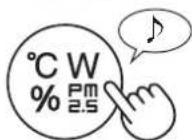

Press 3 sec.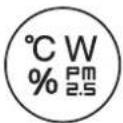
HUMIDIFIER FILTER/TANK
REPLACEMENT AND MAINTENANCE CYCLE
Sharp Consumer Electronics
Poland sp.zo.o.
Ostaszewo 57B, 87-148 Lysomice,
Poland
SHARP CORPORATION
OSAKA, JAPAN
SDA/MAN/0239
www.sharpcounter.eu

- ENGLISH
- CONTENTS
- IMPORTANT SAFETY INSTRUCTIONS
- READ AND SAVE THESE INSTRUCTIONS BEFORE USING THIS PRODUCT
- WARNING
- NOTE
- CAUTIONS CONCERNING INSTALLATION
- CAUTIONS CONCERNING FILTER
- CAUTIONS CONCERNING OPERATION
- CAUTIONS CONCERNING MAINTENANCE
- WHEN REMOTELY CONTROLLING THE AIR PURIFIER
- IN CASE OF REMOTE OPERATION FROM OUTSIDE, YOU MAY NOT BE ABLE TO CHECK THE AIR PURIFIER'S CURRENT CONDITION OR THE AREA AROUND IT AND THE SITUATION CONCERNING ANYONE POSSIBLY STAYING THERE, SO PLEASE ADEQUATELY CONFIRM SAFETY BEFORE USE
- MAKE SURE THE ELECTRIC PLUG IS FULLY INSERTED INTO A POWER SOCKET, AND THERE IS NO DUST ON THE PLUG OR IN THE SOCKET HOLE. (IT MAY CAUSE HEAT, COMBUSTION, FIRE, ETC., DUE TO POOR CONTACT OR CONTACT FAILURE)
- CAUTION FOR USE
- CAUTION FOR WI-FI
- CAUTION FOR USAGE REGARDING ELECTRICAL WAVES
- CAUTION FOR PERSONAL INFORMATION (RELATED TO SECURITY)
- OPERATION PRINCIPLE
- FEATURES
- PLASMACLUSTER
- TRIPLE FILTERING SYSTEM + HUMIDIFICATION
- PRE-FILTER
- DEODORIZING FILTER
- HEPA FILTER
- HUMIDIFYING FUNCTION
- UNIQUE AIRFLOW
- PRODUCT INFORMATION AND ACCESSORIES
- PLEASE READ BEFORE OPERATING YOUR AIR PURIFIER
- LIGHT SENSOR
- FILTER INSTALLATION
- ABOUT TRAY HANDLE
- WI-FI SETTINGS
- BEFORE YOU BEGIN
- ENSURE YOUR SMART DEVICE IS CONNECTED TO A 2.4 GHZ WI-FI NETWORK
- WI-FI PROTECTED SETUP (WPS) ACCESS POINT (ROUTER)
- ENSURE YOUR SMART DEVICE MEETS MINIMUM SOFTWARE REQUIREMENTS (AS OF SEPTEMBER 2022)
- PRODUCT WI-FI SPECIFICATIONS
- TRADEMARKS
- INITIAL SET UP
- ① DOWNLOAD & SIGN UP
- INSTALL THE DESIGNATED APP TO YOUR SMART DEVICE
- CONNECT YOUR SMART DEVICE TO THE ROUTER AND LAUNCH THE APP
- CONNECTION OF THE AIR PURIFIER AND A ROUTER
- TAP "≡" AT THE UPPER LEFT PART OF THE "HOME" SCREEN, AND SELECT "PAIRING" → "CONNECTION WITH A ROUTER
- FOLLOW INSTRUCTIONS ON THE APP
- CONNECTION BETWEEN THE AIR PURIFIER AND A SMART DEVICE
- TAP "PAIR" FOR THE AIR PURIFIER YOU WOULD LIKE TO PAIR
- FOLLOW THE INSTRUCTIONS ON THE APP
- HOW TO SET WI-FI ON / OFF AFTER COMPLETING THE INITIAL SET UP
- IF YOU WOULD LIKE TO TURN THE WI-FI OFF
- IF YOU WOULD LIKE TO TURN THE WI-FI ON AGAIN
- START/STOP
- CLEAN ION SHOWER MODE
- SELECT AIR VOLUME AND MODE
- AUTO
- POLLEN
- SLEEP
- SWITCH DISPLAY
- CHILD LOCK
- WEEKLY SCHEDULER: APP ONLY
- ON TIMER
- OFF TIMER
- HOW TO CHANGE VARIOUS SETTINGS
- TURN THE PRODUCT OFF
- SELECT "FUNCTION NUMBER (F1-F7 OR A1-A8)" ON PAGES
- WHEN WI-FI SETTING
- WHEN PRODUCT SETTING
- FINISH THE SETTING
- WI-FI FUNCTIONS (A1-A8)
- CARE AND MAINTENANCE
- CARE
- FILTER MAINTENANCE INDICATOR
- HUMIDIFYING FILTER/HUMIDIFYING TRAY
- REPLACEMENT AND MAINTENANCE CYCLE
- MAINTENANCE
- REMOVE THE HUMIDIFYING FILTER AND TRAY
- RINSE WITH PLENTY OF WATER
- ATTACH THE HUMIDIFYING FILTER AND TRAY
- REPLACEMENT
- SEE THIS PAGE FOR DIRECTIONS ON HOW TO INSTALL THE FILTER WHEN REPLACING
- DISPOSAL OF FILTERS
- HOW TO CLEAN HARD-TO-REMOVE DIRT
- MAIN BODY / BACK PANEL / SENSOR FILTER
- BACK PANEL
- SENSOR FILTER
- HEPA FILTER / DEODORIZING FILTER
- HEPA FILTER DEODORIZING FILTER
- SEE PAGE 8 FOR DIRECTIONS ON HOW TO INSTALL THE FILTER WHEN REPLACING
- ABOUT THE PRODUCT
- ODOUR AND SMOKE PERSISTS
- AIR DISCHARGED FROM THE PRODUCT HAS AN ODOUR
- THE PRODUCT DOES NOT OPERATE WHEN CIGARETTE SMOKE IS IN THE AIR
- SMELL FROM A NEW PRODUCT AND/OR FILTER
- THE PRODUCT MAKES A CLICKING OR TICKING SOUND
- THE CLEANLINESS INDICATOR IS BLUE EVEN WHEN THE AIR IS NOT CLEAN
- THE CLEANLINESS INDICATOR IS RED EVEN WHEN THE AIR IS CLEAN
- THE CLEANLINESS INDICATOR CHANGES COLOUR FREQUENTLY
- FILTER MAINTENANCE INDICATOR IS ON
- THE DISPLAY GOES OFF
- THE DISPLAY DOES NOT MATCH THE WEATHER REPORT OR ANOTHER HYGROMETER OR THERMOMETER IN THE ROOM
- THE HUMIDIFY INDICATOR ON THE DISPLAY DOES NOT LIGHT UP WHEN THE HUMIDIFYING TRAY IS EMPTY
- THE WATER LEVEL IN THE HUMIDIFYING TRAY DOES NOT DECREASE OR DECREASES SLOWLY
- IS DISPLAYED
- ONE OF THE FOLLOWING IS DISPLAYED
- C1, C4, C
- ABOUT THE WI-FI FUNCTION
- WI-FI CONNECTION OF THE AIR PURIFIER AND THE ROUTER CANNOT BE PERFORMED
- THE CONNECTION BETWEEN THE AIR PURIFIER AND YOUR SMART DEVICE CANNOT BE ESTABLISHED
- REMOTE OPERATION FROM A SMART DEVICE CANNOT BE PERFORMED
- WHEN CHANGING THE ROUTER
- WHEN CHANGING THE SMART DEVICE
- WHEN GOING TO DISPOSE OR HAND OVER THE AIR PURIFIER
- IN CASE OF BEING HANDED OVER FROM A THIRD PARTY
- WI-FI INDICATOR BLINKS SLOWLY
- WI-FI INDICATOR BLINKS FAST
- WI-FI INDICATOR GOES OFF
- ONE OF "A2" TO "A6" CANNOT BE SELECTED IN THE WI-FI SETTING MODE. (PAGE 16 - 17)
- INTELLECTUAL PROPERTY RIGHTS FOR THIS PRODUCT
- SOFTWARE STRUCTURE
- SOFTWARE OF OUR DEVELOPMENT AND FREE SOFTWARE
- OBLIGATION OF LICENSE INDICATION
- INFORMATION ON DISPOSAL FOR USERS (PRIVATE HOUSEHOLDS)
- IN THE EUROPEAN UNION
- IN OTHER COUNTRIES OUTSIDE THE EU
- INFORMATION ON DISPOSAL FOR BUSINESS USERS
- ON (ON) CANCEL
- PRODUCT FUNCTIONS (F1-F7)
- ITALIAN
- DUTCH
- HUMIDIFIER FILTER/TANK
Brand : SHARP
Model : UAKCP100E
Category : Air purifier