
M24 - Coffee machine La Cimbali - Free user manual and instructions
Find the device manual for free M24 La Cimbali in PDF.



| Product type | Professional espresso coffee machine |
| Brand | La Cimbali |
| Model | M24 |
| Usage | Professional (bars, restaurants, institutions) |
| Electrical supply | Three-phase 400V or single-phase 230V depending on version, 50/60 Hz |
| Power | Approximately 3000-4000 W (depending on configuration) |
| Boiler capacity | Approximately 10-12 liters (not precisely specified) |
| Boiler pressure | Approximately 1.2 bar |
| Pump pressure | Up to 6-9 bar (mains, with reducer if >6 bar) |
| Main functions | Espresso, steam, hot water, cup warmer, dose programming, Turbosteam (optional) |
| Number of groups | 2 groups standard (depending on version) |
| Material | Stainless steel, metal body |
| Dimensions (W x D x H) | Approximately 80 x 55 x 55 cm (estimate) |
| Weight | Approximately 70-80 kg (estimate) |
| Cleaning and maintenance | Daily cleaning of groups, filters, steam and hot water wands, drip tray and drain tray. Use Service Line products. |
| Safety devices | Main switch, heating element switch, temperature limiter, safety valves, burn protection |
| Spare parts and repairability | Original Cimbali parts: filter holders, gaskets, wands, heating elements, solenoid valves. Repair by qualified personnel. |
| Standards | DIN 10531 (food hygiene), lead and nickel certification |
| Included accessories | Filter holders, filters, tamper, cleaning brush, rubber disc for cleaning (not explicitly listed) |
Frequently Asked Questions - M24 La Cimbali
User questions about M24 La Cimbali
0 question about this device. Answer the ones you know or ask your own.
Ask a new question about this device
Download the instructions for your Coffee machine in PDF format for free! Find your manual M24 - La Cimbali and take your electronic device back in hand. On this page are published all the documents necessary for the use of your device. M24 by La Cimbali.
USER MANUAL M24 La Cimbali
natural_image
Line drawing of a M24 coffee machine with control panel and side-mounted buttons (no text or symbols on the device itself)Code 952-169-020 (rev. 1745)
LA CIMBALI
Italiano
Translation of the original instructions
Français
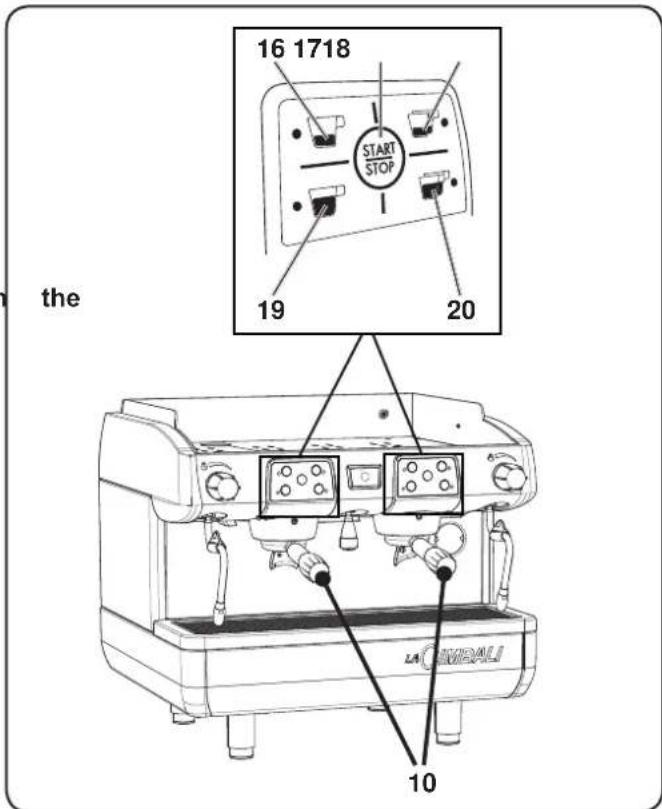
1 Main ON/OFF switch
1a Boiler heat resistance switch
2 Pushbutton Panel
6 Swivel steam jet pipe
6a Turbosteam pipe (*)
7 Steam adjustment knob
7a Turbosteam selector (*)
8 Hot water dispensing pipe
9 Dispensing push button - Hot water
10 Filter holder
11 Cups-warmer
14 Boiler / pump pressure gauge
15 Pan
16 Dispensing push button - 1 short coffee
17 Dispensing push button - 2 short coffees
18 STOP-CONTINUOUS /
Prog - push button
19 Dispensing push button - 1 long coffee
20 Dispensing push button - 2 long coffees
Items marked - (*) - are fitted in some product configurations only.
FR LEGENDE
EN GRUPPO CIMBALI has voluntarily agreed to submit representative samples of the product line documented in this manual to the stringent tests of the standard DIN 10531 (Food Hygiene - Production and supply of ho- beverage appliances - hygiene requirements, migration test).
The analyses were performed by accredited laboratories, assess the safety, configuration, purity, composition, authenticity and origin of products and biological substances.
The analyses carried out on the release of lead and nickel in liquid dispensed were performed on all the utilities of each coffee machine tested. At the conclusion of testing, it was verified that the sampled values were all below the limits set by DIN 10531.

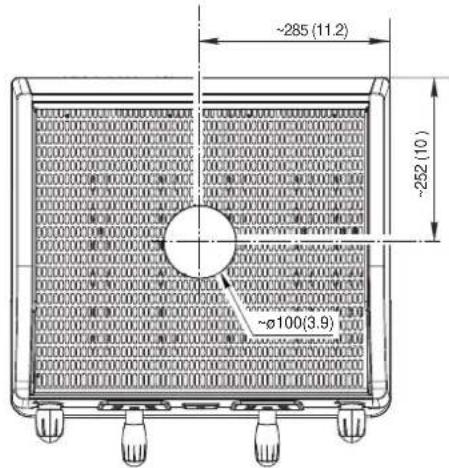
| DIMENSIONS | |
| 2 gr. | |
| L mm inches | 57022.4 |
| L1 mm inches | 34013.4 |
| Weight Kg pounds | 57125.4 |
* +30 mm Tall version

| MACHINE | POWER SUPPLY | INSTALLED POWER | LINE POWER | SUPPLY CABLE SECTION |
| 2 GR. | 220-240V 50/60Hz | 3,0-3,6 kW | 16A | 3Gx1.5mm 2 |
Simbologia - Symbols - Symboles - Symbole - Símbolos - Símbolos

Avviso generico - Generic warning - Avertissement générique Allgemeiner Warnhinweis - Aviso general - Aviso geral

ATTENZIONE: pericolo elettricità - WARNING: Electrical Hazard - ATTENTION : danger électrique ACHTUNG: Elektrische Gefährdung - ATENCIÓN: peligro de electricidad - ATENÇÃO: perigo eletricidade

ATTENZIONE: pericolo di schiacciamento mani - WARNING: Trapping Hazard, Take Care with Hands ATTENTION : danger d'écrasement des mains - ACHTUNG: Gefährdung durch Quetschung der Hände ATENCIÓN: peligro de aplastamiento de manos - ATENÇÃO: perigo de esmagamento das mãos

ATTENZIONE: Superficie calda - WARNING: Hot surface - ATTENTION : Surface chaude ACHTUNG: Heisse Oberfläche - ATENCIÓN: Peligro de quemaduras - ATENÇÃO: Perigo de queimaduras

Salvaguardia dell'ambiente - Environmental protection - Sauvegarde de l'environnement Umweltschutz - Salvaguardia del ambiente - Proteção do ambiente

Queste pagine del manuale sono dedicate all'operatore. These pages of the manual are for the use of the worker operating the machine. Ces pages du manuel sont destinées à l'opérateur. Diese Seiten des Handbuchs sind für den Bediener bestimmt. Estas páginas del manual están dedicadas al operador. Estas páginas do manual são destinadas ao operador.

WARNING: Hot surface
ATTENTION: Surface chaude
natural_image
Illustration of hands using a tool to adjust or install a mechanical component (no text or symbols visible)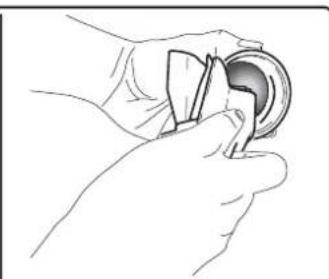
natural_image
Line drawing of a hand holding a circular object with a handle, no text or symbols present
natural_image
Technical line drawing of a mechanical component with labeled part A (no text or symbols beyond label)
natural_image
Illustration of hands using a tool to adjust a component (no text or symbols visible)natural_image
Line drawing of a hand using a tool to clean or adjust a component on a textured surface (no text or symbols)
natural_image
Illustration of a hand using a tool to adjust or install a component on a surface (no text or symbols visible)
natural_image
Illustration of hands operating a vehicle chassis with sensors and legs (no text or symbols)natural_image
Hand inserting a component into a device panel (no visible text or symbols)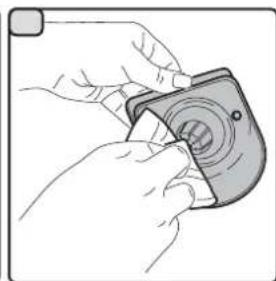
natural_image
Illustration of hands holding a camera module with a circular lens (no text or symbols)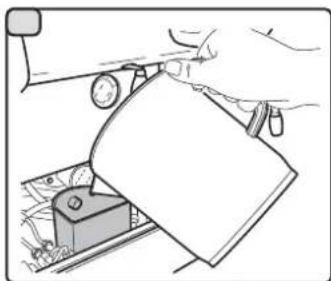
natural_image
Illustration of a hand using a tool to press or adjust a component, with no visible text or symbols.natural_image
Line drawing of a hand using a tool to lift or lift a machine component (no text or symbols)16. Anomalie - Guasti
Dear Madam, Dear Sir,
Congratulations on your new Cimbali!
With this purchase, you have chosen an advanced espresso coffee machine built using the most cutting edge technology. This machine not only offers you a perfect combination of efficiency and functionality, but also provides you with all the tools you need to do your job in the best possible way. We recommend that you take some time to read this Use and Maintenance Booklet. It will help you become more familiar with your new espresso machine, which we're sure you are looking forward to using.
Wishing you all the best.
GRUPPO
CIMBALI
Index
Page
- General Rules 2
2.1 Transport and handling 3
2.2 Installation Rules 4
-
Electrical Installation Rules 5
-
Water Installation Rules 5
-
Installation Check-up 6
-
Rules for the worker operating the machine 7
-
Caution 8
-
Maintenance and Repairs 8
-
Dismantling the machine 9
USE
-
Setting at work 10
-
Heating phase 10
-
Delivery of the coffee 11
-
Programming the coffee measures 11
-
Other hot beverage 12
-
Cleaning and maintenance 14
-
Defects - Malfunctions 16
ILLUSTRATIONS IX
Service Line XII
1. General Rules

Please read the warnings and rules in this User's Manual carefully before using or handling the machine in any way because they provide important information regarding safety and hygiene when operating the machine. Keep this booklet handy for easy reference.
- The machine was designed solely for preparing espresso coffee and hot beverages using hot water or steam, and for warming cups.
- The machine must be installed in a place where it is only used by carefully trained staff that know the risks attached to using the machine.
• The machine is for professional use only. - This appliance can be used by children aged from 8 years and above and persons with reduced physical, sensory or mental capabilities or lack of experience and knowledge if they are supervised or given instruction concerning the safe use of the appliance and understand the hazards involved. Children must not play with the appliance.
Cleaning and user maintenance must not be made by children without supervision.
Use by minors, with or without adult supervision, must not contravene local employment laws.
• The appliance must not be left unattended. - The appliance must not be used outdoors.
- If the appliance is stored in rooms where the temperature can drop below the freezing point, empty the boiler and water circuit tubes.
- Do not expose the appliance to atmospheric agents (rain, sun, and cold).
- Do not clean the appliance with jets of water.
- Noise: assessed acoustic pressure level 76 dB(A) (+/- 1dB); Turbosteam version 83 dB(A) (+/- 1dB).
- If the power-supply cord is damaged, it can only be replaced by qualified and authorized technicians.
- If the machine is used improperly or for purposes other than those described above, it can be a source of danger. The manufacturer will not be held responsible for damages caused by improper use of the appliance.

WARNING
Installation, dismantling, and adjustments must only be performed by qualified and authorized technicians.
Carefully read the warnings and rules in this manual because they provide important information regarding safe installation, use and maintenance of the machine.
Keep this booklet handy for easy reference.
2.1 Transport and handling
Packaging
- The machine is delivered in a robust cardboard package, with appropriate internal protection. The package features the standard symbols indicating rules to be followed when handling and storing the machine.
- Transport must be carried out according to the instructions on the package, handling with appropriate caution and avoiding impact of any type.
- Do not expose the machine to atmospheric agents (rain, sun, and cold).
Checks on receipt
- On receipt of the machine, carefully check all transport documentation is correct (against label on package).
- Check that the original packaging is not damaged.
• After removing the machine from its packing materials, make sure that the machine and its safety devices are intact. - Packing materials (plastic bags, polystyrene foam, staples, etc.) must be kept out of the reach of children because they are potentially hazardous.
Advice for disposal of packaging

The packaging materials are eco-compatible and recyclable. For the protection of the environment they must not be dumped, but taken to a recovery / waste-disposal centre, according to local regulations.
Handling

Staff responsible for moving the machine must realize the risks in moving heavy loads.
Move the machine carefully, using, where possible, the correct lifting equipment (fork lift, for example).
If moving the machine by hand, make sure:
- enough people are available for the task, depending on the machine weight and difficult handling;
- to always use the necessary safety gear (shoes/gloves).
2.2 Installation Rules
- Before plugging in the machine, make sure that the information on the nameplate (voltage, etc.) matches that of the electrical and water systems.
- Check the condition of the power supply cord; if it is damaged it must be replaced.
• Completely unwind the power supply cable. - The coffee machine should sit on a flat, stable surface at least 20 mm from walls and from the counter. Keep in mind that the highest surface on the machine (the cup warmer tray) sits at a height of at least 1.2 meters. Make sure there is a shelf nearby for accessories.
• Room temperature must range between 10irc and 32irc C ( 50irc F and 90irc F). - An electrical outlet, water connections, and a drain with siphon must be in the immediate vicinity.
- Do not install in rooms (kitchens) that are cleaned with jets of water.
- Do not obstruct openings or ventilation and heat vents.
- Do not install the machine outdoors.
3. Electrical Installation Rules

Prior to installation, make sure there is a circuit breaker installed with a distance between the contacts that allows for complete disconnection when there is a category III overload and that provides protection against current leakage equal to 30 mA. The circuit breaker must be installed on the power supply in compliance with installation rules.
If the power supply is not working properly, the machine can cause transitory voltage drops.
The electrical safety of this machine is only ensured when it is correctly connected to an efficient earthing system in compliance with the electrical safety laws in force. This fundamental safety requirement must be verified. If in doubt, request that a qualified electrician inspect the system. The manufacturer cannot be held responsible for any damage caused by the lack of an earthing system on the electrical supply.
Do not use adaptors, multiple plugs, and/or extension cords.

Check that the type of connection and voltage correspond with the information on the nameplate: see illustrations chapter figure 1.
The machines are fitted with power-supply cables in the factory, specific to the required: three-phase Y connection (5 wires) or three-phase Δ connection (4 wires), or single-phase connection (3 wires).
IT IS NOT PERMITTED TO CHANGE THE ELECTRICAL SUPPLY.
4. Water Installation Rules
WATER REQUIREMENTS
Water used in coffee machines must be potable and suitable for human consumption (see laws and regulations in force). Check on the machine's water inlet that the pH and chloride values comply with current law.
If the values do not fall within the limits, an appropriate water treatment device must be inserted (respecting the local laws and compatible with the machine).
If the machine uses water with a hardness exceeding 8irc F ( 4.5irc D), a specific maintenance plan must be implemented according to the hardness detected and machine usage.
WARNING
Only use the supplied parts for installation. If other parts are installed, they must be new (unused pipes and gaskets for the water connection) and they must be able to come in contact with potable water suitable for human consumption (according to local laws in force).
WATER CONNECTIONS
Place the machine on a flat surface and stabilize it by adjusting and securing the feet.
Hook up the water connections as shown in the Illustrations chapter Figure 2, respecting the hygiene, water safety, and anti-pollution laws in the country of installation.
Note: If the water pressure can rise above six bar, install a pressure reducer set at 2-3 bar. See Illustrations chapter Figure 3.
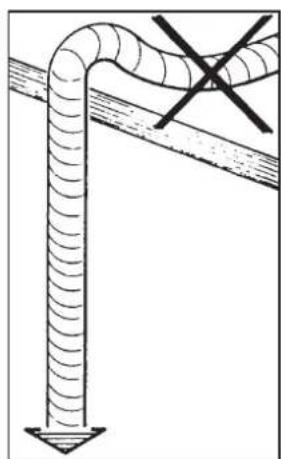
Water draining tube: place the end of the water draining tube in a drain with a siphon for inspection and cleaning.
IMPORTANT: The curves of the draining tube must NOT bend as shown in Illustrations chapter Figure 4.
5. Installation Check-up

WARNING: AFTER INSTALLATION, CHECK TO SEE IF THE MACHINE IS WORKING PROPERLY (see the Installation Module C).
WATER CONNECTIONS
• No leaks from the connections or tubes
FUNCTIONING
- Boiler and operating pressures are normal.
• The pressure gauge is working properly.
• The self-leveling device is working properly.
• The expansion valves are working properly

WARNING: ONCE THE MACHINE HAS BEEN INSTALLED AND IS READY FOR USE, BEFORE ALLOWING THE WORKER TO START USING THE MACHINE, WASH THE INTERNAL COMPONENTS ACCORDING TO THE INSTRUCTIONS BELOW:
GROUPS
- Hook up the filter holders to the groups (without coffee).
- Let each group dispense water for about a minute.
HOT WATER
- Continuously dispense hot water (pressing the appropriate button) until at least 2,5 liters of water have been used (see the "Hot water dispensing" Chapter in the User's Manual)
STEAM
- Dispense steam from the nozzles for about a minute, using the appropriate buttons.
6. Rules for the worker operating the machine
BEFORE YOU START

WARNING: BEFORE YOU START OPERATING THE MACHINE, WASH THE INTERNAL COMPONENTS FOLLOWING THE INSTRUCTIONS INDICATED BELOW. THESE STEPS MUST BE REPEATED AT LEAST ONCE A DAY AND WHEN THE MACHINE HAS NOT BEEN OPERATED FOR MORE THAN 8 HOURS.
Groups
- Hook up the filter holders to the groups (without coffee).
- Let each group dispense water for about a minute.
Hot Water
- Continuously dispense hot water (pressing the appropriate button) until at least 2,5 liters of water have been used (see the "Hot water dispensing" Chapter in the User's Manual).
Steam
- Dispense steam from the nozzles for about a minute, using the appropriate buttons.
DURING OPERATION
Steam dispensing
- Before heating the beverage (water, milk, etc.), open the steam nozzle for at least 3 seconds and let the steam escape so that condensation is eliminated.
Coffee dispensing
- If the machine has not been used for more than an hour, before making coffee, dispense about 100 cc and discard the liquid.
Hot water dispensing
- If the machine has not been used for more than an hour, before using the hot water, dispense about 200 cc and discard the liquid.
Cleaning the coffee circuits
- Please read the specific section in the user's manual to learn how to clean these circuits.
7. Caution

Danger of burns
The areas marked with this sign become hot. Great care should be taken when in the vicinity of these areas.

WARNING: Hot surface
ATTENTION: Surface chaude
The manufacturer disclaims all liability for damages to items or persons due to improper use or due to the coffee machine being used for purposes other than its intended use.
Never operate the coffee machine with wet hands or naked feet.
Ensure that the appliance is not used by children or persons who have not been instructed in its correct use.
Danger of Burns
Do not place the hands or other parts of the body close to the coffee dispensing groups, or near to the steam and hot-water nozzles.
Cup-warmer tray
Place only coffee cups, cups and glasses to be used in conjunction with the coffee machine on the cup-warmer tray.
Ensure that the coffee cups are completely drained before placing them on the cup-warmer tray.
No other objects shall be placed on the cup-warmer tray.

MACHINE CLOSE-DOWN
When the machine is left unattended for a prolonged period (for example hours), carry out the following steps:
- Remove the plug or turn off the main off-on switch;
- Close the water tap.
Non-compliance with these safety measures exonerates the manufacturer from all liability for malfunctions, damage to property and/or injury to persons.
8. Maintenance and Repairs
If the machine is not working properly, turn off the machine, turn off the main off-on switch, and call the service centre.
If the power-supply cord is damaged, switch off the machine and request a replacement from the service centre.

To ensure safety during operation, it is absolutely necessary to:
- follow all the manufacturer's instructions;
• have qualified and authorized technicians periodically check that all safety devices are intact and functioning properly (the first inspection within three years of purchase and every year after that).

WARNING
- Maintenance by unqualified individuals can jeopardize the safety and conformity of the machine.
Only use qualified, authorized technicians for repairs.
WARNING
Only use original spare parts guaranteed by the manufacturer.
If original spare parts are not used, the manufacturer's warranty will no longer be valid.
WARNING
After maintenance, perform the installation CHECK-UP as indicated in the specific section of the user's manual.
9. Dismantling the machine
Pursuant to European Directive 2012/19/UE on electrical waste (WEEE), users in the Europe-an community are advised of the following.
Electrical equipment cannot be disposed of as ordinary urban waste: it must be disposed of according to the special EU directive for the recycling of electric and electronic equipment.

Suitable differentiated waste disposal so that the machine can then be recycled, treated and disposed of in an
environmentally friendly manner contributes to avoiding possible negative effects on the environment and health, and encourages the reuse and/or recycling of the materials from which the machine is made.
Improper disposal of electric equipment that fails to respect the laws in force will be subject to administrative fines and penal sanctions.
GRUPPO CIMBALI electrical equipment is marked with a pictogram of a garbage can inside a barred circle. This symbol means that the equipment was sold on the market after August 13, 2005, and must be disposed of accordingly.
DISMANTLING THE MACHINE
To protect the environment, please proceed in compliance with the local laws in force.
USE
10. Setting at work

"Before switching on the machine, ensure the following:
- The mains switch is on;
- The water mains tap is open".

CAREFULLY PAY ATTENTION TO THE SEQUENCE FOR ACTIVATING THESWITCHES (1) AND (1A).
Press the luminous main switch (1); the related indicator light switches on and the key LEDs also light up.
If the water level in the boiler is lower than the minimum limit, the boiler will be filled to the right level, indicated by restored pressure in the manometer-pump.

ONLY AFTER the boiler filling process has been completed should you press the light switch that activates the resistance (1A); the related indicate light switches on and the heating phase begins.
Wait until the operating pressure (approx. 1.2 bar) appears on the manometer (14).
At this point, the machine is ready for use.
11. Heating phase
During heating, if one of the coffee dispensing push buttons is pressed, the machine dispenses a coffee at the temperature reached at the time.
Heating is completed when the boiler gauge indicator (14) remains stable in the P green area.
The machine is now ready to dispense coffee, steam and hot water.
To make sure that the dispenser unit and the filter holder (10) are at similar temperatures, press the coffee dispensing push button (18) and let the machine dispense coffee for a few seconds. Then press again the push button (18) to stop dispensing.

12. Delivery of the coffee
Remove the filter holder (10), empty out any coffee grouts and fill it up with 1 or 2 servings of ground coffee, depending on the filter holder used.
Press the ground coffee in filter down uniformly, using the grinder/doser presser.
Remove any residues of ground coffee from the filter rim. Fit and tighten the filter holder (10) on the coffee dispenser unit, positioning the cup (or cups) under the nozzle (or nozzles) of the filter holder (10).
Press the coffee dispensing push button (16, 17, 19, 20) for the required serving; the machine will stop automatically. Press the push button (18) for continuous dispensing.
Dispensing, whether for dosed servings or in the continuous dispensing mode, can be interrupted at any time by pressing the STOP push button (18).


Do not remove the coffee filter before the coffee dispensing has completed.
13. Programming the coffee measures
How to access the programming function
To enter the programming mode, press push button (18) and keep it pressed for about 8 seconds; the blinking LED light sequence above the keys and the intermittent buzzer indicates that the machine is in the programming phase.
To exit the programming mode, after programming the various drinks, press push button (18) again.

"Before programming the coffee dispensing push buttons fill the filter holder with correct serving of ground coffee.
Don't use coffee grouts for programming servings."
Fit and tighten the filter holder (10) on the coffee dispenser unit, positioning the cup (or cups) under the nozzle (or nozzles) of the filter holder (10).
Press (and keep momentarily pressed) the coffee dispensing push button (16, 17, 19 or 20) corresponding to the required serving to be programmed; the LED of the key to be programmed stays on and does not blink.
When the amount of coffee in the cup reaches the required level, release the coffee dispensing push button.
Repeat the above operations for the other coffee push buttons.
Note: if you make a programming mistake, use a new dose of ground coffee and repeat the operation.
14. Other hot beverage

Scalding hazard! Use the appropriate insulating devices to move the water and steam wands.
Steam dispensing
Complete immerse the left or right steam nozzle (6) (if supplied) in the container with the beverage to be heated. Turn the steam adjustment knob (7) counter-clockwise. Wait until the beverage has reached the desired temperature. Afterwards, turn the knob (7) clockwise to stop the steam from exiting.
Cleaning of steam dispensing pipes At the conclusion of each steam dispensing phase:
- Using a clean sponge, wash with hot water removing any organic residue present. Rinse carefully.
- clean the inside of the steam nozzle as follows:
Turn the nozzle towards the cup tray and carefully activate steam dispensing at least once.
Heating milk for frothy coffee (cappuccino)
General indications
Milk is a delicate biological product and can easily deteriorate. Heat modifies its structure. Milk must be kept at a storage temperature no higher than 5°C (41°F) from the moment the container is opened and throughout its entire period of use. Our storage appliances are suitable for this purpose.

NOTE: at the end of the work day (or not more than 24 hours from the time the container is opened), any remaining milk must be discarded.
Use a tall narrow jug and fill it up to about the half-way mark. Then plunge the steam jet pipe (6) into the milk.
Gradually open up the steam tap (7) and heat the milk for a few seconds.
When the amount of foam and sufficiently warm temperature are reached, stop the steam by turning the knob (7) in the opposite direction.
When the steam jet pipe (6) is no longer required, clean it thoroughly with a sponge and a clean cloth.
Dispensing hot water
Position a container under the hot water dispensing pipe (8) and press the hot water dispensing push button (9). Dispensing starts and then stops automatically.
Dosed dispensing can be interrupted at any time by pressing the hot water dispensing push button (9).
14. Other hot beverage
Dispensing with the Turbosteam selector (7a) (when provided)
Machines equipped with the TURBOSTEAM (STOP STEAM) dispensing system have the "stop steam dispensing when set temperature is reached" function, and can rapidly heat and froth milk.
Select the type of milk you desire:
- using the knob (7a), clockwise (frothed) or counterclockwise (hot).
When the set temperature is reached, steam dispensing can be stopped:
- automatically;
- manually, turning the knob (7a) in in any direction.
Temperature setting
The temperature setting for the "Stop Steam" function is factory set at 72°C (161°F) and is therefore not set by the user.
Nevertheless, the standard setting can be changed within the range of 45 and 85°C (113÷185°F).
To make this change:
- switch off the machine;
- remove the cups-warmer;
- adjust the setting (R) on the Turbosteam card, keeping in mind the corresponding number of notches and temperature:
notch 0 = 4 5 ^ irc C (1 1 3 ^ irc F)
notch 1 0 = 8 5 ^ irc C (1 8 5 ^ irc F)
increment between the 2 notches = \~4°C (39.2°F)
The indication of intermediate temperatures is approximate; after each adjustment, please use a thermometer to determine the actual set temperature.
The ideal setting for milk frothing is set in the factory. If =additional =adjustments =must =be =made, =turn =the =flow adjustment valve (F):
- counterclockwise: more air > more frothy milk - clockwise: less air > less frothy milk
Note: even slight turns of the valve (F) can make a great difference in how the milk is frothed.

Correctalignment of the steam thermocouple is performed in the factory: for this reason, do not turn the adjusting screw (T).


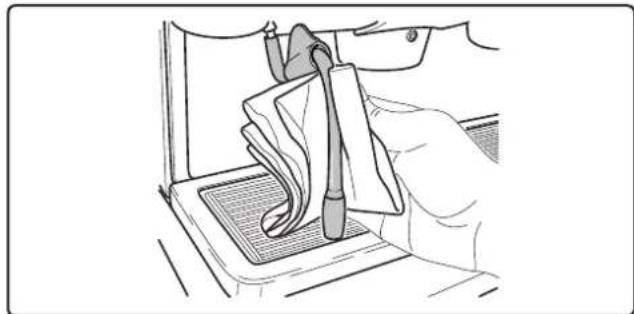
Scalding hazard! Use the appropriate insulating devices (A) to move the water and steam wands.

15. Cleaning and maintenance

For correct application of the food safety system (HACCP), please follow the instructions in this paragraph. Washing must be carried out using original “Service Line” products, see details on the last page. Any other product could make the materials in contact with food unsuitable.
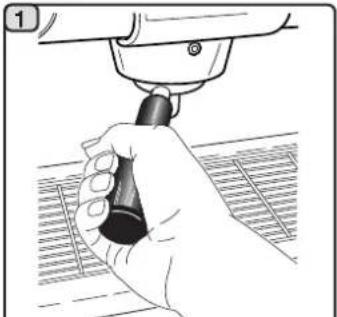
CLEANING DISPENSING UNIT - This operation must be made on all the groups at the end of each working day
natural_image
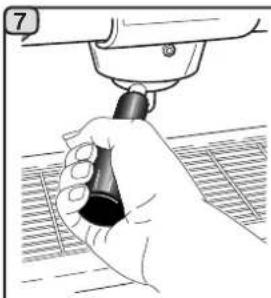
Illustration of a hand holding a tool with a black handle, against a grid background (no text or symbols)Remove the filter holder from the coffee group.
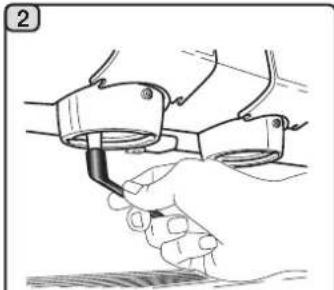
natural_image
Illustration of a hand holding a tool or device with a curved line, no text or symbols presentUsing a brush, clean the cover gasket.

natural_image
Illustration of hands using a handheld device to add a sample into a container (no text or symbols visible)Insert the rubber disk into the filter-holder with its filter
natural_image
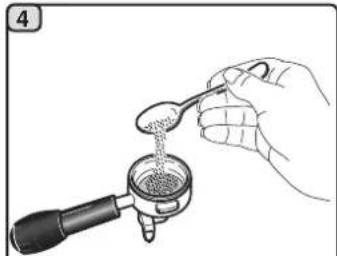
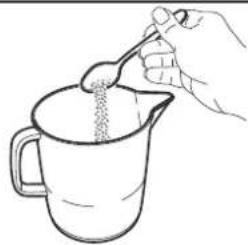
Illustration of a hand pouring liquid from a spoon into a container (no text or symbols)Pour in a packet or dosing cupful of detergent powder.
natural_image
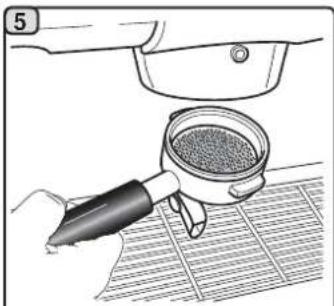
Illustration of a hand using a tool to clean or store contents on a grid-patterned surface (no text or symbols)Attach the filter-holder to the dispenser unit.
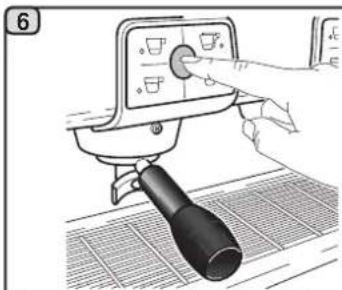
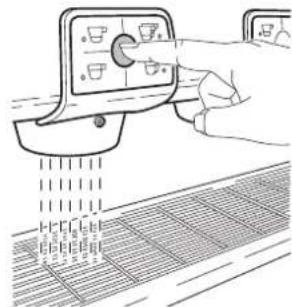
Press the stop button and press it again after 10 seconds. Repeat this step 10 times.
natural_image
Hand holding a tool with a black handle, next to a mechanical component (no text or symbols visible)Remove the filter holder; Press the stop button and execute the rinse cycle with water for about 30".
natural_image
Line drawing of a hand operating a control panel with a grid-patterned surface below (no text or symbols)
Do not remove the filter holder during coffee dispensing.
FILTER-HOLDERS - This operation must be made on all the filter-holders at the end of each working day
1
natural_image
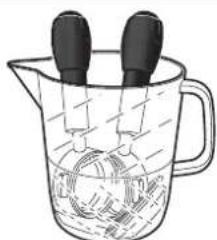
Line drawing of a hand pouring granular substance from a ladle into a pitcher (no text or symbols)Put a liter of cold water in a suitable container and add detergent.
2

natural_image
Line drawing of a hand holding a magnifying glass over a surface (no text or symbols)Remove the filters from the filter-holders.
natural_image
Illustration of hands using a tool to adjust or install a mechanical component (no text or symbols visible)3
natural_image
Illustration of a beaker with liquid and two droppers, no text or symbols presentSoak the filters and the filter-holders in this solution for about 15 minutes.
4

natural_image
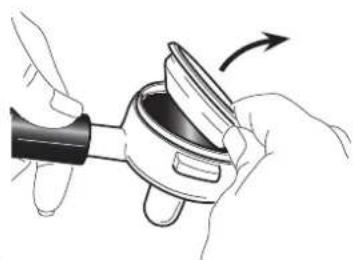
Illustration of hands using a tool to adjust or install a mechanical component (no text or symbols visible)Remove any residue with a sponge and rinse well with cold water.

natural_image
Line drawing of a hand holding a small object with a dark circular opening (no text or symbols)5
natural_image
Diagram of a mechanical component with labeled part A, showing a cylindrical body and a pointed tip (no text or symbols beyond label)
natural_image
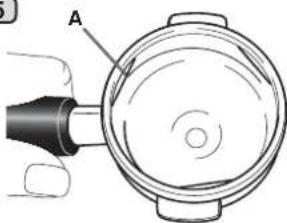
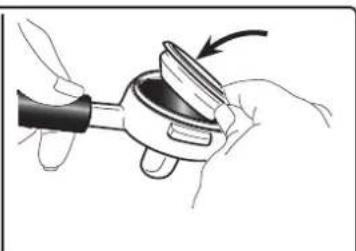
Illustration of hands holding a mechanical component with an arrow indicating rotation (no text or symbols)Place the filters back in the filter holder, making sure that the anchoring spring (A) of the filter is in its slot.
STEAM AND HOT WATER DISPENSING PIPES - This operation must be made at the end of each working day
Using a clean sponge, wash with hot water removing any organic residue present. Rinse carefully. To clean the inside of the steam nozzle, follow these steps: Turn the nozzle towards the cup tray and carefully activate steam dispensing at least once.
natural_image
Line drawing of a hand using a tool to clean or repair a component on a grid-patterned surface (no text or symbols)NOTE: the procedures described below can also be carried out when the machine is switched off.
GRILLE AND DRIP BASIN - This operation must be made at the end of each working day
- Remove the grille from the basin.
- Extract the basin.
- Rinse the grid and tray under running water.

natural_image
Line drawing of a hand using a tool to clean or adjust a surface, no text or symbols present
natural_image
Illustration of hands using a tool to adjust or install a mechanical component (no text or symbols visible)DISCHARGE BASIN - This operation must be made at the end of each working day
- After removing the tray, remove the lid to the draining tray.
- Remove any residues with a sponge and rinse well with cold water.
- Pour about a liter of hot water into the discharge basin to remove any discharge residues.

natural_image
Hand inserting a component into a device panel (no visible text or symbols)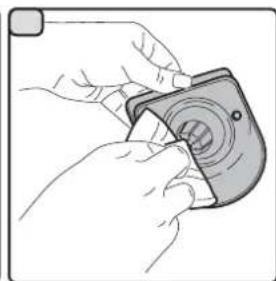
natural_image
Illustration of hands using a camera to adjust the lens (no text or symbols visible)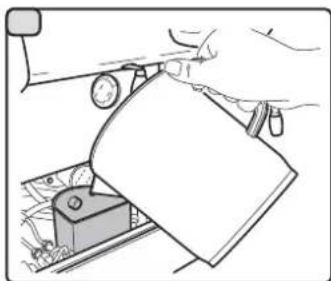
natural_image
Illustration of a hand using a tool to press or adjust a component, with no visible text or symbols.BODYWORK - This operation must be made at the end of each working day
Use a soft cloth and cleaning products WITHOUT ammonia or abrasives, removing any organic residue present in the work area.
Note. Do not spray liquids into the panel slots.

natural_image
Line drawing of a hand using a tool to lift a cup on a stand (no text or symbols)16. Defects - Malfunctions
Direct action by the customer
Before calling service personnel, to avoid useless expense, check whether the machine problem corresponds to one of the cases listed below.
| PROBLEM | CAUSE | SOLUTION |
| The coffee machine is not working. | No electricity supply. | Check the electricity supply.Check the position of the ON/OFF switch (1). |
| The coffee machine is not heating up. | Wrong position of the switch (1a). | Press the switch (1a). |
| Leaking from the filter holder rim (10). | Underpan gasket dirty with coffee. | Clean using the special brush provided. |
| Coffee dispensing time too short. | Coffee ground too coarse.Coffee too old. | Use a finer grind.Use new coffee. |
| Coffee drips out of machine. | Filter holes blocked or filter holder (10) outlet hole dirty.Coffee ground too fine. | Clean.Use a coarser grind. |
| Loss of water under the machine. | Discharge well clogged up.Discharge pan hole blocked. | Clean.Clean. |
| Machine heated up, but it does not dispense coffee. | Water supply or water softener tap closed. No water in system. | Open.Wait until water is available or call a plumber. |
| The automatic level control devices remain in operation. | Same causes as above. | Same solution as above. |
2.1 Transport et manutention
Emballage
CONDITIONS HYDRAULIQUES REQUISES
WARNING: Hot surface
ATTENTION: Surface chaude

15. Nettoyage

natural_image
Illustration of a hand using a tool to adjust or install a mechanical component (no text or symbols visible)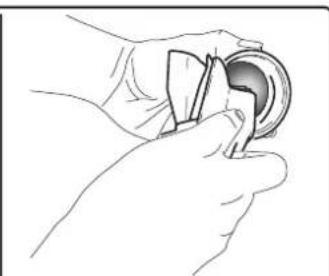
natural_image
Line drawing of a hand holding a circular object with a handle (no text or symbols)
natural_image
Illustration of a hand holding a small object with an arrow indicating rotation (no text or symbols)natural_image
Line drawing of a hand using a tool to clean or repair a component on a grid-patterned surface (no text or symbols)natural_image
Line drawing of a hand using a tool to clean or adjust a surface, with no text or symbols present.
natural_image
Illustration of a hand using a tool to adjust or install a mechanical component (no text or symbols visible)natural_image
Hand inserting a component into a vehicle chassis (no text or symbols visible)
natural_image
Illustration of hands using a camera to adjust the lens (no text or symbols present)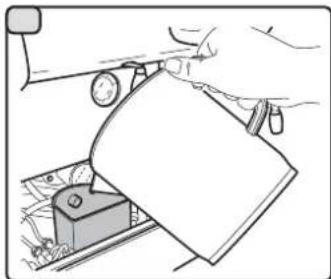
natural_image
Illustration of a hand using a tool to cut a component into a device (no text or symbols visible)natural_image
Line drawing of a hand using a tool to lift a cup on a gridded base (no text or symbols)16. Anomalies - Avaries
Interventions directes de la part du client:
WARNING: Hot surface
ATTENTION: Surface chaude

natural_image
Interior view of a mechanical or electronic device with visible wiring and components (no readable text or symbols)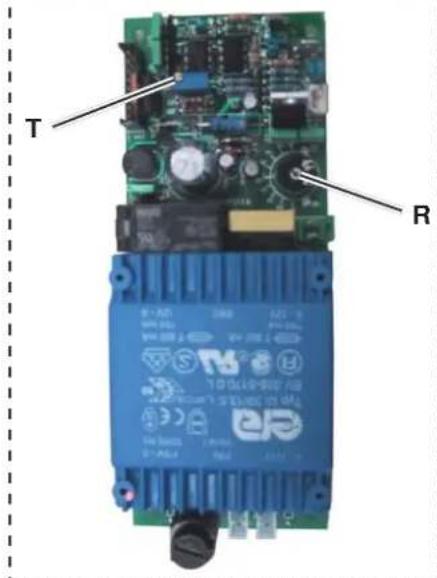
der
15. Reiningung

natural_image
Hand holding a tool with a black handle, partially visible through a grid-patterned surface (no text or symbols)natural_image
Illustration of a hand holding a tool or device with a curved line, no text or symbols presentnatural_image
Illustration of hands using a handheld device to interact with a circular device (no text or symbols visible)natural_image
Illustration of a hand pouring liquid from a spoon into a container (no text or symbols)natural_image
Illustration of a hand using a tool to clean or store food items, with a mesh grid on the floor (no text or symbols)natural_image
Illustration of a hand using a cleaning tool on a metal tray (no text or symbols visible)natural_image
Hand holding a tool with a black knob, pressing down on a grid-patterned surface (no text or symbols visible)natural_image
Line drawing of a hand operating a control panel with a mesh grid below (no text or symbols)natural_image
Line drawing of a hand pouring granular substance from a spoon into a pitcher (no text or symbols)natural_image
Line drawing of a hand holding a small object with a magnifying glass (no text or symbols)natural_image
Illustration of hands using a tool to adjust or install a mechanical component (no text or symbols visible)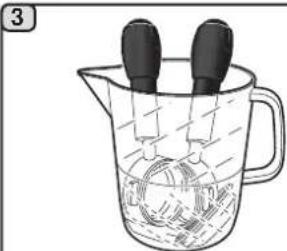
natural_image
Illustration of a glass beaker with liquid and two black droppers, no text or symbols presentnatural_image
Illustration of hands using a tool to adjust or install a mechanical component (no text or symbols visible)natural_image
Illustration of a hand holding a circular object with a handle, no text or symbols present

natural_image
Illustration of hands using a mechanical tool to adjust a component (no text or symbols visible)natural_image
Line drawing of a hand using a tool to clean or repair a component on a grid-patterned surface (no text or symbols)natural_image
Line drawing of a hand using a tool to clean or adjust a surface, no text or symbols present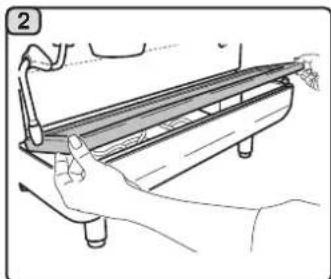
natural_image
Illustration of a hand using a tool to adjust or install a mechanical component (no text or symbols visible)natural_image
Line drawing of a hand inserting a component into a vehicle's dashboard (no text or symbols)
natural_image
Illustration of hands using a camera to adjust the lens (no text or symbols present)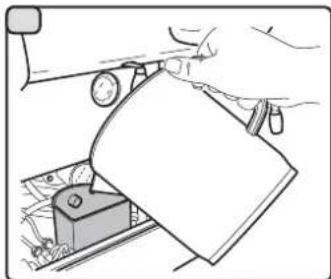
natural_image
Illustration of a hand using a tool to cut a piece of paper or document on a mechanical component (no text or symbols visible)natural_image
Line drawing of a hand using a tool to lift a cup on a gridded base (no text or symbols)
natural_image
Illustration of hands using a tool to adjust or install a mechanical component (no text or symbols visible)
natural_image
Line drawing of a hand holding a circular object with a handle, no text or symbols present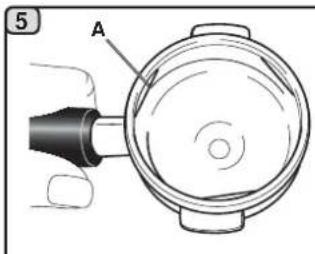
natural_image
Technical diagram of a mechanical component with labeled part A (no text or symbols beyond label)
natural_image
Illustration of a hand holding a mechanical component with an arrow indicating rotation (no text or symbols)natural_image
Line drawing of a hand holding a tool over a textured surface, no text or symbols presentnatural_image
Line drawing of a hand using a tool to clean or adjust a surface, no text or symbols present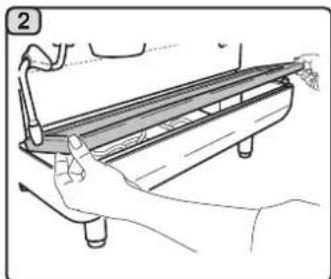
natural_image
Illustration of a hand using a tool to adjust or install a mechanical component (no text or symbols visible)natural_image
Hand inserting a component into a vehicle chassis (no text or symbols visible)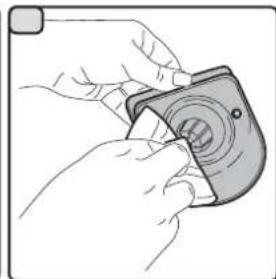
natural_image
Illustration of hands using a camera to adjust the lens (no text or symbols present)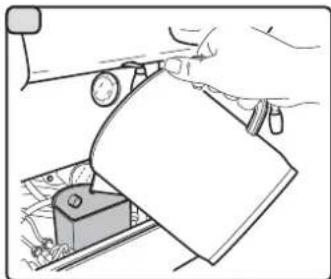
natural_image
Illustration of a hand using a tool to cut a piece of paper or plastic (no text or symbols visible)natural_image
Line drawing of a hand using a tool to lift a cup on a gridded base (no text or symbols)com

natural_image
Interior view of an electronic device with visible wiring and components (no text or symbols)
natural_image
Illustration of hands using a tool to adjust or install a mechanical component (no text or symbols visible)
natural_image
Line drawing of a hand holding a circular object with a handle, no text or symbols present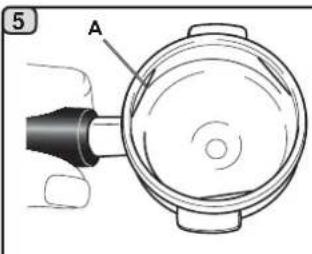
natural_image
Technical diagram of a mechanical component with labeled part A (no text or symbols beyond label)
natural_image
Illustration of hands using a tool to adjust or install a mechanical component (no text or symbols visible)natural_image
Line drawing of a hand using a tool to clean or repair a component on a grid-patterned surface (no text or symbols)natural_image
Line drawing of a hand using a tool to clean or adjust a surface, with no text or symbols present.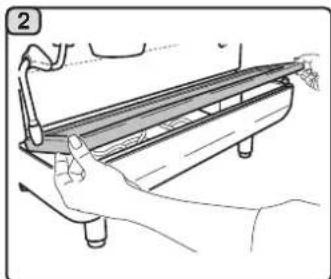
natural_image
Illustration of a hand using a tool to adjust or install a mechanical component (no text or symbols visible)natural_image
Hand inserting a component into a vehicle chassis (no text or symbols visible)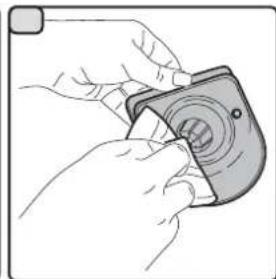
natural_image
Illustration of hands using a camera to adjust the lens (no text or symbols present)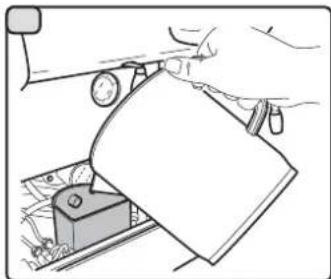
natural_image
Illustration of a hand using a tool to cut a piece of paper or plastic (no text or symbols visible)natural_image
Line drawing of a hand using a tool to lift a cup on a gridded base (no text or symbols)16. Anomalias - Avarias
Fig. 1 Abb.
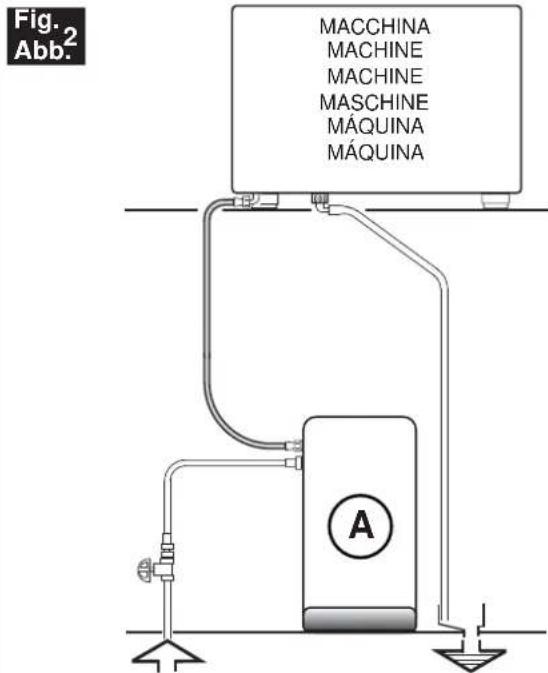
A) eventuale dispositivo per il trattamento dell'acqua
A) possible water-treatment device
A) dispositif possible pour le traitement de l'eau
A) Einheit zur Wasseraufbereitung (sofern installiert)
A) posible dispositivo para el tratamiento del agua
A) eventual dispositivo para o tratamento da água
natural_image
Diagram of a pipe with ribbed ends and a diagonal line intersecting it (no text or symbols)Fig. 4 Abb.
Install a water feeding tap
(for pressure beyond this value, install a pressure reducer)
GRUPPO CIMBALI reserves the right to make changes to the machines in accordance with the needs of individual countries and on the basis of technological progresses.
This publication may not, either in whole or in part, be used, copied or published without the written authorisation of GRUPPO CIMBALI S.p.A.
© Copyright by GRUPPO CIMBALI S.p.A., Milan, Italy
All rights reserved
The GRUPPO CIMBALI Company's client service, the aim of which is to assure top coffee-machine performance for its clients at all times, also offers its ECO LINE, a series of specific cleaning products expressly designed for this purpose.
ECO LINE - Cleaning products
A) For cappuccino makers in liquid form 610-004-149;
B) For dispensers, filter-holders, coffee cups in powder form 610-004-250;
C) For dispensers, filter-holders, coffee cups in sachets 610-004-244;
D) For superautomatic-machine dispensers in tablet form 610-004-216.
Order directly from your local distributor and refer to the particular item you require by its number, as shown above.
The Manufacturer reserves the right to modify the appliances presented in this publication without notice




- Italiano
- Français
- FR LEGENDE
- Simbologia - Symbols - Symboles - Symbole - Símbolos - Símbolos
- Anomalie - Guasti
- Index
- USE
- General Rules
- WARNING
- Transport and handling
- Packaging
- Checks on receipt
- Advice for disposal of packaging
- Handling
- Installation Rules
- Electrical Installation Rules
- Water Installation Rules
- WATER REQUIREMENTS
- WATER CONNECTIONS
- Installation Check-up
- FUNCTIONING
- GROUPS
- HOT WATER
- STEAM
- Rules for the worker operating the machine
- BEFORE YOU START
- DURING OPERATION
- Steam dispensing
- Coffee dispensing
- Hot water dispensing
- Cleaning the coffee circuits
- Caution
- Danger of burns
- Cup-warmer tray
- MACHINE CLOSE-DOWN
- Maintenance and Repairs
- To ensure safety during operation, it is absolutely necessary to:
- Dismantling the machine
- Setting at work
- Heating phase
- Delivery of the coffee
- Programming the coffee measures
- How to access the programming function
- Other hot beverage
- Heating milk for frothy coffee (cappuccino)
- Dispensing hot water
- Temperature setting
- Cleaning and maintenance
- Defects - Malfunctions
- Direct action by the customer
- Transport et manutention
- Emballage
- CONDITIONS HYDRAULIQUES REQUISES
- Nettoyage
- Anomalies - Avaries
- Reiningung
- Anomalias - Avarias
Brand : La Cimbali
Model : M24
Category : Coffee machine