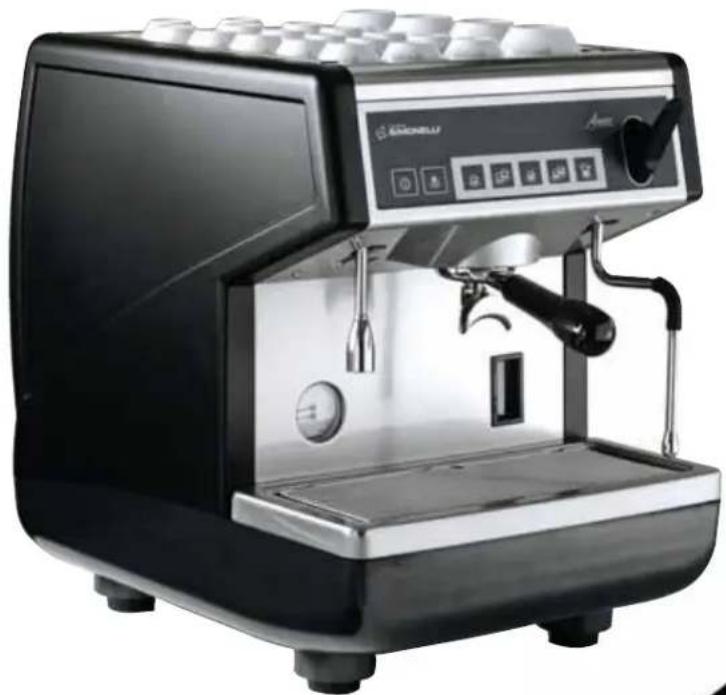
Appia 1 Group - Coffee machine NUOVA SIMONELLI - Free user manual and instructions
Find the device manual for free Appia 1 Group NUOVA SIMONELLI in PDF.


| Product type | Professional espresso machine |
| Brand | Nuova Simonelli |
| Model | Appia 1 Group |
| Power supply | 110-120 V, 208-240 V or 380 V three-phase depending on version |
| Power | 1500 W / 1800 W / 2400 W / 2700 W / 3400 W / 4500 W / 5200 W / 5400 W depending on version |
| Boiler pressure (adjustable) | 1 - 1.4 bar |
| Pump pressure (adjustable) | 9 bar |
| Number of groups | 1 |
| Steam wand | Yes, manual or Autosteam option with temperature probe |
| Hot water wand | Yes |
| Water supply | Direct connection to water mains |
| Main functions | Programmable coffee dispensing (4 doses), hot water, steam, automatic shut-off, cleaning with blind filter |
| Safety | Mandatory all-pole circuit breaker, grounding, overheat protection, safety shutdown |
| Maintenance and cleaning | Regular cleaning of showers, filters, holders, water softener recommended |
| Included accessories | Inlet tube, drain tube, 2 filter holders, single/double/blind filters, spring, distribution nozzles, tamper |
| Data plate | Serial number, voltage, power, frequency, year of manufacture |
Frequently Asked Questions - Appia 1 Group NUOVA SIMONELLI
User questions about Appia 1 Group NUOVA SIMONELLI
0 question about this device. Answer the ones you know or ask your own.
Ask a new question about this device
Download the instructions for your Coffee machine in PDF format for free! Find your manual Appia 1 Group - NUOVA SIMONELLI and take your electronic device back in hand. On this page are published all the documents necessary for the use of your device. Appia 1 Group by NUOVA SIMONELLI.
USER MANUAL Appia 1 Group NUOVA SIMONELLI
espresso coffee machines
natural_image
Black and white photo of a semi-klahoma espresso machine with control panel and side arm (no visible text or symbols)Appia® MADE IN ITALY
LIBRETTO ISTRUZIONI
USER HANDBOOK MANUEL D'INSTRUCTIONS GEBRAUCHANWEISUNGEN INSTRUCCIONES DE MANEJO
EC DECLARATION OF CONFORMITY


nuova simonelli
espresso coffee machines
Via M. D'Antegiano, 6 - 62031 Belforte del Chienti (MC)
declare under our responsibility that the product:
MACCHINE PER CAFFE' ESPRESSO
ESPRESSO COFFEE MACHINES
MODELS: Appia - versions V, Esse.
to which this declaration relates, following the provisions of the Directives:
D.P.R. N. 777 - 23/8/82
DIR. CEE N. 30/778
EN 60335-1 1994 +A11 +A12 +A13 +A14 +A15
EN 60335-2-15; 1996 +Al; TRD 801/08.96
EN 55014: 1987 A: 1990; EN 55011
following the provisions of the Directives
natural_image
Black and white semi-assembly espresso machine with control panel and side buttons (no visible text or symbols)
text_image
Appia® MADE IN ITALYCARATTERISTICHE TECNICHE
text_image
Technical diagram of a washing machine with labeled parts and directional arrows indicating flow or movement.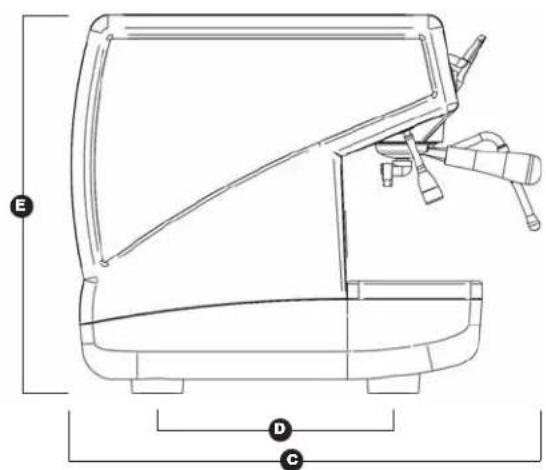
text_image
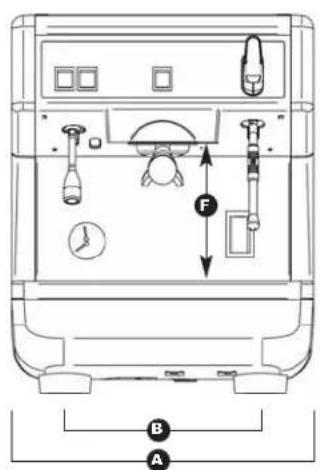
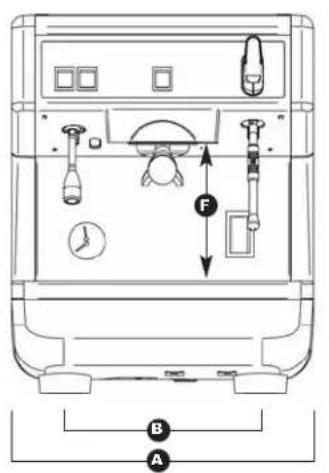
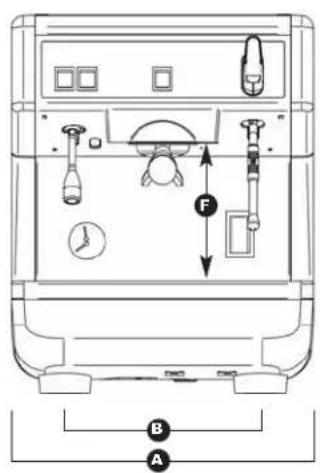
E D C| 1 Gruppo 110V 1 | Gruppo 220V | |||
| PESO NETTO | 42 kg | 92.6 lb | 42 kg | 92.6 lb |
| PESO LORDO 48 kg 106 lb 48 kg 106 lb | ||||
| POT. TERMICA | 1800 W | 1800 W | 1500 W | 1500 W |
| DIMENSIONI 400 mm 15A | A ^1116'' 400 m | A 15 | A ^1116'' | |
| B 310 mm 12 | B ^3/16'' 310 mm | B 2 | B ^3/16'' | |
| C 545 mm 21 | C ^7/16'' 545 mm | C 1 | C ^7/16'' | |
| D 370 mm 14 | D ^9/16'' 370 mm | D 4 | D ^9/16'' | |
| E 530 mm 20 | E ^13/16'' 530 mm | E 20 | E ^13/16'' | |
| F 180 mm 7 | F ^1/16'' 180 mm | F | F ^1/16'' | |

text_image
Appia® MADE IN ITALYINDICE
CARATTERISTICHE TECNICHE .....2
- DESCRIZIONE ....5
1.1 LISTA ACCESSORI 6
-
PRESCRIZIONI DI SICUREZZA .....7
-
TRASPORTO E MOVIMENTAZIONE ....10
3.1 IDENTIFICAZIONE MACCHINA .....10
3.2 TRASPORTO 10
text_image
Labeled diagram of a Swiss coffee machine with numbered parts for identificationFig. 1
LEGENDA
natural_image
Simple electrical symbol icon with a plus sign inside a circle, labeled 'Fig. 4' (no text or numbers on the symbol itself)
natural_image
Line drawing of a hand using a washing machine to press or adjust a bag, with no visible text or symbols.
natural_image
Simple line drawing of a landscape with mountains, trees, and a cross symbol (no text or labels)
natural_image
Illustration of a hand washing machine with a 'X' symbol, no text or symbols present
natural_image
Illustration of a hand cleaning a kitchen sink with a hand holding a small bowl (no text or symbols present)natural_image
Experimental setup with labeled components A and a grid-patterned surface, no readable text or symbols presentnatural_image
Close-up of a mechanical device with transparent casing and wiring, no visible text or symbolsnatural_image
Close-up of a mechanical component with a labeled section B and a small hole, shown in view (no text or symbols on the main subject)natural_image
Close-up of a hand holding a green component with a white arrow and plus/minus signs, next to industrial piping (no readable text or symbols)6.1 ACCENSIONE/ SPEGNIMENTO DELLA MACCHINA
6.1.1 APPIA V
natural_image
Illustration of a hand using a tool to adjust or install a wall-mounted panel, with an arrow indicating direction (no text or symbols present)natural_image
Close-up of a Siemens Elastomniere industrial machine with control panel and mechanical lever (no visible text or symbols)natural_image
Illustration of a hand using a magnifying glass to adjust a small object, labeled Fig. 21 (no text or symbols on the diagram itself)natural_image
Hand inserting a plug into a device panel with icons, labeled Fig. 22 (no text or symbols on the diagram itself)natural_image
Line drawing of a hand pouring liquid into a cup using a lathe machine (no text or symbols)natural_image
Two-panel image showing a kitchen machine and a hand holding a green product, both without visible text or symbols.natural_image
Diagram of a cylindrical device with internal tubing and labeled component D, no readable text or symbols present9. MESSAGGI FUNZIONI MACCHINA Appia V
By purchasing the you have made an excellent choice.
The purchase of a professional espresso coffee-maker involves various elements of selection: the name of the manufacturing firm, the machine's specific functions, its technical reliability, the option of immediate and suitable servicing, its price. You certainly evaluated all these factors and then made your choice: the Appia model.
We think you have made the best choice and after every coffee and cappuccino you will be able to assess this.
You will see how practical, convenient and efficient working with Appia is.
If this is the first time you have bought a Nuova Simonelli coffee machine, welcome to high quality coffee-making; if you are already a customer of ours, we feel flattered by the trust you have shown us.
Thanks of the preference.
With best wishes,
natural_image
Black and white photo of a modern espresso machine with control panel and side arm (no visible text or symbols)
text_image
Appia® MADE IN ITALYTECHNICAL CHARACTERISTICS
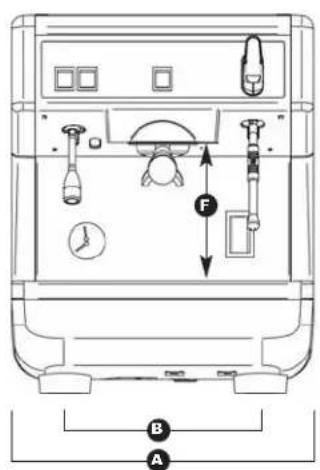
text_image
Technical diagram of a washing machine with labeled parts and directional arrows indicating flow or movement.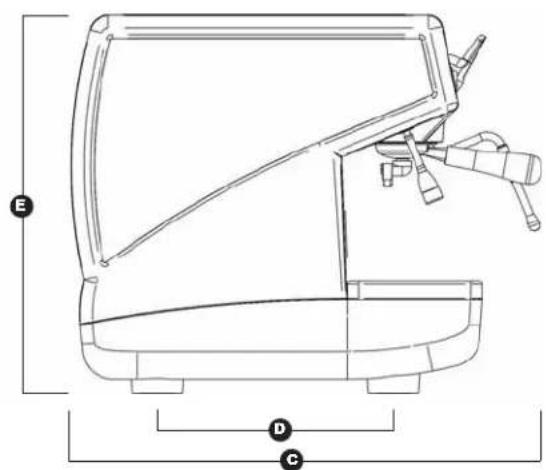
text_image
E D C| 1 Group 110V 1 Group 220V | ||||
| NET WEIGHT | 42 kg | 92.6 lb | 42 kg | 92.6 lb |
| GROS WEIGHT 48 kg | 106 lb 48 kg 106 lb | |||
| POWER 1800 W 1800 W 1500 W 1500 W | ||||
| DIMENSIONS 400 mm | A | A^1116 " 400 mm A 5 | A | A^1116 " |
| B 310 mm 12 | B 316 " 310 mm B 2 | B | B 316 " | |
| C 545 mm 21 | C 716 " 545 mm C 1 | C | C 716 " | |
| D 370 mm 14 | D 916 " 370 mm D 4 | D | D 916 " | |
| E 530 mm 20 | E 1316 " 530 mm E 20 | E | E 1316 " | |
| F 180 mm 7 | F 116 " 180 mm F | F | F 116 " | |

text_image
Appia® MADE IN ITALYINDEX
TECHNICAL CHARACTERISTICS .....22
- DESCRIPTION 25
1.1 ACCESSORIES LIST 26
-
SAFETY PRESCRIPTION .....27
-
TRANSPORT AND HANDLING .....30
3.1 MACHINE IDENTIFICATION 30
3.2 TRANSPORT 30
3.3 HANDLING 30
- INSTALLATION AND PRELIMINARY
OPERATIONS 31
- ADJUSTMENTS TO BE MADE BY A
QUALIFIED TECHNICIAN ONLY .....32
5.1 PRESSURE SWITCH ADJUSTMENT 32
5.2 PUMP ADJUSTMENT 32
- USE 33
6.1 SWITCHING THE MACHINE ON/OFF 33
6.1.1 APPIA V 33
6.2 SELECTION CONFIGURATION ....33
- PROGRAMMING APPIA V .....36
7.1 PROGRAMMING DOSES 36
7.2 PROGRAMMING COFFEE DOSES .....36
7.3 PROGRAMMING HOT WATER 36
7.4 PROGRAMMING THE AUTOSTEAM STEAM NOZZLE (OPTIONAL) 36
7.5 PROGRAMMING STANDARD DOSES ....36
- CLEANING AND MAINTENANCE .....38
8.1 SWITCHING OFF THE MACHINE....38
8.2 CLEANING THE OUTSIDE OF THE MACHINE .....38
8.3 CLEANING STAINLESS COFFEE-HOLDERS .....38
8.4 CLEANING THE UNIT WITH THE AID OF THE BLIND FILTER 38
8.5 CLEANING FILTERS AND FILTER-HOLDERS .....38
8.6 RESIN AND SOFTENER REGENERATION .....39
- APPIA V MACHINE FUNCTION MESSAGES....40
ELECTRIC SYSTEM APPIA V .....102
ELECTRIC SYSTEM APPIA ESSE ....104
PLUMBING SYSTEM 106
Appia® MADE IN ITALY
1. DESCRIPTION V - Esseia
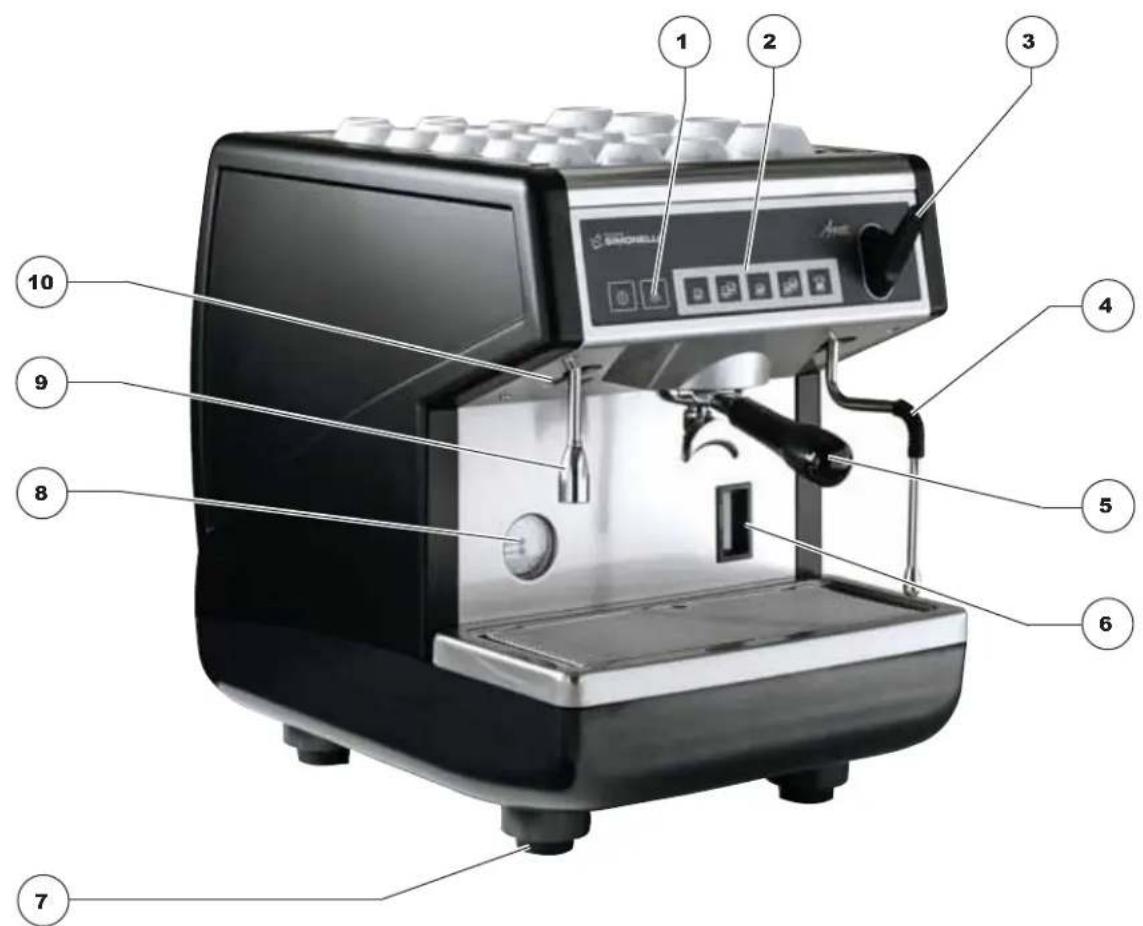
text_image
Labeled diagram of a coffee machine with numbered parts for identificationFig. 1
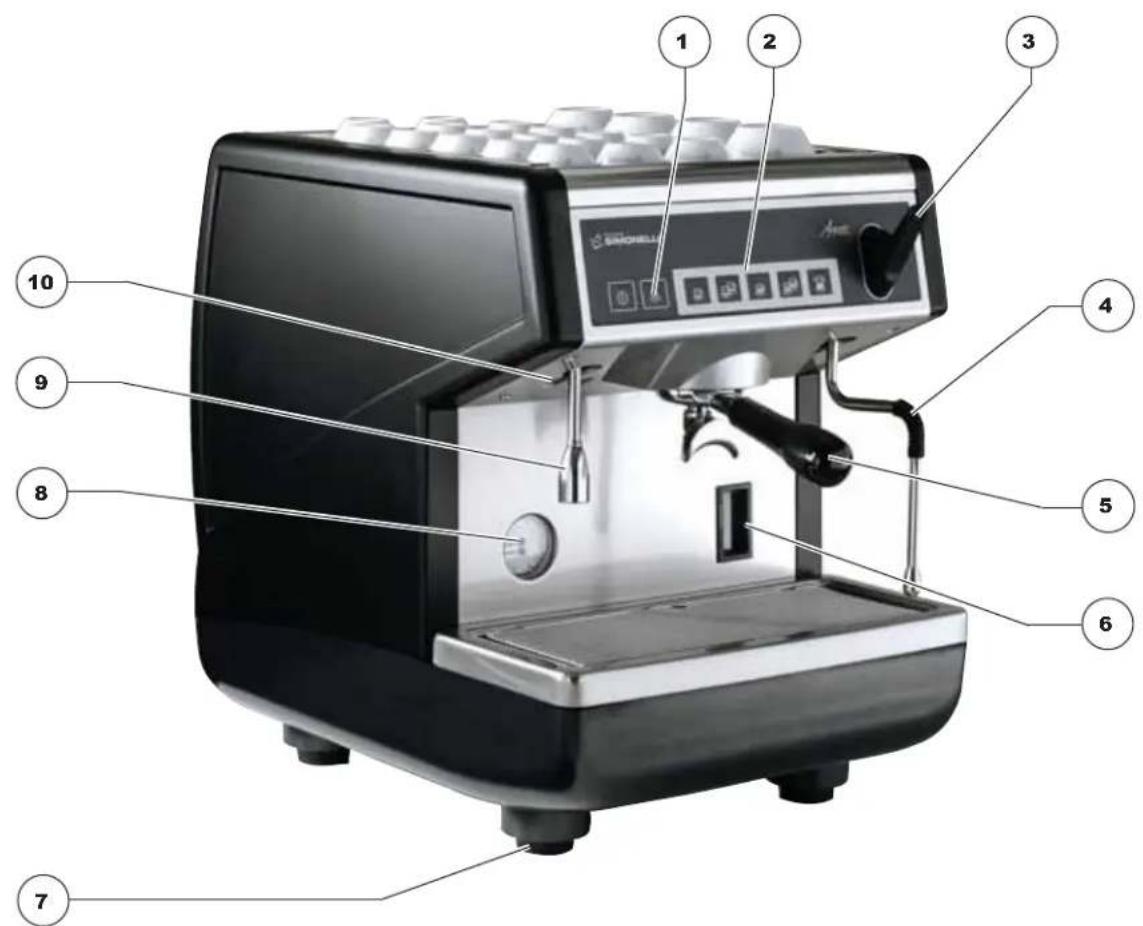
KEY
1 Select buttons
2 Delivery buttons
3 Steam knob
4 Steam nozzle
5 Filter holder
6 Optical level
7 Adjustable foot
8 Pressure gauge
9 Hot water nozzle
10 Rating plate
1.1 ACCESSORIES LIST
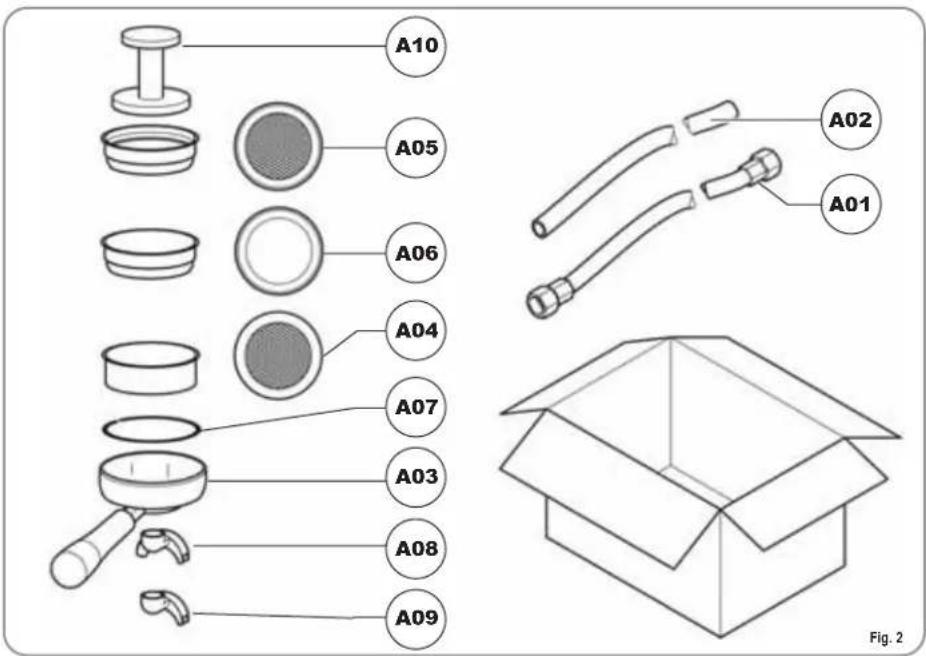
This book is an integral and essential part of the product and must be given to the user. Read this book carefully. It provides important information concerning safety of installation, use and maintenance. Save it carefully for future reference.

After unpacking, make sure the appliance is complete. In case of doubts, do not use the appliance, but consult a qualified technician. Packaging items which are potentially dangerous (plastic bags, polystyrene foam, nails, etc.) must be kept out of children's reach and must not be disposed of in the environment.
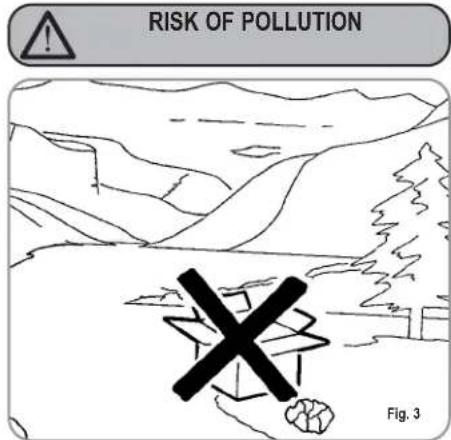
text_image
RISK OF POLLUTION Fig. 3
Before connecting the appliance make sure the rating plate data correspond with the mains. This plate is on the front panel at the top right hand side of the appliance. The appliance must be installed by qualified technicians in accordance with current standards and manufacturer's instructions.
The manufacturer is not liable for any damage caused due to failure to ground the system. For the electrical safety of the appliance, it is necessary to equip the system with the proper grounding. This must be carried out by a qualified electrician who must ensure that the electric power of the system is sufficient to absorb the maximum power input stated on the plate.
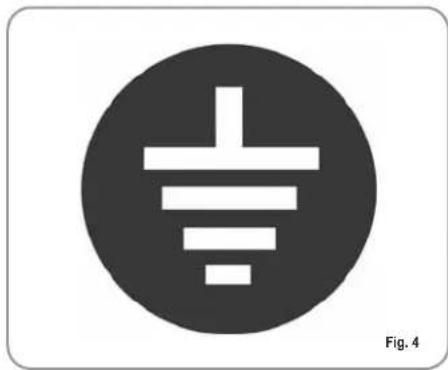
natural_image
Simple electrical symbol icon with three parallel lines inside a circle (no text or labels)
In particular you must ensure that the size of the wiring cables is sufficient to absorb power input. The use of adapters, multiple sockets or extensions is strictly forbidden. If they prove necessary, call a fully qualified electrician.

The machine must be installed according to the local standards in force with regard to plumbing systems. For this reason, the plumbing connections must be carried out by a qualified technician.

This appliance must only be used as described in this handbook. The manufacturer shall not be liable for any damage caused due to improper, incorrect and unreasonable use.

Basic rules must be observed when using any electric appliance.
In particular:
• do not touch the appliance when hands or feet are wet;

CAUTION RISK OF ELECTRIC SHOCK
• do not use the appliance when barefoot;
• do not use extensions in bath or shower rooms;
• do not pull the supply cord out of the socket to disconnect it from the mains;
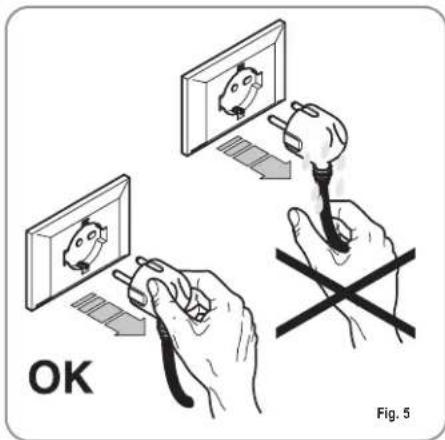
text_image
OK Fig. 5- do not leave the appliance exposed to atmospheric agents (rain, sun, etc.);
- do not let the appliance be used by children, unauthorised staff or staff who have not read and fully understood the contents of this handbook.

Before servicing the appliance, the authorised technician must first switch off the appliance and remove the plug.
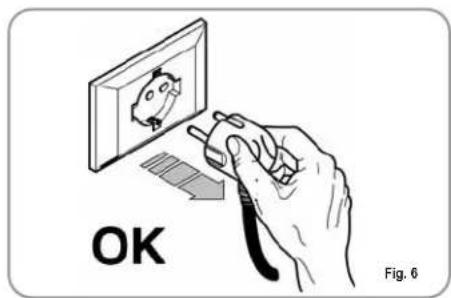
text_image
OK Fig. 6
For all cleaning operations comply exclusively with the instructions given in this booklet.
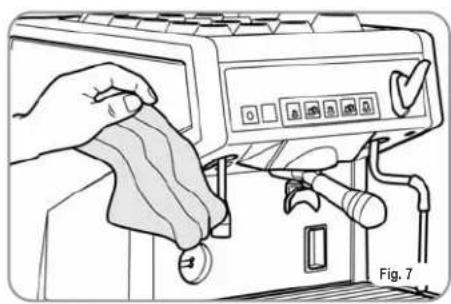
natural_image
Illustration of a hand cleaning a printer with a cloth, showing no text or symbols on the device itself.
If the appliance breaks down or fails to work properly, switch it off. Any intervention is strictly forbidden. Contact qualified experts only. Repairs should only be made by the manufacturer or authorized service centres. Only original spare parts must be used. Failure to observe the above, could make the appliance unsafe.

For installation, the qualified electrician must fit an omnipolar switch in accordance with the safety regulations in force and with 3 (0,12) or more mm (in) between contacts.

To avoid dangerous overheating, make sure the supply cord is fully uncoiled.

Do not obstruct the extraction and/or dissipator grids, especially of the cup warmer.

The user must not replace the appliance supply cord. If the cord is damaged, switch off the appliance and have a qualified technician change the cord.

If no longer using the appliance, we recommend making it inoperative; after removing the plug from the mains electricity, cut the power supply cable.

CAUTION RISK OF POLLUTION

Do not dispose of the machine in the environment: to dispose of the machine, use an authorised centre, or contact the manufacturer for relative information.
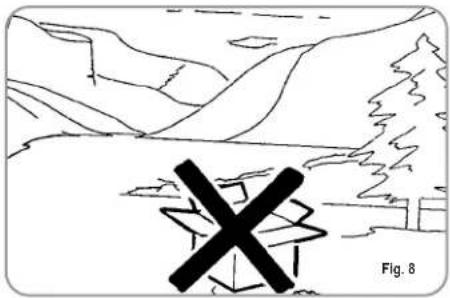
natural_image
Simple line drawing of a mountainous landscape with a cross symbol overlay (no text or symbols present)
CAUTION RISK OF INTOXICATION

Use the steam nozzle with care and never place hands below the jet of steam. Do not touch the nozzle immediately after use.
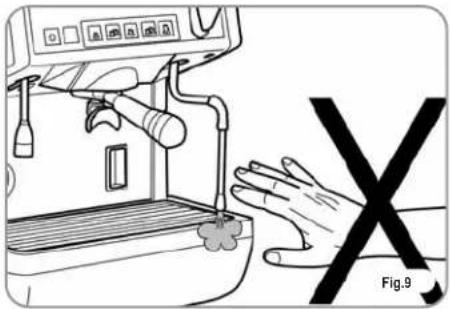
natural_image
Line drawing of a espresso machine with a hand holding a 'X' symbol, no text or symbols present
CAUTION RISK OF BURNS OR SCALDING

We remind you that before carrying out any installation, maintenance, unloading or adjustment operations, the qualified operator must put on work gloves and protective footwear.
3. TRANSPORT AND HANDLING
3.1 MACHINE IDENTIFICATION
Always quote the machine serial number in all communications to the manufacturer, Nuova Simonelli.
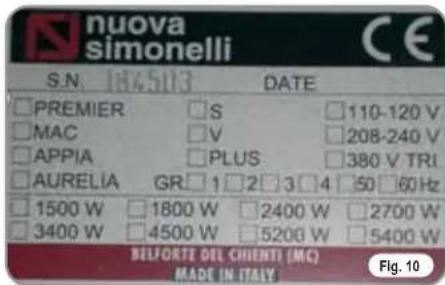
text_image
nuova simonelli S.N. 184503 DATE □ PREMIER □ S □ 110-120 V □ MAC □ V □ 208-240 V □ APPIA □ PLUS □ 380 V TRI □ AURELIA GR □ 1 □ 2 □ 3 □ 4 □ 50 □ 60 Hz □ 1500 W □ 1800 W □ 2400 W □ 2700 W □ 3400 W □ 4500 W □ 5200 W □ 5400 W BELFORTE DEL CHIENTI (MC) MADE IN ITALY Fig. 103.2 TRANSPORT
The machine is transported on pallets which also contain other machines - all boxed and secured to the pallet with supports.
Prior to carrying out any transport or handling operation, the operator must:
- put on work gloves and protective footwear, as well as a set of overalls which must be elasticated at the wrists and ankles.
The pallet must be transported using a suitable means for lifting (e.g., forklift).
3.3 HANDLING

CAUTION
RISK OF IMPACT OR CRASHING
During all handling operations, the operator must ensure that there are no persons, objects or property in the handling area.
The pallet must be slowly raised to a height of 30 cm (11,8 in) and moved to the loading area. After first ensuring that there are no persons, objects or property, loading operations can be carried out.
Upon arrival at the destination and after ensuring that there are no persons, objects or property in the unloading area, the proper lifting equipment (e.g. forklift) should be used to lower the pallet to the ground and then to move it (at approx. 30 cm (11,8 in) from ground level), to the storage area.

CAUTION
RISK OF IMPACT OR CRASHING
Before carrying out the following operation, the load must be checked to ensure that it is in the correct position and that, when the supports are cut, it will not fall.
The operator, who must first put on work gloves and protective footwear, will proceed to cut the supports and to storing the product. To carry out this operation, the technical characteristics of the product must be consulted in order to know the weight of the machine and to store it accordingly.
4. INSTALLATION AND PRELIMINARY OPERATIONS
After unpacking, assess that the machine and its accessories unit are complete, then proceed as follows:
- place the machine so that it is level on a flat surface;
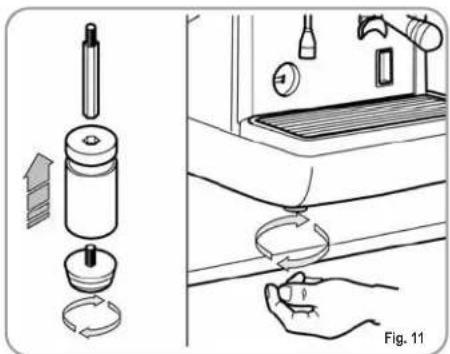
- assemble its supporting feet by inserting the insert into the cylindrical unit;
- twist the rubber foot into the screw thread inside the unit;
- screw the whole assembled unit into the allotted setting for the machine's adjustable feet;
• level the machine by regulating the adjustable feet;
NOTE: the unit grooves have to face upwards, as shown in the following illustration.
natural_image
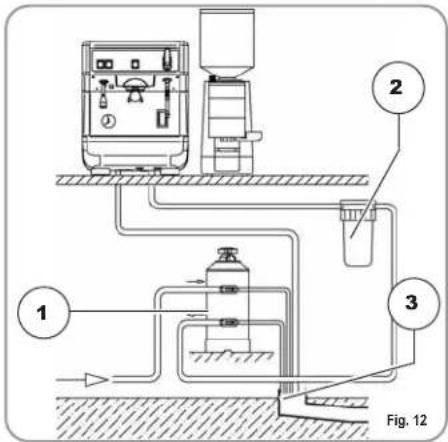
Diagram showing a hand holding a small object next to a kitchen sink with a water dispenser (no text or symbols present)It is advisable to install a softener (1) and then a mesh filter (2) on the external part of the plumbing system, during preliminaries and after levelling the machine.
In this way impurities like sand, particles of calcium, rust etc will not damage the delicate graphite surfaces and durability will be guaranteed.
Following these operations, connect the plumbing systems as illustrated in the following figure.

WARNING
Avoid throttling in the connecting tubes. Assess that the drain pipe (3) is able to eliminate waste.
text_image
1 2 3 Fig. 12KEY
1 Softener
2 Mesh filter
3 Drain ∅ 50 mm
NOTE: For a correct functioning of the machine the water works pressure must not exceed 4 bars.
Otherwise install a pressure reducer upstream of the softener; the internal diameter of water entrance tube must not be less than 6mm ( 38 ).

CAUTION RISK OF SHORT CIRCUITS
The machine must always be protected by an automatic omnipolar switch of suitable
power with contact openings of equal distance or more than 3mm.
Nuova Simonelli is not liable for any damage to people or objects due to not observing current security measures.
Prior to connecting the machine to the electrical mains, assess that the voltage shown on the machine's data plate corresponds with that of the mains.
5. ADJUSTMENTS TO BE MADE BY A QUALIFIED TECHNICIAN ONLY
5.1 PRESSURE SWITCH ADJUSTMENT

CAUTION
The adjustments listed here below must ONLY be performed by a Specialist Technical Engineer.
Nuova Simonelli cannot be held liable for any damage to persons or property arising from failure to observe the safety instructions supplied in this manual.

CAUTION ELECTRIC SHOCK HAZARD
Before performing any operation, the specialist technical engineer must first switch off the main switch off and unplug the machine.
To adjust the service pressure of the boiler, thus regulating the water temperature, according to the various functions and needs of the coffee desired, proceed as follows:
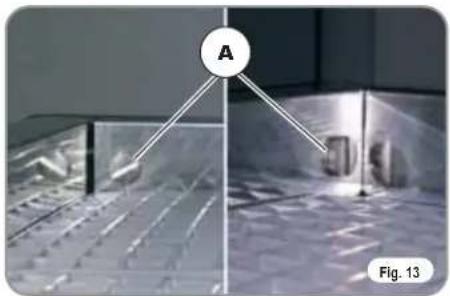
- remove the cup grille from the top part of the machine by unscrewing the four side screws "A";
natural_image
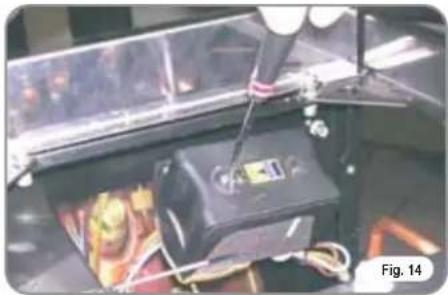
Experimental setup with labeled point A and panel, no readable text or symbols present- turn the pressure switch adjustment screw to INCREASE (clockwise) or REDUCE (anticlockwise) pressure.
natural_image
Close-up of a mechanical device with wires and components, labeled Fig. 14 (no readable text or symbols)Advisable pressure: 1 - 1,4 bar (according to the kind of coffee).
5.2 PUMP ADJUSTMENT
To change the working pressure of the pump and therefore, the coffee extraction pressure, proceed as follows:
- remove the worktop grid cover;
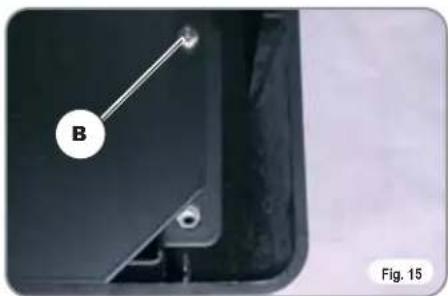
• take off the sheet metal guard by unscrewing the two side screws (B) as illustrated in the following figure.
natural_image
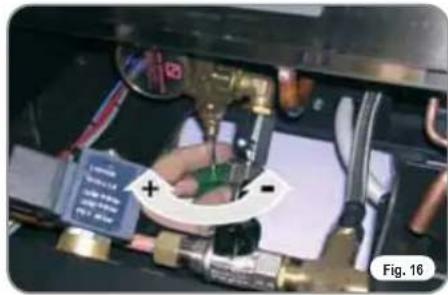
Close-up of a mechanical component with a labeled part 'B' and a small hole, shown in view (no text or symbols beyond label)- turn the pump registration screw, turning it clockwise to INCREASE and counter clock wise to DECREASE the pressure.
natural_image
Close-up of a hand holding a U-shaped tool with a plus and minus signs, surrounded by tubing and mechanical components (no readable text or symbols)Advisable pressure: 9 bar..
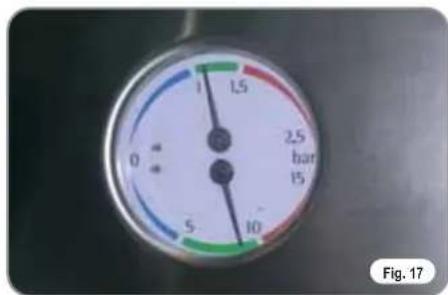
- The set pump pressure is shown on the lower part of the gauge.
text_image
0 5 1 1,5 2,5 bar 15 10 Fig. 17Once the adjustments have been completed, refit the sheet metal guard into its seating and fix it into place with the two side screws; refit the work surface grille
6. USE
Before starting to use the appliance, the operator must be sure to have read and understood the safety prescriptions contained in this booklet.
6.1 SWITCHING THE MACHINE ON/OFF
6.1.1 APPIA V
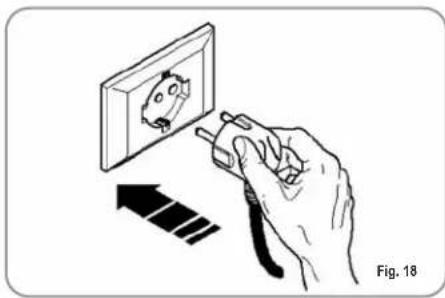
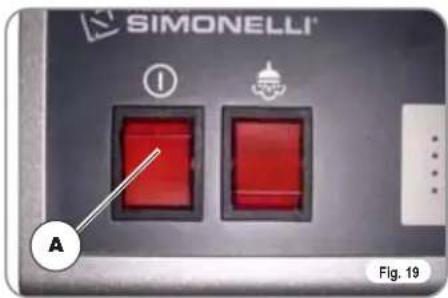
- Plug the machine into the mains socket; the LED of the on switch will begin to flash.
- Hold down the on switch ⏻ for 5 seconds.
At this point, the Flash-test will begin; this is where all LEDs are switched on for three seconds, after which the test is complete and the hot water/steam key will switch off.
The fact that the machine is operating is shown by the LED of the on switch
and all delivery keys, which remain lit.
natural_image
Illustration of a hand using a tool to adjust or install a wall-mounted device, with an arrow indicating direction (no text or symbols present)NOTE: once the auto diagnosis has been completed all the keys are activated.

WARNING
For electronic card maintenance, turn the machine off by means of the external main switch or disconnect the plug.
• To switch off the machine, hold down the on switch for 5 seconds;
the LEDs on the delivery keys will switch off and the on switch LED will flash.
6.1.2 APPIA ESSE
The machine is fitted with a main switch (A). The fact that the machine is operating is shown by the fact that this switch is set to on. To switch off the machine, move the switch to the off position.
text_image
SIMONELLI A Fig. 196.2 SELECTION
CONFIGURATION
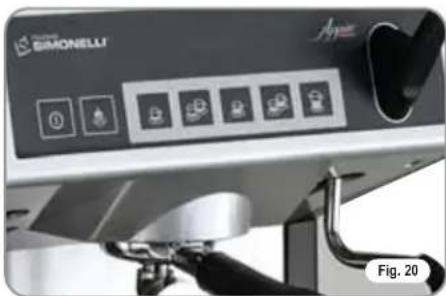
Set the desired function on the available keys placed above the filter-holders (see chapter "DESCRIPTION").
natural_image
Close-up of a Siemens Elbow vacuum cleaner with control panel and buttons (no readable text or symbols)BUTTONS KEY
(Selection configuration)

1 small coffee

2 small coffees

1 long coffee

2 long coffees

Continuous
6.3 MAKING COFFEE
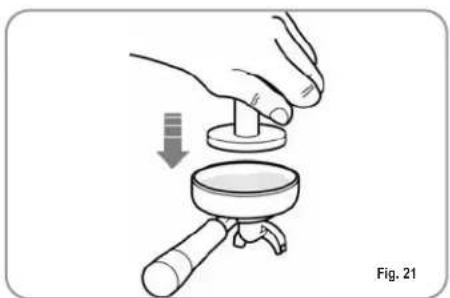
Unhitch the filter-holder and fill it with one or two doses of ground coffee depending on the filter used.
natural_image
Illustration of a hand using a magnifying glass to adjust a small object, labeled Fig. 21 (no text or symbols on the diagram itself)Press the coffee with the provided coffee presser, dust off any coffee residue from the rim of the filter (this way the rubber gasket will last longer).
Insert the filter in its unit.
Press the desired coffee button:

1 small coffee

2 small coffees

1 long coffee

2 long coffees
By starting up the coffee brewing procedure the unit's pump is activated and the unit's solenoid valve is opened.
By pressing it, the button will turn on and signal the operation
NOTE: when in pause, leave the filter-holder inserted in the unit so that it will keep warm. To guarantee the utmost thermic stability during use, the delivery units are thermo-compensated with complete hot water circulation.
6.4 USING STEAM

CAUTION RISK OF BURNS OR SCALDING
While using the steam nozzle, you must pay attention to not place your hands beneath it or touch just after it has been used.
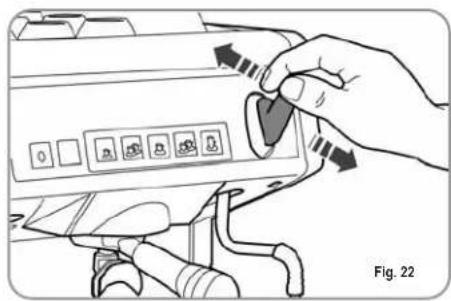
To use steam just pull or push the provided lever (Fig. 22).
By pulling it completely the lever will hold a position of maximum delivery; by pushing it, the lever will automatically give way.
The two steam nozzles are articulated to guarantee their easy use.
natural_image
Hand inserting a card into a device control panel (no text or symbols visible)6.5 MAKING CAPPUCCINO
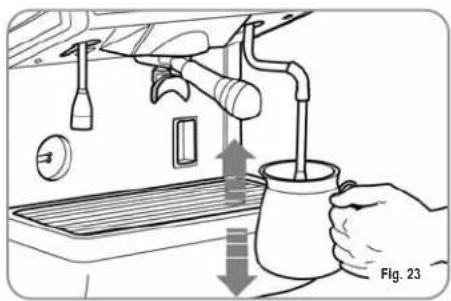
To obtain the typical cappuccino foam, immer-se the nozzle all the way into a container 1/3 full of milk (preferably cone-shaped). Turn on the steam. Before the milk starts to boil, pull the nozzle slightly up and lightly move it vertically across the surface of the milk. When you have completed the procedure, clean the nozzle carefully with a soft cloth.
natural_image
Illustration of a hand pouring liquid into a cup using a water dispenser (no text or symbols)6.6 HOT WATER SELECTION

CAUTION RISK OF BURNS OR SCALDING
While using the hot water nozzle, pay careful attention not to place your hands beneath it or touch it just after it has been used.
This nozzle delivers hot water to make tea or herb teas.
Place a container underneath the hot water nozzle and press the switch (ESSE model) or press the hot water select button (V model).
Make sure the button lights up.
Water will be delivered from the hot water nozzle for as long as the set time indicates.
NOTE: Hot water can be delivered at the same time as coffee.
6.7 AUTOSTEAM STEAM NOZZLE WITH TEMPERATURE PROBE (OPTIONAL ON V MODEL ONLY)
As an optional extra, the machine can be equipped with an Autosteam steam nozzle in place of the hot water nozzle.
On this version, the hot water nozzle is fitted in place of the manual steam nozzle.
The Autosteam steam nozzle can be used to deliver steam to foam milk or heat other liquids.
Place a suitable container with milk or another beverage inside it beneath the Autosteam steam nozzle.
Press the key and make sure that the key lights up. The Autosteam steam nozzle will dispense steam until the liquid reaches the pre-set temperature (see chapter 7.4 for programming details).
NOTE: Hot water can be delivered at the same time as coffee.
7. PROGRAMMING Appia V
7.1 PROGRAMMING DOSES
To access the programming units, proceed as follows:
NOTE: the procedure can be carried out with the machine on.
• To enter the programming function for each group, it is necessary to hold down the continued delivery key for 5 seconds

• The delivery keys will begin to flash.
7.2 PROGRAMMING COF-FEE DOSES
To programme the amount of water for each of the delivery keys, proceed as follows:
- fill the filter holder with the right amount of coffee (the double or single filter holder can be used, according to the key to be programmed).
- Place the filter holder in the group.
- Press one of the delivery keys:


- The machine will begin to dispense and once the required quantity has been delivered, press the continued key.

- Delivery will cease and the selected dose key will switch off (the other keys will continue to flash).
- Press the continued key to exit the programming function or to continue programming other dose keys
7.3 PROGRAMMING HOT WATER
- Use the relevant procedure to enter the programming function.
- Press the hot water selection key
• Hot water delivery will begin. - Decide the required amount of hot water and then press the key again

- Press the continued key to exit the programming function or to continue programming other selection keys.
7.4 PROGRAMMING THE AUTOSTEAM STEAM NOZZLE (OPTIONAL)
- Use the relevant procedure to enter the programming function.
- Insert a jug containing milk and press the steam key ; this will make steam come out of the nozzle.
- When the steam key is pressed again, the control unit will store the sample temperature reached in its memory (if the milk tempe-

rature reaches the maximum temperature, steam delivery will be stopped and the maximum value will remain the setting for the control unit).
- Press the continued key to exit the programming function or to continue programming other selection keys.
7.5 PROGRAMMING STAN- DARD DOSES
- It is possible to enter pre-set values for the 4 group doses and water (steam).
To do this, it is necessary to press the key and hold it down for at least 10

seconds until the flashing keys switch off.
The doses are:
| 1CN | 2CN | 1CL | 2CL |
| 40 cc | 60 cc | 50 cc | 85 cc |
| WATER STEAM TEMP | |
| 0 sec. | 50°C |
NOTE: A time setting of 0 seconds for steam and water means this function will work continually.
7.6 PROGRAMMING OPERATING PARAMETERS

CAUTION
The adjustments listed here below must ONLY be performed by a Specialist Technical Engineer
The page for setting operating parameters is opened by pressing the key together

with the 2 espresso key

delivery is enabled:
- Enabling the pump if the level is enabled.
- Enabling the software block to enter the dose programming function.
- Adjusting keypad brightness.
1. Enabling the pump during levelling.
Use the 1 espresso key to set pump enabling during levelling:

if the key is if the pump is enabled together with the level; if it is switched off, the pump is not enabled with the level function
- Enabling the software block to enter the dose programming function.

Use the 1 long coffee key to enable a software block to programme doses (key lit) or to de-activate the block.
3. Adjusting keypad brightness.
The 2 long coffees key which will flash, is used to choose the key brightness setting from 5 pre-set levels.

Use the key to change the level, lowering it to minimum or returning it to maxi- mum.

Press the continued key to exit the programming function and return to the dose programming function

8. LEANING AND MAINTENANCE
8.1 SWITCHING OFF THE MACHINE
To stop the machine, it is necessary to hold down the on/off key for 5 seconds (V model) or move the main switch to the OFF position (ESSE model).
8.2 CLEANING THE OUTSIDE OF THE MACHINE
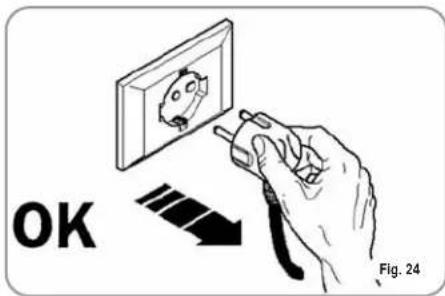
Before performing any cleaning operation, the machine must be cut off from the power supply (machine switched off and unplugged).
text_image
OK Fig. 24
WARNING
Do not use solvents, chlorine-based products or abrasives.
Cleaning the work area: remove the worktop, lifting it up from the front and sliding it out. Remove the water collection dish underneath and clean everything with hot water and cleansers.
Cleaning the bottom: To clean all the chromium-plated areas, use a soft, damp cloth.
8.3 CLEANING THE STAIN- LESS COFFEE-HOLDERS
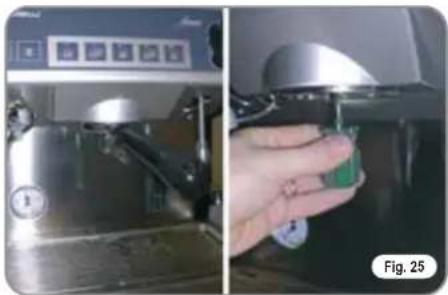
The stainless coffee-holders are situated under the delivery units, as shown in figure (Fig. 25).
natural_image
Two-panel image showing a stainless steel coffee machine and a hand holding a green product, both without visible text or symbols.NOTE: To clean proceed as follows:
- Turn the screw placed in the centre of the coffee-holder.
- Slide the coffee-holder out and check that its holes are not obstructed but clean.
- If obstructed, clean as described (Paragraph "CLEANING FILTERS AND FILTER-HOLDERS")
We recommend cleaning the coffee-holder once a week.
8.4 CLEANING THE UNIT WITH THE AID OF THE BLIND FILTER
The machine is pre-set for cleaning the delivery unit with a specific washing powder.
We recommend carrying out a washing cycle at least once a day with special cleansers.

CAUTION RISK OF INTOXICATION
Once the filter-holder has been removed, repeat delivery operations a few times to eliminate any cleanser residues.
To carry out the washing procedure, proceed as follows:
1) Substitute the filter with the delivery unit blind filter.
2) Fill it with two spoonfuls of special cleanser powder and insert it into the unit filter-holder.
3) Press one of the coffee keys and halt it after 10 seconds.
4) Repeat the procedure several times.
5) Remove the filter-holder and carry our a few deliveries.
8.5 CLEANING FILTERS AND FILTER-HOLDERS
Place two spoonfuls of special cleanser in half a litre of hot water and immerse filter and filter-holder (without its handle) in it leaving them to soak for at least half an hour. Then rinse abundantly with running water.
8.6 RESIN AND SOFTENER REGENERATION
To avoid scaling deposits in the boiler and in the heating exchangers, the softener must always be kept efficient. Therefore, the ionic resins must be regularly regenerated.
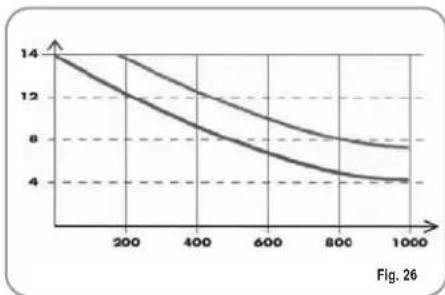
Regeneration times are established according to the quantity of coffee delivered daily and the hardness of the water utilised.
As an indication, regeneration times can be calculated on the basis diagram illustrated in Fig. 26.
line
| x | y1 | y2 | | ---- | ---- | ---- | | 0 | 14 | 14 | | 200 | 12 | 13 | | 400 | 10 | 11 | | 600 | 8 | 9 | | 800 | 6 | 7 | | 1000 | 4 | 5 |Regeneration procedures are as follows:
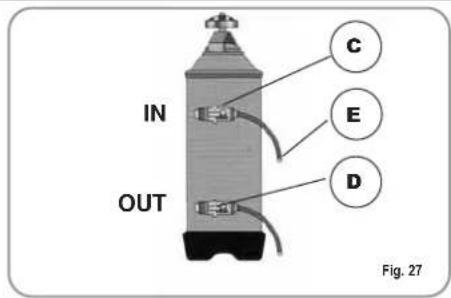
1) Turn the machine off and place a container large enough to contain at least 5 litres under tube E (Fig. 27).
Turn levers C and D from left to right; take the cap off by unscrewing knob and fill with 1 Kg normal kitchen salt (Fig. 28).
text_image
IN OUT C E D Fig. 27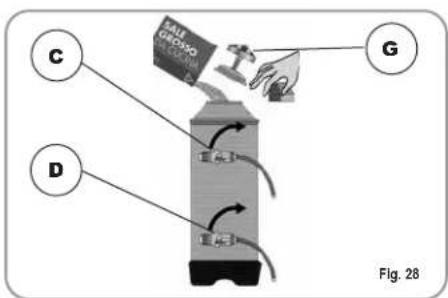
text_image
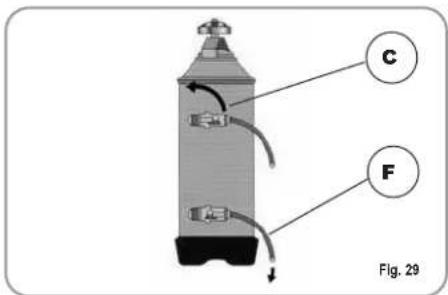
C D G Fig. 282) Put the cap back on and reposition lever C moving it towards the left (Fig. 29) and allowing tube F to discharge the salty water until it has been eliminated and the water becomes fresh again (about half and hour).
text_image
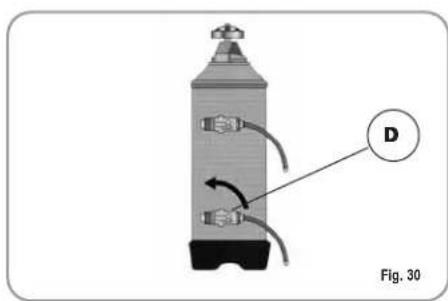
C F Fig. 293) Reposition lever D towards the left (Fig. 30).
natural_image
Diagram of a cylindrical device with internal tubing and labeled component D, no readable text or symbols present9. Appia V MACHINE FUNCTION MESSAGES
| DISPLAY AND KEY INDICATIONS | CAUSE | EFFECT | SOLUTION | NOTES |
Drawing of continued key  hing and delivery key hing and delivery key  | If the doser doesn't send out its set commands within the first three seconds from delivery onset. | If the delivery isn't manually halted, the maximum time limit (120 sec) will be blocked. | Interrupt delivery. | |
Drawing of continued key flashing.  | If within 90 sec. from onset, with pump inserted during the levelling, at 180 sec., if the level has not been re-established. | The pump, the resistor and all the functions will be halted. | Turn the machine off for at least 5 sec. and then switch it on again. |
Félicitations,
natural_image
Black and white photo of a modern espresso machine with control panel and side arm (no visible text or symbols)
text_image
Appia® MADE IN ITALYCARACTERISTIQUES TECHNIQUES
text_image
Technical diagram of a coffee machine with labeled parts and directional arrows indicating flow or movement.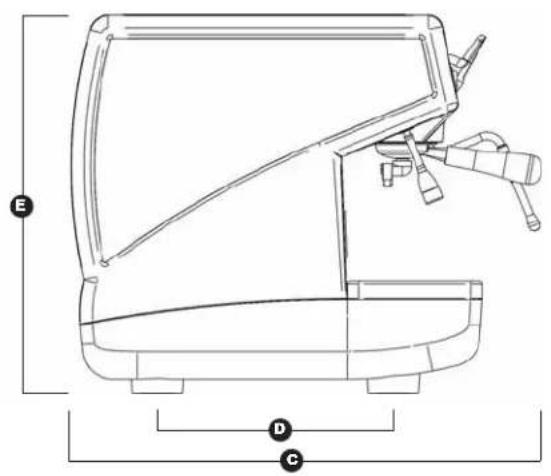
text_image
E D C| 1 Groupe 110V 1 | Groupe 220V | |||
| POIDS NET | 42 kg | 92.6 lb | 42 kg | 92.6 lb |
| POIDS BRUT 48 kg 106 lb 48 kg 106 lb | ||||
| PUISS. THERMIQUE | 1800 W 1800 | W 1500 W 1500 W | ||
| DIMENSIONS 400 mm | A | ^1 116" 400 m | A | ^1 116" |
| B 310 mm 12 | B 316" 310 mm | B 2 | B 316" | |
| C 545 mm 21 | C 716" 545 mm | C 1 | C 716" | |
| D 370 mm 14 | D 916" 370 mm | D 4 | D 916" | |
| E 530 mm 20 | E ^1 316" 530 mm | E 20 | E ^1 316" | |
| F 180 mm 7 | F 116" 180 mm | F | F 116" | |

text_image
Appia® MADE IN ITALYINDEX
CARACTERISTIQUES TECHNIQUES ...42
- DESCRIPTION 45
1.1 LISTE ACCESSOIRES 46
-
PRESCRIPTIONS DE SECURITE .....47
-
TRANSPORT ET DEPLACEMENT .....50
3.1 IDENTIFICATION MACHINE ....50
3.2 TRANSPORT 50
3.3 DEPLACEMENT ....50
-
INSTALLATION ET OPERATIONS PRELIMINAIRES ....51
-
REGLAGES DU TECHNICIEN QUALIFIE 52
- PROGRAMMATION APPIA V .....56
7.1 PROGRAMMATION DOSES .....56
7.2 PROGRAMMATION DOSES CAFE ....56
7.3 PROGRAMMATION EAU CHAUDE .....56
7.4 PROGRAMMATION LANCE VAPEUR AUTOSTEAM (OPTION) .....56
7.5 PROGRAMMATION DOSES STANDARD .....56
7.6 PROGRAMMATION PARAMETRES DE FONCTIONNEMENT ....57
- NETTOYAGE ET ENTRETIEN .....58
8.1 ARRET DE LA MACHINE ....58
8.2 NETTOYAGE DE LA CARROSSERIE .....58
8.3 NETTOYAGE DES DOUCHES INOX ....58
8.4 NETTOYAGE DU GROUPE A L'AIDE DU FILTRE BORGNE ....58
8.5 NETTOYAGE DES FILTRES ET DES SUPPORTS A FILTRES ....58
8.6 REVIVIFICATION DES RESINES DE L'ADOUCISSEUR ....59
- MESSAGES FONCTIONS MACHINE APPIA V ....60
INSTALLATION ELECTRIQUE APPIA V ...102
INSTALLATION ELECTRIQUE
APPIA ESSE 104
INSTALLATION HYDRAULIQUE .....106
Appia® MADE IN ITALY
1. DESCRIPTION V - Esseia
text_image
Labeled diagram of a coffee machine with numbered parts for identificationFig. 1
LEGENDE
natural_image
Simple electrical symbol icon with a plus sign inside a circle, labeled 'Fig. 4' (no text or numbers on the symbol itself)
natural_image
Illustration of a hand using a tool to adjust a small object on a screen, labeled 'OK' and 'Fig. 6' (no text or symbols on the diagram itself)
natural_image
Line drawing of a hand using a washing machine to press or adjust the product (no text or symbols visible)
natural_image
Simple line drawing of a mountainous landscape with a cross symbol overlay (no text or symbols present)
ATTENTION RISQUE D'INTOXICATION

natural_image
Illustration of a hand washing machine with a 'X' symbol, no text or symbols present
ATTENTION RISQUE DE BRULURES

3. TRANSPORT ET DEPLACEMENT
3.1 IDENTIFICATION DE LA MACHINE
RISQUE D'IMPACT OU D'ECRASEMENT
RISQUE D'IMPACT OU D'ECRASEMENT
natural_image
Illustration of a hand washing an apple from a sink, showing the process with a tool and cleaning steps (no text or symbols)natural_image
Experimental setup with labeled component A and grid-patterned surfaces, no readable text or symbols presentnatural_image
Close-up of a mechanical device with a transparent casing and internal components, labeled Fig. 14 (no readable text or symbols)natural_image
Close-up of a mechanical component with labeled point B and part number Fig. 15 (no text or symbols on the object itself)natural_image
Close-up of a hand holding a green component with a white circular mark and plus/minus signs, surrounded by tubing (no readable text or symbols)natural_image
Illustration of a hand using a tool to install a wall-mounted socket, with an arrow indicating direction (no text or symbols)natural_image
Close-up of a Siemens Elbow industrial machine (no visible text or symbols)LEGENDE TOUCHES
natural_image
Illustration of a hand using a magnifying glass to adjust a small object, labeled Fig. 21 (no text or symbols on the diagram itself)natural_image
Hand inserting a plug into a device panel with icons, labeled Fig. 22 (no text or symbols on the diagram itself)6.5 PREPARATION DU CAPPUCCINO
natural_image
Illustration of a hand pouring liquid into a cup using a washing machine (no text or symbols)6.6 SELECTION EAU CHAUDE

ATTENTION RISQUE DE BRULURES
| EAU TEMP. | VAPEUR |
| 0 sec. | 50°C |
natural_image
Two-panel image showing a kitchen machine and a hand holding a small green object, both without any visible text or symbols.natural_image
Diagram of a cylindrical device with internal tubing and labeled component D, no readable text or symbols present9. MESSAGES FONCTIONS MACHINE Appia V
natural_image
Black and white photo of a modern espresso machine with control panel and side arm (no visible text or symbols)
text_image
Appoia® MADE IN ITALYtext_image
Technical diagram of a coffee machine with labeled parts and directional arrows indicating flow or movement.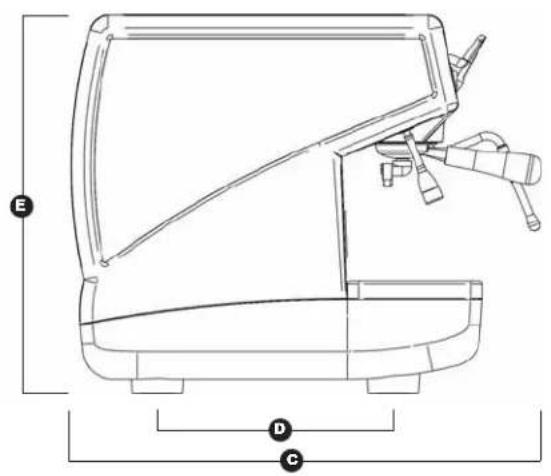
text_image
E D C| 1 Gruppe 110V 1 | Gruppe 220V | |||
| NETTOGEWICHT | 42 kg | 92.6 lb | 42 kg | 92.6 lb |
| BRUTTOGEWICHT | 48 kg | 106 lb | 48 kg | 106 lb |
| HEIZLEISTUNG | 1800 W | 1800 W | 1500 W | 1500 W |
| ABMESSUNGEN 400 | 1A 15 | A 116 " 400 m | A 15 | A 116 " |
| B 310 mm 12 | B 316 " 310 mm | B 2 | B 316 " | |
| C 545 mm 21 | C 716 " 545 mm | C 1 | C 716 " | |
| D 370 mm 14 | D 916 " 370 mm | D 4 | D 916 " | |
| E 530 mm 20 | E 1316 " 530 mm | E 20 | E 1316 " | |
| F 180 mm 7 | F 116 " 180 mm | F | F 116 " | |

text_image
Appia® MADE IN ITALYINHALTSVERZEICHNIS
text_image
Labeled diagram of a coffee machine with numbered parts for identificationAbb. 1
LEGENDE
natural_image
Symbol of a light bulb inside a dark circle, labeled 'Abb. 4' (no additional text or symbols)
natural_image
Hand holding a pen and pointing at a wall-mounted device with a cartoon face (no text or symbols on the device itself)natural_image
Line drawing of a hand using a sewing machine to press or adjust the product (no text or symbols visible)
natural_image
Simple line drawing of a mountainous landscape with a cross symbol overlay (no text or symbols present)
natural_image
Illustration of a hand washing a sink with a hand holding a small object, alongside a close-up of the device (no text or symbols present)natural_image
Experimental setup with labeled components A and Abb. 13, showing metallic surfaces and a central circular marker (no readable text or symbols beyond labels)natural_image
Close-up of a 3D printer with a black box and cable, showing internal components (no visible text or symbols)natural_image
Close-up of a mechanical component with a labeled section B and a circular arrow, no readable text or symbols present.natural_image
Close-up of a hand holding a valve with a green indicator, surrounded by tubing and a blue label (no readable text or symbols)natural_image
Hand installing a wall socket with an arrow indicating upward motion (no text or symbols)natural_image
Close-up of a Siemens Elastomniere industrial machine (no visible text or symbols on the device body)natural_image
Illustration of a hand using a magnifying glass to press a small object, with no text or symbols present.natural_image
Two-panel image showing a kitchen appliance with a hand holding a green tool, no visible text or symbols.natural_image
Black and white photo of a modern espresso machine with control panel and side arm (no visible text or symbols)
text_image
Appia® MADE IN ITALYCARACTERÍSTICAS TÉCNICAS
text_image
Technical diagram of a washing machine with labeled parts and directional arrows indicating flow or movement.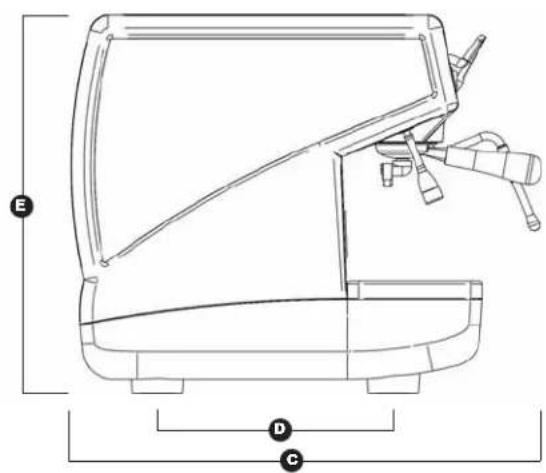
text_image
E D C| 1 Grupo 110V 1 Grupo 220V | ||||
| PESO NETO 42 kg 92.6 lb 42 kg 92.6 lb | ||||
| PESO BRUTO 48 kg 106 lb 48 kg 106 lb | ||||
| POT. TÉRMICA | 1800 W | 1800 W | 1500 W | 1500 W |
| MEDIDAS 400 mm 15 | A | ^11/16" 400 m A 15 | A | ^11/16" |
| B 310 mm 12 | B ^3/_16 " 310 mm B 2 | B | ^3/_16" | |
| C 545 mm 21 | C ^7/_16 " 545 mm C 1 | C | ^7/_16" | |
| D 370 mm 14 | D ^9/_16 " 370 mm D 4 | D | ^9/_16" | |
| E 530 mm 20 | E ^13/_16 " 530 m E 20 | E | ^13/_16" | |
| F 180 mm 7 | F ^1/_16 " 180 mm F | F | ^1/_16" | |

text_image
Appia® MADE IN ITALYINDICE
CARACTERISTICAS TECNICAS .....82
- DESCRIPCIÓN .....85
1.1 LISTA DE ACCESORIOS 86
text_image
Labeled diagram of a coffee machine with numbered parts for identificationFig. 1
LEYENDA
natural_image
Simple electrical symbol icon with three parallel lines inside a circle (no text or labels)
natural_image
Illustration of a hand using a tool to adjust a small object on a screen, labeled 'OK' and 'Fig. 6' (no text or symbols on the diagram itself)
natural_image
Line drawing of a hand using a handheld device to press or install a machine, no text or symbols present
natural_image
Simple line drawing of a landscape with mountains, trees, and a cross symbol (no text or labels)
natural_image
Illustration of a hand washing machine with a 'X' symbol, no text or symbols present
natural_image
Illustration of a hand washing a small object from a sink, showing the process with no text or symbols.natural_image
Experimental setup with labeled point A and scale bar, no readable text or symbols presentnatural_image
Close-up of a robotic arm interacting with a black mechanical device (no visible text or symbols)natural_image
Close-up of a mechanical component with a labeled part 'B' and a small hole, shown in view (no text or symbols beyond label)natural_image
Close-up of a hand holding a U-shaped tool with a green indicator, surrounded by tubing and mechanical components (no visible text or symbols)natural_image
Illustration of a hand using a tool to install an electrical socket into a wall, with an arrow indicating direction (no text or symbols present)natural_image
Close-up of a Siemens Elastomniere industrial machine (no visible text or symbols on the device body)LEYENDA BOTONES
natural_image
Illustration of a hand using a magnifying glass to adjust a small object, labeled Fig. 21 (no text or symbols on the diagram itself)natural_image
Hand pressing a button on a device panel with icons, labeled Fig. 22 (no text or symbols on the diagram itself)natural_image
Illustration of a hand pouring liquid into a cup on a kitchen sink, with no text or symbols present.natural_image
Two-panel image showing a hand holding a small green object next to a metallic machine (no visible text or symbols)natural_image
Diagram of a cylindrical device with internal tubing and labeled component D, no readable text or symbols present9. MENSAJES FUNCIONES MÁQUINA Appia V
text_image
Technical schematic diagram of a mechanical or fluid system with numbered components and labeled partsIMPIANTO IDRAULICO /PLUMBING SYSTEM /INSTALLATION HYDRAULIQUE /HYDRAULIKANLAGE /INSTLACIÓN HIDRÁULICA
| LEGENDA | LEGENDA | LÉGENDE | ZEICHENERKLÄRUNG | NOTA |
| 1 Rubinetto ingresso acqua2 Pompa3 Valvola di ritegno4 Valvola di espansione5 Elettrovalvola di livello6 Dosatore volumetrico7 Scambiatore di calore8 Elettrovalvola erogazione9 Valvola di sicurezza cald.10 Rubinetto vapore11 Pressostato12 Caldaia13 Resistenza14 Manometro doppia scala15 Depuratore16 Gruppo erogatore | 1 Water inlet valve2 Pump3 Check valve4 Expansion valve5 Level solenoid valve6 Volumetric doser7 Heat exchanger8 Delivery solenoid valve9 Boiler tank safety valve10 Steam valve11 Pressure switch12 Boiler tank13 Heating element14 Pressure gauge with dual scale15 Water softener16 Delivery group | 1 Robinet arrivée d'eau2 Pompe3 Soupape d'arrêt4 Soupape d'expansion5 Electrovanne de niveau6 Doseur volumétrique7 Echangeur de chaleur8 Electrovanne de distribution9 Soupape de sûreté chaudière10 Robinet vapeur11 Pressostat12 Chaudière13 Résistance14 Manomètre double échelle15 Dépurateur16 Groupe de distribution | 1 Hahn Wassereinlauf2 Pumpe3 Rückschlagventil4 Drosselventil5 Elektroventil Füllstand6 Volumendosierer7 Wärmetauscher8 Elektroventil Ausgabe9 Sicherheitsventil Wärmet.10 Dampfhahn11 Druckwächter12 Kessel13 Widerstand14 DruckmesserDoppelskala15 Reiniger16 Ausgabegruppe | 1 Grifo entrada agua2 Bomba3 Válvula de retención4 Válvula de expansión5 Electroválvula de nivel6 Dosador volumétrico7 intercambiador de calor8 electroválvula de erogación9 Válvula de seguridad caldera10 Grifo vapor11 Presostato12 Caldera13 Resistencia14 Manómetro doble escala15 Depurador16 Grupo erogador |
NOTE / NOTES:

nuova
SIMONELLI®
espresso coffee machines
Nuova Distribution Centre
LLC 6940Salashan PKWY BLDG A 98248
Ferdale, WA
Tel. +1.360.3662226
Fax +1.3603664015
videoconf.+1.360.3188595
espresso coffee machines
Via M. d'Antegiano, 6
62020 Belforte del Chienti
Macerata Italy
Tel. +39.0733.9501
Fax +39.0733-950242