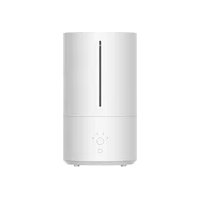
Xiaomi Smart Humidifier 2 - Humidifier

Smart Humidifier 2 - Humidifier Xiaomi - Free user manual and instructions

Find the device manual for free Smart Humidifier 2 Xiaomi in PDF.

English EN Download 💬 AI Question 10 questions ⚙️ Specs
📄

Document temporarily unavailable

The manual is currently being transferred to our new server. It will be accessible again in a few hours. Thank you for your patience.

Pick your language and provide your email: we'll send you a specifically translated version.
Product type Smart humidifier
Brand Xiaomi
Model Smart Humidifier 2 (MJJSQ05DY)
Dimensions 190 × 335 mm
Net weight 1.57 kg
Water tank capacity 4.5 L
Humidification capacity 350 mL/h
Noise ≤38 dB(A)
Rated voltage 220-240 V~, 50/60 Hz
Rated power 28 W
Standby power consumption ≤0.5 W (simple standby), ≤2.0 W (network standby)
Wireless connectivity Wi-Fi IEEE 802.11 b/g/n 2.4 GHz, Bluetooth 4.2
Operating modes Level 1, Level 2, Level 3, Constant humidity (60 % RH recommended)
UV sterilization Built-in UV-C lamp, turns on with the device
Essential oil compartment Yes, with replaceable cotton fiber
Dry-run protection Yes, automatic shutdown if tank empty
Tank removal protection Yes, automatic shutdown if tank removed
Over-humidity protection Yes, automatic switch to level 1 if humidity >70 % RH for 30 min (disablable in app)
Recommended cleaning Tank every 3 days, filter at least once/week, device once/week
Operating temperature 5 °C to 40 °C
Operating humidity 10 % - 80 % RH
Spare parts / repairability Replaceable cotton fiber for essential oils every 3 months; do not disassemble yourself, contact after-sales service
General information Mi Home / Xiaomi Home app compatible; EU declaration available on www.mi.com

Frequently Asked Questions - Smart Humidifier 2 Xiaomi

How to install the Xiaomi Smart Humidifier 2?
Remove the water tank, open the lid, add water to the maximum mark (4.5 L). Replace the tank by aligning the water level window with the power button. Plug in the device, it will beep in standby mode. Press the power button to start.
How to use constant humidity mode?
Press the mode button several times until the constant humidity indicator lights up. This mode maintains humidity at 60 % RH by default. The humidifier automatically adjusts the level: if humidity is below 60 %, it switches to level 3; when it reaches 60 %, it switches back to level 1.
Can I add essential oils?
Yes, place a few drops of essential oil on the provided cotton fiber, then insert the fiber into the essential oil compartment on the top. Never pour oil elsewhere, as this could damage the device.
How to clean the humidifier?
Turn off and unplug the device. Clean the water tank every 3 days with fresh water and a soft cloth. For limescale, use citric acid. Clean the filter at least once a week. Wipe the exterior with a damp cloth. Dry all parts before reassembling.
What to do if the humidifier does not turn on?
Check that the device is plugged in and the water tank has water. If the tank is empty, add water and press the power button. If the problem persists, contact after-sales service.
How to connect the humidifier to the Mi Home app?
Download the Mi Home / Xiaomi Home app. Open the app, tap '+' at the top right, and follow the prompts. Ensure that Wi-Fi is enabled on the humidifier (power button + mode button pressed simultaneously). The Wi-Fi indicator should flash. If necessary, reset Wi-Fi by holding the mode button for 7 seconds.
What does the red light on the humidifier mean?
The four mode indicators turning red indicate either a lack of water (tank empty) or water tank removal. The humidifier stops automatically. Fill with water or replace the tank, then press the power button to restart.
Is it safe to let the humidifier run at night?
Yes, use constant humidity mode to avoid excessive humidity. The device is equipped with dry-run protection and tank removal protection. It also has a UV-C lamp to sterilize the water. Ensure the device is on a flat and stable surface.
How to replace the cotton fiber in the essential oil compartment?
Open the essential oil compartment, remove the old cotton fiber and insert a new one. It is recommended to replace the fiber every 3 months for optimal diffusion.
What to do if the mist is too weak?
Clean the air inlet and mist outlet with a soft cloth to remove dust. Make sure the water tank is filled. If the problem persists, the atomizer or fan may be damaged; contact after-sales service.

User questions about Smart Humidifier 2 Xiaomi

0 question about this device. Answer the ones you know or ask your own.

Ask a new question about this device

The email remains private: it is only used to notify you if someone responds to your question.

No questions yet. Be the first to ask one.

Download the instructions for your Humidifier in PDF format for free! Find your manual Smart Humidifier 2 - Xiaomi and take your electronic device back in hand. On this page are published all the documents necessary for the use of your device. Smart Humidifier 2 by Xiaomi.
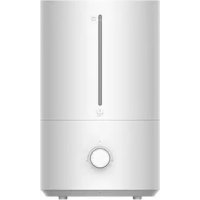
USER MANUAL Smart Humidifier 2 Xiaomi

Manual assistant
Powered by Anthropic
Waiting for your message
Product information

Brand : Xiaomi

Model : Smart Humidifier 2

Category : Humidifier