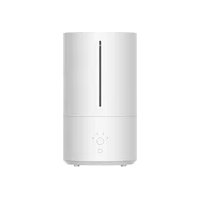
Smart Humidifier 2 - Humidifier Xiaomi - Free user manual and instructions
Find the device manual for free Smart Humidifier 2 Xiaomi in PDF.



| Product type | Smart humidifier |
| Brand | Xiaomi |
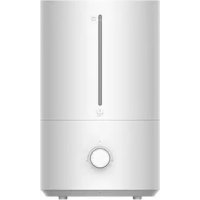
| Model | Smart Humidifier 2 (MJJSQ05DY) |
| Dimensions | 190 × 335 mm |
| Net weight | 1.57 kg |
| Water tank capacity | 4.5 L |
| Humidification capacity | 350 mL/h |
| Noise | ≤38 dB(A) |
| Rated voltage | 220-240 V~, 50/60 Hz |
| Rated power | 28 W |
| Standby power consumption | ≤0.5 W (simple standby), ≤2.0 W (network standby) |
| Wireless connectivity | Wi-Fi IEEE 802.11 b/g/n 2.4 GHz, Bluetooth 4.2 |
| Operating modes | Level 1, Level 2, Level 3, Constant humidity (60 % RH recommended) |
| UV sterilization | Built-in UV-C lamp, turns on with the device |
| Essential oil compartment | Yes, with replaceable cotton fiber |
| Dry-run protection | Yes, automatic shutdown if tank empty |
| Tank removal protection | Yes, automatic shutdown if tank removed |
| Over-humidity protection | Yes, automatic switch to level 1 if humidity >70 % RH for 30 min (disablable in app) |
| Recommended cleaning | Tank every 3 days, filter at least once/week, device once/week |
| Operating temperature | 5 °C to 40 °C |
| Operating humidity | 10 % - 80 % RH |
| Spare parts / repairability | Replaceable cotton fiber for essential oils every 3 months; do not disassemble yourself, contact after-sales service |
| General information | Mi Home / Xiaomi Home app compatible; EU declaration available on www.mi.com |
Frequently Asked Questions - Smart Humidifier 2 Xiaomi
User questions about Smart Humidifier 2 Xiaomi
0 question about this device. Answer the ones you know or ask your own.
Ask a new question about this device
Download the instructions for your Humidifier in PDF format for free! Find your manual Smart Humidifier 2 - Xiaomi and take your electronic device back in hand. On this page are published all the documents necessary for the use of your device. Smart Humidifier 2 by Xiaomi.
USER MANUAL Smart Humidifier 2 Xiaomi
Read this manual carefully before use, and retain it for future reference.
- This appliance can be used by children aged from 8 years and above and persons with reduced physical, sensory or mental capabilities or lack of experience and knowledge if they have been given supervision or instruction concerning use of the appliance in a safe way and understand the hazards involved. Children shall not play with the appliance. Cleaning and user maintenance shall not be made by children without supervision.
- This appliance is not intended for use by persons (including children) with reduced physical, sensory or mental capabilities, or lack of experience and knowledge, unless they have been given supervision or instruction concerning use of the appliance by a person responsible for their safety.
- If the supply cord is damaged, it must be replaced by the manufacturer, its service agent or similarly qualified persons in order to avoid a hazard.
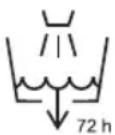
- Clean the water tank every 3 days.
- Be aware that high humidity levels may encourage the growth of biological organisms in the environment.
- Do not permit the area around the humidifier to become damp or wet. If dampness occurs, turn the output of the humidifier down. If the humidifier output volume cannot be turned down, use the humidifier intermittently. Do not allow absorbent materials, such as carpeting, curtains, drapes, or tablecloths, to become damp.
- Unplug the appliance during filling and cleaning.
- Never leave water in the reservoir when the appliance is not in use.
- Empty and clean the humidifier before storage. Clean the humidifier before next use.
-
Empty the water tank and refill every third day. Before refilling, clean it with fresh tap water or cleaning agents if required by the manufacturer. Remove any scale, deposits, or film that has formed on the sides of the water tank or on interior surfaces, and wipe all surfaces dry.
-
WARNING: Micro-organisms that may be present in the water or in the environment where the appliance is used or stored, can grow in the reservoir and be blown in the air causing very serious health risks when the water is not renewed and the tank is not cleaned properly every 3 days.
- This appliance contains a UV emitter. Do not stare at the light source.
- Do not plug in or unplug the humidifier with wet hands so as to avoid the risk of electric shocks.
- Do not attempt to disassemble, repair, or modify the humidifier by yourself.
- Do not touch the vaporizer once the humidifier is turned on. Otherwise, you may feel a sting.
- Do not tangle, damage, or place heavy objects on the power cord so as to avoid the risk of electric shocks, short circuits, or fire.
- Immediately unplug the humidifier if there is an error during use, and contact after-sales service team.
- During the working of the humidifier, do not remove the water tank from the base, and never touch the water conduits or any components inside the reservoir.
- Unplug the humidifier during thunderstorms or when you do not plan to use it for an extended period of time.
- Do not turn the humidifier upside down when it is working or there is water in the tank so as to avoid damage to the internal electronic components.
- Do not add essential oils to any parts of the humidifier other than the essential oil compartment, otherwise it may cause damage to the humidifier.
- Please strictly follow the instructions in this user manual when using the humidifier. Users are responsible for any loss or damage that may arise from improper use of the humidifier.
Regulatory Compliance Information
WEEE Disposal and Recycling Information
natural_image
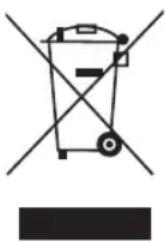
Simple line drawing of a trash bin with crossed lines indicating no waste or restriction (no text or symbols)All products bearing this symbol are waste electrical and electronic equipment (WEEE as in directive 2012/19/EU) which should not be mixed with unsorted household waste. Instead, you should protect human health and the environment by handing over your waste equipment to a designated collection point for the recycling of waste electrical and electronic equipment, appointed by the government or local authorities. Correct disposal and recycling will help prevent potential negative consequences to the environment and human health. Please contact the installer or local authorities for more information about the location as well as terms and conditions of such collection points.
EU Declaration of Conformity

Hereby, Guangdong Deerma Technology Co., Ltd. declares that the radio equipment type MJJSQ05DY is in compliance with Directive 2014/53/EU. The full text of the EU declaration of conformity is available at the following internet address:
http://www.mi.com/global/service/support/declaration.html
For detailed e-manual, please go to www.mi.com/global/support/user-guide
Product Overview
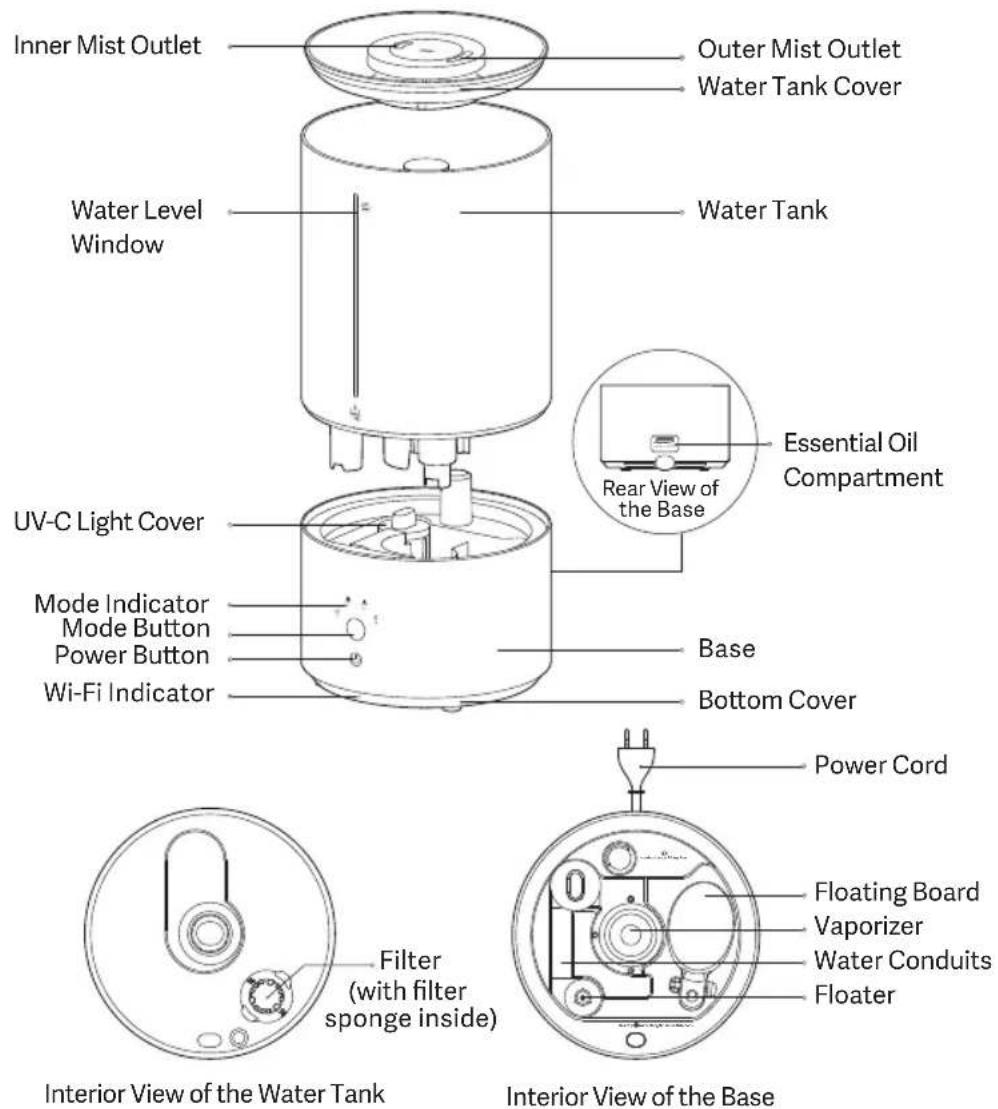
Note: Illustrations of product, accessories, and user interface in the user manual are for reference purposes only. Actual product and functions may vary due to product enhancements.
How to Install
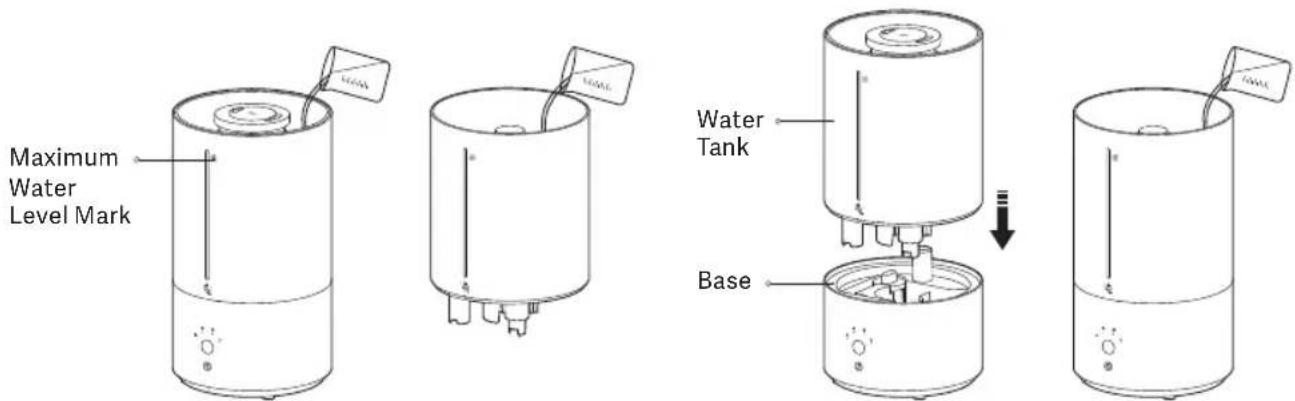
- Add water to the water tank from the hollow part of the water tank cover up to the maximum water level mark.
Notes:
- Remove the floating board fastener from the base before use.
- You can also remove the water tank and place it on a level surface, then open the water tank cover and add water. To reinstall the water tank, align the water level window with the power button and place the water tank onto the base. As well, you can open the water tank cover and add water directly without removing the water tank.
- Make sure that the water tank and the base are placed steadily on a level surface during water adding.
- Do not splash water on the mist outlets during water adding to avoid water leakage.
- Put an appropriate amount of essential oil (sold separately) onto the fiber cotton. Then place the cotton in the essential oil compartment and reinstall the compartment.
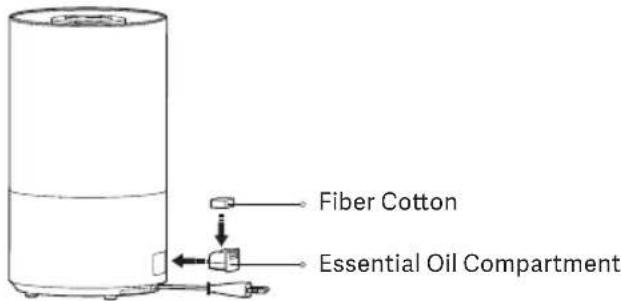
Warning: Do not add toxic and hazardous substances into the essential oil compartment.
How to Use
- Connecting to power: Plug the humidifier into an electrical outlet that meets the humidifier's requirements. When the humidifier makes a beep, it is in standby mode.
- Turning on/off: Press the power button to turn on/off the humidifier. When turned on for the first time, the humidifier is at level 1 by default.
- Switching the mode: Press the mode button to cycle through the modes of level 1, level 2, level 3, and constant humidity, and the corresponding indicator will remain white. After the humidifier is turned off and turned back on again, the mode will be the last used one.
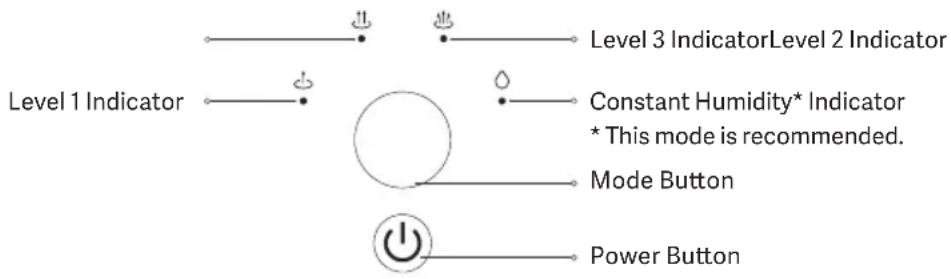
Mode Indicator Descriptions
| Mode in operation | The indicator of the corresponding mode remains white. |
| Insufficient water in the water tank | The four indicators remain red for 30 seconds, then go out. |
| Water tank removed | The four indicators remain red and go out after the water tank is reinstalled. |
- Constant humidity mode (recommended): This mode will maintain humidity at 60% RH by default. If the current humidity does not reach 60% RH, the humidifier will switch to level 3. When the ambient humidity reaches 60% RH, the humidifier will automatically switch to level 1. When this mode is in use, the constant humidity indicator will remain on.
Note: It is recommended to use the constant humidity mode to prevent tables from being wet due to inappropriate mode settings. - UV sterilization: The humidifier has a built-in UV-C light, which is turned on simultaneously with the humidifier. After the humidifier is turned off, the UV-C light will turn off in two minutes.
Note: The UV-C light cover needs to be installed correctly by aligning the marks on the humidifier. Otherwise, the humidifier cannot work properly. -
Enabling/Disabling Wi-Fi: Press the power button and the mode button simultaneously to enable or disable Wi-Fi.
-
Resetting the Wi-Fi: Press and hold the mode button for seven seconds. When the Wi-Fi indicator blinks orange, the Wi-Fi is reset successfully.
Note: Within 30 minutes after the Wi-Fi is reset successfully, the Wi-Fi indicator will remain blue for three minutes and then go out if the humidifier is connected to the network successfully. If the humidifier cannot connect to the network within 30 minutes, the Wi-Fi function will be disabled. - Dry running protection: When the water tank runs out of water, the humidifier will beep three times, and the indicators will remain red for 30 seconds and go out. Then the humidifier will enter standby mode. After adding water, press the power button to turn the humidifier on.
- Water tank removal protection: When the water tank is removed, the humidifier will beep three times, and all mode indicators will remain red. Then the humidifier will stop working. After the water tank is reinstalled, the indicators will go out and the humidifier will enter standby mode. Press the power button to turn the humidifier on.
• Over-humidity protection: When operating at level 3, the humidifier will automatically switch to level 1 if it detects that the ambient humidity exceeds 70% RH for 30 minutes. This function can prevent tables from being wet by a large amount of moisture.
Note: This function is disabled by default and can be enabled in the app.
Connecting with the Mi Home/Xiaomi Home App
This product works with the Mi Home/Xiaomi Home app*. Use the Mi
Home/Xiaomi Home app to control your device, and to interact with other smart home devices.
Scan the QR code to download and install the app. You will be directed to the connection setup page if the app is installed already. Or search for "Mi Home/Xiaomi Home" in the app store to download and install it. Open the Mi Home/Xiaomi Home app, tap "+" on the upper right, and then follow the instructions to add your device.
* The app is referred to as Xiaomi Home app in Europe (except for Russia). The name of the app displayed on your device should be taken as the default.
Note: The version of the app might have been updated, please follow the instructions based on the current app version.


works with Mi Home
Care & Maintenance
• Always turn off and unplug the humidifier before cleaning it.
- The humidifier can be wiped directly with a clean, soft, and damp cloth, and it is recommended to clean it once a week.
- It is recommended to clean the filter at least once a week and the water tank every three days.
- To remove the scale in the water tank, you can pour citric acid (sold separately) into the tank, wipe off the scale with a cotton swab or soft brush, and then clean the tank with water.
- If the humidifier will not be used for an extended period, empty the water tank but do not pour water along the side with buttons. Then clean and dry all the parts before storing the humidifier.
- It is recommended to replace the fiber cotton in the essential oil compartment every three months.
Precautions
Installing the Humidifier
• To avoid electric shocks, fires, personal injury, or other damage, make sure the humidifier is properly used.
- Do not connect the humidifier to the electrical outlet until it is fully assembled.
- Do not disassemble the humidifier.
Moving the Humidifier
- Turn off and unplug the humidifier before moving it.
- When transporting or moving the humidifier, empty the water tank first.
Placing the Humidifier
- When using the humidifier for the first time in a new environment, leave it at room temperature for 30 minutes before use; otherwise, the water tank may be damaged due to sudden temperature changes.
- Do not place the humidifier directly on wooden surfaces to prevent surfaces from being damaged or deformed caused by moisture.
- Do not place the humidifier within a distance of two meters from furniture and appliances to protect furniture and appliances from moisture.
- Keep the humidifier away from heat sources and avoid exposing it to direct sunlight.
• Empty the water tank before placing it separately. - Do not use the humidifier on a blanket or towel to avoid blocking the air inlet and wetting the table.
Power Cord
To avoid fires, electric shocks, or other damage, use the power cord and electrical outlet as instructed below:
- The power cord must be plugged into a suitable electrical outlet.
- Do not pull on the power cord.
• Always unplug the humidifier before carrying out any maintenance or moving it.
Water Tank
- Do not add water over 40^ into the water tank to avoid damage to the humidifier.
- Do not add water through the mist outlets.
- When there is water at the bottom of the humidifier, wipe the water off with a dry cloth to avoid damaging the humidifier.
- Do not use the humidifier in environments where the temperature is below 0^ , as the water in the water tank may freeze and cause damage to the humidifier. Always empty the water out of the water tank in such environments.
- Do not place any metal objects, chemicals, or detergent into the water tank when the humidifier is in use, as this will damage the humidifier and cause air quality deterioration.
• Always turn off and unplug the humidifier before emptying the water tank.
Using the Humidifier
- Immediately stop using the humidifier if it makes unusual sounds, gives off bad odors, or overheats.
- Keep hair and fabrics away from the humidifier to prevent them from being caught in or blocking the air inlet and the air outlet.
- Do not sit on, lean on or tilt the humidifier.
- When using the humidifier in conjunction with gas-fueled appliances, such as gas stoves and gas heaters, make sure there is sufficient ventilation to avoid carbon monoxide poisoning.
Usage Restrictions
Follow the instructions below to avoid electric shocks, fires, or other damage:
- Always place the humidifier on a level surface. Otherwise, the water level reading may be incorrect or the water tank may overflow.
- The voltage of the power source must be the same as the rated voltage of the humidifier. Do not use the humidifier if the voltages do not match.
Specifications
| Name: Humidifier | Humidifying Capacity: 350 mL/h * |
| Model: MJJSQ05DY | Noise: ≤ 38 dB(A) |
| Rated Voltage: 220–240 V~ | Net Weight: 1.57 kg |
| Rated Power: 28 W | Water Tank Capacity: 4.5 L |
| Rated Frequency: 50/60 Hz | Item Dimensions: Φ 190 × 335 mm |
| Operation Frequency: 2400–2483.5 MHz | Maximum Output Power: <20 dBm |
| Operating Temperature: 5°C to 40°C | Operating Humidity: 10%–80% RH |
| Wireless Connectivity: Wi-Fi IEEE 802.11 b/g/n 2.4 GHz, Bluetooth 4.2 | |
| Power Consumption | Time to Enter the Condition |
| Standby mode: ≤ 0.5 W | Standby mode: ≤ 20 min |
| Networked standby mode: ≤ 2.0 W | Networked standby mode: ≤ 20 min |
* The humidifying capacity was tested by CVC Testing Technology Co., Ltd. according to the standard GB/T 23332-2018. The tested mist dispensing angle is 180^ . Test Report No.: WTS2022-8606.
Under normal use of condition, this equipment should be kept a separation distance of at least 20 cm between the antenna and the body of the user.
Troubleshooting
| Issue Possible Cause | Solution | |
| The humidifier cannot turn on normally. | The humidifier is not connected to power. | Check if the humidifier is plugged in properly. |
| The water is running out in the water tank. | Add water to the water tank. | |
| The humidifier does not generate wind or mist when it is working. | Fan error | Contact the after-sales service team. |
| The vaporizer is damaged. | ||
| The mist volume is too small. | The air inlet or the mist outlet is blocked. | Clean the air inlet or the mist outlet. |
Note: If you cannot fix the issues with the above solutions, please contact the after-sales service team.
natural_image
Simple line drawing of a trash bin with crossed lines indicating no waste or restriction (no text or symbols)DBA9B15B
natural_image
Simple line drawing of a trash bin with no text or symbolsDBA9B15B
natural_image
Simple line drawing of a trash bin with no text or symbolsRACCOLTA DIFFERENZIATA
natural_image
Simple line drawing of a trash bin with no text or symbolsDBA9B15B
Cura e manutenzione
natural_image
Simple line drawing of a trash bin with no text or symbolsDBA9B15B
Pflege und Wartung
natural_image
Simple line drawing of a trash bin with crossed lines indicating no waste or restriction (no text or symbols)DBA9B15B
• presents the purpose of the source
DBA9B15B
natural_image
Simple line drawing of a trash bin with crossed lines indicating no waste or restriction (no text or symbols)DBA9B15B
Bakım
For further information, please go to www.mi.com
Manufactured for: Xiaomi Communications Co., Ltd.
Manufactured by: Guangdong Deerma Technology Co., Ltd.
(a Mi Ecosystem company)
Address: No.4-1 Longhui Road, Malong Village Committee, Beijiao Town, Shunde District, Foshan City, Guangdong Province, China
User Manual Version: V1.0
Dirección: No.4-1 Longhui Road, Malong Village Committee, Beijiao Town, Shunde District, Foshan City, Guangdong Province, China
Адрес: No.4-1 Longhui Road, Malong Village Committee, Beijiao Town, Shunde District, Foshan City, Guangdong Province, China
Adresse : No.4-1 Longhui Road, Malong Village Committee, Beijiao Town, Shunde District, Foshan City, Guangdong Province, China
Indirizzo: No.4-1 Longhui Road, Malong Village Committee, Beijiao Town, Shunde District,
Foshan City, Guangdong Province, China
Adresse: No.4-1 Longhui Road, Malong Village Committee, Beijiao Town, Shunde District,
Foshan City, Guangdong Province, China
Adres: No.4-1 Longhui Road, Malong Village Committee, Beijiao Town, Shunde District,
Foshan City, Guangdong Province, China
No.4-1 Longhui Road, Malong Village Committee, Beijiao Town, Shunde District, :العنوان
Foshan City, Guangdong Province, China
Adres: No.4-1 Longhui Road, Malong Village Committee, Beijiao Town, Shunde District,
Foshan City, Guangdong Province, China
Xiaomi Technology Netherlands B.V.
Prinses Beatrixlaan 582, 2595BM, The Hague, The Netherlands
contact@support.mi.com
UK REP.
Xiaomi Technology UK Limited
Davidson House, Forbury Square, Reading, Berkshire RG1 3EU
contact@support.mi.com
- Regulatory Compliance Information
- WEEE Disposal and Recycling Information
- EU Declaration of Conformity
- Product Overview
- How to Install
- How to Use
- Connecting with the Mi Home/Xiaomi Home App
- Care & Maintenance
- Precautions
- Installing the Humidifier
- Moving the Humidifier
- Placing the Humidifier
- Power Cord
- Water Tank
- Using the Humidifier
- Usage Restrictions
- Cura e manutenzione
- Pflege und Wartung
- Bakım
Brand : Xiaomi
Model : Smart Humidifier 2
Category : Humidifier