Phoenix Inverter 123000 230V - Power inverter VICTRON ENERGY - Free user manual and instructions
Find the device manual for free Phoenix Inverter 123000 230V VICTRON ENERGY in PDF.



| Product type | Pure sine wave inverter (converter) |
| Brand | Victron Energy |
| Model | Phoenix Inverter 123000 230V (12/3000) |
| Dimensions (H x W x D) | 362 x 258 x 218 mm |
| Weight | 18 kg |
| Power supply (DC input voltage) | 9.5 – 17 V DC |
| Nominal output power (25°C) | 3000 VA |
| Continuous power (25°C) | 2400 W |
| Peak power | 6000 W |
| Output voltage | 230 VAC ±2% |
| Output frequency | 50 Hz ±0.1% (adjustable 60 Hz) |
| Maximum efficiency | 92% |
| Technology | SinusMax (pure sine wave, high frequency) |
| Integrated protections | Short circuit, overload, battery over/under-voltage, excessive temperature, input ripple |
| Programmable relay | Yes (alarm or other function) |
| Parallel/three-phase function | Up to 6 units in parallel, three-phase configuration possible |
| Configuration | By DIP switches or PC (free VEConfigure software) |
| Protection rating (IP) | IP21 |
| Housing material | Aluminum (blue RAL 5012) |
| Operating temperature | -40 to +65°C |
| Cooling | Fan |
| Battery connection | M8 bolts (2 x positive, 2 x negative) |
| 230 V connection | Screw terminals 13 mm² (AWG 6) |
| Safety class | Class I (grounding required) |
| Maintenance and cleaning | No specific maintenance. Check connections once a year. Clean with a dry cloth, avoid moisture, oil, and dust. |
| Spare parts and repairability | No user-serviceable parts. Contact Victron Energy support. |
| General information | SinusMax technology for high instantaneous power. Silent operation. Suitable for inductive loads (motors, compressors). |
Frequently Asked Questions - Phoenix Inverter 123000 230V VICTRON ENERGY
User questions about Phoenix Inverter 123000 230V VICTRON ENERGY
0 question about this device. Answer the ones you know or ask your own.
Ask a new question about this device
Download the instructions for your Power inverter in PDF format for free! Find your manual Phoenix Inverter 123000 230V - VICTRON ENERGY and take your electronic device back in hand. On this page are published all the documents necessary for the use of your device. Phoenix Inverter 123000 230V by VICTRON ENERGY.
USER MANUAL Phoenix Inverter 123000 230V VICTRON ENERGY
Phoenix Inverter (with firmware xxxx400 or higher)
12 | 3000 | 230V 24 | 3000 | 230V 48 | 3000 | 230V
24 | 5000 | 230V 48 | 5000 | 230V
1. SAFETY INSTRUCTIONS
In general
Please read the documentation supplied with this product first, so that you are familiar with the safety signs en directions before using the product.
This product is designed and tested in accordance with international standards. The equipment should be used for the designated application only.
WARNING: DANGER OF ELECTRICAL SHOCK
The product is used in combination with a permanent energy source (battery). Even if the equipment is switched off, a dangerous electrical voltage can occur at the input and/or output terminals. Always switch the AC power off and disconnect the battery before performing maintenance.
The product contains no internal user-serviceable parts. Do not remove the front panel and do not put the product into operation unless all panels are fitted. All maintenance should be performed by qualified personnel.
Never use the product at sites where gas or dust explosions could occur. Refer to the specifications provided by the manufacturer of the battery to ensure that the battery is suitable for use with this product. The battery manufacturer's safety instructions should always be observed.
WARNING: do not lift heavy objects unassisted.
Installation
Read the installation instructions before commencing installation activities.
This product is a safety class I device (supplied with a ground terminal for safety purposes). The chassis must be grounded. A grounding point is located on the outside of the product. If it can be assumed that the grounding protection is damaged, the product should be taken out of operation and prevented from accidentally being put into operation again; contact qualified maintenance personnel.
Ensure that the connection cables are provided with fuses and circuit breakers. Never replace a protective device by a component of a different type. Refer to the manual for the correct part.
Check before switching the device on whether the available voltage source conforms to the configuration settings of the product as described in the manual.
Ensure that the equipment is used under the correct operating conditions. Never operate it in a wet or dusty environment.
Ensure that there is always sufficient free space around the product for ventilation, and that ventilation openings are not blocked.
Install the product in a heatproof environment. Ensure therefore that there are no chemicals, plastic parts, curtains or other textiles, etc. in the immediate vicinity of the equipment.
Transport and storage
On storage or transport of the product, ensure that the battery leads are disconnected.
No liability can be accepted for damage in transit if the equipment is not transported in its original packaging.
Store the product in a dry environment; the storage temperature should range from -20°C to 60°C .
Refer to the battery manufacturer's manual for information on transport, storage, charging, recharging and disposal of the battery.
2. DESCRIPTION
SinusMax - Superior engineering
Developed for professional duty, the Phoenix range of inverters is suitable for the widest range of applications. The design criteria have been to produce a true sine wave inverter with optimised efficiency but without compromise in performance.
Employing hybrid HF technology, the result is a top quality product with compact dimensions, light in weight and capable of supplying power, problem-free, to any load.
Extra start-up power
A unique feature of the SinusMax technology is very high start-up power.
Conventional high frequency technology does not offer such extreme performance. Phoenix inverters, however, are well suited to power up difficult loads such as compressors, electric motors and similar appliances.
Virtually unlimited power thanks to parallel and 3-phase operation capability
Up to 6 inverters can operate in parallel to achieve higher power output. Six 24/5000 units, for example, will provide 30 kVA output power. Operation in 3-phase configuration is also possible.
To transfer the load to another AC source: the automatic transfer switch
If an automatic transfer switch is required, we recommend to using the MultiPlus or Quattro instead. The switch is included in these products and the charger function of the MultiPlus/Quattro can be disabled. Computers and other electronic equipment will continue to operate without disruption because the MultiPlus/Quattro features a very short switchover time (less than 20 milliseconds).
Programmable relay
The Phoenix Inverter is equipped with a programmable relay, which by default is set as an alarm relay. The relay can be programmed for all kinds of other applications however, for example as a starter relay for a generating set.
Programmable with DIP switches or personal computer
The Phoenix Inverter is supplied ready for use. The following features are available for changing certain settings if desired:
— The most important settings can be changed in a very simple manner, using DIP switches.
— All settings can be changed with a PC and free of charge software, downloadable from our website www.victronenergy.com
3. OPERATION
3.1 On/Off Switch
When switched to "on", the product is fully functional. The inverter will come into operation and the LED "inverter on" will light up.
3.2 Remote control
Remote control is possible with a simple on/off switch or with a Phoenix Inverter Control panel.
3.3 LED Indications
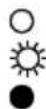
LED off
LED flashes
LED illuminated
Inverter
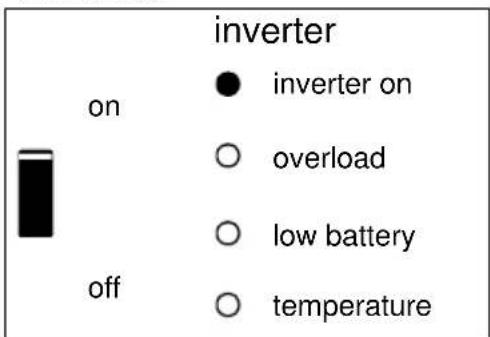
The inverter is on and supplies power to the load.
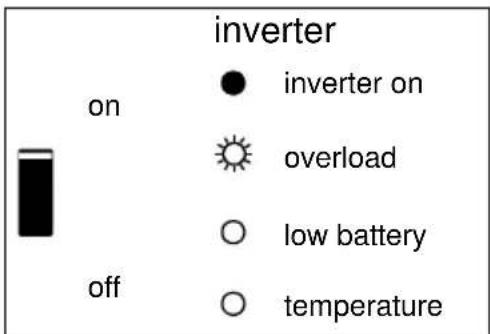
The nominal output of the inverter is exceeded. The “overload” LED flashes.
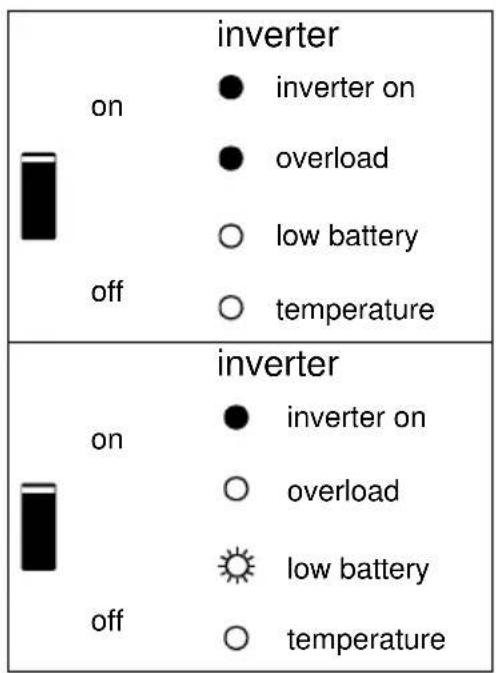
The inverter is switched off due to overload or short circuit.
The battery is almost fully exhausted.
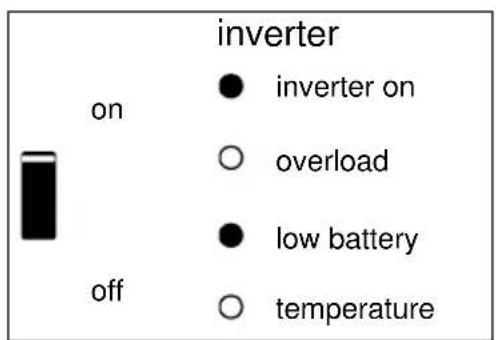
The inverter has switched off due to low battery voltage.
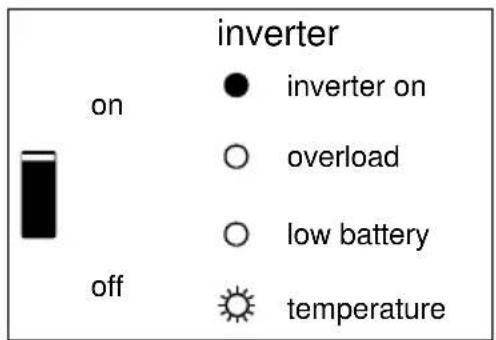
The internal temperature is reaching a critical level.
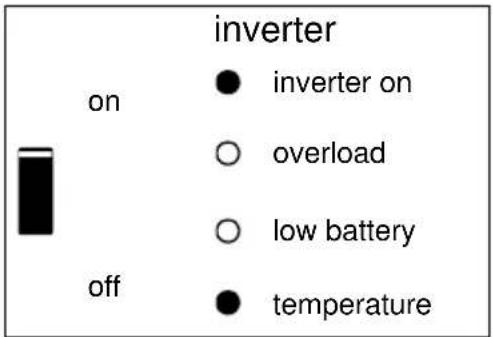
The inverter has switched off due to the electronics temperature being too high.
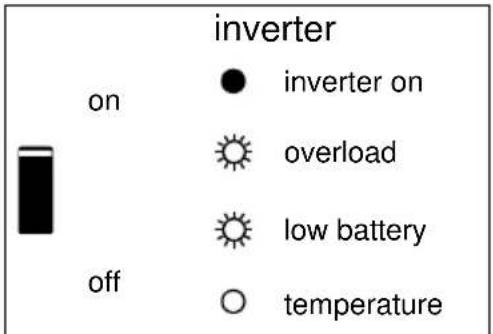
-If the LEDs are flashing alternately, the battery is nearly exhausted and the nominal output is exceeded. -If "overload" and "low battery" flash simultaneously, the ripple voltage on the battery terminals is too high.
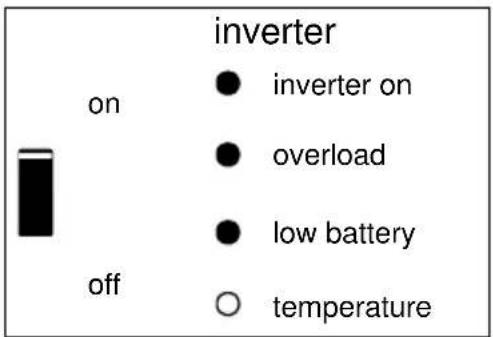
The inverter switched off due to excess ripple voltage on the battery terminals.
4. INSTALLATION

This product may only be installed by a qualified electrical engineer.
4.1 Location
The product must be installed in a dry and well-ventilated area, as close as possible to the batteries. There should be a clear space of at least 10 cm around the appliance for cooling.

Excessively high ambient temperature will result in the following:
- Reduced service life.
- Reduced peak capacity, or shutdown of the inverter.
Never position the appliance directly above the batteries.
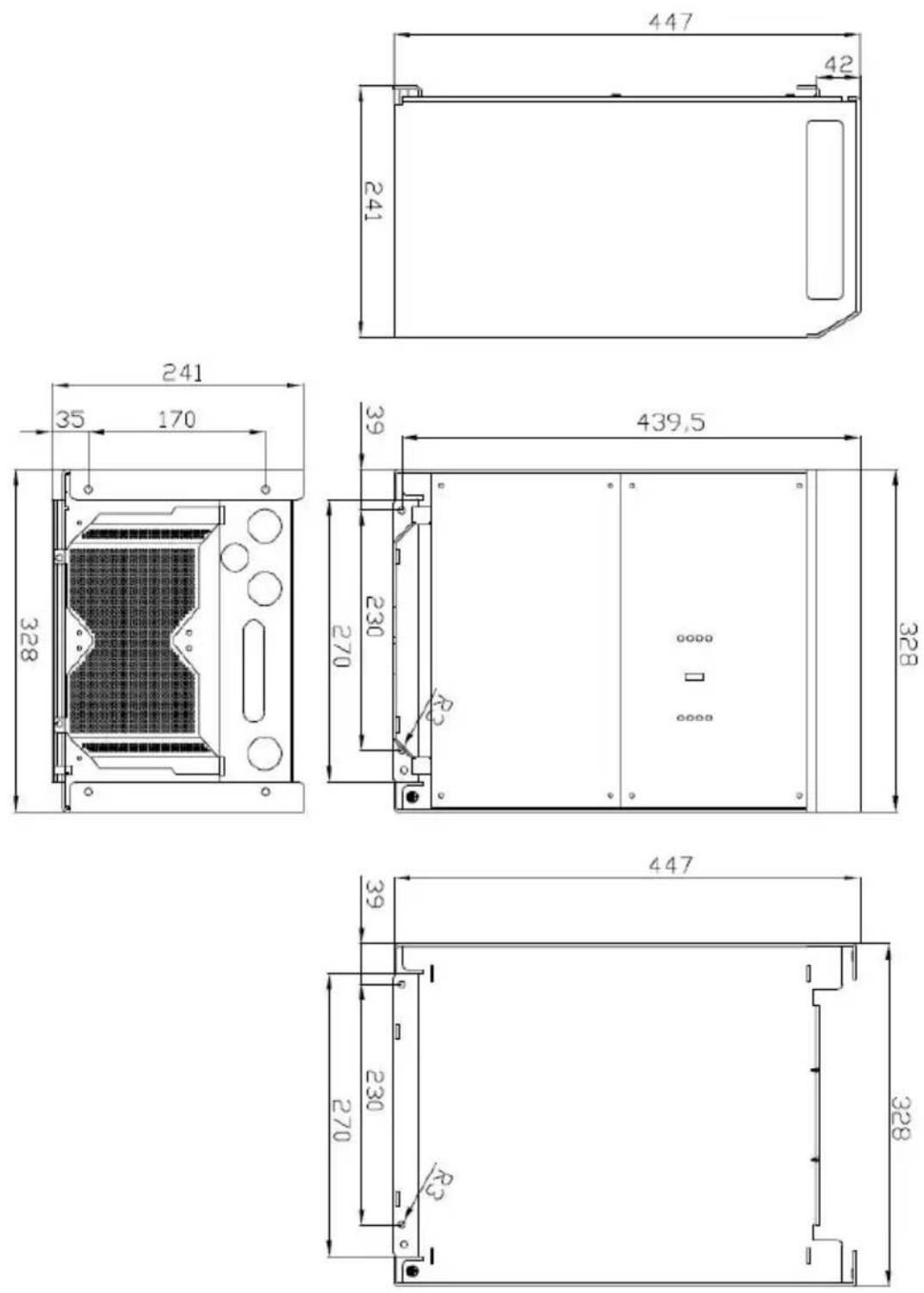
The Phoenix Inverter is suitable for wall mounting. For mounting purposes, a hook and two holes are provided at the back of the casing (see appendix G). The device can be fitted either horizontally or vertically. For optimal cooling, vertical fitting is preferred.

The interior of the product must remain accessible after installation.
Try to keep the distance between the product and the battery to a minimum in order to minimize cable voltage losses.

For safety purposes, this product should be installed in a heat-resistant environment. You should prevent the presence of e.g. chemicals, synthetic components, curtains or other textiles, etc., in the immediate vicinity.
4.2 Connection of battery cables
In order to utilize the full capacity of the product, batteries with sufficient capacity and battery cables with sufficient cross section should be used. See table.
| 12/3000 | 24/3000 | 48/3000 | |
| Recommended battery capacity (Ah) | 400–1200 | 200–700 | 100–400 |
| Recommended DC fuse | 400A | 300A | 125A |
| Recommended cross-section ( mm2 ) per + and - connection terminal | |||
| 0 – 5 m | 90 | 50 | 35 |
| 5 – 10 m | 120 | 90 | 70 |
| 24/5000 | 48/5000 | ||
| Recommended battery capacity (Ah) | 400–1400 | 200–800 | |
| Recommended DC fuse | 400A | 200A | |
| Recommended cross-section ( mm2 ) per + and - connection terminal | |||
| 0 – 5 m* | 2x 50 mm2 | 1x 70 mm2 | |
| 5 -10 m* | 2x 90 mm2 | 2x 70 mm2 |
* '2x' means two positive and two negative cables.
Remark: Internal resistance is the important factor when working with low capacity batteries. Please consult your supplier or the relevant sections of our book “electricity on board”, downloadable from our website.
Procedure
Proceed as follows to connect the battery cables:

Use a torque wrench with insulated box spanner in order to avoid shorting the battery.
Maximum torque: 11 Nm
Avoid shorting the battery cables.
- Undo the four screws at the front of the enclosure and remove the front panel.
- Connect the battery cables: see Appendix A.
- Tighten the nuts well for minimal contact resistance.
4.3 Connection of the AC cabling
This is a Safety Class I product (supplied with a protective grounding terminal).

The neutral output of the inverter is connected to the enclusure.
This to ensure proper functioning of a GFCI (or RCCB) to be installed in the AC output of the Inverter.
The chassis of the product must be connected to ground, or the frame (of a vehicle) or the ground plate or hull (of a boat).
The terminal block can be found on the printed circuit board, see Appendix A. Use a three-wire cable with a flexible core and a cross section of 2.5 or 4 mm 2
Procedure
The AC output cable can be connected directly to the terminal block "AC-out".
4.4 Optional Connections
A number of optional connections are possible:
4.4.1 Remote Control
The product can be remotely controlled in two ways.
- With an external switch (connection terminal H, see appendix A). Operates only if the switch on the Inverter is set to "on".
- With a Phoenix Inverter Control panel (connected to one of the two RJ48 sockets C, see appendix A). Operates only if the switch on the inverter is set to "on".
Only one remote control can be connected, i.e. either a switch or a remote control panel.
4.4.2. Programmable relay
The inverters are equipped with a multi-functional relay that by default is programmed as an alarm relay. (VEConfigure software needed to change relay functionality).
4.4.3 Parallel Connection
The Phoenix Inverter can be connected in parallel with several identical devices. To this end, a connection is established between the devices by means of standard RJ45 UTP cables. The system (Two or more inverters plus optional control panel) will require subsequent configuration (see Section 5).
In the event of connecting units in parallel, the following requirements must be met:
- A maximum of six units connected in parallel.
• Only identical devices with the same power ratings may be connected in parallel. - Battery capacity should be sufficient.
- The DC connection cables to the devices must be of equal length and cross-section.
- If a positive and a negative DC distribution point is used, the cross-section of the connection between the batteries and the DC distribution point must at least equal the sum of the required cross-sections of the connections between the distribution point and the Inverter units.
- Place the units close to each other, but allow at least 10 cm for ventilation purposes under, above and beside the units.
- UTP cables must be connected directly from one unit to the other (and to the remote panel). Connection/splitter boxes are not permitted.
- Only one remote control means (panel or switch) can be connected to the system.
4.4.4 Three-phase operation
The Phoenix Inverter can also be used in 3-phase wye (Y) configuration. To this end, a connection between the devices is made by means of standard RJ45 UTP cables (the same as for parallel operation). The system (Inverters plus an optional control panel) will require subsequently configuration (see Section 5).
Pre-requisites: see Section 4.4.3.
Note: the Phoenix Inverter is not suitable for 3-phase delta ( Δ ) configuration.
5. CONFIGURATION

- Settings may only be changed by a qualified electrical engineer.
- Read the instructions thoroughly before implementing changes.
5.1 Standard settings: ready for use
On delivery, the Phoenix Inverter is set to standard factory values. In general, these settings are suitable fo stand-alone operation.
Standard factory settings
Inverter frequency 50 Hz
Inverter voltage 230 VAC
Stand-alone / parallel / 3-phase
AES (Automatic Economy Switch) off
Programmable relay
stand-alone
alarm function
5.2 Explanation of settings
Settings that are not self-explanatory are described briefly below. For further information, please refer to the help files in the software configuration programs (see Section 5.3).
Inverter frequency
Output frequency
Adjustability: 50Hz; 60Hz
Inverter voltage
Output voltage of the Inverter.
Adjustability: 210 - 245V
Stand-alone / parallel operation / 2-3 phase setting
Using several devices, it is possible to:
• increase total inverter power (several devices in parallel)
- create a 3-phase system.
To this end, the devices must be mutually connected with RJ45 UTP cables.
Standard device settings, however, are such that each device operates in stand-alone operation. Reconfiguration of the devices is therefore required.
AES (Automatic Economy Switch)
If this setting is turned 'on', the power consumption in no-load operation and with low loads is decreased by approx. 20%, by slightly 'narrowing' the sinusoidal voltage.
The AES Mode can be set with a DIP switch.
Applicable in stand-alone configuration only.
Search Mode (Applicable in stand-alone configuration only)
If search mode is 'on', the power consumption in no-load operation is decreased by approx. 70%. In this mode the inverter is switched off in case of no load or very low load, and switches on every two seconds for a short period. If the output current exceeds a set level, the inverter will continue to operate. If not, the inverter will shut down again.
Not adjustable with DIP switches.
The Search Mode “shut down” and “remain on” load levels can be set with VEConfigure.
The standard settings are:
Shut down: 40 Watt (linear load)
Turn on: 100 Watt (linear load)
Programmable relay
By default, the programmable relay is set as an alarm relay, i.e. the relay will de-energise in the event of an alarm or a pre-alarm (inverter almost too hot, ripple on the input almost too high, battery voltage almost too low). Not adjustable with DIP switches.
5.3 Configuration by computer
All settings can be changed by means of a computer.
The most common settings can be changed by means of DIP switches (see Section 5.5).
NOTE:
This manual is intended for products with firmware xxxx400 or higher (with x any number)
The firmware number can be found on the microprocessor, after removing the front panel.
It is possible to update older units, as long as that same 7 digit number starts with either 26 or 27. When it starts with 19 or 20 you have an old microprocessor and it is not possible to update to 400 or higher.
For changing settings with the computer, the following is required:
- VEConfigure3 software: can be downloaded free of charge at www.victronenergy.com.
- A MK3-USB (VE.Bus to USB) interface. Alternatively, the Interface MK2.2b (VE.Bus to RS232) can be used (RJ45 UTP cable needed).
5.3.1 VE.Bus Quick Configure Setup
VE.Bus Quick Configure Setup is a software program with which systems with a maximum of three Phoenix Inverters (parallel or three phase operation) can be configured in a simple manner. VEConfigure3 forms part of this program.
You can download the software free of charge at www.victronenergy.com.
5.3.2 VE.Bus System Configurator
For configuring advanced applications and/or systems with four or more Inverters, VE.Bus System Configurator software must be used. You can download the software at www.victronenergy.com . VEConfigure3 forms part of this program.
5.4 Configuration with DIP switches
A number of settings can be changed using DIP switches (see appendix A, position I).
Procedure:
- Turn the Inverter on, preferably unloaded.
- Set the DIP switches for:
o AES (Automatic Economy Switch)
- Inverter voltage
- Inverter frequency
- To store the settings after the required values have been set: press the 'Up' button for 2 seconds (upper button to the right of the DIP switches, see appendix A, position J).
Remarks:
- DIP switches ds8,ds7,ds6,ds2 and ds1 are not assigned and should remain off.
- The DIP switch functions are described in 'top to bottom' order. Since the uppermost DIP switch has the highest number (8), descriptions start with the switch numbered 5.
- These settings are not relevant for slaves. They are however relevant for followers. If you don't want to bother about an Inverter being a master/slave/follower then the easiest and most straight forward way is to set all settings identically on all Inverters.
5.4.1 AES (Automatic Economy Switch)
Procedure: set ds5 to the required value:
ds5
off = AES off
on = AES on
Note: The AES option is only effective if the unit is used 'stand alone'.
5.4.2 Inverter voltage
Procedure: set ds4 to the required value:
ds4
off = 2 4 0 V
on = 2 3 0 V
5.4.3 Inverter frequency
Procedure: set ds3 to the required value:
ds3
off = 6 0 Hz
on = 5 0 Hz
5.4.4. Important note on ds2 and ds1
If the last 3 digits of the firmware is in the 100 range (so the firmware number is xxxx1xx (with x any number) then ds1 & ds2 can be used to set the inverter in stand-alone, parallel or three-phase. Please consult the appropriate manual.
5.4.5 Examples
| DS-8 not usedDS-7 not usedDS-6 not usedDS-5 AESDS-4 Inverter voltageDS-3 Inverter frequencyDS-2 Stand-alone modeDS-1 Stand-alone mode | 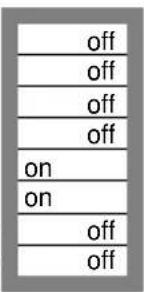 | DS-8DS-7DS-6DS-5DS-4DS-3DS-2DS-1 | 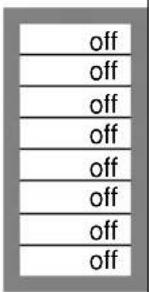 | DS-8DS-7DS-6DS-5DS-4DS-3DS-2DS-1 | 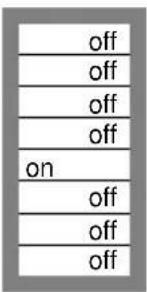 | DS-8DS-7DS-6DS-5DS-4DS-3DS-2DS-1 | 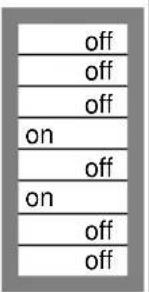 |
| stand-aloneExample 1 (factory setting):5 AES: off4 Inverter voltage 230V3 Inverter frequency 50Hz | stand-aloneExample 2:5 AES: off4 240V3 60Hz | stand-aloneExample 3:5 AES: off4 230V3 60Hz | stand-aloneExample 4:5 AES: on4 240V3 50Hz | ||||
To store the settings after the dipswitches are set according to the required values: press the 'Up' button for 2 seconds (upper button to the right of the DIP switches, see appendix A, position J). The overload and low-battery LED's will flash to indicate acceptance of the settings.
The DIP switches can be left in the selected positions, so that the settings can always be recovered.
6. MAINTENANCE
The Phoenix Inverter does not require specific maintenance. It will suffice to check all connections once a year. Avoid moisture and oil/soot/vapours, and keep the device clean.
7. FAULT INDICATIONS
With the procedures below, most errors can be quickly identified. If an error cannot be resolved, please refer to your Victron Energy supplier.
7.1 General error indications
| Problem | Cause | Solution |
| Inverter operation not initiated when switched on. | The battery voltage is excessively high or too low. No voltage on DC connection. | Ensure that the battery voltage is within the correct range. |
| “Low battery” LED flashes. | The battery voltage is low. | Charge the battery or check the battery connections. |
| “Low battery” LED lights. | The converter switches off because the battery voltage is too low. | Charge the battery or check the battery connections. |
| “Overload” LED flashes. | The converter load is higher than the nominal load. | Reduce the load. |
| “Overload” LED lights. | The converter is switched off due to excessively high load. | Reduce the load. |
| “Temperature” LED flashes or lights. | The environmental temperature is high, or the load is too high. | Install the converter in cool and well-ventilated environment, or reduce the load. |
| “Low battery” and “overload” LEDs flash intermittently. | Low battery voltage and excessively high load. | Charge the batteries, disconnect or reduce the load, or install higher capacity batteries. Fit shorter and/or thicker battery cables. |
| “Low battery” and “overload” LEDs flash simultaneously. | Ripple voltage on the DC connection exceeds 1,5Vrms. | Check the battery cables and battery connections. Check whether battery capacity is sufficiently high, and increase this if necessary. |
| “Low battery” and “overload” LEDs light. | The inverter is switched off due to an excessively high ripple voltage on the input. | Install batteries with a larger capacity. Fit shorter and/or thicker battery cables, and reset the inverter (switch off, and then on again). |
| One alarm LED lights and the second flashes. | The inverter is switched off due to alarm activation by the lighted LED. The flashing LED indicates that the inverter was about to switch off due to the related alarm. | Check this table for appropriate measures in regard to this alarm state. |
7.2 VE.Bus LED indications
Inverters included in a VE.Bus system (a parallel or 3-phase arrangement) can provide so-called VE.Bus LED indications. These LED indications can be subdivided into two groups: OK codes and error codes.
7.2.1 VE.Bus OK codes
If the internal status of a device is in order but the device cannot yet be started because one or more other devices in the system indicate an error status, the devices that are in order will indicate an OK code. This facilitates error tracing in a VE.Bus system, since devices not requiring attention are easily identified as such.
Important: OK codes will only be displayed if a device is not inverting!
- The "inverter on" LED must flash.
- A flashing "overload" LED indicates that the device can perform inverter operation.
- A flashing "temperature" LED indicates that the device is not blocking charge operation. (This is just a formal indication which originates from the relationship with the Phoenix Multi. This indication has no special meaning on a Phoenix Inverter)
NOTE: The "low battery" LED can function together with the OK code that indicates that the device does not block charge.
7.2.2 VE.Bus error codes
If a VE.Bus error occurs (example: a broken UTP cable) the system will switch off and the 'inverter on' LED will flash.
If such an error occurs one should switch all units off, verify all cabling and switch the units on again.
Additional information about the error can be retrieved from the Inverter with the VE.BUS System Configurator or the VE.BUS Quick Configure tool.
8. TECHNICAL SPECIFICATIONS
| Phoenix Inverter | 12/3000 | 24/3000 | 48/3000 | |
| INVERTER | ||||
| Input voltage range (V DC) | 9,5 – 17 | 19 – 33 | 38 – 66 | |
| Output (1) | Output voltage: 230 VAC ± 2% | Frequency: 50 Hz ± 0,1% | ||
| Cont. output power at 25°C (VA) (3) | 3000 | 3000 | 3000 | |
| Cont. output power at 25°C (W) | 2400 | 2400 | 2400 | |
| Cont. output power at 40°C (W) | 2200 | 2200 | 2200 | |
| Cont. output power at 65°C (W) | 1700 | 1700 | 1700 | |
| Peak power (W) | 6000 | 6000 | 6000 | |
| Maximum efficiency (%) | 92 | 94 | 95 | |
| Zero-load power (W) | 20 | 20 | 25 | |
| GENERAL | ||||
| Programmable relay (4) | Yes | Yes | Yes | |
| Protection (2) | a – g | |||
| Common Characteristics | Operating temp.: -40 to +65°C (fan assisted cooling) Humidity (non condensing): max 95% | |||
| ENCLOSURE | ||||
| Common Characteristics | Material & Colour: aluminium (blue RAL 5012) Protection: IP 21 | |||
| Battery-connection | M8 bolts (2 plus and 2 minus connections) | |||
| 230 V AC-connection | Screw terminals 13mm2 (6 AWG) | |||
| Weight (kg) 18 | ||||
| Dimensions (hxwxd in mm) | 362x258x218 | |||
| STANDARDS | ||||
| Safety | EN 60335-1, EN 60335-2-29 | |||
| Emission / Immunity | EN 55014-1, EN 61000-3-2 / EN 55014-2, EN 61000-3-3 | |||
| Automotive Directive | 2004/104/EC | |||
1) Can be adjusted to 60Hz; 120V/60Hz on request
2) Protection
a. Output short circuit
b. Overload
c. Battery voltage too high
d. Battery voltage too low
e. Temperature too high
f. 230VAC on inverter output
g. Input voltage ripple too high
3) Non linear load, crest factor 3:1
4) Multipurpose relay which can be set for general alarm, DC undervoltage or genset start signal function
| Phoenix Inverter | 24/5000 48/5000 | |
| INVERTER | ||
| Input voltage range (V DC) | 19 – 33 | 38 – 66 |
| Output (1) | Output voltage: 230 VAC ± 2% | Frequency: 50 Hz ± 0,1% |
| Cont. output power at 25°C (VA) (3) | 5000 | 5000 |
| Cont. output power at 25°C (W) | 4000 | 4000 |
| Cont. output power at 40°C (W) | 3700 | 3700 |
| Cont. output power at 65°C (W) | 3000 | 3000 |
| Peak power (W) | 10000 | 10000 |
| Maximum efficiency (%) | 94 | 95 |
| Zero-load power (W) | 30 | 35 |
| GENERAL | ||
| Programmable relay (4) | Yes | Yes |
| Protection (2) | a - g | |
| Common Characteristics | Operating temp.: -40 to +65°C (fan assisted cooling) Humidity (non condensing): max 95% | |
| ENCLOSURE | ||
| Common Characteristics | Material & Colour: aluminium (blue RAL 5012) Protection: IP 21 | |
| Battery-connection | M8 bolts (2 plus and 2 minus connections) | |
| 230 V AC-connection | Screw clamp 13mm2 (6 AWG) | |
| Weight (kg) | 30 | |
| Dimensions (hxwxd) | 444 x 328 x 240 | |
| STANDARDS | ||
| Safety | EN 60335-1, EN 60335-2-29 | |
| Emission / Immunity | EN 55014-1, EN 61000-3-2 / EN 55014-2, EN 61000-3-3 | |
1) Can be adjusted to 60Hz; 120V/60Hz on request
2) Protection
a. Output short circuit
b. Overload
c. Battery voltage too high
d. Battery voltage too low
e. Temperature too high
f. 230VAC on inverter output
g. Input voltage ripple too high
3) Non linear load, crest factor 3:1
4) Multipurpose relay which can be set for general alarm, DC undervoltage or genset start signal function
1. VEILIGHEIDSVOORSCHRIFTEN
Algemeen
AES (Automatic Economy Switch) off
Programmeerbaar relais
stand alone
alarm functie
5.2 Verklaring instellingen
AES (Automatic Economy Switch)
AES (Automatic Economy Switch)
AES (Automatic Economy Switch)
AES (Automatic Economy Switch)
APPENDIX A1 Overview connections INVERTER 3k
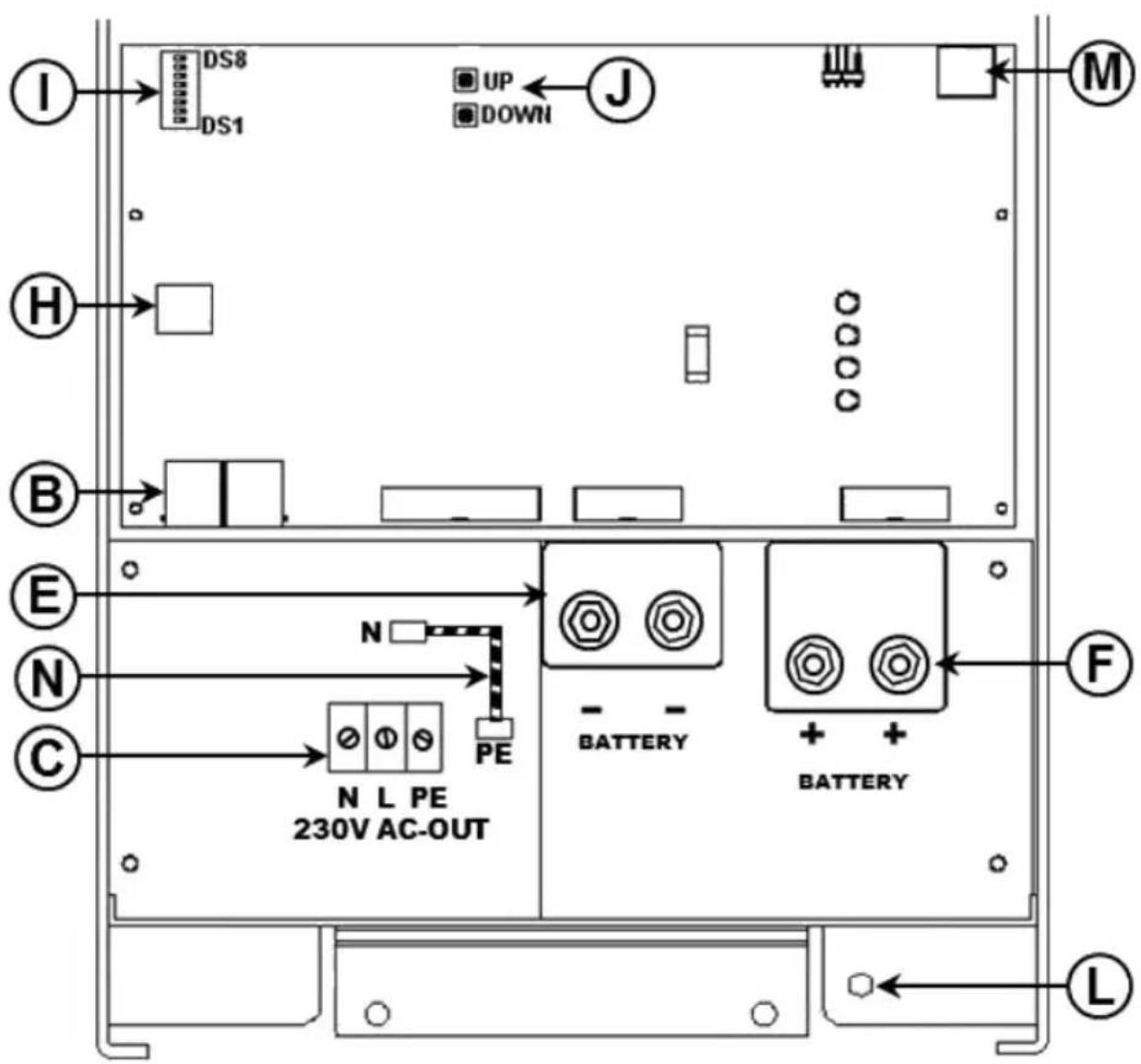
APPENDIX A2 Overview connections INVERTER 5k
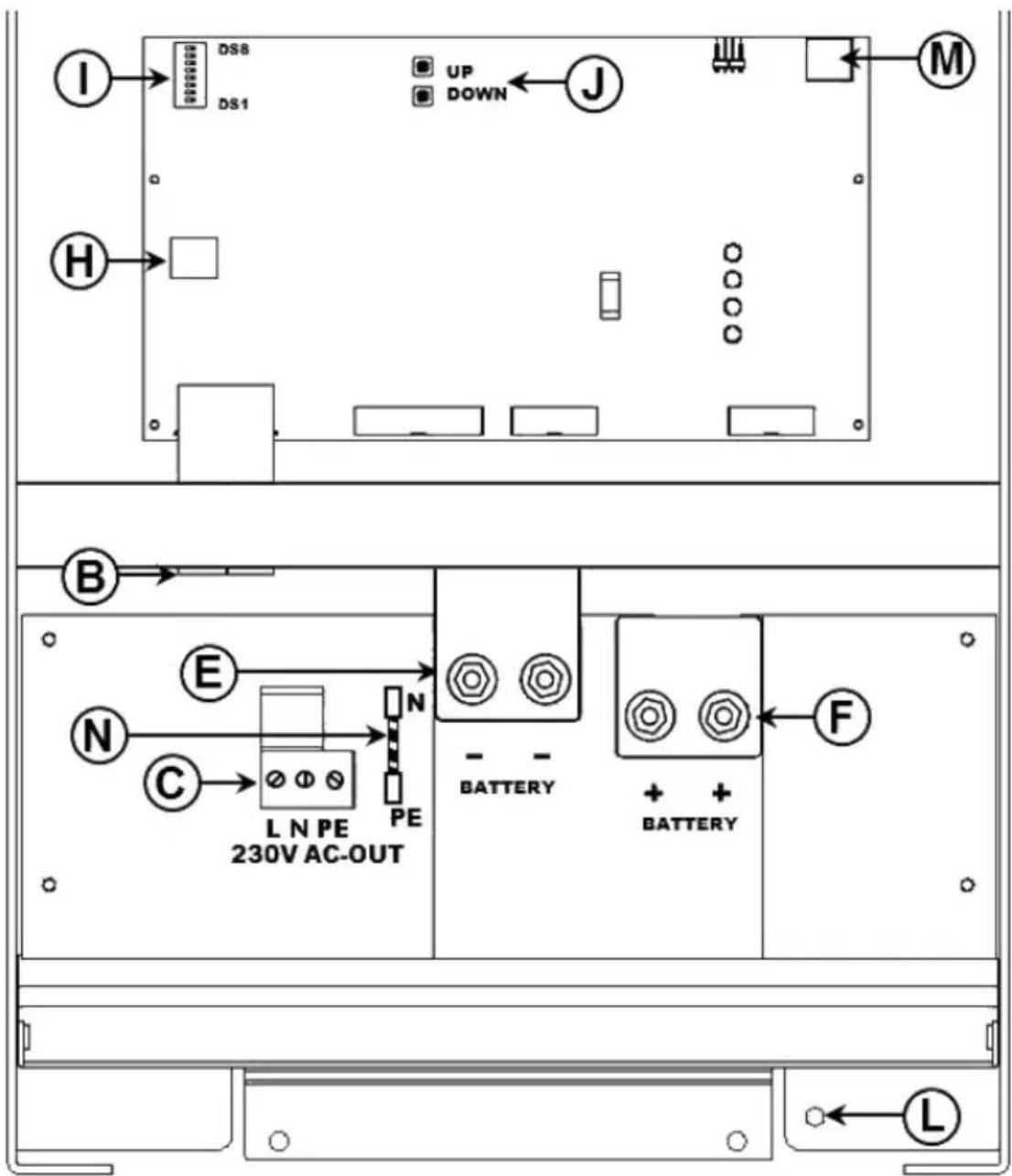
EN:
| B | 2x RJ45 connector for remote control and/or parallel / three-phase operation. |
| C | Load connection. 3K model AC out: (left to right): N (neutral), L (phase), PE (ground). 5K model AC out (left to right): L (phase), ), N (neutral), PE (ground). |
| E | Battery minus. Double M8 battery minus connection. |
| F | Battery plus. Double M8 battery positive connection. |
| H | Connections for remote switch: Short left and middle terminal to switch the Phoenix “on”. |
| I | Dipswitches DS1 tm DS8 for set-up mode. |
| J | Pushbuttons for set-up mode. |
| L | Primary ground connection M8 (PE). |
| M | Alarm contact: (left to right) NC, NO, COM. |
| N | Remove to disconnect output from ground |
NL:
APPENDIX B: Block diagram
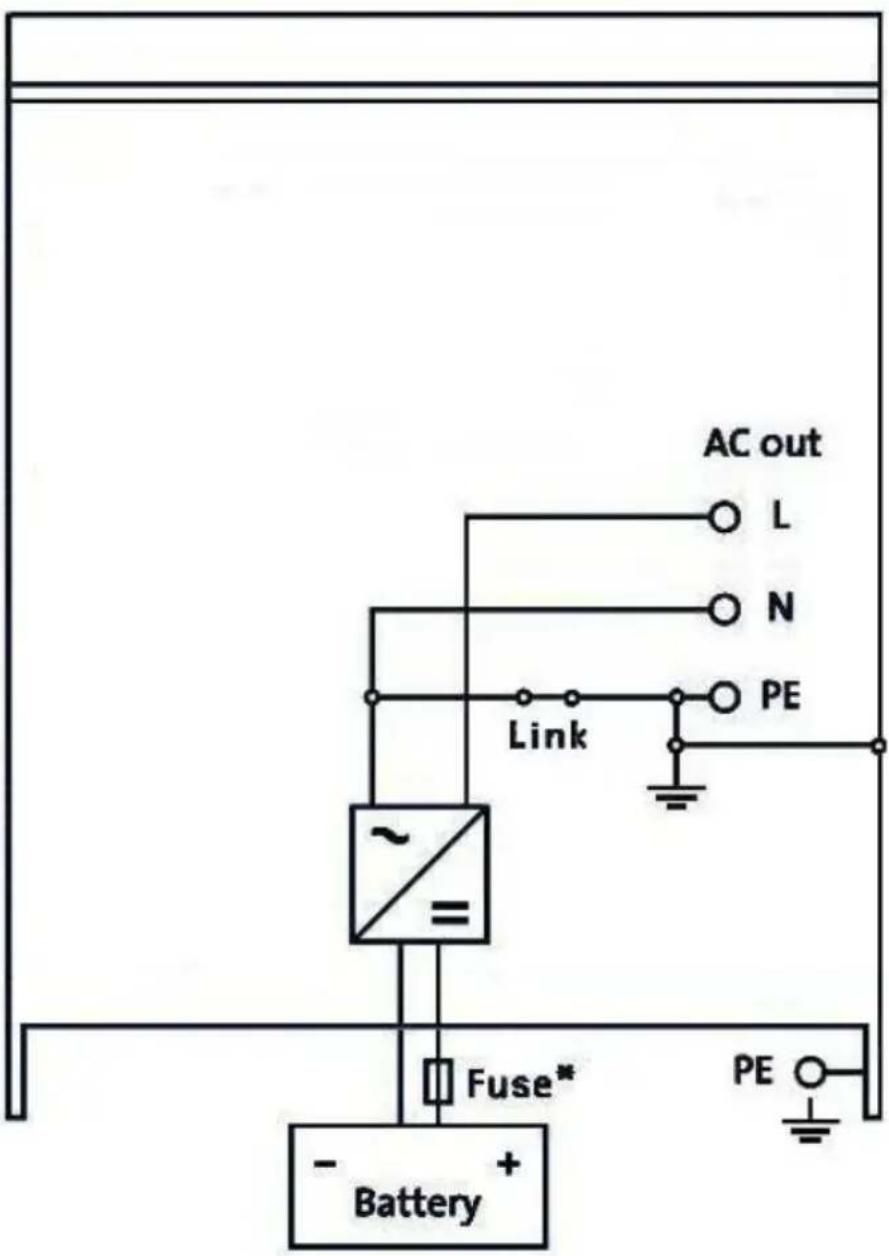
* See table in Chapter 4.2 "Recommended DC fuse".
* Zie de tabel in Hst 4.2 "Aanbevolen DC zekering"
* Voir le tableau du Chapitre 4.2 « Fusible CC recommandé ».
* Ver tabla en Capítulo 4.2 "Fusible CC recomendado".
APPENDIX C: Parallel connection
3k
![graph TD A["Panel"] --> B["MASTER Unit 1"] B --> C["SLAVE Unit 2"] C --> D["SLAVE Unit 3"] D --> E["PE OUT To load"] D --> F["AC OUT L"] D --> G["AC OUT N"] D --> H["To load"]](/content/2026/04/589684/images/b2c74c6604f51062bcda84d62e98203681812f918eb8a1acf7ad7677ae43dbaf.jpg)
5k
![graph TD A["Panel"] --> B["MASTER Unit 1"] B --> C["SLAVE Unit 2"] C --> D["SLAVE Unit 3"] D --> E["PE OUT To load"] B --> F["BAT- BAT+"] C --> G["BAT- BAT+"] D --> H["BAT- BAT+"] E --> I["AC OUT N"] E --> J["AC OUT L"] E --> K["To load"]](/content/2026/04/589684/images/9db325afefe7e3653091fabe77f7e85442ec68329786d79b25cedb1d5b42e726.jpg)
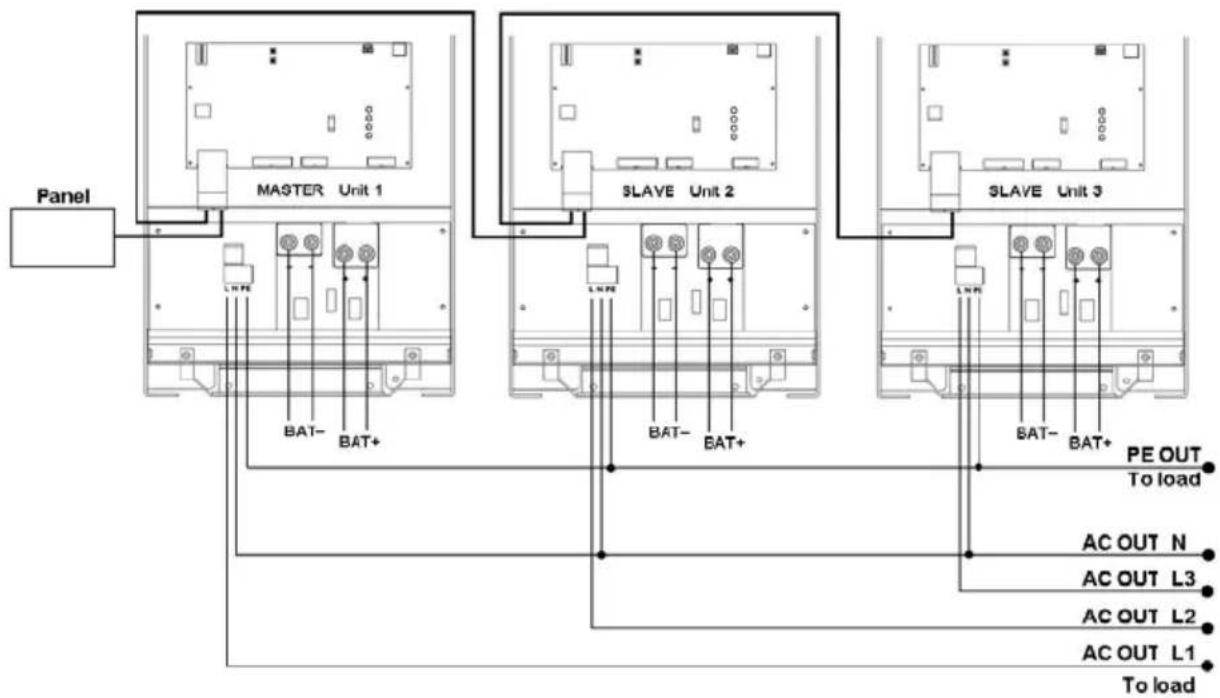
APPENDIX D: Three phase connection
3k
![graph TD A["Panel"] --> B["MASTER Unit 1"] B --> C["SLAVE Unit 2"] C --> D["SLAVE Unit 3"] D --> E["PE OUT To load"] B --> F["BAT- BAT+"] C --> G["BAT- BAT+"] D --> H["BAT- BAT+"] F --> I["AC OUT N"] G --> J["AC OUT L3"] H --> K["AC OUT L2"] I --> L["AC OUT L1"] J --> M["To load"] K --> N["To load"]](/content/2026/04/589684/images/8ae88c51545944a4927d82396aa246702630dd8bd12d4a88809ada367044485c.jpg)
5k
APPENDIX G: Dimensions
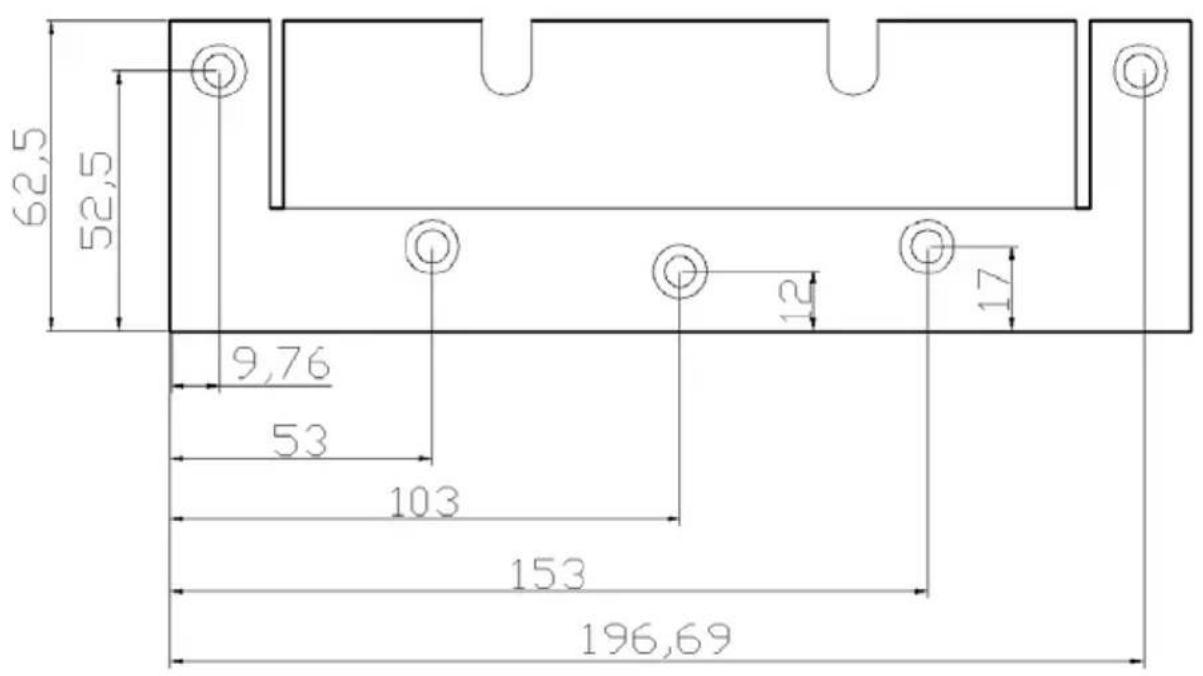
Dimensions 3k cabinet
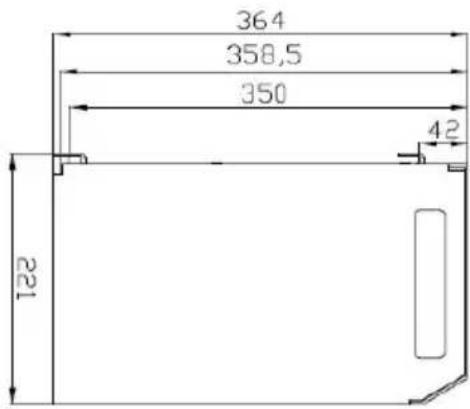
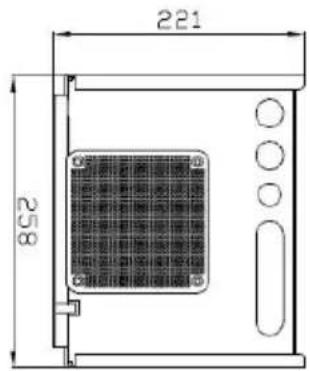
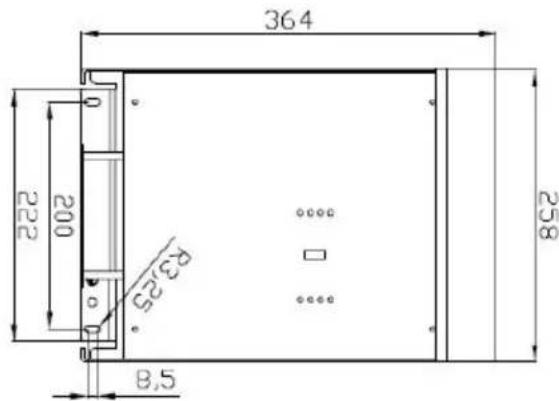
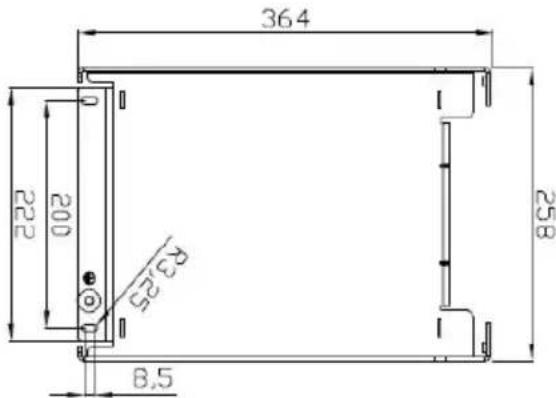
Dimensions 5k cabinet
Victron Energy Blue Power
Distributor:
Serial number:
Version : 22
Date : September 1 st , 2017
Victron Energy B.V.
De Paal 35 | 1351 JG Almere
PO Box 50016 | 1305 AA Almere | The Netherlands
General phone : +31 (0)36 535 97 00
Fax : +31 (0)36 535 97 40
E-mail : sales@victronenergy.com
www.victronenergy.com


- PHOENIX INVERTER (WITH FIRMWARE XXXX400 OR HIGHER)
- SAFETY INSTRUCTIONS
- IN GENERAL
- WARNING: DANGER OF ELECTRICAL SHOCK
- INSTALLATION
- TRANSPORT AND STORAGE
- DESCRIPTION
- SINUSMAX - SUPERIOR ENGINEERING
- EXTRA START-UP POWER
- VIRTUALLY UNLIMITED POWER THANKS TO PARALLEL AND 3-PHASE OPERATION CAPABILITY
- TO TRANSFER THE LOAD TO ANOTHER AC SOURCE: THE AUTOMATIC TRANSFER SWITCH
- PROGRAMMABLE RELAY
- PROGRAMMABLE WITH DIP SWITCHES OR PERSONAL COMPUTER
- OPERATION
- 3.1 ON/OFF SWITCH
- 3.2 REMOTE CONTROL
- 3.3 LED INDICATIONS
- INVERTER
- 4.1 LOCATION
- 4.2 CONNECTION OF BATTERY CABLES
- PROCEDURE
- MAXIMUM TORQUE: 11 NM
- 4.3 CONNECTION OF THE AC CABLING
- THE NEUTRAL OUTPUT OF THE INVERTER IS CONNECTED TO THE ENCLUSURE
- 4.4 OPTIONAL CONNECTIONS
- 4.4.1 REMOTE CONTROL
- 4.4.3 PARALLEL CONNECTION
- 4.4.4 THREE-PHASE OPERATION
- CONFIGURATION
- 5.1 STANDARD SETTINGS: READY FOR USE
- STANDARD FACTORY SETTINGS
- 5.2 EXPLANATION OF SETTINGS
- INVERTER FREQUENCY
- INVERTER VOLTAGE
- STAND-ALONE / PARALLEL OPERATION / 2-3 PHASE SETTING
- AES (AUTOMATIC ECONOMY SWITCH)
- 5.3 CONFIGURATION BY COMPUTER
- NOTE
- 5.3.1 VE.BUS QUICK CONFIGURE SETUP
- 5.3.2 VE.BUS SYSTEM CONFIGURATOR
- 5.4 CONFIGURATION WITH DIP SWITCHES
- REMARKS
- 5.4.1 AES (AUTOMATIC ECONOMY SWITCH)
- 5.4.2 INVERTER VOLTAGE
- 5.4.3 INVERTER FREQUENCY
- IMPORTANT NOTE ON DS2 AND DS1
- MAINTENANCE
- FAULT INDICATIONS
- 7.1 GENERAL ERROR INDICATIONS
- 7.2 VE.BUS LED INDICATIONS
- 7.2.1 VE.BUS OK CODES
- 7.2.2 VE.BUS ERROR CODES
- TECHNICAL SPECIFICATIONS
- VEILIGHEIDSVOORSCHRIFTEN
- ALGEMEEN
- 5.2 VERKLARING INSTELLINGEN
- APPENDIX A2 OVERVIEW CONNECTIONS INVERTER 5K
- APPENDIX B: BLOCK DIAGRAM
- APPENDIX C: PARALLEL CONNECTION
- APPENDIX D: THREE PHASE CONNECTION
- DIMENSIONS 3K CABINET
- VICTRON ENERGY BLUE POWER
Brand : VICTRON ENERGY
Model : Phoenix Inverter 123000 230V
Category : Power inverter