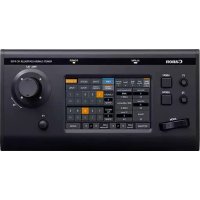
RCIP100 - Surveillance Camera CANON - Free user manual and instructions
Find the device manual for free RCIP100 CANON in PDF.


| Product type | Remote control for surveillance camera (PTZ controller) |
| Brand | Canon |
| Model | RC-IP100 |
| Power supply | 100-240 V AC, 50/60 Hz (depending on region) |
| Power consumption | Approximately 15 W (estimate) |
| Protection class | Class I (mandatory grounding) |
| Dimensions (W × D × H) | 210 × 160 × 55 mm (approximately) |
| Weight | Approximately 0.8 kg (estimate) |
| Housing material | Flame retardant plastic |
| Main functions | Remote pan, tilt and zoom (PTZ) control, standby/activation, camera settings |
| Connectivity | RS-232/422 cable (estimate), power connector |
| Operating temperature | 0 to 40 °C |
| Operating humidity | 20 to 80 % (non-condensing) |
| Maintenance and cleaning | Clean with a dry cloth; do not use chemicals |
| Safety | Do not expose to rain or moisture; disconnect before maintenance |
| Spare parts and repairability | Replaceable fuse (approved type); repair by qualified personnel only |
| General information | Compliant with FCC Part 15 (Class A); WEEE directive |
| Included accessories | Power cord, user manual |
Frequently Asked Questions - RCIP100 CANON
User questions about RCIP100 CANON
0 question about this device. Answer the ones you know or ask your own.
Ask a new question about this device
Download the instructions for your Surveillance Camera in PDF format for free! Find your manual RCIP100 - CANON and take your electronic device back in hand. On this page are published all the documents necessary for the use of your device. RCIP100 by CANON.
USER MANUAL RCIP100 CANON
Remote Camera Controller
RC-IP100
User Manual (Basic)
ENGLISH
For details on settings and operation, please refer to the User Manual on the website.
Please check the latest version of the User Manual from the URL below.
FRANÇAIS
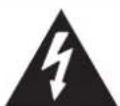
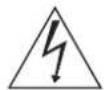
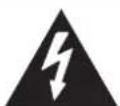
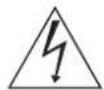
The lightning flash with arrowhead symbol, within an equilateral triangle, is intended to alert the user to the presence of uninsulated "dangerous voltage" within the product's enclosure that may be of sufficient magnitude to constitute a risk of electric shock to persons.
The exclamation point within an equilateral triangle is intended to alert the user to the presence of important operating and maintenance (servicing) instructions in the literature accompanying the appliance.
CANICES-3A/NMB-3A
CAUTION:
DO NOT OPEN COVERS AND DO NOT REPAIR YOURSELF. REFER SERVICING TO QUALIFIED PERSONNEL.
WARNING:
TO PREVENT FIRE OR SHOCK HAZARD,DO NOT EXPOSE THIS UNIT TO RAIN OR MOISTURE.
CAUTION:
This unit should be used with AC 120 V, 60 Hz. To prevent electric shocks and fire hazards, DO NOT use any other power source.
CAUTION:
TO PREVENT ELECTRIC SHOCK, MATCH WIDE BLADE OF PLUG TO WIDE SLOT, FULLY INSERT.
"WARNING" and the following or equivalent. "To reduce therisk of fire or electric shock,do not expose this apparatuso rain or moisture."
A warning that an apparatus with CLASS I construction shall be connected to a MAINS socket outlet with protective earthing connection.
IMPORTANT SAFETY INSTRUCTIONS
1) Read these instructions.
2) Keep these instructions.
3) Heed all warnings.
4) Follow all instructions.
5) Do not use this apparatus near water.
6) Clean only with dry cloth.
7) Do not block any ventilation openings. Install in accordance with the manufacturer's instructions.
8) Do not install near any heat sources such as radiators, heat registers, stoves, or other apparatus (including amplifiers) that produce heat.
9) Do not defeat the safety purpose of the polarized or grounding-type plug. A polarized plug has two blades with one wider than the other. A grounding type plug has two blades and a third grounding prong. The wide blade or the third prong are provided for your safety. If the provided plug does not fit into your outlet, consult an electrician for replacement of the obsolete outlet.
10) Protect the power cord from being walked on or pinched particularly at plugs, convenience receptacles, and the point where they exit from the apparatus.
11)Only use attachments/accessories specified by the manufacturer.
12)Use only with the cart, stand, tripod, bracket, or table specified by the manufacturer, or sold with the apparatus. When a cart is used, use caution when moving the cart/apparatus combination to avoid injury from tip-over.
13)Unplug this apparatus during lightning storms or when unused for long periods of time.
14) Refer all servicing to qualified service personnel. Servicing is required when the apparatus has been damaged in any way, such as power-supply cord or plug is damaged, liquid has been spilled or objects have fallen into the apparatus, the apparatus has been exposed to rain or moisture, does not operate normally, or has been dropped.

Failure to heed the following precautions may result in damage to the unit.
- DO NOT place the unit
in an environment prone to extreme temperatures or humidity.
--in direct sunlight.
in a dusty environment.
in an environment where strong magnetic fields are generated.
-on a surface that is unstable or subject to vibration.
- DO NOT block the unit's ventilation openings or holes. (If the ventilation openings or holes are blocked by a newspaper or cloth, etc., the heat may not be able to get out.)
- DO NOT place heavy objects on the unit.
- DO NOT place anything which might spill on top of the unit. (If water or liquid is allowed to enter this equipment, fire or electric shock may be caused.)
- DO NOT expose the apparatus to dripping or splashing.
- DO NOT use this equipment in a bathroom or places with water. Also DO NOT place any containers filled with water or liquids (such as cosmetics or medicines, flower vases, potted plants, cups, etc.) on top of this unit.
- DO NOT place any naked flame sources, such as lighted candles, on the apparatus.
- AVOID violent shocks to the unit during transport.
CAUTION:
Changes or modifications not approved by Canon could void user's authority to operate the equipment.
Declaration of Conformity
Model Number: RC-IP100
Trade Name: Canon
Responsible Party: Canon U.S.A., Inc.
Address: One Canon Park, Melville, New York 11747
U.S.A.
Telephone Number: 1-800-OK-CANON (1-800-652-2666)
FCC NOTICE
Remote Camera Controller, Model Name: RC-IP100
This device complies with Part 15 of the FCC Rules. Operation is subject to the following two conditions: (1) This device may not cause harmful interference, and (2) this device must accept any interference received, including interference that may cause undesired operation.
Note: This equipment has been tested and found to comply with the limits for a Class A digital device, pursuant to Part 15 of the FCC Rules.
These limits are designed to provide reasonable protection against harmful interference when the equipment is operated in a commercial environment. This equipment generates, uses, and can radiate radio frequency energy and, if not installed and used in accordance with the user manual, may cause harmful interference to radio communications. Operation of this equipment in a residential area is likely to cause harmful interference in which case the user will be required to correct the interference at his own expense.
Do not make any changes or modifications to the equipment unless otherwise specified in the manual. If such changes or modifications should be made, you could be required to stop operation of the equipment.
When the equipment is installed in a cabinet or a shelf, make sure that it has sufficient space on all sides to allow for ventilation (10cm or more on both sides, on top and at the rear). Use the supplied power cord.
(If not, fire or electric shock may be caused.)
DONT continue to operate the equipment if you are in any doubt about it working normally, or if it is damaged in any way, switch off, withdraw the mains plug and consult your dealer.
DO be careful with glass panels on equipment.
DO consult you dealer if you are ever in doubt about the installation, operation or safety of your equipment.
NEVER let anyone especially children push anything into holes, slots or any other opening in the case—this could result in a fatal electrical shock.
MOISTURE CONDENSATION
Moisture in the air will condense on the unit when you move it from a cold place to a warm place, or under extremely humid conditions—just as water droplets form on the surface of a glass filled with cold liquid. In conditions where condensation may occur, disconnect the unit's power plug from the wall and keep it disconnected for a few hours to let the moisture dry, then turn on the unit.
The rating plate and the safety caution are on the rear of the unit.
WARNING: TO PREVENT FIRE OR SHOCK HAZARD, DO NOT EXPOSE THIS UNIT TO RAIN OR MOISTURE.
DISCLAIMER OF LIABILITY
Canon shall not be liable for any loss relating to the unit's failure to properly record, store or playback any content (video, audio or otherwise) for any reason whatsoever. Any applicable warranties shall only cover replacement or repair of the effected unit, and shall not apply to recovery or replacement of lost content.
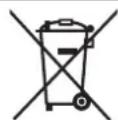
If this symbol is shown, it is only valid in the European Union.
Dear Customer, [European Union]
This apparatus is in conformance with the valid European directives and standards regarding electromagnetic compatibility and electrical safety.
CANONE EUROPA N.V.
Bovenkerkerweg 59, 1185 XB Amstelveen, The Netherlands
WARNING
This is a Class A product. In a domestic environment this product may cause radio interference in which case the user may be required to take adequate measures.
IMPORTANT:
Please read the various precautions on page 19 before installing or operating the unit.
CAUTION:
- When you are not using the unit for a long period of time, it is recommended that you disconnect the power cord from the mains outlet.
Dangerous voltage inside. Refer internal servicing to qualified service personnel. To prevent electric shock or fire hazard, remove the power cord from the mains outlet prior to connecting or disconnecting any signal lead or aerial.
The mains plug shall remain readily operable.
The STANDBY/ON button does not completely shut off mains power from the unit, but switches operating current on and off. "O" shows electrical power standby and "I" shows ON.
A warning that an apparatus with CLASS I construction shall be connected to a MAINS socket outlet with protective earthing connection.
Main Plug
The Main Plug is used as the disconnect device, the disconnect device shall remain readily operable
Even if the display window of the unit is unlit, the main power supply is not cut off unless the power cord is unplugged.
The main power supply for this unit is controlled by inserting or removing the power plug.
POWER CONNECTION
The power supply voltage rating of this product is AC 220 - 240 V (For European countries, Asian countries, and United Kingdom). The power cord attached conforms to the following power supply voltage and countries. Use only the power cord designated to ensure safety and EMC regulations of each country.
For European and Asian countries: AC 220 - 240 V
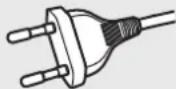
For United Kingdom: AC 220 - 240 V
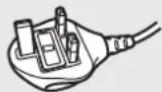
This plug will fit only into a grounded power outlet. If you are unable to insert the plug into the outlet, contact your electrician to install the proper outlet. Do not defeat the safety purpose of the grounded plug.
- This product should be operated only with the type of power source indicated on the label. If you are not sure of the type of power supply of your home, consult your product dealer or local electric power company.
Warning:
- Do not use the same power cord for AC 120 V as for AC 220 - 240 V. Doing so may cause malfunction, electric shock or fire.
Note for United Kingdom power cord only
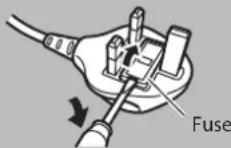
The plug of United Kingdom power cord has a built-in fuse. When replacing the fuse, be sure to use only a correctly rated approved type, re-fit the fuse cover. (Consult your dealer or qualified personnel.)
How to replace the fuse
Open the fuse compartment with the blade screwdriver, and replace the fuse.
This equipment has been designed and manufactured to meet international safety standards but, like any electrical equipment, care must be taken if you are to obtain the best results and safety is to be assured.
DO read the operating instructions before you attempt to use the equipment.
DO ensure that all electrical connections (including the mains plug, extension leads and interconnections between pieces of equipment) are properly made and in accordance with the manufacturer's instructions. Switch off and withdraw the mains plug when making or changing connections.
DO consult your dealer if you are ever in doubt about the installation, operation or safety of your equipment.
DO be careful with glass panels on equipment.
DONT continue to operate the equipment if you are in any doubt about it working normally, or if it is damaged in any way—switch off, withdraw the mains plug and consult your dealer.
DON'T remove any fixed cover as this may expose dangerous voltages.
DONT leave equipment switched on when it is unattended unless it is specifically stated that it is designed for unattended operation or has a standby mode. Switch off using the switch on the equipment and make sure that your family knows how to do this. Special arrangements may need to be made for infirm or handicapped people.
DONT obstruct the ventilation of the equipment, for example with curtains or soft furnishings. Overheating will cause damage and shorten the life of the equipment.
DONT allow electrical equipment to be exposed to rain or moisture.
ABOVE ALL...
NEVER let anyone especially children push anything into holes, slots or any other opening in the case this could result in a fatal electrical shock;
NEVER guess or take chances with electrical equipment of any kind—it is better to be safe than sorry!
European Union regulatory notices:
Remote Camera Controller, Model Name: RC-IP100 Warning
This is a class A product. In a domestic environment this product may cause radio interference in which case the user may be required to take adequate measures.
Only for European Union and EEA (Norway, Iceland and Liechtenstein)
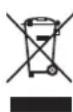
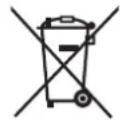
This symbol indicates that this product is not to be disposed of with your household waste, according to the WEEE Directive (2012/19/EU) and national legislation.
This product should be handed over to a designated collection point, e.g., on an authorized one-for-one basis when you buy a new similar product or to an authorized collection site for recycling waste electrical and electronic equipment (EEE). Improper handling of this type of waste could have a possible negative impact on the environment and human health due to potentially hazardous substances that are generally associated with EEE. At the same time, your cooperation in the correct disposal of this product will contribute to the effective usage of natural resources. For more information about where you can drop off your waste equipment for recycling, please contact your local city office, waste authority, approved WEEE scheme or your household waste disposal service. For more information regarding return and recycling of WEEE products, please visit www.canon-europe.com/sustainability/approach/.
Précautions
ATTENTION
RISQUE D' ELECTROCUTION
NE PAS OUVRIR

2) Conserverces instructions.
Partie responsible : Canon U.S.A., Inc.
Adresse : One Canon Park, Melville, New York 11747,
U.S.A.
Cher client, [Union europeenne]
www.canon-europe.com/sustainability/approach/.
Precauciones
PRECAUCION RIESGO DE DESCARGA ELECTRICA NO ABRIR

PARA EVITAR DESCARGAS ELECTRICAS, HAGA COINCIDIR
LA PATILLA ANCHA DEL ENCHUFE CON LA BANURA ANCHA
E INTRODUZCA COMPLETAMENTE.
Parte responsible: Canon U.S.A., Inc.
www.canon-europe.com/sustainability/approach/.
ПЕДУПЕЖDEHNE: ONACHOE HANPRJHEHNE BHYTPN YCTPOINCTBA
IPEyIPEKDEHNE: BO 36EKAHNE IOHAPA HIN IOPAHEH NJEHTPNUECHM TOHOM HE NOBEPRAITE DAHHOE YCTPOICTBO BO3ENCTBIO DOHNJN BIAH.
OTHA3 OT OTBETCTBEHHOCTN
Kompanha Canon He Hecet OTBETCTBEHHOCTNa KaHne-Heo notepn, CB3aHHbIe C HnepabInbHOI 3aNcIbO, XPAHEHM NIN BOCPON3BDEHEM IIO60r KOHTHTA (BIIeo, aydno NIN npOero) NO KAKoI-N6o npUHNE. IIO6bIe npImeHmblre rapaHTn NOKpbIAOT ToIbKO 3aMeHy NIN pEmOH TocPraBADwe ChAcT yCTpOyCTBa, IN He PACNPoCTpaHHTOcr HA BOCCTAHOBLeHne NIN 3aMeHy YTPaeeHHORO KOHTHTA.
Ecnn OTO6paKaHaETc3 3OT CnMBoJ, TO OH DeIeCTByeT ToIbKO B EbponeiCKOM CoIO3e.
YBaHaembI KJIneHT, [Ebponeckn Coo3]
DaHHoe yCTpOCTBO COOTBETCTBYeT DeHCTBnTELbHbIM Ebponeckm DInpeKTHiBAM H cTaHdapTAM NO 3JKeKTPOMaHTHO COBMecTMMOCTHN 3JIeKTPuuecHoi 6e3oNaCHocTH.
CANON EUROPA N.V.
Bovenkerkerweg 59, 1185 XB Amstelveen, The Netherlands (Hideplaandb)
IPEyIpyENDEHNE
Ipoayk Klaacca A.B 6bIBoBx ycNoBnx DaHnoe ycPoIcTBO MOKeT Bbl3bBAbTa paHIOmEXn, B 30m Cnyae Nl3OBaTeIHOEOxOIMO pInHrTa COOTBETCTBYUOme Mepbl.
BAHHO:
IpoaanyiCTa, npoHTte pa3nHbIe Mepbl npedoctoPOxHOCTNa ctp. 19 nepey yctahOBKOn HIN kcnnyatauey yctpoCTBa.
PTEyPENEHHENE:
EcnyycpOcTBHOHeHCnOJb3yETcBTeueHneDnHTeNbHorO
BpeMeHN, peKOMeHnyETcA OTOeMHHTb ERO OT CTeBOI PO3eTKN.
Onachoe HanpKaHHe BHyTpH. No Bcem Bonpocam 06CnyKuBaHH
BHytpenHeuactn yctpoiCTBa obaaaiTecb K KBaHnphiHupoBAHOMy 06cIyHbAIOeMy nepcoAHy.Bo n36eHAnHe NOPaHHeH 3JIeKTPueckn TOMOH BO3NHHOBHeH NOKapa OTHIOUHTe HYPnITAHnO t CeTEBOI PO3EKN pepeD NOHIOUHOHem NIN OTHIOUHEHm CnHbHbHO RaEBn An AHTHeHbI.
CeteboiTencelno-npeHHemy6ydtBa6oohmcoCTOHNH.
KhoNka STANDBY/ON,0/1"noHocTbHO He OTKIOaETnTaHneOT CTeH,HO BHKIOHaET N BbIKIOHaET pa6OuH TOK.
OTo6paKaHaTepeHIM OKnIaHnAeJIeKtpueeCHOrO nITaHnA
noka3bIbaeBHI.
PpeynpeKdHneO TOM, YTO yCTPOCTBO KOHCTpyKcH NJIaccaI DJIHKHO 6bITb NOJIKUeHO K rJIAHBON PO3ETKe C 3aUNTHbIM 3aEMLeHHem.
TnabHbI wTeNCeIb
TlaBHyI WTeNceJIb IcNoJIb3yeTc B KaYeCTBe yCTpoiCTBa OTHIOUeHIN;YCTPOICTBO OTKIOUeHIN DOJIXHO OCTaBaTbCBA JERKOIOCTyHOM COCTOHN
JaKe ecnO kOnO dncnIe yctpoCTBa He OTo6paKaTcra, OCHOBHe nHTaHHe He 6yTeT OTHIOUeHO, ecn KaBeJIb NITaHHe OTCoeDInHe OH pO3eTKn.
OCHOBHON ICTOUYHK NITAHNDAI DAHHORO YCTPOJCTBA ynpabJIaETCNYTEM YCTAHOBHN HIN H3BJIeEHNA WTENCJIbHO BUNHN.
IPOKJIIOUOHEHNEIITAHNIA
HomHaJIbHoe HapJKeHHe NHTaHnJaHHOro npHOBpa CoCTaBnAeT 220-240 B nepemehoro ToKa
30-2, Shimomaruco 3-chome, Ohta-ku, Tokyo 146-8501, Japan
|PyCCHN
HmnpTeP dIe BelaPucn, Ka3axcTaHa, ApmeHn, Hprn3nn
I3eJIa, ONiCaHbIe B 3OM pyKOBOcCTBe, MOrY TBnIOuHaTb MoJeJI, HeOCTyINHbIE B BaIe I CTpaHe n/InI peHNoHE. KOHTaKTHa HΦOpMaIg I JI DOCTyINbIX MoJeIe yKa3aHa Ha yNaKOBKe.
XpaHnTe eroB IerKHOODcTynHom MeCte IaJdaJIbHeIWeero HcNoIb3OBAHnB B KaueCTBe CnpaBOUHnKa.
HOHTaKTbI:
CANON Pocn
OOO «KaHOh Py»
Cepe6pHnueckaHahepeKna,29,8-ntaK,6n3HeC-ueHtp
PINHAJIEXHOCTN DIA CHINHEHNA PNCHA
IOPAHKEHIN 3JIeHTPnueCHN MTOH N IOMEX.
TexHuechne xapaKTepeNCTHK
MaHbI3dbI Kayinci3diK HycKaynapbl
| ECKEPTY: |
| TOK COFY KAVNIH JXÖHE KEDEPΓIINEPDI A3AΙΤΥ YUΗN |
| TEK YCbIHyIJIFAH KOCAJIKbI JXABДbIKTAPДbI |
| ПАДАЛАНБИHbI3. |
Cnnattamanap
STANDBY/ON"()”HJ#n是KJ的J#J#J#J#J#J#J#J#J#J#J#J#J#J#J#J#J#J#J#J#J#J#J#J#J#J#J#J#J#J#J#J#J#J#J#J#J#J#J#J#J#J#
Safety Precautions 2
Contents 20
Precautions 20
Name of Parts 21
Basic Operations 22
Troubleshooting 22
Third-party Software 22
Connection Diagram 22
Specifications 23
Please read through the User Manual in "Safety Precautions" carefully to ensure proper use of the unit. After reading, store the manual at a place that can easily be accessed at all times.
Content of this Manual
Symbols used
Caution: Describes precautions concerning the operation of this product.
Memo : Describes reference information, such as functions and usage restrictions of this product.
Caution
- Unauthorized reprinting of part or the whole of the contents of this document is strictly forbidden.
- Contents of the manual may be subject future changes without prior notice.
- We have taken all possible measures to ensure that the contents in order when creating this manual. However, should you have any comments concerning the information, please contact our customer service center.
- Notwithstanding 2 and 3 above, we shall not be liable for any impact resulting from the use of this product.
Precautions
Storage and Usage Locations
This unit is exclusively designed for in-door use.
Avoid using or placing this unit in the following places.
It might result in malfunctions or failure.
- Hot or cold places that are beyond the allowable operating temperature range (0 °C to 40 °C (32 °F to 104 °F)).
- Locations beyond or below the allowable operating humidity range of 20% RH to 90% RH . (Condensation is not allowed)
- Near equipment that emits strong magnetic fields, such as transformers or motors.
- Near equipment that emits radio waves, such as transceivers and mobile phones.
- Locations with excessive dust and sand.
- Locations prone to moisture such as window side.
- Locations that are subjected to radiation, X-rays, salt attack or corrosive gases.
- Places subject to smoke or vapor such as near a cooking stove
- Places subject to strong vibrations or unstable surfaces
Do not leave this unit in a parked car under direct sunlight or near a heater for long hours.
Protect this unit against penetration of dust when using it in a place subject to sandy dust.
Handling Precautions
Do not rub against or press the surface of the touch panel with a knife or a sharp object.
Do not apply excessive force to this unit; do not lift this unit while holding the control lever.
Maintenance
Turn off the power before performing any maintenance.
Wipe using a soft cloth. Wiping with thinner or benzene may melt or tarnish its surface. For tough stains, wipe using a cloth that is dipped into a neutral detergent diluted with water, followed by wiping with a dry cloth.
Cautions on Installing this Unit on a Desktop
Install this unit such that it does not fall from the desktop due to vibrations.
Energy Saving
When this unit is not in use, set the Power switch to "OFF" to reduce power consumption.
Trademark
Product names and company names indicated in this manual are trademarks or registered trademarks of the respective companies.
Disclaimer
Do not use any AC adapter other than the AC adapter that comes bundled with this product.
The bundled AC adapter and power cord are to be used with this product only. They cannot be used with other equipment.
Disposal
When disposing of this product, do so appropriately by following the applicable laws, regulations and local laws.
Name of Parts
Front Panel
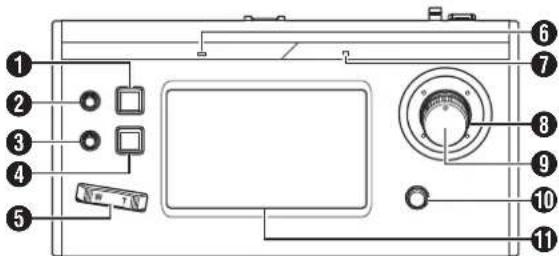
1 USER1 button
For configuring the assigned features.
F1 knob
For adjusting the assigned features.
F2 knob
For adjusting the assigned features.
4USER2 button
For configuring the assigned features.
5 Zoom lever
For performing the zoom operation of the remote camera.
6 ALARM lamp
Red : Lights up when the alarm is activated.
7 POWER lamp
Green : Lights up while the power is turned on.
Control lever
For operating pan/tilt of the remote camera.
9 F3 knob
For adjusting the assigned features.
10 F4 knob
For adjusting the assigned features.
Operation panel
Used as a touch panel.
Memo :
- For details on how to assign a function to a button or knob, please refer to the User Manual on the website.
Rear Panel
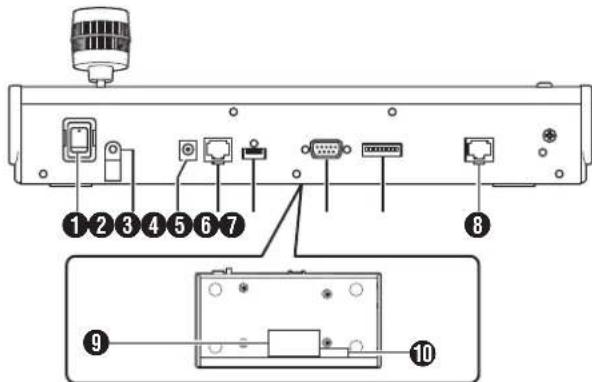
1 Power switch
For turning the power on or off.
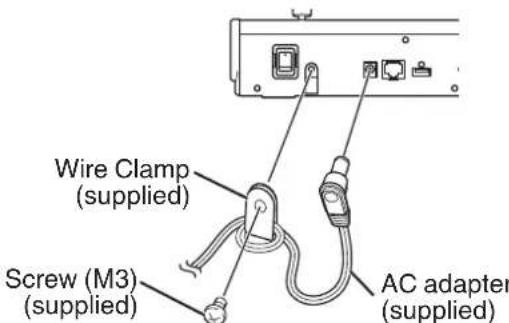
2 Wire Clamp
For preventing the AC adapter cable from falling out.
DC 12V terminal
For connecting the supplied AC adapter.
4 LAN terminal
For connecting a LAN cable.
5 SERVICE terminal
For use during servicing.
6 TALLY terminal
Used for TALLY connection.
7 SETTING switch
1 to 4 : For switching TALLY IN and OUT.
5 to 8: Used for servicing only.
8 SERIAL terminal
For connecting a serial cable.
Memo:
- The specifications of the terminals are as follows
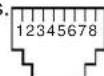
| Pin No. Signal Pin No. Signal | ||
| 1 TX+ 5 NC | ||
| 2 TX- 6 RX- | ||
| 3 RX+ 7 GND | ||
| 4 NC 8 GND | ||
Rating label
10 MAC address label
Installling the Wire Clamp
Basic Operations
For more details please refer to the User Manual.
1 Turn on the power.
- Set the power switch at the rear of this unit to "On". The LED lamp lights up in green.
2 Configure the settings of this unit.
- Set the IP address of this unit as follows.
① Select [SETTINGS] on the home screen of the operation panel.
- If the home screen does not appear, select [HOME] to display the home screen.
② Select [Network].
3 Select [CONTROLLER].
The IP address setting screen appears.
④ Enter the IP address and tap [ENTER].
3 Configure the camera settings.
- Configure the camera to be operated as follows.
① Select [SETTINGS] on the home screen of the operation panel.
- If the home screen does not appear, select [HOME] to display the home screen.
② Select [Network].
③ Select [CAMERA REGISTRATION].
4 Perform registration according to the camera to be connected.
- IP camera: Select [AUTO] or [Manual]
- Serial camera: Select [Serial Activate 1] or [Serial Activate 100]
Memo : _____
-
For details on the settings, please refer to the User Manual on the website.
-
To add or change the camera to be operated, perform the above procedures again.
Troubleshooting
| Problem Symptom Action | ||
| Power does not turn on. | No response even after tapping the operation panel on the unit. | Turn off the power switch at the back of the unit and power on again. If it still does not start up, stop using the unit, disconnect the power cord from the power outlet and consult a dealer or our service center. |
Third-party Software
This product includes third-party software modules. For the licensing terms of the respective modules, please refer to [HOME] [SETTINGS] [Open Source License].
Connection Diagram
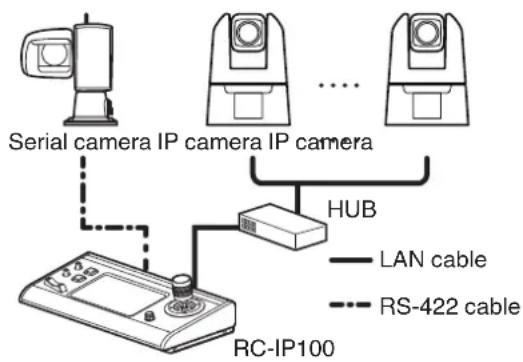
- Up to 100 cameras can be connected concurrently.
Specifications
For the latest information on the product (firmware, User Manual, etc.), please visit our website.
General
| Item Description | |
| Power DC 12 V | |
| Current consumption | 0.6 A |
| Mass | Approx. 2.1 kg |
| Surrounding temperature | 0 °C to 40 °C (32 °F to 104 °F) (operation) |
| Allowable operating humidity | 20 %RH to 90 %RH (No condensation) |
Terminal Section
| Item Description |
| TALLY terminal D-sub 9-pin |
| LAN terminal 10BASE-T/100BASE-TX |
| DC 12V terminal DC jack (for the supplied AC adapter) |
| SERIAL terminal RS-422 |
Accessories
| Accessories |
| Printed Materials |
| AC Adapter |
| Power Cord |
| Wire Clamp |
| Screw (M3) |
Compatible Cameras
Please refer to "About Cameras Compatible to the Remote Camera Controller RC-IP100" on the website. Please note that some features might not be usable depending on the camera in use.
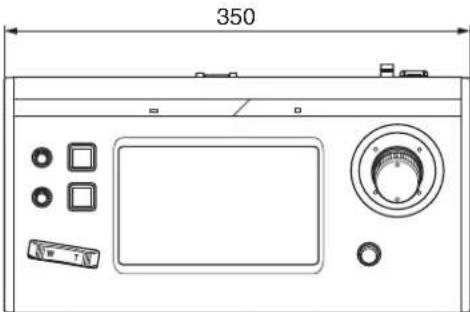
Dimensional Outline Drawing (Unit: mm)
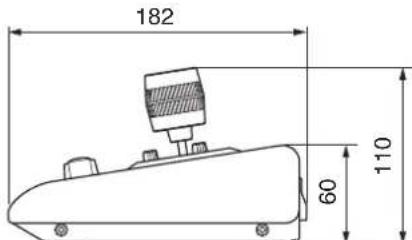
* The specifications and appearance of this product are subject to changes for further improvement without prior notice.
